engine HYUNDAI TUCSON 2014 Workshop Manual
[x] Cancel search | Manufacturer: HYUNDAI, Model Year: 2014, Model line: TUCSON, Model: HYUNDAI TUCSON 2014Pages: 542, PDF Size: 7.59 MB
Page 206 of 542
3-120
Convenient features of your vehicle
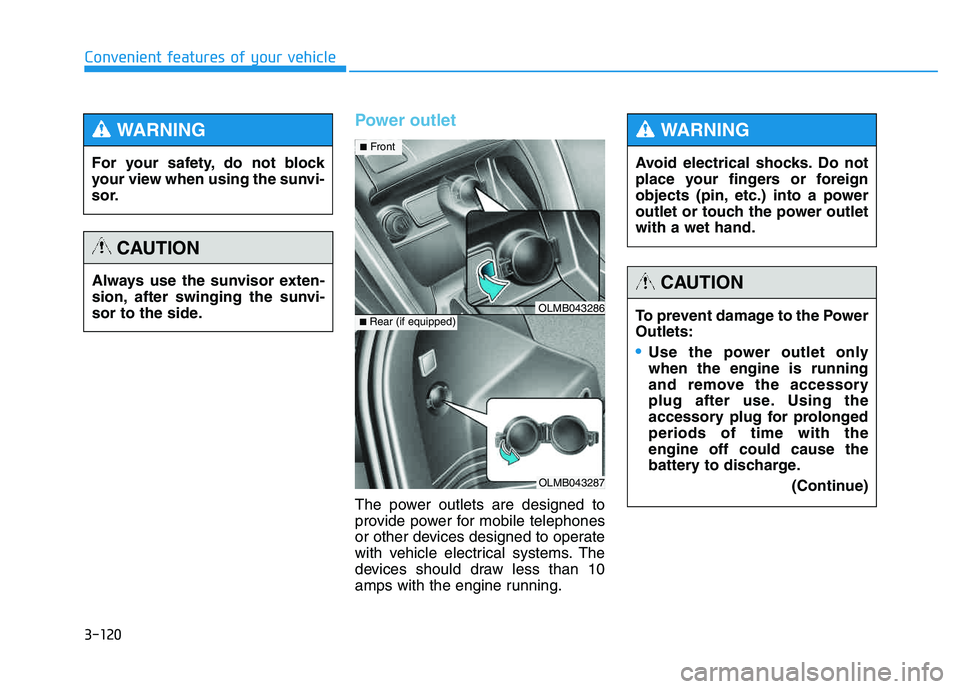
Power outlet
The power outlets are designed to
provide power for mobile telephones
or other devices designed to operate
with vehicle electrical systems. The
devices should draw less than 10
amps with the engine running.
OLMB043287
■Rear (if equipped)OLMB043286
■ Front
For your safety, do not block
your view when using the sunvi-
sor.
WARNING
Always use the sunvisor exten-
sion, after swinging the sunvi-
sor to the side.
CAUTION
Avoid electrical shocks. Do not
place your fingers or foreign
objects (pin, etc.) into a power
outlet or touch the power outletwith a wet hand.
WARNING
To prevent damage to the Power Outlets:
Use the power outlet only when the engine is running
and remove the accessory
plug after use. Using the
accessory plug for prolongedperiods of time with theengine off could cause the
battery to discharge.
(Continue)
CAUTION
Page 215 of 542
4-4
Multimedia System
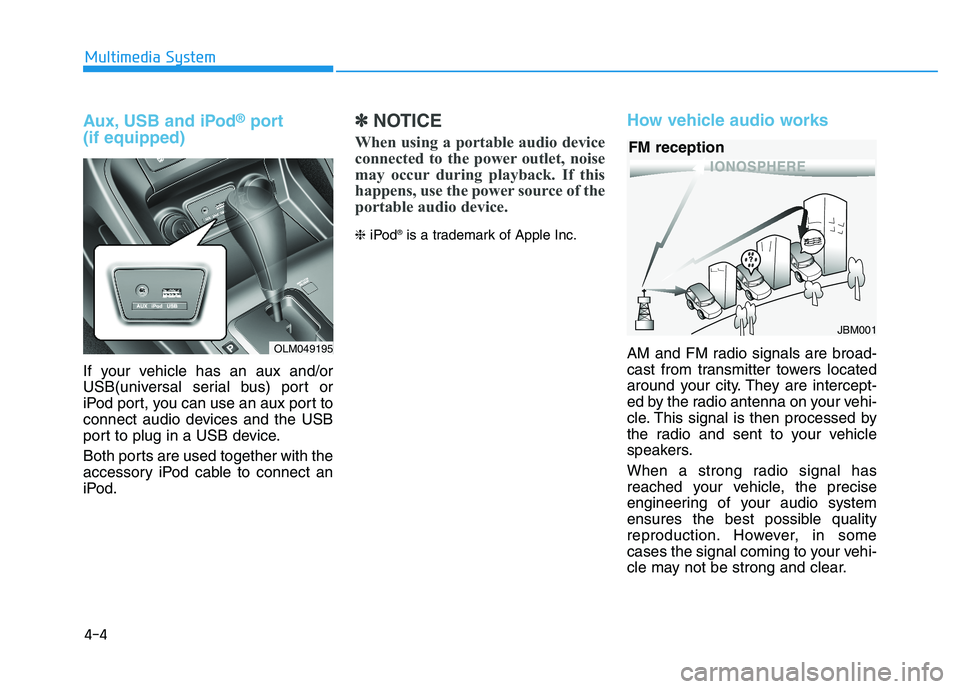
Aux, USB and iPod®port
(if equipped)
If your vehicle has an aux and/or
USB(universal serial bus) port or
iPod port, you can use an aux port to
connect audio devices and the USB
port to plug in a USB device.
Both ports are used together with the
accessory iPod cable to connect an
iPod.
✽✽ NOTICE
When using a portable audio device
connected to the power outlet, noise
may occur during playback. If this
happens, use the power source of the
portable audio device.
❈ iPod ®
is a trademark of Apple Inc.
How vehicle audio works
AM and FM radio signals are broad-
cast from transmitter towers located
around your city. They are intercept-
ed by the radio antenna on your vehi-
cle. This signal is then processed by
the radio and sent to your vehicle
speakers.
When a strong radio signal has
reached your vehicle, the precise
engineering of your audio system
ensures the best possible quality
reproduction. However, in some
cases the signal coming to your vehi-
cle may not be strong and clear.
JBM001
FM reception
OLM049195
Page 221 of 542
4-10
Multimedia System
✽✽NOTICE - USING THE USB DEVICE
To use an external USB device, make sure the device is not con-
nected when starting up the
vehicle. Connect the device after
starting up.
If you start the engine when the USB device is connected, it may
damage the USB device. (USB
flashdrives are very sensitive to
electric shock.)
If the engine is started up or turned off while the external USB
device is connected, the external
USB device may not work.
The System may not play unau- thenticated MP3 or WMA files.
1) It can only play MP3 files with the compression rate between
8Kbps~320Kbps.
2) It can only play WMA music files with the compression rate
between 8Kbps~320Kbps.
Take precautions for static elec- tricity when connecting or dis-
connecting the external USB
device. (Continued)(Continued)
An encrypted MP3 PLAYER is
not recognizable.
Depending on the condition of the external USB device, the
connected external USB device
can be unrecognizable.
When the formatted byte/sector setting of External USB device
is not either 512BYTE or
2048BYTE, then the device will
not be recognized.
Use only a USB device format- ted to FAT 12/16/32.
USB devices without USB I/F authentication may not be rec-
ognizable.
Make sure the USB connection terminal does not come in con-
tact with the human body or
other objects.
If you repeatedly connect or dis- connect the USB device in a
short period of time, it may
break the device.
You may hear a strange noise when connecting or disconnect-
ing a USB device. (Continued)(Continued)
If you disconnect the external
USB device during playback in
USB mode, the external USB
device can be damaged or may
malfunction. Therefore, discon-
nect the external USB device
when the audio is turned off or
in another mode. (e.g, Radio,
CD)
Depending on the type and capacity of the external USB
device or the type of the files
stored in the device, there is a
difference in the time taken for
recognition of the device.
Do not use the USB device for purposes other than playing
music files.
Playing videos through the USB is not supported.
Use of USB accessories such as rechargers or heaters using USB
I/F may lower performance or
cause trouble. (Continued)
Page 289 of 542
4-78
Multimedia System
✽✽NOTICE - USING THE USB DEVICE
Connect the USB device after turning on the engine. The USB
device may become damaged if
it is already connected when the
ignition is turned on.The USB
device may not operate properly
if the car ignition is turned on or
off with the USB device connect-
ed.
Heed caution to static electricity when connecting/disconnecting
USB devices.
Encoded MP3 Players will not be recognized when connected
as an external device.
When connecting an external USB device, the device may not
properly recognize the USB is in
some states.
Only products formatted with byte/sectors under 64Kbyte will
be recognized.
This device recognizes USB devices formatted in FAT
12/16/32 file formats. This
device does not recognize files in
NTFS file format. (Continued)(Continued)
Some USB devices may not be supported due to compatibility
issues.
Avoid contact between the USB connector with bodily parts or
foreign objects.
Repeated connecting/discon- necting of USB devices within
short periods of time may result
in product malfunction.
A strange noise may occur when disconnecting the USB.
Make sure to connect/discon- nect external USB devices with
the audio power turned off.
The amount of time required to recognize the USB device may
differ depending on the type,
size or file formats stored in the
USB. Such differences in time
are not indications of malfunc-
tions.
The device only supports USB devices used to play music files.
USB images and videos are not supported. (Continued)(Continued)
Do not use the USB I/F to charge batteries or USB acces-
sories that generate heat. Such
acts may lead to worsened per-
formance or damage to the
device.
The device may not recognize the USB device if separately
purchased USB hubs and exten-
sion cables are being used.
Connect the USB directly with
the multimedia terminal of the
vehicle.
When using mass storage USB devices with separate logical
drives, only files saved to the
root drive can be played.
Files may not properly operate if application programs are
installed to the USBs.
The device may not operate nor- mally if MP3 Players, cellular
phones, digital cameras, or
other electronic devices (USB
devices not recognized as
portable disk drives) are con-
nected with the device.
Page 337 of 542
Driving your vehicle
BEFORE DRIVING ..................................................5-3
Before entering the vehicle ..........................................5-3
Before starting .................................................................5-3
IGNITION SWITCH .................................................5-5
Key ignition switch .........................................................5-5
Engine Start/Stop button ................................................5-8
AUTOMATIC TRANSAXLE ..................................5-13
Automatic transaxle operation ...................................5-13
Parking ...............................................................................5-18
Good driving practices ..................................................5-19
ALL WHEEL DRIVE (AWD) ..................................5-21
AWD operation ................................................................5-22
Emergency precautions .................................................5-26
BRAKING SYSTEM ..............................................5-28
Power brakes ..................................................................5-28
Disc brakes wear indicator ..........................................5-29
Parking brake ..................................................................5-29
Anti-lock Brake System (ABS) ....................................5-32
Electronic Stability Control (ESC)................................5-35
Vehicle Stability Management (VSM).........................5-38
Hill-Start Assist Control (HAC) ...................................5-40
Downhill Brake Control (DBC) ......................................5-41
Good braking practices ................................................5-43
DRIVING ASSIST SYSTEM ...................................5-44
Active ECO system ........................................................5-44
Rear view camera ...........................................................5-45
CRUISE CONTROL SYSTEM ................................5-47
Cruise control operation................................................5-47
SPECIAL DRIVING CONDITIONS..........................5-51
Hazardous driving conditions.......................................5-51
Rocking the vehicle ....................................................5-51
Smooth cornering ...........................................................5-52
Driving at night ................................................................5-52
Driving in the rain ...........................................................5-53
Driving in flooded areas ................................................5-54
Reducing the risk of a rollover ...................................5-54
WINTER DRIVING .................................................5-55
Snow or icy conditions ..................................................5-55
TRAILER TOWING.................................................5-58
If you decide to pull a trailer? .....................................5-59
Trailer towing equipment ..............................................5-61
Driving with a trailer ......................................................5-62
Maintenance when trailer towing ...............................5-65
VEHICLE LOAD LIMIT ..........................................5-66
Tire loading information label......................................5-67
5
Page 338 of 542
5-2
Driving your vehicle
Carbon monoxide (CO) gas is toxic. Breathing CO can cause unconsciousness and death.
Engine exhaust contains carbon monoxide which cannot be seen or smelled.
Do not inhale engine exhaust.
If at any time you smell engine exhaust inside the vehicle, open the windows immediately. Exposure to CO can cause
unconsciousness and death by asphyxiation.
Be sure the exhaust system does not leak.
The exhaust system should be checked whenever the vehicle is raised to change the oil or for any other purpose. If
you hear a change in the sound of the exhaust or if you drive over something that strikes the underneath side of the
vehicle, have the exhaust system checked as soon as possible by an authorized HYUNDAI dealer.
Do not run the engine in an enclosed area.
Letting the engine idle in your garage, even with the garage door open, is a hazardous practice. Run the engine only
long enough to start the engine and to move the vehicle out of the garage.
Avoid idling the engine for prolonged periods with people inside the vehicle.
If it is necessary to idle the engine for a prolonged period with people inside the vehicle , be sure to do so only in an
open area with the air intake set at "Fresh" and fan control set to high so fresh air is drawn into the interior.
Keep the air intakes clear.
To assure proper operation of the ventilation system, keep the ventilation air intakes located in front of the windshield
clear of snow, ice, leaves, or other obstructions.
If you must drive with the tailgate open:
Close all windows.
Open instrument panel air vents.
Set the air intake control at "Fresh", the air flow control at "Floor" or "Face", and the fan control set to high.
WARNING
Page 339 of 542
5-3
Driving your vehicle
Before entering the vehicle
• Be sure all windows, outside mir-ror(s), and outside lights are clean
and unobstructed.
Remove frost, snow, or ice.
Visually check the tires for uneven wear and damage.
Check under the vehicle for any sign of leaks.
Be sure there are no obstacles behind you if you intend to back up.
Before starting
Make sure the hood, the tailgate,and the doors are securely closed
and locked.
Adjust the position of the seat and steering wheel.
Adjust the inside and outside rearview mirrors.
Verify all the lights work.
Fasten your seatbelt. Check that all passengers have fastened their
seatbelts.
Check the gauges and indicators in the instrument panel and the mes-
sages on the instrument display
when the ignition switch is in theON position.
Check that any items you are car- rying are stored properly or fas-
tened down securely.
5
CALIFORNIA PROPOSITION 65
WARNING
Engine exhaust and a wide vari- ety of automobile components
including components found inthe interior furnishings in a
vehicle, contain or emit harmful
chemicals known to the State of
California to cause cancer and
birth defects and reproductive
harm. In addition, certain fluids
contained in vehicles and cer-
tain products of components
contain or emit chemicals
known to the State of California
to cause cancer and birth
defects or other reproductiveharm.
WARNING
BBEEFFOO RREE DD RRIIVV IINN GG
Page 341 of 542
5-5
Driving your vehicle
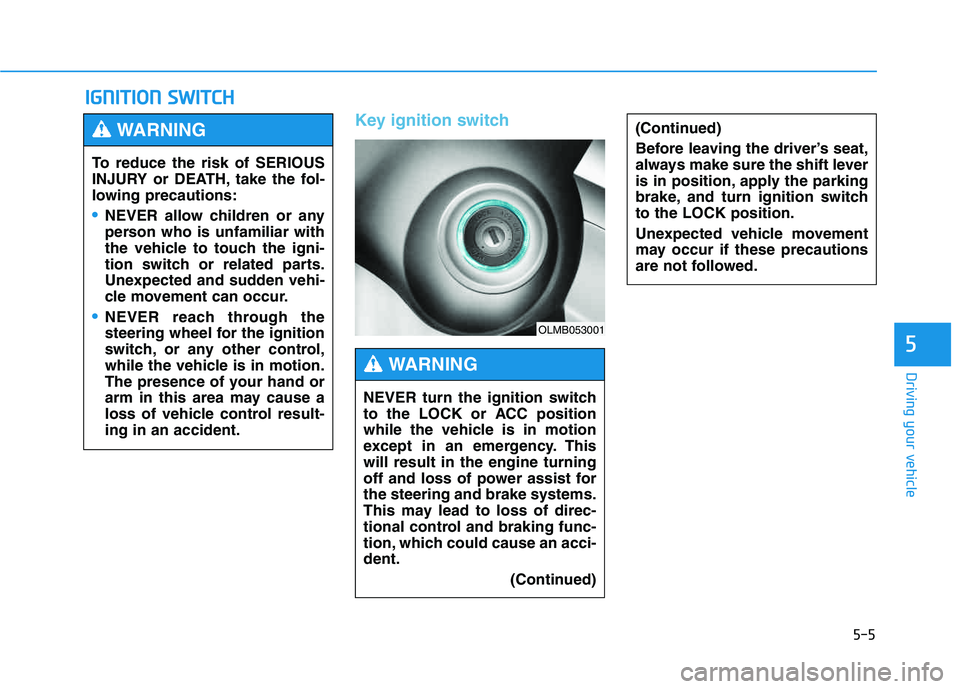
Key ignition switch
IIGG NN IITT IIOO NN SS WW IITT CCHH
5
(Continued)
Before leaving the driver’s seat,
always make sure the shift lever
is in position, apply the parking
brake, and turn ignition switchto the LOCK position.
Unexpected vehicle movement
may occur if these precautions
are not followed.
To reduce the risk of SERIOUS
INJURY or DEATH, take the fol-
lowing precautions:
NEVER allow children or any
person who is unfamiliar with
the vehicle to touch the igni-
tion switch or related parts.
Unexpected and sudden vehi-
cle movement can occur.
NEVER reach through the
steering wheel for the ignition
switch, or any other control,
while the vehicle is in motion.
The presence of your hand or
arm in this area may cause a
loss of vehicle control result-ing in an accident.
WARNING
NEVER turn the ignition switch
to the LOCK or ACC position
while the vehicle is in motion
except in an emergency. Thiswill result in the engine turning
off and loss of power assist forthe steering and brake systems.
This may lead to loss of direc-
tional control and braking func-
tion, which could cause an acci-dent.
(Continued)
WARNING
OLMB053001
Page 342 of 542
5-6
Driving your vehicle
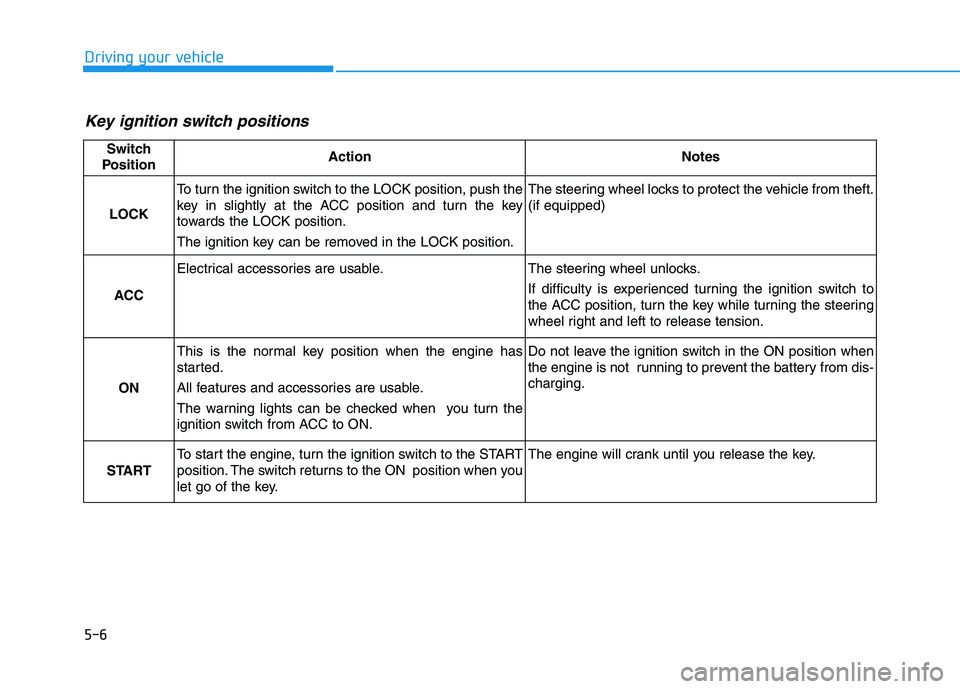
Key ignition switch positions
Switch
PositionActionNotes
LOCK
To turn the ignition switch to the LOCK position, push the
key in slightly at the ACC position and turn the key
towards the LOCK position.
The ignition key can be removed in the LOCK position.The steering wheel locks to protect the vehicle from theft. (if equipped)
ACC
Electrical accessories are usable.The steering wheel unlocks.
If difficulty is experienced turning the ignition switch to
the ACC position, turn the key while turning the steering
wheel right and left to release tension.
ON
This is the normal key position when the engine has
started.
All features and accessories are usable.
The warning lights can be checked when you turn the
ignition switch from ACC to ON.Do not leave the ignition switch in the ON position when
the engine is not running to prevent the battery from dis-charging.
START
To start the engine, turn the ignition switch to the START
position. The switch returns to the ON position when you
let go of the key.The engine will crank until you release the key.
Page 343 of 542
5-7
Driving your vehicle
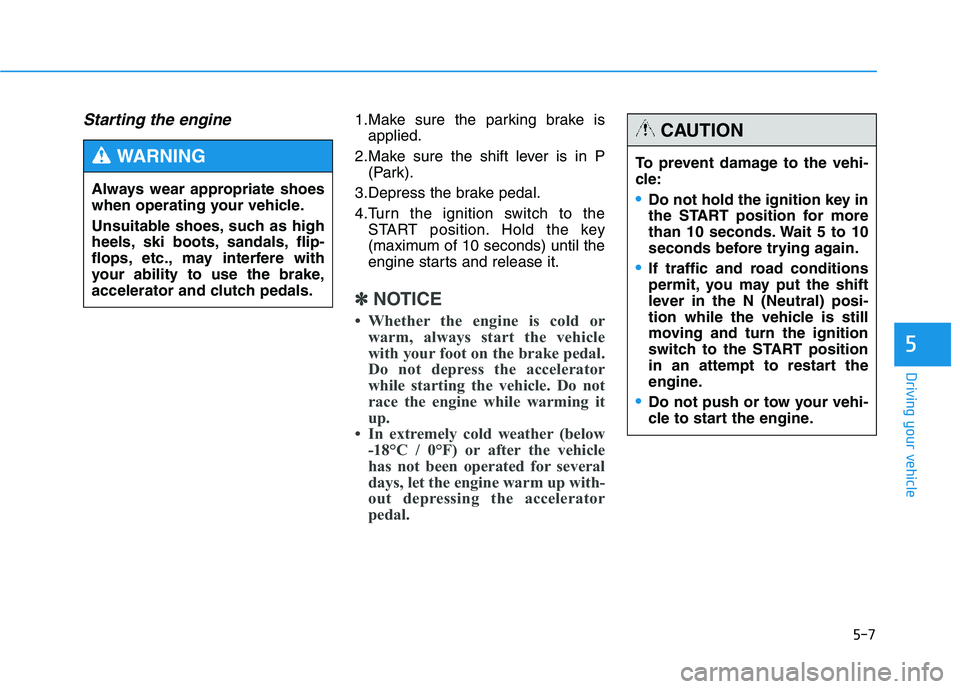
Starting the engine 1.Make sure the parking brake isapplied.
2.Make sure the shift lever is in P (Park).
3.Depress the brake pedal.
4.Turn the ignition switch to the START position. Hold the key
(maximum of 10 seconds) until the
engine starts and release it.
✽✽ NOTICE
Whether the engine is cold or warm, always start the vehicle
with your foot on the brake pedal.
Do not depress the accelerator
while starting the vehicle. Do not
race the engine while warming it
up.
In extremely cold weather (below -18°C / 0°F) or after the vehicle
has not been operated for several
days, let the engine warm up with-
out depressing the accelerator
pedal.
5
Always wear appropriate shoes
when operating your vehicle.
Unsuitable shoes, such as high
heels, ski boots, sandals, flip-
flops, etc., may interfere with
your ability to use the brake,
accelerator and clutch pedals.
WARNING To prevent damage to the vehi-
cle:
Do not hold the ignition key in
the START position for more
than 10 seconds. Wait 5 to 10
seconds before trying again.
If traffic and road conditions
permit, you may put the shift
lever in the N (Neutral) posi-
tion while the vehicle is still
moving and turn the ignition
switch to the START position
in an attempt to restart the
engine.
Do not push or tow your vehi-
cle to start the engine.
CAUTION