key battery HYUNDAI TUCSON 2014 Owners Manual
[x] Cancel search | Manufacturer: HYUNDAI, Model Year: 2014, Model line: TUCSON, Model: HYUNDAI TUCSON 2014Pages: 542, PDF Size: 7.59 MB
Page 91 of 542
3-5
Convenient features of your vehicle
3
Remote key precautions
The remote key will not work if any of
the following occur:
The key is in the ignition switch.
You exceed the operating distancelimit (about 30 m [90 feet]).
The remote key battery is weak.
Other vehicles or objects may be blocking the signal.
The weather is extremely cold.
The remote key is close to a radio transmitter such as a radio station
or an airport which can interfere
with normal operation of the remote
key.
When the remote key does not work
correctly, open and close the door
with the mechanical key. If you have
a problem with the remote key, con-
tact an authorized HYUNDAI dealer. (Continue)(Continue)
If the remote key is in close proximi-
ty to your mobile phone, the signal
could be blocked by your mobile
phones normal operational signals.
This is especially important when the
phone is active such as making and
receiving calls, text messaging,
and/or sending/receiving emails.
Avoid placing the remote key and
your mobile phone in the same pants
or jacket pocket and always try tomaintain an adequate distance
between the two devices.
This device complies with Part 15of the FCC rules.
Operation is subject to the following
two conditions:
1. This device may not cause harm-
ful interference, and
2. This device must accept any inter- ference received, including inter-
ference that may cause undesired
operation.
✽✽ NOTICE
Changes or modifications not
expressly approved by the party
responsible for compliance could
void the user's authority to operate
the device.
Page 92 of 542
3-6
Convenient features of your vehicle
Battery replacement
If the remote key is not working prop-
erly, try replacing the battery with a
new one.
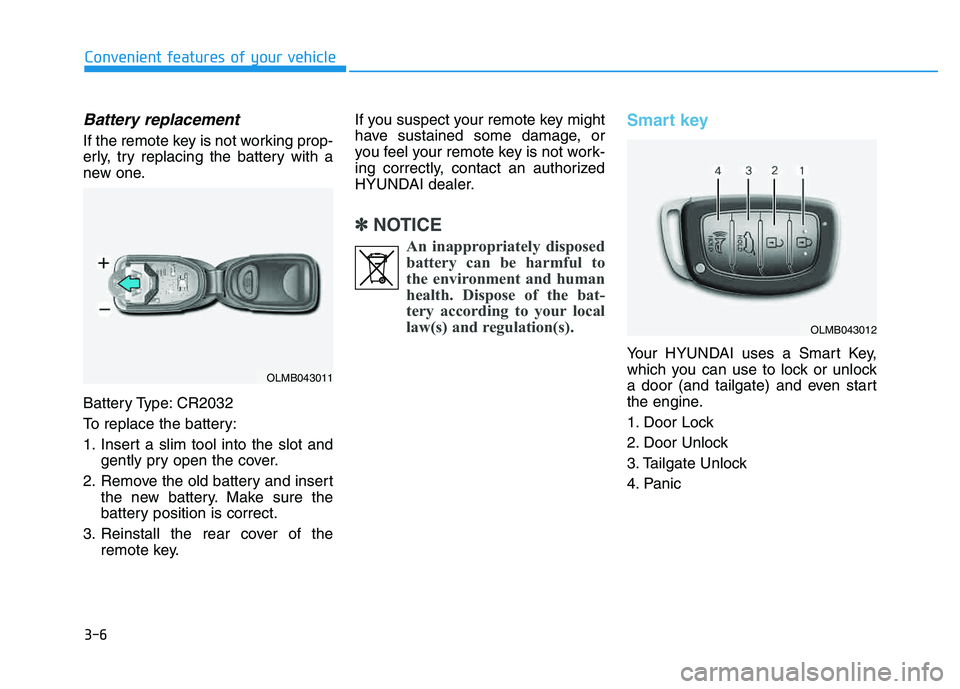
Battery Type: CR2032
To replace the battery:
1. Insert a slim tool into the slot andgently pry open the cover.
2. Remove the old battery and insert the new battery. Make sure the
battery position is correct.
3. Reinstall the rear cover of the remote key. If you suspect your remote key might
have sustained some damage, or
you feel your remote key is not work-
ing correctly, contact an authorized
HYUNDAI dealer.
✽✽
NOTICE
An inappropriately disposedbattery can be harmful to
the environment and human
health. Dispose of the bat-
tery according to your local
law(s) and regulation(s).
Smart key
Your HYUNDAI uses a Smart Key,
which you can use to lock or unlock
a door (and tailgate) and even start
the engine.
1. Door Lock
2. Door Unlock
3. Tailgate Unlock
4. Panic
OLMB043011
OLMB043012
Page 97 of 542
3-11
Convenient features of your vehicle
3
Battery replacement
If the Smart Key is not working prop-
erly, try replacing the battery with a
new one.
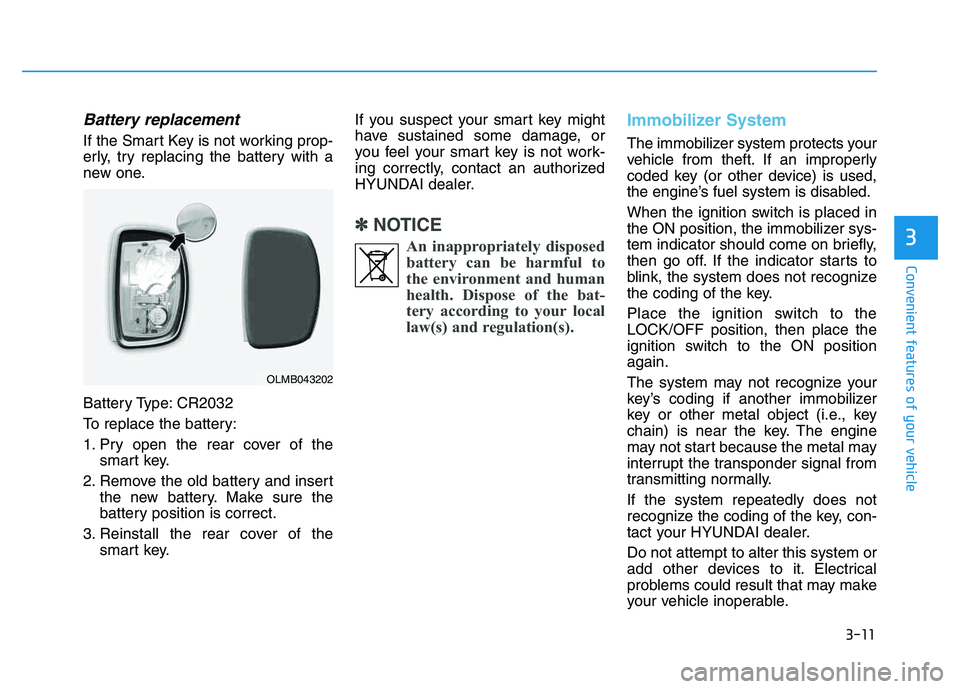
Battery Type: CR2032
To replace the battery:
1. Pry open the rear cover of thesmart key.
2. Remove the old battery and insert the new battery. Make sure the
battery position is correct.
3. Reinstall the rear cover of the smart key. If you suspect your smart key might
have sustained some damage, or
you feel your smart key is not work-
ing correctly, contact an authorized
HYUNDAI dealer.
✽✽
NOTICE
An inappropriately disposedbattery can be harmful to
the environment and human
health. Dispose of the bat-
tery according to your local
law(s) and regulation(s).
Immobilizer System
The immobilizer system protects your
vehicle from theft. If an improperly
coded key (or other device) is used,
the engine’s fuel system is disabled.
When the ignition switch is placed in
the ON position, the immobilizer sys-
tem indicator should come on briefly,
then go off. If the indicator starts to
blink, the system does not recognize
the coding of the key.
Place the ignition switch to the LOCK/OFF position, then place the
ignition switch to the ON positionagain.
The system may not recognize your
key’s coding if another immobilizer
key or other metal object (i.e., key
chain) is near the key. The engine
may not start because the metal may
interrupt the transponder signal from
transmitting normally. If the system repeatedly does not
recognize the coding of the key, con-
tact your HYUNDAI dealer. Do not attempt to alter this system or
add other devices to it. Electrical
problems could result that may make
your vehicle inoperable.
OLMB043202
Page 120 of 542
3-34
Convenient features of your vehicle
Immobilizer indicator (if equipped)
Without smart key system
This indicator illuminates when the
immobilizer key is inserted and
turned to the ON position to start the
engine.
At this time, you can start the engine. The indicator goes out after the
engine is running.
If this indicator blinks when the igni-
tion switch is in the ON position
before starting the engine, have the
system checked by an authorized
HYUNDAI dealer.
With smart key system
If any of the following occurs in a vehi-
cle equipped with the smart key, the
immobilizer indicator illuminates, blinks
or goes off.
When the smart key is in the vehi- cle, if the Engine Start/Stop button
is in the ACC or ON position, the
indicator will illuminate for approxi-mately 30 seconds to indicate that
you are able to start the engine.
However, when the smart key is
not in the vehicle, if the Engine
Start/Stop button is pressed, the
indicator will blink for a few sec-
onds to indicate that you are not be
able to start the engine.
If the indicator illuminates only for 2 seconds and goes out when the
Engine Start/Stop button is turned
to ON position with the smart key in
the vehicle, have the system
checked by an authorized
HYUNDAI dealer. When the battery is weak, if the
Engine Start/Stop button is
pressed, the indicator will blink and
you are not able to start the
engine. However, you are able to
start the engine by inserting the
smart key in the smart key holder.
Also, if the smart key system relat-
ed parts have a problem, the indi-
cator will blink.
Malfunction indicator
(MIL) (check engine light)
This indicator light is part of theEngine Control System which moni-
tors various emission control system
components. If this light illuminates
while driving, it indicates that apotential malfunction has been
detected somewhere in the emissioncontrol system.
Page 167 of 542
3-81
Convenient features of your vehicle
3
High beam operation
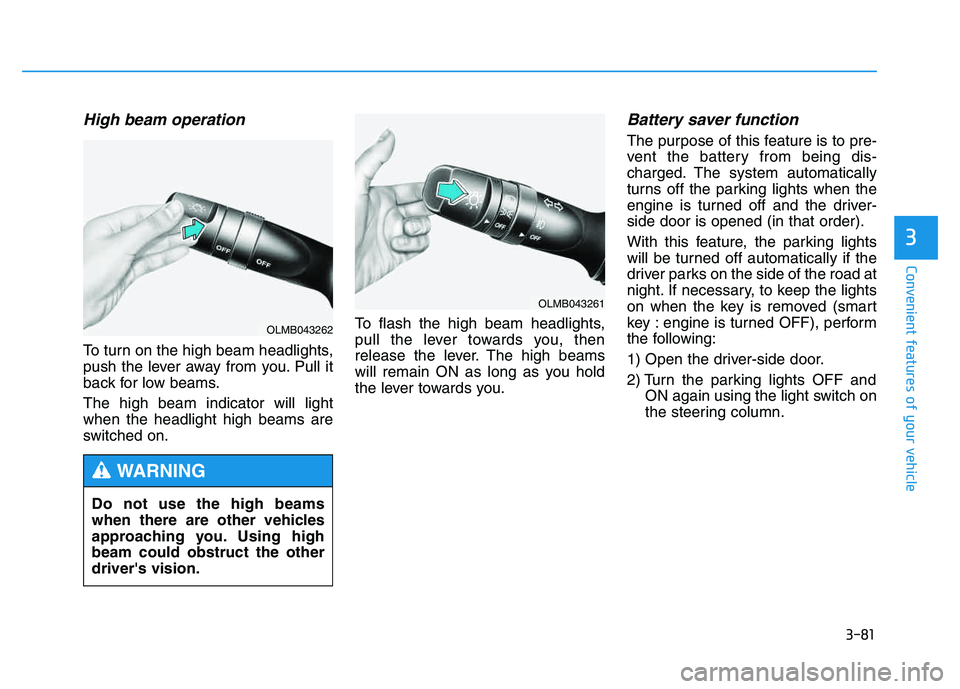
To turn on the high beam headlights,
push the lever away from you. Pull it
back for low beams. The high beam indicator will light when the headlight high beams are
switched on.To flash the high beam headlights,
pull the lever towards you, then
release the lever. The high beams
will remain ON as long as you hold
the lever towards you.
Battery saver function
The purpose of this feature is to pre-
vent the battery from being dis-
charged. The system automatically
turns off the parking lights when the
engine is turned off and the driver-side door is opened (in that order).
With this feature, the parking lights
will be turned off automatically if the
driver parks on the side of the road at
night. If necessary, to keep the lights
on when the key is removed (smart
key : engine is turned OFF), perform
the following:
1) Open the driver-side door.
2) Turn the parking lights OFF and
ON again using the light switch on
the steering column.
Do not use the high beams
when there are other vehicles
approaching you. Using highbeam could obstruct the otherdriver's vision.
WARNING
OLMB043261
OLMB043262
Page 168 of 542
3-82
Convenient features of your vehicle
Headlight escort function
If the key is removed from the ignition
switch or placed in the ACC positionor the LOCK/OFF position with theheadlights ON, the headlights (and/or
parking lights) remain on for about 5
minutes. However, if the driver’s dooris opened and closed, the headlights
are turned off after 15 seconds.
The headlights can be turned off by
pressing the LOCK button on the
remote key or smart key twice or
turning the light switch to the OFF or
AUTO position. However, if you turn
the light switch to the AUTO position
when it is dark outside, the head-
lights will not be turned off.
Headlight welcome function
When the headlight switch is in the
ON position or in the AUTO positionand all doors (and tailgate) are closed
and locked, if you press the door
unlock button on the remote transmit-
ter or smart key, the headlights will
come on for about 15 seconds.
If the headlight switch is in the AUTO position, the function can only oper-ate at night.
To turn off the headlights immediately,
do one of the following:
Press the door lock button.
Press the unlock button twice with-in 4 seconds.
Press the unlock button once more after 4 seconds.
If the driver gets out of the vehi-
cle through other doors (except
the driver’s door), the battery
saver function does not operate
and the headlight escort function
does not turn off automatically.
Therefore, it causes the battery
to be discharged. In this case,make sure to turn off the lamp
before getting out of the vehicle.CAUTION
Page 295 of 542
4-84
Multimedia System
✽✽NOTICE - USING THE
iPod ®
DEVICE
iPod ®
is a registered trademark
of Apple Inc.
In order to use the iPod ®
while
operating the keys, you must use
a dedicated iPod ®
cable. (the
cable that is supplied when pur-
chasing iPod ®
/iPhone ®
prod-
ucts)
If the iPod ®
is connected to the
vehicle while it is playing, a high
pitch sound could occur for
approximately 1-2 seconds
immediately after connecting. If
possible, connect the iPod to the
vehicle with the iPod ®
stopped/paused.
During ACC ON state, connect- ing the iPod ®
through the iPod ®
cable will charge the iPod ®
through the car audio system.
When connecting with the iPod ®
cable, make sure to fully insert
the jack to prevent communica-
tion interference. (Continued)(Continued)
When the EQ features of an
external device, such as the
iPod ®
, and the audio system are
both active, EQ effects could
overlap and cause sound deteri-
oration and distortion.
Whenever possible, turn off the
EQ feature within the external
device upon use by connecting
with the audio system.
Noise may occur when an iPod ®
or AUX device is connected.
When such devices are not
being used, disconnect the
device for storage.
When the iPod ®
or AUX device
power is connected to the power
jack, playing the external device
may result in noise. In such
cases, disconnect the power con-
nection before use.
Skipping or improper operation may occur depending on the
characteristics of your iPod ®
/Phone ®
device.
(Continued) (Continued)
If your iPhone
®
is connected to
both the Bluetooth®
Wireless
Technology and USB, the sound
may not be properly played. In
your iPhone ®
, select the Dock
connector or Bluetooth®
Wireless Technology to change
the sound output (source).
iPod mode cannot be operated when the iPod ®
cannot be recog-
nized due to versions that do not
support communication proto-
cols.
For fifth generation iPod ®
Nano
devices, the iPod ®
may not be
recognized when the battery
level is low. Please charge the
iPod ®
for use.
Search/play orders shown within the iPod ®
device may differ with
the orders shown within the
audio system.
If the iPod ®
malfunctions due to
an iPod ®
device defect, reset the
iPod ®
and try again. (To learn
more, refer to your iPod®
manu-
al) (Continued)
Page 342 of 542
5-6
Driving your vehicle
Key ignition switch positions
Switch
PositionActionNotes
LOCK
To turn the ignition switch to the LOCK position, push the
key in slightly at the ACC position and turn the key
towards the LOCK position.
The ignition key can be removed in the LOCK position.The steering wheel locks to protect the vehicle from theft. (if equipped)
ACC
Electrical accessories are usable.The steering wheel unlocks.
If difficulty is experienced turning the ignition switch to
the ACC position, turn the key while turning the steering
wheel right and left to release tension.
ON
This is the normal key position when the engine has
started.
All features and accessories are usable.
The warning lights can be checked when you turn the
ignition switch from ACC to ON.Do not leave the ignition switch in the ON position when
the engine is not running to prevent the battery from dis-charging.
START
To start the engine, turn the ignition switch to the START
position. The switch returns to the ON position when you
let go of the key.The engine will crank until you release the key.
Page 348 of 542
5-12
Driving your vehicle
✽✽NOTICE
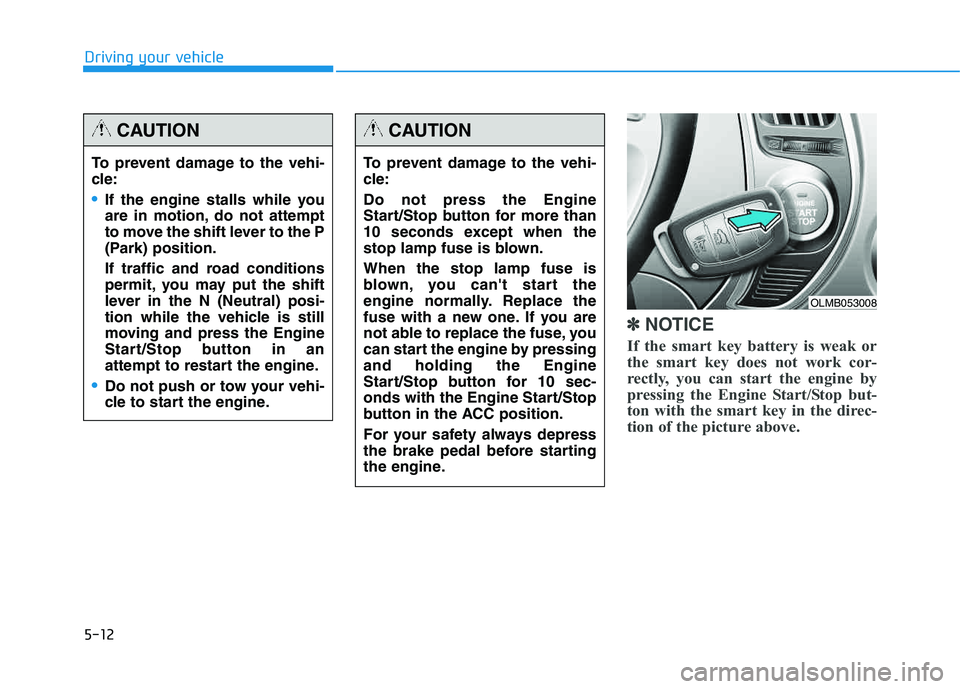
If the smart key battery is weak or
the smart key does not work cor-
rectly, you can start the engine by
pressing the Engine Start/Stop but-
ton with the smart key in the direc-
tion of the picture above.
To prevent damage to the vehi-
cle:
If the engine stalls while you
are in motion, do not attempt
to move the shift lever to the P
(Park) position.
If traffic and road conditions
permit, you may put the shift
lever in the N (Neutral) posi-
tion while the vehicle is still
moving and press the Engine
Start/Stop button in an
attempt to restart the engine.
Do not push or tow your vehi-
cle to start the engine.
CAUTION
To prevent damage to the vehi-
cle: Do not press the Engine
Start/Stop button for more than
10 seconds except when the
stop lamp fuse is blown. When the stop lamp fuse is
blown, you can't start the
engine normally. Replace the
fuse with a new one. If you are
not able to replace the fuse, you
can start the engine by pressingand holding the Engine
Start/Stop button for 10 sec-
onds with the Engine Start/Stop
button in the ACC position.
For your safety always depress
the brake pedal before starting
the engine.
CAUTION
OLMB053008
Page 502 of 542
7-72
Maintenance
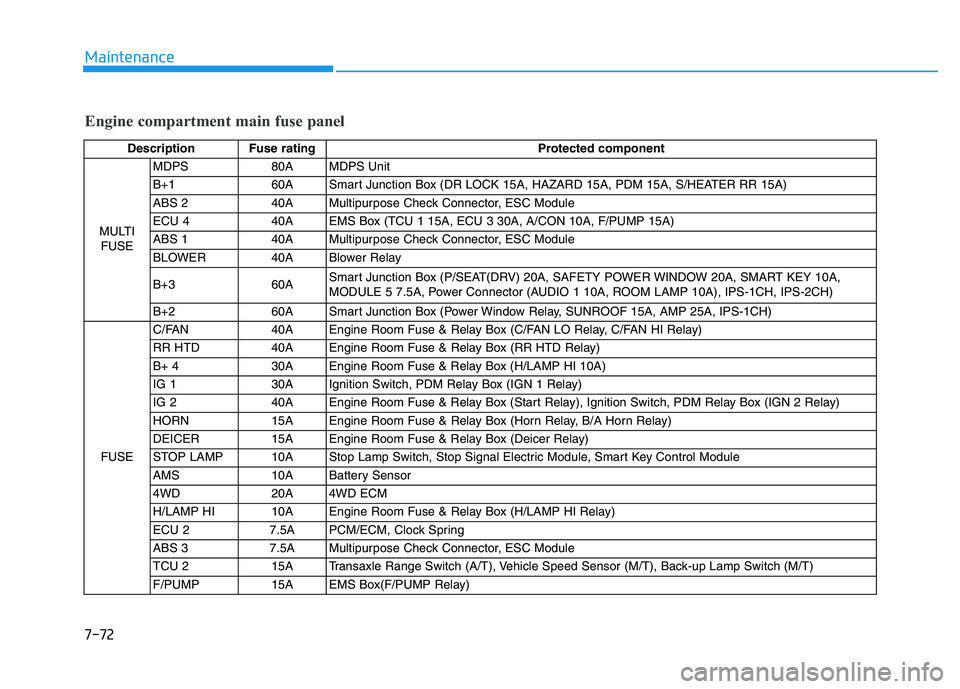
Engine compartment main fuse panel
Description Fuse ratingProtected component
MULTI FUSE MDPS 80A MDPS Unit
B+1 60A Smart Junction Box (DR LOCK 15A, HAZARD 15A, PDM 15A, S/HEATER RR 15A)
ABS 2 40A Multipurpose Check Connector, ESC Module
ECU 4 40A EMS Box (TCU 1 15A, ECU 3 30A, A/CON 10A, F/PUMP 15A)
ABS 1 40A Multipurpose Check Connector, ESC Module
BLOWER 40A Blower Relay
B+3 60A
Smart Junction Box (P/SEAT(DRV) 20A, SAFETY POWER WINDOW 20A, SMART KEY 10A,
MODULE 5 7.5A, Power Connector (AUDIO 1 10A, ROOM LAMP 10A), IPS-1CH, IPS-2CH)
B+2 60A Smart Junction Box (Power Window Relay, SUNROOF 15A, AMP 25A, IPS-1CH)
FUSE C/FAN 40A Engine Room Fuse & Relay Box (C/FAN LO Relay, C/FAN HI Relay)
RR HTD 40A Engine Room Fuse & Relay Box (RR HTD Relay)
B+ 4 30A Engine Room Fuse & Relay Box (H/LAMP HI 10A)
IG 1 30A Ignition Switch, PDM Relay Box (IGN 1 Relay)
IG 2 40A Engine Room Fuse & Relay Box (Start Relay), Ignition Switch, PDM Relay Box (IGN 2 Relay)
HORN 15A Engine Room Fuse & Relay Box (Horn Relay, B/A Horn Relay)
DEICER 15A Engine Room Fuse & Relay Box (Deicer Relay)
STOP LAMP 10A Stop Lamp Switch, Stop Signal Electric Module, Smart Key Control Module
AMS 10A Battery Sensor
4WD 20A 4WD ECM
H/LAMP HI 10A Engine Room Fuse & Relay Box (H/LAMP HI Relay)
ECU 2 7.5A PCM/ECM, Clock Spring
ABS 3 7.5A Multipurpose Check Connector, ESC Module
TCU 2 15A Transaxle Range Switch (A/T), Vehicle Speed Sensor (M/T), Back-up Lamp Switch (M/T)
F/PUMP 15A EMS Box(F/PUMP Relay)