remote control HYUNDAI TUCSON 2015 User Guide
[x] Cancel search | Manufacturer: HYUNDAI, Model Year: 2015, Model line: TUCSON, Model: HYUNDAI TUCSON 2015Pages: 653, PDF Size: 8.45 MB
Page 357 of 653
4-146
Multimedia System
PPHH OO NNEE
Before using the Bluetooth®Wireless
Technology phone features
Bluetooth®Wireless
Technology phone, you must first pair and connect the
Bluetooth®
Wireless Technology mobile phone.
connected, it is not possible to enter
Phone mode. Once a phone ispaired or connected, the guidance
screen will be displayed.
(IGN/ACC ON), the
Bluetooth®
Wireless Technology phone will be
automatically connected. Even if you
are outside, the
Bluetooth® Wireless
Technology phone will be automati-
cally connected once you are in the
vicinity of the vehicle. If you do not
want automatic
Bluetooth®Wireless
Technology phone connection, setthe
Bluetooth®Wireless Technology
power to OFF.
PP HH OO NNEE
Making a call using the Steering
wheel remote controller
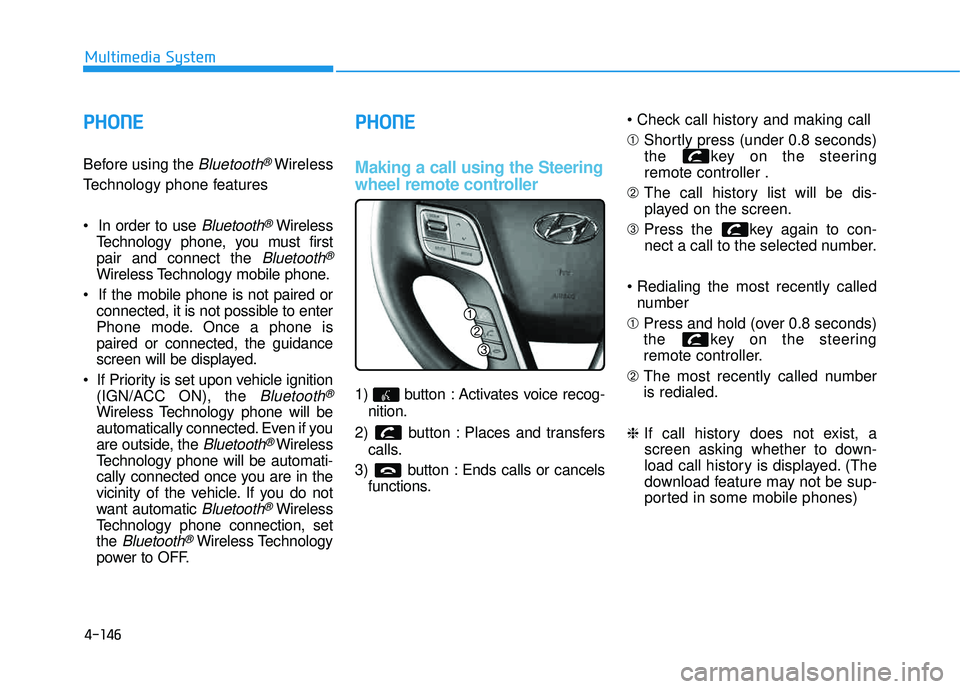
1) button : Activates voice recog-
nition.
2) button : Places and transfers calls.
3) button : Ends calls or cancels functions. ➀
Shortly press (under 0.8 seconds)
the key on the steering remote controller .
➁ The call history list will be dis-
played on the screen.
➂ Press the key again to con-
nect a call to the selected number.
number
➀ Press and hold (over 0.8 seconds)
the key on the steering
remote controller.
➁ The most recently called numberis redialed.
❈ If call history does not exist, a
screen asking whether to down-
load call history is displayed. (The
download feature may not be sup-
ported in some mobile phones)
Page 359 of 653
4-148
Multimedia System
Pairing Key / Key
on the Steering Remote
Controller
When No Devices have been
Paired
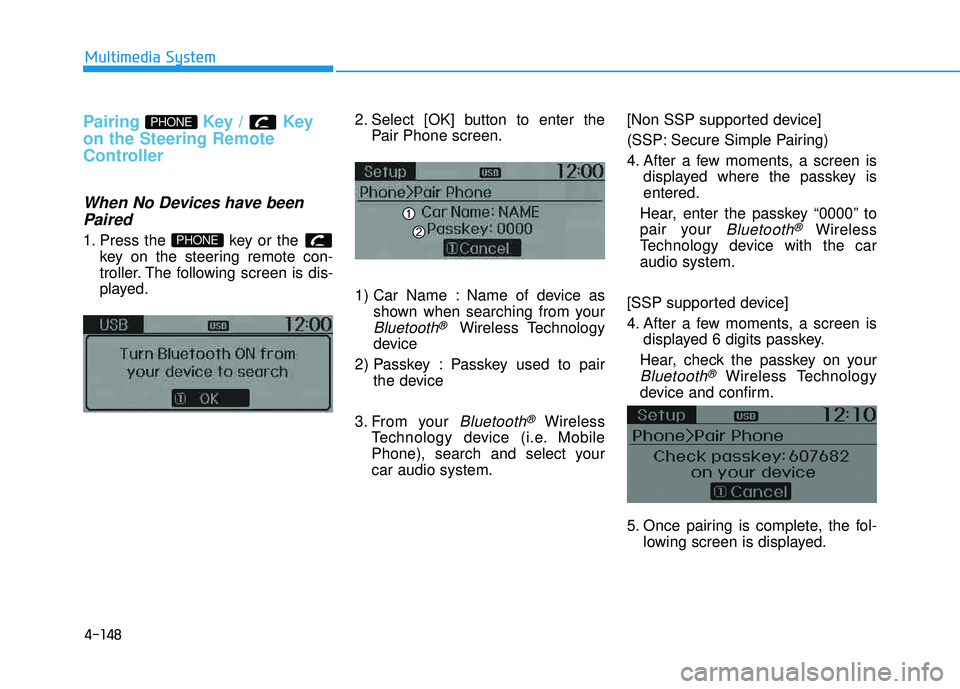
1. Press the key or the key on the steering remote con-
troller. The following screen is dis-
played. 2. Select [OK] button to enter the
Pair Phone screen.
1) Car Name : Name of device as shown when searching from your
Bluetooth®Wireless Technology
device
2) Passkey : Passkey used to pair the device
3. From your
Bluetooth®Wireless
Technology device (i.e. Mobile
Phone), search and select yourcar audio system. [Non SSP supported device]
(SSP: Secure Simple Pairing)
4. After a few moments, a screen is
displayed where the passkey is entered.
Hear, enter the passkey “0000” to
pair your
Bluetooth®Wireless
Technology device with the caraudio system.
[SSP supported device]
4. After a few moments, a screen is displayed 6 digits passkey.
Hear, check the passkey on your
Bluetooth®Wireless Technology
device and confirm.
5. Once pairing is complete, the fol- lowing screen is displayed.
PHONE
PHONE
Page 371 of 653
4-160
Multimedia System
VVOO IICC EE RR EECCOO GGNN IITT IIOO NN
Using Voice Recognition
Starting Voice Recognition
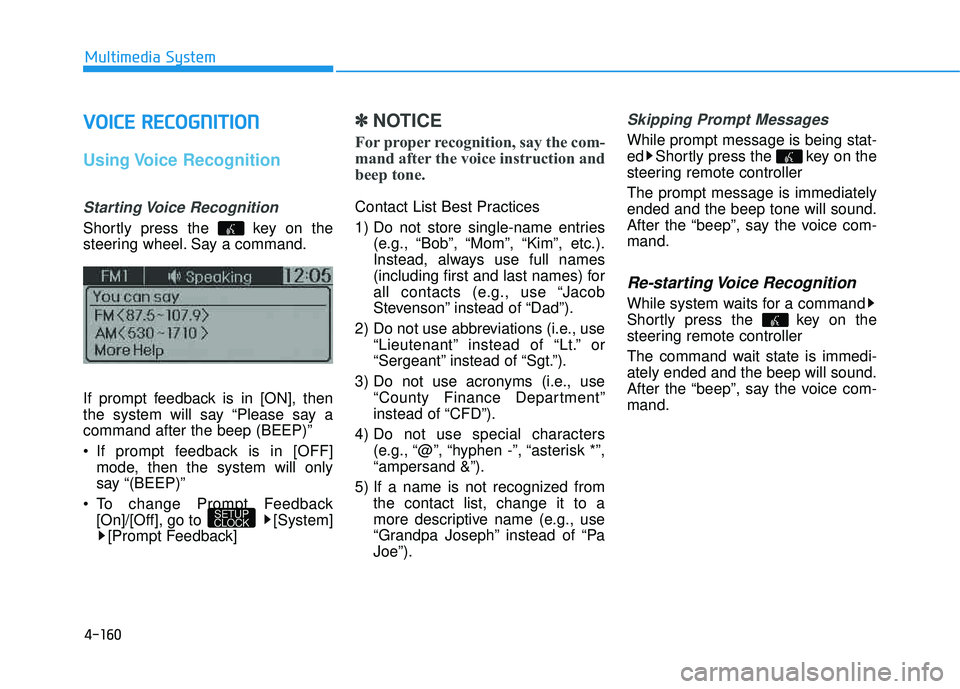
Shortly press the key on the
steering wheel. Say a command.
If prompt feedback is in [ON], then
the system will say “Please say acommand after the beep (BEEP)”
If prompt feedback is in [OFF]
mode, then the system will only
say “(BEEP)”
To change Prompt Feedback [On]/[Off], go to [System][Prompt Feedback]
✽✽ NOTICE
For proper recognition, say the com-
mand after the voice instruction and
beep tone.
Contact List Best Practices
1) Do not store single-name entries (e.g., “Bob”, “Mom”, “Kim”, etc.).
Instead, always use full names
(including first and last names) for
all contacts (e.g., use “Jacob
Stevenson” instead of “Dad”).
2) Do not use abbreviations (i.e., use “Lieutenant” instead of “Lt.” or
“Sergeant” instead of “Sgt.”).
3) Do not use acronyms (i.e., use “County Finance Department”
instead of “CFD”).
4) Do not use special characters (e.g., “@”, “hyphen -”, “asterisk *”,“ampersand &”).
5) If a name is not recognized from the contact list, change it to a
more descriptive name (e.g., use
“Grandpa Joseph” instead of “PaJoe”).
Skipping Prompt Messages
While prompt message is being stat-
ed Shortly press the key on the
steering remote controller The prompt message is immediately ended and the beep tone will sound.
After the “beep”, say the voice com-mand.
Re-starting Voice Recognition
While system waits for a command
Shortly press the key on the
steering remote controller
The command wait state is immedi- ately ended and the beep will sound.
After the “beep”, say the voice com-mand.
SETUP
CLOCK
Page 372 of 653
4-161
Multimedia System
4
EENN DDIINN GG VV OO IICC EE RR EECCOO GGNN IITT IIOO NN
While Voice Recognition is operating
Press and hold the key on the
steering remote controller
✽✽ NOTICE
While using voice command, pressing any steering wheel con-
trol or a different key will end
voice command.
When the system is waiting for a voice command, say “cancel” or
“end” to end voice command.
When the system is waiting for a voice command, press and hold
the key on the steering wheel
to end voice command.
Page 383 of 653
4-172
Multimedia System
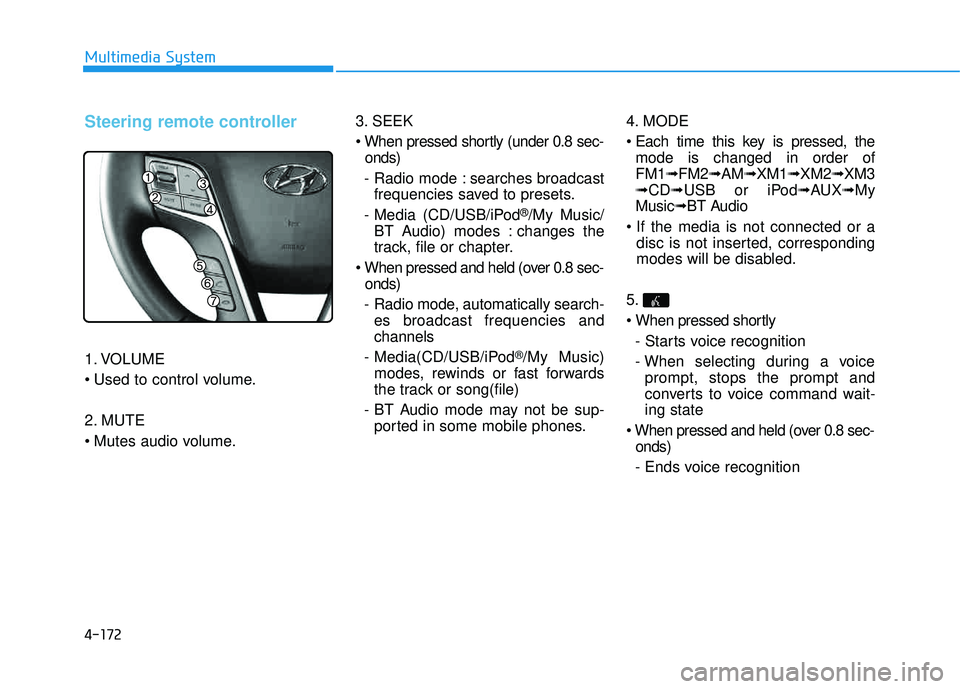
Steering remote controller
1. VOLUME
2. MUTE
3. SEEK
onds)
- Radio mode : searches broadcast frequencies saved to presets.
- Media (CD/USB/iPod
®/My Music/
BT Audio) modes : changes the
track, file or chapter.
onds)
- Radio mode, automatically search- es broadcast frequencies andchannels
- Media(CD/USB/iPod
®/My Music)
modes, rewinds or fast forwards
the track or song(file)
- BT Audio mode may not be sup- ported in some mobile phones. 4. MODE
mode is changed in order of FM1 ➟FM2 ➟AM ➟XM1 ➟XM2 ➟XM3
➟ CD ➟USB or iPod ➟AUX ➟My
Music ➟BT Audio
disc is not inserted, corresponding
modes will be disabled.
5.
- Starts voice recognition
- When selecting during a voice prompt, stops the prompt and
converts to voice command wait-ing state
onds)
- Ends voice recognition
Page 416 of 653
4-205
Multimedia System
4
Pairing a Bluetooth®Wireless
Technology Device
What is Bluetooth® Wireless
Technology Pairing?
Pairing refers to the process of syn-
chronizing your
Bluetooth®Wireless
Technology phone or device with the
car audio system for connection.
Pairing is necessary to connect anduse the
Bluetooth®Wireless
Technology feature.
Pairing Key / Key
on the Steering Remote
Controller
When No Devices have been
Paired
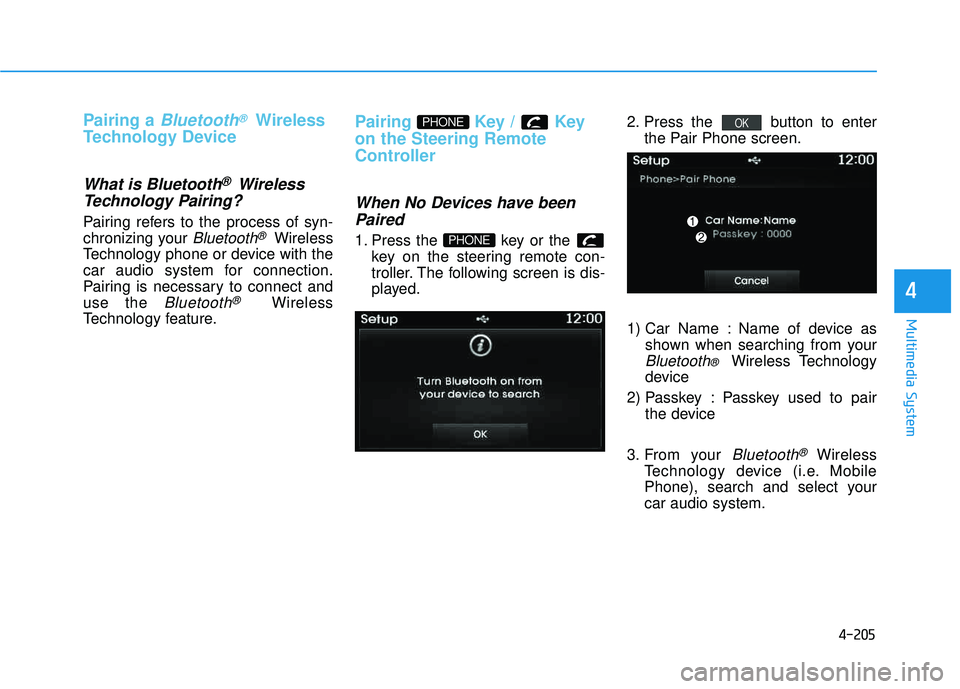
1. Press the key or the key on the steering remote con-
troller. The following screen is dis-
played. 2. Press the button to enter
the Pair Phone screen.
1) Car Name : Name of device as shown when searching from your
Bluetooth® Wireless Technology
device
2) Passkey : Passkey used to pair the device
3. From your
Bluetooth®Wireless
Technology device (i.e. Mobile
Phone), search and select yourcar audio system.
OK
PHONE
PHONE
Page 429 of 653
4-218
Multimedia System
VVOO IICC EE RR EECCOO GGNN IITT IIOO NN
Using Voice Recognition
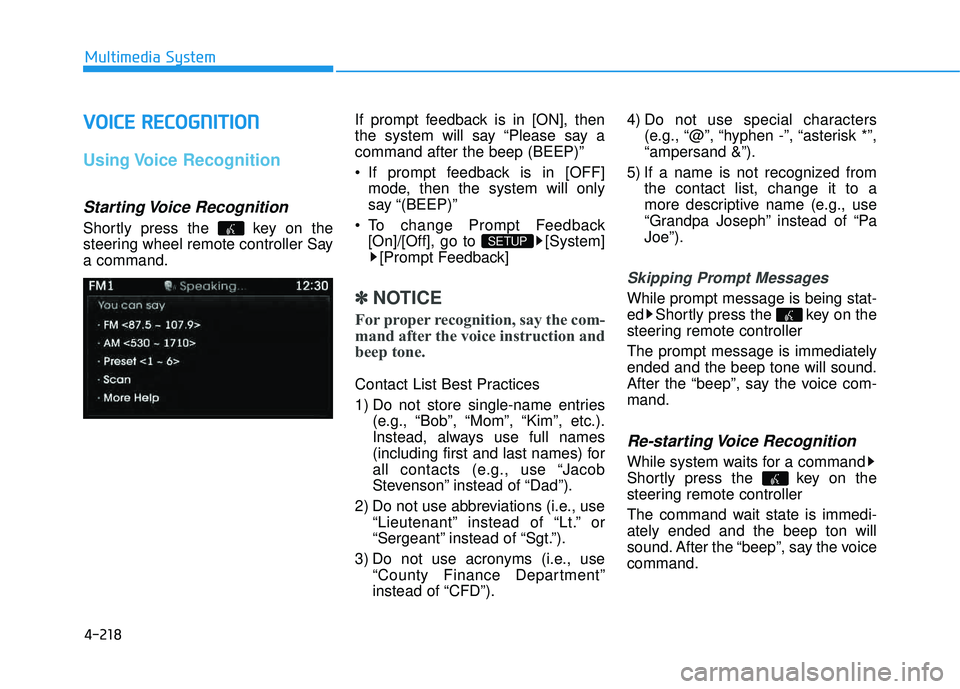
Starting Voice Recognition
Shortly press the key on the
steering wheel remote controller Saya command. If prompt feedback is in [ON], then
the system will say “Please say acommand after the beep (BEEP)”
If prompt feedback is in [OFF]
mode, then the system will only
say “(BEEP)”
To change Prompt Feedback [On]/[Off], go to [System][Prompt Feedback]
✽✽ NOTICE
For proper recognition, say the com-
mand after the voice instruction and
beep tone.
Contact List Best Practices
1) Do not store single-name entries (e.g., “Bob”, “Mom”, “Kim”, etc.).
Instead, always use full names
(including first and last names) for
all contacts (e.g., use “Jacob
Stevenson” instead of “Dad”).
2) Do not use abbreviations (i.e., use “Lieutenant” instead of “Lt.” or
“Sergeant” instead of “Sgt.”).
3) Do not use acronyms (i.e., use “County Finance Department”
instead of “CFD”). 4) Do not use special characters
(e.g., “@”, “hyphen -”, “asterisk *”,“ampersand &”).
5) If a name is not recognized from the contact list, change it to a
more descriptive name (e.g., use
“Grandpa Joseph” instead of “PaJoe”).
Skipping Prompt Messages
While prompt message is being stat-
ed Shortly press the key on the
steering remote controller The prompt message is immediately ended and the beep tone will sound.
After the “beep”, say the voice com-mand.
Re-starting Voice Recognition
While system waits for a command
Shortly press the key on the
steering remote controller
The command wait state is immedi- ately ended and the beep ton will
sound. After the “beep”, say the voicecommand.
SETUP
Page 529 of 653
6-13
What to do in an emergency
✽✽NOTICE
The TPMS Malfunction Indicator
may illuminate after blinking for
one minute if the vehicle is near elec-
tric power supply cables or radio
transmitters such as police stations,
government and public offices,
broadcasting stations, military
installations, airports, transmitting
towers, etc. Additionally, the TPMS
Malfunction indicator may illumi-
nate if snow chains are used or elec-
tronic devices such as computers,
chargers, remote starters, naviga-
tion, etc. This may interfere with
normal operation of the TPMS.This device complies with Part 15 of the FCC rules.
Operation is subject to the following
two conditions:
1. This device may not cause harm- ful interference, and
2. This device must accept any inter- ference received, including inter-
ference that may cause undesired
Changes or modifications not
expressly approved by the party
responsible for compliance could
void the user's authority to operatethe equipment.
Tampering with, modifying, or dis-
abling the TPMS components may
interfere with the system’s ability to
function and may void the warranty
for that portion of the vehicle.Changing a Tire with TPMS
If you have a flat tire, the Low Tire
Pressure Telltale will illuminate. If you
believe you have a flat tire or feel any
vehicle instability, take your foot off
the accelerator pedal and let the
vehicle slow down while driving
straight ahead. Do not apply the
brakes immediately or attempt to pull
off the road as this may cause a lossof control resulting in an accident.
When the vehicle has slowed to such
a speed that it is safe to do so, brake
carefully and pull off the road. Drive
off the road as far as possible and
park on firm, level ground. If you are
on a divided highway, do not park in
the median area between the two
traffic lanes. Replace the flat tire with
the compact spare tire.
6
Page 646 of 653
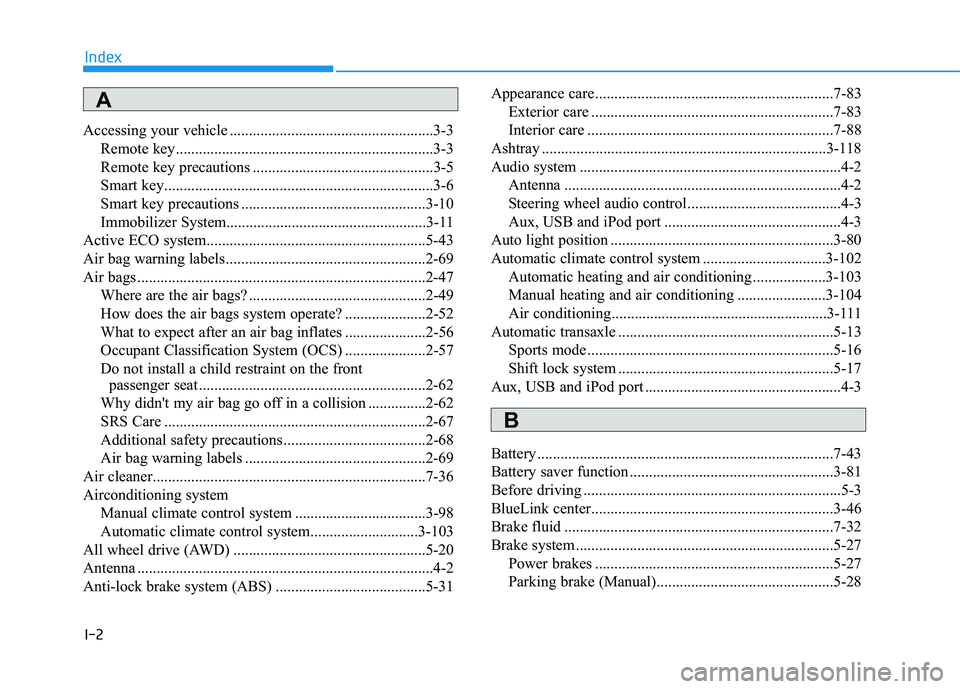
I-2
Accessing your vehicle .....................................................3-3Remote key...................................................................3-3
Remote key precautions ...............................................3-5
Smart key......................................................................3-6
Smart key precautions ................................................3-10
Immobilizer System....................................................3-11
Active ECO system.........................................................5-43
Air bag warning labels....................................................2-69
Air bags ...........................................................................2-47 Where are the air bags? ..............................................2-49
How does the air bags system operate? .....................2-52
What to expect after an air bag inflates .....................2-56
Occupant Classification System (OCS) .....................2-57
Do not install a child restraint on the front passenger seat ...........................................................2-62
Why didn't my air bag go off in a collision ...............2-62
SRS Care ....................................................................2-67
Additional safety precautions .....................................2-68
Air bag warning labels ...............................................2-69
Air cleaner.......................................................................7-36
Airconditioning system Manual climate control system ..................................3-98
Automatic climate control system............................3-103
All wheel drive (AWD) ..................................................5-20
Antenna .............................................................................4-2
Anti-lock brake system (ABS) .......................................5-31 Appearance care..............................................................7-83
Exterior care ...............................................................7-83
Interior care ................................................................7-88
Ashtray ..........................................................................3-118
Audio system ....................................................................4-2 Antenna ........................................................................4-2
Steering wheel audio control........................................4-3
Aux, USB and iPod port ..............................................4-3
Auto light position ..........................................................3-80
Automatic climate control system ................................3-102
Automatic heating and air conditioning ...................3-103
Manual heating and air conditioning .......................3-104
Air conditioning........................................................3-111
Automatic transaxle ........................................................5-13 Sports mode ................................................................5-16
Shift lock system ........................................................5-17
Aux, USB and iPod port ...................................................4-3
Battery .............................................................................7-43
Battery saver function .....................................................3-81
Before driving ...................................................................5-3
BlueLink center...............................................................3-46
Brake fluid ......................................................................7-32
Brake system ...................................................................5-27 Power brakes ..............................................................5-27
Parking brake (Manual)..............................................5-28
Index
A
B
Page 651 of 653
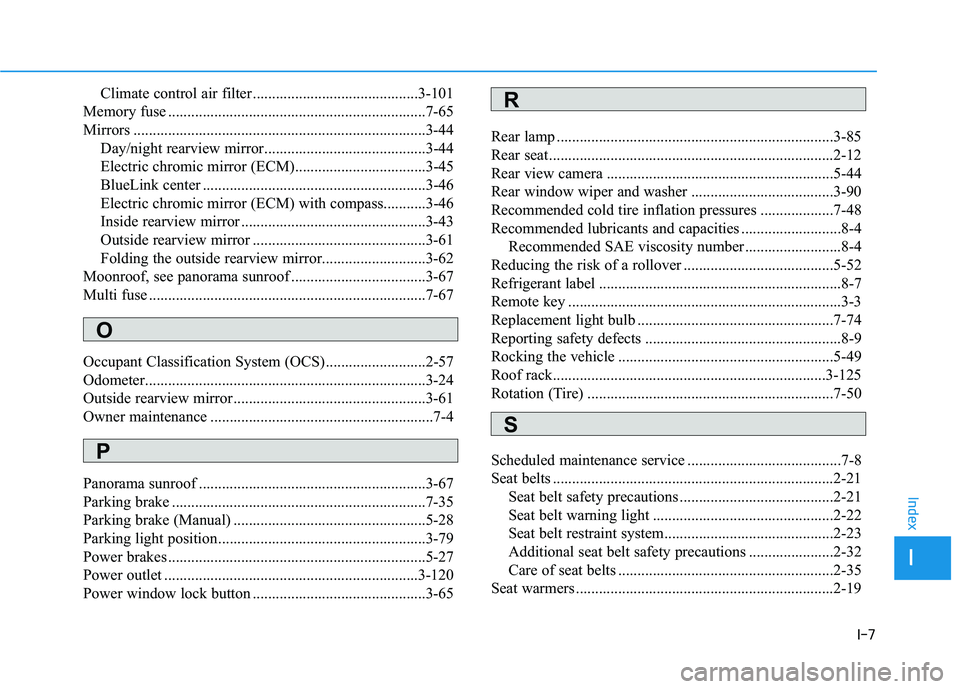
I-7
Climate control air filter ...........................................3-101
Memory fuse ...................................................................7-65
Mirrors ............................................................................3-44 Day/night rearview mirror..........................................3-44
Electric chromic mirror (ECM)..................................3-45
BlueLink center ..........................................................3-46
Electric chromic mirror (ECM) with compass...........3-46
Inside rearview mirror ................................................3-43
Outside rearview mirror .............................................3-61
Folding the outside rearview mirror...........................3-62
Moonroof, see panorama sunroof ...................................3-67
Multi fuse ........................................................................7-67
Occupant Classification System (OCS)..........................2-57
Odometer.........................................................................3-24
Outside rearview mirror..................................................3-61
Owner maintenance ..........................................................7-4
Panorama sunroof ...........................................................3-67
Parking brake ..................................................................7-35
Parking brake (Manual) ..................................................5-28
Parking light position......................................................3-79
Power brakes ...................................................................5-27
Power outlet ..................................................................3-120
Power window lock button .............................................3-65 Rear lamp ........................................................................3-85
Rear seat..........................................................................2-12
Rear view camera ...........................................................5-44
Rear window wiper and washer .....................................3-90
Recommended cold tire inflation pressures ...................7-48
Recommended lubricants and capacities ..........................8-4
Recommended SAE viscosity number .........................8-4
Reducing the risk of a rollover .......................................5-52
Refrigerant label ...............................................................8-7
Remote key .......................................................................3-3
Replacement light bulb ...................................................7-74
Reporting safety defects ...................................................8-9
Rocking the vehicle ........................................................5-49
Roof rack.......................................................................3-125
Rotation (Tire) ................................................................7-50
Scheduled maintenance service ........................................7-8
Seat belts .........................................................................2-21
Seat belt safety precautions ........................................2-21
Seat belt warning light ...............................................2-22
Seat belt restraint system............................................2-23
Additional seat belt safety precautions ......................2-32
Care of seat belts ........................................................2-35
Seat warmers ...................................................................2-19
I
Index
O
R
S
P