steering HYUNDAI TUCSON 2015 User Guide
[x] Cancel search | Manufacturer: HYUNDAI, Model Year: 2015, Model line: TUCSON, Model: HYUNDAI TUCSON 2015Pages: 653, PDF Size: 8.45 MB
Page 87 of 653
Convenient features of your vehicle
ACCESSING YOUR VEHICLE ..................................3-3
Remote key .......................................................................3-3
Remote key precautions..................................................3-5
Smart key ...........................................................................3-6
Smart key precautions...................................................3-10 Immobilizer System ........................................................3-11
DOOR LOCKS .......................................................3-13
Operating door locks from outside the vehicle .....3-13
Operating door locks from inside the vehicle ........3-16
Auto door lock/unlock features ................................3-18
Child-protector rear door locks .................................3-18
THEFT-ALARM SYSTEM ...................................3-19
INSTRUMENT CLUSTER ......................................3-20
Instrument Cluster Control............................................3-21
Gauges ...............................................................................3-21
Transaxle Shift Indicator ...............................................3-24
TRIP COMPUTER ..................................................3-25
Trip Modes ........................................................................3-25
Warnings and indicators................................................3-28
STEERING WHEEL ................................................3-42
Electric Power Steering (EPS) ....................................3-42
Tilt steering/Telescope steering .................................3-42
Horn ....................................................................................3-43
MIRRORS ...............................................................3-44
Interior rearview mirrors .............................................3-44
Outside rearview mirrors .............................................3-61
WINDOWS..............................................................3-63
Power windows ..............................................................3-64
PANORAMIC SUNROOF .......................................3-67
Sunroof opening and closing ......................................3-67
Sliding the sunroof ........................................................3-68
Tilting the Sunroof ........................................................3-68
Sunroof open warming ..................................................3-70
Roller blind .......................................................................3-70
HOOD .....................................................................3-71
TAILGATE ...............................................................3-73
Emergency tailgate safety release ...........................3-74
FUEL FILLER DOOR .............................................3-76
LIGHTS ...................................................................3-79
Exterior lights .................................................................3-79
Hazard warning flasher .................................................3-84
Interior lights ....................................................................3-84
Vanity mirror lamp ..........................................................3-86
Glove box lamp ................................................................3-86
Luggage room lamp ........................................................3-86
3
Page 115 of 653
3-29
Convenient features of your vehicle
3
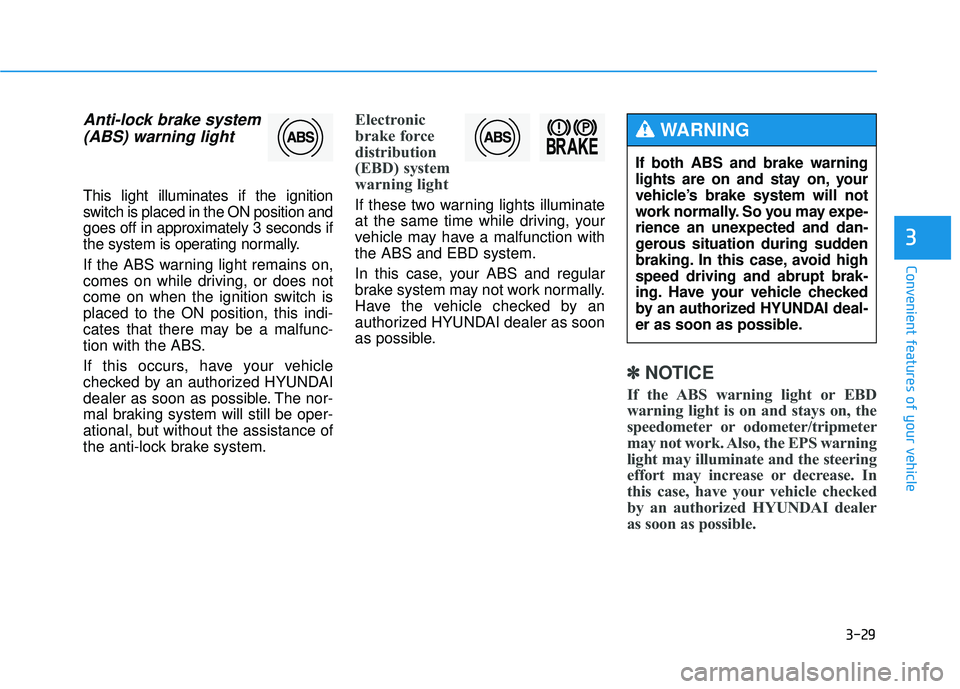
Anti-lock brake system(ABS) warning light
This light illuminates if the ignition
switch is placed in the ON position and
goes off in approximately 3 seconds if
the system is operating normally.
If the ABS warning light remains on,
comes on while driving, or does not
come on when the ignition switch isplaced to the ON position, this indi-
cates that there may be a malfunc-
tion with the ABS.
If this occurs, have your vehicle
checked by an authorized HYUNDAI
dealer as soon as possible. The nor-
mal braking system will still be oper-
ational, but without the assistance of
the anti-lock brake system.
Electronic
brake force
distribution
(EBD) system
warning light
If these two warning lights illuminate
at the same time while driving, your
vehicle may have a malfunction withthe ABS and EBD system.
In this case, your ABS and regular
brake system may not work normally.
Have the vehicle checked by an
authorized HYUNDAI dealer as soon
as possible.
✽✽ NOTICE
If the ABS warning light or EBD
warning light is on and stays on, the
speedometer or odometer/tripmeter
may not work. Also, the EPS warning
light may illuminate and the steering
effort may increase or decrease. In
this case, have your vehicle checked
by an authorized HYUNDAI dealer
as soon as possible.
If both ABS and brake warning
lights are on and stay on, your
vehicle’s brake system will not
work normally. So you may expe-
rience an unexpected and dan-
gerous situation during sudden
braking. In this case, avoid highspeed driving and abrupt brak-
ing. Have your vehicle checked
by an authorized HYUNDAI deal-
er as soon as possible.
WARNING
Page 126 of 653
3-40
Convenient features of your vehicle
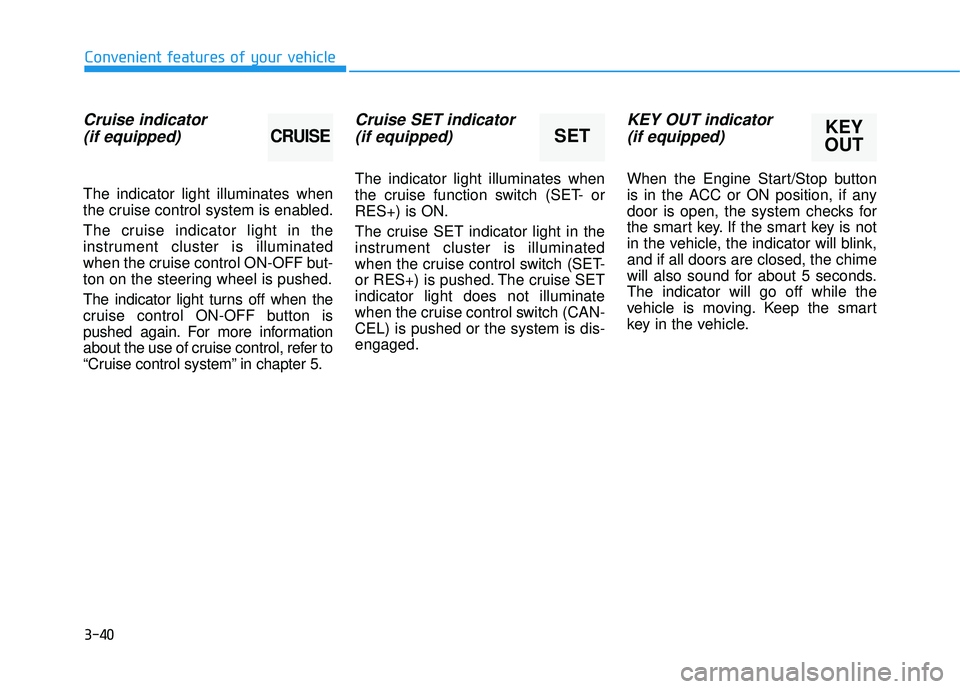
Cruise indicator(if equipped)
The indicator light illuminates when
the cruise control system is enabled.
The cruise indicator light in the
instrument cluster is illuminated
when the cruise control ON-OFF but-
ton on the steering wheel is pushed.
The indicator light turns off when the
cruise control ON-OFF button is
pushed again. For more information
about the use of cruise control, refer to
“Cruise control system” in chapter 5.
Cruise SET indicator (if equipped)
The indicator light illuminates when
the cruise function switch (SET- orRES+) is ON.
The cruise SET indicator light in the
instrument cluster is illuminated
when the cruise control switch (SET-
or RES+) is pushed. The cruise SETindicator light does not illuminate
when the cruise control switch (CAN-CEL) is pushed or the system is dis-engaged.
KEY OUT indicator (if equipped)
When the Engine Start/Stop button
is in the ACC or ON position, if any
door is open, the system checks for
the smart key. If the smart key is not
in the vehicle, the indicator will blink,and if all doors are closed, the chime
will also sound for about 5 seconds.The indicator will go off while the
vehicle is moving. Keep the smart
key in the vehicle.
KEY
OUTSETCRUISE
Page 128 of 653
3-42
Electric Power Steering (EPS)
This system assists you with steering
the vehicle.
If the engine is turned off or if the
EPS becomes inoperative, you may
still steer the vehicle, but it will
require increased steering effort.
Should you notice any change in the
effort required to steer during normal
vehicle operation, have the EPS
checked by an authorized HYUNDAI
dealer.
✽✽NOTICE
The steering effort may be high immediately after placing the igni-
tion switch in the ON position.
This happens as the system per-
forms the EPS system diagnostics.
When the diagnostics is complet-
ed, the steering wheel will return
to its normal condition.
A click noise may be heard from the EPS relay after the ignition
switch is placed in the ON or
LOCK/OFF position.
A motor noise may be heard when the vehicle is at a stop or at a low
driving speed.
When you operate the steering wheel in low temperature, abnor-
mal noise may occur. If tempera-
ture rises, the noise will disappear.
This is a normal condition.Tilt steering/Telescope steering
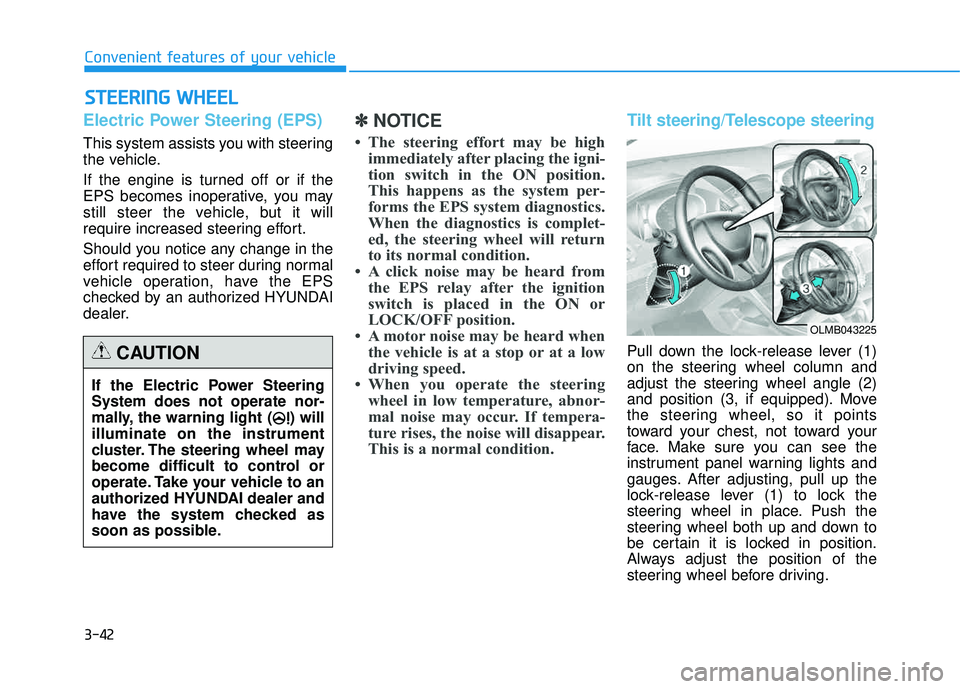
Pull down the lock-release lever (1)
on the steering wheel column and
adjust the steering wheel angle (2)
and position (3, if equipped). Move
the steering wheel, so it points
toward your chest, not toward your
face. Make sure you can see the
instrument panel warning lights and
gauges. After adjusting, pull up the
lock-release lever (1) to lock the
steering wheel in place. Push the
steering wheel both up and down to
be certain it is locked in position.
Always adjust the position of the
steering wheel before driving.
SSTT EEEERR IINN GG WW HHEEEELL
Convenient features of your vehicle
If the Electric Power Steering System does not operate nor-
mally, the warning light ( ) willilluminate on the instrument
cluster. The steering wheel may
become difficult to control or
operate. Take your vehicle to an
authorized HYUNDAI dealer and
have the system checked as
soon as possible.
CAUTION
OLMB043225
Page 129 of 653
3-43
Convenient features of your vehicle
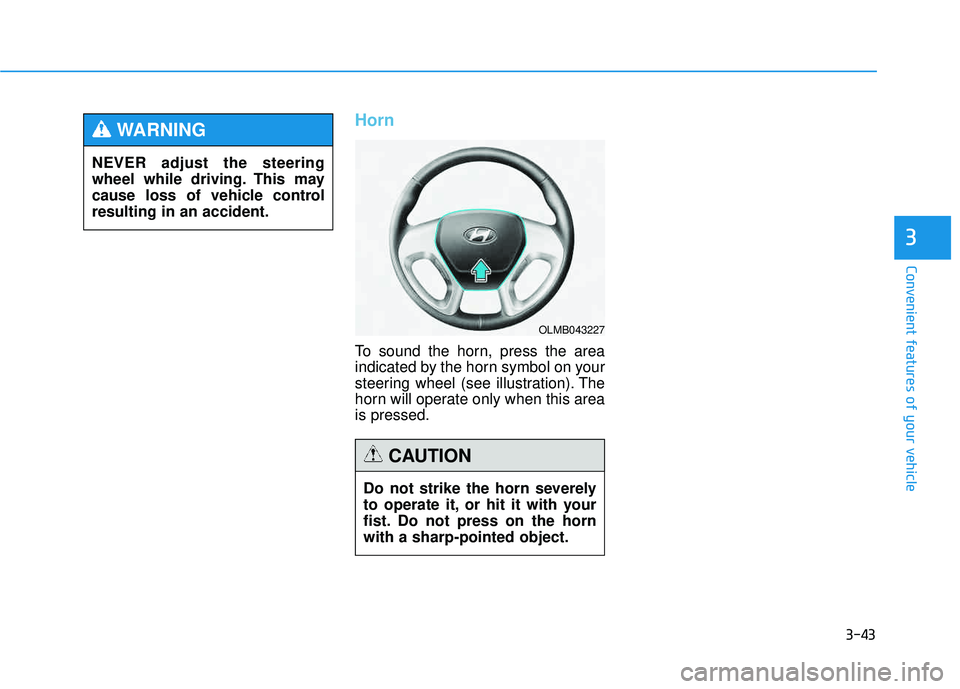
Horn
To sound the horn, press the area
indicated by the horn symbol on your
steering wheel (see illustration). The
horn will operate only when this area is pressed.
3
Do not strike the horn severely
to operate it, or hit it with your
fist. Do not press on the hornwith a sharp-pointed object.
CAUTION
OLMB043227
NEVER adjust the steering
wheel while driving. This may
cause loss of vehicle controlresulting in an accident.
WARNING
Page 167 of 653
3-81
Convenient features of your vehicle
3
High beam operation
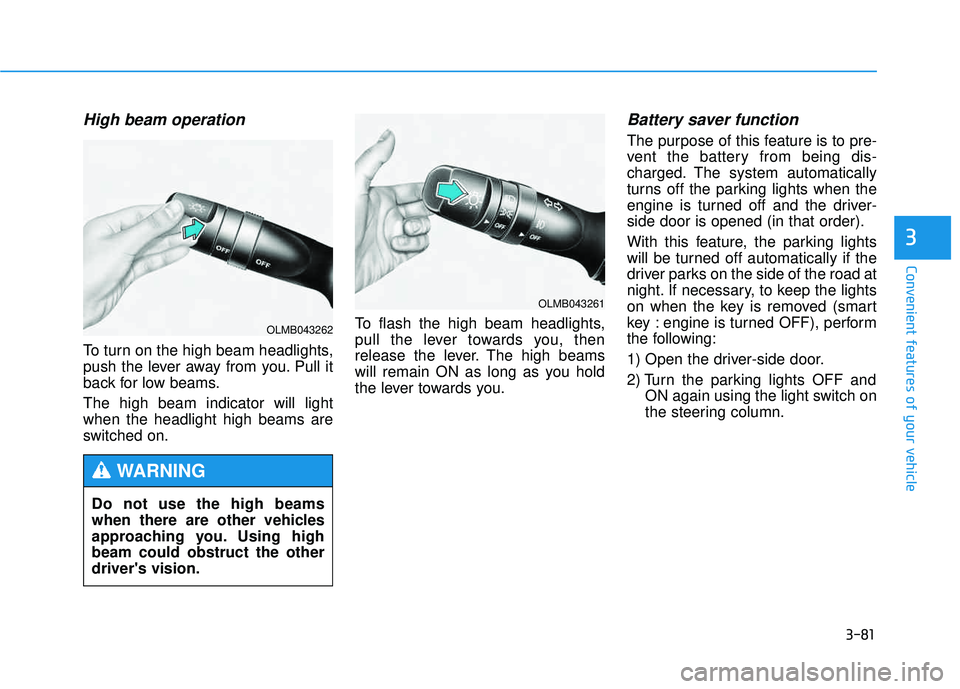
To turn on the high beam headlights,
push the lever away from you. Pull it
back for low beams. The high beam indicator will light when the headlight high beams are
switched on.To flash the high beam headlights,
pull the lever towards you, then
release the lever. The high beams
will remain ON as long as you hold
the lever towards you.
Battery saver function
The purpose of this feature is to pre-
vent the battery from being dis-
charged. The system automatically
turns off the parking lights when the
engine is turned off and the driver-side door is opened (in that order).
With this feature, the parking lights
will be turned off automatically if the
driver parks on the side of the road at
night. If necessary, to keep the lights
on when the key is removed (smart
key : engine is turned OFF), perform
the following:
1) Open the driver-side door.
2) Turn the parking lights OFF and
ON again using the light switch on
the steering column.
Do not use the high beams
when there are other vehicles
approaching you. Using highbeam could obstruct the otherdriver's vision.
WARNING
OLMB043261
OLMB043262
Page 207 of 653
3-121
Convenient features of your vehicle
3
Digital clock
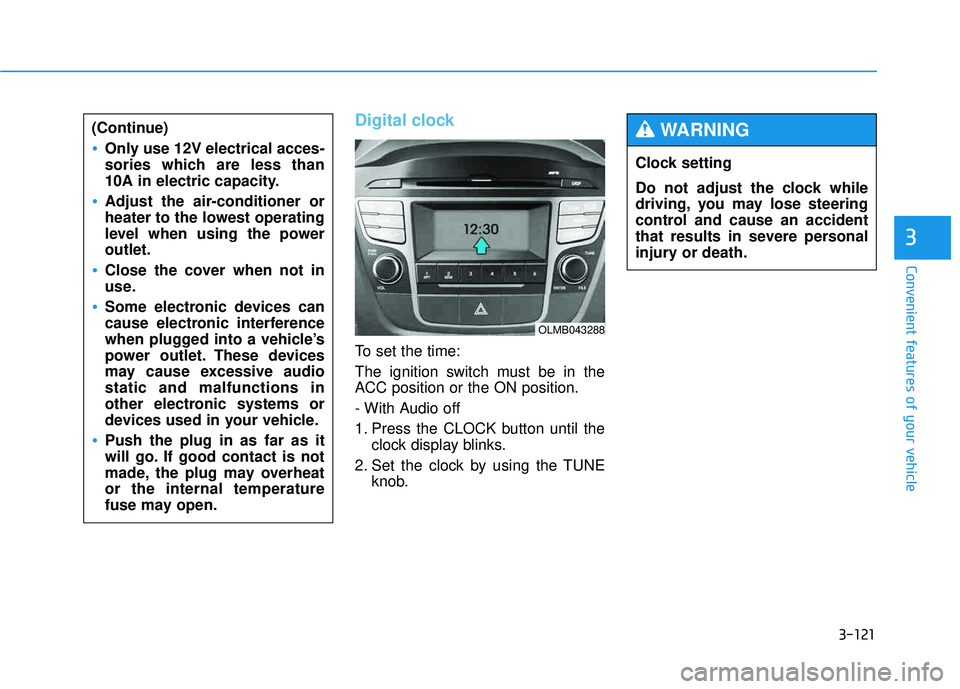
To set the time:
The ignition switch must be in the
ACC position or the ON position.
- With Audio off
1. Press the CLOCK button until theclock display blinks.
2. Set the clock by using the TUNE knob.
(Continue)
Only use 12V electrical acces-
sories which are less than
10A in electric capacity.
Adjust the air-conditioner or
heater to the lowest operating
level when using the poweroutlet.
Close the cover when not in
use.
Some electronic devices can
cause electronic interference
when plugged into a vehicle’s
power outlet. These devices
may cause excessive audiostatic and malfunctions in
other electronic systems or
devices used in your vehicle.
Push the plug in as far as it
will go. If good contact is not
made, the plug may overheator the internal temperature
fuse may open.
OLMB043288
Clock setting
Do not adjust the clock while
driving, you may lose steering
control and cause an accident
that results in severe personal
injury or death.
WARNING
Page 212 of 653
Multimedia System
AUDIO SYSTEM ......................................................4-2
HOW VEHICLE AUDIO WORKS .............................4-4
BEFORE READING THE MANUAL,
CHECK THE FOLLOWING.....................................4-15
CD PLAYER : AC110TMKN, AC1B0TMKN, AC1B1TMAN ......................4-16/4-126
System controllers and functions..................4-17/4-127
Setup .....................................................................4-20/4-130
Radio : FM, AM OR XM ....................................4-24/4-134
Basic method of use .........................................4-27/4-137
Bluetooth®Wireless Technology Audio ........4-34/4-144
Phone ....................................................................4-36/4-146
Voice command list ............................................4-53/4-163
CD PLAYER : AC111TMAN,
AC110TMAN ..............................................4-59/4-169
System controllers and functions..................4-60/4-170
Steering remote controller ..............................4-62/4-172
RADIO mode ........................................................4-64/4-174XM RADIO TM
mode..............................................4-66/4-176
MEDIA mode ........................................................4-70/4-180
AUDIO CD mode ..................................................4-71/4-181
MP3 CD mode .....................................................4-74/4-184
USB mode.............................................................4-80/4-190
iPod ®
mode ..........................................................4-85/4-195
AUX mode ............................................................4-88/4-198 MY MUSIC mode ................................................4-90/4-200
Bluetooth
®Wireless Technology Audio ........4-94/4-204
Pairing a
Bluetooth ®Wireless Technology
Device .......................................................................4-95/4-205Using
Bluetooth ® Wireless Technology.......4-100/4-210
Voice recognition .............................................4-108/4-218
Setup ...................................................................4-115/4-225
Rear view camera ............................................4-121/4-231 Blue Link ®
...........................................................4-122/4-232
4
Page 214 of 653
4-3
Multimedia System
Steering wheel audio control (if equipped)
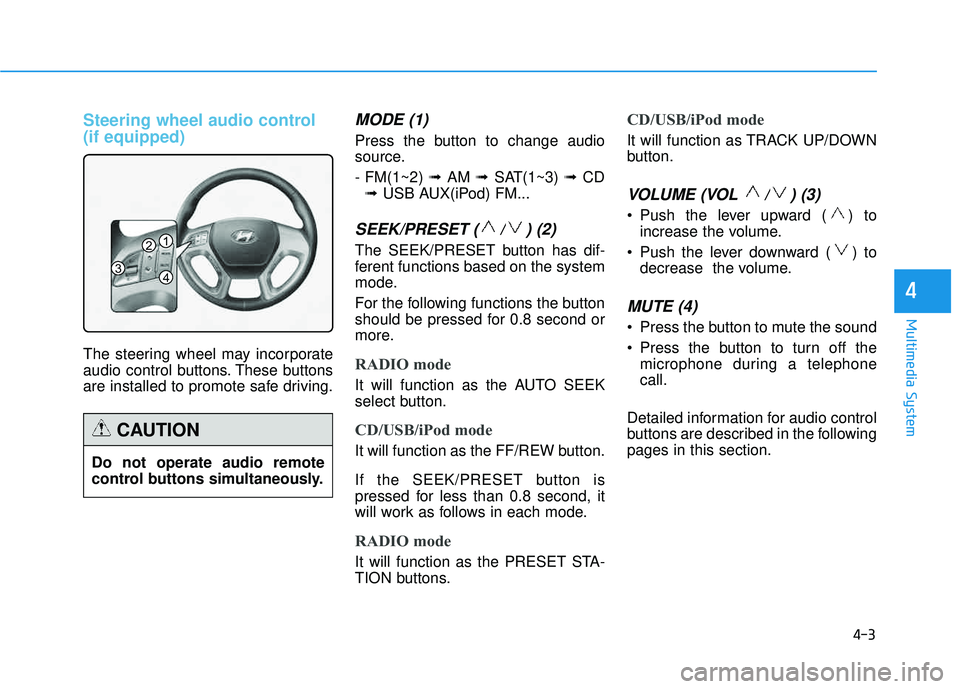
The steering wheel may incorporate
audio control buttons. These buttons
are installed to promote safe driving.
MODE (1)
Press the button to change audio
source. - FM(1~2) ➟ AM ➟ SAT(1~3) ➟ CD
➟ USB AUX(iPod) FM...
SEEK/PRESET ( / ) (2)
The SEEK/PRESET button has dif-
ferent functions based on the system
mode.
For the following functions the button
should be pressed for 0.8 second or
more.
RADIO mode
It will function as the AUTO SEEK
select button.
CD/USB/iPod mode
It will function as the FF/REW button.
If the SEEK/PRESET button is
pressed for less than 0.8 second, it
will work as follows in each mode.
RADIO mode
It will function as the PRESET STA-
TION buttons.
CD/USB/iPod mode
It will function as TRACK UP/DOWN
button.
VOLUME (VOL / ) (3)
• Push the lever upward ( ) to
increase the volume.
Push the lever downward ( ) to decrease the volume.
MUTE (4)
Press the button to mute the sound
Press the button to turn off themicrophone during a telephone call.
Detailed information for audio control
buttons are described in the followingpages in this section.
4
1
3
2
4
Do not operate audio remote
control buttons simultaneously.
CAUTION
Page 247 of 653
4-36
Multimedia System
PPHH OO NNEE
Before using the Bluetooth®Wireless
Technology phone features
Bluetooth®Wireless
Technology phone, you must first pair and connect the
Bluetooth®
Wireless Technology mobile phone.
connected, it is not possible to enter
Phone mode. Once a phone ispaired or connected, the guidance
screen will be displayed.
(IGN/ACC ON), the
Bluetooth®
Wireless Technology phone will be
automatically connected. Even if you
are outside, the
Bluetooth® Wireless
Technology phone will be automati-
cally connected once you are in the
vicinity of the vehicle. If you do not
want automatic
Bluetooth®Wireless
Technology phone connection, setthe
Bluetooth®Wireless Technology
power to OFF.
PP HH OO NNEE
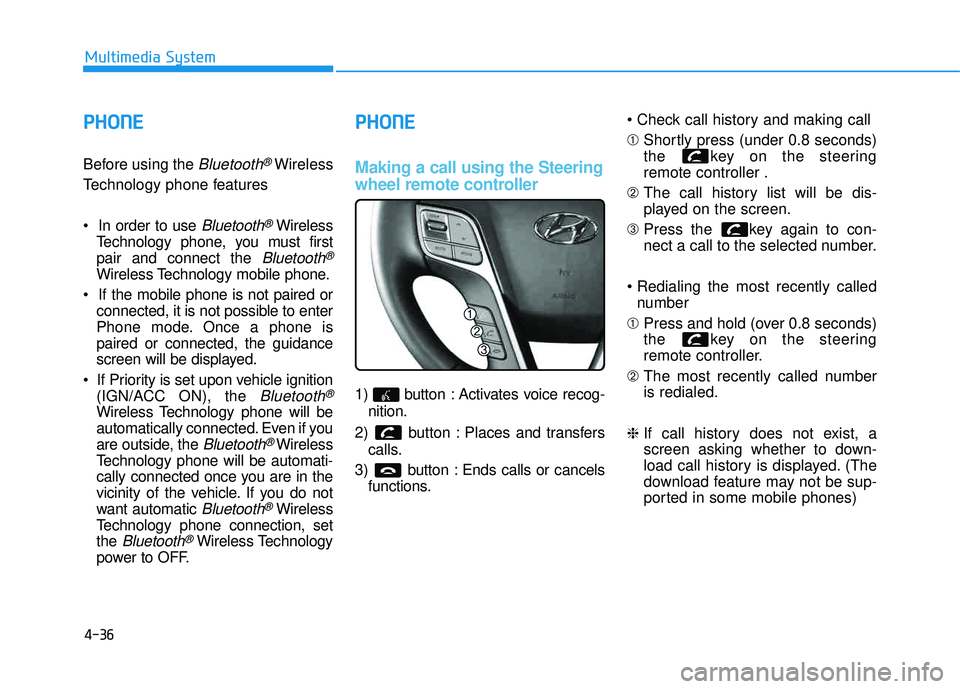
Making a call using the Steering
wheel remote controller
1) button : Activates voice recog-
nition.
2) button : Places and transfers calls.
3) button : Ends calls or cancels functions. ➀
Shortly press (under 0.8 seconds)
the key on the steeringremote controller .
➁ The call history list will be dis-
played on the screen.
➂ Press the key again to con-
nect a call to the selected number.
number
➀ Press and hold (over 0.8 seconds)
the key on the steering
remote controller.
➁ The most recently called numberis redialed.
❈ If call history does not exist, a
screen asking whether to down-
load call history is displayed. (The
download feature may not be sup-
ported in some mobile phones)