display HYUNDAI TUCSON 2016 Owners Manual
[x] Cancel search | Manufacturer: HYUNDAI, Model Year: 2016, Model line: TUCSON, Model: HYUNDAI TUCSON 2016Pages: 642, PDF Size: 9.78 MB
Page 367 of 642
4-104
Multimedia System
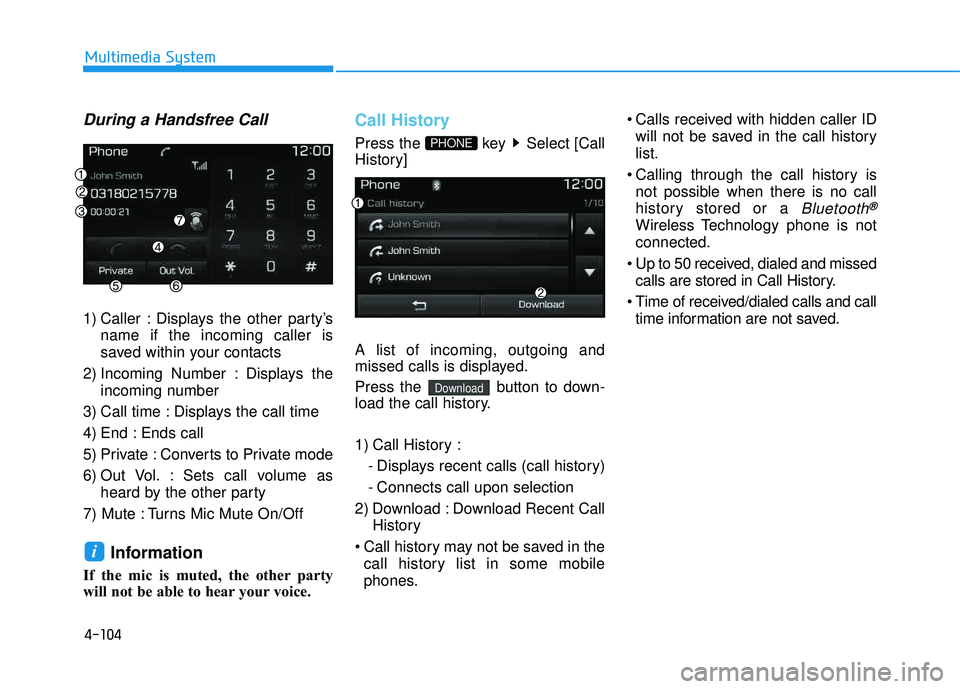
During a Handsfree Call
1) Caller : Displays the other party’sname if the incoming caller is
saved within your contacts
2) Incoming Number : Displays the incoming number
3) Call time : Displays the call time
4) End : Ends call
5) Private : Converts to Private mode
6) Out Vol. : Sets call volume as heard by the other party
7) Mute : Turns Mic Mute On/Off
Information
If the mic is muted, the other party
will not be able to hear your voice.
Call History
Press the key Select [Call
History] A list of incoming, outgoing and
missed calls is displayed.
Press the button to down-
load the call history.
1) Call History : - Displays recent calls (call history)
- Connects call upon selection
2) Download : Download Recent Call History
Call history may not be saved in the call history list in some mobile
phones. Calls received with hidden caller ID
will not be saved in the call history list.
Calling through the call history is not possible when there is no call
history stored or a
Bluetooth®
Wireless Technology phone is notconnected.
Up to 50 received, dialed and missed calls are stored in Call History.
Time of received/dialed calls and call time information are not saved.
Download
PHONE
i
Page 368 of 642
![HYUNDAI TUCSON 2016 Owners Manual 4-105
Multimedia System
4
Contacts
Press the key Select [Contacts]
The list of saved phone book entries
is displayed. Press the but-
ton to download the call history.1) Contacts List :
- Displays](/img/35/56201/w960_56201-367.png "HYUNDAI TUCSON 2016 Owners Manual 4-105
Multimedia System
4
Contacts
Press the key Select [Contacts]
The list of saved phone book entries
is displayed. Press the but-
ton to download the call history.1) Contacts List :
- Displays")
4-105
Multimedia System
4
Contacts
Press the key Select [Contacts]
The list of saved phone book entries
is displayed. Press the but-
ton to download the call history.1) Contacts List :
- Displays downloaded contactsentries
- Connects call upon selection
2) Sort by : Find a contact in an alphabetical order.
3) Download : Download contacts entries
Information
Up to 1,000 contacts saved in yourBluetooth®Wireless Technology
phone can be downloaded into the
car contacts. Contacts that have
been downloaded to the car cannot
be edited or deleted on the phone.
Mobile phone contacts are managed separately for each paired
Bluetooth
®Wireless Technology
device (max 5 devices x 1,000 con-
tacts each). Previously downloaded
data is maintained even if the
Bluetooth
®Wireless Technology
device has been disconnected.
(However, the contacts and call histo-
ry saved to the phone will be deleted
if a paired phone is deleted.)
(Continued)(Continued)
It is possible to download contacts
during Bluetooth streaming audio.
When downloading contacts, the icon will be displayed within the sta-
tus bar.
It is not possible to begin download- ing a contact list when the contact
download feature has been turned
off within the Bluetooth
®Wireless
Technology device. In addition,
some devices may require device
authorization upon attempting to
download contacts. If downloading
does not normally occur, check the
Bluetooth
®Wireless Technology
device settings or the screen state.
The contacts download feature may not be supported in some mobile
phones. For more information of
supported Bluetooth
®devices and
function support, refer to your
phone’s user manual.
i
Download
PHONE
Page 370 of 642
4-107
Multimedia System
4
Information- Before down-
loading contacts
Only contacts within connected phones can be downloaded. Also
check to see that your mobile phone
supports the download feature.
To learn more about whether your mobile phone supports contacts
downloads, refer to your mobile
phone user’s manual.
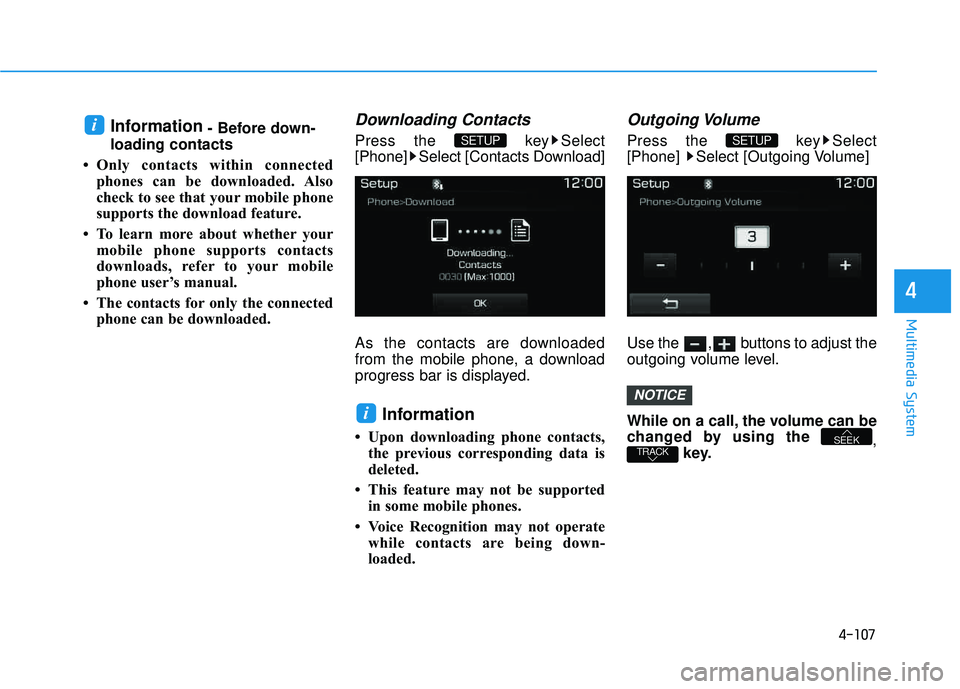
The contacts for only the connected phone can be downloaded.Downloading Contacts
Press the key Select
[Phone] Select [Contacts Download]
As the contacts are downloaded
from the mobile phone, a download
progress bar is displayed.
Information
Upon downloading phone contacts, the previous corresponding data is
deleted.
This feature may not be supported in some mobile phones.
Voice Recognition may not operate while contacts are being down-
loaded.
Outgoing Volume
Press the key Select
[Phone] Select [Outgoing Volume]
Use the , buttons to adjust the
outgoing volume level.
While on a call, the volume can be
changed by using the ,
key.
TRACKSEEK
NOTICE
SETUP
i
SETUP i
Page 374 of 642
4-111
Multimedia System
4
Command Function
More Help Provides guidance on commands that can be
used anywhere in the system.
Help Provides guidance on commands that can be
used within the current mode.
Call
Ex) Call “John Smith”
Call
Ex) Call "John Smith" on Mobile
Call
Ex) Call "John Smith" in Office
Call
Ex) Call "John Smith" at Home
Call
Ex) Call "John Smith" on Other
Phone Provides guidance on Phone related com- mands. After saying this command, say
“Favorites”,“Dial Number”, “Call History” or
“Contacts” execute corresponding functions.
Favorites Displays the Favorite screen.
Call History Displays the Call History screen.
Command Function
Contacts Displays the Contacts screen. After saying this command, say the name of a contact
saved in the Contacts to automatically con-
nect the call.
Dial Number Displays the Dial number screen. After saying this command, you can say the number that
you want to call.
Redial Connects the most recently called number.
Tutorial Pro vides guidance on how to use voice
recognition and Bluetooth®connections.
When listening to the radio, displays the next
radio screen. (FM1➟FM2➟AM➟XM1➟XM2➟XM3➟FM1)
Radio
When listening to a different mode, displays
the most recently played radio screen.
When currently listening to the FM radio, maintains the current state.
When listening to a different mode, displaysthe most recently played FM screen.
FM1(FM One) Displays the FM1 screen.
FM2(FM Two) Displays the FM2 screen.
AM Displays the AM screen.
(Call by Name)
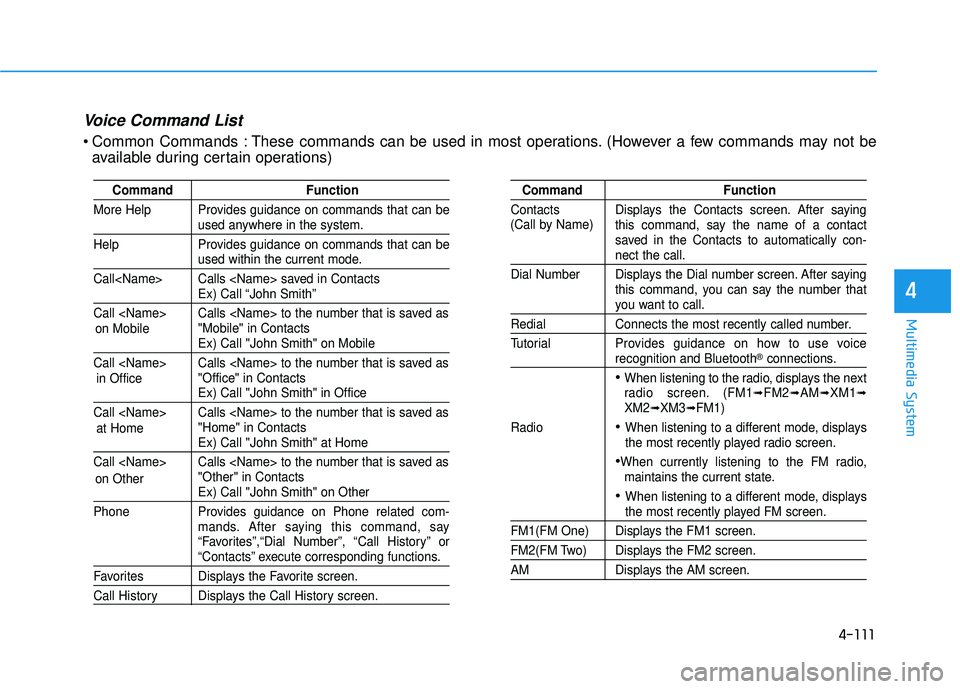
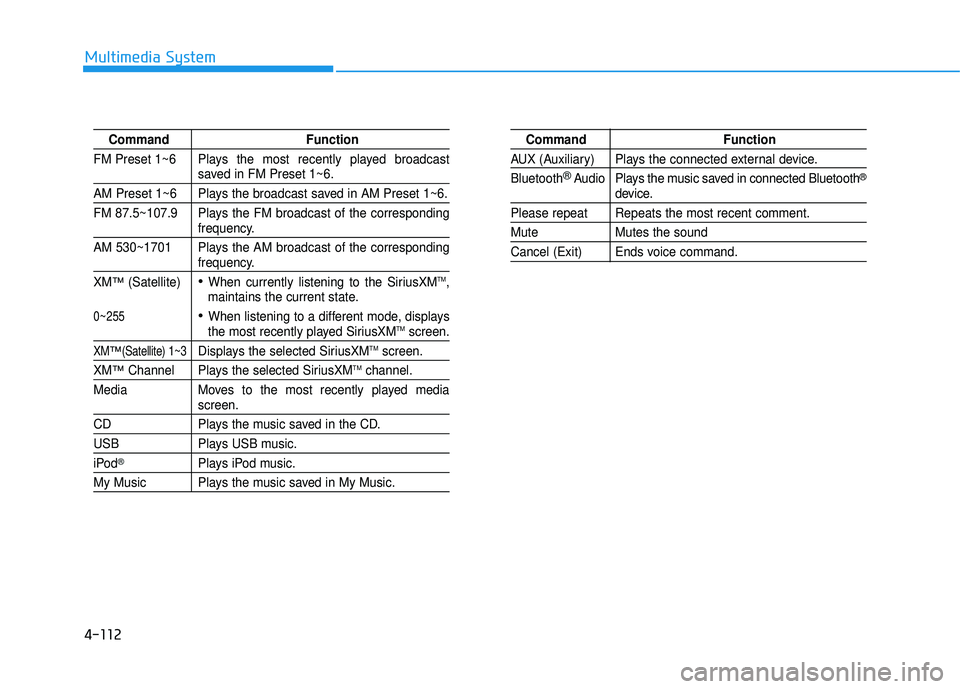
Voice Command List
Common Commands : These commands can be used in most operations. (However a few commands may not be
available during certain operations)
on Mobile
in Officeat Home
on Other
Page 375 of 642
4-112
Multimedia System
Command Function
FM Preset 1~6 Plays the most recently played broadcast
saved in FM Preset 1~6.
AM Preset 1~6 Plays the broadcast saved in AM Preset 1~6.
FM 87.5~107.9 Plays the FM broadcast of the corresponding
frequency.
AM 530~1701 Plays the AM broadcast of the corresponding
frequency.
XM
™(Satellite)When currently listening to the SiriusXMTM,
maintains the current state.
When listening to a different mode, displaysthe most recently played SiriusXMTMscreen.
XM™(Satellite) 1~3Displays the selected SiriusXMTMscreen.
XM™Channel Plays the selected SiriusXMTMchannel.
Media Moves to the most recently played media
screen.
CD Plays the music saved in the CD.
USB Plays USB music.
iPod®Plays iPod music.
My Music Plays the music saved in My Music.
Command Function
AUX (Auxiliary) Plays the connected external device. Bluetooth
®Audio Plays the music saved in connected Bluetooth®
device.
Please repeat Repeats the most recent comment.
Mute Mutes the sound
Cancel (Exit) Ends voice command.
0~255
Page 376 of 642
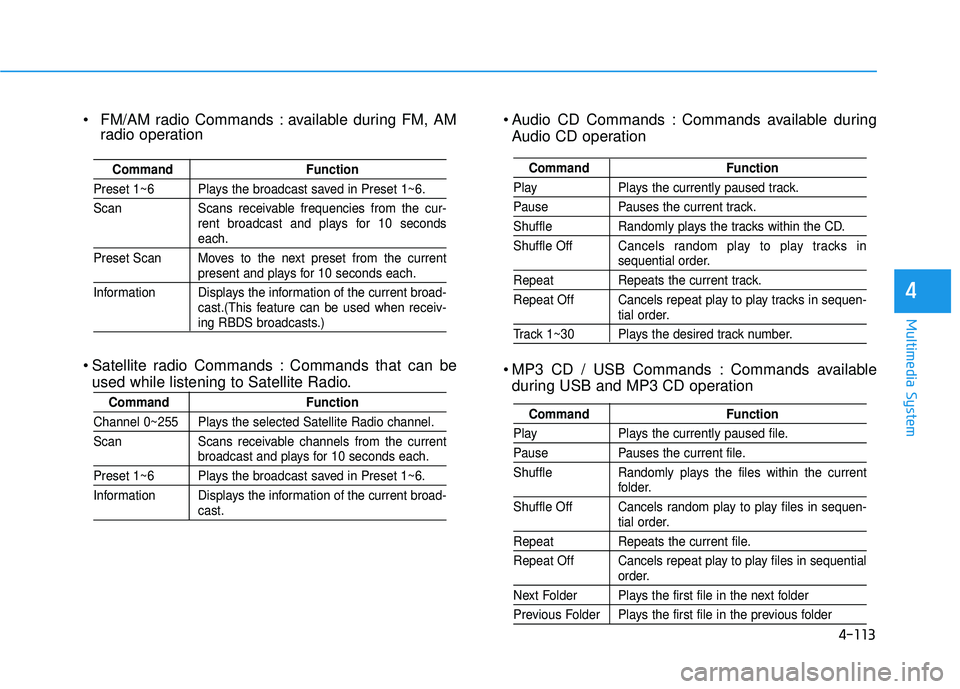
4-113
Multimedia System
4
Audio CD Commands : Commands available duringAudio CD operation
MP3 CD / USB Commands : Commands available during USB and MP3 CD operation
Command Function
Play Plays the currently paused track.
Pause Pauses the current track.
Shuffle Randomly plays the tracks within the CD. Shuffle Off Cancels random play to play tracks in
sequential order.
Repeat Repeats the current track.
Repeat Off Cancels repeat play to play tracks in sequen-
tial order.
Track 1~30 Plays the desired track number.
Command Function
Play Plays the currently paused file.
Pause Pauses the current file.
Shuffle Randomly plays the files within the current
folder.
Shuffle Off Cancels random play to play files in sequen-
tial order.
Repeat Repeats the current file.
Repeat Off Cancels repeat play to play files in sequential
order.
Next Folder Plays the first file in the next folder
Previous Folder Plays the first file in the previous folder
FM/AM radio Commands : available during FM, AM radio operation
Satellite radio Commands : Commands that can be used while listening to Satellite Radio.
Command Function
Preset 1~6 Plays the broadcast saved in Preset 1~6.
Scan Scans receivable frequencies from the cur- rent broadcast and plays for 10 seconds
each.
Preset Scan Moves to the next preset from the current
present and plays for 10 seconds each.
Information Displays the information of the current broad- cast.(This feature can be used when receiv-
ing RBDS broadcasts.)
Command Function
Channel 0~255 Plays the selected Satellite Radio channel.
Scan Scans receivable channels from the current
broadcast and plays for 10 seconds each.
Preset 1~6 Plays the broadcast saved in Preset 1~6.
Information Displays the information of the current broad-
cast.
Page 379 of 642
![HYUNDAI TUCSON 2016 Owners Manual 4-116
Multimedia System
SSeettuu pp
Starting Mode
Press the key to display the Setup screen.
You can select and control options
related to [Display], [Sound], [Clock/Calendar], [Phone] and [System]](/img/35/56201/w960_56201-378.png "HYUNDAI TUCSON 2016 Owners Manual 4-116
Multimedia System
SSeettuu pp
Starting Mode
Press the key to display the Setup screen.
You can select and control options
related to [Display], [Sound], [Clock/Calendar], [Phone] and [System]")
4-116
Multimedia System
SSeettuu pp
Starting Mode
Press the key to display the Setup screen.
You can select and control options
related to [Display], [Sound], [Clock/Calendar], [Phone] and [System].
Display Settings
Adjusting the Brightness
Press the key Select
[Display] Select [Brightness]
Use the , buttons to adjust the
screen brightness or set the
Brightness on Automatic, Day, or
Night mode.
Press the button to reset.
1) Automatic : Adjusts the brightness
automatically
2) Day : Always maintains the bright- ness on high
3) Night : Always maintains the brightness on low
Mode Pop up
Press the key Select
[Display] Select [Mode Pop up]
This feature is used to display the
Mode Pop up screen when entering
radio and media modes.
When this feature is turned on, pressing the or key
will display the Mode Pop up screen.
Information
The media Mode Pop up screen can be
displayed only when two or more
media modes have been connected.
i
MEDIA RADIO
SETUP
Default
SETUPSETUP
Page 380 of 642
![HYUNDAI TUCSON 2016 Owners Manual 4-117
Multimedia System
4
MP3 Information Display
Press the key Select
[Display] Select [Media Display]
This feature is used to change the
information displayed within USB
and MP3 CD modes.
1) F](/img/35/56201/w960_56201-379.png "HYUNDAI TUCSON 2016 Owners Manual 4-117
Multimedia System
4
MP3 Information Display
Press the key Select
[Display] Select [Media Display]
This feature is used to change the
information displayed within USB
and MP3 CD modes.
1) F")
4-117
Multimedia System
4
MP3 Information Display
Press the key Select
[Display] Select [Media Display]
This feature is used to change the
information displayed within USB
and MP3 CD modes.
1) Folder/File : Displays file nameand folder name
2) Album/Artist/Song : Displays album name/artist name/song
Sound Settings
Sound Settings
Press the key Select
[Sound] Select [Sound Setting] Use the , , , buttons to
adjust the Fader/Balance settings.
Use the , buttons to adjust the
Bass/Middle/Treble settings.
Press the button to reset.DefaultSETUP
SETUP
Page 382 of 642
![HYUNDAI TUCSON 2016 Owners Manual 4-119
Multimedia System
4
Clock/Calendar Setting
Clock Settings
Press the key Select [Clock
/Calendar] Select [Clock Settings]
Use the , buttons to set the
Hour, Minutes and AM/PM setting.
Pres](/img/35/56201/w960_56201-381.png "HYUNDAI TUCSON 2016 Owners Manual 4-119
Multimedia System
4
Clock/Calendar Setting
Clock Settings
Press the key Select [Clock
/Calendar] Select [Clock Settings]
Use the , buttons to set the
Hour, Minutes and AM/PM setting.
Pres")
4-119
Multimedia System
4
Clock/Calendar Setting
Clock Settings
Press the key Select [Clock
/Calendar] Select [Clock Settings]
Use the , buttons to set the
Hour, Minutes and AM/PM setting.
Press and hold the key
(over 0.8 seconds) to display the
Clock /Calendar screen.
Calendar Settings
Press the key Select
[Clock/Calendar] Select [CalendarSettings]
Use the , buttons to set the
Day, Month and Year setting.
Time Format
Press the key Select
[Clock/Calendar] Select [Time Format]
This feature is used to change the
clock format between 12hr or 24hr.SETUPSETUP
CLOCK
NOTICE
SETUP
Page 383 of 642
![HYUNDAI TUCSON 2016 Owners Manual 4-120
Multimedia System
Clock Display
Press the key Select [Clock
/Calendar] Select [Clock Display
(Power off)]
This feature is used to display a clock on the screen when the audio sys-
tem is turn](/img/35/56201/w960_56201-382.png "HYUNDAI TUCSON 2016 Owners Manual 4-120
Multimedia System
Clock Display
Press the key Select [Clock
/Calendar] Select [Clock Display
(Power off)]
This feature is used to display a clock on the screen when the audio sys-
tem is turn")
4-120
Multimedia System
Clock Display
Press the key Select [Clock
/Calendar] Select [Clock Display
(Power off)]
This feature is used to display a clock on the screen when the audio sys-
tem is turned off.
System Setting
Memory Information
Press the key Select
[System] Select [Memory Information]
This feature displays information
related to system memory.
1) Using : Displays capacity currentlyin use
2) Capacity : Displays total capacity
Prompt Feedback
Press the key Select
[System] Select [Prompt Feedback]
This feature is used to select the
desired prompt feedback option from
ON and OFF.
1) ON : When using voice recogni- tion, provides detailed guidance prompts
2) OFF : When using voice recogni- tion, omits some guidancepromptsSETUP
SETUP
SETUP