ECO mode HYUNDAI TUCSON 2016 User Guide
[x] Cancel search | Manufacturer: HYUNDAI, Model Year: 2016, Model line: TUCSON, Model: HYUNDAI TUCSON 2016Pages: 642, PDF Size: 9.78 MB
Page 130 of 642
3-32
Convenient features of your vehicle
Programming HomeLink®
Please note the following:
When programming a garage door
opener, it is advised to park the
vehicle outside of the garage.
It is recommended that a new bat- tery be placed in the hand-held
transmitter of the device being pro-
grammed to HomeLink
®for quicker
training and accurate transmission
of the radio-frequency signal.
Some vehicles may require the ignition switch to be placed in the
ACC (or "Accessories") position for
programming and/or operation ofHomeLink
®.
In the event that there are still pro- gramming difficulties or questions
after following the programming
steps listed below, contactHomeLink
®at: www.homelink.com
or by calling 1-800-355-3515.
Programming
To train most devices, follow these
instructions:
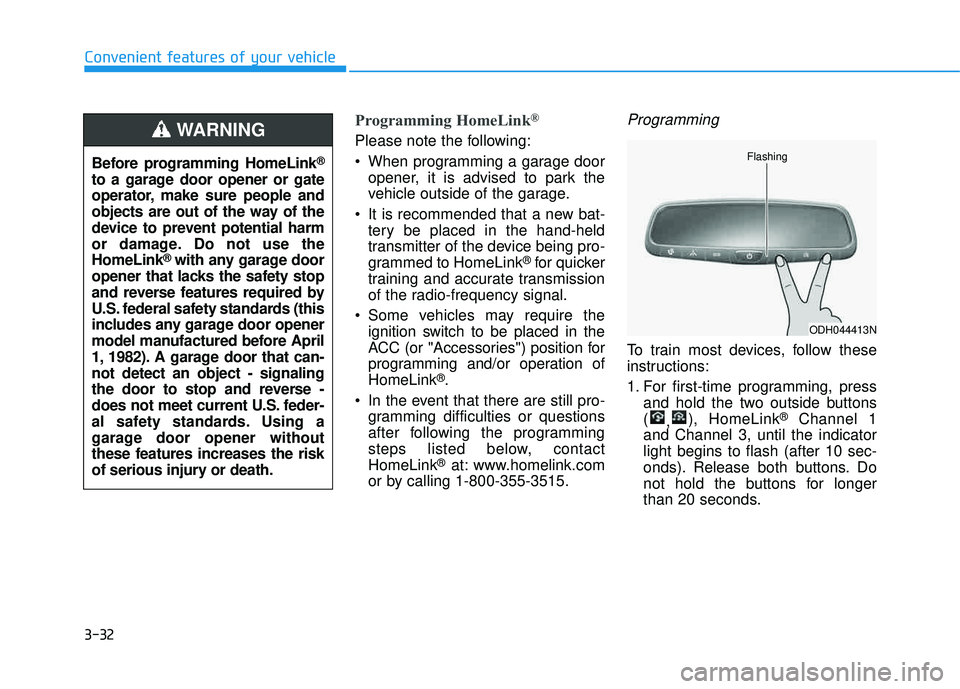
1. For first-time programming, press and hold the two outside buttons ( ,), HomeLink
®Channel 1
and Channel 3, until the indicatorlight begins to flash (after 10 sec-
onds). Release both buttons. Do
not hold the buttons for longer
than 20 seconds.
ODH044413N
Flashing
Before programming HomeLink®
to a garage door opener or gate
operator, make sure people and
objects are out of the way of the
device to prevent potential harm
or damage. Do not use theHomeLink
®with any garage door
opener that lacks the safety stop
and reverse features required by
U.S. federal safety standards (this
includes any garage door opener
model manufactured before April
1, 1982). A garage door that can-not detect an object - signaling
the door to stop and reverse -
does not meet current U.S. feder-
al safety standards. Using a
garage door opener without
these features increases the risk
of serious injury or death.
WARNING
Page 133 of 642
3-35
Convenient features of your vehicle
3
Erasing HomeLink®buttons
Individual buttons cannot be erased.
However, to erase all three pro-
grammed buttons:
1. Press and hold the two outerHomeLink
®buttons until the indi-
cator light begins to flash after 10
seconds.
2. Release both buttons. Do not hold for longer than 20 seconds.
The Integrated HomeLink
®Wireless
Control System is now in the training
(learn) mode and can be pro-
grammed at any time following the
appropriate steps in the
Programming chapters above. NVS
®is a registered trademark and
Z-Nav™ is a trademark of the Gentex
Corporation, Zeeland, Michigan.HomeLink
®is a registered trademark
owned by Johnson Controls,
Incorporated, Milwaukee, Wisconsin.
FCC ID: NZLTLMHL4
IC: 4112A-TLMHL4
Information
This device complies with Part 15 of
the FCC Rules.
Operation is subject to the following
three conditions:
1. This device may not cause harmful interference.
2. This device must accept any inter- ference received, including interfer-
ence that may cause undesired
operation.
3. The transceiver has been tested and complies with FCC and Industry
Canada rules. Changes or modifica-
tions not expressly approved by the
party responsible for compliance
could void the user ’s authority to
operate the device.
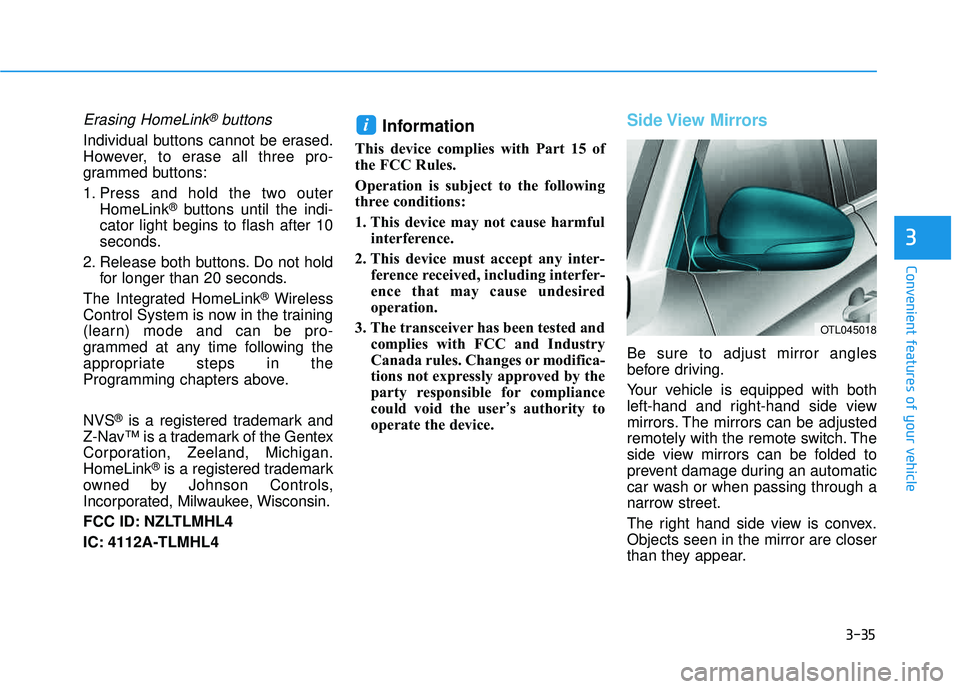
Side View Mirrors
Be sure to adjust mirror angles
before driving.
Your vehicle is equipped with both
left-hand and right-hand side view
mirrors. The mirrors can be adjusted
remotely with the remote switch. The
side view mirrors can be folded to
prevent damage during an automatic
car wash or when passing through a
narrow street.
The right hand side view is convex. Objects seen in the mirror are closer
than they appear.
i
OTL045018
Page 166 of 642
3-68
Convenient features of your vehicle
The outside temperature on the dis-
play may not change immediately
like a general thermometer to pre-
vent the driver from being inattentive.
To change the temperature unit from °F to °C or °C to °F:
- Go to User Settings Mode ➝Other
Features ➝Temperature Unit.
- Press the AUTO button for 3 sec- onds while pressing the OFF button.
(Automatic climate control system)
Both the temperature unit on the
cluster LCD display and climate con-
trol screen will change.Automatic transmission shift indicator / Ecoshift dual clutchtransmission shift indicator (If equipped)
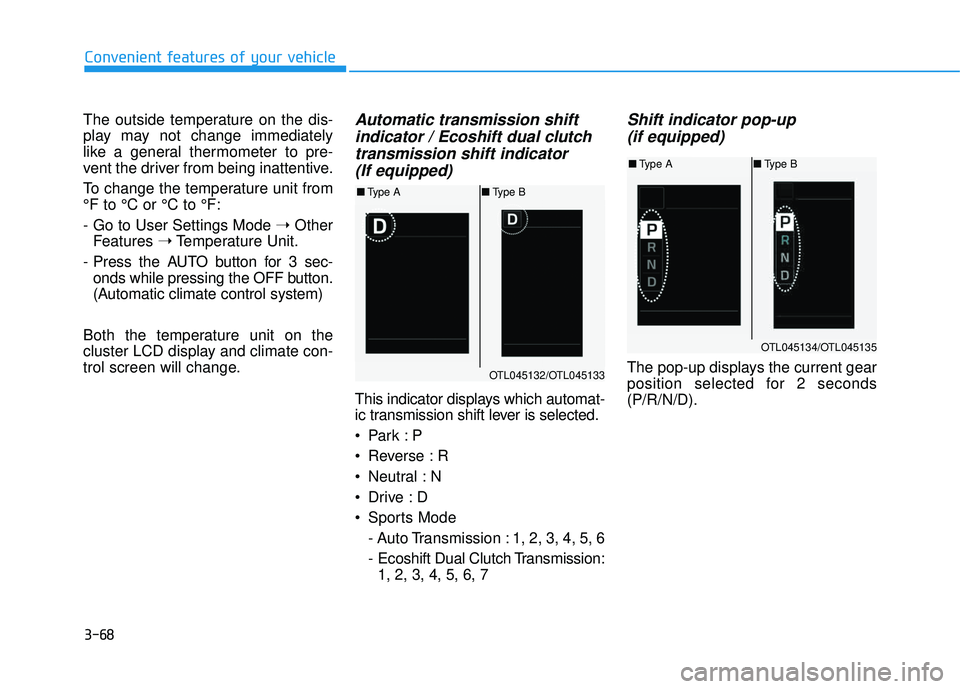
This indicator displays which automat-
ic transmission shift lever is selected.
Reverse : R
Neutral : N
Sports Mode
- Auto Transmission : 1, 2, 3, 4, 5, 6
- Ecoshift Dual Clutch Transmission:1, 2, 3, 4, 5, 6, 7
Shift indicator pop-up
(if equipped)
The pop-up displays the current gear
position selected for 2 seconds(P/R/N/D).OTL045132/OTL045133
■ Type A ■Type B
OTL045134/OTL045135
■Type A ■Type B
Page 168 of 642
3-70
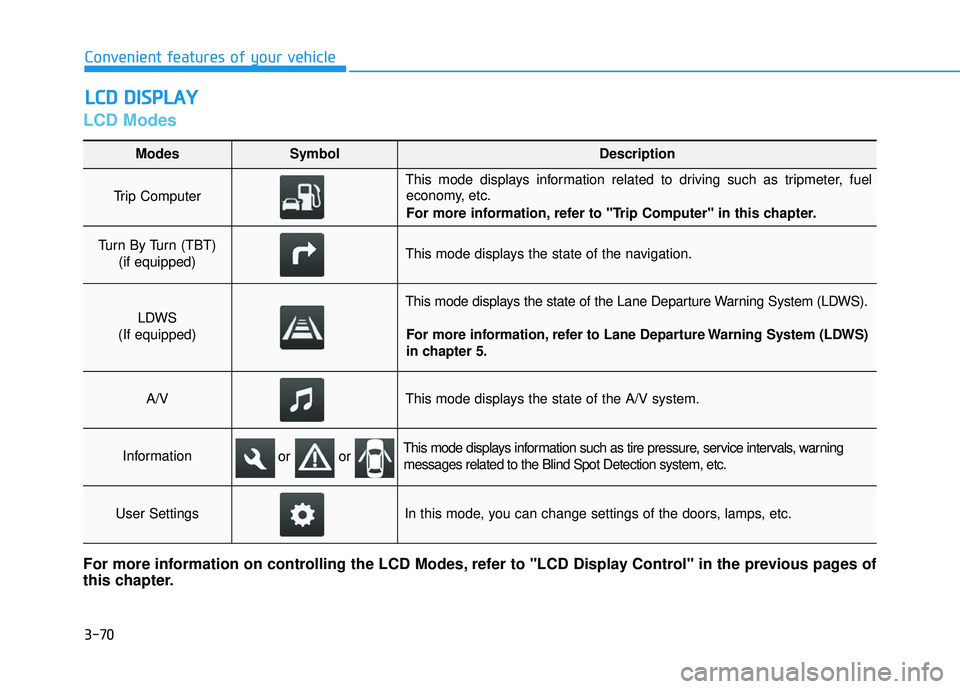
LCD Modes
LLCC DD DD IISS PP LLAA YY
Convenient features of your vehicle
Modes SymbolDescription
Trip Computer
This mode displays information related to driving such as tripmeter, fuel
economy, etc.
For more information, refer to "Trip Computer" in this chapter.
Turn By Turn (TBT)
(if equipped)This mode displays the state of the navigation.
LDWS
(If equipped)
This mode displays the state of the Lane Departure Warning System (LDWS).
For more information, refer to Lane Departure Warning System (LDWS)
in chapter 5.
A/VThis mode displays the state of the A/V system.
InformationThis mode displays information such as tire pressure, service intervals, warningmessages related to the Blind Spot Detection system, etc.
User SettingsIn this mode, you can change settings of the doors, lamps, etc.
For more information on controlling the LCD Modes, refer to "LCD Display Control" in the previous pages of
this chapter.
or or
Page 169 of 642
3-71
Convenient features of your vehicle
3
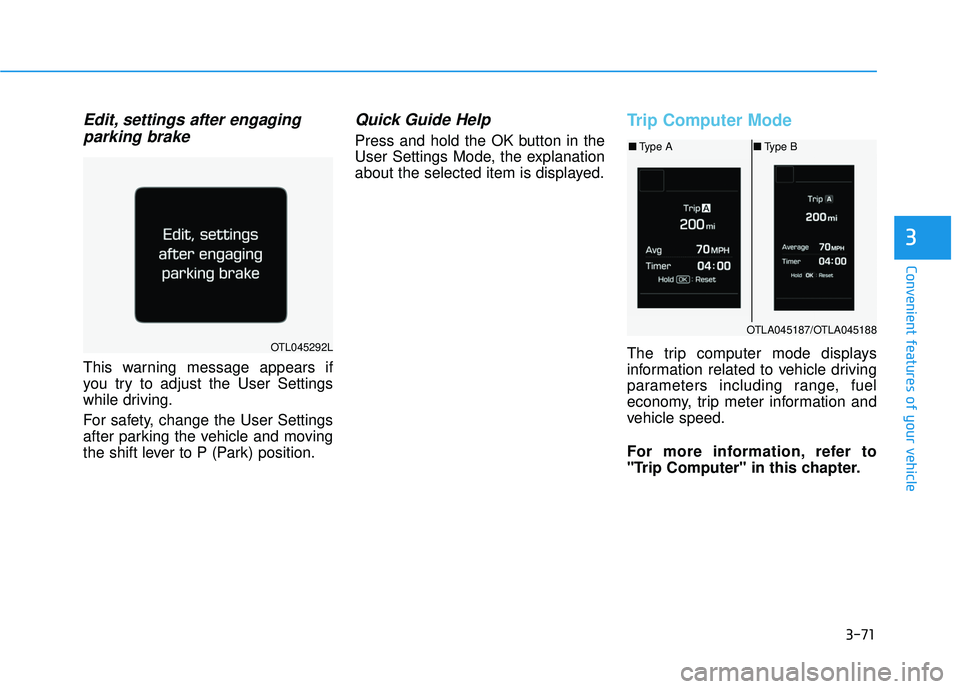
Edit, settings after engagingparking brake
This warning message appears if
you try to adjust the User Settings
while driving.
For safety, change the User Settings
after parking the vehicle and moving
the shift lever to P (Park) position.
Quick Guide Help
Press and hold the OK button in the
User Settings Mode, the explanation
about the selected item is displayed.
Trip Computer Mode
The trip computer mode displays
information related to vehicle driving
parameters including range, fuel
economy, trip meter information and
vehicle speed.
For more information, refer to
"Trip Computer" in this chapter.OTL045292L
OTLA045187/OTLA045188
■ Type A ■Type B
Page 171 of 642
3-73
Convenient features of your vehicle
3
Information Mode
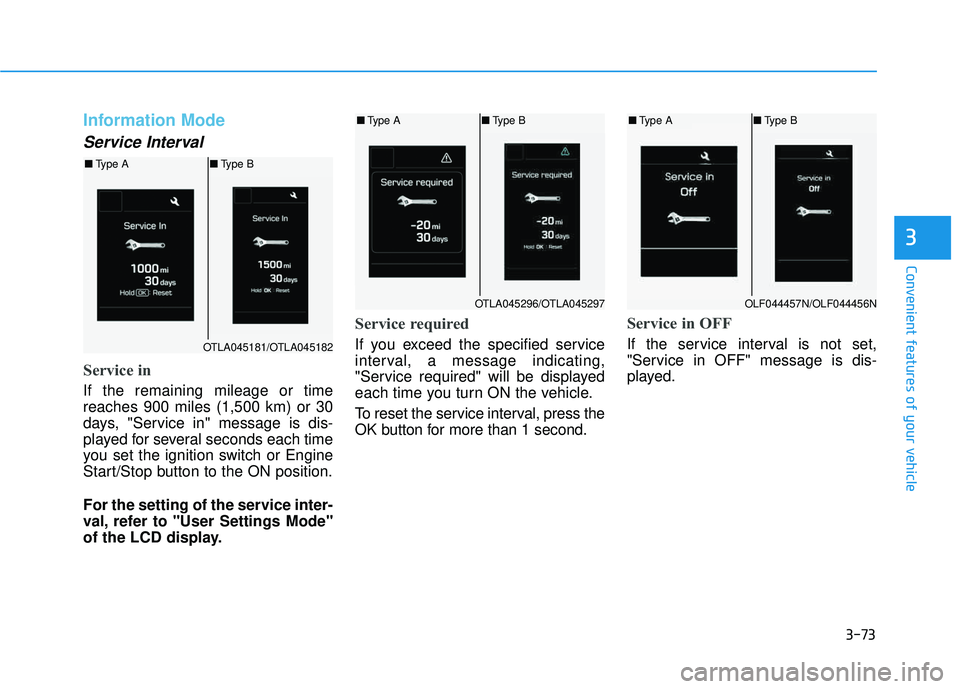
Service Interval
Service in
If the remaining mileage or time reaches 900 miles (1,500 km) or 30
days, "Service in" message is dis-
played for several seconds each time
you set the ignition switch or Engine
Start/Stop button to the ON position.
For the setting of the service inter-
val, refer to "User Settings Mode"
of the LCD display.
Service required
If you exceed the specified service
interval, a message indicating,
"Service required" will be displayed
each time you turn ON the vehicle.
To reset the service interval, press the
OK button for more than 1 second.
Service in OFF
If the service interval is not set,
"Service in OFF" message is dis-
played.OTLA045181/OTLA045182
■Type A ■Type B
OTLA045296/OTLA045297
■Type A ■Type B
OLF044457N/OLF044456N
■Type A ■Type B
Page 172 of 642
3-74
Convenient features of your vehicle
Information
If any of the following conditions
occur, the mileage and number of days
to service may be incorrect.
- The battery cable is disconnected.
- The fuse switch is turned off.
- The battery is discharged.
Warning Message
If one of followings occurs, warning
messages will be displayed on the
information mode for several seconds.
- Malfunction of below systems
function (if equipped)
(LDWS) malfunction (if equipped)
i
Page 178 of 642
3-80
Convenient features of your vehicle
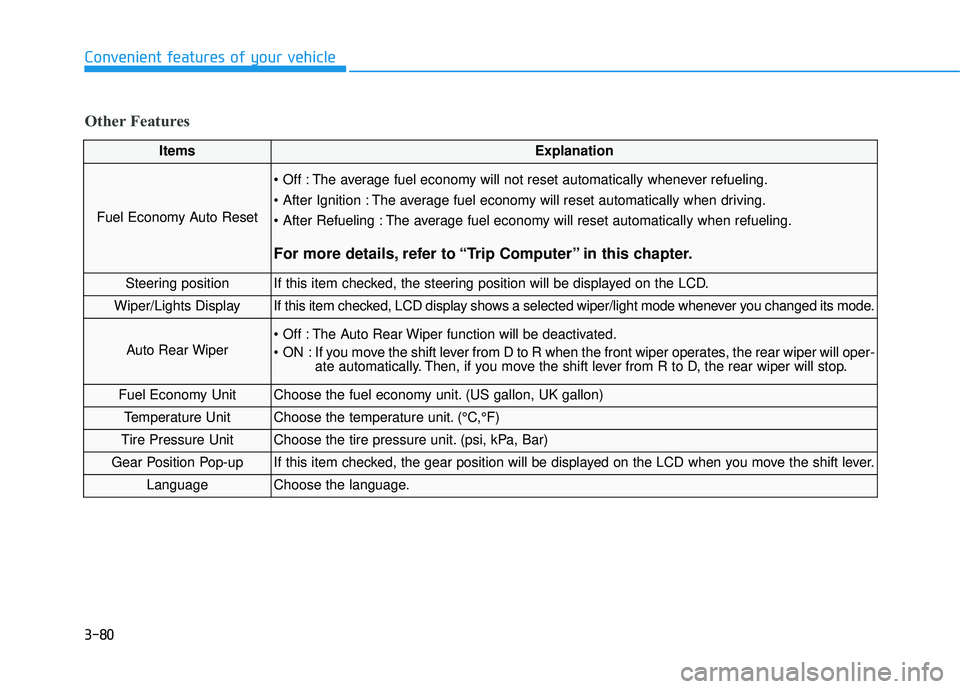
ItemsExplanation
Fuel Economy Auto Reset
The average fuel economy will not reset automatically whenever refueling.
The average fuel economy will reset automatically when driving.
The average fuel economy will reset automatically when refueling.
For more details, refer to “Trip Computer” in this chapter.
Steering positionIf this item checked, the steering position will be displayed on the LCD.
Wiper/Lights DisplayIf this item checked, LCD display shows a selected wiper/light mode whenever you changed its mode.
Auto Rear Wiper
The Auto Rear Wiper function will be deactivated.
ON : If you move the shift lever from D to R when the front wiper operates, the rear wiper will oper-ate automatically. Then, if you move the shift lever from R to D, the rear wiper will stop.
Fuel Economy UnitChoose the fuel economy unit. (US gallon, UK gallon)
Temperature UnitChoose the temperature unit. (°C,°F)
Tire Pressure UnitChoose the tire pressure unit. (psi, kPa, Bar)
Gear Position Pop-upIf this item checked, the gear position will be displayed on the LCD when you move the shift lever.
LanguageChoose the language.
Other Features
Page 187 of 642
3-89
Convenient features of your vehicle
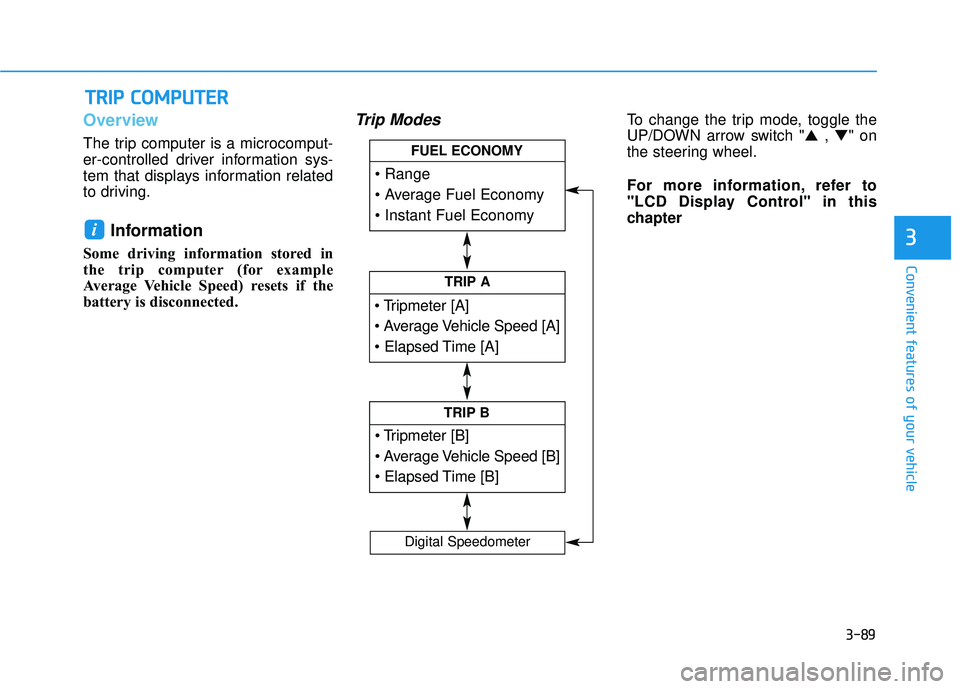
Overview
The trip computer is a microcomput-
er-controlled driver information sys-
tem that displays information related
to driving.
Information
Some driving information stored in
the trip computer (for example
Average Vehicle Speed) resets if the
battery is disconnected.
Trip ModesTo change the trip mode, toggle the
UP/DOWN arrow switch "▲ , ▼ " on
the steering wheel.
For more information, refer to
"LCD Display Control" in this
chapter
i
TT RR IIPP CC OO MM PPUU TTEERR
3
TRIP A
TRIP B
FUEL ECONOMY
Digital Speedometer
Page 190 of 642
3-92
Convenient features of your vehicle
Average Fuel Economy (2)
The average fuel economy is calcu-lated by the total driving distance and fuel consumption since the last
average fuel economy reset.
- Fuel economy range:0.0 ~ 99.9 MPG or L/100km or km/L
The average fuel economy can be reset both manually and automati-
cally.
Manual reset
To clear the average fuel economy
manually, press the OK button on the
steering wheel for more than 1 sec-
ond when the average fuel economy
is displayed.
For more information on the OK
button, refer to the "LCD Display
Control" in this chapter.
Automatic reset
To reset the average fuel economy
automatically whenever refueling,select the "After refueling" mode in
User Setting menu of the LCD display(Refer to "LCD Display" ).
Under "After refueling" mode, the
average fuel economy will be cleared
to zero (---) when the vehicle speed
exceeds 1 km/h after refueling morethan 1.6 gallons (6 liters).
Information
The vehicle must be driven for a min-
imum of 0.19 mile [0.3 km] since the
last ignition key cycle before the aver-
age fuel economy will be recalculated.
Instant Fuel Economy (3)
This mode displays the instanta-
neous fuel economy while driving
when the vehicle speed is greaterthan 6.2 mph [10 kph].
- Fuel economy range: 0 ~ 50 MPG or 0 ~ 30 L/100km
i