service HYUNDAI TUCSON 2016 User Guide
[x] Cancel search | Manufacturer: HYUNDAI, Model Year: 2016, Model line: TUCSON, Model: HYUNDAI TUCSON 2016Pages: 642, PDF Size: 9.78 MB
Page 177 of 642
3-79
Convenient features of your vehicle
3
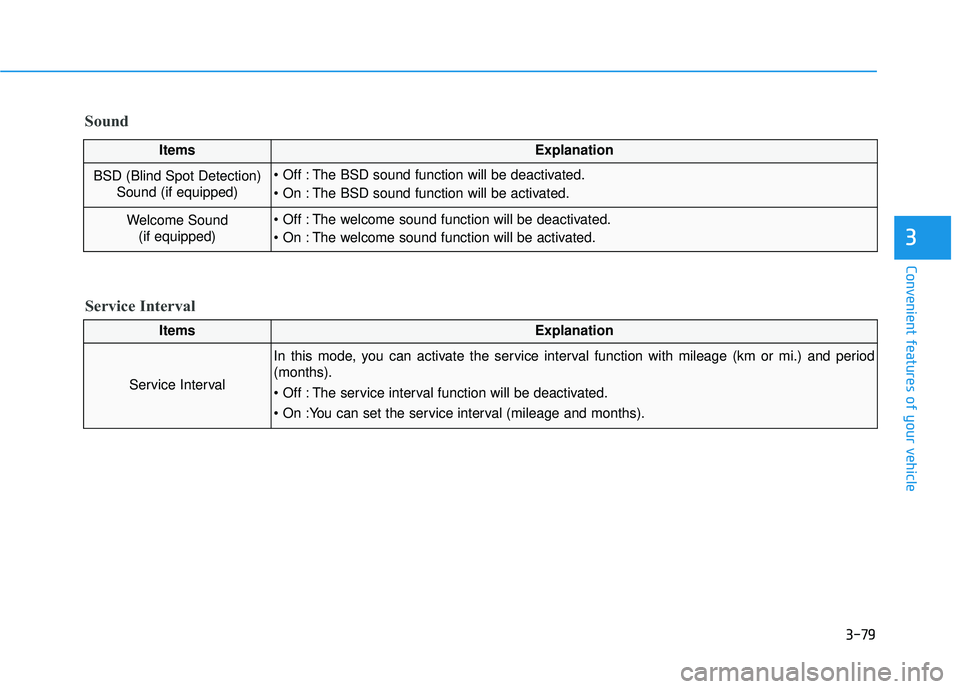
ItemsExplanation
Service Interval
In this mode, you can activate the service interval function with mileage (km or mi.) and period (months).
The service interval function will be deactivated.
Service Interval
Sound
ItemsExplanation
BSD (Blind Spot Detection)Sound (if equipped) The BSD sound function will be deactivated.
The BSD sound function will be activated.
Welcome Sound (if equipped) The welcome sound function will be deactivated.
The welcome sound function will be activated.
Page 184 of 642
3-86
Convenient features of your vehicle
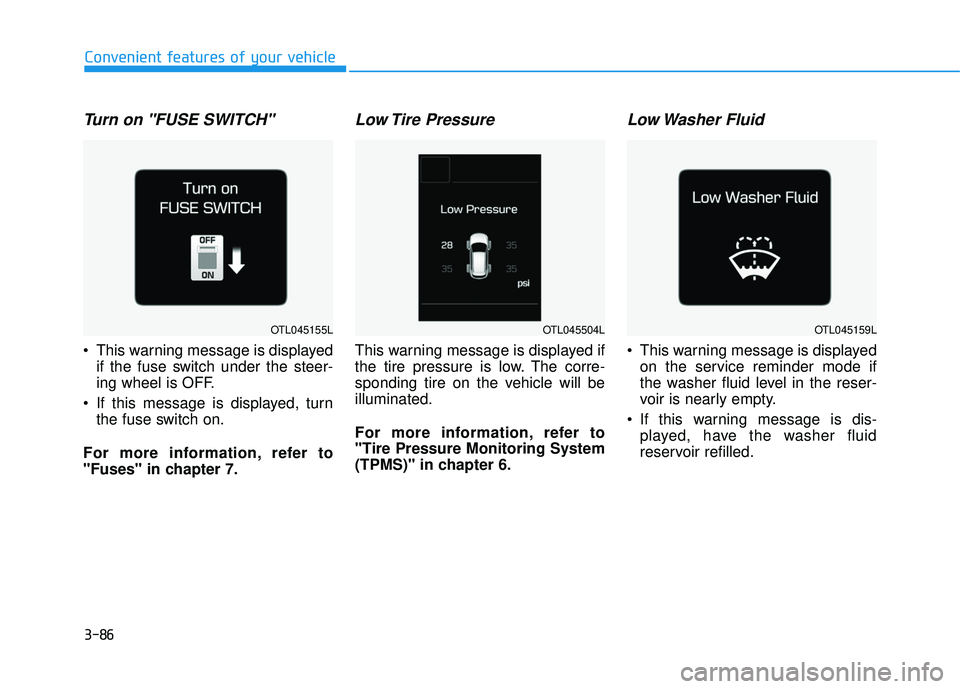
Turn on "FUSE SWITCH"
This warning message is displayedif the fuse switch under the steer-
ing wheel is OFF.
If this message is displayed, turn the fuse switch on.
For more information, refer to
"Fuses" in chapter 7.
Low Tire Pressure
This warning message is displayed if
the tire pressure is low. The corre-
sponding tire on the vehicle will beilluminated.
For more information, refer to "Tire Pressure Monitoring System
(TPMS)" in chapter 6.
Low Washer Fluid
This warning message is displayed on the service reminder mode if
the washer fluid level in the reser-
voir is nearly empty.
If this warning message is dis- played, have the washer fluid
reservoir refilled.
OTL045159LOTL045155LOTL045504L
Page 199 of 642
3-101
Convenient features of your vehicle
3
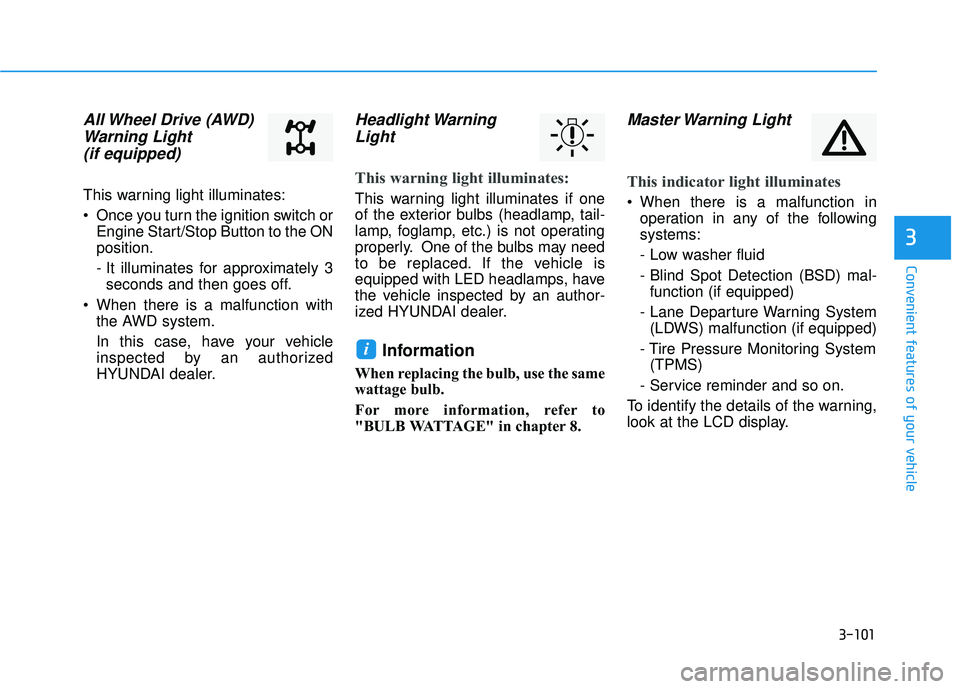
All Wheel Drive (AWD)Warning Light (if equipped)
This warning light illuminates:
Once you turn the ignition switch or Engine Start/Stop Button to the ON position.
- It illuminates for approximately 3seconds and then goes off.
When there is a malfunction with the AWD system.
In this case, have your vehicle
inspected by an authorized
HYUNDAI dealer.
Headlight Warning
Light
This warning light illuminates:
This warning light illuminates if one
of the exterior bulbs (headlamp, tail-
lamp, foglamp, etc.) is not operating
properly. One of the bulbs may need
to be replaced. If the vehicle is
equipped with LED headlamps, have
the vehicle inspected by an author-
ized HYUNDAI dealer.
Information
When replacing the bulb, use the same
wattage bulb.
For more information, refer to
"BULB WATTAGE" in chapter 8.
Master Warning Light
This indicator light illuminates
When there is a malfunction in operation in any of the following systems:
- Low washer fluid
- Blind Spot Detection (BSD) mal-function (if equipped)
- Lane Departure Warning System (LDWS) malfunction (if equipped)
- Tire Pressure Monitoring System (TPMS)
- Service reminder and so on.
To identify the details of the warning,
look at the LCD display.
i
Page 233 of 642
3-135
Convenient features of your vehicle
3
System Maintenance
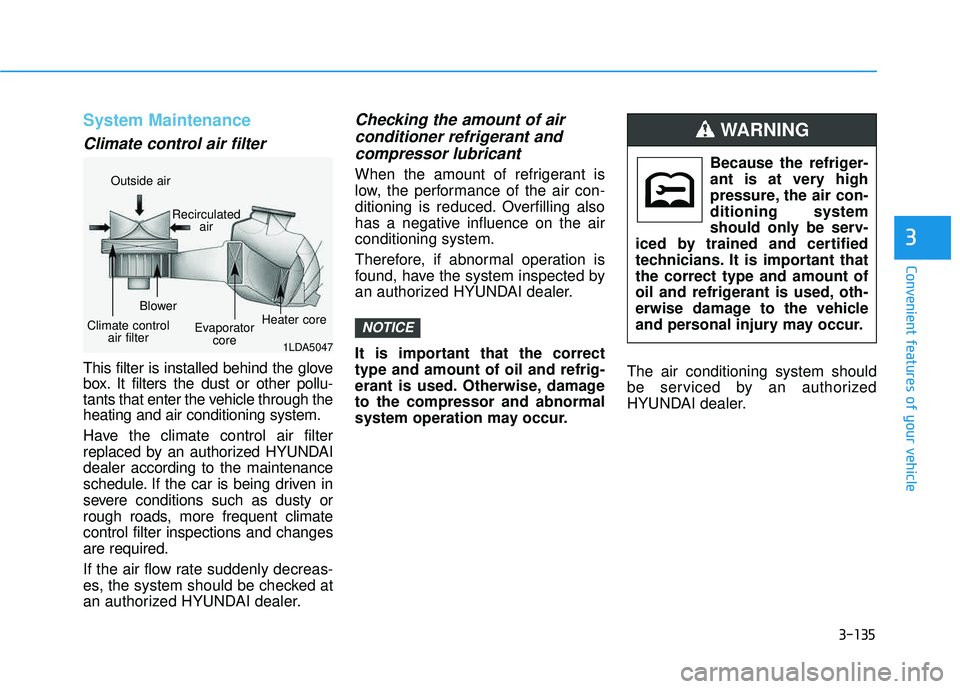
Climate control air filter
This filter is installed behind the glove
box. It filters the dust or other pollu-
tants that enter the vehicle through theheating and air conditioning system.
Have the climate control air filter
replaced by an authorized HYUNDAIdealer according to the maintenance
schedule. If the car is being driven in
severe conditions such as dusty or
rough roads, more frequent climatecontrol filter inspections and changesare required.
If the air flow rate suddenly decreas-
es, the system should be checked at
an authorized HYUNDAI dealer.
Checking the amount of air conditioner refrigerant andcompressor lubricant
When the amount of refrigerant is
low, the performance of the air con-
ditioning is reduced. Overfilling also
has a negative influence on the airconditioning system.
Therefore, if abnormal operation is
found, have the system inspected by
an authorized HYUNDAI dealer.
It is important that the correct type and amount of oil and refrig-
erant is used. Otherwise, damageto the compressor and abnormal
system operation may occur. The air conditioning system should
be serviced by an authorized
HYUNDAI dealer.
NOTICE
Because the refriger-
ant is at very high
pressure, the air con-ditioning system
should only be serv-
iced by trained and certified
technicians. It is important thatthe correct type and amount of
oil and refrigerant is used, oth-
erwise damage to the vehicle
and personal injury may occur.
WARNING
1LDA5047
Outside air
Recirculatedair
Climate control air filter Blower
Evaporatorcore Heater core
Page 246 of 642
3-148
Convenient features of your vehicle
Checking the amount of air conditioner refrigerant andcompressor lubricant
When the amount of refrigerant is
low, the performance of the air con-
ditioning is reduced. Overfilling also
has a negative influence on the airconditioning system.
Therefore, if abnormal operation is
found, have the system inspected by
an authorized HYUNDAI dealer.
It is important that the correct type and amount of oil and refrig-
erant is used. Otherwise, damageto the compressor and abnormal
system operation may occur. The air conditioning system should
be serviced by an authorized
HYUNDAI dealer.
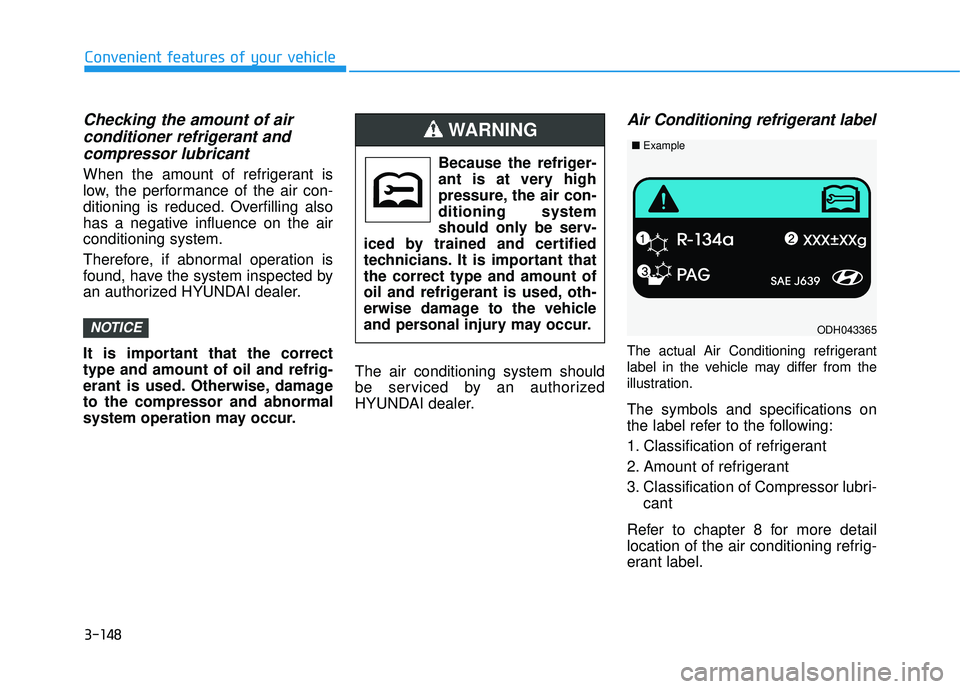
Air Conditioning refrigerant label
The actual Air Conditioning refrigerant
label in the vehicle may differ from the
illustration.
The symbols and specifications on
the label refer to the following:
1. Classification of refrigerant
2. Amount of refrigerant
3. Classification of Compressor lubri-
cant
Refer to chapter 8 for more detail
location of the air conditioning refrig-
erant label.
NOTICE
Because the refriger-
ant is at very high
pressure, the air con-ditioning system
should only be serv-
iced by trained and certified
technicians. It is important thatthe correct type and amount of
oil and refrigerant is used, oth-
erwise damage to the vehicle
and personal injury may occur.
WARNING
ODH043365
■ Example
Page 287 of 642
4-24
Multimedia System
SiriusXM®Satellite Radio
information
Satellite Radio channels:
Enjoy SiriusXM Satellite Radio with a
3-month trial subscription to the
Sirius Select package. You’ll get over
140 channels, including commercial-
free music, plus all your favorite
sports, exclusive talk, entertainment,
and a selection of premium program-
ming. For more information and a
complete list of SiriusXM channels,
visit siriusxm.com in the United
States, siriusxm.ca in Canada, or call
SiriusXM at 1-888-539-7474.
Satellite Radio reception fac-
tors:
To receive the satellite signal, your
vehicle has been equipped with a
satellite radio antenna located on the
roof of your vehicle. The vehicle roof
provides the best location for an
unobstructed, open view of the sky, a
requirement of a satellite radio sys-
tem. Like AM/FM, there are several
factors that can affect satellite radio
reception performance:
Antenna obstructions: For optimal reception performance, keep the
antenna clear of snow and ice
build-up and keep luggage and
other material as far away from the
antenna as possible.
Terrain: Hills, mountains, tall build- ings, bridges, tunnels, freeway
overpasses, parking garages,
dense tree foliage and thunder-
storms can interfere with your reception.
SiriusXM Satellite Radio serv-
ice:
SiriusXM is a subscription-based
satellite radio service that broad-
casts music, sports, news and enter-
tainment programming to radio
receivers, which are available for
installation in motor vehicles or facto-
ry installed, as well as for the home,
portable and wireless devices, and
through an Internet connection on
personal computer.
Vehicles that are equipped with a
factory installed SiriusXM SatelliteRadio system include:
Hardware and an introductory trial subscription term, which begins on the date of sale or lease of the
vehicle.
For a small upgrade fee, access to SiriusXM music channels, and
other select channels over the
Internet using any computer con-
nected to the Internet (U.S. cus- tomers only).
For information on extended sub-
scription terms, contact SiriusXMat 1-888-539-7474.
Page 288 of 642
4-25
Multimedia System
4
NOTE:
SiriusXM services require a sub-
scription sold separately, or as a
package, by Sirius XM Radio Inc. If
you decide to continue service
after your trial, the subscription
plan you choose will automatical-
ly renew thereafter and you will be
charged according to your chosen
payment method at then-current
rates. Fees and taxes apply. To
cancel you must call SiriusXM at
1-866-635-2349. See SiriusXM
Customer Agreement for com-
plete terms at www.siriusxm.com.
SiriusXM U.S. satellite and data
services are available only in the
48 contiguous USA, DC and PR
(with coverage limitations).
SiriusXM satellite service is also
available in Canada; see www.sir-
iusxm. ca. All fees and program-
ming subject to change. Sirius,XM and all related marks andlogos are trademarks of Sirius XMRadio Inc.
Page 333 of 642
4-70
Multimedia System
Information
iPod®is a registered trademark of
Apple Inc. iPod®mobile digital device
sold separately. The Bluetooth®word
mark and logos are registered trade-
marks owned by Bluetooth SIG, Inc.
and any use of such marks by
Hyundai is under license. SiriusXM
services require a subscription sold
separately, or as a package, by Sirius
XM Radio Inc. If you decide to con-
tinue service after your trial, the sub-
scription plan you choose will auto-
matically renew thereafter and you
will be charged according to your cho-
sen payment method at then-current
rates. Fees and taxes apply. To cancel
you must call SiriusXM at 1-866-635-
2349. See SiriusXM Customer
Agreement for complete terms at
www.siriusxm.com. SiriusXM U.S.
satellite and data services are avail-
able only in the 48 contiguous USA,
DC and PR (with coverage limita-
tions). SiriusXM satellite service is
also available in Canada; see www.sir-
iusxm.ca. All fees and programming
subject to change.
(Continued)(Continued)
Sirius, XM and all related marks and
logos are trademarks of Sirius XM
Radio Inc. Android™ is a trademark
of Google, Inc. BlackBerry is a regis-
tered trademark of Research In
Motion Limited (RIM). All other
marks, channel names and logos are
the property of their respective own-
ers. All rights reserved.
i
Page 378 of 642
4-115
Multimedia System
4
Information
SiriusXM™ service requires a sub-
scription, sold separately, after 3-
month trial included with vehicle pur-
chase. If you decide to continue your
SiriusXM™ service at the end of your
trial subscription, the plan you choose
will automatically renew and bill at
then-current rates until you call us at
1-866-635-2349 to cancel. See our
Customer Agreement for complete
terms at www.siriusxm.com. Other
fees and taxes apply. All fees and pro-
gramming are subject to change.
Sirius satellite service is available only
to those at least 18 and older in the 48
contiguous USA, D.C., and PR (with
coverage limitations). Our Internet
radio service is available throughout
our satellite service area and in AK
and HI. Certain channels are not
available on our Internet radio service
or on mobile devices. SiriusXM™
Traffic available in select markets. See
siriusxm.com/traffic for more infor-
mation. © 2013 Sirius XM™ Radio
Inc. Sirius, XM™ and all related
marks and logos are trademarks of
Sirius XM™ Radio Inc. (Continued)(Continued)
iPod®is a registered trademark of
Apple Inc.
iPod
®mobile digital device sold sepa-
rately. The Bluetooth®word mark and
logos are registered trademarks
owned by Bluetooth SIG, Inc. and any
use of such marks by Hyundai is
under license. A Bluetooth
®enabled
cell phone is required to use
Bluetooth
®wireless technology. All
rights reserved.
i
Page 471 of 642
5-87
Driving your vehicle
5
- When using tire chains:
Wrong size chains or improperlyinstalled chains can damage
your vehicle's brake lines, sus-
pension, body and wheels.
Use SAE "S" class or wire chains.
If you hear noise caused by chains contacting the body,
retighten the chain to prevent
contact with the vehicle body.
To prevent body damage, retighten the chains after driving0.3~0.6 miles (0.5~1.0 km).
Do not use tire chains on vehi- cles equipped with aluminum
wheels. If unavoidable, use a
wire type chain.
Use wire chains less than 0.59 inch (15 mm) wide to prevent
damage to the chain’s connec-tion.
Winter Precautions
Use high quality ethylene glycol
coolant
Your vehicle is delivered with high
quality ethylene glycol coolant in the
cooling system. It is the only type ofcoolant that should be used because
it helps prevent corrosion in the cool-
ing system, lubricates the water
pump and prevents freezing. Be sure
to replace or replenish your coolantin accordance with the maintenance
schedule in chapter 7. Before winter,
have your coolant tested to assure
that its freezing point is sufficient for
the temperatures anticipated during
the winter.
Change to "winter weight" oil if
necessary
In some climates it is recommended
that a lower viscosity "winter weight"
oil be used during cold weather. See
chapter 8 for recommendations. If
you aren't sure what weight oil you
should use, consult an authorized
HYUNDAI dealer.
Check battery and cables
Winter puts additional burdens on
the battery system. Visually inspect
the battery and cables as described
in chapter 7. The level of charge in
your battery can be checked by an
authorized HYUNDAI dealer or a
service station.
NOTICE