reset HYUNDAI TUCSON 2016 Owner's Guide
[x] Cancel search | Manufacturer: HYUNDAI, Model Year: 2016, Model line: TUCSON, Model: HYUNDAI TUCSON 2016Pages: 642, PDF Size: 9.78 MB
Page 338 of 642
4-75
Multimedia System
4
RRaadd iioo MM ooddee
Basic Mode Screen
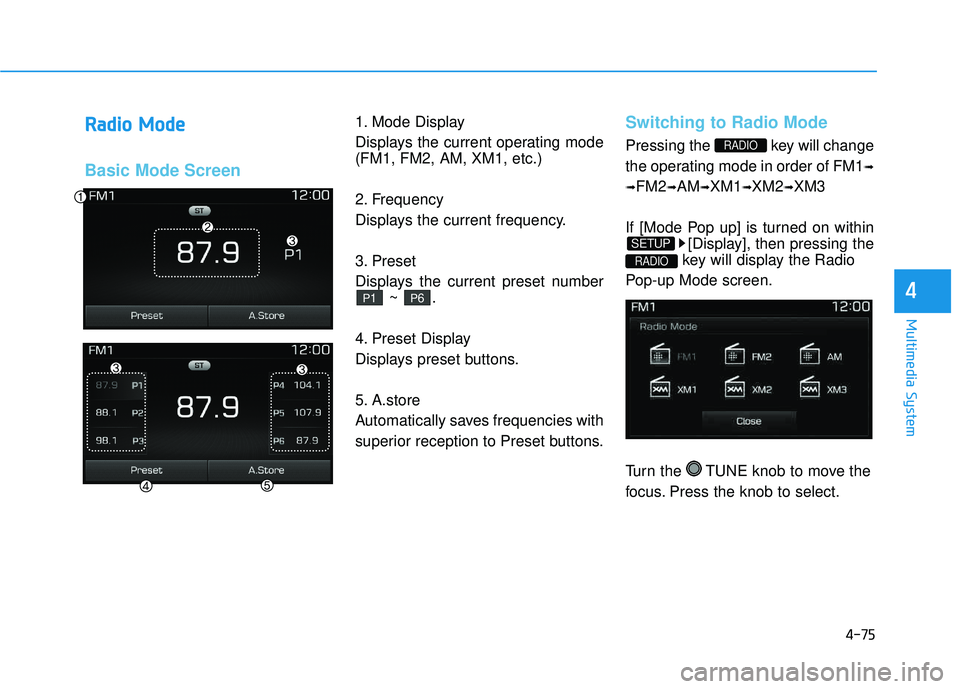
1. Mode Display
Displays the current operating mode (FM1, FM2, AM, XM1, etc.)
2. Frequency
Displays the current frequency.
3. Preset
Displays the current preset number
~ .
4. Preset Display
Displays preset buttons.
5. A.store
Automatically saves frequencies with
superior reception to Preset buttons.Switching to Radio Mode
Pressing the key will change
the operating mode in order of FM1 ➟
➟ FM2
➟AM ➟XM1 ➟XM2 ➟XM3
If [Mode Pop up] is turned on within [Display], then pressing the
key will display the Radio
Pop-up Mode screen.
Turn the TUNE knob to move the
focus. Press the knob to select.
RADIO
SETUP
RADIO
P6P1
Page 339 of 642
4-76
Multimedia System
Searching Radio Frequencies
Using Seek
Press the , key to
play the previous/next frequency.
Using TUNE
Turn the TUNE knob to select the
desired frequency.
Using Radio Mode
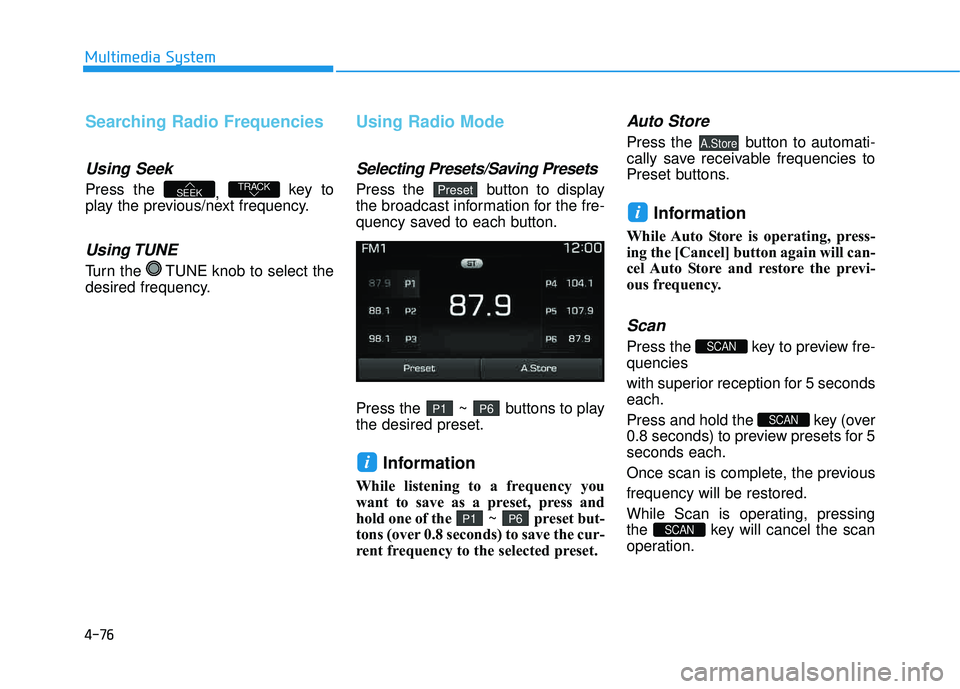
Selecting Presets/Saving Presets
Press the button to display
the broadcast information for the fre-
quency saved to each button.
Press the ~ buttons to play the desired preset.
Information
While listening to a frequency you
want to save as a preset, press and
hold one of the ~ preset but-
tons (over 0.8 seconds) to save the cur-
rent frequency to the selected preset.
Auto Store
Press the button to automati-
cally save receivable frequencies to
Preset buttons.
Information
While Auto Store is operating, press-
ing the [Cancel] button again will can-
cel Auto Store and restore the previ-
ous frequency.
Scan
Press the key to preview fre-quencies
with superior reception for 5 seconds each.
Press and hold the key (over
0.8 seconds) to preview presets for 5seconds each.
Once scan is complete, the previous frequency will be restored.
While Scan is operating, pressing
the key will cancel the scan
operation.
SCAN
SCAN
SCAN
i
A.Store
P6P1
i
P6P1
PresetTRACKSEEK
Page 340 of 642
4-77
Multimedia System
4
XXMM TT
MM
RRaadd iioo MM ooddee
Basic Mode Screen
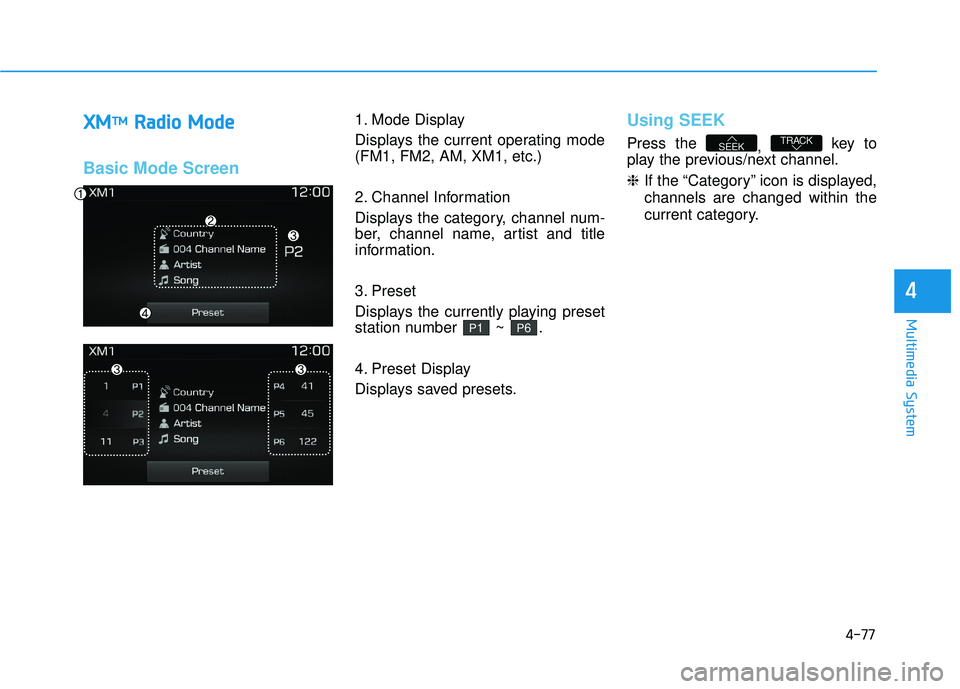
1. Mode Display
Displays the current operating mode (FM1, FM2, AM, XM1, etc.)
2. Channel Information
Displays the category, channel num-
ber, channel name, artist and title
information.
3. Preset
Displays the currently playing preset
station number ~ .
4. Preset Display
Displays saved presets.Using SEEK
Press the
, key to
play the previous/next channel. ❈ If the “Category” icon is displayed,
channels are changed within the
current category.TRACKSEEK
P6P1
Page 341 of 642
4-78
Multimedia System
SCAN
Press the key to scan all
channels with superior reception for5 seconds each.
Once scan is complete, the previous-
ly played channel will be restored.
During Scan, pressing the
key again will cancel the scan opera-
tion and restore the previously
played channel.
If the “Category” icon is displayed, channels are changed within the cur-
rent category.
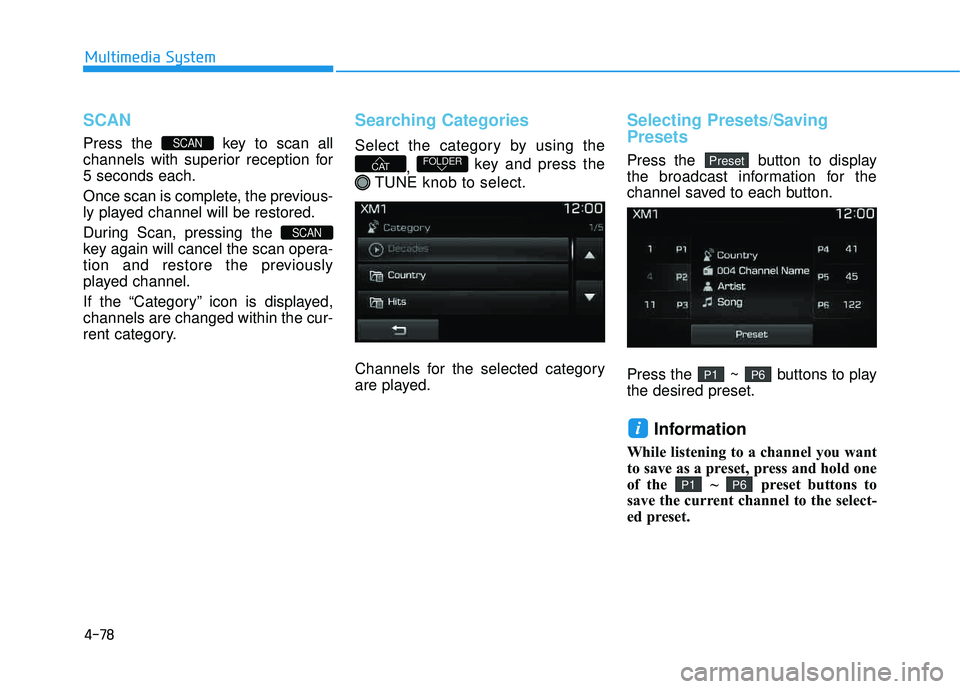
Searching Categories
Select the category by using the, key and press the
TUNE knob to select.
Channels for the selected category
are played.
Selecting Presets/Saving Presets
Press the button to display
the broadcast information for the
channel saved to each button.
Press the ~ buttons to play the desired preset.
Information
While listening to a channel you want
to save as a preset, press and hold one
of the ~ preset buttons to
save the current channel to the select-
ed preset.
P6P1
i
P6P1
PresetFOLDERCAT
SCAN
SCAN
Page 361 of 642
4-98
Multimedia System
Information
Bluetooth®Wireless Technology fea-
tures supported within the vehicle
are as follows. Some features may
not be supported depending on your
Bluetooth
®Wireless Technology
device.
- Outgoing/Incoming Handsfree calls
- Operations during a call (Switch to Private, Switch to call waiting,
MIC on/off)
- Downloading Call History
- Downloading Mobile Contacts - Bluetooth
®Wireless Technology
device auto connection
- Bluetooth Audio Streaming
Up to five Bluetooth
®Wireless
Technology devices can be paired to
the Car Handsfree system.
Only one Bluetooth
®Wireless Technology
device can be connected at a time.
Other devices cannot be paired while
a Bluetooth
®Wireless Technology
device is connected.
(Continued)(Continued)
Only
Bluetooth
®Wireless Technology
Handsfree and Bluetooth audio
related features are supported.
Bluetooth related operations are possible only within devices that
support Handsfree or audio fea-
tures, such as a Bluetooth
®Wireless
Technology mobile phone or a
Bluetooth audio device.
If a connected Bluetooth
®Wireless
Technology device becomes discon-
nected due to being out of communi-
cation range, turning the device
OFF, or a Bluetooth
®Wireless
Technology communication error,
corresponding Bluetooth
®Wireless
Technology devices are automatical-
ly searched and reconnected.
If the system becomes unstable due to communication errors between
the car Handsfree and the
Bluetooth
®Wireless Technology
device, reset the device by turning
off and back on again. Upon reset-
ting Bluetooth
®Wireless Technology
device, the system will be restored.
(Continued)(Continued)
After pairing is complete, a contacts
download request is sent once to the
mobile phone. Some mobile phones
may require confirmation upon
receiving a download request,
ensure your mobile phone accepts
the connection. Refer to your
phones user’s manual for additional
information regarding phone pair-
ing and connections.
i
Page 375 of 642
4-112
Multimedia System
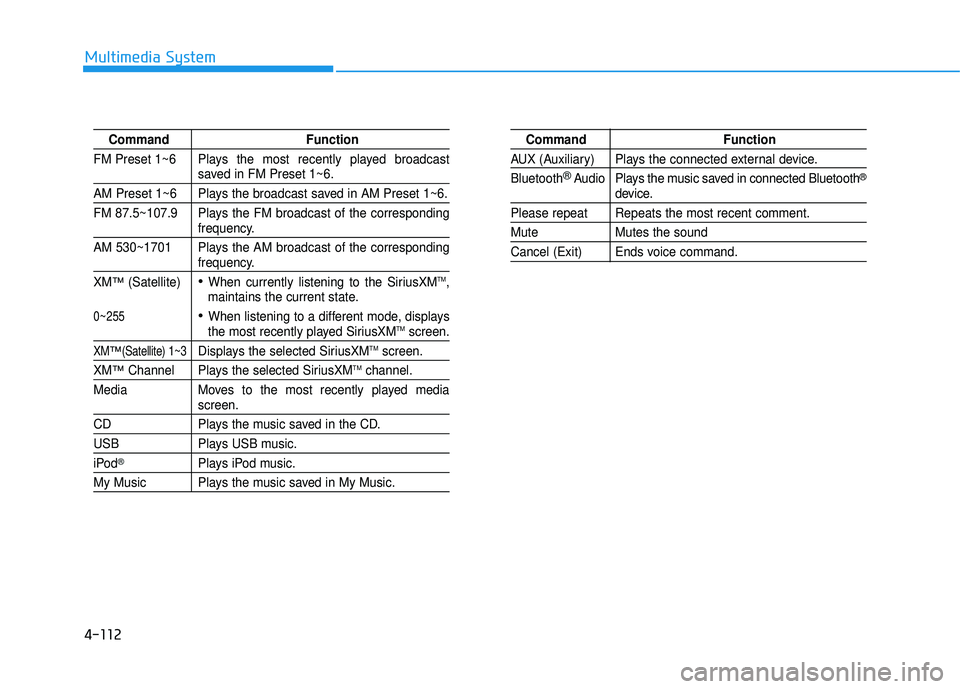
Command Function
FM Preset 1~6 Plays the most recently played broadcast
saved in FM Preset 1~6.
AM Preset 1~6 Plays the broadcast saved in AM Preset 1~6.
FM 87.5~107.9 Plays the FM broadcast of the corresponding
frequency.
AM 530~1701 Plays the AM broadcast of the corresponding
frequency.
XM
™(Satellite)When currently listening to the SiriusXMTM,
maintains the current state.
When listening to a different mode, displaysthe most recently played SiriusXMTMscreen.
XM™(Satellite) 1~3Displays the selected SiriusXMTMscreen.
XM™Channel Plays the selected SiriusXMTMchannel.
Media Moves to the most recently played media
screen.
CD Plays the music saved in the CD.
USB Plays USB music.
iPod®Plays iPod music.
My Music Plays the music saved in My Music.
Command Function
AUX (Auxiliary) Plays the connected external device. Bluetooth
®Audio Plays the music saved in connected Bluetooth®
device.
Please repeat Repeats the most recent comment.
Mute Mutes the sound
Cancel (Exit) Ends voice command.
0~255
Page 376 of 642
4-113
Multimedia System
4
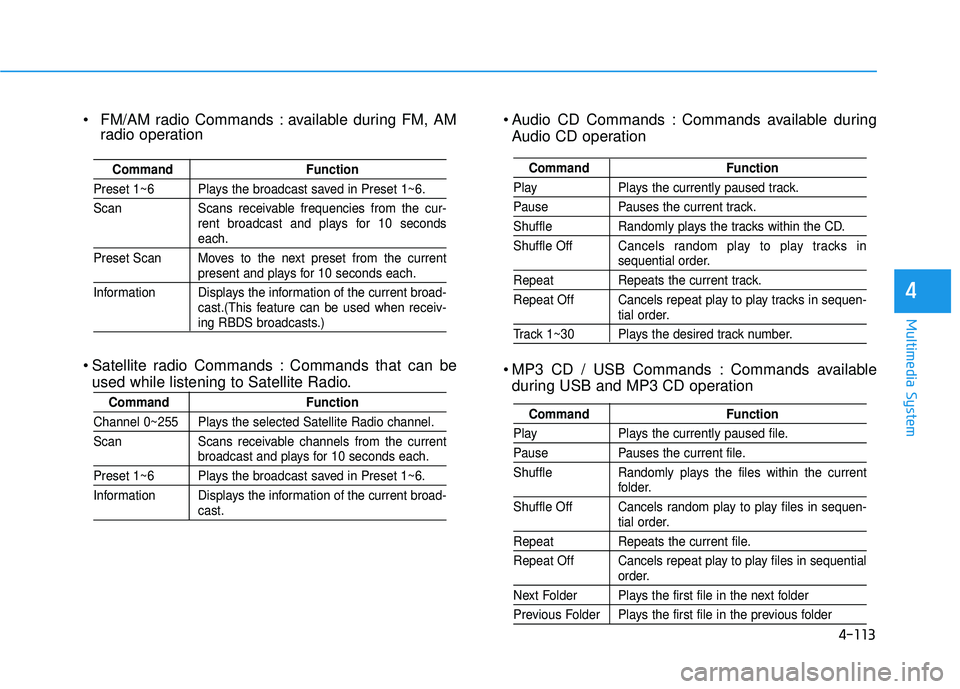
Audio CD Commands : Commands available duringAudio CD operation
MP3 CD / USB Commands : Commands available during USB and MP3 CD operation
Command Function
Play Plays the currently paused track.
Pause Pauses the current track.
Shuffle Randomly plays the tracks within the CD. Shuffle Off Cancels random play to play tracks in
sequential order.
Repeat Repeats the current track.
Repeat Off Cancels repeat play to play tracks in sequen-
tial order.
Track 1~30 Plays the desired track number.
Command Function
Play Plays the currently paused file.
Pause Pauses the current file.
Shuffle Randomly plays the files within the current
folder.
Shuffle Off Cancels random play to play files in sequen-
tial order.
Repeat Repeats the current file.
Repeat Off Cancels repeat play to play files in sequential
order.
Next Folder Plays the first file in the next folder
Previous Folder Plays the first file in the previous folder
FM/AM radio Commands : available during FM, AM radio operation
Satellite radio Commands : Commands that can be used while listening to Satellite Radio.
Command Function
Preset 1~6 Plays the broadcast saved in Preset 1~6.
Scan Scans receivable frequencies from the cur- rent broadcast and plays for 10 seconds
each.
Preset Scan Moves to the next preset from the current
present and plays for 10 seconds each.
Information Displays the information of the current broad- cast.(This feature can be used when receiv-
ing RBDS broadcasts.)
Command Function
Channel 0~255 Plays the selected Satellite Radio channel.
Scan Scans receivable channels from the current
broadcast and plays for 10 seconds each.
Preset 1~6 Plays the broadcast saved in Preset 1~6.
Information Displays the information of the current broad-
cast.
Page 379 of 642
![HYUNDAI TUCSON 2016 Owners Guide 4-116
Multimedia System
SSeettuu pp
Starting Mode
Press the key to display the Setup screen.
You can select and control options
related to [Display], [Sound], [Clock/Calendar], [Phone] and [System]](/img/35/56201/w960_56201-378.png "HYUNDAI TUCSON 2016 Owners Guide 4-116
Multimedia System
SSeettuu pp
Starting Mode
Press the key to display the Setup screen.
You can select and control options
related to [Display], [Sound], [Clock/Calendar], [Phone] and [System]")
4-116
Multimedia System
SSeettuu pp
Starting Mode
Press the key to display the Setup screen.
You can select and control options
related to [Display], [Sound], [Clock/Calendar], [Phone] and [System].
Display Settings
Adjusting the Brightness
Press the key Select
[Display] Select [Brightness]
Use the , buttons to adjust the
screen brightness or set the
Brightness on Automatic, Day, or
Night mode.
Press the button to reset.
1) Automatic : Adjusts the brightness
automatically
2) Day : Always maintains the bright- ness on high
3) Night : Always maintains the brightness on low
Mode Pop up
Press the key Select
[Display] Select [Mode Pop up]
This feature is used to display the
Mode Pop up screen when entering
radio and media modes.
When this feature is turned on, pressing the or key
will display the Mode Pop up screen.
Information
The media Mode Pop up screen can be
displayed only when two or more
media modes have been connected.
i
MEDIA RADIO
SETUP
Default
SETUPSETUP
Page 380 of 642
![HYUNDAI TUCSON 2016 Owners Guide 4-117
Multimedia System
4
MP3 Information Display
Press the key Select
[Display] Select [Media Display]
This feature is used to change the
information displayed within USB
and MP3 CD modes.
1) F](/img/35/56201/w960_56201-379.png "HYUNDAI TUCSON 2016 Owners Guide 4-117
Multimedia System
4
MP3 Information Display
Press the key Select
[Display] Select [Media Display]
This feature is used to change the
information displayed within USB
and MP3 CD modes.
1) F")
4-117
Multimedia System
4
MP3 Information Display
Press the key Select
[Display] Select [Media Display]
This feature is used to change the
information displayed within USB
and MP3 CD modes.
1) Folder/File : Displays file nameand folder name
2) Album/Artist/Song : Displays album name/artist name/song
Sound Settings
Sound Settings
Press the key Select
[Sound] Select [Sound Setting] Use the , , , buttons to
adjust the Fader/Balance settings.
Use the , buttons to adjust the
Bass/Middle/Treble settings.
Press the button to reset.DefaultSETUP
SETUP
Page 433 of 642
5-49
Driving your vehicle
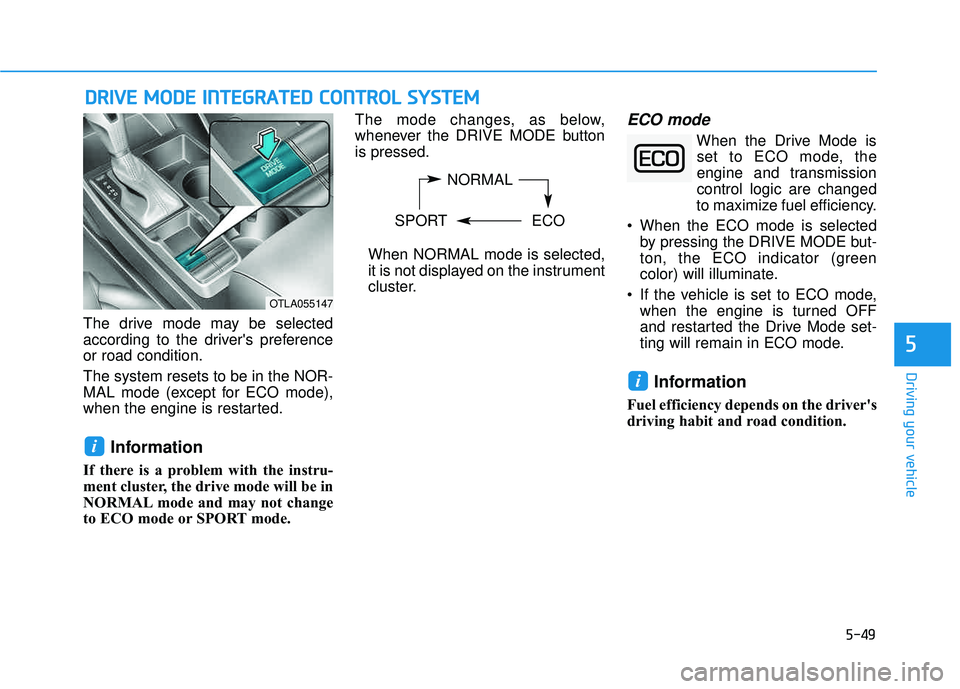
The drive mode may be selected
according to the driver's preferenceor road condition. The system resets to be in the NOR-
MAL mode (except for ECO mode),
when the engine is restarted.
Information
If there is a problem with the instru-
ment cluster, the drive mode will be in
NORMAL mode and may not change
to ECO mode or SPORT mode. The mode changes, as below,
whenever the DRIVE MODE buttonis pressed.
When NORMAL mode is selected,
it is not displayed on the instrument
cluster.
ECO mode
When the Drive Mode isset to ECO mode, the
engine and transmissioncontrol logic are changed
to maximize fuel efficiency.
When the ECO mode is selected by pressing the DRIVE MODE but-
ton, the ECO indicator (green
color) will illuminate.
If the vehicle is set to ECO mode, when the engine is turned OFF
and restarted the Drive Mode set-
ting will remain in ECO mode.
Information
Fuel efficiency depends on the driver's
driving habit and road condition.
i
i
DDRRIIVV EE MM OODDEE IINN TTEEGG RRAA TTEEDD CC OO NNTTRR OO LL SS YY SSTT EEMM
5
NORMAL
SPORT ECO
OTLA055147