defrost HYUNDAI TUCSON 2016 Owners Manual
[x] Cancel search | Manufacturer: HYUNDAI, Model Year: 2016, Model line: TUCSON, Model: HYUNDAI TUCSON 2016Pages: 642, PDF Size: 9.78 MB
Page 14 of 642
F14F14
LCD Display ...........................................................3-70
LCD Modes ........................................................................3-70
Trip Computer Mode.......................................................3-71
Turn By Turn (TBT) Mode ............................................3-72
LDWS Mode ......................................................................3-72
A/V Mode..........................................................................3-72
Information Mode ...........................................................3-73
User Settings Mode ........................................................3-75
Warning Messages..........................................................3-81
Trip computer .......................................................3-89
Overview............................................................................3-89
Trip A/B .............................................................................3-90
Fuel Economy...................................................................3-91
Digital Speedometer .......................................................3-93
Warning and indicator lights ..............................3-94
Warning Lights .................................................................3-94
Indicator Lights ..............................................................3-102
Light .....................................................................3-107
Exterior Lights ...............................................................3-107
Welcome System ...........................................................3-113
Interior Lights ................................................................3-114
Wipers and washers ..........................................3-118
Windshield Wipers ........................................................3-118
Windshield Washers .....................................................3-119
Rear window wiper and washer switch ..................3-120
Driver Assist System .........................................3-121
Rear View Camera ........................................................3-121
Rear Parking Assist System .......................................3-122
Rear parking assist system precautions .................3-125
Defroster .............................................................3-126
Rear Window Defroster ..............................................3-126
Manual climate control system........................3-127
Heating and Air Conditioning .....................................3-128
System Operation .........................................................3-133
System Maintenance....................................................3-135
Automatic climate control system ...................3-137
Automatic Heating and Air Conditioning.................3-138
Manual Heating and Air Conditioning......................3-139
System Operation .........................................................3-145
System Maintenance....................................................3-147
Windshield defrosting and defogging ............3-149
Manual Climate Control System ................................3-149
Automatic Climate Control System ...........................3-150
Defogging logic..............................................................3-151
Page 24 of 642
1-3
Your vehicle at a glance
1
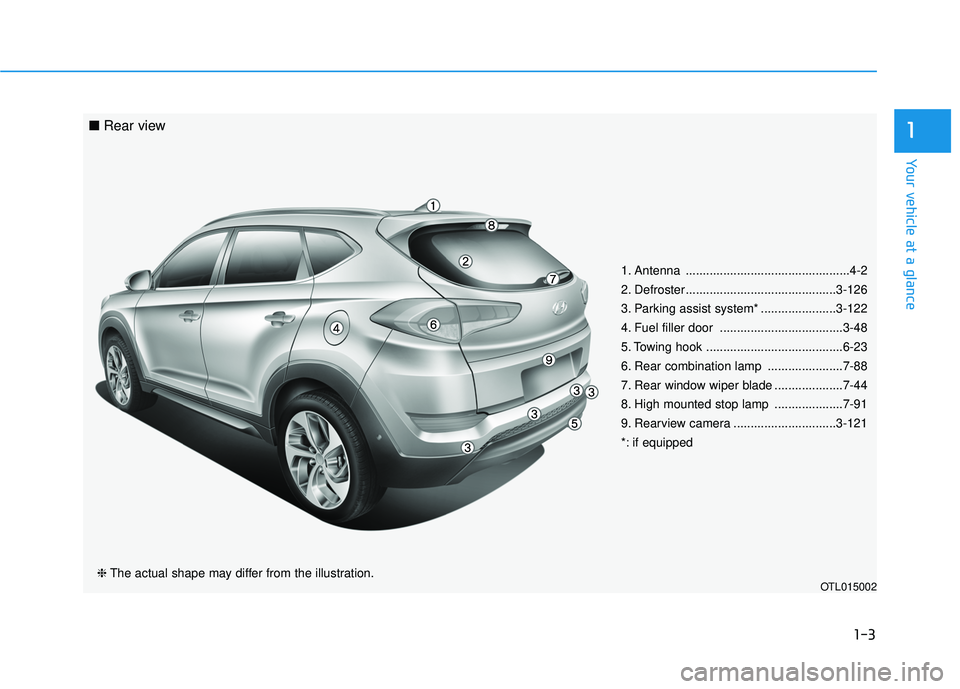
1. Antenna ................................................4-2
2. Defroster............................................3-126
3. Parking assist system* ......................3-122
4. Fuel filler door ....................................3-48
5. Towing hook ........................................6-23
6. Rear combination lamp ......................7-88
7. Rear window wiper blade ....................7-44
8. High mounted stop lamp ....................7-91
9. Rearview camera ..............................3-121
*: if equipped
OTL015002❈The actual shape may differ from the illustration.
■ Rear view
Page 100 of 642
LCD Display ...........................................................3-70
LCD Modes ........................................................................3-70
Trip Computer Mode.......................................................3-71
Turn By Turn (TBT) Mode ............................................3-72
LDWS Mode ......................................................................3-72
A/V Mode..........................................................................3-72
Information Mode ...........................................................3-73
User Settings Mode ........................................................3-75
Warning Messages..........................................................3-81
Trip computer .......................................................3-89
Overview............................................................................3-89
Trip A/B .............................................................................3-90
Fuel Economy...................................................................3-91
Digital Speedometer .......................................................3-93
Warning and indicator lights ..............................3-94
Warning Lights .................................................................3-94
Indicator Lights ..............................................................3-102
Light .....................................................................3-107
Exterior Lights ...............................................................3-107
Welcome System ...........................................................3-113
Interior Lights ................................................................3-114
Wipers and washers ..........................................3-118
Windshield Wipers ........................................................3-118
Windshield Washers .....................................................3-119
Rear window wiper and washer switch ..................3-120
Driver Assist System .........................................3-121
Rear View Camera ........................................................3-121
Rear Parking Assist System .......................................3-122
Rear parking assist system precautions .................3-125
Defroster .............................................................3-126
Rear Window Defroster ..............................................3-126
Manual climate control system........................3-127
Heating and Air Conditioning .....................................3-128
System Operation .........................................................3-133
System Maintenance....................................................3-135
Automatic climate control system ...................3-137
Automatic Heating and Air Conditioning.................3-138
Manual Heating and Air Conditioning......................3-139
System Operation .........................................................3-145
System Maintenance....................................................3-147
Windshield defrosting and defogging ............3-149
Manual Climate Control System ................................3-149
Automatic Climate Control System ...........................3-150
Defogging logic..............................................................3-151
3
Page 216 of 642
3-118
Convenient features of your vehicle
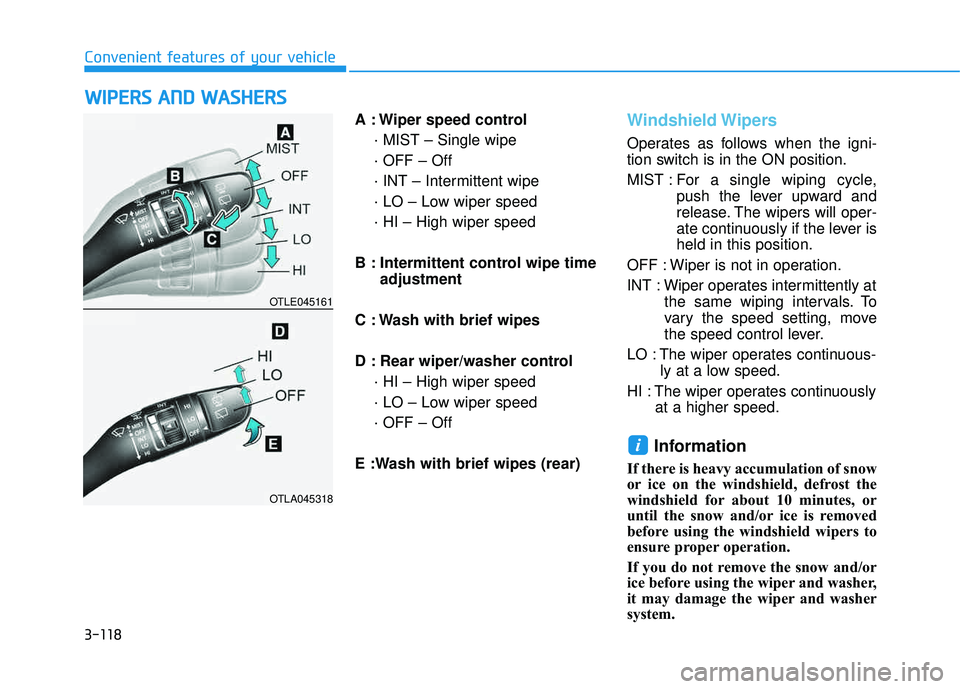
A : Wiper speed control· MIST – Single wipe · OFF – Off
· INT – Intermittent wipe
· LO – Low wiper speed· HI – High wiper speed
B : Intermittent control wipe time adjustment
C : Wash with brief wipes
D : Rear wiper/washer control · HI – High wiper speed
· LO – Low wiper speed· OFF – Off
E :Wash with brief wipes (rear)Windshield Wipers
Operates as follows when the igni-
tion switch is in the ON position.
MIST : For a single wiping cycle,
push the lever upward and
release. The wipers will oper-
ate continuously if the lever isheld in this position.
OFF : Wiper is not in operation.
INT : Wiper operates intermittently at the same wiping intervals. To
vary the speed setting, move
the speed control lever.
LO : The wiper operates continuous- ly at a low speed.
HI : The wiper operates continuously at a higher speed.
Information
If there is heavy accumulation of snow
or ice on the windshield, defrost the
windshield for about 10 minutes, or
until the snow and/or ice is removed
before using the windshield wipers to
ensure proper operation.
If you do not remove the snow and/or
ice before using the wiper and washer,
it may damage the wiper and washer
system.
i
WWIIPP EERR SS AA NN DD WW AASSHH EERR SS
OTLE045161
OTLA045318
Page 217 of 642
3-119
Convenient features of your vehicle
3
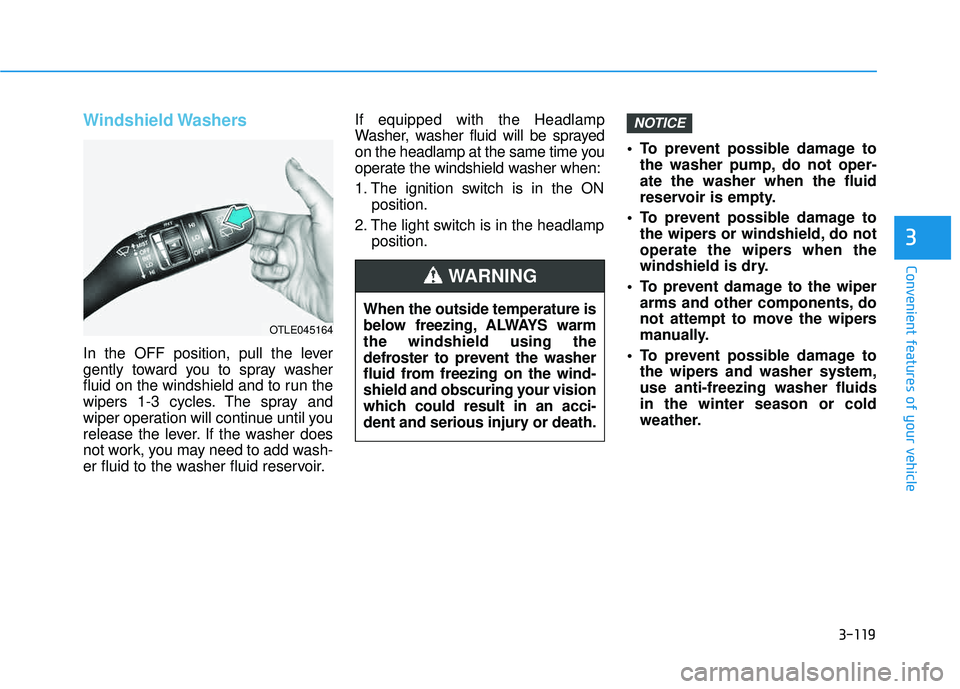
Windshield Washers
In the OFF position, pull the lever
gently toward you to spray washer
fluid on the windshield and to run the
wipers 1-3 cycles. The spray and
wiper operation will continue until you
release the lever. If the washer does
not work, you may need to add wash-
er fluid to the washer fluid reservoir.If equipped with the Headlamp
Washer, washer fluid will be sprayed
on the headlamp at the same time you
operate the windshield washer when:
1. The ignition switch is in the ON
position.
2. The light switch is in the headlamp position. To prevent possible damage to
the washer pump, do not oper- ate the washer when the fluid
reservoir is empty.
To prevent possible damage to the wipers or windshield, do not
operate the wipers when the
windshield is dry.
To prevent damage to the wiper arms and other components, do
not attempt to move the wipers
manually.
To prevent possible damage to the wipers and washer system,use anti-freezing washer fluidsin the winter season or cold
weather.
NOTICE
When the outside temperature is
below freezing, ALWAYS warmthe windshield using the
defroster to prevent the washer
fluid from freezing on the wind-
shield and obscuring your vision
which could result in an acci-
dent and serious injury or death.
WARNING
OTLE045164
Page 224 of 642
3-126
Convenient features of your vehicle
DDEEFFRR OO SSTT EERR
The rear window defroster is com-
prised of conductors bonded tothe inside surface of the rear win-
dow. Never use sharp instruments
or window cleaners that contain
abrasives to clean the window.
Damage to the rear window
defroster may result.
If you want to defrost and defog
the front windshield, refer to the
"Windshield Defrosting and
Defogging" section in this chapter.
Rear Window Defroster
The defroster heats the window to
remove frost, fog and thin ice from
the interior and exterior of the rear
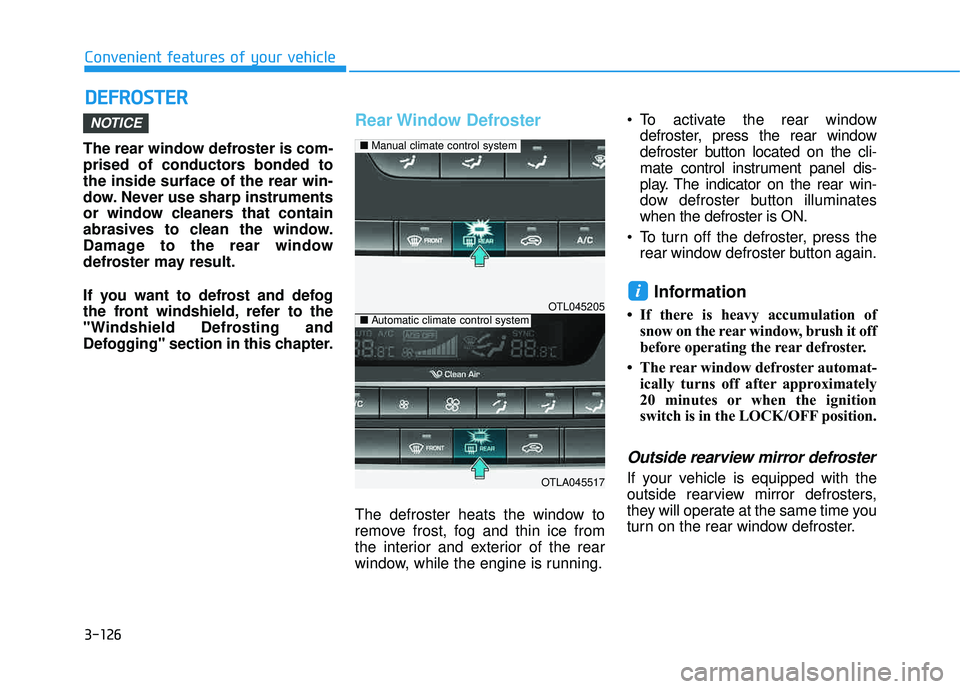
window, while the engine is running. To activate the rear window
defroster, press the rear window
defroster button located on the cli-
mate control instrument panel dis-
play. The indicator on the rear win-
dow defroster button illuminateswhen the defroster is ON.
To turn off the defroster, press the rear window defroster button again.
Information
If there is heavy accumulation ofsnow on the rear window, brush it off
before operating the rear defroster.
The rear window defroster automat- ically turns off after approximately
20 minutes or when the ignition
switch is in the LOCK/OFF position.
Outside rearview mirror defroster
If your vehicle is equipped with the
outside rearview mirror defrosters,
they will operate at the same time you
turn on the rear window defroster.
i
NOTICE
OTL045205
OTLA045517
■Manual climate control system
■Automatic climate control system
Page 225 of 642
3-127
Convenient features of your vehicle
3
MMAANN UU AALL CC LLIIMM AATTEE CC OO NNTTRR OO LL SS YY SSTT EEMM (( IIFF EE QQ UUIIPP PPEEDD ))
OTL045207
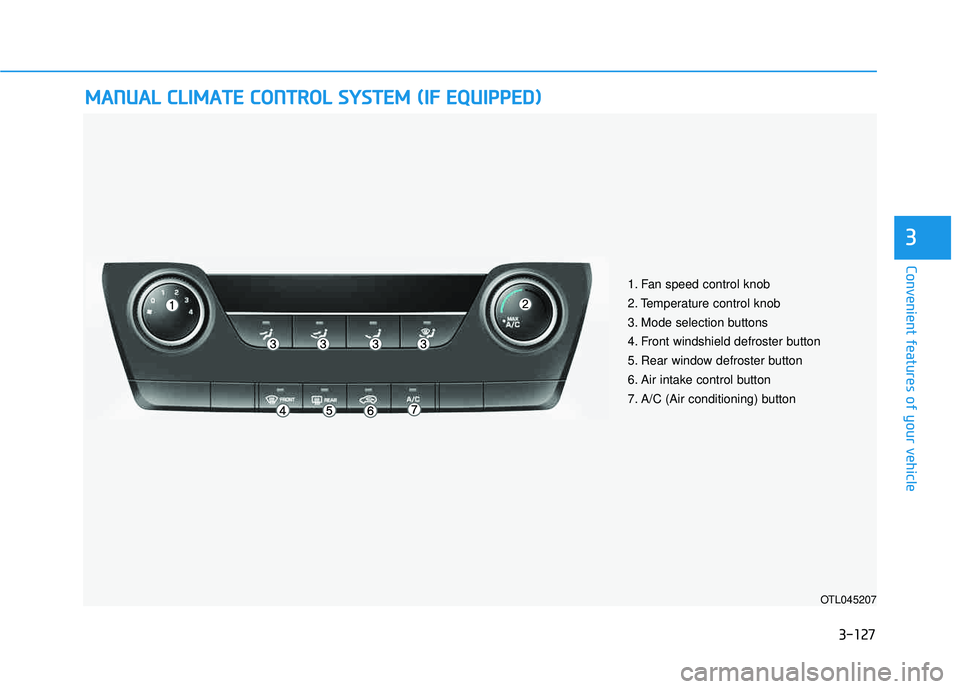
1. Fan speed control knob
2. Temperature control knob
3. Mode selection buttons
4. Front windshield defroster button
5. Rear window defroster button
6. Air intake control button
7. A/C (Air conditioning) button
Page 227 of 642
3-129
Convenient features of your vehicle
3
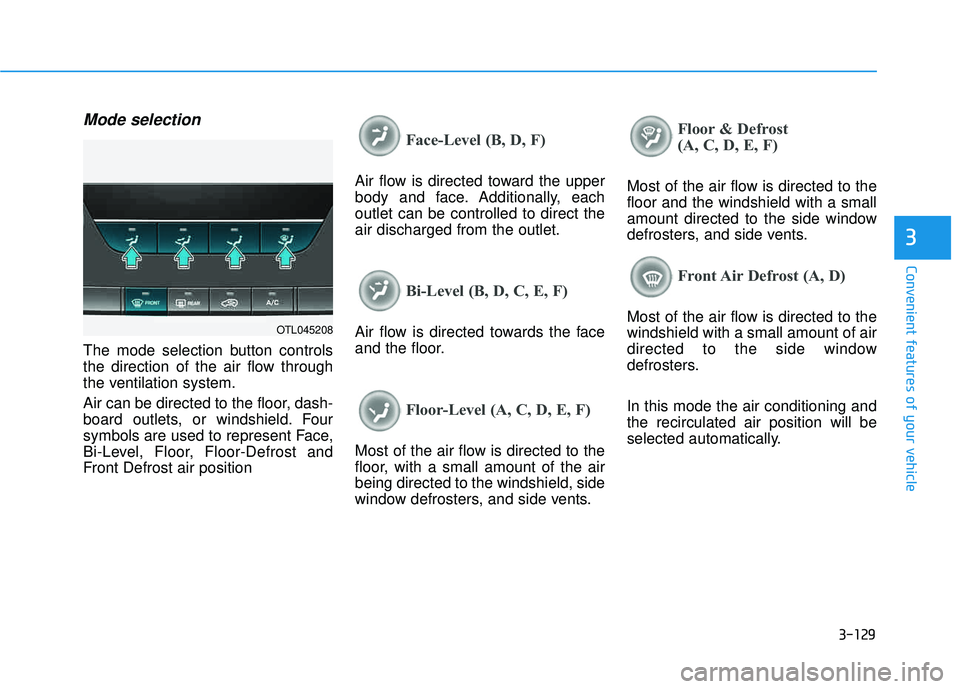
Mode selection
The mode selection button controls
the direction of the air flow through
the ventilation system.
Air can be directed to the floor, dash-
board outlets, or windshield. Four
symbols are used to represent Face,
Bi-Level, Floor, Floor-Defrost and
Front Defrost air position
Face-Level (B, D, F)
Air flow is directed toward the upper
body and face. Additionally, eachoutlet can be controlled to direct theair discharged from the outlet.
Bi-Level (B, D, C, E, F)
Air flow is directed towards the face
and the floor.
Floor-Level (A, C, D, E, F)
Most of the air flow is directed to the
floor, with a small amount of the airbeing directed to the windshield, side
window defrosters, and side vents.
Floor & Defrost
(A, C, D, E, F)
Most of the air flow is directed to the floor and the windshield with a small
amount directed to the side window
defrosters, and side vents.
Front Air Defrost (A, D)
Most of the air flow is directed to the windshield with a small amount of air
directed to the side window
defrosters. In this mode the air conditioning and the recirculated air position will be
selected automatically.OTL045208
Page 231 of 642
3-133
Convenient features of your vehicle
3
System Operation
Ventilation
1. Select the Face Level mode.
2. Set the air intake control to theoutside (fresh) air position.
3. Set the temperature control to the desired position.
4. Set the fan speed control to the desired speed.
Heating
1. Select the Floor Level mode.
2. Set the air intake control to theoutside (fresh) air position.
3. Set the temperature control to the desired position.
4. Set the fan speed control to the desired speed.
5. If dehumidified heating is desired, turn the air conditioning system on.
If the windshield fogs up, select the
Floor & Defrost mode or press
the Front Defrost mode.
Operation Tips
To keep dust or unpleasant fumes from entering the car through the
ventilation system, temporarily set
the air intake control to the recircu-
lated air position. Return the con-trol to the fresh air position whenthe dust or odor has dissipated.
This will help keep the driver alert
and comfortable.
To prevent the inside of the wind- shield from fogging, set the air
intake control to the fresh air posi-
tion and fan speed to the desired
position, turn on the air conditioning
system, and adjust the temperature
control to desired temperature.
Air conditioning
All HYUNDAI Air Conditioning
Systems are filled with environmen-
tally friendly R-134a refrigerant.
1. Start the engine.
2. Push the air conditioning button.
3. Set the mode to the Face Level mode.
4. Set the air intake control to the recirculated air position. However,
prolonged operation of the recircu-
lated air position will excessively
dry the air. In this case, switch the
air intake control to the outside
(fresh) air position. The indicator
light on the button will turn OFF.
5. Adjust the fan speed control and temperature control to maintain
maximum comfort.
When maximum cooling is desired,
rotate the temperature control knob
to the left-most position (MAX AC).
Then set the fan speed control knobto the highest speed.
Page 235 of 642
3-137
Convenient features of your vehicle
3
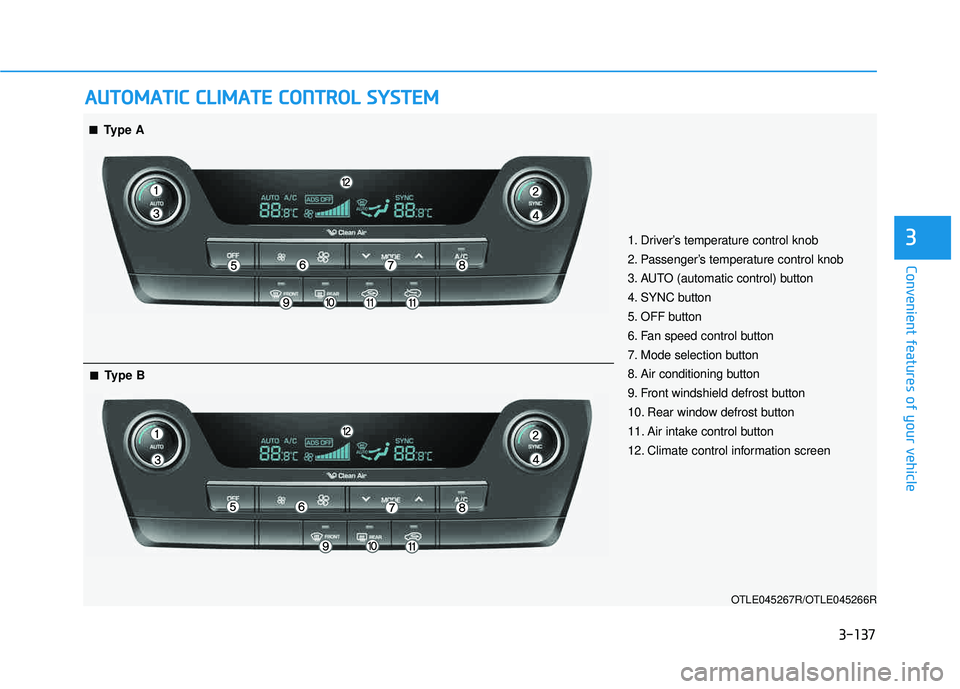
AAUU TTOO MM AATTIICC CC LLIIMM AATTEE CC OO NNTTRR OO LL SS YY SSTT EEMM
OTLE045267R/OTLE045266R
■■Type A
■■Type B
1. Driver’s temperature control knob
2. Passenger’s temperature control knob
3. AUTO (automatic control) button
4. SYNC button
5. OFF button
6. Fan speed control button
7. Mode selection button
8. Air conditioning button
9. Front windshield defrost button
10. Rear window defrost button
11. Air intake control button
12. Climate control information screen