navigation HYUNDAI TUCSON 2016 Owners Manual
[x] Cancel search | Manufacturer: HYUNDAI, Model Year: 2016, Model line: TUCSON, Model: HYUNDAI TUCSON 2016Pages: 642, PDF Size: 9.78 MB
Page 16 of 642
F16F16
Multimedia System.................................................4-2
AUX, USB and iPod®
Port ...............................................4-2
Antenna ...............................................................................4-2
Steering Wheel Audio Control........................................4-3
Audio / Video / Navigation System (AVN) ..................4-4
Bluetooth® Wireless Technology Hands-Free ...........4-4
How Vehicle Audio Works ...............................................4-5
Features of Your Vehicle.................................................4-7
Caring for Disc ...................................................................4-8
System Controllers and Functions ..........4-18, 4-71
Audio Head Unit ...................................................4-18, 4-71
Steering-Wheel Mounted Controls .................4-20, 4-73
Radio Mode ...........................................................4-22, 4-75 SiriusXM Radio Mode / XM TM
Radio
Mode .......................................................................4-26, 4-77
Media Mode ..........................................................4-28, 4-79
Audio CD Mode.....................................................4-29, 4-80
MP3 CD Mode .......................................................4-31, 4-82
USB Mode ..............................................................4-34, 4-85
iPod ®
Mode ...........................................................4-37, 4-88
AUX Mode..............................................................4-39, 4-90
MY Music Mode ...................................................4-40, 4-91
Bluetooth® Wireless Technology
Audio Mode ...........................................................4-43, 4-94
Voice Recognition ..............................................4-58, 4-109
Setup .....................................................................4-64, 4-116
Rear View Camera .............................................4-69, 4-1214Multimedia system
Page 89 of 642
2-62
Safety system of your vehicle
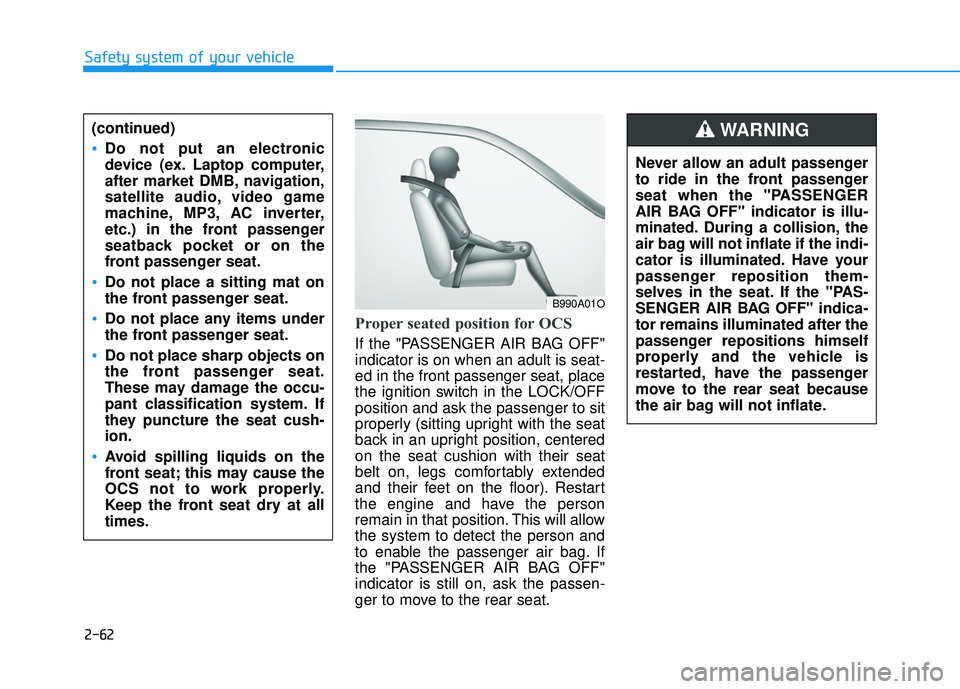
Proper seated position for OCS
If the "PASSENGER AIR BAG OFF" indicator is on when an adult is seat- ed in the front passenger seat, place
the ignition switch in the LOCK/OFF position and ask the passenger to sit
properly (sitting upright with the seat
back in an upright position, centered on the seat cushion with their seat
belt on, legs comfortably extended
and their feet on the floor). Restart
the engine and have the person
remain in that position. This will allowthe system to detect the person and
to enable the passenger air bag. If
the "PASSENGER AIR BAG OFF"indicator is still on, ask the passen-
ger to move to the rear seat.
B990A01O
Never allow an adult passenger
to ride in the front passenger
seat when the "PASSENGER
AIR BAG OFF" indicator is illu-
minated. During a collision, the
air bag will not inflate if the indi-
cator is illuminated. Have your
passenger reposition them-
selves in the seat. If the "PAS-
SENGER AIR BAG OFF" indica-tor remains illuminated after the
passenger repositions himself
properly and the vehicle is
restarted, have the passenger
move to the rear seat because
the air bag will not inflate.
WARNING (continued)
Do not put an electronic
device (ex. Laptop computer,
after market DMB, navigation,
satellite audio, video game
machine, MP3, AC inverter,
etc.) in the front passenger
seatback pocket or on the
front passenger seat.
Do not place a sitting mat on
the front passenger seat.
Do not place any items under
the front passenger seat.
Do not place sharp objects on
the front passenger seat.
These may damage the occu-
pant classification system. If
they puncture the seat cush-ion.
Avoid spilling liquids on the
front seat; this may cause the
OCS not to work properly.
Keep the front seat dry at alltimes.
Page 168 of 642
3-70
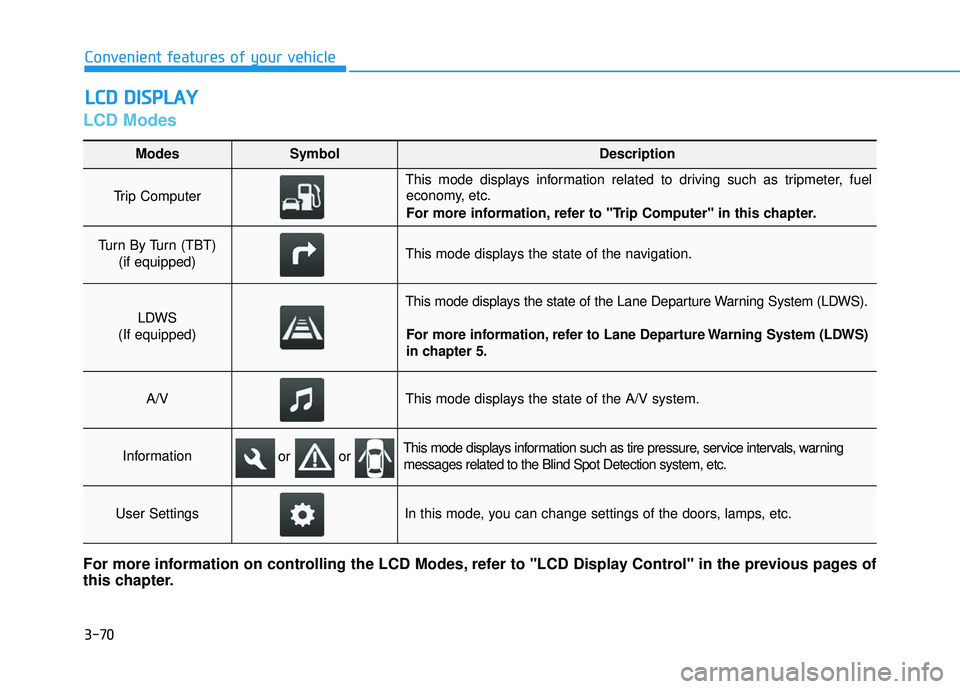
LCD Modes
LLCC DD DD IISS PP LLAA YY
Convenient features of your vehicle
Modes SymbolDescription
Trip Computer
This mode displays information related to driving such as tripmeter, fuel
economy, etc.
For more information, refer to "Trip Computer" in this chapter.
Turn By Turn (TBT)
(if equipped)This mode displays the state of the navigation.
LDWS
(If equipped)
This mode displays the state of the Lane Departure Warning System (LDWS).
For more information, refer to Lane Departure Warning System (LDWS)
in chapter 5.
A/VThis mode displays the state of the A/V system.
InformationThis mode displays information such as tire pressure, service intervals, warningmessages related to the Blind Spot Detection system, etc.
User SettingsIn this mode, you can change settings of the doors, lamps, etc.
For more information on controlling the LCD Modes, refer to "LCD Display Control" in the previous pages of
this chapter.
or or
Page 170 of 642
3-72
Convenient features of your vehicle
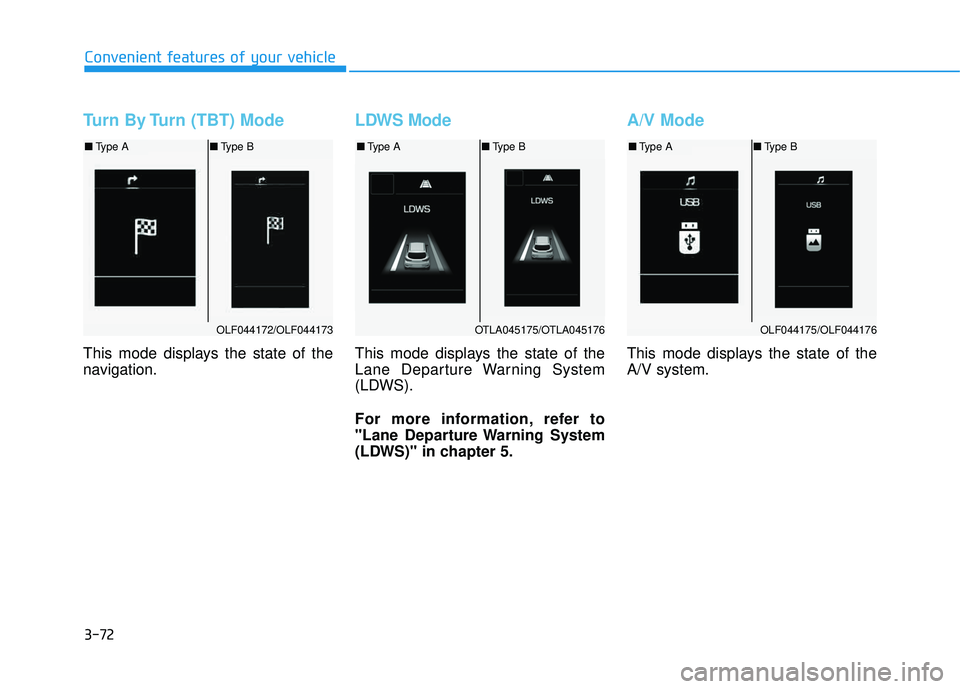
Turn By Turn (TBT) Mode
This mode displays the state of the
navigation.
LDWS Mode
This mode displays the state of the
Lane Departure Warning System
(LDWS).
For more information, refer to
"Lane Departure Warning System
(LDWS)" in chapter 5.
A/V Mode
This mode displays the state of the A/V system.
OLF044172/OLF044173
■Type A ■Type B
OTLA045175/OTLA045176
■Type A ■Type B
OLF044175/OLF044176
■Type A ■Type B
Page 256 of 642
3-158
Convenient features of your vehicle
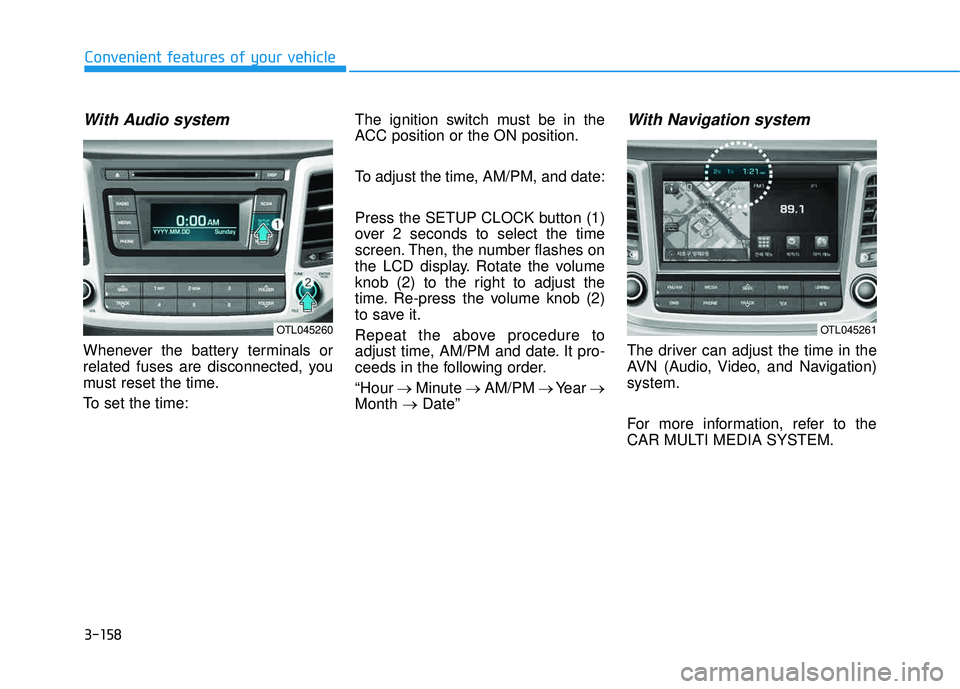
With Audio system
Whenever the battery terminals or
related fuses are disconnected, you
must reset the time.
To set the time:The ignition switch must be in the
ACC position or the ON position.
To adjust the time, AM/PM, and date:
Press the SETUP CLOCK button (1)
over 2 seconds to select the time
screen. Then, the number flashes on
the LCD display. Rotate the volume
knob (2) to the right to adjust the
time. Re-press the volume knob (2)
to save it.
Repeat the above procedure to
adjust time, AM/PM and date. It pro-
ceeds in the following order. “Hour
Minute AM/PM Year
Month Date”
With Navigation system
The driver can adjust the time in the
AVN (Audio, Video, and Navigation)system.
For more information, refer to the
CAR MULTI MEDIA SYSTEM.
OTL045260OTL045261
Page 257 of 642
3-159
Convenient features of your vehicle
3
GPS Time check
The clock is automatically updated
through the navigation system.
GPS Time non-check
The clock can be manually adjusted.
1. Select the "System Settings" onthe "INFO/Setup" screen.
2. Select the "Clock Settings".
3. Select "Time Settings" on the screen
4. Select the "Time Format" to the 12 hour or 24 hour format.
For more information, please refer to
the manual that was separately sup-
plied with your vehicle.
Clothes Hanger
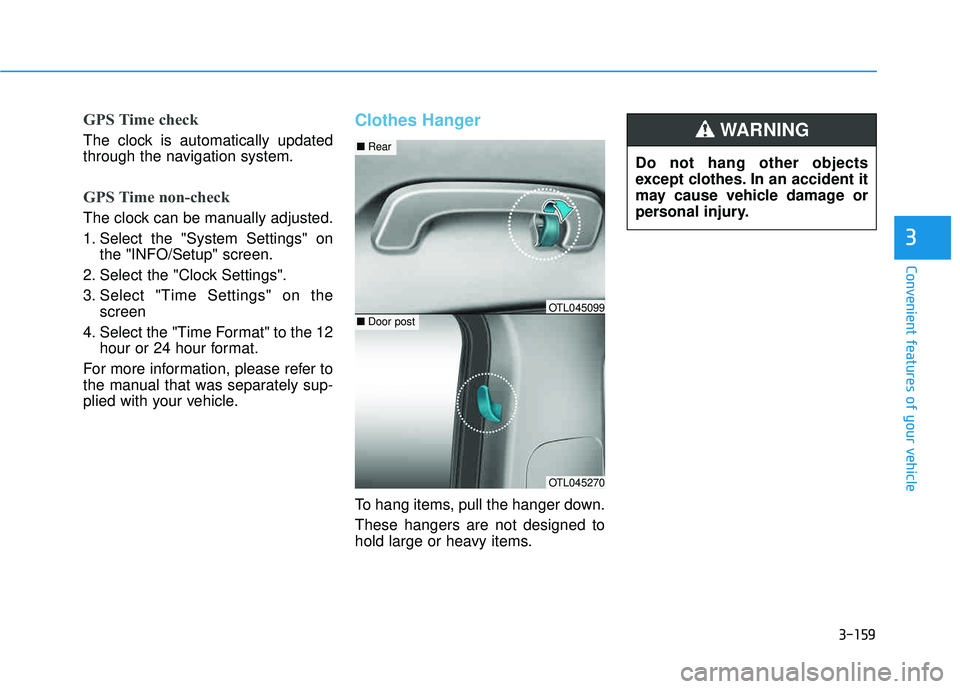
To hang items, pull the hanger down. These hangers are not designed to
hold large or heavy items. Do not hang other objects
except clothes. In an accident it
may cause vehicle damage or
personal injury.
WARNING
OTL045270
■
Rear
■Door postOTL045099
Page 264 of 642
Multimedia System
Multimedia System.................................................4-2
AUX, USB and iPod®
Port ...............................................4-2
Antenna ...............................................................................4-2
Steering Wheel Audio Control........................................4-3
Audio / Video / Navigation System (AVN) ..................4-4
Bluetooth® Wireless Technology Hands-Free ...........4-4
How Vehicle Audio Works ...............................................4-5
Features of Your Vehicle.................................................4-7
Caring for Disc ...................................................................4-8
System Controllers and Functions ..........4-18, 4-71
Audio Head Unit ...................................................4-18, 4-71
Steering-Wheel Mounted Controls .................4-20, 4-73
Radio Mode ...........................................................4-22, 4-75 SiriusXM Radio Mode / XM TM
Radio
Mode .......................................................................4-26, 4-77
Media Mode ..........................................................4-28, 4-79
Audio CD Mode.....................................................4-29, 4-80
MP3 CD Mode .......................................................4-31, 4-82
USB Mode ..............................................................4-34, 4-85
iPod ®
Mode ...........................................................4-37, 4-88
AUX Mode..............................................................4-39, 4-90
MY Music Mode ...................................................4-40, 4-91
Bluetooth® Wireless Technology
Audio Mode ...........................................................4-43, 4-94 Voice Recognition ..............................................4-58, 4-109
Setup .....................................................................4-64, 4-116
Rear View Camera .............................................4-69, 4-121
4
Page 267 of 642
4-4
Audio / Video / Navigation
System (AVN)
Detailed information for the AVN sys-
tem is described in a separately sup-
plied manual.
Bluetooth®Wireless
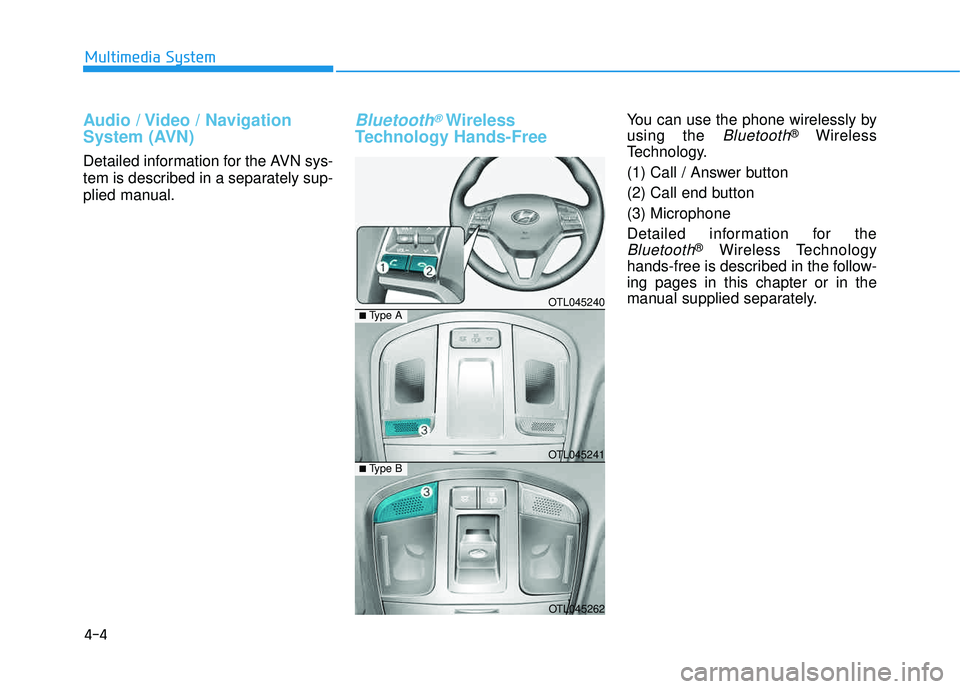
Technology Hands-FreeYou can use the phone wirelessly by using the
Bluetooth®Wireless
Technology.
(1) Call / Answer button
(2) Call end button (3) Microphone
Detailed information for the
Bluetooth®Wireless Technology
hands-free is described in the follow- ing pages in this chapter or in the
manual supplied separately.
Multimedia System
OTL045240
OTL045241
OTL045262
■ Type B
■Type A
Page 500 of 642
6-13
What to do in an emergency
6
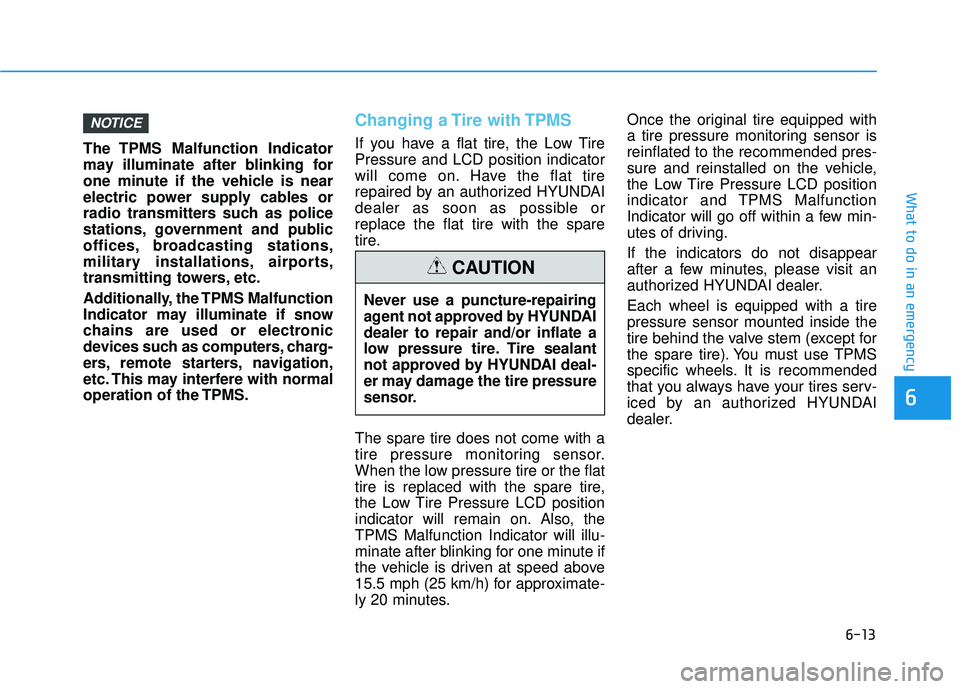
The TPMS Malfunction Indicator
may illuminate after blinking for
one minute if the vehicle is near
electric power supply cables or
radio transmitters such as police
stations, government and public
offices, broadcasting stations,
military installations, airports,
transmitting towers, etc.
Additionally, the TPMS Malfunction
Indicator may illuminate if snow
chains are used or electronic
devices such as computers, charg-
ers, remote starters, navigation,
etc. This may interfere with normal
operation of the TPMS.
Changing a Tire with TPMS
If you have a flat tire, the Low Tire Pressure and LCD position indicator
will come on. Have the flat tire
repaired by an authorized HYUNDAI
dealer as soon as possible orreplace the flat tire with the spare
tire. The spare tire does not come with a
tire pressure monitoring sensor.
When the low pressure tire or the flat
tire is replaced with the spare tire,
the Low Tire Pressure LCD position
indicator will remain on. Also, theTPMS Malfunction Indicator will illu-
minate after blinking for one minute if
the vehicle is driven at speed above
15.5 mph (25 km/h) for approximate-
ly 20 minutes.Once the original tire equipped with
a tire pressure monitoring sensor isreinflated to the recommended pres-
sure and reinstalled on the vehicle,
the Low Tire Pressure LCD position
indicator and TPMS Malfunction
Indicator will go off within a few min-
utes of driving. If the indicators do not disappear
after a few minutes, please visit an
authorized HYUNDAI dealer. Each wheel is equipped with a tire pressure sensor mounted inside the
tire behind the valve stem (except for
the spare tire). You must use TPMS
specific wheels. It is recommended
that you always have your tires serv-
iced by an authorized HYUNDAI
dealer.
NOTICE
Never use a puncture-repairing
agent not approved by HYUNDAIdealer to repair and/or inflate a
low pressure tire. Tire sealant
not approved by HYUNDAI deal-
er may damage the tire pressure
sensor.
CAUTION
Page 583 of 642
7-70
Maintenance
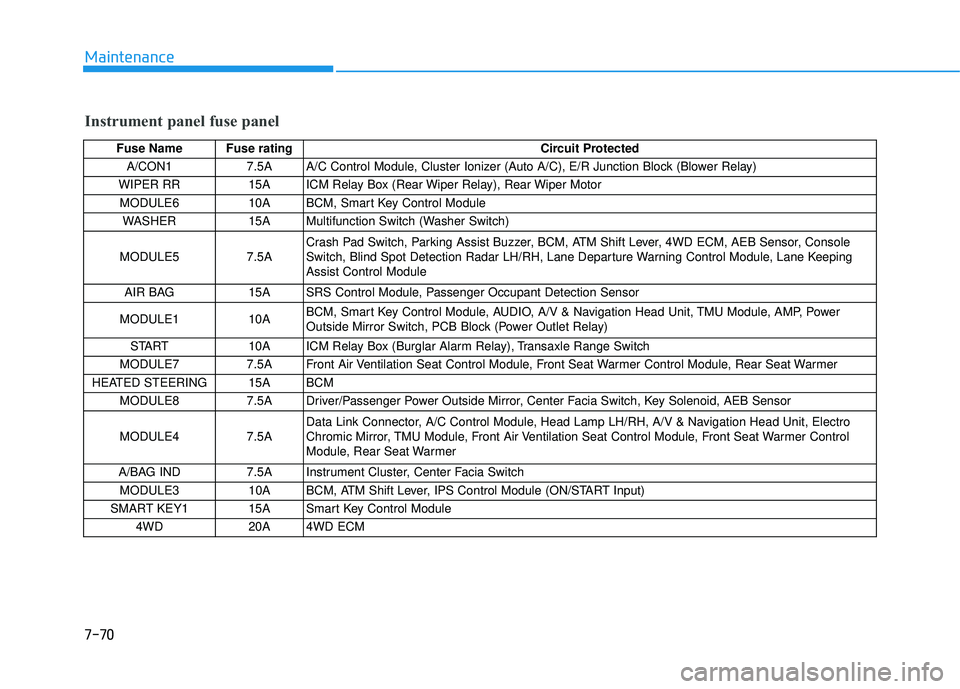
Instrument panel fuse panel
Fuse Name Fuse ratingCircuit Protected
A/CON1 7.5A A/C Control Module, Cluster Ionizer (Auto A/C), E/R Junction Block (Blower Relay)
WIPER RR 15A ICM Relay Box (Rear Wiper Relay), Rear Wiper Motor MODULE6 10A BCM, Smart Key Control Module WASHER 15A Multifunction Switch (Washer Switch)
MODULE5 7.5A Crash Pad Switch, Parking Assist Buzzer, BCM, ATM Shift Lever, 4WD ECM, AEB Sensor, Console
Switch, Blind Spot Detection Radar LH/RH, Lane Departure Warning Control Module, Lane KeepingAssist Control Module
AIR BAG 15A SRS Control Module, Passenger Occupant Detection Sensor
MODULE1 10A BCM, Smart Key Control Module, AUDIO, A/V & Navigation Head Unit, TMU Module, AMP, Power
Outside Mirror Switch, PCB Block (Power Outlet Relay)
START 10A ICM Relay Box (Burglar Alarm Relay), Transaxle Range Switch
MODULE7 7.5A Front Air Ventilation Seat Control Module, Front Seat Warmer Control Module, Rear Seat Warmer
HEATED STEERING 15A BCM MODULE8 7.5A Driver/Passenger Power Outside Mirror, Center Facia Switch, Key Solenoid, AEB Sensor MODULE4 7.5A Data Link Connector, A/C Control Module, Head Lamp LH/RH, A/V & Navigation Head Unit, Electro
Chromic Mirror, TMU Module, Front Air Ventilation Seat Control Module, Front Seat Warmer Control
Module, Rear Seat Warmer
A/BAG IND 7.5A Instrument Cluster, Center Facia Switch MODULE3 10A BCM, ATM Shift Lever, IPS Control Module (ON/START Input)
SMART KEY1 15A Smart Key Control Module 4WD 20A 4WD ECM