mirror Hyundai Tucson 2019 - RHD (UK, Australia) Owner's Guide
[x] Cancel search | Manufacturer: HYUNDAI, Model Year: 2019, Model line: Tucson, Model: Hyundai Tucson 2019Pages: 685, PDF Size: 17.76 MB
Page 231 of 685
3-139
Convenient features of your vehicle
To prevent damage to the conduc-
tors bonded to the inside surface
of the rear window, never use
sharp instruments or window
cleaners containing abrasives to
clean the window.
Information
If you want to defrost and defog the
front windscreen, refer to
“Windscreen Defrosting and
Defogging” in this chapter.
Rear window defroster
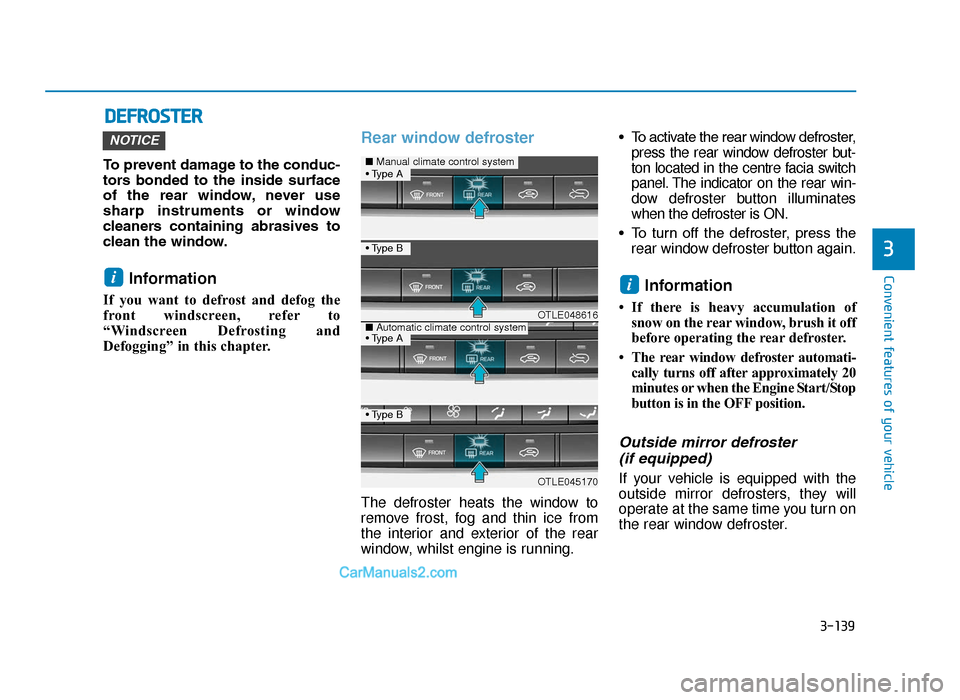
The defroster heats the window to
remove frost, fog and thin ice from
the interior and exterior of the rear
window, whilst engine is running.• To activate the rear window defroster,
press the rear window defroster but-
ton located in the centre facia switch
panel. The indicator on the rear win-
dow defroster button illuminates
when the defroster is ON.
• To turn off the defroster, press the rear window defroster button again.
Information
• If there is heavy accumulation ofsnow on the rear window, brush it off
before operating the rear defroster.
• The rear window defroster automati- cally turns off after approximately 20
minutes or when the Engine Start/Stop
button is in the OFF position.
Outside mirror defroster (if equipped)
If your vehicle is equipped with the
outside mirror defrosters, they will
operate at the same time you turn on
the rear window defroster.
ii
NOTICE
DEFROSTER
3
OTLE048616
OTLE045170
■ Manual climate control system
■Automatic climate control system
• Type B
• Type B
• Type A
• Type A
TLe UK 3b(110~).qxp 6/12/2018 2:38 PM Page 139
Page 255 of 685
3-163
Convenient features of your vehicle
3
• For maximum defrosting, set thetemperature control to the extreme
right/hot position and the fan speed
control to the highest speed.
• If warm air to the floor is desired whilst defrosting or defogging, set
the mode to the floor-defrost posi-
tion.
• Before driving, clear all snow and ice from the windscreen, rear win-
dow, outside rear view mirrors, and
all side windows.
• Clear all snow and ice from the bonnet and air inlet in the cowl grill
to improve heater and defroster
efficiency and to reduce the proba-
bility of fogging up inside of the
windscreen.Manual climate control system
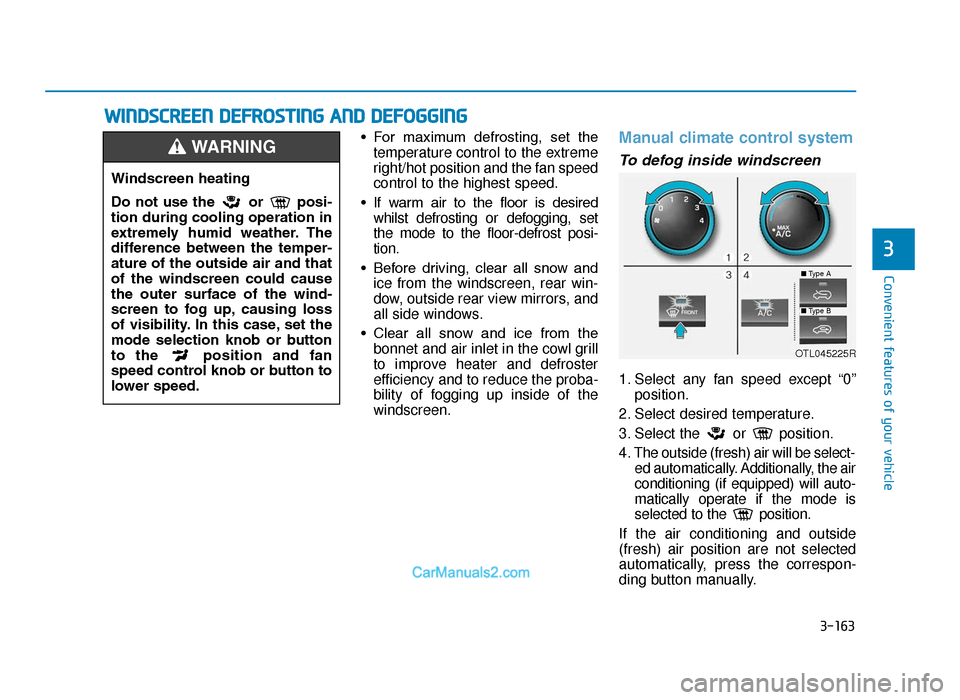
To defog inside windscreen
1. Select any fan speed except “0” position.
2. Select desired temperature.
3. Select the or position.
4. The outside (fresh) air will be select- ed automatically. Additionally, the air
conditioning (if equipped) will auto-
matically operate if the mode is
selected to the position.
If the air conditioning and outside
(fresh) air position are not selected
automatically, press the correspon-
ding button manually.
WINDSCREEN DEFROSTING AND DEFOGGING
Windscreen heating
Do not use the or posi-
tion during cooling operation in
extremely humid weather. The
difference between the temper-
ature of the outside air and that
of the windscreen could cause
the outer surface of the wind-
screen to fog up, causing loss
of visibility. In this case, set the
mode selection knob or button
to the position and fan
speed control knob or button to
lower speed.
WARNING
OTL045225R
■ Type A
■Type B
TLe UK 3b(110~).qxp 6/12/2018 2:40 PM Page 163
Page 262 of 685
3-170
Convenient features of your vehicle
To close:
Push back into position.
Make sure the sunglass holder is
closed whilst driving.
•Do not keep objects except
sunglasses inside the sun-
glass holder. Such objects can
be thrown from the holder in
the event of a sudden stop or
an accident, possibly injuring
the passengers in the vehicle.
•Do not open the sunglass
holder whilst the vehicle is
moving. The rear view mirror
of the vehicle can be blocked
by an open sunglass holder.
•Do not put the glasses forcibly
into a sunglass holder. It may
cause personal injury if you
try to open it forcibly when the
glasses are jammed in holder.
WARNING
TLe UK 3b(110~).qxp 6/12/2018 2:41 PM Page 170
Page 264 of 685
3-172
Convenient features of your vehicle• Keep your drinks sealed whilstdriving to prevent spilling your
drink. If liquid spills, it may get
into the vehicle's electrical/elec-
tronic system and damage elec-
trical/electronic parts.
• When cleaning spilled liquids, do not dry the cup holder at high
temperature. This may damage
the cup holder.
Sunvisor
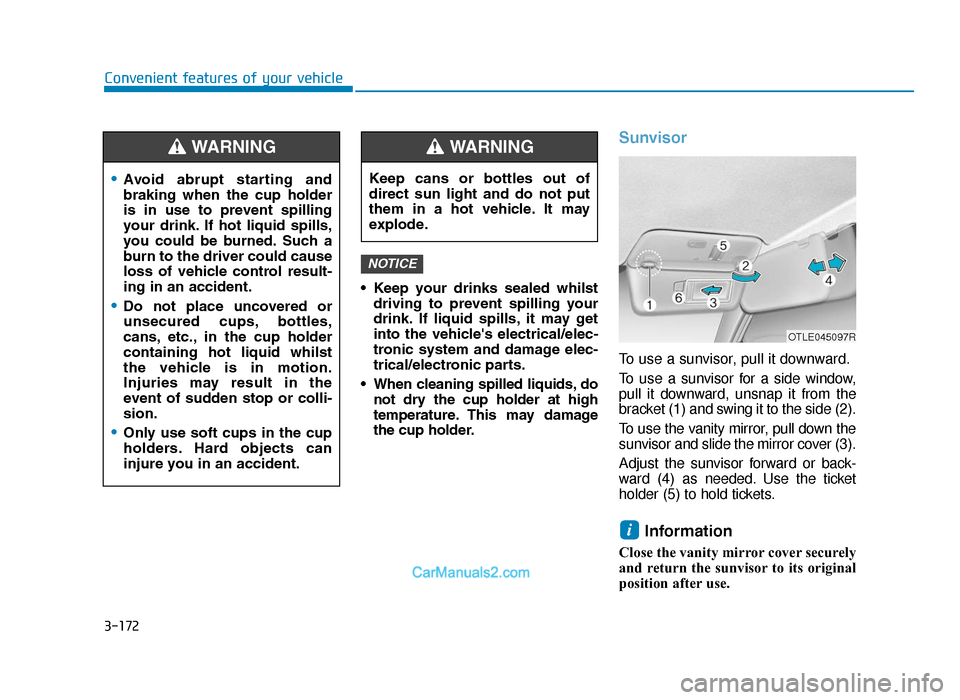
To use a sunvisor, pull it downward.
To use a sunvisor for a side window,
pull it downward, unsnap it from the
bracket (1) and swing it to the side (2).
To use the vanity mirror, pull down the
sunvisor and slide the mirror cover (3).
Adjust the sunvisor forward or back-
ward (4) as needed. Use the ticket
holder (5) to hold tickets.
Information
Close the vanity mirror cover securely
and return the sunvisor to its original
position after use.
i
NOTICE
•Avoid abrupt starting and
braking when the cup holder
is in use to prevent spilling
your drink. If hot liquid spills,
you could be burned. Such a
burn to the driver could cause
loss of vehicle control result-
ing in an accident.
•Do not place uncovered or
unsecured cups, bottles,
cans, etc., in the cup holder
containing hot liquid whilst
the vehicle is in motion.
Injuries may result in the
event of sudden stop or colli-
sion.
•Only use soft cups in the cup
holders. Hard objects can
injure you in an accident.
WARNING
Keep cans or bottles out of
direct sun light and do not put
them in a hot vehicle. It may
explode.
WARNING
OTLE045097R
TLe UK 3b(110~).qxp 6/12/2018 2:41 PM Page 172
Page 329 of 685
5-5
Driving your vehicle
5
Before entering the vehicle
• Be sure all windows, outside mir-ror(s), and outside lights are clean
and unobstructed.
• Remove frost, snow, or ice.
• Visually check the tyres for uneven wear and damage.
• Check under the vehicle for any sign of leaks.
• Be sure there are no obstacles behind you if you intend to back up.
Before starting
• Make sure the bonnet, the boot,and the doors are securely closed
and locked.
• Adjust the position of the seat and steering wheel.
• Adjust the inside and outside rearview mirrors.
• Verify all the lights work.
• Fasten your seatbelt. Check that all passengers have fastened their
seatbelts.
• Check the gauges and indicators in the instrument panel and the mes-
sages on the instrument display
when the ignition switch is in the
ON position. • Check that any items you are car-
rying are stored properly or fas-
tened down securely.
BEFORE DRIVING
NEVER drink or take drugs and
drive.
Drinking or taking drugs and
driving is dangerous and may
result in an accident and SERI-
OUS INJURY or DEATH.
Drunk driving is the number one
contributor to the highway death
toll each year. Even a small
amount of alcohol will affect your
reflexes, perceptions and judg-
ment. Just one drink can reduce
your ability to respond to chang-
ing conditions and emergencies
and your reaction time gets
worse with each additional drink.
Driving whilst under the influ-
ence of drugs is as dangerous or
more dangerous than driving
under the influence of alcohol.
You are much more likely to have
a serious accident if you drink or
take drugs and drive. If you are
drinking or taking drugs, don’t
drive. Do not ride with a driver
who has been drinking or taking
drugs. Choose a designated driv-
er or call a taxi.
WARNING
To reduce the risk of SERIOUS
INJURY or DEATH, take the fol-
lowing precautions:
•ALWAYS wear your seat belt.
All passengers must be prop-
erly belted whenever the vehi-
cle is moving. For more
details, refer to “Seat Belts” in
chapter 2.
•Always drive defensively.
Assume other drivers or pedes-
trians may be careless and
make mistakes.
•Stay focused on the task of
driving. Driver distraction can
cause accidents.
•Leave plenty of space between
you and the vehicle in front of
you.
WARNING
TLe UK 5.qxp 5/10/2018 12:19 PM Page 5
Page 414 of 685
5-90
Driving your vehicle
Dirt, snow, or foreign substances on
the lens may adversely affect the
sensing performance of the sensor.
• Do not apply license plate mold- ing or foreign objects such as a
bumper sticker or a bumper
guard near the radar sensor.
Doing so may adversely affect
the sensing performance of the
radar.
• Always keep the radar sensor and cover clean and free of dirt
and debris.
• Use only a soft cloth to wash the vehicle. Do not spray pressur-
ized water directly on the sensor
or sensor cover.
(Continued)(Continued)
• Be careful not to apply unneces-
sary force on the radar sensor or
sensor cover. If the sensor is
forcibly moved out of proper
alignment, the FCA system may
not operate correctly. In this
case, a warning message may
not be displayed. Have the vehi-
cle inspected by a HYUNDAI
authorised repairer.
• If the front bumper becomes damaged in the area around the
radar sensor, the FCA system
may not operate properly. We
recommend that you have the
vehicle inspected by a HYUNDAI
authorised repairer.
• Use only genuine parts to repair or replace a damaged sensor or
sensor cover. Do not apply paint
to the sensor cover. • NEVER install any accessories
or stickers on the front wind-
screen, nor tint the front wind-
screen.
• NEVER locate any reflective objects (i.e. white paper, mirror)
over the dashboard. Any light
reflection may cause a malfunc-
tion of the system.
• Pay extreme caution to keep the camera out of water.
• NEVER disassemble the camera assembly, nor apply any impact
on the camera assembly.
• Playing the vehicle audio sys- tem at high volume may offset
the system warning sounds.
Information
We recommend that you have the sys-
tem checked by a HYUNDAI autho-
rised repairer when:
• The windscreen glass is replaced.
• The radar sensor or cover gets dam-aged or replaced.
i
NOTICE
NOTICE
TLe UK 5.qxp 5/10/2018 12:24 PM Page 90
Page 424 of 685
![Hyundai Tucson 2019 - RHD (UK, Australia) Owners Guide 5-100
Driving your vehicle
[A] : Blind spot area
[B] : Closing at high speed
The Blind-spot Collision Warning
(BCW) system uses radar sensors in
the rear bumper to monitor and warn
the driver of a](/img/35/19695/w960_19695-423.png "Hyundai Tucson 2019 - RHD (UK, Australia) Owners Guide 5-100
Driving your vehicle
[A] : Blind spot area
[B] : Closing at high speed
The Blind-spot Collision Warning
(BCW) system uses radar sensors in
the rear bumper to monitor and warn
the driver of a")
5-100
Driving your vehicle
[A] : Blind spot area
[B] : Closing at high speed
The Blind-spot Collision Warning
(BCW) system uses radar sensors in
the rear bumper to monitor and warn
the driver of an approaching vehicle
in the driver's blind spot area.
The system monitors the rear area of
the vehicle and provides information
to the driver with an audible alert and
an indicator on the outside rearview
mirrors.(1) BCW : Blind spot area
The BCW range varies relative to
vehicle speed. Note that if your
vehicle is travelling much faster
than the vehicles around you, the
warning will not occur.
(2) BCW : Closing at high speed The BCW-Closing at high speed
feature will alert you when a vehi-
cle is approaching in an adjacent
lane at a high rate of speed. If the
driver activates the turn signal
when the system detects an
oncoming vehicle, the system
sounds an audible alert. Distance
from the approaching vehicle can
be seen differently according to
the relative speed. (3) RCCW (Rear Cross-Traffic
Collision Warning)
The RCCW feature monitors
approaching cross traffic from the
left and right side of the vehicle
when your vehicle is in reverse.
The feature will operate when the
vehicle is moving in reverse below
about 6 mph (10 km/h). If oncom-
ing cross traffic is detected a
warning chime will sound.
Distance from the approaching
vehicle can be seen differently
according to the relative speed.
BLIND-SPOT COLLISION WARNING (BCW) SYSTEM (IF EQUIPPED)
OOS057099R
TLe UK 5.qxp 5/10/2018 12:25 PM Page 100
Page 425 of 685
5-101
Driving your vehicle
5
BCW (if equipped)
Operating conditions
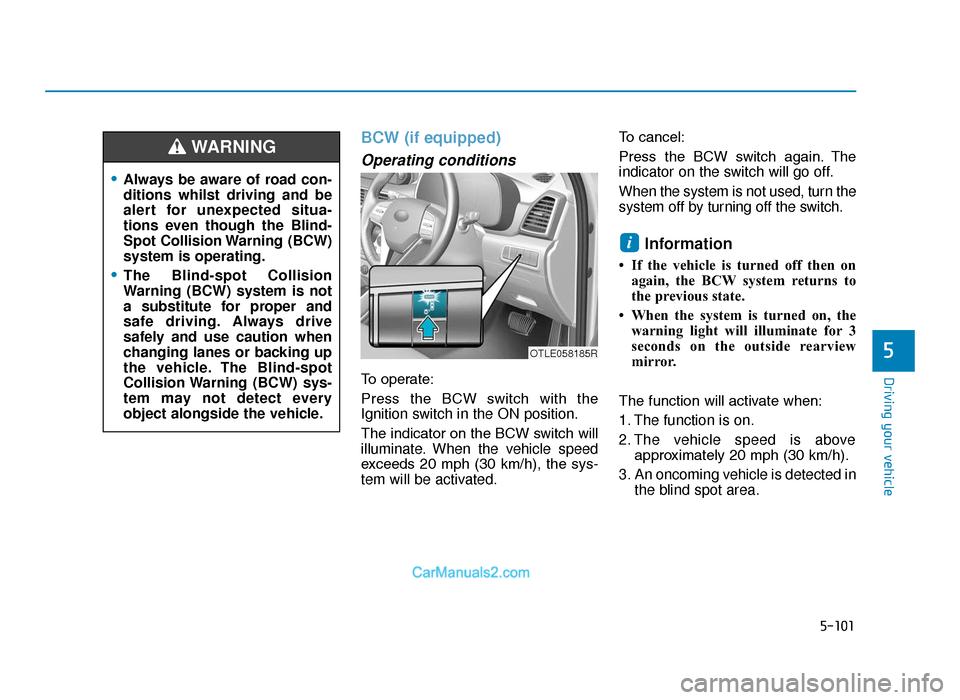
To operate:
Press the BCW switch with the
Ignition switch in the ON position.
The indicator on the BCW switch will
illuminate. When the vehicle speed
exceeds 20 mph (30 km/h), the sys-
tem will be activated.To cancel:
Press the BCW switch again. The
indicator on the switch will go off.
When the system is not used, turn the
system off by turning off the switch.
Information
• If the vehicle is turned off then on
again, the BCW system returns to
the previous state.
• When the system is turned on, the warning light will illuminate for 3
seconds on the outside rearview
mirror.
The function will activate when:
1. The function is on.
2. The vehicle speed is above approximately 20 mph (30 km/h).
3. An oncoming vehicle is detected in the blind spot area.
i
OTLE058185R
•Always be aware of road con-
ditions whilst driving and be
alert for unexpected situa-
tions even though the Blind-
Spot Collision Warning (BCW)
system is operating.
•The Blind-spot Collision
Warning (BCW) system is not
a substitute for proper and
safe driving. Always drive
safely and use caution when
changing lanes or backing up
the vehicle. The Blind-spot
Collision Warning (BCW) sys-
tem may not detect every
object alongside the vehicle.
WARNING
TLe UK 5.qxp 5/10/2018 12:25 PM Page 101
Page 426 of 685
5-102
Driving your vehicle
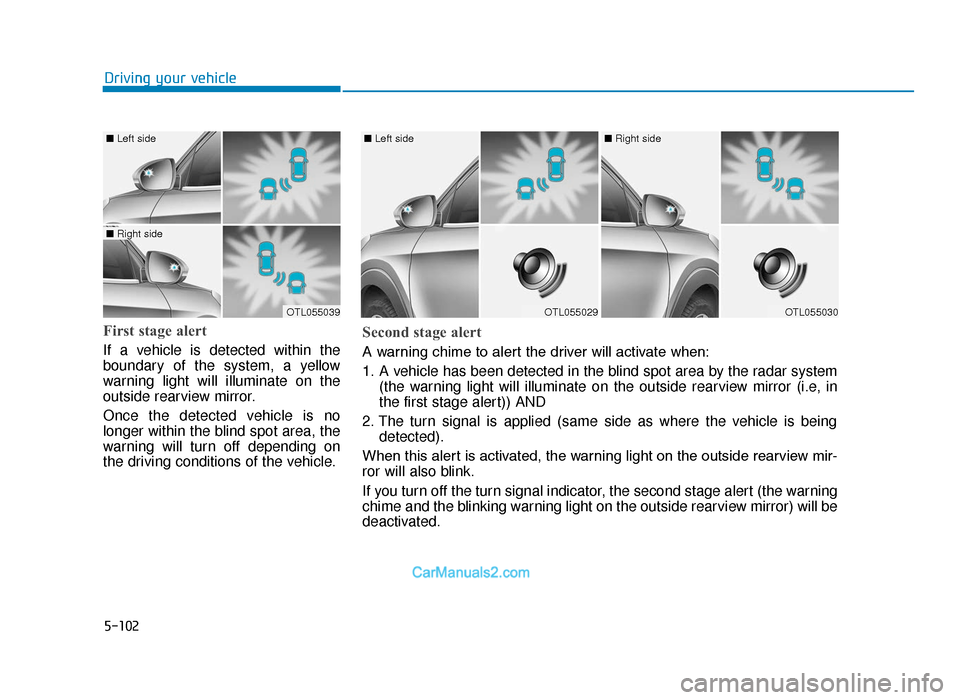
First stage alert
If a vehicle is detected within the
boundary of the system, a yellow
warning light will illuminate on the
outside rearview mirror.
Once the detected vehicle is no
longer within the blind spot area, the
warning will turn off depending on
the driving conditions of the vehicle.
OTL055039
■ Left side
■ Right side
OTL055029
■ Left side
OTL055030
■ Right side
Second stage alert
A warning chime to alert the driver will activate when:
1. A vehicle has been detected in the blind spot area by the radar system
(the warning light will illuminate on the outside rearview mirror (i.e, in
the first stage alert)) AND
2. The turn signal is applied (same side as where the vehicle is being detected).
When this alert is activated, the warning light on the outside rearview mir-
ror will also blink.
If you turn off the turn signal indicator, the second stage alert (the warning
chime and the blinking warning light on the outside rearview mirror) will be
deactivated.
TLe UK 5.qxp 5/10/2018 12:25 PM Page 102
Page 428 of 685
5-104
Driving your vehicle
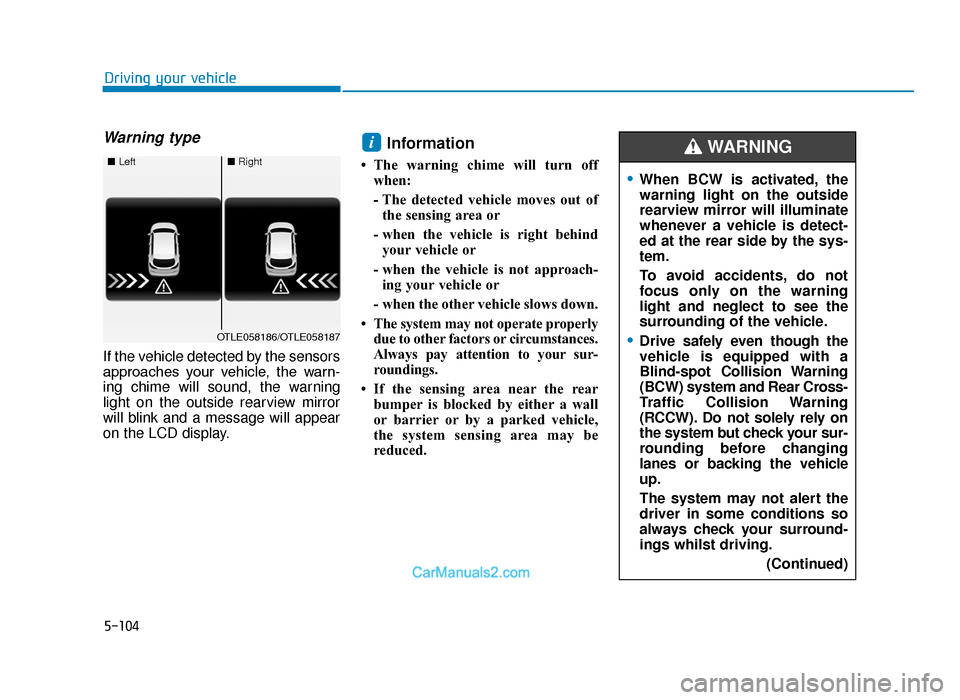
Warning type
If the vehicle detected by the sensors
approaches your vehicle, the warn-
ing chime will sound, the warning
light on the outside rearview mirror
will blink and a message will appear
on the LCD display.
Information
• The warning chime will turn offwhen:
- The detected vehicle moves out ofthe sensing area or
- when the vehicle is right behind your vehicle or
- when the vehicle is not approach- ing your vehicle or
- when the other vehicle slows down.
• The system may not operate properly due to other factors or circumstances.
Always pay attention to your sur-
roundings.
• If the sensing area near the rear bumper is blocked by either a wall
or barrier or by a parked vehicle,
the system sensing area may be
reduced.
i
■ Left■Right
OTLE058186/OTLE058187
•When BCW is activated, the
warning light on the outside
rearview mirror will illuminate
whenever a vehicle is detect-
ed at the rear side by the sys-
tem.
To avoid accidents, do not
focus only on the warning
light and neglect to see the
surrounding of the vehicle.
•Drive safely even though the
vehicle is equipped with a
Blind-spot Collision Warning
(BCW) system and Rear Cross-
Traffic Collision Warning
(RCCW). Do not solely rely on
the system but check your sur-
rounding before changing
lanes or backing the vehicle
up.
The system may not alert the
driver in some conditions so
always check your surround-
ings whilst driving.
(Continued)
WARNING
TLe UK 5.qxp 5/10/2018 12:26 PM Page 104