mirror Hyundai Tucson 2019 - RHD (UK, Australia) Owner's Guide
[x] Cancel search | Manufacturer: HYUNDAI, Model Year: 2019, Model line: Tucson, Model: Hyundai Tucson 2019Pages: 685, PDF Size: 17.76 MB
Page 431 of 685
5-107
Driving your vehicle
5
• When the sensors are blocked byother vehicles, walls or parking-lot
pillars.
• The vehicle drives on a curved road or through a tollgate.
• The vehicle is driven near areas containing metal substances such
as a construction zone, railroad,
etc.
• There is a fixed object near the vehicle, such as a guardrail, per-
son, animal, etc.
• Whilst going down or up a steep road where the height of the lane is
different.
• When driving through a narrow road with many trees or bushes.
• When driving on wet surfaces.
• When driving through a large area with few vehicles or structures
around, such as a desert, rural
area, etc.
• A big vehicle is near such as a bus or truck.
• When other vehicles are close to your vehicle.
• When the other vehicle approach- es very close. • When the detected vehicle also
moves back, as your vehicle drives
back.
• Whilst changing lanes.
• If the vehicle has started at the same time as the vehicle next to
you and has accelerated.
• When the other vehicle passes at a very fast speed.
• When the vehicle in the next lane moves two lanes away from you
OR when the vehicle two lanes
away moves to the next lane to
you.
• The vehicle is turning left or right at a crossroads.
• A motorcycle or bicycle is near.
• A flat trailer is near.
• If there are small objects in the detecting area such as a shopping
cart, a baby stroller or pedestrian.
• If there is a low height vehicle such as a sports car.The BCW indicator on the outer
side view mirror may not illuminate
properly when:
• The outside rearview mirror hous-ing is damaged.
• The mirror is covered with dirt, snow, or debris.
• The window is covered with dirt, snow, or debris.
• The window is tinted.
TLe UK 5.qxp 5/10/2018 12:26 PM Page 107
Page 433 of 685
5-109
Driving your vehicle
5
LKA operation
To activate/deactivate the LKA sys-
tem:
With the ignition switch in the ON
position, press the LKA system but-
ton located on the instrument panel
at the lower right hand side of the
driver.
The indicator in the cluster display
will initially illuminate white. This indi-
cates the LKA system is in the
READY but NOT ENABLED state.
(Continued)
•The system detects lane
markers (or road edge) and
controls the steering wheel by
a camera, therefore, if the lane
markers (or road edge) are
hard to detect, the system
may not work properly.
Please refer to "Limitations of
the system".
•Do not remove or damage the
related parts of LKA system.
•You may not hear a warning
sound of LKA system because
of excessive audio sound.
•Do not place objects on the
dashboard that reflects light
such as mirrors, white paper,
etc. The system may malfunc-
tion if the sunlight is reflected.
(Continued)
(Continued)
•Always have your hands on
the steering wheel whilst the
LKA system is activated. If
you continue to drive with
your hands off the steering
wheel after the "Keep hands
on steering wheel" warning
message appears, the system
will stop control the steering
wheel.
•The steering wheel is not con-
tinuously controlled so if the
vehicle speed is at a higher
rate when leaving a lane (or
road edge) the vehicle may
not be controlled by the sys-
tem. The driver must always
follow the speed limit when
using the system.
•If you attach objects to the
steering wheel, the system
may not assist steering or the
hands off alarm may not work
properly.
•When you tow a trailer, make
sure that you turn off the LKA
system.
OTLE058188R
TLe UK 5.qxp 5/10/2018 12:26 PM Page 109
Page 440 of 685
5-116
Driving your vehicle
• The field of view in front is obstructed by sun glare.
• There is not enough distance between you and the vehicle in
front to be able to detect the lane
marker or the vehicle ahead is driv-
ing on the lane marker.
• Road surface is not evenness.
• Driving on a steep grade, over a hill, or when driving on a curved
road.
• The adverse road conditions cause excessive vehicle vibrations whilst
driving.
• The surrounding of the inside rear view mirror temperature is high
due to direct sunlight, etc. When front visibility is poor
• The windscreen or the LKA cam-
era lens is blocked with dirt or
debris.
• The windscreen glass is fogged up; a clear view of the road is
obstructed.
• Placing objects on the dashboard, etc.
• The sensor cannot detect the lane because of fog, heavy rain or snow.
LKA system function change
The driver can change LKA to the
Lane Departure Warning (LDW) sys-
tem or change the LKA system mode
from the LCD display. Go to the "User
Settings →Driver Assistance →
Lane Safety → Lane Keeping Assist
(LKA)/Lane Departure Warning
(LDW)".
The system is automatically set to
Lane Keeping Assist(LKA) if a func-
tion is not selected.
Lane Keeping Assist (LKA)
This mode guides the driver to help
keep the vehicle within the lanes. It
rarely controls the steering wheel,
when the vehicle drives well inside
the lanes. However, it starts to con-
trol the steering wheel, when the
vehicle is about to deviate out of the
lane.
Lane Departure Warning (LDW)
LDW system alerts the driver with a
visual warning and a warning alarm
when the system detects the vehicle
departing the lane. The steering
wheel will not be controlled.
TLe UK 5.qxp 5/10/2018 12:27 PM Page 116
Page 444 of 685
5-120
Driving your vehicle
The Driver Attention Warning
(DAW) system utilizes the camera
sensor on the front windscreen for
its operation. To keep the camera
sensor in the best condition, you
should observe the followings:
• NEVER install any accessories or stickers on the front wind-
screen, nor tint the front wind-
screen.
• NEVER locate any reflective objects (i.e. white paper, mirror)
over the dashboard. Any light
reflection may cause a malfunc-
tion of the Driver Attention
Warning (DAW) system.
• Pay extreme caution to keep the camera sensor out of water.
• NEVER disassemble the camera assembly, nor apply any impact
on the camera assembly.
(Continued)(Continued)
• Do not disassemble the camera
temporarily for tinted window or
attaching any types of coatings
and accessories. If you disas-
semble a camera and assemble
it again, we recommend that you
take your vehicle to a HYUNDAI
authorised repairer and have the
system checked for calibration.
NOTICE
The Driver Attention Warning
(DAW) system may not properly
operate with limited alerting in
the following situations:
•The lane detection perform-
ance is limited. (For more
details, refer to "Lane Keeping
Assist (LKA) system" in this
chapter.)
• The vehicle is violently driven
or is abruptly turned for
obstacle avoidance (e.g. con-
struction area, other vehicles,
fallen objects, bumpy road).
• Forward drivability of the
vehicle is severely under-
mined (possibly due to wide
variation in tyre pressures,
uneven tyre wear-out, toe-
in/toe-out alignment).
(Continued)
CAUTION
TLe UK 5.qxp 5/10/2018 12:27 PM Page 120
Page 448 of 685
5-124
Driving your vehicle
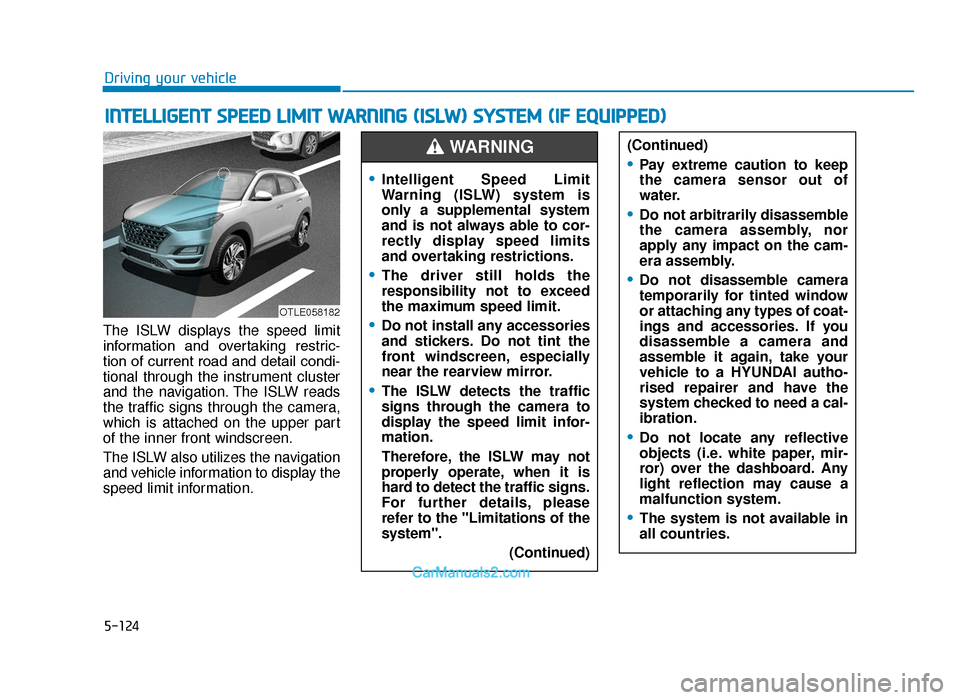
The ISLW displays the speed limit
information and overtaking restric-
tion of current road and detail condi-
tional through the instrument cluster
and the navigation. The ISLW reads
the traffic signs through the camera,
which is attached on the upper part
of the inner front windscreen.
The ISLW also utilizes the navigation
and vehicle information to display the
speed limit information.
INTELLIGENT SPEED LIMIT WARNING (ISLW) SYSTEM (IF EQUIPPED)
OTLE058182
(Continued)
•Pay extreme caution to keep
the camera sensor out of
water.
•Do not arbitrarily disassemble
the camera assembly, nor
apply any impact on the cam-
era assembly.
•Do not disassemble camera
temporarily for tinted window
or attaching any types of coat-
ings and accessories. If you
disassemble a camera and
assemble it again, take your
vehicle to a HYUNDAI autho-
rised repairer and have the
system checked to need a cal-
ibration.
•Do not locate any reflective
objects (i.e. white paper, mir-
ror) over the dashboard. Any
light reflection may cause a
malfunction system.
•The system is not available in
all countries.
•Intelligent Speed Limit
Warning (ISLW) system is
only a supplemental system
and is not always able to cor-
rectly display speed limits
and overtaking restrictions.
•The driver still holds the
responsibility not to exceed
the maximum speed limit.
•Do not install any accessories
and stickers. Do not tint the
front windscreen, especially
near the rearview mirror.
•The ISLW detects the traffic
signs through the camera to
display the speed limit infor-
mation.
Therefore, the ISLW may not
properly operate, when it is
hard to detect the traffic signs.
For further details, please
refer to the "Limitations of the
system". (Continued)
WARNING
TLe UK 5.qxp 5/10/2018 12:27 PM Page 124
Page 485 of 685
5-161
Driving your vehicle
5
Information
The ESC system (if equipped) must be
turned OFF before rocking the vehi-
cle.
If you are still stuck after rocking
the vehicle a few times, have the
vehicle pulled out by a tow vehicle
to avoid engine overheating, pos-
sible damage to the transaxle, and
tyre damage. See "Towing" in
chapter 6.
Smooth cornering
Avoid braking or gear changing in
corners, especially when roads are
wet. Ideally, corners should always
be taken under gentle acceleration.
Driving at night
Night driving presents more hazards
than driving in the daylight. Here are
some important tips to remember:
• Slow down and keep more dis-tance between you and other vehi-
cles, as it may be more difficult to
see at night, especially in areas
where there may not be any street
lights.
• Adjust your mirrors to reduce the glare from other driver's head-
lamps.
• Keep your headlamps clean and properly aimed. Dirty or improperly
aimed headlamps will make it
much more difficult to see at night.
• Avoid staring directly at the head- lamps of oncoming vehicles. You
could be temporarily blinded, and it
will take several seconds for your
eyes to readjust to the darkness.
Driving in the rain
Rain and wet roads can make driving
dangerous. Here are a few things to
consider when driving in the rain or on
slick pavement:
• Slow down and allow extra followingdistance. A heavy rainfall makes it
harder to see and increases the dis-
tance needed to stop your vehicle.
• Turn OFF your Cruise Control. (if equipped)
• Replace your windscreen wiper blades when they show signs of
streaking or missing areas on the
windscreen.
• Be sure your tyres have enough tread. If your tyres do not have
enough tread, making a quick stop
on wet pavement can cause a skid
and possibly lead to an accident.
See "Tyre Replacement" in chap-
ter 7.
• Turn on your headlamps to make it easier for others to see you.
• Driving too fast through large pud- dles can affect your brakes. If you
must go through puddles, try to
drive through them slowly.
NOTICE
i
TLe UK 5.qxp 5/10/2018 12:32 PM Page 161
Page 604 of 685

7-55
7
Maintenance
Driver’s side fuse panel
Fuse Name SymbolFuse RatingCircuit Protected
A/CON 1 7.5A A/C Control Module, Cluster Ionizer (Auto A/C),
E/R Junction Block (RLY.4, 5, 13)
WIPER RR15A ICM Relay Box (Rear Wiper Relay), Rear Wiper Motor
MODULE 6 10A BCM, Smart Key Control Module
WASHER 15A Multifunction Switch (Washer Switch)
MODULE 5 7.5A Crash Pad Switch, Rear Parking Assist Buzzer, BCM, 4WD ECM, Forward Collision Avoidance
Assist Unit, Steering Angle Sensor, Blind Spot Detection Radar LH/RH, Console Switch,
Smart Parking Assist Control Module, Lane Keeping Assist Control Module
AIR BAG15A SRS Control Module
MODULE 1 10A BCM, A/V & Navigation Head Unit, MTS E-Call Module, AUDIO, Low DC-DC Converter,
Smart Key Control Module, AMP, Power Outside Mirror Switch, PCB Block (Power Outlet Relay),
Surround View Monitor, Wiresess Charger Unit, Rear USB Port
START 10A ICM Relay Box (Burglar Alarm Relay), Transaxle Range Switch
MODULE 7 7.5A Front Air Ventilation Seat Module, Front Seat Warmer Module,
Rear Seat Warmer, Surround View Monitor
HEATED
STEERING15A BCM
MODULE 8 7.5A Driver/Passenger Power Outside Mirror, Driver/Passenger Smart Key Outside Handle,
Forward Collision Avoidance Assist Unit, Data Link Connector
TLe UK 7.qxp 5/10/2018 1:36 PM Page 55
Page 605 of 685
7-56
Maintenance
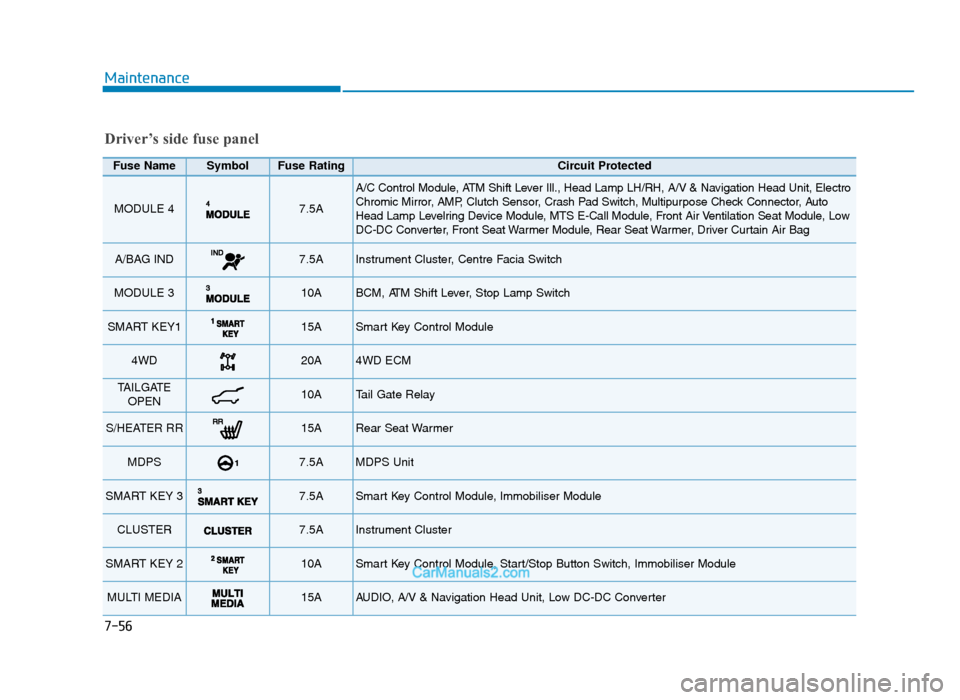
Fuse Name SymbolFuse RatingCircuit Protected
MODULE 4 7.5A
A/C Control Module, ATM Shift Lever Ill., Head Lamp LH/RH, A/V & Navigation Head Unit, Electro
Chromic Mirror, AMP, Clutch Sensor, Crash Pad Switch, Multipurpose Check Connector, Auto
Head Lamp Levelring Device Module, MTS E-Call Module, Front Air Ventilation Seat Module, Low
DC-DC Converter, Front Seat Warmer Module, Rear Seat Warmer, Driver Curtain Air Bag
A/BAG IND 7.5A Instrument Cluster, Centre Facia Switch
MODULE 3 10A BCM, ATM Shift Lever, Stop Lamp Switch
SMART KEY115A Smart Key Control Module
4WD 20A 4WD ECM
TAILGATEOPEN10A Tail Gate Relay
S/HEATER RR15A Rear Seat Warmer
MDPS 7.5A MDPS Unit
SMART KEY 3 7.5A Smart Key Control Module, Immobiliser Module
CLUSTER 7.5A Instrument Cluster
SMART KEY 2 10A Smart Key Control Module, Start/Stop Button Switch, Immobiliser Module
MULTI MEDIA 15A AUDIO, A/V & Navigation Head Unit, Low DC-DC Converter
Driver’s side fuse panel
TLe UK 7.qxp 5/10/2018 1:36 PM Page 56
Page 606 of 685
7-57
7
Maintenance
Driver’s side fuse panel
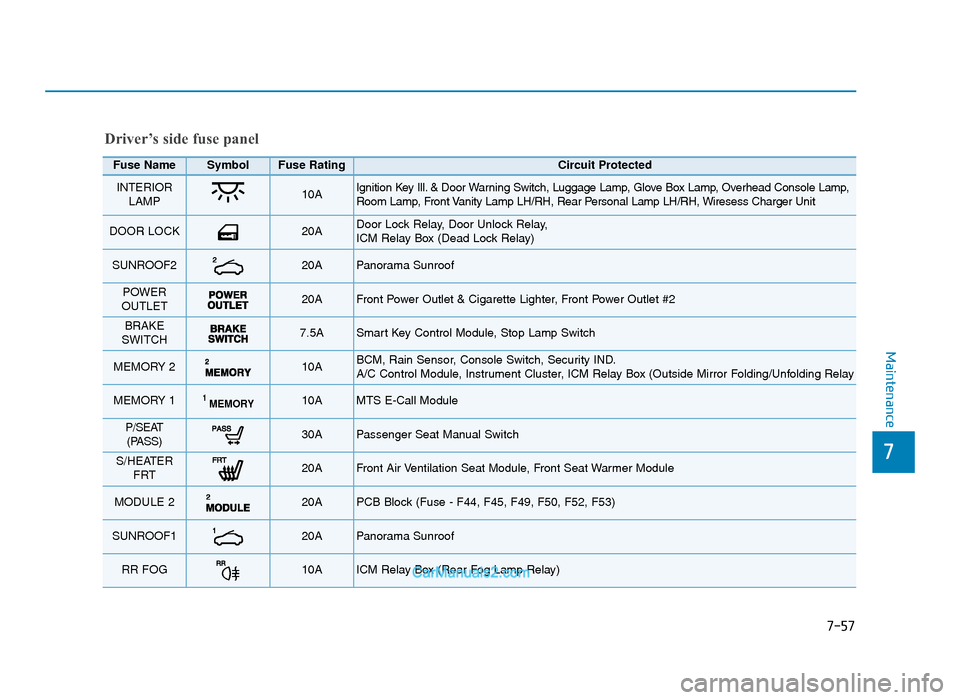
Fuse Name SymbolFuse RatingCircuit Protected
INTERIORLAMP10A Ignition Key Ill. & Door Warning Switch, Luggage Lamp, Glove Box Lamp, Overhead Console Lamp,
Room Lamp, Front Vanity Lamp LH/RH, Rear Personal Lamp LH/RH, Wiresess Charger Unit
DOOR LOCK 20A Door Lock Relay, Door Unlock Relay,
ICM Relay Box (Dead Lock Relay)
SUNROOF220A Panorama Sunroof
POWER
OUTLET 20A Front Power Outlet & Cigarette Lighter, Front Power Outlet #2
BRAKE
SWITCH 7.5A Smart Key Control Module, Stop Lamp Switch
MEMORY 2 10A BCM, Rain Sensor, Console Switch, Security IND.
A/C Control Module, Instrument Cluster, ICM Relay Box (Outside Mirror Folding/Unfolding Relay
MEMORY 1MEMORY110A MTS E-Call Module
P/SEAT (PASS)30A Passenger Seat Manual Switch
S/HEATER FRT 20A Front Air Ventilation Seat Module, Front Seat Warmer Module
MODULE 2 20A PCB Block (Fuse - F44, F45, F49, F50, F52, F53)
SUNROOF120A Panorama Sunroof
RR FOG10A ICM Relay Box (Rear Fog Lamp Relay)
TLe UK 7.qxp 5/10/2018 1:36 PM Page 57
Page 607 of 685
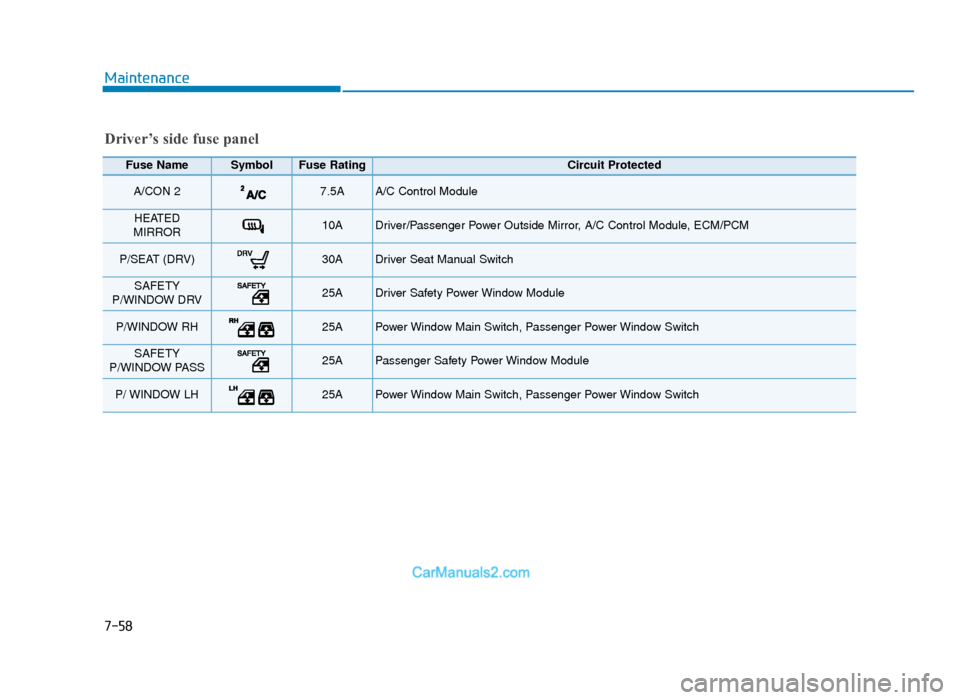
7-58
Maintenance
Driver’s side fuse panel
Fuse Name SymbolFuse RatingCircuit Protected
A/CON 2 7.5A A/C Control Module
HEATED
MIRROR 10A Driver/Passenger Power Outside Mirror, A/C Control Module, ECM/PCM
P/SEAT (DRV) 30A Driver Seat Manual Switch
SAFETY
P/WINDOW DRV25A Driver Safety Power Window Module
P/WINDOW RH 25A Power Window Main Switch, Passenger Power Window Switch
SAFETY
P/WINDOW PASS25APassenger Safety Power Window Module
P/ WINDOW LH 25A Power Window Main Switch, Passenger Power Window Switch
TLe UK 7.qxp 5/10/2018 1:36 PM Page 58