key battery Hyundai Tucson 2019 Owner's Manual - RHD (UK, Australia)
[x] Cancel search | Manufacturer: HYUNDAI, Model Year: 2019, Model line: Tucson, Model: Hyundai Tucson 2019Pages: 685, PDF Size: 17.76 MB
Page 98 of 685
3-6
Type B
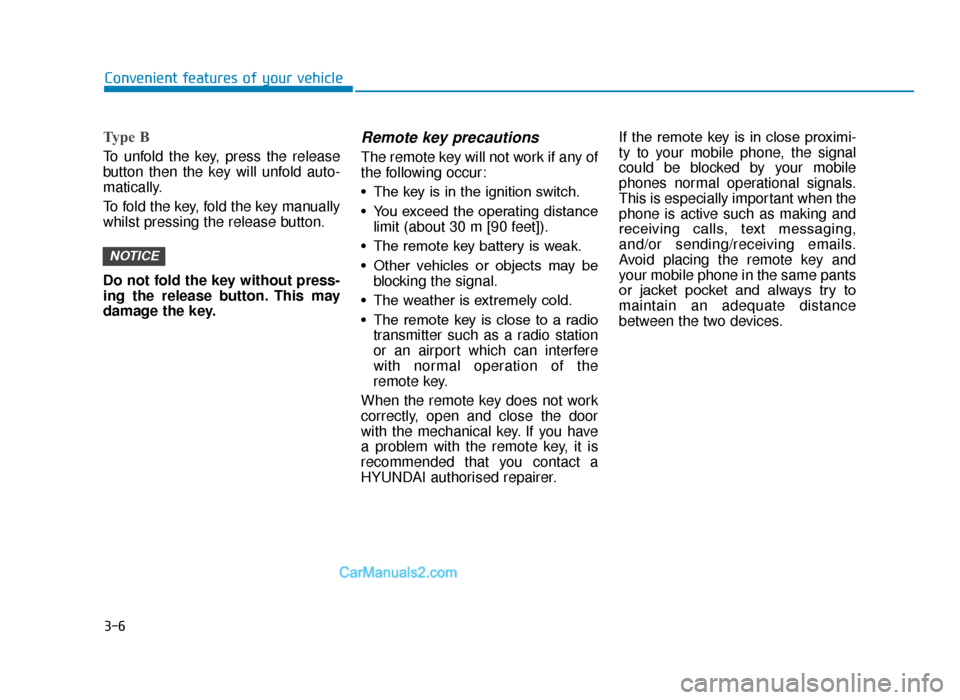
To unfold the key, press the release
button then the key will unfold auto-
matically.
To fold the key, fold the key manually
whilst pressing the release button.
Do not fold the key without press-
ing the release button. This may
damage the key.
Remote key precautions
The remote key will not work if any of
the following occur:
• The key is in the ignition switch.
• You exceed the operating distancelimit (about 30 m [90 feet]).
• The remote key battery is weak.
• Other vehicles or objects may be blocking the signal.
• The weather is extremely cold.
• The remote key is close to a radio transmitter such as a radio station
or an airport which can interfere
with normal operation of the
remote key.
When the remote key does not work
correctly, open and close the door
with the mechanical key. If you have
a problem with the remote key, it is
recommended that you contact a
HYUNDAI authorised repairer. If the remote key is in close proximi-
ty to your mobile phone, the signal
could be blocked by your mobile
phones normal operational signals.
This is especially important when the
phone is active such as making and
receiving calls, text messaging,
and/or sending/receiving emails.
Avoid placing the remote key and
your mobile phone in the same pants
or jacket pocket and always try to
maintain an adequate distance
between the two devices.
NOTICE
Convenient features of your vehicle
TLe UK 3a(~109).qxp 6/12/2018 2:20 PM Page 6
Page 99 of 685
3-7
Convenient features of your vehicle
Information
Changes or modifications not express-
ly approved by the party responsible
for compliance could void the user’s
authority to operate the equipment. If
the keyless entry system is inoperative
due to changes or modifications not
expressly approved by the party
responsible for compliance, it will not
be covered by your manufacturer’s
vehicle warranty.
Keep the remote key away from
electromagnetic materials that
blocks electromagnetic waves to
the key surface.
Battery replacement
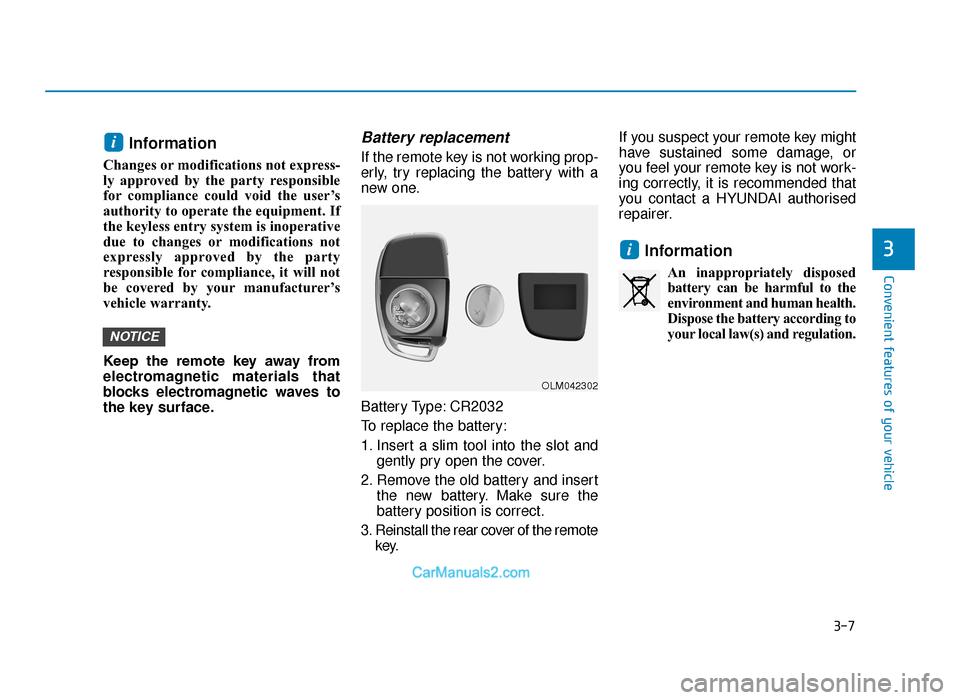
If the remote key is not working prop-
erly, try replacing the battery with a
new one.
Battery Type: CR2032
To replace the battery:
1. Insert a slim tool into the slot andgently pry open the cover.
2. Remove the old battery and insert the new battery. Make sure the
battery position is correct.
3. Reinstall the rear cover of the remote key. If you suspect your remote key might
have sustained some damage, or
you feel your remote key is not work-
ing correctly, it is recommended that
you contact a HYUNDAI authorised
repairer.
Information
An inappropriately disposed
battery can be harmful to the
environment and human health.
Dispose the battery according to
your local law(s) and regulation.
i
NOTICE
i
3
OLM042302
TLe UK 3a(~109).qxp 6/12/2018 2:20 PM Page 7
Page 102 of 685
3-10
Convenient features of your vehicle
Tailgate unlocking
To unlock:
1. Carry the smart key.
2. Either press the tailgate handlebutton or press the Tailgate Unlock
button (3) on the smart key for
more than one second.
3. The hazard warning lights will blink two times. The tailgate will unlock.
The power tailgate will unlock and
then open (if equipped).
For more details, refer to “Power
tailgate” in this chapter.
Information
After unlocking the tailgate, the tail-
gate will lock automatically after 30
seconds unless the tailgate is opened.
Start-up
You can start the engine without insert-
ing the key. For detailed information
refer to the Engine Start/Stop but-
ton in chapter 5.
To prevent damaging the smart key:
• Keep the smart key away from water or any liquid and fire. If the
inside of the smart key gets
damp (due to drinks or moisture),
or is heated, internal circuit may
malfunction, excluding the car
from the warranty.
• Avoid dropping or throwing the smart key.
• Protect the smart key from extreme temperatures.
Always have the smart key with
you when leaving the vehicle. If
the smart key is left near the vehi-
cle, the vehicle battery may be dis-
charged.
Mechanical key
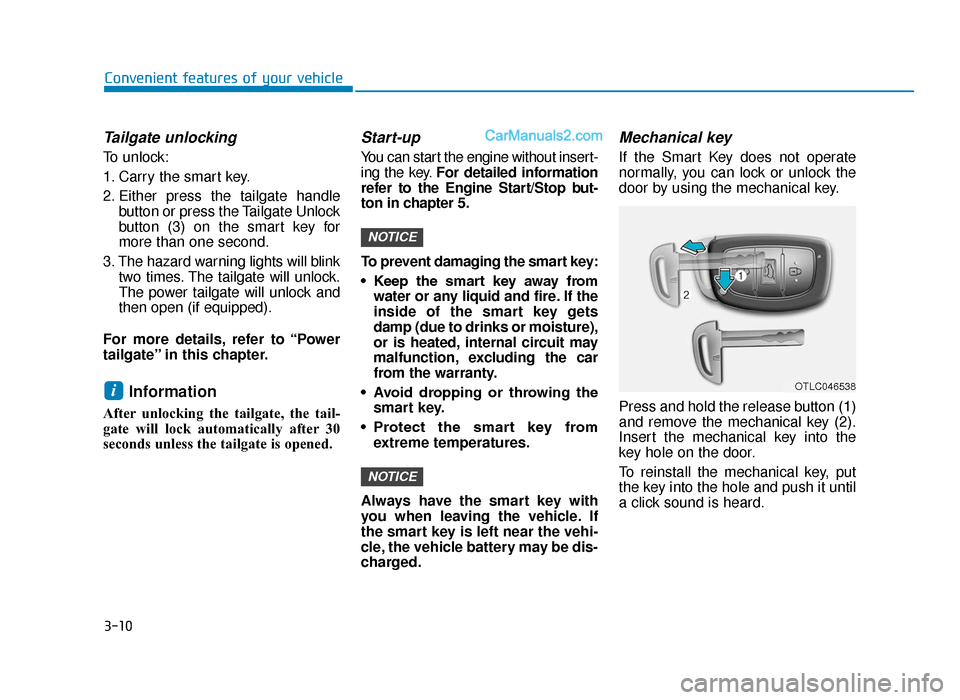
If the Smart Key does not operate
normally, you can lock or unlock the
door by using the mechanical key.
Press and hold the release button (1)
and remove the mechanical key (2).
Insert the mechanical key into the
key hole on the door.
To reinstall the mechanical key, put
the key into the hole and push it until
a click sound is heard.
NOTICE
NOTICE
iOTLC046538
TLe UK 3a(~109).qxp 6/12/2018 2:21 PM Page 10
Page 104 of 685
3-12
Convenient features of your vehicle
Information
Changes or modifications not express-
ly approved by the party responsible
for compliance could void the user’s
authority to operate the equipment. If
the keyless entry system is inoperative
due to changes or modifications not
expressly approved by the party
responsible for compliance, it will not
be covered by your manufacturer’s
vehicle warranty.
Keep the smart key away from
electromagnetic materials that
blocks electromagnetic waves to
the key surface.
Battery replacement
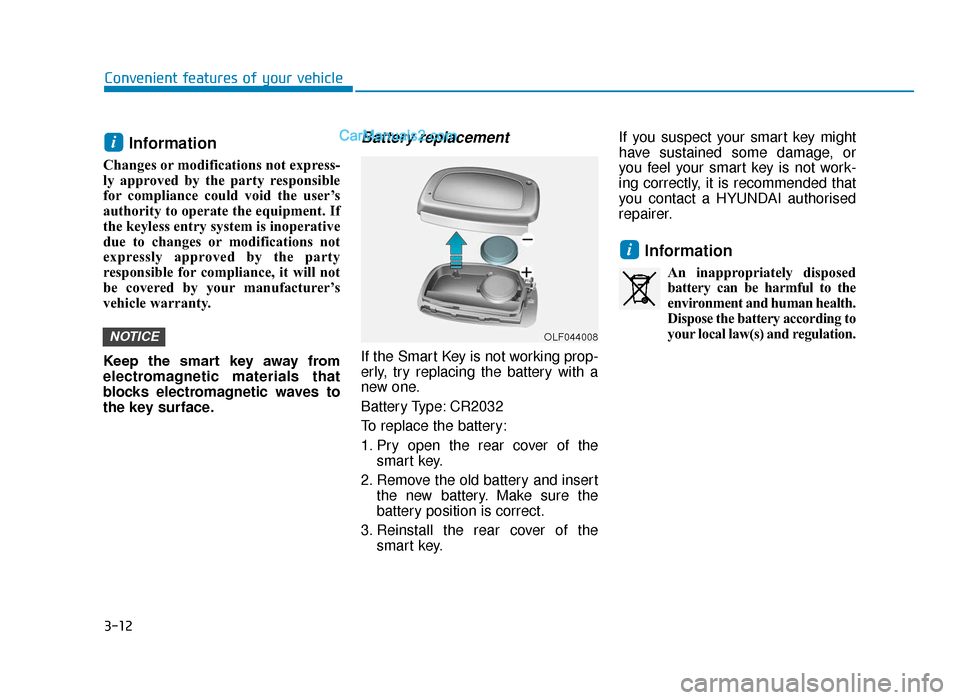
If the Smart Key is not working prop-
erly, try replacing the battery with a
new one.
Battery Type: CR2032
To replace the battery:
1. Pry open the rear cover of thesmart key.
2. Remove the old battery and insert the new battery. Make sure the
battery position is correct.
3. Reinstall the rear cover of the smart key. If you suspect your smart key might
have sustained some damage, or
you feel your smart key is not work-
ing correctly, it is recommended that
you contact a HYUNDAI authorised
repairer.
Information
An inappropriately disposed
battery can be harmful to the
environment and human health.
Dispose the battery according to
your local law(s) and regulation.
i
NOTICE
i
OLF044008
TLe UK 3a(~109).qxp 6/12/2018 2:21 PM Page 12
Page 123 of 685
3-31
Convenient features of your vehicle
3
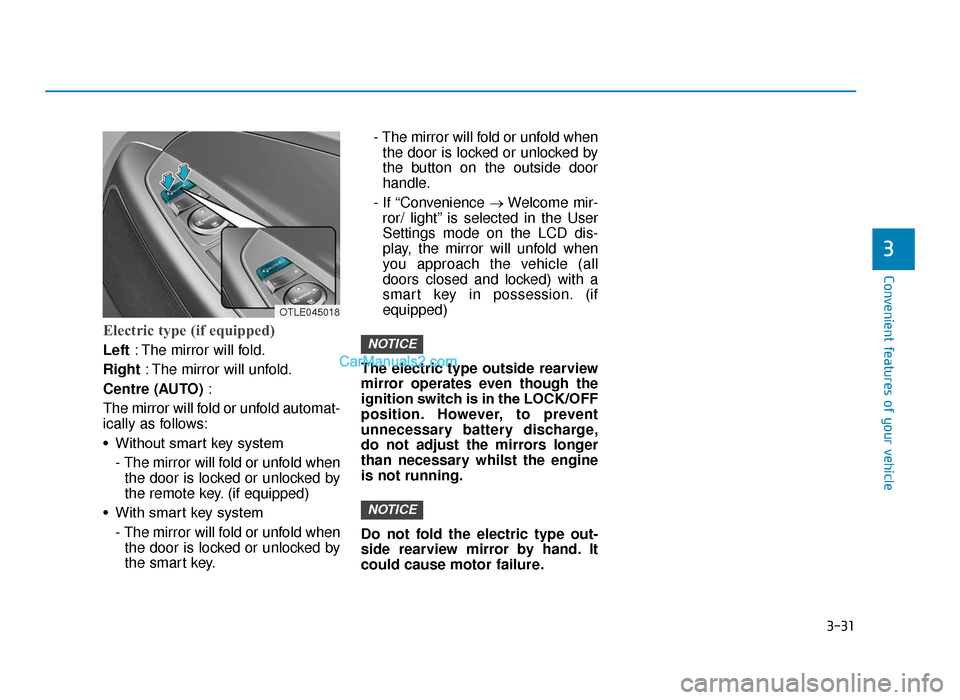
Electric type (if equipped)
Left: The mirror will fold.
Right : The mirror will unfold.
Centre (AUTO) :
The mirror will fold or unfold automat-
ically as follows:
• Without smart key system - The mirror will fold or unfold whenthe door is locked or unlocked by
the remote key. (if equipped)
• With smart key system - The mirror will fold or unfold whenthe door is locked or unlocked by
the smart key. - The mirror will fold or unfold when
the door is locked or unlocked by
the button on the outside door
handle.
- If “Convenience →Welcome mir-
ror/ light” is selected in the User
Settings mode on the LCD dis-
play, the mirror will unfold when
you approach the vehicle (all
doors closed and locked) with a
smart key in possession. (if
equipped)
The electric type outside rearview
mirror operates even though the
ignition switch is in the LOCK/OFF
position. However, to prevent
unnecessary battery discharge,
do not adjust the mirrors longer
than necessary whilst the engine
is not running.
Do not fold the electric type out-
side rearview mirror by hand. It
could cause motor failure.
NOTICE
NOTICE
OTLE045018
TLe UK 3a(~109).qxp 6/12/2018 2:22 PM Page 31
Page 142 of 685
3-50
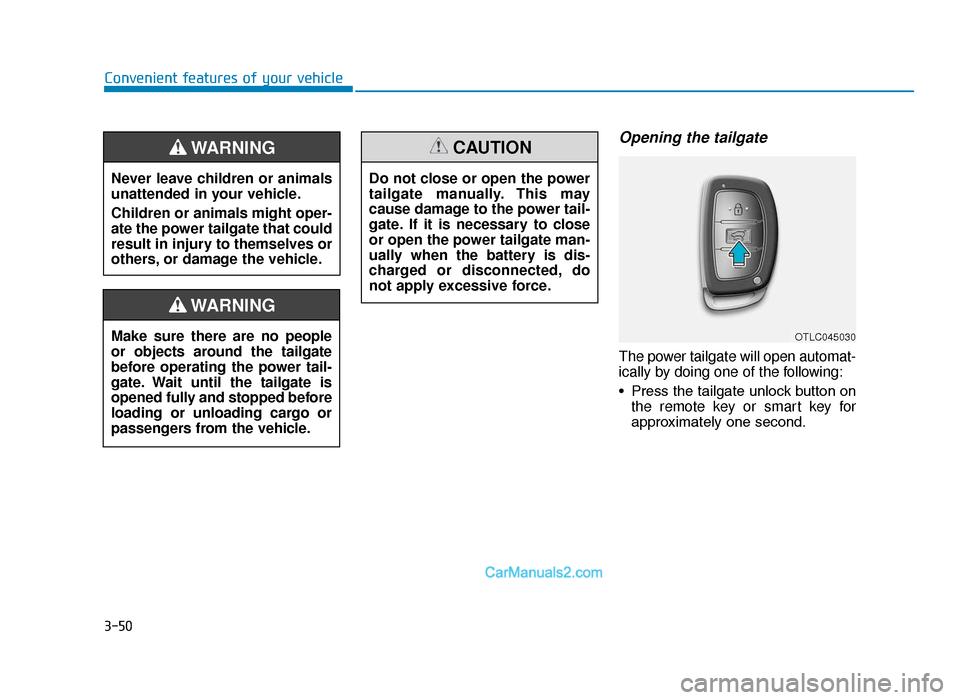
Opening the tailgate
The power tailgate will open automat-
ically by doing one of the following:
• Press the tailgate unlock button onthe remote key or smart key for
approximately one second.
Convenient features of your vehicle
Never leave children or animals
unattended in your vehicle.
Children or animals might oper-
ate the power tailgate that could
result in injury to themselves or
others, or damage the vehicle.
WARNING
Make sure there are no people
or objects around the tailgate
before operating the power tail-
gate. Wait until the tailgate is
opened fully and stopped before
loading or unloading cargo or
passengers from the vehicle.
WARNING
Do not close or open the power
tailgate manually. This may
cause damage to the power tail-
gate. If it is necessary to close
or open the power tailgate man-
ually when the battery is dis-
charged or disconnected, do
not apply excessive force.
CAUTION
OTLC045030
TLe UK 3a(~109).qxp 6/12/2018 2:24 PM Page 50
Page 171 of 685
3-79
Convenient features of your vehicle
Warning messages
Shift to "P" position (for smart key system and auto-matic transaxle/dual clutchtransmission)
This warning message illuminates if
you try to turn off the engine without
the shift lever in P (Park) position.
At this time, the Engine Start/Stop
button turns to the ACC position (If
you press the Engine Start/Stop but-
ton once more, it will turn to the ON
position).
Low Key Battery (for smart key system)
This warning message illuminates if
the battery of the smart key is dis-
charged whilst changing the Engine
Start/Stop button whilst changing to
the OFF position.
Press start button whilst turn-ing wheel (for smart key sys-tem)
This warning message illuminates if
the steering wheel does not unlock
normally when the Engine Start/Stop
button is pressed.
You should press you should press the
Engine Start/Stop button whilst turning
the steering wheel right and left.
Steering wheel unlocked (for smart key system)
This warning message illuminates if
the steering wheel does not lock
whilst the Engine Start/Stop button
changes to the OFF position.
Check steering wheel lock system (for smart key system)
This warning message illuminates if
the steering wheel does not lock nor-
mally whilst the Engine Start/Stop but-
ton changes to the OFF position.
Press brake pedal to start engine(for smart key system and auto-matic transaxle)
This warning message illuminates if
the Engine Start/Stop button changes
to the ACC position twice by pressing
the button repeatedly without depress-
ing the brake pedal.
You can start the vehicle by depressing
the brake pedal.
Press clutch pedal to startengine (for smart key systemand manual transaxle)
This warning message illuminates if
the Engine Start/Stop button is in the
ACC position twice by pressing the
button repeatedly without depressing
the clutch pedal.
Depress the clutch pedal to start the
engine.
3
TLe UK 3a(~109).qxp 6/12/2018 2:27 PM Page 79
Page 197 of 685
3-105
Convenient features of your vehicle
3
Immobiliser IndicatorLight (without smart key)(if equipped)
This indicator light illuminates:
• When the vehicle detects the
immobiliser in your key properly
whilst the ignition switch is ON.
- At this time, you can start theengine.
- The indicator light goes off after starting the engine.
This indicator light blinks:
• When there is a malfunction with the immobiliser system.
In this case, we recommend that
you have the vehicle inspected by
a HYUNDAI authorised repairer.
Immobiliser IndicatorLight (With Smart Key) (if equipped)
This indicator light illuminates for
up to 30 seconds:
• When the vehicle detects the
smart key in the vehicle properly
whilst the Engine Start/Stop button
is ACC or ON.
- At this time, you can start theengine.
- The indicator light goes off after starting the engine.
This indicator light blinks for a few
seconds:
• When the smart key is not in the vehicle.
- At this time, you cannot start theengine.
This indicator light illuminates for
2 seconds and goes off:
• When the vehicle cannot detect the smart key which is in the vehicle
whilst the Engine Start/Stop button
is ON.
In this case, we recommend that
you have the vehicle inspected by
a HYUNDAI authorised repairer.
This indicator light blinks:
• When the battery of the smart keyis weak.
- At this time, you can not start theengine. However, you can start
the engine if you press the
Engine Start/Stop button with the
smart key. (For more details,
refer to “Starting the Engine” in
chapter 5).
• When there is a malfunction with the immobiliser system.
In this case, we recommend that
you have the vehicle inspected by
a HYUNDAI authorised repairer.
TLe UK 3a(~109).qxp 6/12/2018 2:29 PM Page 105
Page 209 of 685
3-117
Convenient features of your vehicle
3
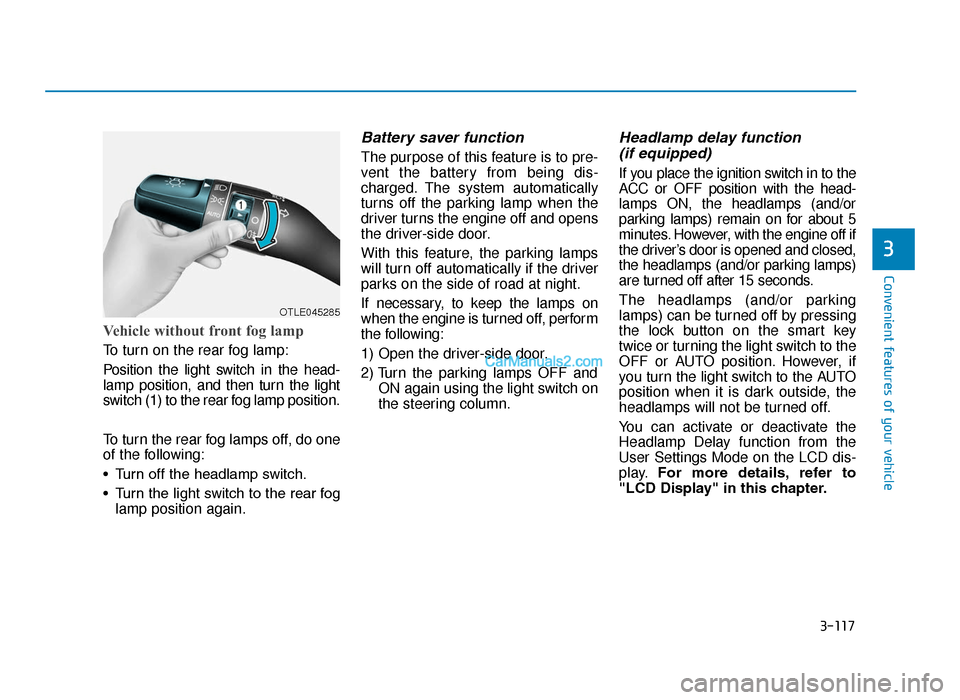
Vehicle without front fog lamp
To turn on the rear fog lamp:
Position the light switch in the head-
lamp position, and then turn the light
switch (1) to the rear fog lamp position.
To turn the rear fog lamps off, do one
of the following:
• Turn off the headlamp switch.
• Turn the light switch to the rear foglamp position again.
Battery saver function
The purpose of this feature is to pre-
vent the battery from being dis-
charged. The system automatically
turns off the parking lamp when the
driver turns the engine off and opens
the driver-side door.
With this feature, the parking lamps
will turn off automatically if the driver
parks on the side of road at night.
If necessary, to keep the lamps on
when the engine is turned off, perform
the following:
1) Open the driver-side door.
2) Turn the parking lamps OFF and ON again using the light switch on
the steering column.
Headlamp delay function (if equipped)
If you place the ignition switch in to the
ACC or OFF position with the head-
lamps ON, the headlamps (and/or
parking lamps) remain on for about 5
minutes. However, with the engine off if
the driver’s door is opened and closed,
the headlamps (and/or parking lamps)
are turned off after 15 seconds.
The headlamps (and/or parking
lamps) can be turned off by pressing
the lock button on the smart key
twice or turning the light switch to the
OFF or AUTO position. However, if
you turn the light switch to the AUTO
position when it is dark outside, the
headlamps will not be turned off.
You can activate or deactivate the
Headlamp Delay function from the
User Settings Mode on the LCD dis-
play. For more details, refer to
"LCD Display" in this chapter.
OTLE045285
TLe UK 3b(110~).qxp 6/12/2018 2:35 PM Page 117
Page 213 of 685
3-121
Convenient features of your vehicle
3
Headlamp and Parking lamp
When the headlamp (lamp switch in
the headlamp or AUTO position) is on
and all doors (and tailgate) are locked
and closed, the parking lamp and
headlamp will come on for 15 seconds
if/or any of the below is performed.
• When the door unlock button ispressed on the remote key or
smart key.
At this time, if you press the door lock
or unlock button, the parking lamp and
headlamp will turn off immediately.
You can activate or deactivate the
Welcome Light from the User
Settings Mode on the LCD display.
For more details, refer to "LCD
Display" in this chapter.
Interior lamp
When the interior lamp switch is in
the DOOR position and all doors (and
tailgate) are closed and locked, the
room lamp will come on for 30 sec-
onds if any of the below is performed.
• When the door unlock button is pressed on the remote key or
smart key.
• When the button of the outside door handle is pressed.
At this time, if you press the door lock
or unlock button, the room lamp will
turn off immediately.
Interior lights
Do not use the interior lights for
extended periods when the engine
is turned off or the battery will dis-
charge.
Interior lamp AUTO cut
The interior lamps will automatically
go off approximately 20 minutes after
the engine is turned off and the
doors closed. If a door is opened, the
lamp will go off 40 minutes after the
engine is turned off. If the doors are
locked and the vehicle enters the
armed stage of the theft alarm sys-
tem, the lamps will go off five sec-
onds later.
NOTICE
Do not use the interior lights
when driving in the dark. The inte-
rior lights may obscure your view
and cause an accident.
WARNING
TLe UK 3b(110~).qxp 6/12/2018 2:35 PM Page 121