turn signal Hyundai Tucson 2019 Owner's Manual - RHD (UK, Australia)
[x] Cancel search | Manufacturer: HYUNDAI, Model Year: 2019, Model line: Tucson, Model: Hyundai Tucson 2019Pages: 685, PDF Size: 17.76 MB
Page 17 of 685
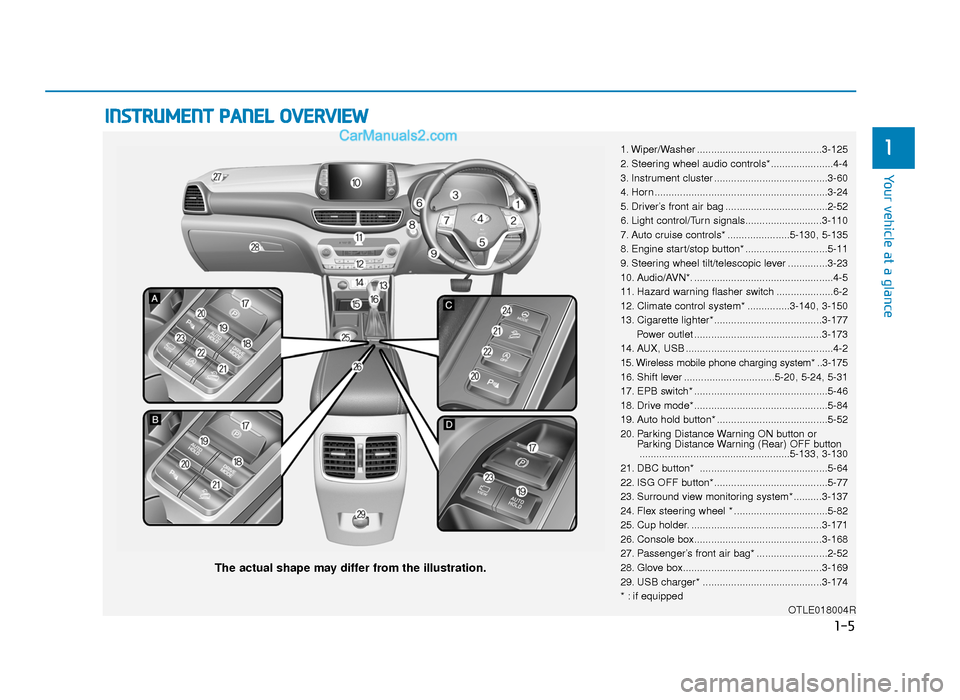
INSTRUMENT PANEL OVERVIEW
1. Wiper/Washer ............................................3-125
2. Steering wheel audio controls*......................4-4
3. Instrument cluster ........................................3-60
4. Horn .............................................................3-24
5. Driver’s front air bag ....................................2-52
6. Light control/Turn signals...........................3-110
7. Auto cruise controls* ......................5-130, 5-135
8. Engine start/stop button* .............................5-11
9. Steering wheel tilt/telescopic lever ..............3-23
10. Audio/AVN*. .................................................4-5
11. Hazard warning flasher switch ....................6-2
12. Climate control system* ...............3-140, 3-150
13. Cigarette lighter*......................................3-177Power outlet .............................................3-173
14. AUX, USB ....................................................4-2
15. Wireless mobile phone charging system* ..3-175
16. Shift lever ................................5-20, 5-24, 5-31
17. EPB switch* ...............................................5-46
18. Drive mode* ...............................................5-84
19. Auto hold button* .......................................5-52
20. Parking Distance Warning ON button or Parking Distance Warning (Rear) OFF button.....................................................5-133, 3-130
21. DBC button* .............................................5-64
22. ISG OFF button*........................................5-77
23. Surround view monitoring system* ..........3-137
24. Flex steering wheel * .................................5-82
25. Cup holder. ..............................................3-171
26. Console box.............................................3-168
27. Passenger’s front air bag* .........................2-52
28. Glove box.................................................3-169
29. USB charger* ..........................................3-174
* : if equipped OTLE018004R
The actual shape may differ from the illustration.
1-5
Your vehicle at a glance
1
TLe UK 1.qxp 5/10/2018 11:27 AM Page 5
Page 78 of 685
2-58
Safety system of your vehicleDuring a moderate to severe frontal
collision, sensors will detect the vehi-
cle’s rapid deceleration. If the rate of
deceleration is high enough, the con-
trol unit will inflate the front air bags,
at the time and with the force needed.
The front air bags help protect the
driver and front passenger by
responding to frontal impacts in
which seat belts alone cannot pro-
vide adequate restraint. When need-
ed, the side air bags help provide
protection in the event of a side
impact or rollover by supporting the
side upper body area.
• Air bags are activated (able toinflate if necessary) only when the
ignition switch is in the ON position.
• Air bags inflate in the event of cer- tain frontal or side collisions to help
protect the occupants from serious
physical injury.
• There is no single speed at which the air bags will inflate. Generally,
air bags are designed to inflate
based upon the severity of a colli-
sion and its direction. These two
factors determine whether the sen-
sors produce an electronic deploy-
ment/inflation signal. • Air bag deployment depends on a
number of factors including vehicle
speed, angles of impact and the
density and stiffness of the vehi-
cles or objects which your vehicle
impacts during a collision. The
determining factors are not limited
to those mentioned above.
• The front air bags will completely inflate and deflate in an instant. It is
virtually impossible for you to see
the air bags inflate during an acci-
dent. It is much more likely that you
will simply see the deflated air
bags hanging out of their storage
compartments after the collision.
• In addition to inflating in serious side collisions, vehicles equipped
with a rollover sensor, side and/or
curtain air bags will inflate if the
sensing system detects a rollover.
When a rollover is detected, cur-
tain air bags will remain inflated
longer to help provide protection
from ejection, especially when
used in conjunction with the seat
belts. (if equipped with a rollover
sensor)
If your SRS malfunctions, the
air bag may not inflate properly
during an accident increasing
the risk of serious injury or
death.
If any of the following condi-
tions occur, your SRS is mal-
functioning:
•The light does not turn on for
approximately six seconds
when the ignition switch is in
the ON position.
•The light stays on after illumi-
nating for approximately six
seconds.
•The light comes on whilst the
vehicle is in motion.
•The light blinks when the
engine is running.
We recommend that a HYUNDAI
authorised repairer inspect the
SRS as soon as possible if any
of these conditions occur.
WARNING
TLe UK 2.qxp 6/12/2018 2:08 PM Page 58
Page 167 of 685
3-75
Convenient features of your vehicle
3
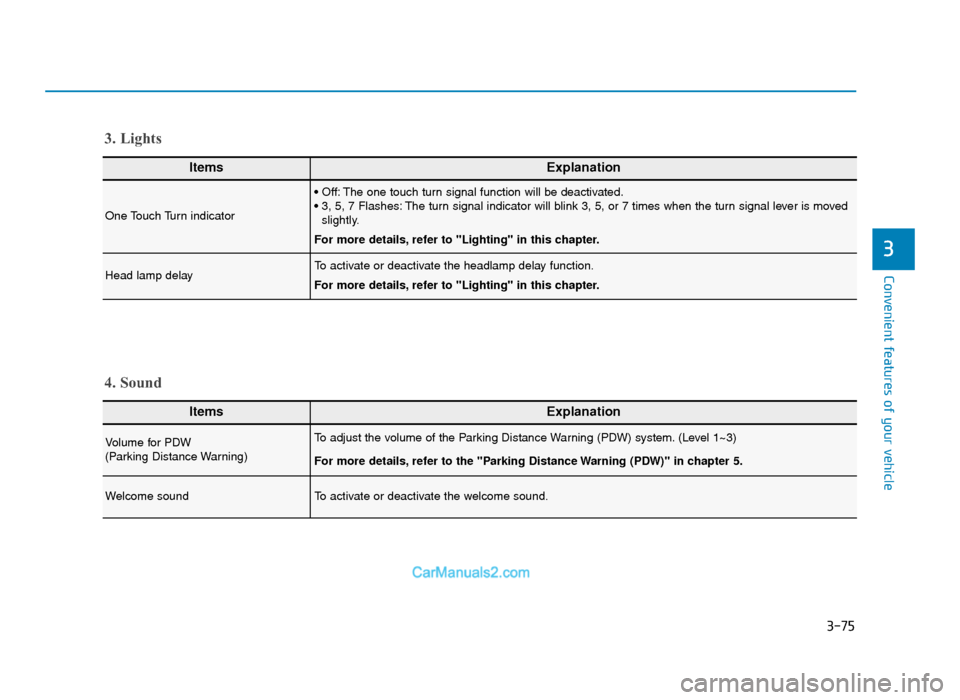
ItemsExplanation
One Touch Turn indicator
• Off: The one touch turn signal function will be deactivated.
• 3, 5, 7 Flashes: The turn signal indicator will blink 3, 5, or 7 times when the turn signal lever is movedslightly.
For more details, refer to "Lighting" in this chapter.
Head lamp delayTo activate or deactivate the headlamp delay function.
For more details, refer to "Lighting" in this chapter.
3. Lights
ItemsExplanation
Volume for PDW
(Parking Distance Warning)To adjust the volume of the Parking Distance Warning (PDW) system. (Level 1~3)
For more details, refer to the "Parking Distance Warning (PDW)" in chapter 5.
Welcome soundTo activate or deactivate the welcome sound.
4. Sound
TLe UK 3a(~109).qxp 6/12/2018 2:27 PM Page 75
Page 176 of 685
3-84
Convenient features of your vehicle
Engine has overheated
This warning message illuminates
with a warning chime when the
engine coolant temperature is above
120°C (248°F). This means that the
engine is overheated and may be
damaged.
If your vehicle is overheated, refer
to “Overheating” in chapter 6.
Check headlight (if equipped)
This warning message is displayed if
the headlamps are not operating
properly.
In addition, if a specific lamp(turn
signal lamp etc.) is not operating
properly, the warning message
according to a specific lamp (turn
signal lamp etc.) is displayed. A cor-
responding bulb may need to be
replaced.
Information
Make sure to replace the burned out
bulb with a new one of the same
wattage rating.
If not, this warning message will not
be displayed.
Low engine oil (if equipped)
This warning message is displayed
when the engine oil level should be
checked.
If this warning message is displayed,
check the engine oil level as soon as
possible and add engine oil as
required.
Slowly pour the recommended oil lit-
tle by little into a funnel. (Oil refill
capacity : approximately 0.6 ~ 1.0 l)
Use only the specified engine oil.
(Refer to "Recommended lubricants
and capacities" in chapter 8.)
Do not overfill the engine oil. Make
sure the oil level is not above F (Full)
mark on the dipstick.
i
TLe UK 3a(~109).qxp 6/12/2018 2:27 PM Page 84
Page 198 of 685
3-106
Convenient features of your vehicle
Turn Signal IndicatorLight
This indicator light blinks:
• When you turn the turn signal light
on.
If any of the following occurs, there
may a malfunction with the turn signal
system. In this case, we recommend
that you have the vehicle inspected by
a HYUNDAI authorised repairer. - The indicator light does not blinkbut illuminates.
- The indicator light blinks more rapidly.
- The indicator light does not illumi- nate at all.
Low Beam IndicatorLight (if equipped)
This indicator light illuminates:
• When the headlights are on.
High Beam IndicatorLight
This indicator light illuminates:
• When the headlights are on and in
the high beam position
• When the turn signal lever is pulled into the Flash-to-Pass position.
High Beam Assist(HBA) indicator light (if equipped)
This warning light illuminates:
• When the high-beam is on with the
light switch in the AUTO light posi-
tion.
• If your vehicle detects oncoming or preceding vehicles, the High Beam
Assist (HBA) system will switch the
high beam to low beam automati-
cally.
For more details, refer to "High
Beam Assist (HBA)" in this chap-
ter.
TLe UK 3a(~109).qxp 6/12/2018 2:29 PM Page 106
Page 207 of 685
3-115
Convenient features of your vehicle
3
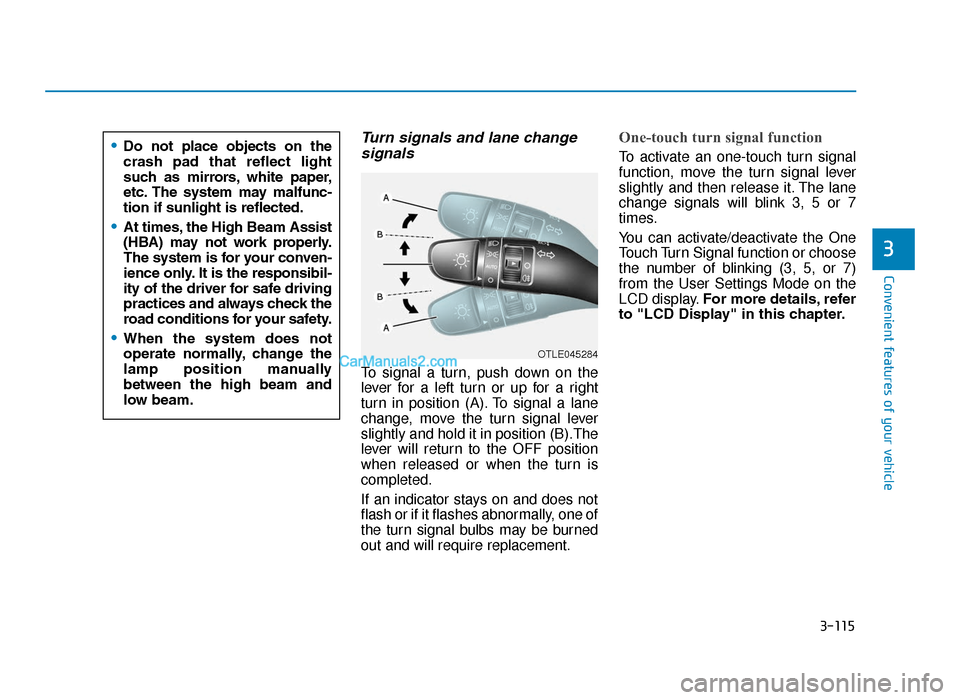
Turn signals and lane changesignals
To signal a turn, push down on the
lever for a left turn or up for a right
turn in position (A). To signal a lane
change, move the turn signal lever
slightly and hold it in position (B).The
lever will return to the OFF position
when released or when the turn is
completed.
If an indicator stays on and does not
flash or if it flashes abnormally, one of
the turn signal bulbs may be burned
out and will require replacement.
One-touch turn signal function
To activate an one-touch turn signal
function, move the turn signal lever
slightly and then release it. The lane
change signals will blink 3, 5 or 7
times.
You can activate/deactivate the One
Touch Turn Signal function or choose
the number of blinking (3, 5, or 7)
from the User Settings Mode on the
LCD display. For more details, refer
to "LCD Display" in this chapter.
OTLE045284
•Do not place objects on the
crash pad that reflect light
such as mirrors, white paper,
etc. The system may malfunc-
tion if sunlight is reflected.
•At times, the High Beam Assist
(HBA) may not work properly.
The system is for your conven-
ience only. It is the responsibil-
ity of the driver for safe driving
practices and always check the
road conditions for your safety.
•When the system does not
operate normally, change the
lamp position manually
between the high beam and
low beam.
TLe UK 3b(110~).qxp 6/12/2018 2:35 PM Page 115
Page 258 of 685
3-166
Convenient features of your vehicle
Auto defogging system (only for automatic climate control system, if equipped)
Auto defogging reduces the possibil-
ity of fogging up the inside of the
windscreen by automatically sensing
the moisture of inside the wind-
screen.
The auto defogging system operates
when the heater or air conditioning is
on.
Information
The auto defogging system may not
operate normally, when the outside
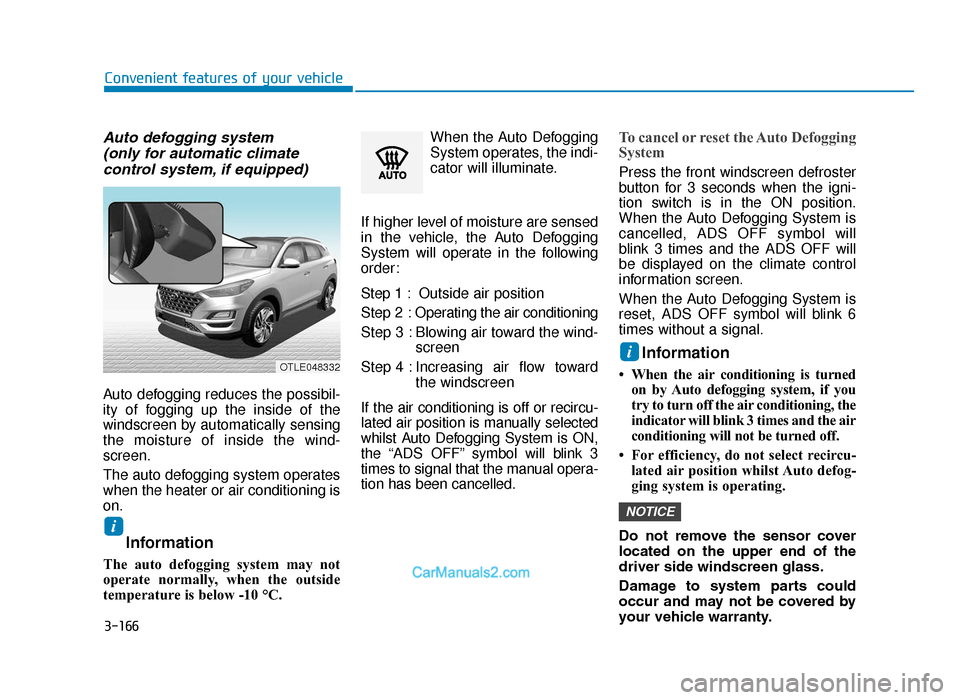
temperature is below -10 °C. When the Auto Defogging
System operates, the indi-
cator will illuminate.
If higher level of moisture are sensed
in the vehicle, the Auto Defogging
System will operate in the following
order:
Step 1 : Outside air position
Step 2 : Operating the air conditioning
Step 3 : Blowing air toward the wind- screen
Step 4 : Increasing air flow toward the windscreen
If the air conditioning is off or recircu-
lated air position is manually selected
whilst Auto Defogging System is ON,
the “ADS OFF” symbol will blink 3
times to signal that the manual opera-
tion has been cancelled.
To cancel or reset the Auto Defogging
System
Press the front windscreen defroster
button for 3 seconds when the igni-
tion switch is in the ON position.
When the Auto Defogging System is
cancelled, ADS OFF symbol will
blink 3 times and the ADS OFF will
be displayed on the climate control
information screen.
When the Auto Defogging System is
reset, ADS OFF symbol will blink 6
times without a signal.
Information
• When the air conditioning is turned on by Auto defogging system, if you
try to turn off the air conditioning, the
indicator will blink 3 times and the air
conditioning will not be turned off.
• For efficiency, do not select recircu- lated air position whilst Auto defog-
ging system is operating.
Do not remove the sensor cover
located on the upper end of the
driver side windscreen glass.
Damage to system parts could
occur and may not be covered by
your vehicle warranty.
NOTICE
i
i
OTLE048332
TLe UK 3b(110~).qxp 6/12/2018 2:41 PM Page 166
Page 299 of 685
![Hyundai Tucson 2019 Owners Manual - RHD (UK, Australia) 4-24
Multimedia System
Searching for radio stations
To search for the previous or next
available radio station, press the
[∨
SEEK/TRACK ∧] button on the
control panel.
• You can also press](/img/35/19695/w960_19695-298.png "Hyundai Tucson 2019 Owners Manual - RHD (UK, Australia) 4-24
Multimedia System
Searching for radio stations
To search for the previous or next
available radio station, press the
[∨
SEEK/TRACK ∧] button on the
control panel.
• You can also press")
4-24
Multimedia System
Searching for radio stations
To search for the previous or next
available radio station, press the
[∨
SEEK/TRACK ∧] button on the
control panel.
• You can also press and hold the [∨
SEEK/TRACK ∧] button to
search for frequencies quickly.
When you release the button, a
radio station with a strong signal is
selected automatically. (if equipped)
If you know the exact frequency of
the radio station you want to listen to,
turn the [TUNE] knob on the control
panel to change the frequency.
Saving radio stations
You can save your favourite radio
stations and listen to them by select-
ing them from the preset list.
Whilst listening to the radio, press
the number button for an empty pre-
set slot on the radio screen.
• The radio station you are listening to will be added to the selected
number.
• You can save up to 36 radio sta- tions.
• If the preset list is full, you can replace one of your favourite
stations with the station you are
listening to. On the control
panel, press and hold the
desired number button.
Listening to saved radio stations
1. Confirm the preset number for the radio station you want to listen to.
2. On the control panel, press the desired number button.
• Alternatively, push the Up/Downlever on the steering wheel to
change the station.
NOTICE
TLe UK 4.qxp 5/10/2018 12:05 PM Page 24
Page 320 of 685
4-45
Multimedia System
4
SYSTEM STATUS ICONS
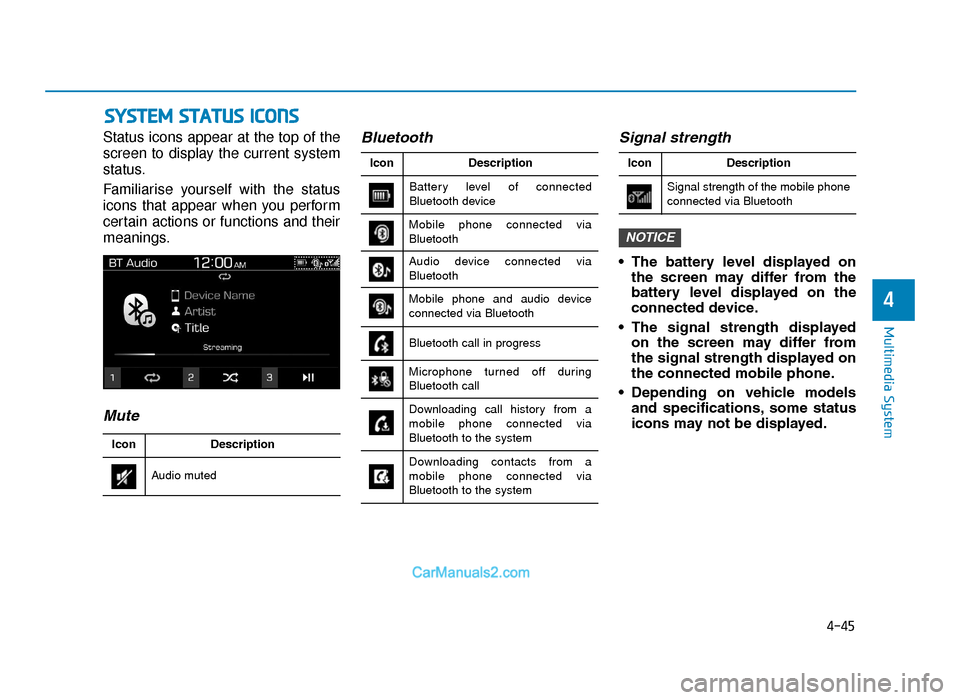
Status icons appear at the top of the
screen to display the current system
status.
Familiarise yourself with the status
icons that appear when you perform
certain actions or functions and their
meanings.
MuteBluetooth
Signal strength
• The battery level displayed on
the screen may differ from the
battery level displayed on the
connected device.
• The signal strength displayed on the screen may differ from
the signal strength displayed on
the connected mobile phone.
• Depending on vehicle models and specifications, some status
icons may not be displayed.
NOTICE
Battery level of connected
Bluetooth device Description
Icon
Bluetooth call in progress
Microphone turned off during
Bluetooth call
Downloading call history from a
mobile phone connected via
Bluetooth to the system
Downloading contacts from a
mobile phone connected via
Bluetooth to the system
Mobile phone connected via
Bluetooth
Audio device connected via
Bluetooth
Mobile phone and audio device
connected via Bluetooth
Audio muted Description
Icon
Signal strength of the mobile phone
connected via Bluetooth Description
Icon
TLe UK 4.qxp 5/10/2018 12:05 PM Page 45
Page 390 of 685
5-66
Driving your vehicle
• The DBC may not deactivate on steep inclines even though the
brake or accelerator pedal is
depressed.
• Do not turn on the DBC when driving with shift lever in 3rd
gear (and above) for vehicles
with manual transaxle. The
engine may stop if the DBC sys-
tem is activated.
• The DBC does not operate when: - The shift lever is in P (Park).
- The ESC is activated.
Low Vacuum Assist (LVA)
(if equipped)
Low Vacuum Assist (LVA) amplifies
the hydraulic brake force to assist the
driver under low or temporarily low
engine vacuum. You may hear a
motor running sound and feel a slight
vibration in the brake pedal like ABS
operating. This indicates that the
Supplemental Brake Assist system is
working to maintain braking power.
Emergency Stop Signal (ESS)
(if equipped)
The Emergency Stop Signal system
alerts the driver behind by blinking
the stop lights, whilst sharply and
severely braking.
The system is activated when:
• The vehicle suddenly stops. (Thedeceleration power exceeds 7 m/s
2,
and the driving speed exceeds 34
mph (55 km/h).)
• The ABS is activated.
The hazard warning flasher automat-
ically turns ON after blinking the stop
lights, when the driving speeds is
decelerated under 25 mph (40 km/h),
when the ABS is deactivated, and
when the sudden braking situation is
over.
NOTICE
Low Vacuum Assist (LVA) will
not prevent accidents due to
improper or dangerous driving
manoeuvres.
WARNING
TLe UK 5.qxp 5/10/2018 12:23 PM Page 66