warning HYUNDAI TUCSON 2022 Manual Online
[x] Cancel search | Manufacturer: HYUNDAI, Model Year: 2022, Model line: TUCSON, Model: HYUNDAI TUCSON 2022Pages: 638, PDF Size: 82.3 MB
Page 130 of 638
Instrument cluster
4-32
ONX4040014
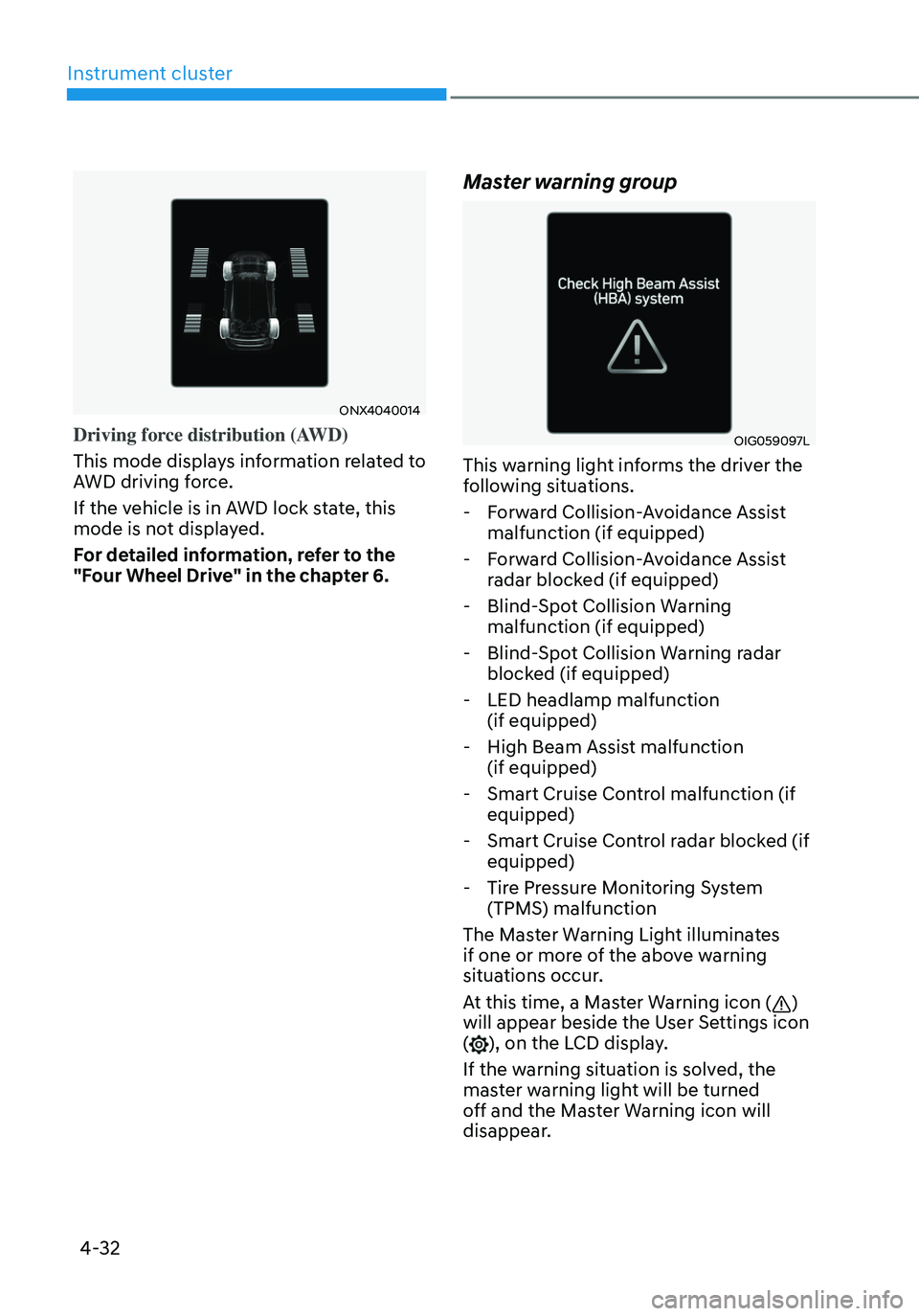
Driving force distribution (AWD)
This mode displays information related to
AWD driving force.
If the vehicle is in AWD lock state, this
mode is not displayed.
For detailed information, refer to the
"Four Wheel Drive" in the chapter 6.
Master warning group
OIG059097L
This warning light informs the driver the
following situations.
-Forward Collision-Avoidance Assist
malfunction (if equipped)
-Forward Collision-Avoidance Assist
radar blocked (if equipped)
-Blind-Spot Collision Warning
malfunction (if equipped)
-Blind-Spot Collision Warning radar
blocked (if equipped)
-LED headlamp malfunction
(if equipped)
-High Beam Assist malfunction
(if equipped)
-Smart Cruise Control malfunction (if
equipped)
-Smart Cruise Control radar blocked (if
equipped)
-Tire Pressure Monitoring System
(TPMS) malfunction
The Master Warning Light illuminates
if one or more of the above warning
situations occur.
At this time, a Master Warning icon (
)
will appear beside the User Settings icon
(
), on the LCD display.
If the warning situation is solved, the
master warning light will be turned
off and the Master Warning icon will
disappear.
Page 132 of 638
Instrument cluster
4-34
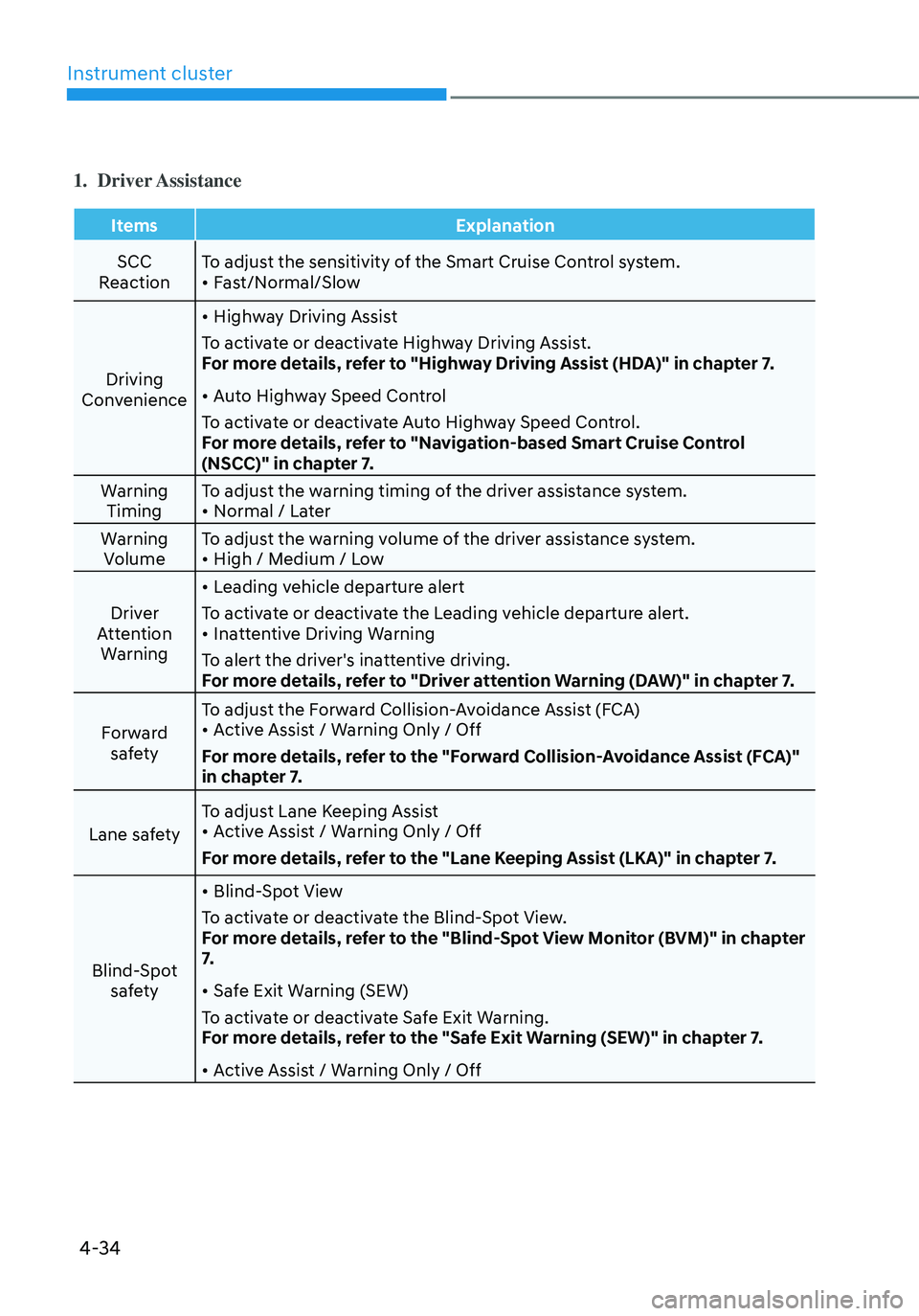
1. Driver Assistance
ItemsExplanation
SCC
Reaction To adjust the sensitivity of the Smart Cruise Control system.
• Fast/Normal/Slow
Driving
Convenience
• Highway Driving Assist
To activate or deactivate Highway Driving Assist.
For more details, refer to "Highway Driving Assist (HDA)" in chapter 7.
• Auto Highway Speed Control
To activate or deactivate Auto Highway Speed Control.
For more details, refer to "Navigation-based Smart Cruise Control
(NSCC)" in chapter 7.
Warning Timing To adjust the warning timing of the driver assistance system.
• Normal / Later
Warning Volume To adjust the warning volume of the driver assistance system.
• High / Medium / Low
Driver
Attention Warning
• Leading vehicle departure alert
To activate or deactivate the Leading vehicle departure alert.
• Inattentive Driving Warning
To alert the driver's inattentive driving.
For more details, refer to "Driver attention Warning (DAW)" in chapter 7.
Forward safety To adjust the Forward Collision-Avoidance Assist (FCA)
• Active Assist / Warning Only / Off
For more details, refer to the "Forward Collision-Avoidance Assist (FCA)"
in chapter 7.
Lane safety To adjust Lane Keeping Assist
• Active Assist / Warning Only / Off
For more details, refer to the "Lane Keeping Assist (LKA)" in chapter 7.
Blind-Spot safety
• Blind-Spot View
To activate or deactivate the Blind-Spot View.
For more details, refer to the "Blind-Spot View Monitor (BVM)" in chapter
7.
• Safe Exit Warning (SEW)
To activate or deactivate Safe Exit Warning.
For more details, refer to the "Safe Exit Warning (SEW)" in chapter 7.
• Active Assist / Warning Only / Off
Page 133 of 638
04
4-35
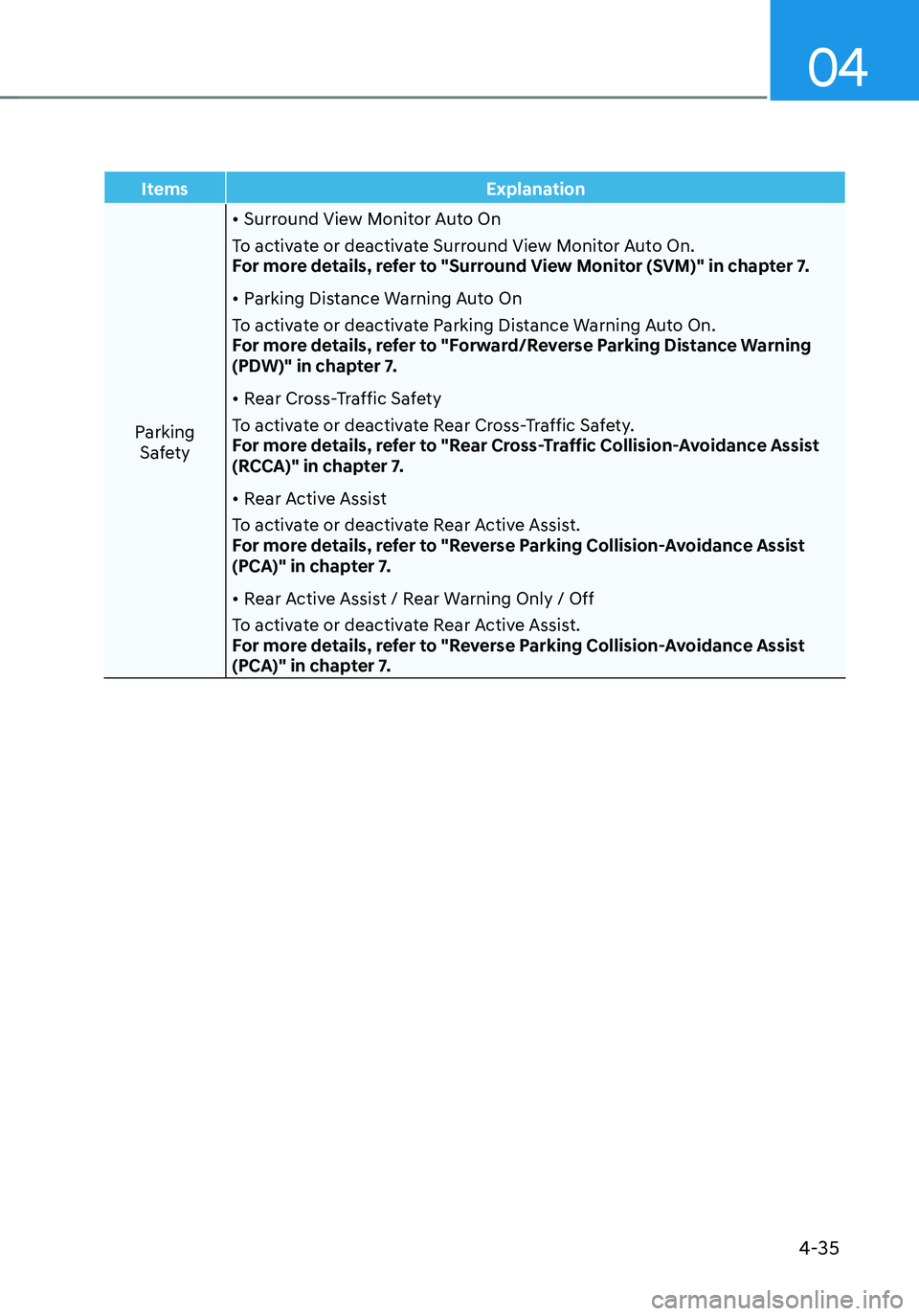
ItemsExplanation
Parking Safety
• Surround View Monitor Auto On
To activate or deactivate Surround View Monitor Auto On.
For more details, refer to "Surround View Monitor (SVM)" in chapter 7.
• Parking Distance Warning Auto On
To activate or deactivate Parking Distance Warning Auto On.
For more details, refer to "Forward/Reverse Parking Distance Warning
(PDW)" in chapter 7.
• Rear Cross-Traffic Safety
To activate or deactivate Rear Cross-Traffic Safety.
For more details, refer to "Rear Cross-Traffic Collision-Avoidance Assist
(RCCA)" in chapter 7.
• Rear Active Assist
To activate or deactivate Rear Active Assist.
For more details, refer to "Reverse Parking Collision-Avoidance Assist
(PCA)" in chapter 7.
• Rear Active Assist / Rear Warning Only / Off
To activate or deactivate Rear Active Assist.
For more details, refer to "Reverse Parking Collision-Avoidance Assist
(PCA)" in chapter 7.
Page 134 of 638
Instrument cluster
4-36
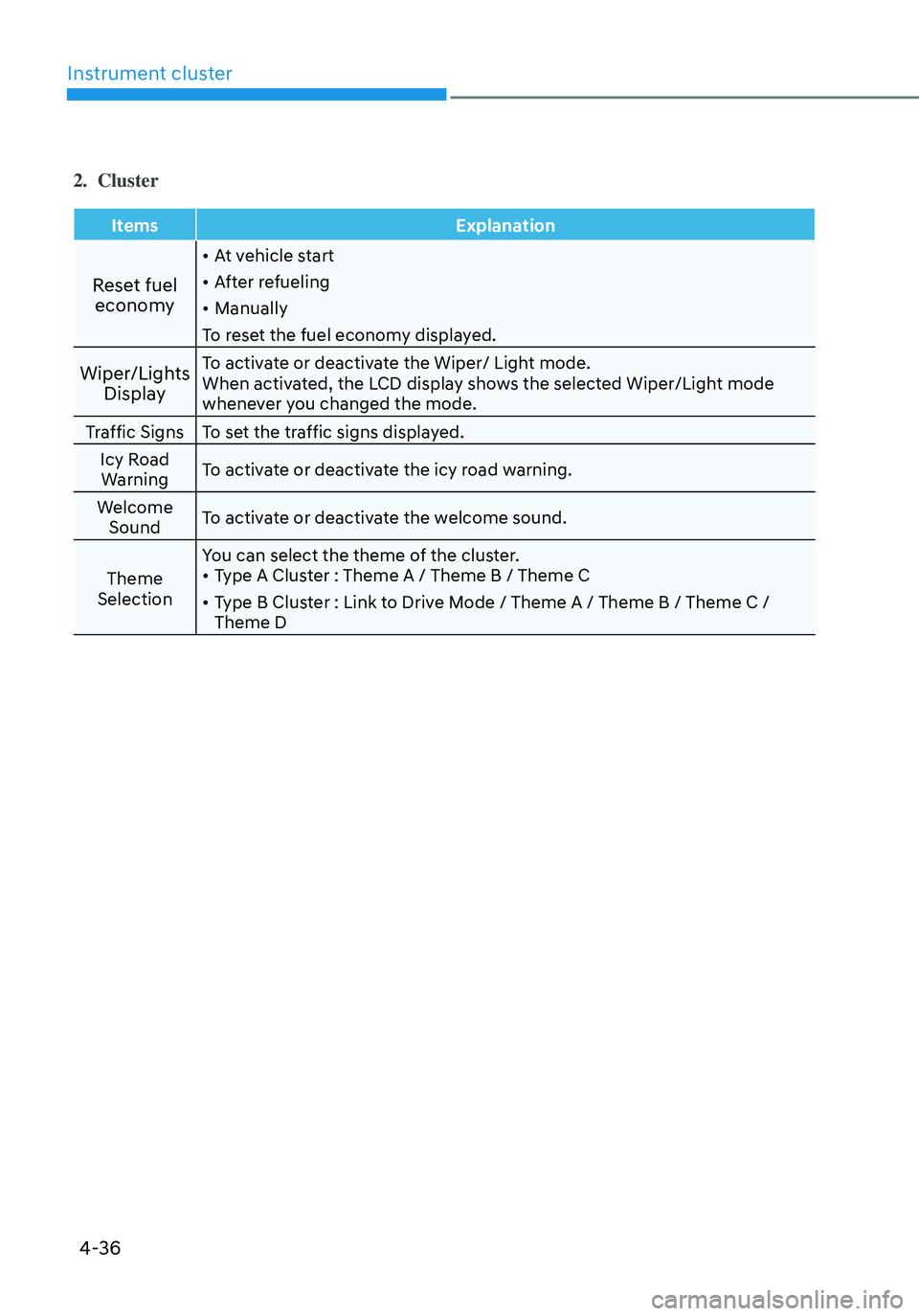
2. Cluster
ItemsExplanation
Reset fuel
economy
• At vehicle start
• After refueling
• Manually
To reset the fuel economy displayed.
Wiper/Lights DisplayTo activate or deactivate the Wiper/ Light mode.
When activated, the LCD display shows the selected Wiper/Light mode
whenever you changed the mode.
Traffic Signs To set the traffic signs displayed.
Icy Road Warning To activate or deactivate the icy road warning.
Welcome Sound To activate or deactivate the welcome sound.
Theme
Selection You can select the theme of the cluster.
• Type A Cluster : Theme A / Theme B / Theme C
• Type B Cluster : Link to Drive Mode / Theme A / Theme B / Theme C /
Theme D
Page 144 of 638
Instrument cluster
4-46
ONX4E040028
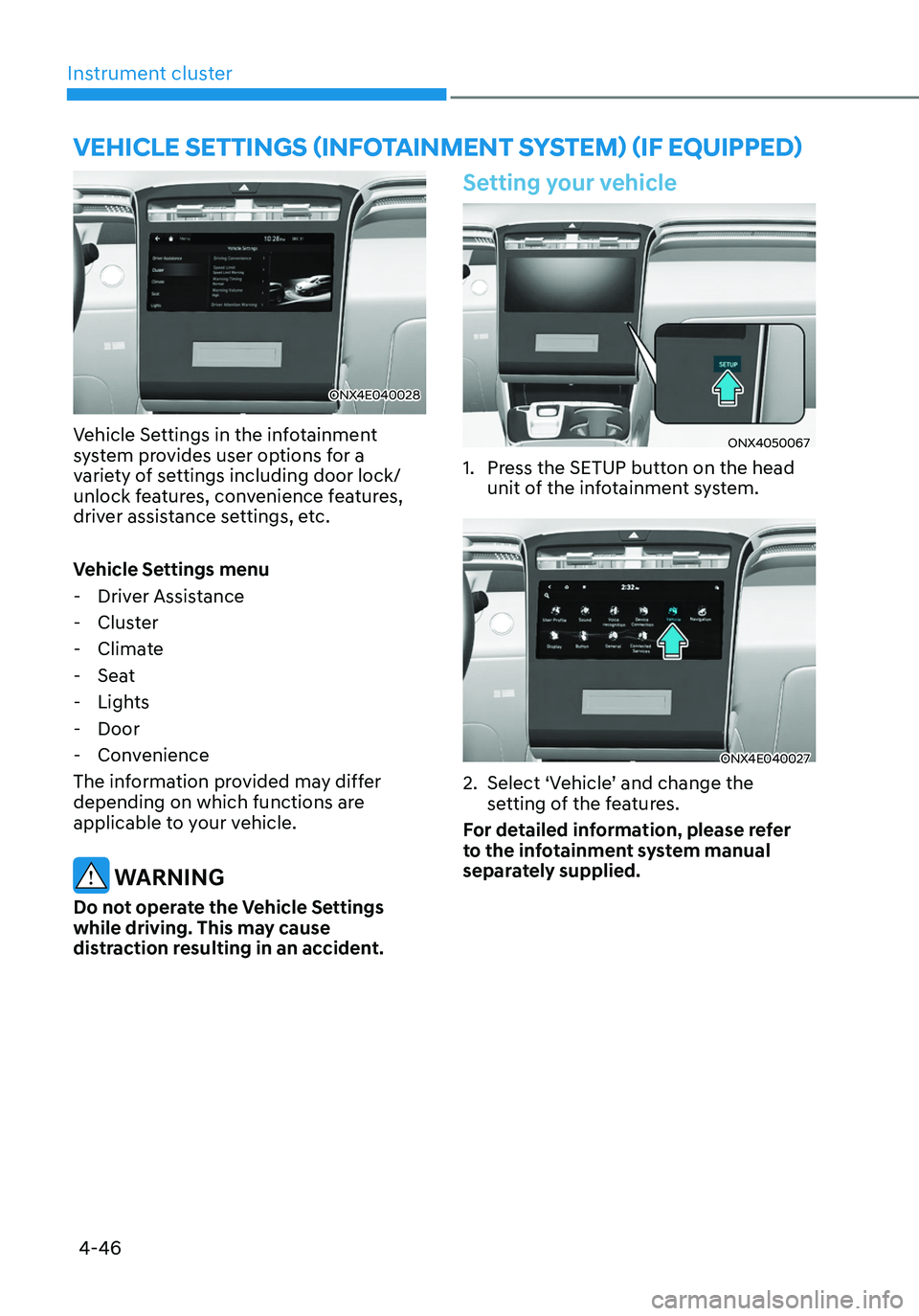
Vehicle Settings in the infotainment
system provides user options for a
variety of settings including door lock/
unlock features, convenience features,
driver assistance settings, etc.
Vehicle Settings menu
-Driver Assistance
-Cluster
-Climate
-Seat
-Lights
-Door
-Convenience
The information provided may differ
depending on which functions are
applicable to your vehicle.
WARNING
Do not operate the Vehicle Settings
while driving. This may cause
distraction resulting in an accident.
Setting your vehicle
ONX4050067
1. Press the SETUP button on the head
unit of the infotainment system.
ONX4E040027
2. Select ‘Vehicle’ and change the
setting of the features.
For detailed information, please refer
to the infotainment system manual
separately supplied.
VEHICLE SETTINGS (INFOTAINMENT SYSTEM) (IF EQUIPPED)
Page 145 of 638

Convenient features
Accessing your vehicle ........................................................................\
.............5-4Remote key ........................................................................\
...........................................5-4
Smart key ........................................................................\
..............................................5 -7
Immobilizer system ........................................................................\
............................5-14
Hyundai Digital Key ........................................................................\
.............................5-15
Door locks........................................................................\
................................. 5-31Operating door locks from outside the vehicle.........................................................5-31
Operating door unlocks from inside the vehicle ......................................................5-33
Auto door lock/unlock features ........................................................................\
......... 5-35
Child-protector rear door locks
........................................................................\
.........5-35
Theft-alarm system ........................................................................\
.................5-36
Integrated memory system
........................................................................\
.....5-37Storing memory positions ........................................................................\
.................5-37
Recalling memory positions ........................................................................\
..............5-38
Resetting the system ........................................................................\
.........................5-38
Seat Easy Access Operation ........................................................................\
..............5-39
Steering wheel ........................................................................\
........................5-40Electric Power Steering (EPS) ........................................................................\
...........5-40
Tilt / Telescopic steering ........................................................................\
....................5-41
Heated steering wheel ........................................................................\
.......................5-41
Horn ........................................................................\
..................................................... 5-42
Mirrors ........................................................................\
.....................................5-43Inside rearview mirror ........................................................................\
........................5-43
Side View mirrors ........................................................................\
...............................5-53
Windows ........................................................................\
..................................5-55Power windows ........................................................................\
..................................5-56
Panoramic sunroof ........................................................................\
..................5-60Power sunshade ........................................................................\
...............................5-60
Tilt open/close ........................................................................\
...................................5-61
Slide open/close ........................................................................\
................................5-61
Automatic reversal ........................................................................\
............................5-62
Resetting the sunroof ........................................................................\
........................5-63
Sunroof open warning ........................................................................\
......................5-64
Exterior features ........................................................................\
......................5-65Hood ........................................................................\
....................................................5-65
Liftgate ........................................................................\
...............................................5-66
Power liftgate ........................................................................\
....................................5-68
Smart liftgate ........................................................................\
......................................5 -74
Fuel filler door ........................................................................\
..................................... 5 -76
5. Convenient features
5
Page 148 of 638
Convenient features
5-4
Remote key (if equipped)
OPD046001
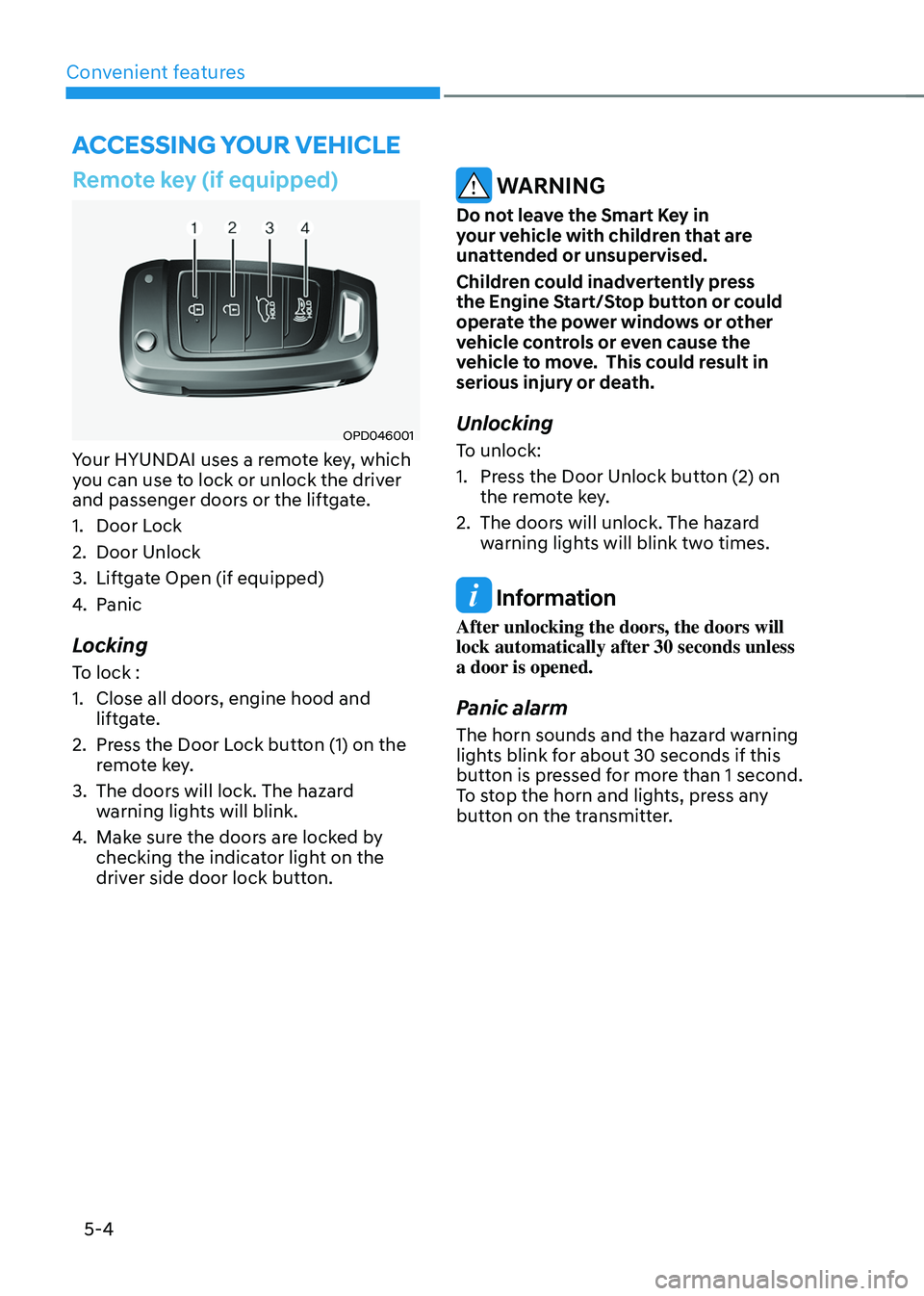
Your HYUNDAI uses a remote key, which
you can use to lock or unlock the driver
and passenger doors or the liftgate.
1. Door Lock
2. Door Unlock
3. Liftgate Open (if equipped)
4. Panic
Locking
To lock :
1. Close all doors, engine hood and
liftgate.
2. Press the Door Lock button (1) on the
remote key.
3. The doors will lock. The hazard
warning lights will blink.
4. Make sure the doors are locked by
checking the indicator light on the
driver side door lock button.
WARNING
Do not leave the Smart Key in
your vehicle with children that are
unattended or unsupervised.
Children could inadvertently press
the Engine Start/Stop button or could
operate the power windows or other
vehicle controls or even cause the
vehicle to move. This could result in
serious injury or death.
Unlocking
To unlock:
1. Press the Door Unlock button (2) on
the remote key.
2. The doors will unlock. The hazard
warning lights will blink two times.
Information
After unlocking the doors, the doors will
lock automatically after 30 seconds unless
a door is opened.
Panic alarm
The horn sounds and the hazard warning
lights blink for about 30 seconds if this
button is pressed for more than 1 second.
To stop the horn and lights, press any
button on the transmitter.
ACCESSING YOUR VEHICLE
Page 152 of 638
Convenient features
5-8
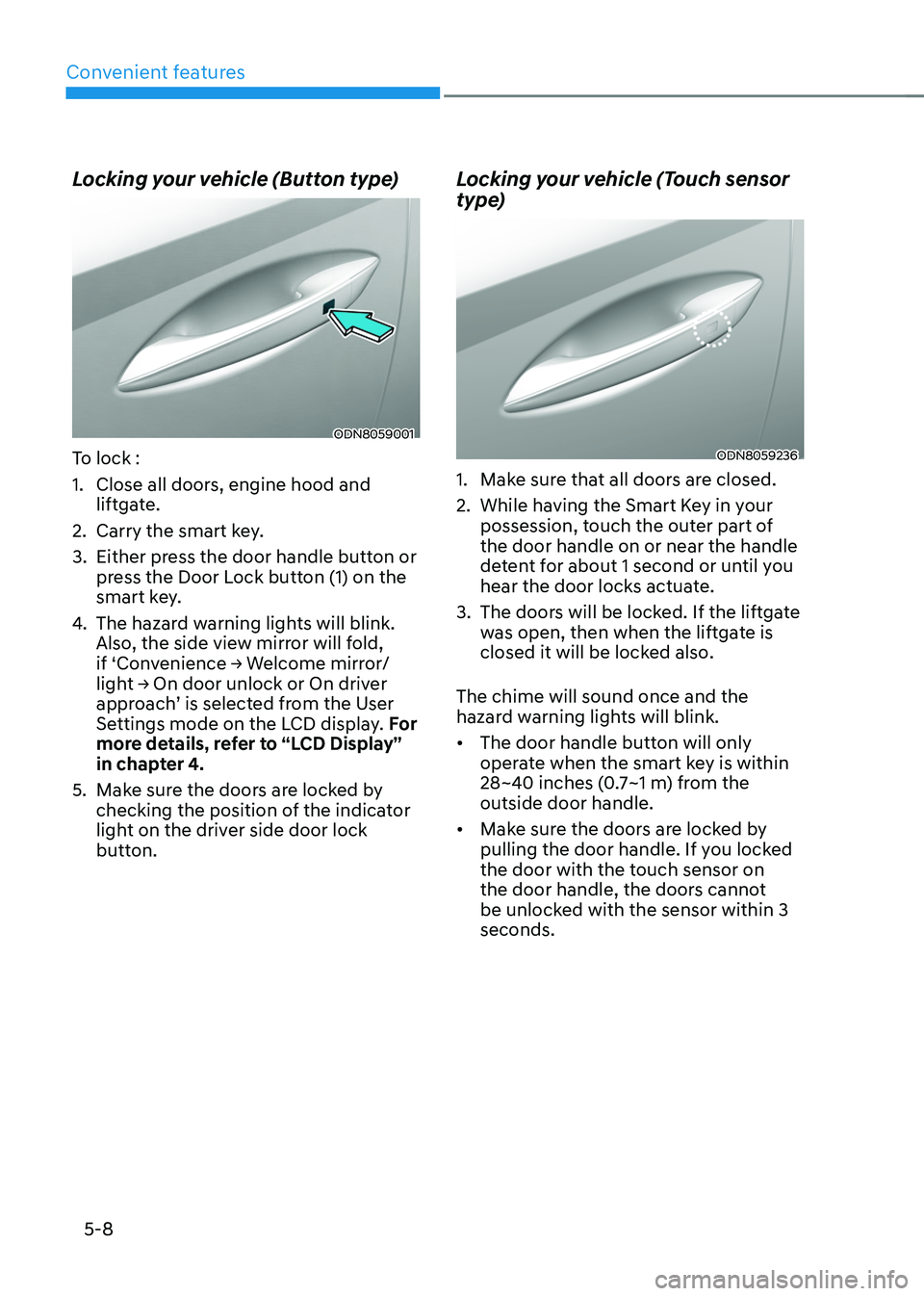
Locking your vehicle (Button type)
ODN8059001
To lock :
1. Close all doors, engine hood and
liftgate.
2. Carry the smart key.
3. Either press the door handle button or
press the Door Lock button (1) on the
smart key.
4. The hazard warning lights will blink.
Also, the side view mirror will fold,
if ‘Convenience → Welcome mirror/light → On door unlock or On driver approach’ is selected from the User
Settings mode on the LCD display. For
more details, refer to “LCD Display”
in chapter 4.
5. Make sure the doors are locked by
checking the position of the indicator
light on the driver side door lock
button.
Locking your vehicle (Touch sensor
type)
ODN8059236
1. Make sure that all doors are closed.
2. While having the Smart Key in your
possession, touch the outer part of
the door handle on or near the handle
detent for about 1 second or until you
hear the door locks actuate.
3. The doors will be locked. If the liftgate
was open, then when the liftgate is
closed it will be locked also.
The chime will sound once and the
hazard warning lights will blink.
• The door handle button will only
operate when the smart key is within
28~40 inches (0.7~1 m) from the
outside door handle.
• Make sure the doors are locked by
pulling the door handle. If you locked
the door with the touch sensor on
the door handle, the doors cannot
be unlocked with the sensor within 3
seconds.
Page 153 of 638
05
5-9
Note that if you press the outside door
handle to lock the doors using the touch
sensor, the doors will not lock under the
following circumstances:
• The Smart Key is in the vehicle
• The Engine Start/Stop button is in the
ACC or ON position
• Any of the doors are open (except for
the liftgate)
If this occurs, then a chime will sound
for about 3 seconds. Check the vehicle
before attempting to lock the car again.
CAUTION
Before you leave your vehicle with the
Smart Key, verify that your vehicle is
locked. When using the touch sensor
on the front door handle, listen to hear
that the lock has actuated, and then
pull the handle within 3 seconds to
confirm the doors are locked.
(if it has been longer than 3 seconds,
verify the doors are locked by pressing
the lock button on the Smart Key. You
will hear a single beep.)
WARNING
Do not leave the Smart Key in
your vehicle with children that are
unattended or unsupervised.
Children could inadvertently press
the Engine Start/Stop button or could
operate the power windows or other
vehicle controls or even cause the
vehicle to move. This could result in
serious injury or death.
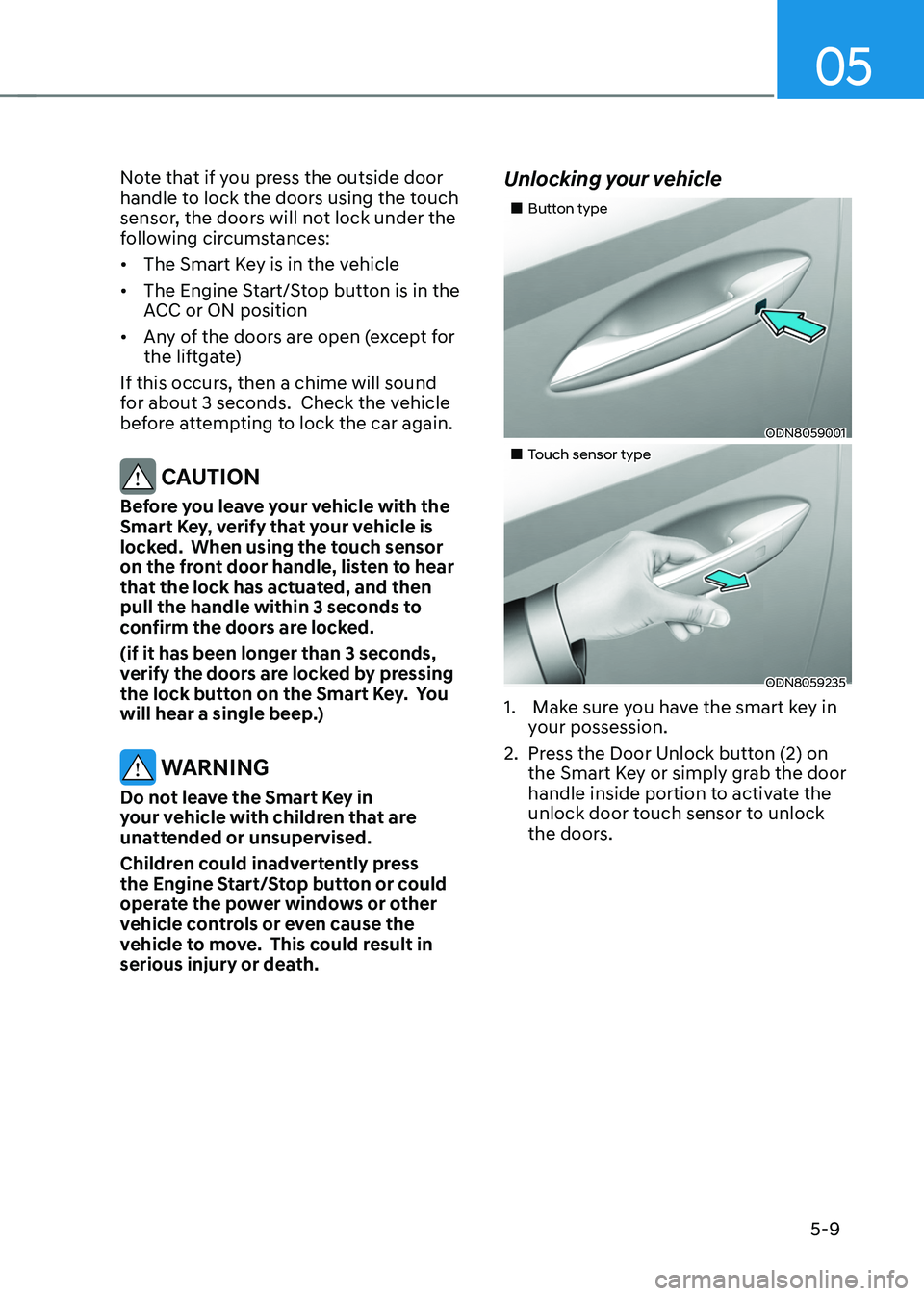
Unlocking your vehicle
„„Button type
ODN8059001
„„Touch sensor type
ODN8059235
1. Make sure you have the smart key in
your possession.
2. Press the Door Unlock button (2) on
the Smart Key or simply grab the door
handle inside portion to activate the
unlock door touch sensor to unlock
the doors.
Page 154 of 638
Convenient features
5-10
3. If you unlock the doors using the
passenger side door handle, all the
doors will unlock. If you unlock the
doors using the driver side door
handle, either the driver side door
will unlock or all the doors will unlock
depending on the setting for the Two
Press Unlock feature. Refer to User
Settings to change the Driver Door
unlock mode.• The door handle button will only
operate when the smart key is
within 28~40 inches (0.7~1 m) from
the outside door handle.
• If you do not open the door after
unlocking within 30 seconds, it will
return to the lock mode.
• If you unlocked the door with the
door handle, the doors cannot be
locked with the sensor within 2
seconds.
To prevent unintentional door lock or
unlock:
Press the lock button on the smart key
and immediately press the unlock button
along with the lock button for more than
4 seconds. The hazard warning lights will
blink four times. At this time, the doors
will not lock or unlock even though the
touch sensor is touched on the outside
door handle.
To deactivate the function, press the
door lock or unlock button on the smart
key. Opening or Unlocking the Liftgate
To open the liftgate:
1. If your vehicle has a Smart Key, make
sure you have the Smart Key in your
possession.
2. Press either the liftgate open/close
button on the vehicle or press and
hold the liftgate open button on
the smart key for more than one
second. The hazard warning lights
will blink twice and the liftgate will be
unlocked. Pull up on the liftgate to
open. If your vehicle is equipped with
power liftgate then the liftgate will
automatically open.
Remotely starting vehicle
(if equipped)
You can start the vehicle using the
Remote Start button on the smart key.
To start the vehicle remotely:
1. Before you can use remote start your
vehicle, the door lock button must be
pressed. Press the door lock button
on the Smart Key. You must be within
about 32 feet (10m) from your vehicle.
2. Press and hold the remote start
button on your Smart Key. You must
press the button within 4 seconds
from when you pressed the door lock
button to activate the remote start.
3. The hazard warning lights will blink
and the engine will start.
4. To turn off the remote start function,
press the Remote Start button once.