change temp on display HYUNDAI TUCSON 2022 Owners Manual
[x] Cancel search | Manufacturer: HYUNDAI, Model Year: 2022, Model line: TUCSON, Model: HYUNDAI TUCSON 2022Pages: 638, PDF Size: 82.3 MB
Page 27 of 638
02
2-15
Recommended SAE viscosity number
CAUTION
Always be sure to clean the area around any filler plug, drain plug, or dipstick before
checking or draining any lubricant. This is especially important in dusty or sandy
areas and when the vehicle is used on unpaved roads. Cleaning the plug and dipstick
areas will prevent dirt and grit from entering the engine and other mechanisms that
could be damaged.
Engine oil viscosity (thickness) has an effect on fuel economy and cold weather
operating (engine start and engine oil flowability). Lower viscosity engine oils can
provide better fuel economy and cold weather performance, however, higher viscosity
engine oils are required for satisfactory lubrication in hot weather. Using oils of any
viscosity other than those recommended could result in engine damage.
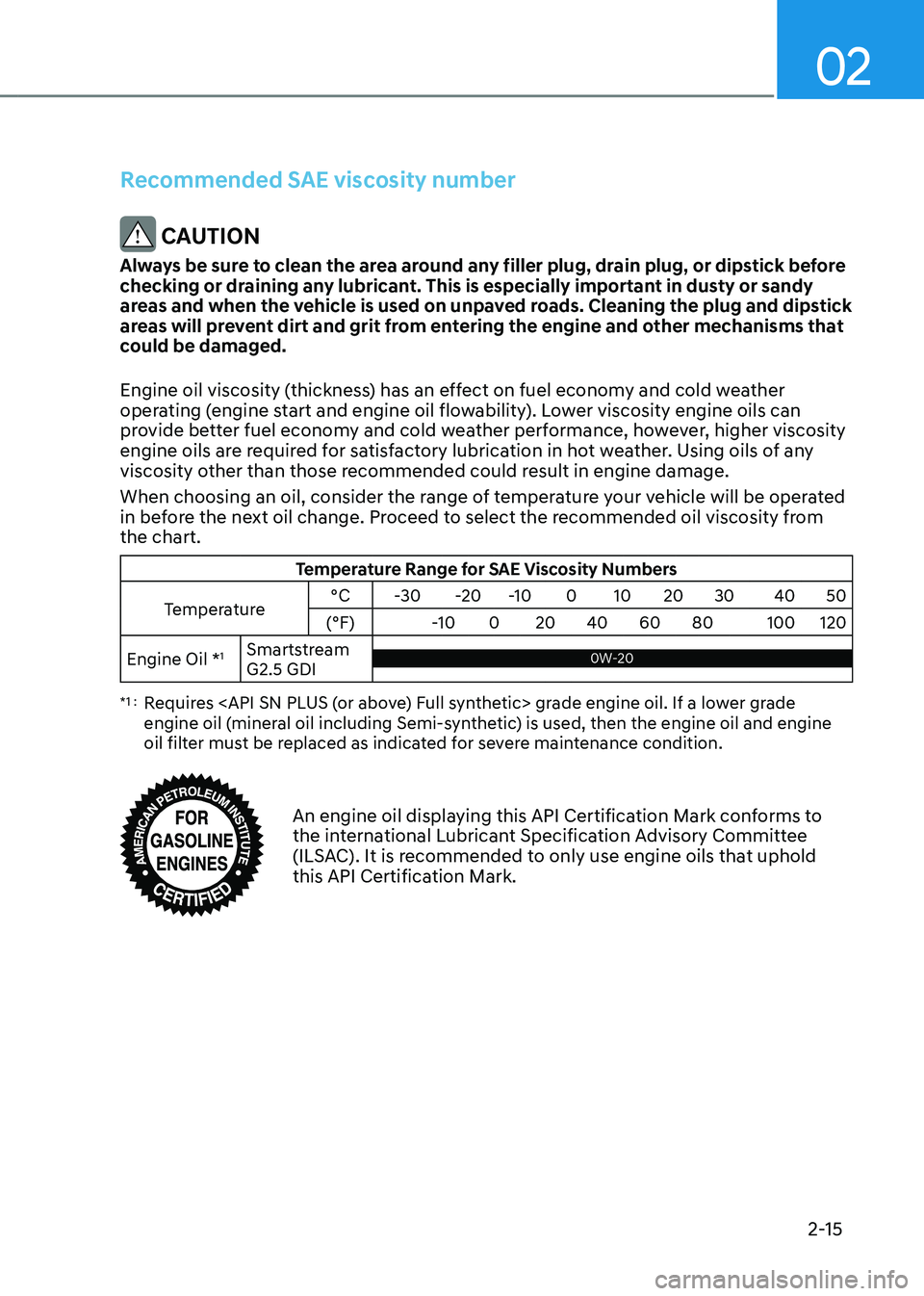
When choosing an oil, consider the range of temperature your vehicle will be operated
in before the next oil change. Proceed to select the recommended oil viscosity from
the chart.
Temperature Range for SAE Viscosity Numbers
Temperature °C
-30-20-10 010 20 30 4050
(°F) -10020 40 60 80 100120
Engine Oil *
1Smartstream
G2.5 GDI0W-20 0W-20
*1 : Requires
engine oil (mineral oil including Semi-synthetic) is used, then the engine oil and engine
oil filter must be replaced as indicated for severe maintenance condition.
An engine oil displaying this API Certification Mark conforms to the international Lubricant Specification Advisory Committee
(ILSAC). It is recommended to only use engine oils that uphold
this API Certification Mark.
Page 105 of 638
04
4 -7
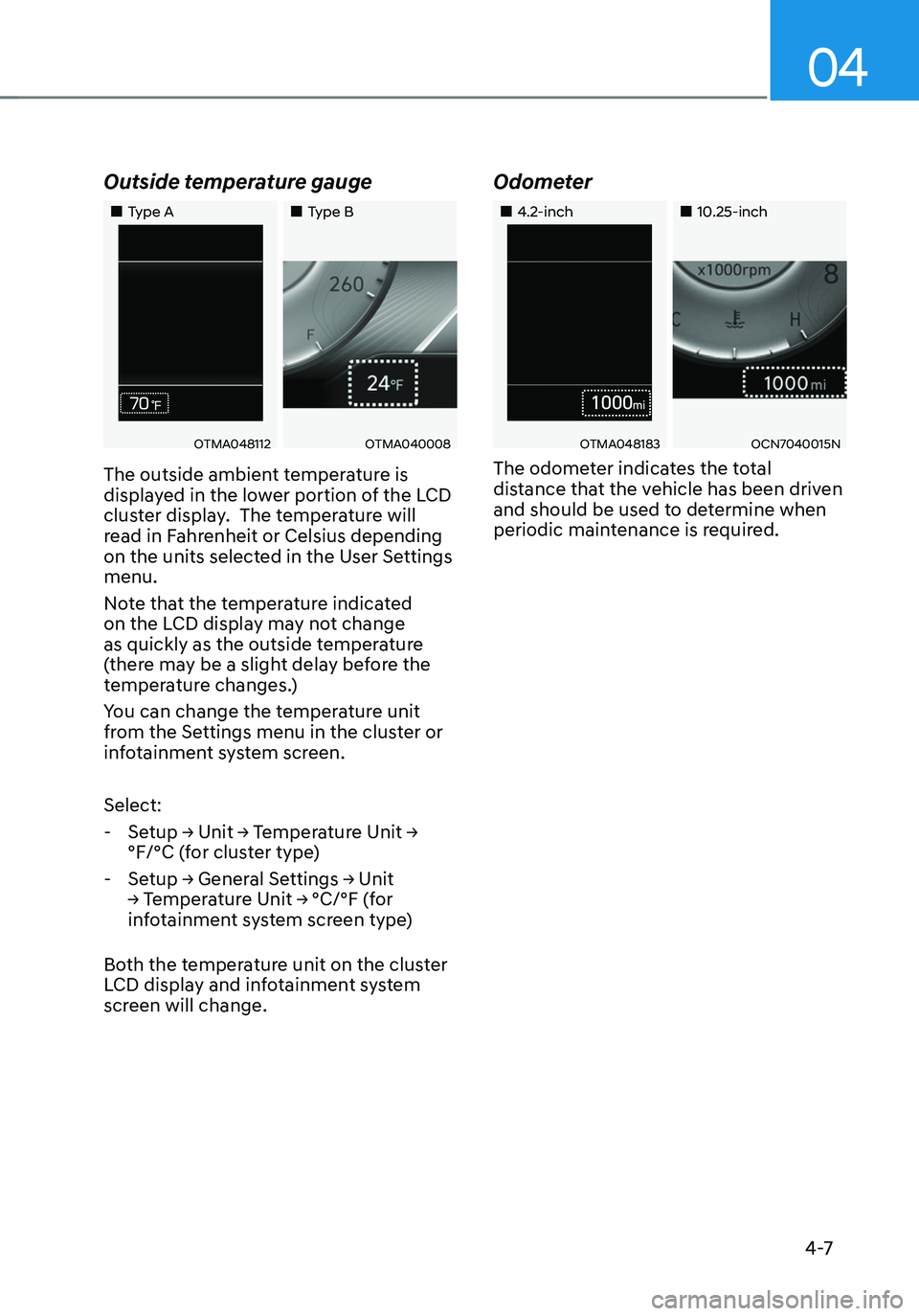
Outside temperature gauge
„„Type A„„Type B
OTMA048112OTMA040008
The outside ambient temperature is
displayed in the lower portion of the LCD
cluster display. The temperature will
read in Fahrenheit or Celsius depending
on the units selected in the User Settings
menu.
Note that the temperature indicated
on the LCD display may not change
as quickly as the outside temperature
(there may be a slight delay before the
temperature changes.)
You can change the temperature unit
from the Settings menu in the cluster or
infotainment system screen.
Select:
-Setup → Unit → Temperature Unit →
°F/°C (for cluster type)
-Setup → General Settings → Unit
→ Temperature Unit → °C/°F (for
infotainment system screen type)
Both the temperature unit on the cluster
LCD display and infotainment system
screen will change.
Odometer
„„4.2-inch„„10.25-inch
OTMA048183OCN7040015N
The odometer indicates the total
distance that the vehicle has been driven
and should be used to determine when
periodic maintenance is required.
Page 121 of 638
04
4-23
LCD Display Messages for
Vehicles Equipped with Smart
Key
Shift to P
This message is displayed if you try to
turn off the vehicle without the gear in
the P (Park) position.
If this occurs, the Engine Start/Stop
button turns to the ACC position.
Low key battery
When the Engine Start/Stop button
is pressed to turn OFF the engine,
this message may be displayed. This
message indicates that the internal
battery of the Smart Key is low. Consider
replacing the Smart Key internal battery.
Press START button while turning
wheel
This message is displayed if the steering
wheel does not unlock normally when
the Engine Start/Stop button is pressed.
You should press the Engine Start/Stop
button while turning the steering wheel
right and left.
Check steering wheel lock system
This message is displayed if the steering
wheel does not lock normally while the
Engine Start/Stop button is pressed to
the OFF position.
Press brake pedal to start engine
This message is displayed if the Engine
Start/Stop button changes to the ACC
position twice by pressing the button
repeatedly without depressing the brake
pedal.
You can start the vehicle by depressing
the brake pedal and then pressing the
Engine Start/Stop button.
Key not in vehicle
This message is displayed if the smart
key is not in the vehicle when you leave
the vehicle with the Engine Start/Stop
button in the ON or Start position.
Always turn off the engine before leaving
your vehicle.
Key not detected
This message is displayed if the smart
key is not detected when you press the
Engine Start/Stop button.
Press START button again
This message is displayed if you were
unable to start the vehicle when the
Engine Start/Stop button was pressed.
If this occurs, attempt to start the engine
by pressing the Engine Start/ Stop button
again.
If the warning message appears each
time you press the Engine Start/Stop
button, we recommend that you have
the vehicle inspected by an authorized
HYUNDAI dealer.
Page 253 of 638
05
5-109
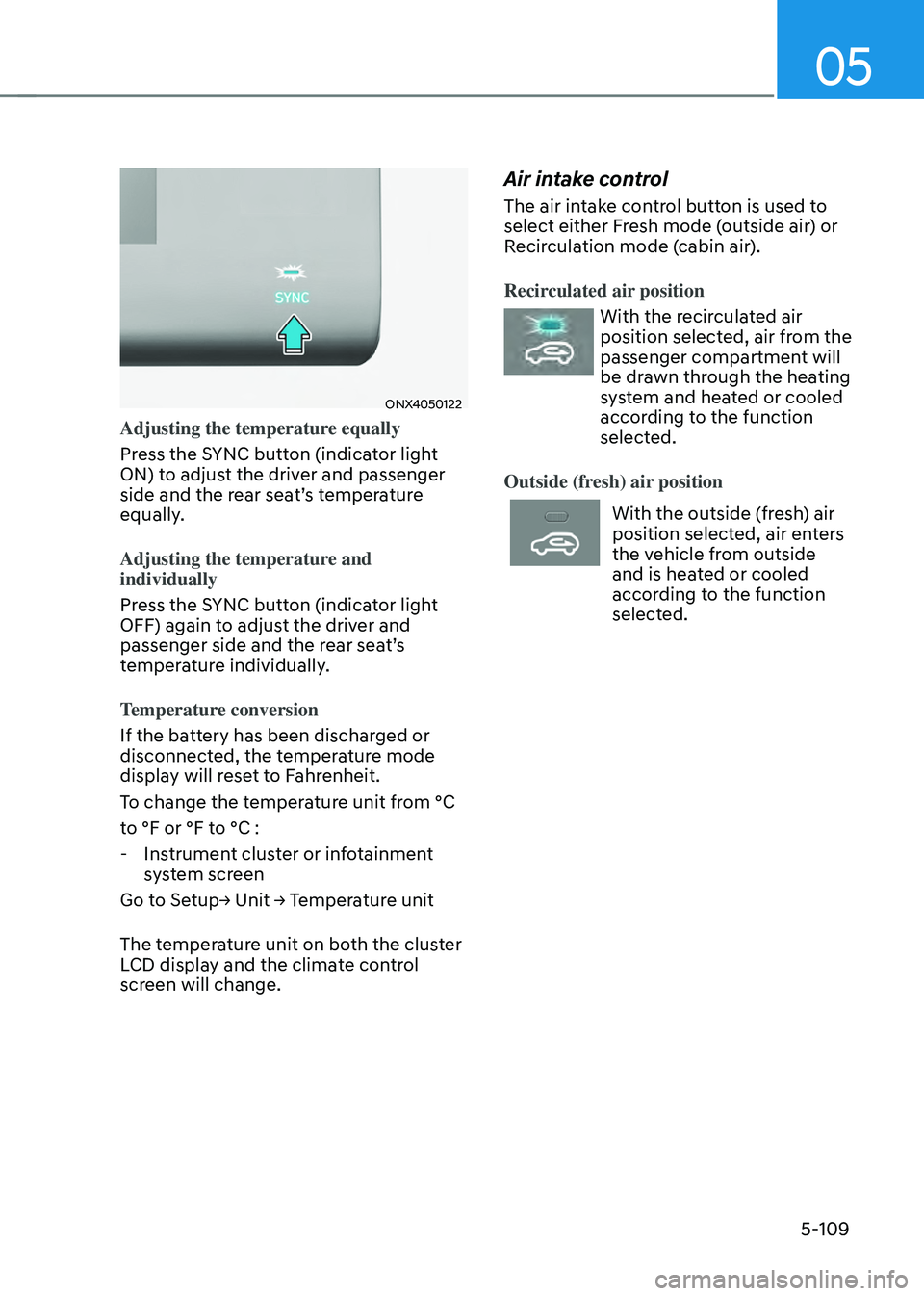
ONX4050122
Adjusting the temperature equally
Press the SYNC button (indicator light
ON) to adjust the driver and passenger
side and the rear seat’s temperature
equally.
Adjusting the temperature and
individually
Press the SYNC button (indicator light
OFF) again to adjust the driver and
passenger side and the rear seat’s
temperature individually.
Temperature conversion
If the battery has been discharged or
disconnected, the temperature mode
display will reset to Fahrenheit.
To change the temperature unit from °C
to °F or °F to °C :
-Instrument cluster or infotainment
system screen
Go to Setup→ Unit → Temperature unit
The temperature unit on both the cluster
LCD display and the climate control
screen will change.
Air intake control
The air intake control button is used to
select either Fresh mode (outside air) or
Recirculation mode (cabin air).
Recirculated air position
With the recirculated air
position selected, air from the
passenger compartment will
be drawn through the heating
system and heated or cooled
according to the function
selected.
Outside (fresh) air position
With the outside (fresh) air
position selected, air enters
the vehicle from outside
and is heated or cooled
according to the function
selected.
Page 264 of 638
Convenient features
5-120
Auto Defogging System
on Models with Automatic
Temperature Control
ONX4050046
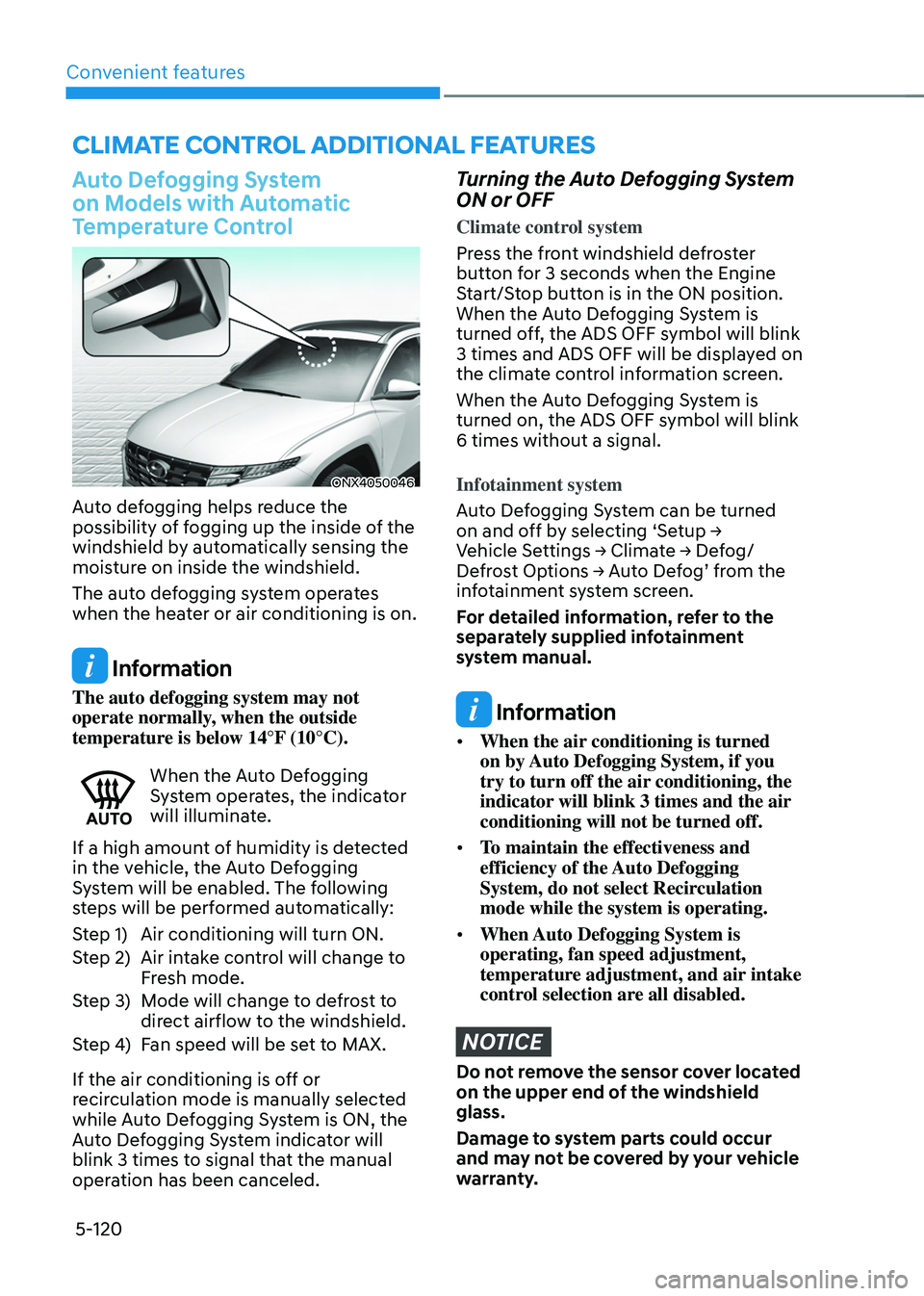
Auto defogging helps reduce the
possibility of fogging up the inside of the
windshield by automatically sensing the
moisture on inside the windshield.
The auto defogging system operates
when the heater or air conditioning is on.
Information
The auto defogging system may not
operate normally, when the outside
temperature is below 14°F (10°C).
When the Auto Defogging System operates, the indicator
will illuminate.
If a high amount of humidity is detected
in the vehicle, the Auto Defogging
System will be enabled. The following
steps will be performed automatically:
Step 1) Air conditioning will turn ON.
Step 2) Air intake control will change to
Fresh mode.
Step 3) Mode will change to defrost to
direct airflow to the windshield.
Step 4) Fan speed will be set to MAX.
If the air conditioning is off or
recirculation mode is manually selected
while Auto Defogging System is ON, the
Auto Defogging System indicator will
blink 3 times to signal that the manual
operation has been canceled.
Turning the Auto Defogging System
ON or OFF
Climate control system
Press the front windshield defroster
button for 3 seconds when the Engine
Start/Stop button is in the ON position.
When the Auto Defogging System is
turned off, the ADS OFF symbol will blink
3 times and ADS OFF will be displayed on
the climate control information screen.
When the Auto Defogging System is
turned on, the ADS OFF symbol will blink
6 times without a signal.
Infotainment system
Auto Defogging System can be turned
on and off by selecting ‘Setup → Vehicle Settings → Climate → Defog/Defrost Options → Auto Defog’ from the infotainment system screen.
For detailed information, refer to the
separately supplied infotainment
system manual.
Information
• When the air conditioning is turned
on by Auto Defogging System, if you
try to turn off the air conditioning, the
indicator will blink 3 times and the air
conditioning will not be turned off.
• To maintain the effectiveness and
efficiency of the Auto Defogging
System, do not select Recirculation
mode while the system is operating.
• When Auto Defogging System is
operating, fan speed adjustment,
temperature adjustment, and air intake
control selection are all disabled.
NOTICE
Do not remove the sensor cover located
on the upper end of the windshield
glass.
Damage to system parts could occur
and may not be covered by your vehicle
warranty.
CLIMATE CONTROL ADDITIONAL FEATURES
Page 273 of 638
05
5-129
The indicator light will blink orange for 10
seconds if there is a malfunction in the
wireless charging system.
In this case, temporarily stop the
charging process, and re-attempt to
charge your smart phone again.
The system warns you with a message on
the LCD display if the smart phone is still
on the wireless charging unit after the
vehicle is turned OFF and the front door
is opened.
For some manufacturer’s smart phones,
the system may not warn you even
though the smart phone is left on the
wireless charging unit. This is due to the
particular characteristic of the smart
phone and not a malfunction of the
wireless charging.
Information
For some manufacturers’ cellular phones,
the system may not warn you even though
the cellular phone is left on the wireless
charging unit. This is due to the particular
characteristic of the cellular phone and
not a malfunction of the wireless charging.
NOTICE
• The wireless smart phone charging
system may not support certain
smart phones, which are not verified
for the Qi specification (
).
• When placing your smart phone on
the charging pad, position the phone
in the middle of the mat for optimal
charging performance. If your smart
phone is off to the side, the charging
rate may be less and in some cases
the smart phone may experience
higher heat conduction.
• In some cases, the wireless charging
may stop temporarily when the
smart key is used, either when
starting the vehicle or locking/
unlocking the doors, etc.
• When charging certain smart
phones, the charging indicator may
not change to blue when the smart
phone is fully charged.
• The wireless charging process may
temporarily stop, when temperature
abnormally increases inside the
wireless smart phone charging
system. The wireless charging
process restarts, when temperature
falls to a certain level.
• The wireless charging process may
temporarily stop when there is
any metallic item, such as a coin,
between the wireless smart phone
charging system and smart phone.
Page 446 of 638
07
7-83
Smart Cruise Control Display and
Control
Basic function
You can see the status of the Smart
Cruise Control operation in the Driving
Assist mode on the cluster. Refer to “LCD
Display Modes” section in chapter 4.
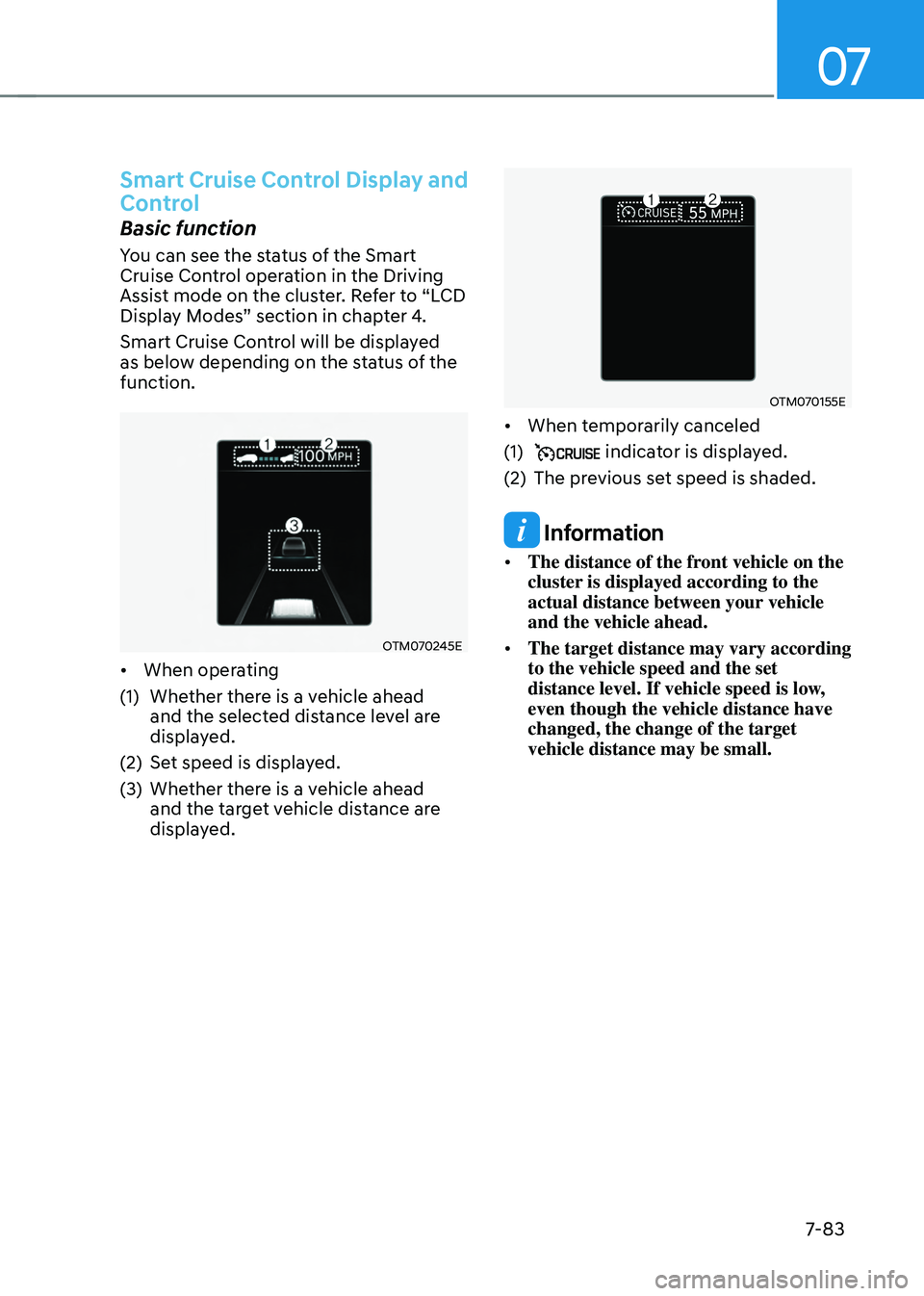
Smart Cruise Control will be displayed
as below depending on the status of the
function.
OTM070245E
• When operating
(1) Whether there is a vehicle ahead
and the selected distance level are
displayed.
(2) Set speed is displayed.
(3) Whether there is a vehicle ahead
and the target vehicle distance are
displayed.
OTM070155E
• When temporarily canceled
(1) indicator is displayed.
(2) The previous set speed is shaded.
Information
• The distance of the front vehicle on the
cluster is displayed according to the
actual distance between your vehicle
and the vehicle ahead.
• The target distance may vary according
to the vehicle speed and the set
distance level. If vehicle speed is low,
even though the vehicle distance have
changed, the change of the target
vehicle distance may be small.
Page 458 of 638
07
7-95
Navigation-based Smart Cruise
Control Operation
Operating conditions
Navigation-based Smart Cruise Control
is ready to operate if all of the following
conditions are satisfied:
• Smart Cruise Control is operating
• Driving on main roads of highways (or
motorways)
Information
For more details on how to operate Smart
Cruise Control, refer to “Smart Cruise
Control (SCC)” section in chapter 7.
Navigation-based Smart Cruise
Control display and control
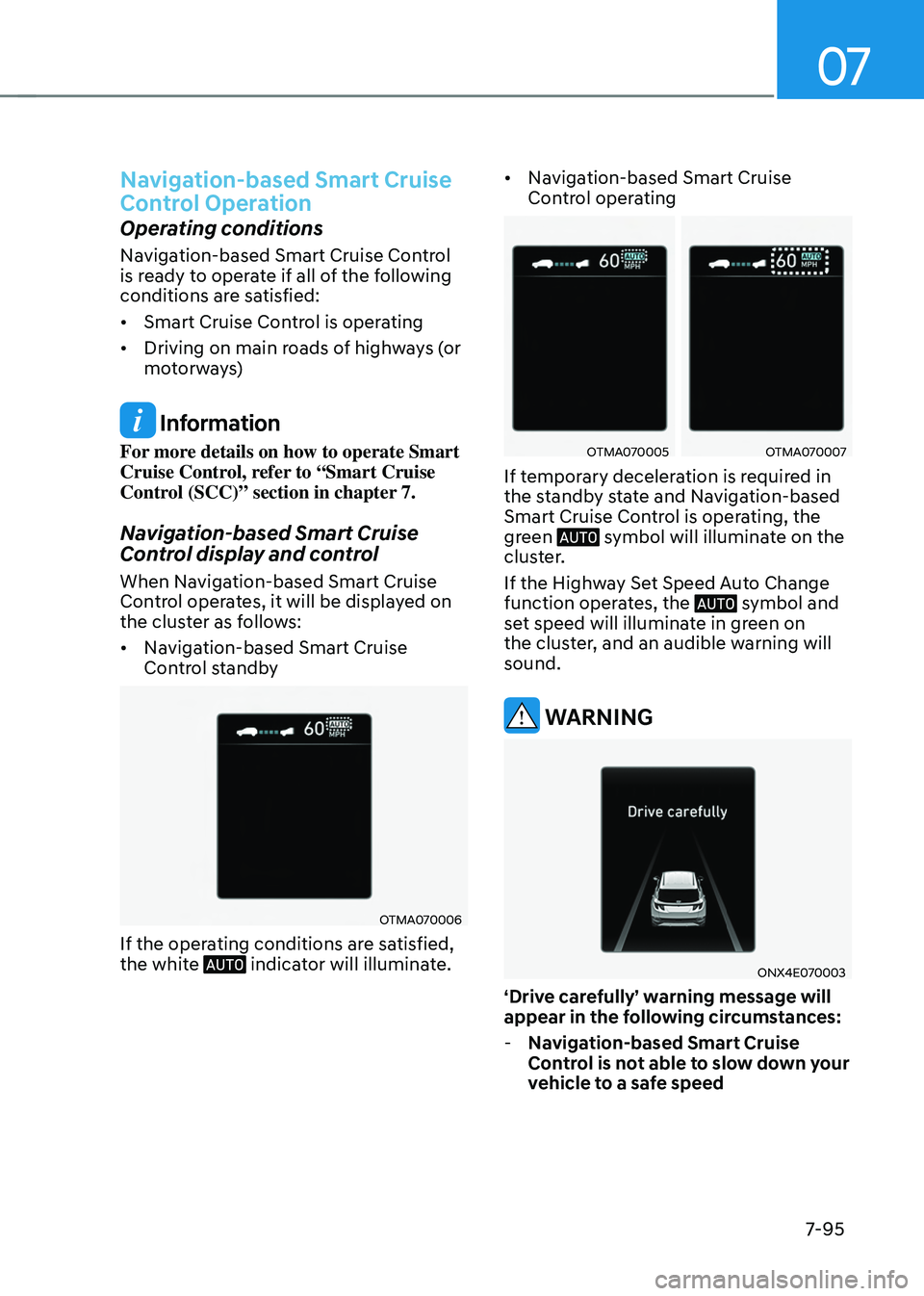
When Navigation-based Smart Cruise
Control operates, it will be displayed on
the cluster as follows:
• Navigation-based Smart Cruise
Control standby
OTMA070006
If the operating conditions are satisfied,
the white indicator will illuminate.
• Navigation-based Smart Cruise
Control operating
OTMA070005OTMA070007
If temporary deceleration is required in
the standby state and Navigation-based
Smart Cruise Control is operating, the
green
symbol will illuminate on the cluster.
If the Highway Set Speed Auto Change
function operates, the
symbol and set speed will illuminate in green on
the cluster, and an audible warning will
sound.
WARNING
ONX4E070003
‘Drive carefully’ warning message will
appear in the following circumstances:
-Navigation-based Smart Cruise
Control is not able to slow down your
vehicle to a safe speed