ECU HYUNDAI TUCSON 2023 User Guide
[x] Cancel search | Manufacturer: HYUNDAI, Model Year: 2023, Model line: TUCSON, Model: HYUNDAI TUCSON 2023Pages: 638, PDF Size: 26.51 MB
Page 73 of 638
Seats & Safety System
3-42
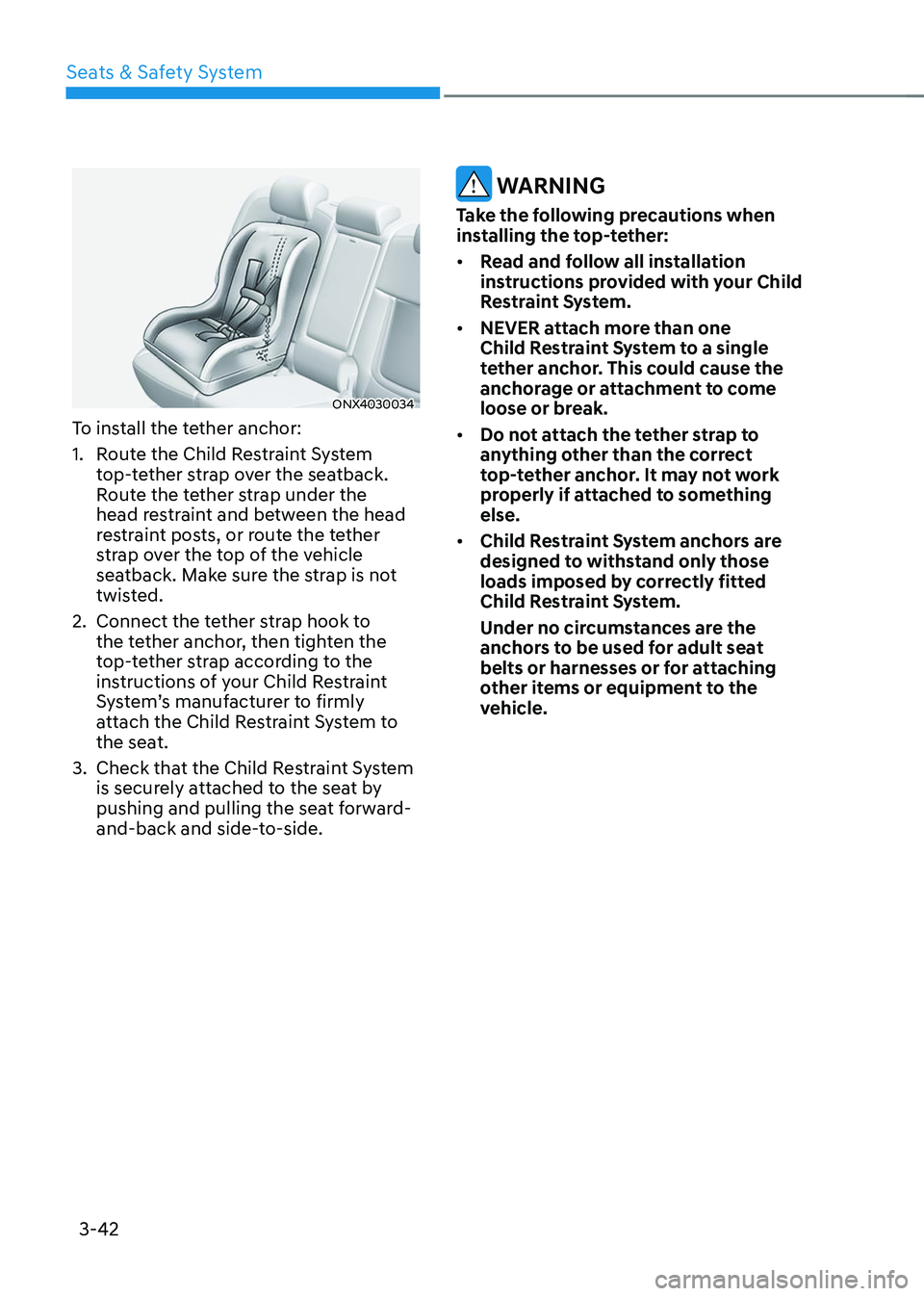
ONX4030034
To install the tether anchor:
1. Route the Child Restraint System
top-tether strap over the seatback.
Route the tether strap under the
head restraint and between the head
restraint posts, or route the tether
strap over the top of the vehicle
seatback. Make sure the strap is not
twisted.
2. Connect the tether strap hook to
the tether anchor, then tighten the
top-tether strap according to the
instructions of your Child Restraint
System’s manufacturer to firmly
attach the Child Restraint System to
the seat.
3. Check that the Child Restraint System
is securely attached to the seat by
pushing and pulling the seat forward-
and-back and side-to-side.
WARNING
Take the following precautions when
installing the top-tether:
• Read and follow all installation
instructions provided with your Child
Restraint System.
• NEVER attach more than one
Child Restraint System to a single
tether anchor. This could cause the
anchorage or attachment to come
loose or break.
• Do not attach the tether strap to
anything other than the correct
top-tether anchor. It may not work
properly if attached to something
else.
• Child Restraint System anchors are
designed to withstand only those
loads imposed by correctly fitted
Child Restraint System.
Under no circumstances are the
anchors to be used for adult seat
belts or harnesses or for attaching
other items or equipment to the
vehicle.
Page 74 of 638
03
3-43
Securing a Child Restraint System
with a lap/shoulder belt
WARNING
ALWAYS place a rearward-facing Child
Restraint System in the rear seat of the
vehicle.
Placing a rearward-facing child restraint
in the front seat can result in serious
injury or death if the Child Restraint
System is struck by an inflating air bag.
When not using the LATCH system, all
Child Restraint Systems must be secured
to a rear seat with the lap part of a lap/
shoulder belt.
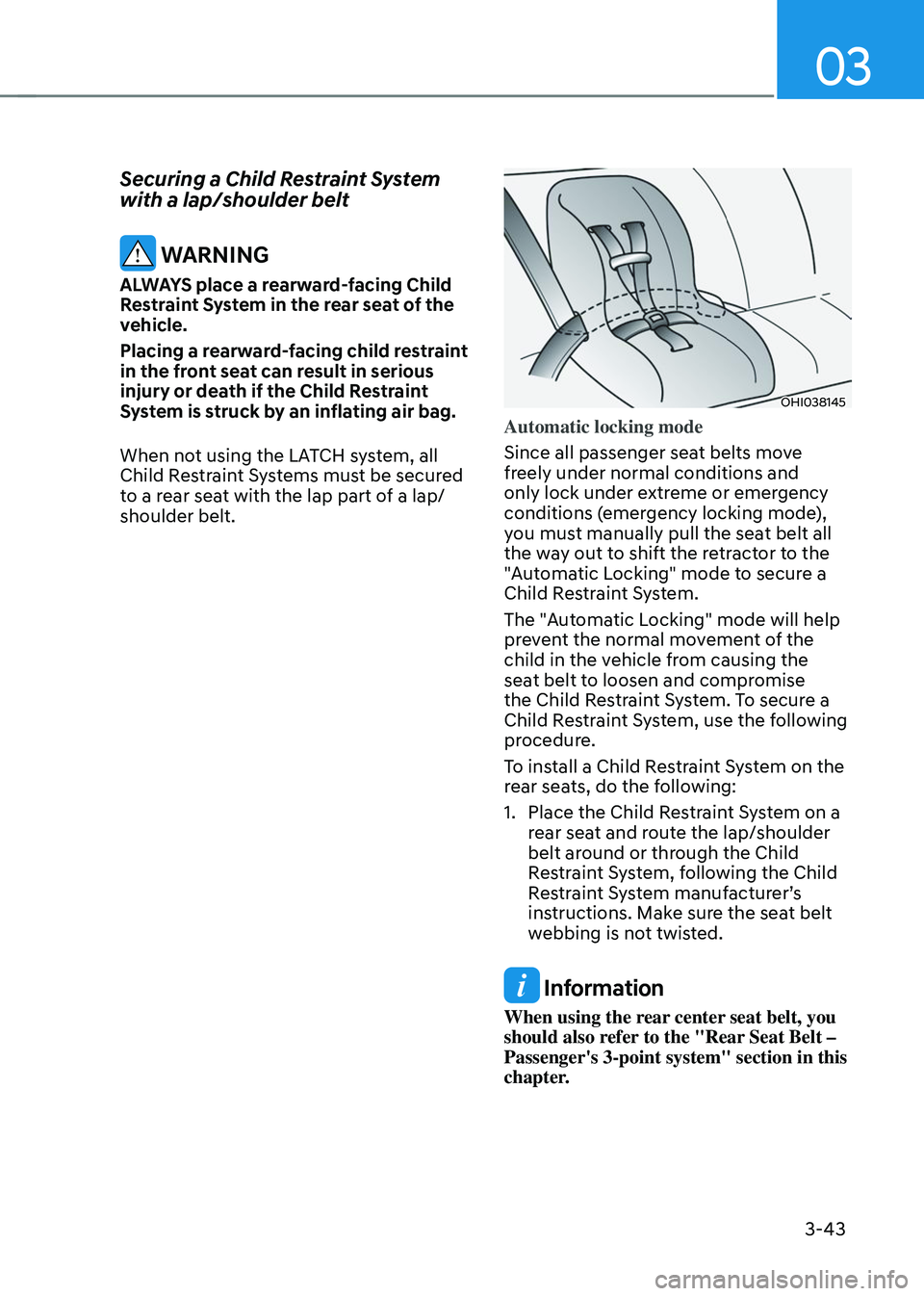
OHI038145
Automatic locking mode
Since all passenger seat belts move
freely under normal conditions and
only lock under extreme or emergency
conditions (emergency locking mode),
you must manually pull the seat belt all
the way out to shift the retractor to the
"Automatic Locking" mode to secure a
Child Restraint System.
The "Automatic Locking" mode will help
prevent the normal movement of the
child in the vehicle from causing the
seat belt to loosen and compromise
the Child Restraint System. To secure a
Child Restraint System, use the following
procedure.
To install a Child Restraint System on the
rear seats, do the following:
1. Place the Child Restraint System on a
rear seat and route the lap/shoulder
belt around or through the Child
Restraint System, following the Child
Restraint System manufacturer’s
instructions. Make sure the seat belt
webbing is not twisted.
Information
When using the rear center seat belt, you
should also refer to the "Rear Seat Belt –
Passenger's 3-point system" section in this
chapter.
Page 81 of 638
Seats & Safety System
3-50
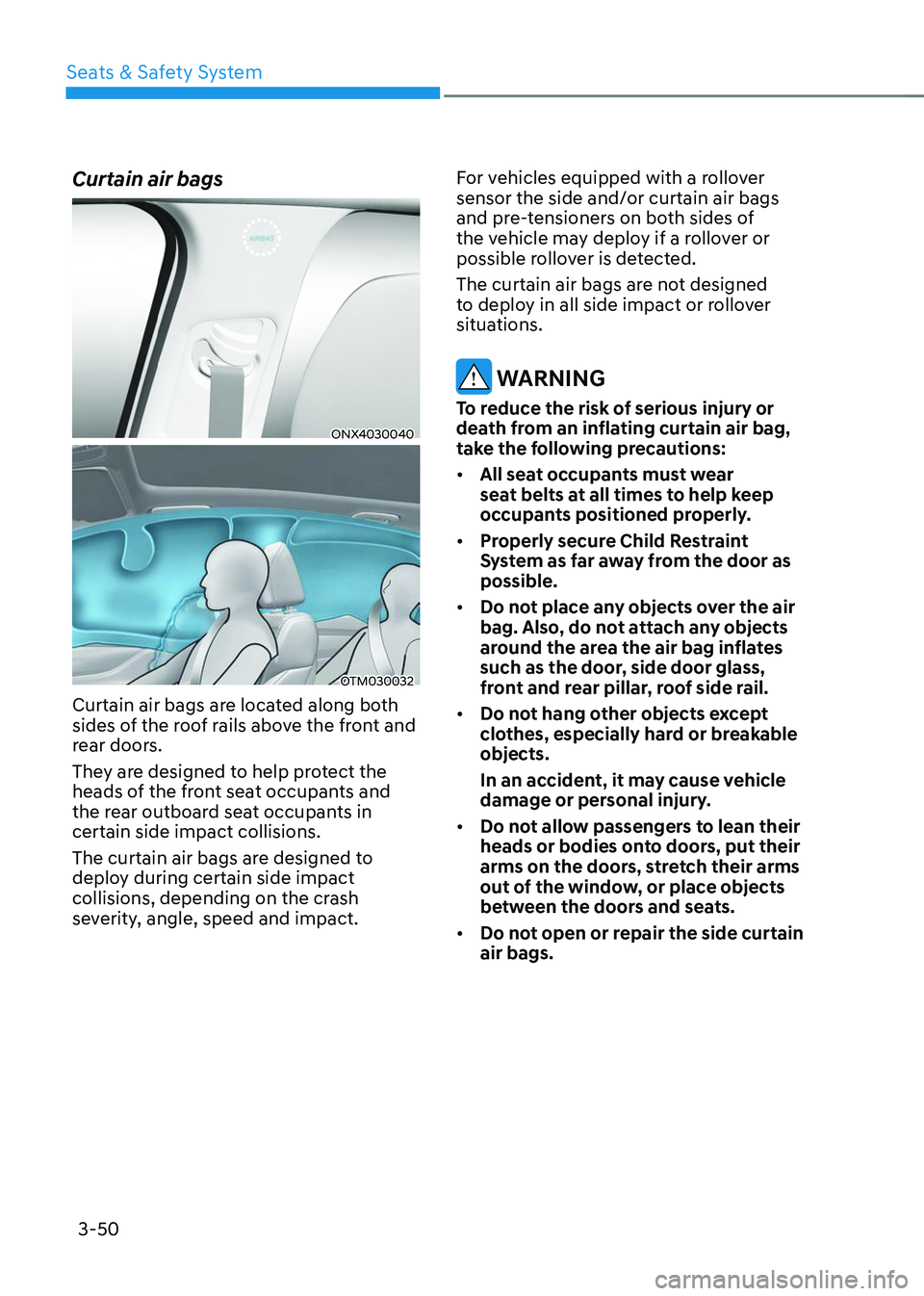
Curtain air bags
ONX4030040
OTM030032
Curtain air bags are located along both
sides of the roof rails above the front and
rear doors.
They are designed to help protect the
heads of the front seat occupants and
the rear outboard seat occupants in
certain side impact collisions.
The curtain air bags are designed to
deploy during certain side impact
collisions, depending on the crash
severity, angle, speed and impact.For vehicles equipped with a rollover
sensor the side and/or curtain air bags
and pre-tensioners on both sides of
the vehicle may deploy if a rollover or
possible rollover is detected.
The curtain air bags are not designed
to deploy in all side impact or rollover
situations.
WARNING
To reduce the risk of serious injury or
death from an inflating curtain air bag,
take the following precautions:
•
All seat occupants must wear
seat belts at all times to help keep
occupants positioned properly.
• Properly secure Child Restraint
System as far away from the door as
possible.
• Do not place any objects over the air
bag. Also, do not attach any objects
around the area the air bag inflates
such as the door, side door glass,
front and rear pillar, roof side rail.
• Do not hang other objects except
clothes, especially hard or breakable
objects.
In an accident, it may cause vehicle
damage or personal injury.
• Do not allow passengers to lean their
heads or bodies onto doors, put their
arms on the doors, stretch their arms
out of the window, or place objects
between the doors and seats.
• Do not open or repair the side curtain
air bags.
Page 123 of 638
04
4-25
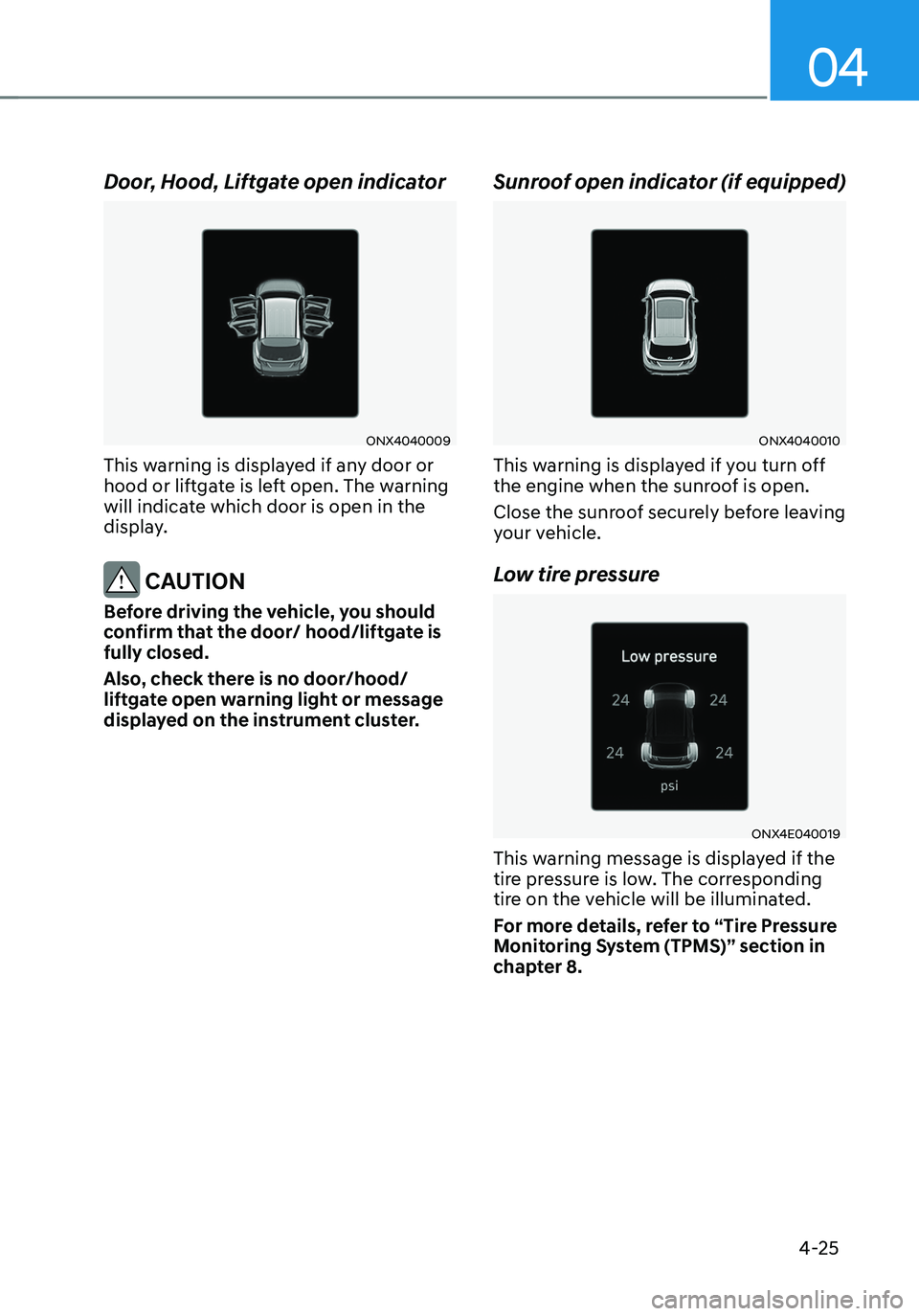
Door, Hood, Liftgate open indicator
ONX4040009
This warning is displayed if any door or
hood or liftgate is left open. The warning
will indicate which door is open in the
display.
CAUTION
Before driving the vehicle, you should
confirm that the door/ hood/liftgate is
fully closed.
Also, check there is no door/hood/
liftgate open warning light or message
displayed on the instrument cluster.
Sunroof open indicator (if equipped)
ONX4040010
This warning is displayed if you turn off
the engine when the sunroof is open.
Close the sunroof securely before leaving
your vehicle.
Low tire pressure
ONX4E040019
This warning message is displayed if the
tire pressure is low. The corresponding
tire on the vehicle will be illuminated.
For more details, refer to “Tire Pressure
Monitoring System (TPMS)” section in
chapter 8.
Page 147 of 638
Climate control additional features ..............................................................5-120Auto Defogging System on Models with Automatic Temperature Control ..........5-120
Auto dehumidify ........................................................................\
................................5-121
Recirculating air when washer fluid is used ............................................................5-121
Sunroof inside air recirculation ........................................................................\
........5-122
Automatic Controls for the Driver Based on Climate Control System Settings ....5-122
Scheduled Ventilation Control ........................................................................\
........5-122
Storage compartment ........................................................................\
...........5-123Center console storage ........................................................................\
.....................5-123
Glove box ........................................................................\
..........................................5-124
Luggage tray ........................................................................\
.....................................5-124
Interior features ........................................................................\
.....................5-125Cup holder ........................................................................\
.........................................5-125
Sunvisor ........................................................................\
............................................5-126
Power outlet ........................................................................\
.....................................5-126
USB charger ........................................................................\
.......................................5-127
Wireless smart phone charging system ..................................................................5-128
Clock ........................................................................\
.................................................5-130
Coat hook ........................................................................\
...........................................5-131
Floor mat anchor(s) ........................................................................\
...........................5-131
Luggage net holder ........................................................................\
...........................5-132
Cargo security screen ........................................................................\
.......................5-132
Exterior features ........................................................................\
.....................5-135Roof rack ........................................................................\
...........................................5-135
Infotainment system ........................................................................\
..............5-136USB Port ........................................................................\
............................................5-136
Antenna ........................................................................\
.............................................5-136
Steering wheel remote controls ........................................................................\
......5-136
Infotainment system ........................................................................\
........................5-137
Voice recognition ........................................................................\
..............................5-137
Bluetooth® Wireless Technology ........................................................................\
.....5-138
How vehicle radio works ........................................................................\
..................5-138
5. Convenient features
5
Page 163 of 638
05
5-19
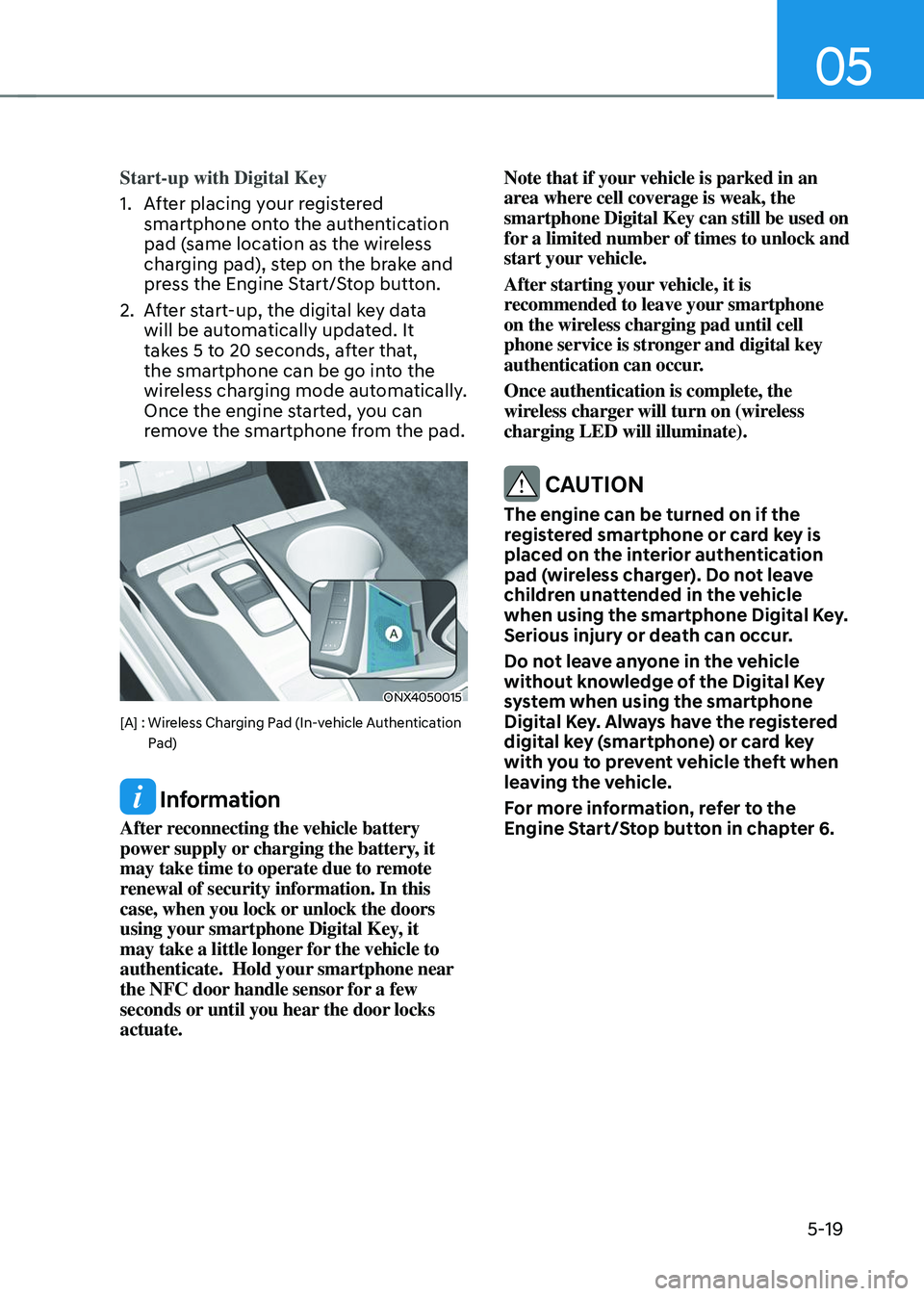
Start-up with Digital Key
1. After placing your registered
smartphone onto the authentication
pad (same location as the wireless
charging pad), step on the brake and
press the Engine Start/Stop button.
2. After start-up, the digital key data
will be automatically updated. It
takes 5 to 20 seconds, after that,
the smartphone can be go into the
wireless charging mode automatically.
Once the engine started, you can
remove the smartphone from the pad.
ONX4050015
[A] : Wireless Charging Pad (In-vehicle Authentication Pad)
Information
After reconnecting the vehicle battery
power supply or charging the battery, it
may take time to operate due to remote
renewal of security information. In this
case, when you lock or unlock the doors
using your smartphone Digital Key, it
may take a little longer for the vehicle to
authenticate. Hold your smartphone near
the NFC door handle sensor for a few
seconds or until you hear the door locks
actuate. Note that if your vehicle is parked in an
area where cell coverage is weak, the
smartphone Digital Key can still be used on
for a limited number of times to unlock and
start your vehicle.
After starting your vehicle, it is
recommended to leave your smartphone
on the wireless charging pad until cell
phone service is stronger and digital key
authentication can occur.
Once authentication is complete, the
wireless charger will turn on (wireless
charging LED will illuminate).
CAUTION
The engine can be turned on if the
registered smartphone or card key is
placed on the interior authentication
pad (wireless charger). Do not leave
children unattended in the vehicle
when using the smartphone Digital Key.
Serious injury or death can occur.
Do not leave anyone in the vehicle
without knowledge of the Digital Key
system when using the smartphone
Digital Key. Always have the registered
digital key (smartphone) or card key
with you to prevent vehicle theft when
leaving the vehicle.
For more information, refer to the
Engine Start/Stop button in chapter 6.
Page 164 of 638
Convenient features
5-20
Remote Control with Digital Key
To use the remote control function with
your android smartphone, Bluetooth
must be turned on.
Remote Control Connection with Digital
Key
1. Open the Hyundai digital key
application on your smart phone.
Select your vehicle within the App.
2. Approach with the activated
smartphone app to your vehicle
and you can check whether the
connection is available. If it enables
your smartphone to connect, connect
with your vehicle by pressing the
connect button. The remote control
function is activated after completing
the process.
Remote Control Operation with Digital
Key
You can execute the remote control
operation including door lock/unlock,
panic on/off, remote start / remote
stop and trunk opening. The icon for
each function will be highlighted and
alarm/vibration also provided when the
operation is performed.
Note that you cannot lock your vehicle
using the Hyundai digital key app if any
of the following occurs:
• The POWER button is in ACC or ON
position.
• Any doors are open.
When the smartphone and the vehicle
are connected by the Bluetooth function
but the remote control command
cannot be received over 5 minutes, the
remote control connection is cancelled
automatically.
CAUTION
• If metallic window tint was applied
to your vehicle, it may cause
bad Bluetooth connection or
performance degradation of the
digital key.
• If multiple users operate the remote
control function simultaneously, the
connection between the digital key
and the vehicle might result in failed
commands. Please connect and
operate the remote control function
only the necessary user.
• When using the remote control
operation, the driver (the remote
control user) should leave the vehicle
after confirming the door lock (the
chime sounds once and the hazard
warning lights blink).
• The remote functions of the Digital
Key app enables the vehicle to be
controlled from a set distance. If
the digital key or the vehicle goes
beyond the operable distance, the
remote control function might be
disconnected or cancelled.
• If the digital key (smartphone) is
connected with the vehicle for the
remote control, the driver with the
key goes far away from the vehicle,
the function might not work.
• If the remote control operation
is executed where the mobile
connection is weak, Bluetooth
connection is poor due to several
Bluetooth devices or there is an
object such as metal or concrete, it
might be delayed or the operable
distance might decrease. You should
not cover the smartphone with your
hand or place other devices which
can cause frequency interference. It
may result in poor performance.
• If the remote control function is not
available, please use NFC function to
lock or unlock the doors.
Page 166 of 638
Convenient features
5-22
Smartphone change/App deletion
If you change your smartphone or delete
the Hyundai Digital Key App, please refer
to the following to set up your Digital
Key:
Smartphone Change/ Reset
If you change or reset the smartphone,
the registered digital key in your previous
smartphone may not be used. Please
refer to following procedure to use the
digital key.
1. Install the digital key application and
log in.
2. If you are the owner, retry the Digital
key save process.
3. If you are the sharer, need to re-share
the key from owner.
App delete & reinstall/ Delete App data
You can re-download the digital key
from server in these cases as follow
procedure.
1. Reinstall the application and log in.
2. Input the PIN number for user
verification.
3. If PIN is correct, digital key data
will be re-downloaded to your
smartphone and you can use it
without any further registration or
sharing.
Smartphone operability with Digital Key
The digital key application may not
be available to old type smartphones.
Please check the available smartphone
models with your dealer. NFC antenna
position on the smartphone can be
confirmed on each smartphone’s manual
or contact to customer service center of
the smartphone manufacture.
CAUTION
• Do not leave the registered digital
key (smartphone) and card key in
your vehicle. Please carry around
your keys all the times.
• If you happen to lose your digital
key (smartphone) or card key
registered as a main user’s key, you
should immediately delete the key
on the vehicle’s key menu. For more
information, refer to the Digital Key
Deletion in this chapter.
• If you registered your digital key
(smartphone) or card key in the
vehicle, a message appears on the
instrument cluster and let you know
the key is registered.
(Message: Digital key(s) active.)
• If you buy a used vehicle, you should
confirm the message and delete the
registered smartphone key and card
key. In this case, you should carry
your smart key.
• If you keep place the NFC card
of the digital key on the interior
authentication pad (wireless
charger) while driving, it may cause a
malfunction of the NFC card.
• You should remove your NFC card
of the digital key on the interior
authentication pad after turning on
the engine.
• Hyundai digital key app may not
work properly when the NFC or
Bluetooth communication between
smartphone and car is not good.
• If the remote control operation
is executed where the mobile
connection is weak, Bluetooth
connection is poor due to lots of
Bluetooth devices or there is an
object such as metal or concrete, it
might be delayed or the operable
distance might decrease. Especially,
you should not cover the smartphone
with your hand or place other
devices which can cause frequency
interference. It may result in poor
performance.
Page 175 of 638
05
5-31
Operating door locks from
outside the vehicle
Mechanical key
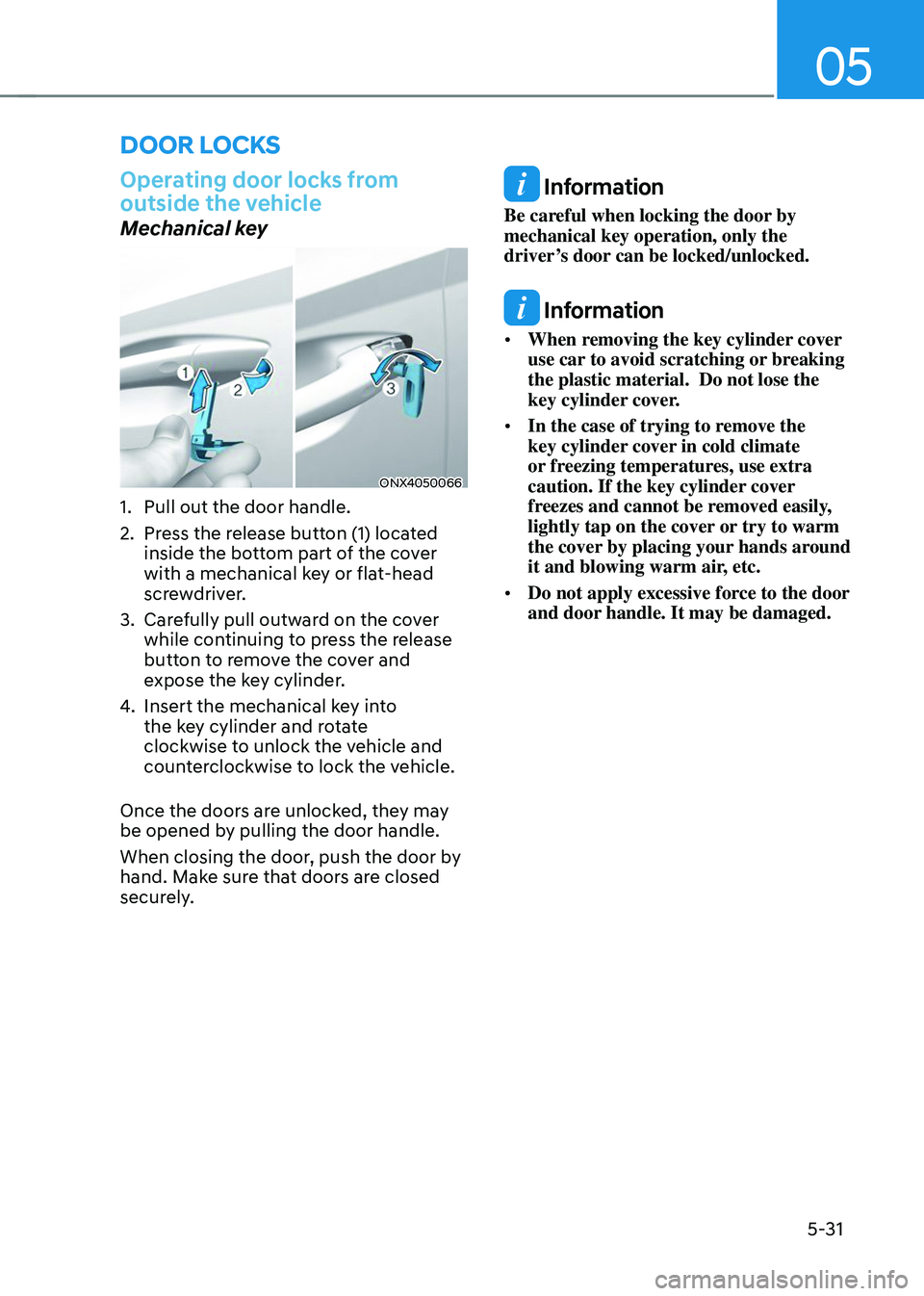
ONX4050066
1. Pull out the door handle.
2. Press the release button (1) located
inside the bottom part of the cover
with a mechanical key or flat-head
screwdriver.
3. Carefully pull outward on the cover
while continuing to press the release
button to remove the cover and
expose the key cylinder.
4. Insert the mechanical key into
the key cylinder and rotate
clockwise to unlock the vehicle and
counterclockwise to lock the vehicle.
Once the doors are unlocked, they may
be opened by pulling the door handle.
When closing the door, push the door by
hand. Make sure that doors are closed
securely.
Information
Be careful when locking the door by
mechanical key operation, only the
driver’s door can be locked/unlocked.
Information
• When removing the key cylinder cover
use car to avoid scratching or breaking
the plastic material. Do not lose the
key cylinder cover.
• In the case of trying to remove the
key cylinder cover in cold climate
or freezing temperatures, use extra
caution. If the key cylinder cover
freezes and cannot be removed easily,
lightly tap on the cover or try to warm
the cover by placing your hands around
it and blowing warm air, etc.
• Do not apply excessive force to the door
and door handle. It may be damaged.
DOOR LOCKS
Page 176 of 638
Convenient features
5-32
Remote key
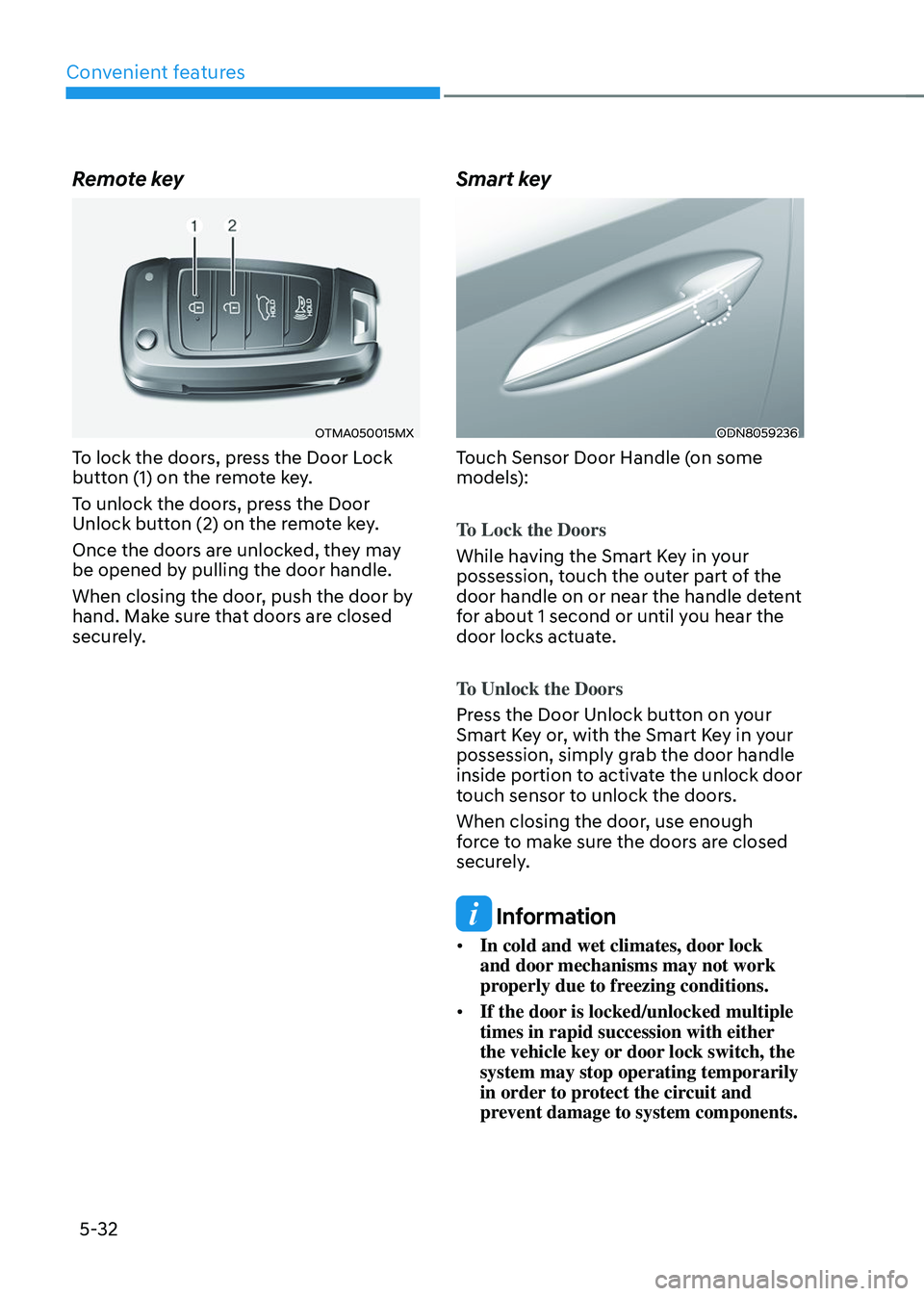
OTMA050015MX
To lock the doors, press the Door Lock
button (1) on the remote key.
To unlock the doors, press the Door
Unlock button (2) on the remote key.
Once the doors are unlocked, they may
be opened by pulling the door handle.
When closing the door, push the door by
hand. Make sure that doors are closed
securely.
Smart key
ODN8059236
Touch Sensor Door Handle (on some
models):
To Lock the Doors
While having the Smart Key in your
possession, touch the outer part of the
door handle on or near the handle detent
for about 1 second or until you hear the
door locks actuate.
To Unlock the Doors
Press the Door Unlock button on your
Smart Key or, with the Smart Key in your
possession, simply grab the door handle
inside portion to activate the unlock door
touch sensor to unlock the doors.
When closing the door, use enough
force to make sure the doors are closed
securely.
Information
• In cold and wet climates, door lock
and door mechanisms may not work
properly due to freezing conditions.
• If the door is locked/unlocked multiple
times in rapid succession with either
the vehicle key or door lock switch, the
system may stop operating temporarily
in order to protect the circuit and
prevent damage to system components.