brake HYUNDAI TUCSON 2023 User Guide
[x] Cancel search | Manufacturer: HYUNDAI, Model Year: 2023, Model line: TUCSON, Model: HYUNDAI TUCSON 2023Pages: 638, PDF Size: 26.51 MB
Page 108 of 638
Instrument cluster
4-10
Parking brake warning light
This warning light illuminates:
• When you set the ignition switch or
the Engine Start/Stop button to the
ON position.
-The parking brake & brake fluid
warning light illuminates for about 3
seconds and will then turn off once
the parking brake is released.
• Whenever the parking brake is
applied.
• Whenever the brake fluid level in the
reservoir is low.
-If the warning light illuminates
with the parking brake released, it
indicates the brake fluid level in the
reservoir is low.
If the brake fluid level in the reservoir is
low:
1. Drive carefully to the nearest safe
location and stop your vehicle.
2. With the engine stopped, check the
brake fluid level immediately and add
fluid as required (For more details,
refer to “Brake Fluid” section in
chapter 9). After adding brake fluid,
check all brake components for fluid
leaks. If a brake fluid leak is found, or
if the warning light remains on, or if
the brakes do not operate properly, do
not drive the vehicle. We recommend
that you have the vehicle inspected by
an authorized HYUNDAI dealer. Dual-diagonal braking system
Your vehicle is equipped with dual-
diagonal braking system. This means you
still have braking on two wheels even if
one of the dual systems should fail.
With only one of the dual systems
working, more than normal pedal travel
and greater pedal pressure is required to
stop the vehicle.
Also, the vehicle will not stop in as short
a distance with only a portion of the
brake system working.
If you experience a malfunction with
the brake system while driving, attempt
to slow your vehicle by coasting or
by using engine braking. You may be
able to reduce your vehicle speed by
manually downshifting to a lower gear.
Use Manual Shift Mode using either the
gear shift lever or the paddle shifters (if
equipped) to shift to a lower gear.
WARNING
Parking Brake & Brake Fluid warning
light
Driving the vehicle with a warning light
ON is dangerous. If the Parking Brake
warning light illuminates with the
parking brake released, it indicates that
the brake fluid level is low.
If this occurs, we recommend that
you have the vehicle inspected by an
authorized HYUNDAI dealer.
Page 109 of 638
04
4-11
Anti-lock Brake System (ABS)
warning light
This warning light illuminates:
• When you set the ignition switch or
the Engine Start/Stop button to the
ON position.
-The ABS warning light illuminates
for about 3 seconds and then goes
off.
• Whenever there is a malfunction with
the ABS.
Note that the hydraulic braking
system will still be operational even if
there is a malfunction with the ABS.
If the ABS warning light remains
illuminated while driving, have the
vehicle inspected by an authorized
HYUNDAI dealer.
Electronic Brake Force
Distribution (EBD) system
warning light
When the ABS warning and Parking Brake warning lights are on
simultaneously, it may indicate a
problem with the Electronic Brake Force
Distribution system.
If both the ABS warning light and the
Parking Brake warning light remain
illuminated while driving, have the
vehicle inspected by an authorized
HYUNDAI dealer.
WARNING
Electronic Brake Force Distribution
(EBD) system warning light
When both ABS and Parking Brake
warning lights are on, the brake
system will not work normally and you
may experience an unexpected and
dangerous situation during sudden
braking.
If this occurs, avoid high speed driving
and abrupt braking.
We recommend that you have the
vehicle inspected by an authorized
HYUNDAI dealer as soon as possible.
NOTICE
Electronic Brake Force Distribution
(EBD) system warning light
When the ABS warning light is on or
both ABS and Parking Brake warning
lights are on, the speedometer,
odometer, or tripmeter may not
work. Also, the EPS warning light may
illuminate and the steering effort may
increase or decrease.
If both the ABS warning light and the
Parking Brake warning light remain
illuminated while driving, have the
vehicle inspected by an authorized
HYUNDAI dealer.
Page 113 of 638
04
4-15
Electronic Parking Brake
(EPB) warning light
This warning light illuminates:
• When you set the ignition switch or
the Engine Start/Stop button to the
ON position.
-The EPB warning light illuminates
for about 3 seconds and then goes
off.
• Whenever there is a malfunction with
EPB.
If the EPB warning light remains
illuminated while driving, have the
vehicle inspected by an authorized
HYUNDAI dealer.
Information
The Electronic Parking Brake (EPB)
warning light may illuminate when
the Electronic Stability Control (ESC)
indicator light comes on to indicate that
ESC is not working properly. This does
not indicate malfunction of EPB.
AUTO HOLD indicator light
This indicator light illuminates:
• [White] When you activate Auto Hold
by pressing the AUTO HOLD switch.
• [Green] When you stop the vehicle
completely by depressing the brake
pedal with Auto Hold activated.
• [Yellow] Whenever there is a
malfunction with the Auto Hold
function.
If the AUTO HOLD indicator light
remains YELLOW while driving, have
the vehicle inspected by an authorized
HYUNDAI dealer.
For more details, refer to “Electronic
Parking Brake (EPB)” section in chapter
6.
Low tire pressure warning
light
This warning light illuminates:
• When you set the ignition switch or
the Engine Start/Stop button to the
ON position.
- The low tire pressure warning light
illuminates for approximately 3
seconds and then goes off.
• When one or more of your tires are
significantly underinflated. (The
location of the underinflated tires are
displayed on the LCD display.)
For more details, refer to “Tire Pressure
Monitoring System (TPMS)” section in
chapter 8.
This warning light remains ON after
blinking for approximately 60 seconds, or
repeatedly blinks ON and OFF in 3 second
intervals:
When there is a malfunction with the
TPMS.
If this occurs, we recommend that
you have the vehicle inspected by an
authorized HYUNDAI dealer as soon as
possible.
For more details, refer to “Tire Pressure
Monitoring System (TPMS)” section in
chapter 8.
WARNING
Safe Stopping
• The TPMS cannot alert you to severe
and sudden tire damage caused by
external factors.
• If you notice any vehicle instability,
immediately take your foot off the
accelerator pedal, apply the brakes
gradually with light force, and slowly
move to a safe position off the road.
Page 118 of 638
Instrument cluster
4-20
Downhill Brake Control (DBC)
indicator light
This indicator light illuminates:
• When you set the ignition switch or
the Engine Start/Stop button to the
ON position.
-The downhill brake control indicator
light illuminates for about 3 seconds
and then goes off.
• When you activate the system by
pressing the DBC button.
This indicator light blinks:
When Downhill Brake Control system is
operating.
This indicator light illuminates yellow:
Whenever there is a malfunction with
Downhill Brake Control system.
If this occurs, we recommend that
you have the vehicle inspected by an
authorized HYUNDAI dealer.
For more details, refer to "Downhill
Brake Control (DBC)“ section in chapter
6.
IDLE STOP & GO (ISG)
indicator light
This indicator light illuminates:
When the engine enters the Idle Stop
mode of ISG (Idle Stop and Go) system.
When the engine automatically starts,
the IDLE STOP & GO (ISG) indicator on
the cluster Illuminates to white.
For more details, refer to "ISG (Idle Stop
and Go) system" section in chapter 6.
Information
When the engine automatically starts
by the ISG system, some warning lights
(ABS, ESC, ESC OFF, EPS or Parking
brake warning light) may turn on for a
few seconds. This happens because of
low battery voltage. It does not mean the
system has malfunctioned.
Page 121 of 638
04
4-23
LCD Display Messages for
Vehicles Equipped with Smart
Key
Shift to P
This message is displayed if you try to
turn off the vehicle without the gear in
the P (Park) position.
If this occurs, the Engine Start/Stop
button turns to the ACC position.
Low key battery
When the Engine Start/Stop button
is pressed to turn OFF the engine,
this message may be displayed. This
message indicates that the internal
battery of the Smart Key is low. Consider
replacing the Smart Key internal battery.
Press START button while turning
wheel
This message is displayed if the steering
wheel does not unlock normally when
the Engine Start/Stop button is pressed.
You should press the Engine Start/Stop
button while turning the steering wheel
right and left.
Check steering wheel lock system
This message is displayed if the steering
wheel does not lock normally while the
Engine Start/Stop button is pressed to
the OFF position.
Press brake pedal to start engine
This message is displayed if the Engine
Start/Stop button changes to the ACC
position twice by pressing the button
repeatedly without depressing the brake
pedal.
You can start the vehicle by depressing
the brake pedal and then pressing the
Engine Start/Stop button.
Key not in vehicle
This message is displayed if the smart
key is not in the vehicle when you leave
the vehicle with the Engine Start/Stop
button in the ON or Start position.
Always turn off the engine before leaving
your vehicle.
Key not detected
This message is displayed if the smart
key is not detected when you press the
Engine Start/Stop button.
Press START button again
This message is displayed if you were
unable to start the vehicle when the
Engine Start/Stop button was pressed.
If this occurs, attempt to start the engine
by pressing the Engine Start/ Stop button
again.
If the warning message appears each
time you press the Engine Start/Stop
button, we recommend that you have
the vehicle inspected by an authorized
HYUNDAI dealer.
Page 122 of 638
Instrument cluster
4-24
Press START button with key
This message is displayed if you press
the Engine Start/Stop button while the
warning message “Key not detected” is
displayed.
At this time, the immobilizer indicator
light blinks.
Check BRAKE SWITCH fuse
This message is displayed if the brake
switch fuse is disconnected.
You need to replace the fuse with a new
one before starting the engine.
If that is not possible, you can start the
engine by pressing the Engine Start/
Stop button for 10 seconds in the ACC
position.
Shift to P or N to start engine
This message is displayed if you try to
start the engine in any other position
except P (Park) or N (Neutral).
Information
You can start the engine with the gear
in N (Neutral). But, for your safety, we
recommend that you start the engine with
the gear shifted to P (Park).
Battery discharging due to external
electrical devices
This message is displayed if the vehicle
battery voltage is low or if a current draw
is detected that could drain the vehicle
battery.
Check to see that there are no non-
factory external electronic devices
connected to the vehicle battery system,
otherwise battery discharge may occur.
If this message appears in the LCD
cluster and there are no other non-
factory electronic devices connected to
the vehicle, have the vehicle inspected
by an authorized HYUNDAI dealer.
Page 163 of 638
05
5-19
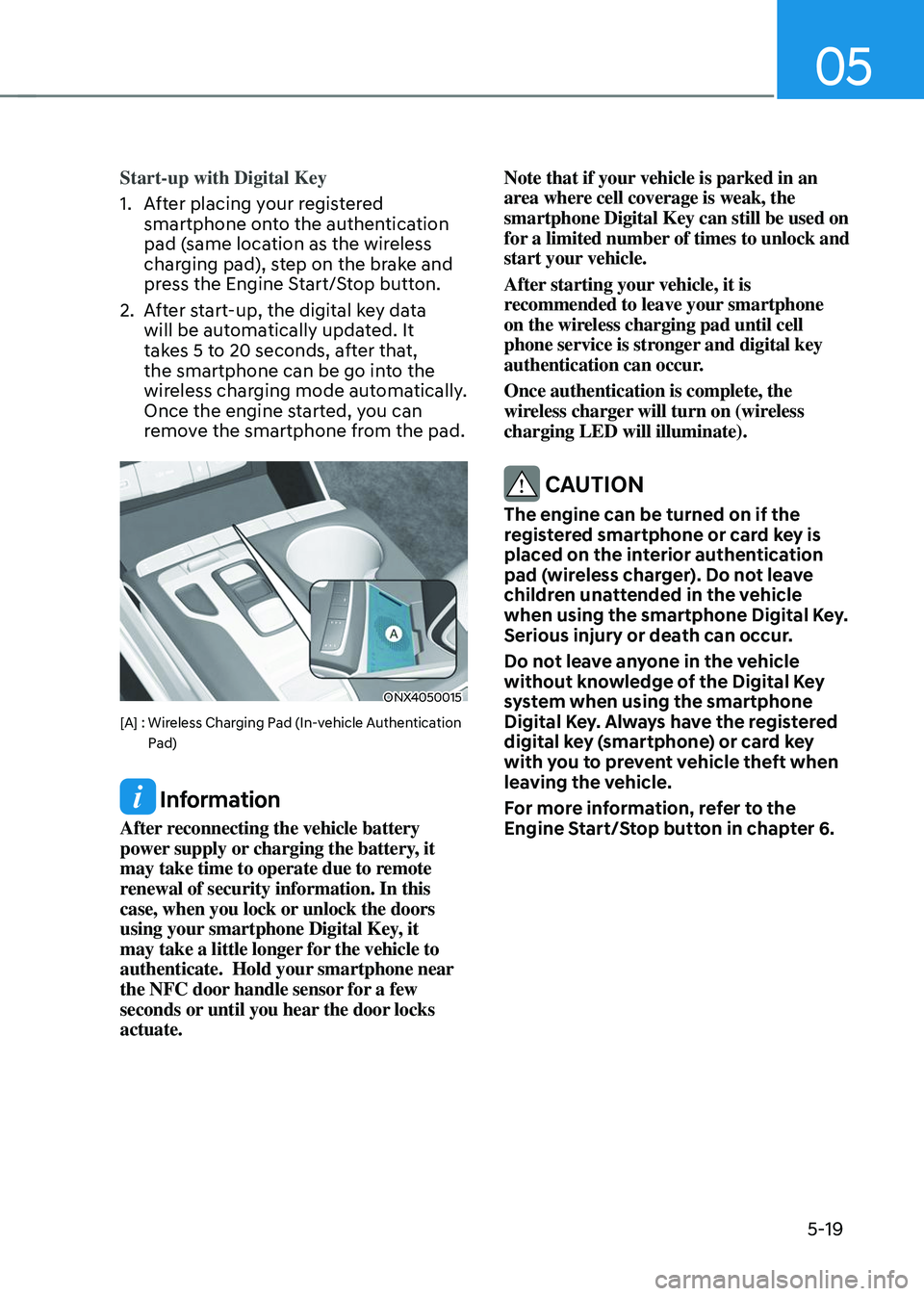
Start-up with Digital Key
1. After placing your registered
smartphone onto the authentication
pad (same location as the wireless
charging pad), step on the brake and
press the Engine Start/Stop button.
2. After start-up, the digital key data
will be automatically updated. It
takes 5 to 20 seconds, after that,
the smartphone can be go into the
wireless charging mode automatically.
Once the engine started, you can
remove the smartphone from the pad.
ONX4050015
[A] : Wireless Charging Pad (In-vehicle Authentication Pad)
Information
After reconnecting the vehicle battery
power supply or charging the battery, it
may take time to operate due to remote
renewal of security information. In this
case, when you lock or unlock the doors
using your smartphone Digital Key, it
may take a little longer for the vehicle to
authenticate. Hold your smartphone near
the NFC door handle sensor for a few
seconds or until you hear the door locks
actuate. Note that if your vehicle is parked in an
area where cell coverage is weak, the
smartphone Digital Key can still be used on
for a limited number of times to unlock and
start your vehicle.
After starting your vehicle, it is
recommended to leave your smartphone
on the wireless charging pad until cell
phone service is stronger and digital key
authentication can occur.
Once authentication is complete, the
wireless charger will turn on (wireless
charging LED will illuminate).
CAUTION
The engine can be turned on if the
registered smartphone or card key is
placed on the interior authentication
pad (wireless charger). Do not leave
children unattended in the vehicle
when using the smartphone Digital Key.
Serious injury or death can occur.
Do not leave anyone in the vehicle
without knowledge of the Digital Key
system when using the smartphone
Digital Key. Always have the registered
digital key (smartphone) or card key
with you to prevent vehicle theft when
leaving the vehicle.
For more information, refer to the
Engine Start/Stop button in chapter 6.
Page 171 of 638
05
5-27
Start-up with Card key
After placing your registered card key
onto the interior authentication pad
(wireless charger), step on the brake and
press the Engine Start/Stop button.
WARNING
• If you do not place the digital key
(card key) onto the center of the
interior authentication pad (wireless
charger) exactly, the card key may
not be recognized. If the engine is
not turned on, adjust and place the
key again.
• If you overlap and use the key
with NFC-enabled cards such as
transportation card or credit card,
the card key may not be recognized.
• If the digital key (card key) does not
work, please detach the key around
4 inches (0.1 m) from the handle
authentication pad and retry to
contact.
• The card key may be damaged due to
impact. It would not work properly if
the key is damaged. You should buy a
new card and register again.
For more information, refer to the
Engine Start/Stop button in chapter 6.
„„Type A
ODN8A059133
„„Type B
ODN8A059247
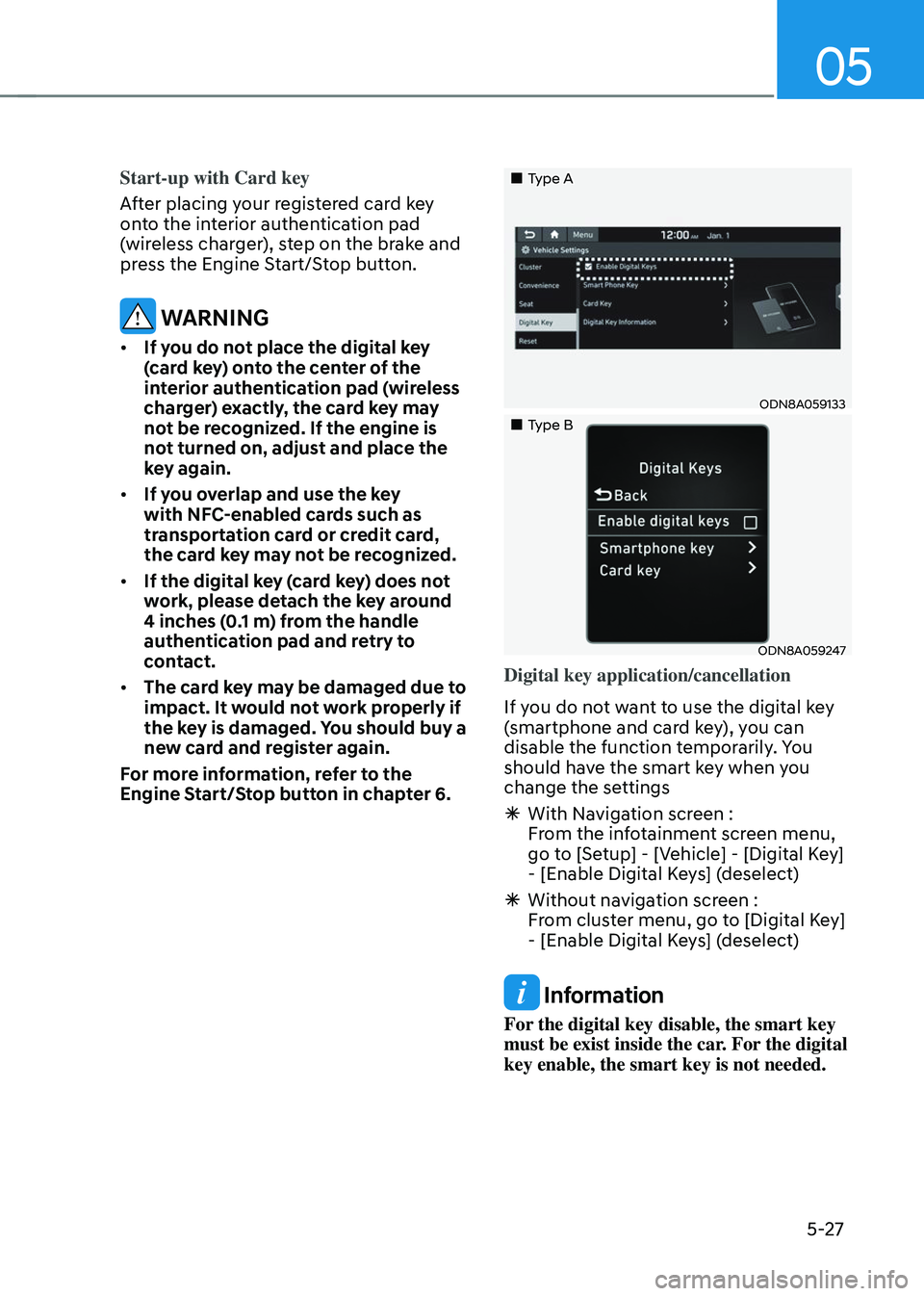
Digital key application/cancellation
If you do not want to use the digital key
(smartphone and card key), you can
disable the function temporarily. You
should have the smart key when you
change the settings
à With Navigation screen :
From the infotainment screen menu,
go to [Setup] - [Vehicle] - [Digital Key]
- [Enable Digital Keys] (deselect)
ÃWithout navigation screen :
From cluster menu, go to [Digital Key]
- [Enable Digital Keys] (deselect)
Information
For the digital key disable, the smart key
must be exist inside the car. For the digital
key enable, the smart key is not needed.
Page 178 of 638
Convenient features
5-34
With the driver door lock/unlock
switch
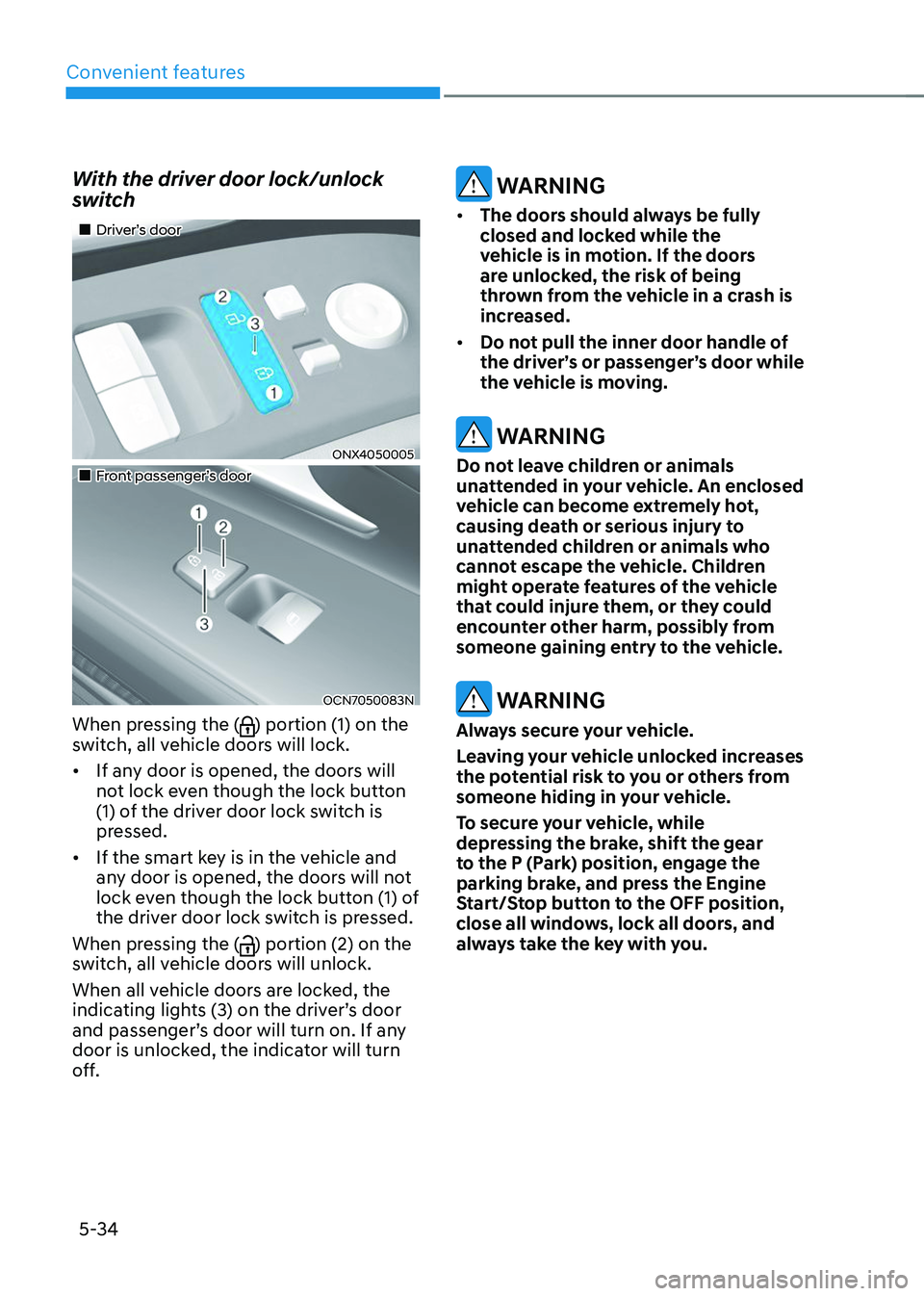
„„Driver’s door
ONX4050005
„„Front passenger’s door
OCN7050083N
When pressing the () portion (1) on the
switch, all vehicle doors will lock.
• If any door is opened, the doors will
not lock even though the lock button
(1) of the driver door lock switch is
pressed.
• If the smart key is in the vehicle and
any door is opened, the doors will not
lock even though the lock button (1) of
the driver door lock switch is pressed.
When pressing the (
) portion (2) on the
switch, all vehicle doors will unlock.
When all vehicle doors are locked, the
indicating lights (3) on the driver’s door
and passenger’s door will turn on. If any
door is unlocked, the indicator will turn
off.
WARNING
• The doors should always be fully
closed and locked while the
vehicle is in motion. If the doors
are unlocked, the risk of being
thrown from the vehicle in a crash is
increased.
• Do not pull the inner door handle of
the driver’s or passenger’s door while
the vehicle is moving.
WARNING
Do not leave children or animals
unattended in your vehicle. An enclosed
vehicle can become extremely hot,
causing death or serious injury to
unattended children or animals who
cannot escape the vehicle. Children
might operate features of the vehicle
that could injure them, or they could
encounter other harm, possibly from
someone gaining entry to the vehicle.
WARNING
Always secure your vehicle.
Leaving your vehicle unlocked increases
the potential risk to you or others from
someone hiding in your vehicle.
To secure your vehicle, while
depressing the brake, shift the gear
to the P (Park) position, engage the
parking brake, and press the Engine
Start/Stop button to the OFF position,
close all windows, lock all doors, and
always take the key with you.
Page 209 of 638
05
5-65
Hood
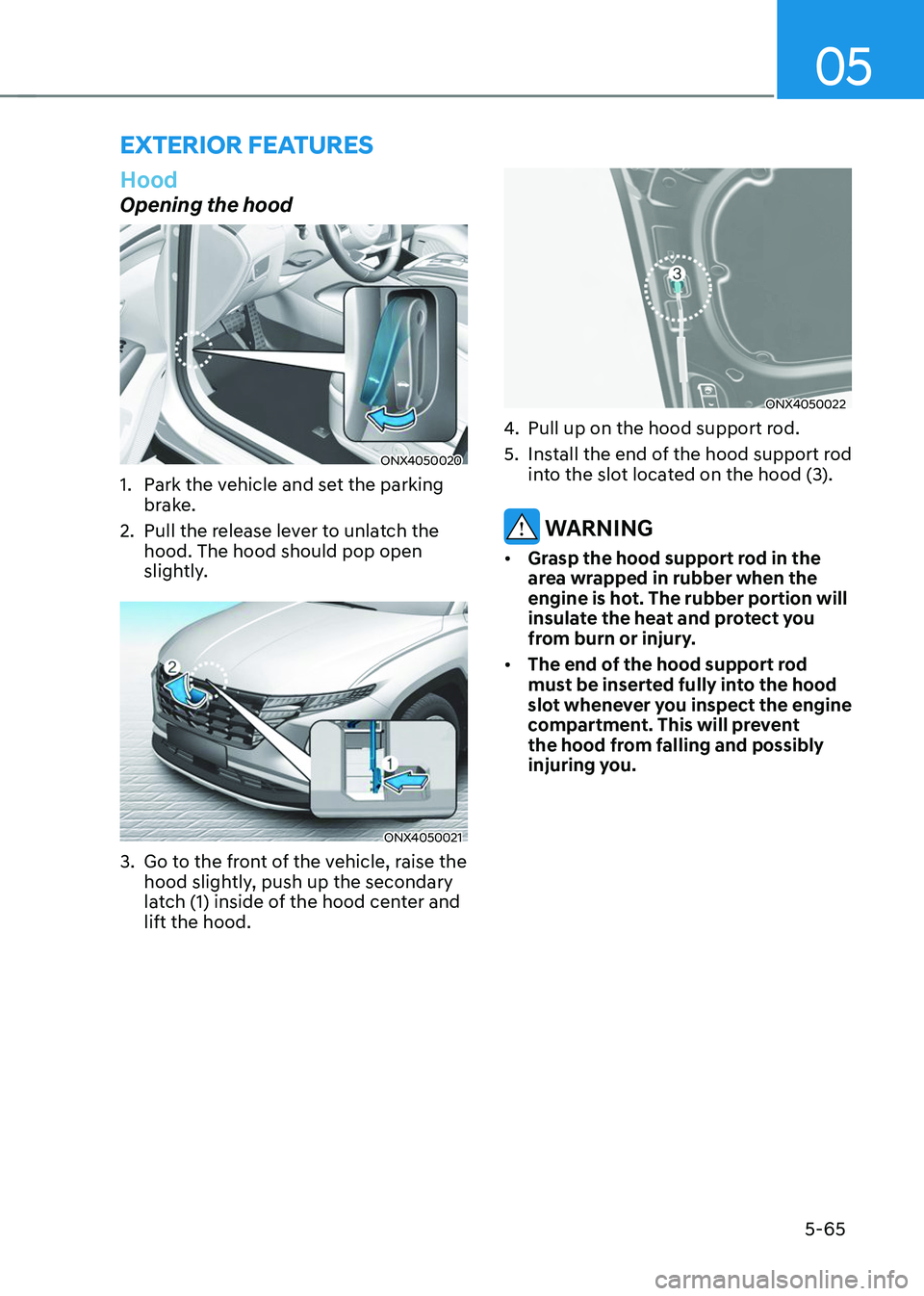
Opening the hood
ONX4050020
1. Park the vehicle and set the parking
brake.
2. Pull the release lever to unlatch the
hood. The hood should pop open
slightly.
ONX4050021
3. Go to the front of the vehicle, raise the
hood slightly, push up the secondary
latch (1) inside of the hood center and
lift the hood.
ONX4050022
4. Pull up on the hood support rod.
5. Install the end of the hood support rod
into the slot located on the hood (3).
WARNING
• Grasp the hood support rod in the
area wrapped in rubber when the
engine is hot. The rubber portion will
insulate the heat and protect you
from burn or injury.
• The end of the hood support rod
must be inserted fully into the hood
slot whenever you inspect the engine
compartment. This will prevent
the hood from falling and possibly
injuring you.
EXTERIOR FEATURES