remote control HYUNDAI TUCSON 2023 User Guide
[x] Cancel search | Manufacturer: HYUNDAI, Model Year: 2023, Model line: TUCSON, Model: HYUNDAI TUCSON 2023Pages: 638, PDF Size: 26.51 MB
Page 286 of 638

Before driving ........................................................................\
............................6-4Before entering the vehicle ........................................................................\
................6-4
Before starting ........................................................................\
.....................................6-4
Ignition switch ........................................................................\
...........................6-5Key ignition switch ........................................................................\
...............................6-5
Key ignition switch positions ........................................................................\
..............6-6
Starting the engine ........................................................................\
...............................6 -7
Engine Start/Stop button ........................................................................\
.........6-8Engine Stop/Start button positions ........................................................................\
...6-9
Starting the engine ........................................................................\
.............................6-10
Turning off the engine ........................................................................\
.........................6-11
Remote start ........................................................................\
.......................................6-12
Automatic transmission ........................................................................\
..........6-14Automatic transmission operation ........................................................................\
....6-14
LCD display message (button type) ........................................................................\
..6-21
Paddle shifter (Manual shift mode) ........................................................................\
...6-22
Good driving practices ........................................................................\
.......................6-23
Braking system ........................................................................\
........................6-25Power-assist brakes ........................................................................\
...........................6-25
Disc brakes wear indicator ........................................................................\
................6-25
Electronic Parking Brake (EPB) ........................................................................\
.........6-26
Auto Hold ........................................................................\
...........................................6-30
Anti-lock Brake System (ABS) ........................................................................\
............6-34
Electronic Stability Control (ESC) ........................................................................\
.....6-35
Vehicle Stability Management (VSM) .....................................................................6-38
Trailer stability assist (TSA) ........................................................................\
...............6-39
Hill-Start Assist Control (HAC) ........................................................................\
.........6-40
Downhill Brake Control (DBC) ........................................................................\
.........6-40
Good braking practices ........................................................................\
.....................6-43
Idle Stop and Go (ISG) ........................................................................\
...........6-44ISG system operation ........................................................................\
........................6-44
ISG system off ........................................................................\
.....................................6-47
Forced to restart engine
........................................................................\
...................6-48
ISG malfunction ........................................................................\
.................................6-48
Drive mode integrated control system .........................................................6-49
All Wheel Drive (AWD)
........................................................................\
...........6-52AWD operation ........................................................................\
...................................6-53
Emergency precautions
........................................................................\
....................6-56
6. Driving your v ehicle
Driving your vehicle
6
Page 364 of 638
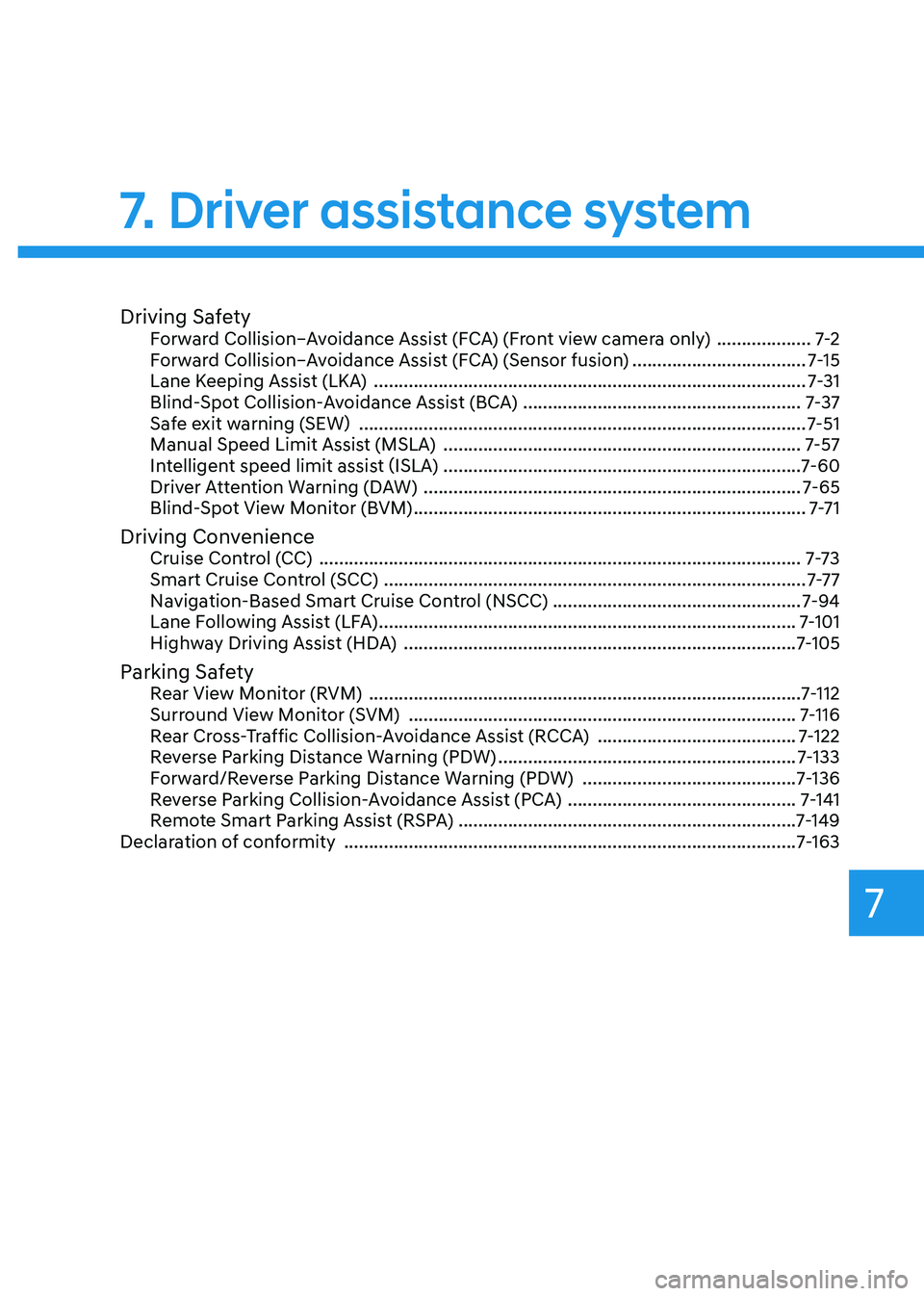
Driving SafetyForward Collision–Avoidance Assist (FCA) (Front view camera only) ...................7-2
Forward Collision–Avoidance Assist (FCA) (Sensor fusion) ...................................7-15
Lane Keeping Assist (LKA) ........................................................................\
...............7-31
Blind-Spot Collision-Avoidance Assist (BCA) ........................................................7-37
Safe exit warning ( SEW) ........................................................................\
..................7-51
Manual Speed Limit Assist (MSLA) ........................................................................\
7-57
Intelligent speed limit assist (ISLA ) ........................................................................\
7-60
Driver Attention Warning (DAW) ........................................................................\
....7-65
Blind-Spot View Monitor (BVM) ........................................................................\
.......7-7 1
Driving ConvenienceCruise Control (CC) ........................................................................\
.........................7-7 3
Smart Cruise Control (SCC) ........................................................................\
.............7-7 7
Navigation-Based Smart Cruise Control (NSCC) ..................................................7-94
Lane Following Assist (LFA) ........................................................................\
............7-101
Highway Driving Assist (HDA) ........................................................................\
.......7-105
Parking SafetyRear View Monitor (RVM) ........................................................................\
...............7-112
Surround View Monitor (SVM) ........................................................................\
......7-116
Rear Cross-Traffic Collision-Avoidance Assist (RCCA) ........................................7-122
Reverse Parking Distance Warning (PDW) ............................................................7-133
Forward/Reverse Parking Distance Warning (PDW) ...........................................7-136
Reverse Parking Collision-Avoidance Assist (PCA) ..............................................7-141
Remote Smart Parking Assist (RSPA) ....................................................................7-149
Declaration of conformity ........................................................................\
...................7-163
7. Driver assistance system
Driver assistance system
7
Page 445 of 638
Driver assistance system7-82
Smart Cruise Control Operation
Operating conditions
Smart Cruise Control will operate when
the following conditions are satisfied.
Basic function
• The gear is in D (Drive)
•
The driver’s door is closed
• EPB (Electronic Parking Brake) is not
applied
• Your vehicle speed is within the
operating speed range
-5~110 mph (10~180 km/h): when
there is no vehicle in front
-0~110 mph (0~180 km/h): when
there is a vehicle in front
• ESC (Electronic Stability Control) or
ABS is on
• ESC (Electronic Stability Control) or
ABS is not controlling the vehicle
• Engine RPM is not in the red zone
• Forward Collision-Avoidance Assist
brake control is not operating (if
equipped)
• Remote Smart Parking Assist brake
control is not operating
Information
At a stop, if there is no vehicle in front of
your vehicle, Smart Cruise Control will
turn on when the brake pedal is depressed. Overtaking Acceleration Assist
Overtaking Acceleration Assist will
operate when the turn signal indicator
is turned on to the left (left-hand drive)
or turned on to the right (right-hand
drive) while Smart Cruise Control is
operating, and the following conditions
are satisfied:
•
Your vehicle speed is above 40 mph
(60 km/h)
• The hazard warning flasher is off
• A vehicle is detected in front of your
vehicle
• Deceleration is not needed to
maintain distance with the vehicle in
front
WARNING
• When the turn signal indicator is
turned on to the left (left-hand drive)
or turned on to the right (right-
hand drive) while there is a vehicle
ahead, the vehicle may accelerate
temporarily. Pay attention to the
road conditions at all times.
• Regardless of your countries driving
direction, Overtaking Acceleration
Assist will operate when the
conditions are satisfied. When
using the function in countries with
different driving direction, always
check the road conditions at all
times.
Page 492 of 638
07
7-129
WARNING
• Even though the warning message
does not appear on the cluster, Rear
Cross-Traffic Safety system may not
operate properly.
• Rear Cross-Traffic Safety system may
not operate properly in an area (for
example: open terrain), where any
substance are not detected after
turning ON the engine.
CAUTION
Turn off Rear Cross-Traffic Safety
system to install a trailer, carrier, etc.,
or remove the trailer, carrier, etc. to use
Rear Cross-Traffic Safety system.
Limitations of Rear Cross-Traffic
Safety system
Rear Cross-Traffic Safety system may
not operate normally, or the system
may operate unexpectedly under the
following circumstances:
• Departing from where trees or grass
are overgrown
• Departing from where roads are wet
• Speed of the approaching vehicle is
fast or slow
Braking control may not work, driver’s attention is required in the following
circumstances:
• The vehicle severely vibrates while
driving over a bumpy road, uneven
road or concrete patch
• Driving on a slippery surface due to
snow, water puddle, ice, etc.
• The tire pressure is low or a tire is
damaged
• The brake is reworked
• Remote Smart Parking Assist is
operating (if equipped)
Information
For more details on the limitations of the
rear corner radar, refer to “Blind-Spot
Collision-Avoidance Assist (BCA)” section
in chapter 7.
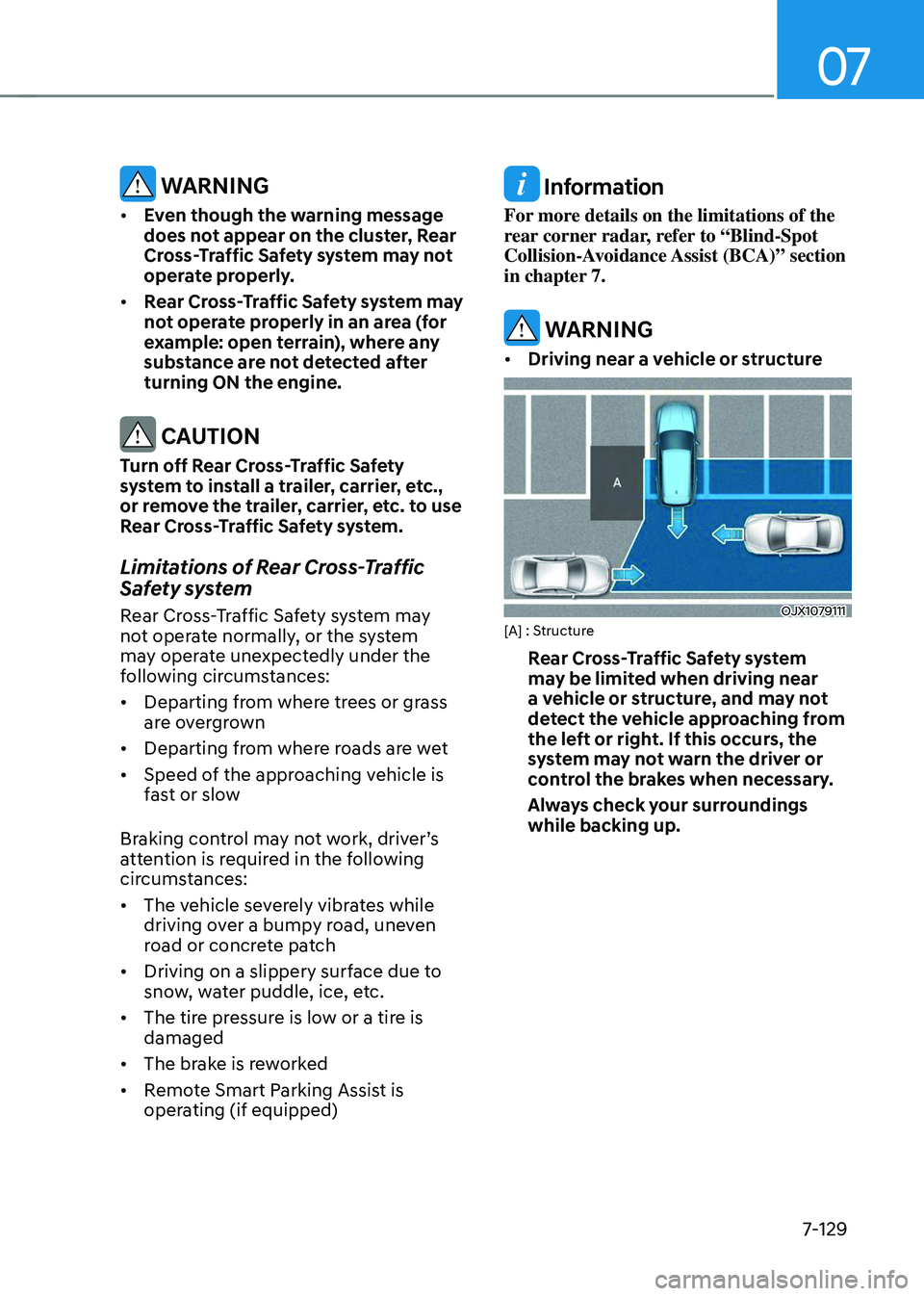
WARNING
• Driving near a vehicle or structure
OJX1079111[A] : Structure
Rear Cross-Traffic Safety system
may be limited when driving near
a vehicle or structure, and may not
detect the vehicle approaching from
the left or right. If this occurs, the
system may not warn the driver or
control the brakes when necessary.
Always check your surroundings
while backing up.
Page 512 of 638
07
7-149
REMOTE SMART PARKING ASSIST (RSPA) (IF EQUIPPED)
Remote Smart Parking Assist uses
vehicle sensors to help the driver park
and exit parking spaces remotely from
outside the vehicle by controlling the
steering wheel, vehicle speed and
gearshifts.
FunctionDescription
Remote
Forward/
Backward Remotely moving forward/
backward
OJX1079037
• Remote Forward/Backward function
helps the driver move the vehicle
forward or Backward from outside the
vehicle using the smart key.
• When Remote Smart Parking Assist
operates, Surround View Monitor and
Parking Distance Warning will also
operate. For more details, refer to
“Surround View Monitor (SVM) and
“Parking Distance Warning (PDW)”
sections in chapter 7.
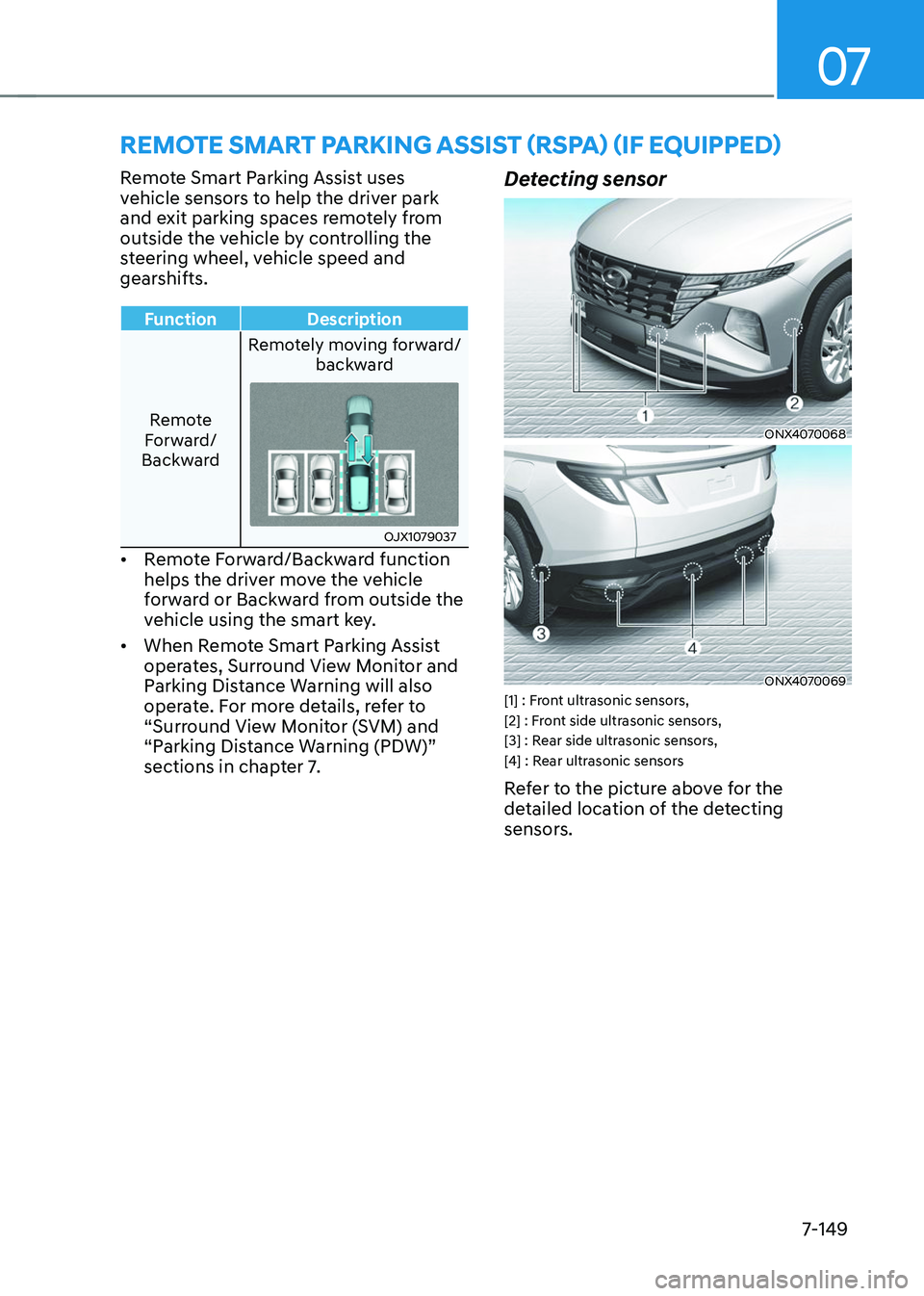
Detecting sensor
ONX4070068
ONX4070069[1] : Front ultrasonic sensors,
[2] : Front side ultrasonic sensors,
[3] : Rear side ultrasonic sensors,
[4] : Rear ultrasonic sensors
Refer to the picture above for the
detailed location of the detecting
sensors.
Page 516 of 638
07
7-153
Remote Forward/Backward
Operating order
Remote Forward/Backward operates in
the following order:
1. Getting ready to remotely move
forward and backward
2. Remotely moving forward and
backward
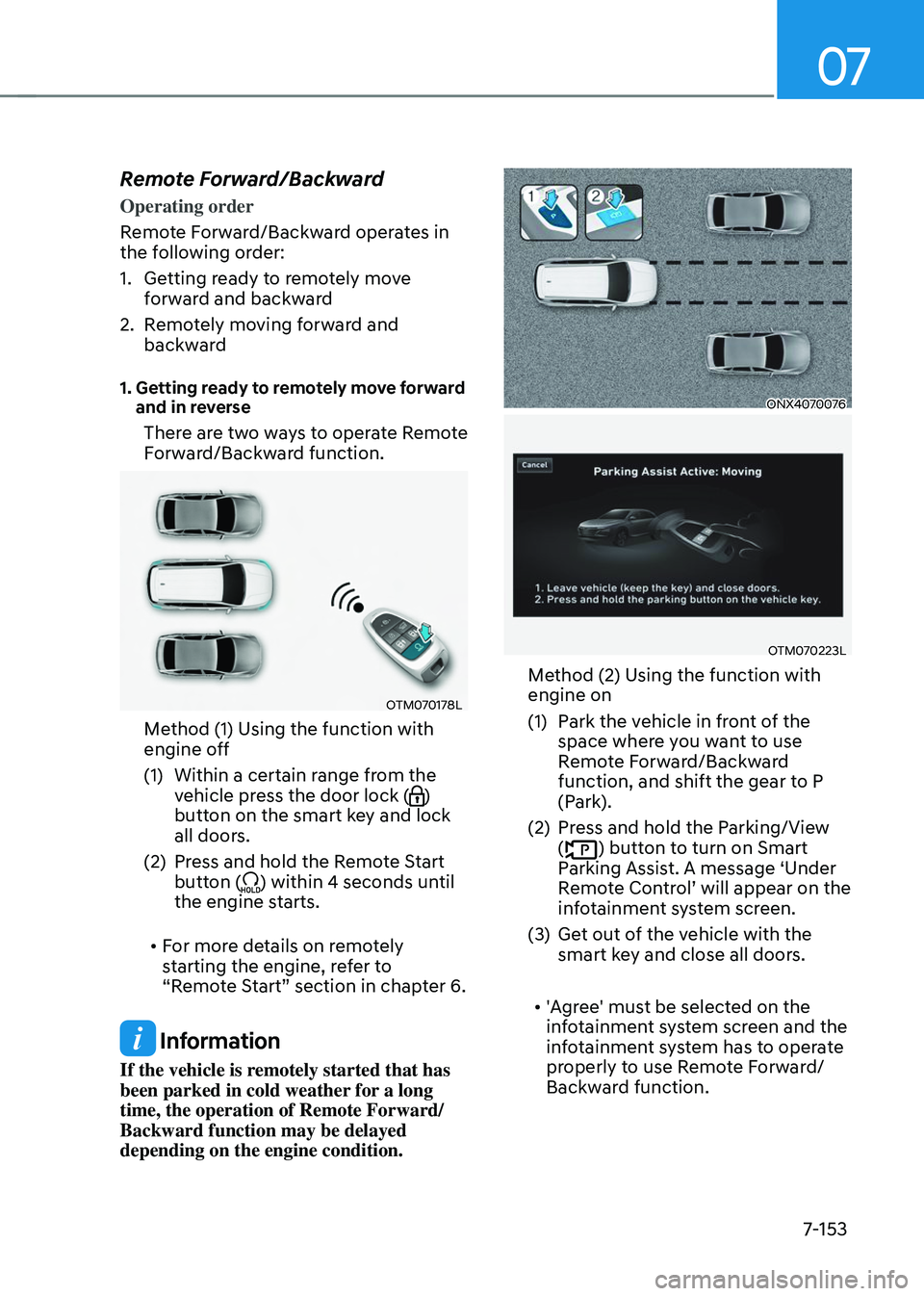
1. Getting ready to remotely move forward and in reverse
There are two ways to operate Remote
Forward/Backward function.
OTM070178L
Method (1) Using the function with
engine off
(1) Within a certain range from the
vehicle press the door lock ()
button on the smart key and lock
all doors.
(2) Press and hold the Remote Start
button () within 4 seconds until
the engine starts.
• For more details on remotely
starting the engine, refer to
“Remote Start” section in chapter 6.
Information
If the vehicle is remotely started that has
been parked in cold weather for a long
time, the operation of Remote Forward/
Backward function may be delayed
depending on the engine condition.
ONX4070076
OTM070223L
Method (2) Using the function with
engine on
(1) Park the vehicle in front of the
space where you want to use
Remote Forward/Backward
function, and shift the gear to P
(Park).
(2) Press and hold the Parking/View
() button to turn on Smart
Parking Assist. A message ‘Under
Remote Control’ will appear on the infotainment system screen.
(3) Get out of the vehicle with the
smart key and close all doors.
• 'Agree' must be selected on the
infotainment system screen and the
infotainment system has to operate
properly to use Remote Forward/
Backward function.
Page 517 of 638
Driver assistance system
7-154
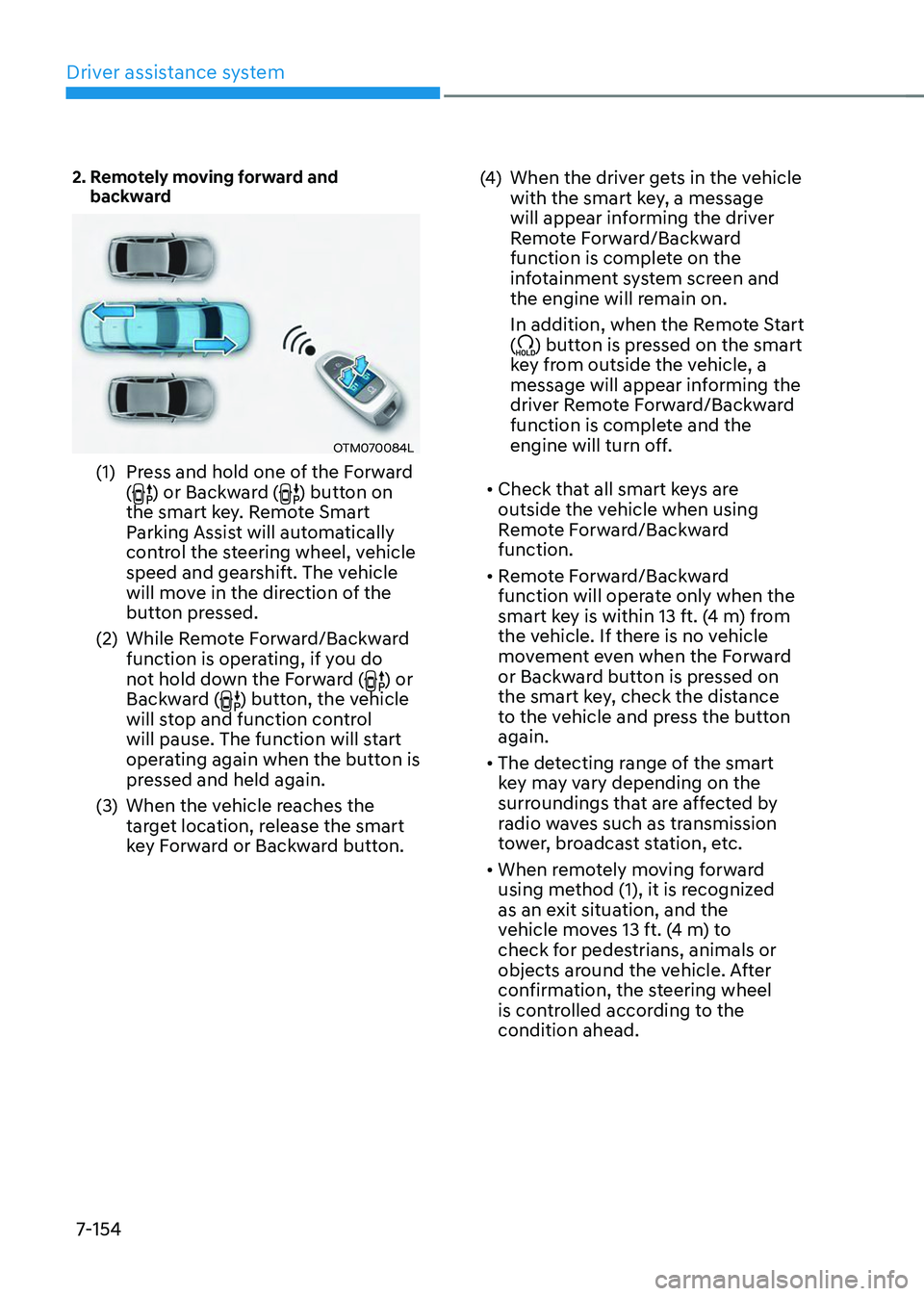
2. Remotely moving forward and backward
OTM070084L
(1) Press and hold one of the Forward
() or Backward () button on
the smart key. Remote Smart
Parking Assist will automatically
control the steering wheel, vehicle
speed and gearshift. The vehicle
will move in the direction of the
button pressed.
(2) While Remote Forward/Backward
function is operating, if you do
not hold down the Forward (
) or
Backward () button, the vehicle
will stop and function control
will pause. The function will start
operating again when the button is
pressed and held again.
(3) When the vehicle reaches the
target location, release the smart
key Forward or Backward button.
(4) When the driver gets in the vehicle
with the smart key, a message
will appear informing the driver
Remote Forward/Backward
function is complete on the
infotainment system screen and
the engine will remain on.
In addition, when the Remote Start
(
) button is pressed on the smart
key from outside the vehicle, a
message will appear informing the
driver Remote Forward/Backward
function is complete and the
engine will turn off.
• Check that all smart keys are
outside the vehicle when using
Remote Forward/Backward
function.
• Remote Forward/Backward
function will operate only when the
smart key is within 13 ft. (4 m) from
the vehicle. If there is no vehicle
movement even when the Forward
or Backward button is pressed on
the smart key, check the distance
to the vehicle and press the button
again.
• The detecting range of the smart
key may vary depending on the
surroundings that are affected by
radio waves such as transmission
tower, broadcast station, etc.
• When remotely moving forward
using method (1), it is recognized
as an exit situation, and the
vehicle moves 13 ft. (4 m) to
check for pedestrians, animals or
objects around the vehicle. After
confirmation, the steering wheel
is controlled according to the
condition ahead.
Page 518 of 638
07
7-155
• When remotely moving forward
using method (2), it is recognized
as a parking situation, and will
immediately control the steering
wheel according to the condition
ahead to assist with entering the
parking space and aligning the
vehicle. However, performance
may reduce depending on the
pedestrians, animals, shape of
objects, location, etc. around the
vehicle.
• For moving remotely backward,
both method (1) and (2) aligns the
steering wheel first, and then will
only move the vehicle straight.
• When remotely moving Forward/
Backward is completed, the vehicle
will automatically shift to P (Park)
and engage EPB (Electronic Parking
Brake). CAUTION
• When using Remote Remote
Forward/Backward function, make
sure that all passengers have gotten
out of the vehicle.
• If the vehicle’s battery is discharged
or Remote Smart Parking Assist
malfunctions when parked in a
narrow parking space, Remote
Forward/Backward function will not
operate. Always park your vehicle in
a space wide enough for you to get in
or out of your vehicle.
• Please note that depending on the
parking space, you may not be able
to exit from the space you have
entered by using Remote Forward/
Backward function.
• After parking, the surrounding may
change due to the movement of
surrounding vehicles. If this occurs,
Remote Forward/Backward function
may not operate.
• Before leaving the vehicle, close
windows and sunroofs, and make
sure the engine is off before locking
the doors.
Page 519 of 638
Driver assistance system
7-156
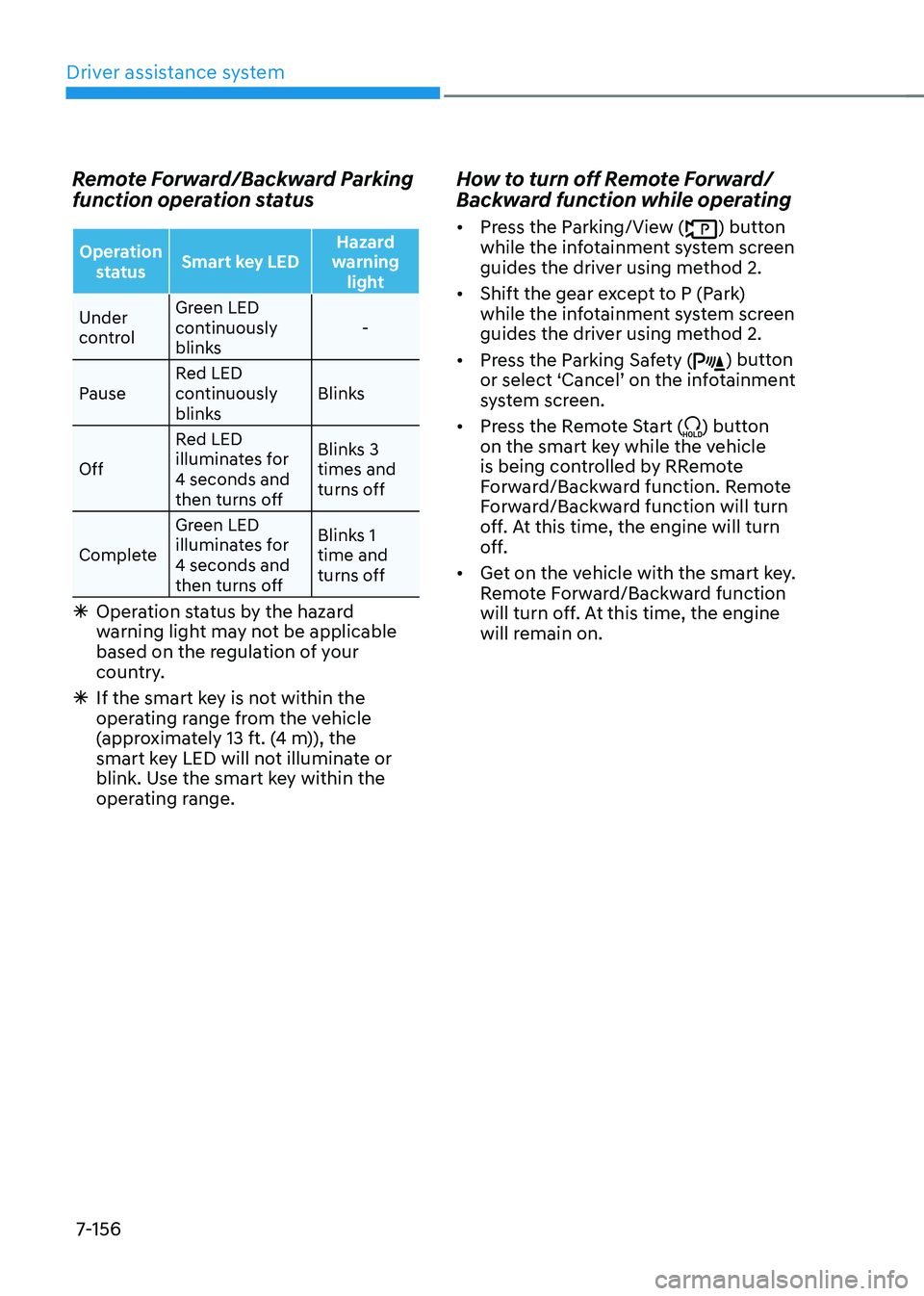
Remote Forward/Backward Parking
function operation status
Operation status Smart key LED Hazard
warning light
Under
control Green LED
continuously
blinks
-
Pause Red LED
continuously
blinks Blinks
Off Red LED
illuminates for
4 seconds and
then turns off Blinks 3
times and
turns off
Complete Green LED
illuminates for
4 seconds and
then turns off Blinks 1
time and
turns off
Ã
Operation status by the hazard
warning light may not be applicable
based on the regulation of your
country.
ÃIf the smart key is not within the
operating range from the vehicle
(approximately 13 ft. (4 m)), the
smart key LED will not illuminate or
blink. Use the smart key within the
operating range.
How to turn off Remote Forward/
Backward function while operating
• Press the Parking/View () button
while the infotainment system screen
guides the driver using method 2.
• Shift the gear except to P (Park)
while the infotainment system screen
guides the driver using method 2.
• Press the Parking Safety (
) button or select ‘Cancel’ on the infotainment system screen.
• Press the Remote Start (
) button
on the smart key while the vehicle
is being controlled by RRemote
Forward/Backward function. Remote
Forward/Backward function will turn
off. At this time, the engine will turn
off.
• Get on the vehicle with the smart key.
Remote Forward/Backward function
will turn off. At this time, the engine
will remain on.
Page 520 of 638
07
7-157
The function will pause in the
following conditions when:
• There is a pedestrian, animal or object
in the direction the vehicle is moving
• The door or liftgate is open
• The Forward (
) or Backward ()
button is not continuously pressed
• Simultaneously pressing multiple
buttons on a smart key
• The smart key is not operated within
13 ft. (4 m) from the vehicle
• Button of another smart key is pressed
in addition to the operating smart key
• Blind-Spot Collision-Avoidance
Assist or Rear Cross-Traffic Collision-
Avoidance Assist operates while the
vehicle is being controlled in the
backward direction.
• The vehicle moves 22 ft. (7 m)
while the smart key is pressed with
Remote Forward/Backward function
(maximum travel distance per button
press)
When Remote Forward/Backward
function is paused, the vehicle will stop.
If the condition that made the function
to pause disappears, the function may
operate again.
The function will cancel in the
following conditions when:
• The steering wheel is steered
• The gear is shifted while the vehicle is
moving
• Operating EPB while the vehicle is
moving
• The engine hood is open
• The brake pedal or accelerator pedal
is depressed when all the doors are
closed
• The smart key is outside the vehicle
when the brake pedal is depressed
while the driver's door is open
• Rapid acceleration occurs
• Vehicle skid occurs
• The wheel is stuck by an obstacle and
cannot move
• There are pedestrians, animals or
objects at the front and rear of the
vehicle at the same time
• Approximately 3 minutes and 50
seconds have past after Remote
Forward/Backward function has
started to operate
• The slope of the road exceeds the
operational range
• The function is paused for more than
1 minute
• The total travel distance of the vehicle
has exceeded 45 ft. (14 m) after
Remote Forward/Backward function
operation