Ac system HYUNDAI TUCSON 2023 Owners Manual
[x] Cancel search | Manufacturer: HYUNDAI, Model Year: 2023, Model line: TUCSON, Model: HYUNDAI TUCSON 2023Pages: 638, PDF Size: 26.51 MB
Page 353 of 638
Driving your vehicle
6-68
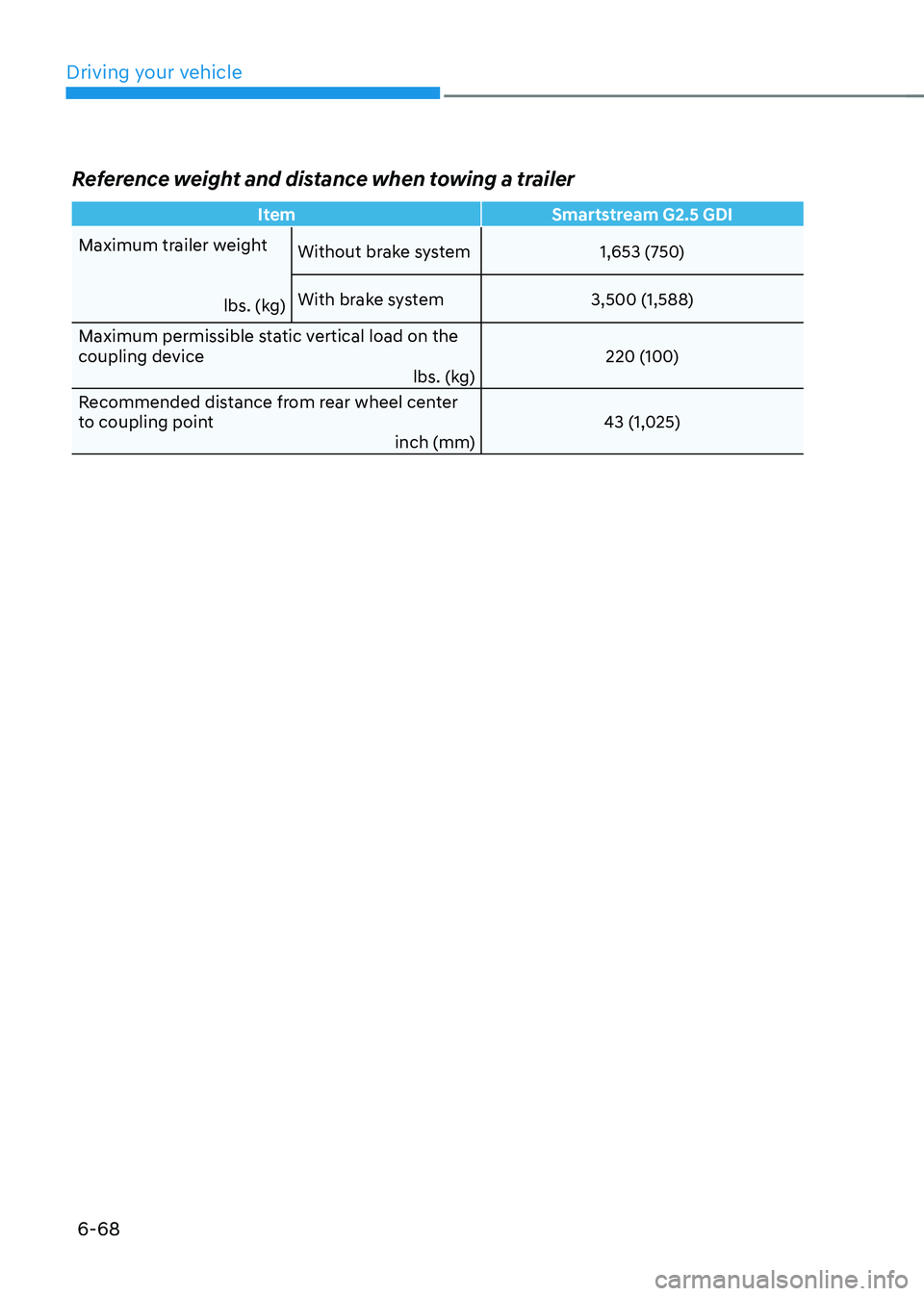
Reference weight and distance when towing a trailer
ItemSmartstream G2.5 GDI
Maximum trailer weight
lbs. (kg)Without brake system
1,653 (750)
With brake system 3,500 (1,588)
Maximum permissible static vertical load on the
coupling device lbs. (kg)220 (100)
Recommended distance from rear wheel center
to coupling point inch (mm)43 (1,025)
Page 355 of 638
Driving your vehicle
6-70
Safety chains
You should always attach chains between
your vehicle and your trailer.
Instructions about safety chains may
be provided by the hitch manufacturer
or trailer manufacturer. Follow the
manufacturer’s recommendation for
attaching safety chains. Always leave just
enough slack so you can turn with your
trailer. And, never allow safety chains to
drag on the ground.
Trailer brakes
If your trailer is equipped with a braking
system, make sure it conforms to
your country’s regulations and that
it is properly installed and operating
correctly.
If your trailer weighs more than the
maximum trailer weight without trailer
brakes loaded, then it needs its own
brakes and they must be adequate. Be
sure to read and follow the instructions
for the trailer brakes so you’ll be able
to install, adjust and maintain them
properly. Be sure not to modify your
vehicle’s brake system.
WARNING
Do not use a trailer with its own brakes
unless you are absolutely certain that
you have properly set up the brake
system. This is not a task for amateurs.
Use an experienced, competent trailer
shop for this work.
Driving with a trailer
Towing a trailer requires a certain
amount of experience. Before setting
out for the open road, you must get to
know your trailer. Acquaint yourself with
the feel of handling and braking with the
added weight of the trailer. And always
keep in mind that the vehicle you are
driving is now longer and not nearly as
responsive as your vehicle is by itself.
Before you start, check the trailer hitch
and platform, safety chains, electrical
connector(s), lights, tires and brakes.
During your trip, occasionally check
to be sure that the load is secure, and
that the lights and trailer brakes are still
working.
Distance
Stay at least twice as far behind the
vehicle ahead as you would when driving
your vehicle without a trailer. This can
help you avoid situations that require
heavy braking and sudden turns.
Passing
You will need more passing distance up
ahead when you’re towing a trailer. And,
because of the increased vehicle length,
you’ll need to go much farther beyond
the passed vehicle before you can return
to your lane.
Page 356 of 638
06
6-71
Backing up
Hold the bottom of the steering wheel
with one hand. Then, to move the trailer
to the left, move your hand to the left. To
move the trailer to the right, move your
hand to the right. Always back up slowly
and, if possible, have someone guide
you.
Making turns
When you’re turning with a trailer, make
wider turns than normal. Do this so your
trailer won’t strike soft shoulders, curbs,
road signs, trees, or other objects. Avoid
jerky or sudden maneuvers. Signal well in
advance.
Turn signals
When you tow a trailer, your vehicle has
to have a different turn signal flasher and
extra wiring. The green arrows on your
instrument panel will flash whenever you
signal a turn or lane change. Properly
connected, the trailer lights will also flash
to alert other drivers you’re about to turn,
change lanes, or stop.
When towing a trailer, the green arrows
on your instrument panel will flash for
turns even if the bulbs on the trailer
are burned out. Thus, you may think
drivers behind you are seeing your
signals when, in fact, they are not. It’s
important to check occasionally to be
sure the trailer bulbs are still working.
You must also check the lights every time
you disconnect and then reconnect the
wires.
WARNING
Do not connect a trailer lighting system
directly to your vehicle’s lighting
system. Use an approved trailer wiring
harness. Failure to do so could result in
damage to the vehicle electrical system
and/or personal injury. We recommend
that you consult an authorized
HYUNDAI dealer for assistance.
Driving on hills
Reduce speed and shift to a lower gear
before you start down a long or steep
downgrade. If you don’t shift down, you
might have to use your brakes so much
that they would get overheated and may
not operate efficiently.
On a long uphill grade, shift down and
reduce your speed to around 45 mph (70
km/h) to reduce the possibility of engine
and transmission overheating.
If your trailer weighs more than the
maximum trailer weight without trailer
brakes and you have a automatic
transmission, you should drive in D
(Drive) when towing a trailer.
Operating your vehicle in D (Drive)
when towing a trailer will minimize heat
build-up and extend the life of your
transmission.
Page 358 of 638
06
6-73
Driving the vehicle after it has been
parked on a hill
1. With the gear in P (Park), apply your
brakes and hold the brake pedal down
while you:• Start your engine;
• Shift into gear; and
• Release the parking brake.
2. Slowly remove your foot from the
brake pedal.
3. Drive slowly until the trailer is clear of
the chocks.
4. Stop and have someone pick up and
store the chocks.
Maintenance when towing a
trailer
Your vehicle will need service more
often when you regularly pull a trailer.
Important items to pay particular
attention to include engine oil,
transmission fluid, axle lubricant and
cooling system fluid. Brake condition
is another important item to frequently
check. If you’re trailering, it’s a good
idea to review these items before
you start your trip. Don’t forget to
also maintain your trailer and hitch.
Follow the maintenance schedule that
accompanied your trailer and check it
periodically. Preferably, conduct the
check at the start of each day’s driving.
Most importantly, all hitch nuts and bolts
should be tight.
NOTICE
To prevent vehicle damage:
• Due to higher load during trailer
usage, overheating might occur on
hot days or during uphill driving.
If the coolant gauge indicates
over-heating, switch off the air
conditioner and stop the vehicle in a
safe area to cool down the engine.
• Do not switch off the engine while
the coolant gauge indicates over-
heating.
(Keep the engine idle to cool down
the engine)
• When towing check transmission
fluid more frequently.
• If your vehicle is not equipped with
an air conditioner, you should install
a condenser fan to improve engine
performance when towing a trailer.
Page 360 of 638
06
6-75
The Loading Information Label
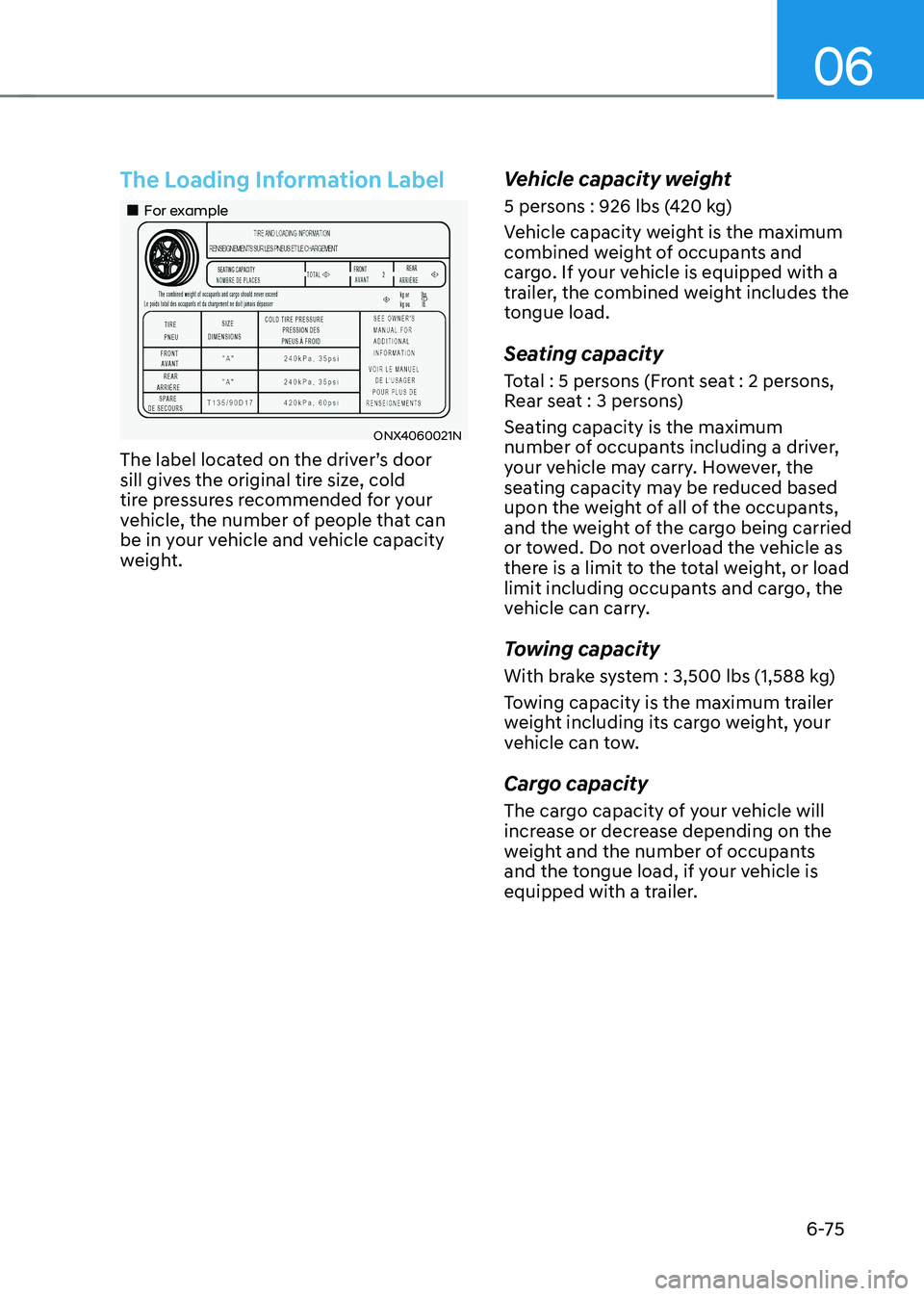
„„For example
ONX4060021N
The label located on the driver’s door
sill gives the original tire size, cold
tire pressures recommended for your
vehicle, the number of people that can
be in your vehicle and vehicle capacity
weight.
Vehicle capacity weight
5 persons : 926 lbs (420 kg)
Vehicle capacity weight is the maximum
combined weight of occupants and
cargo. If your vehicle is equipped with a
trailer, the combined weight includes the
tongue load.
Seating capacity
Total : 5 persons (Front seat : 2 persons,
Rear seat : 3 persons)
Seating capacity is the maximum
number of occupants including a driver,
your vehicle may carry. However, the
seating capacity may be reduced based
upon the weight of all of the occupants,
and the weight of the cargo being carried
or towed. Do not overload the vehicle as
there is a limit to the total weight, or load
limit including occupants and cargo, the
vehicle can carry.
Towing capacity
With brake system : 3,500 lbs (1,588 kg)
Towing capacity is the maximum trailer
weight including its cargo weight, your
vehicle can tow.
Cargo capacity
The cargo capacity of your vehicle will
increase or decrease depending on the
weight and the number of occupants
and the tongue load, if your vehicle is
equipped with a trailer.
Page 364 of 638
Driving SafetyForward Collision–Avoidance Assist (FCA) (Front view camera only) ...................7-2
Forward Collision–Avoidance Assist (FCA) (Sensor fusion) ...................................7-15
Lane Keeping Assist (LKA) ........................................................................\
...............7-31
Blind-Spot Collision-Avoidance Assist (BCA) ........................................................7-37
Safe exit warning ( SEW) ........................................................................\
..................7-51
Manual Speed Limit Assist (MSLA) ........................................................................\
7-57
Intelligent speed limit assist (ISLA ) ........................................................................\
7-60
Driver Attention Warning (DAW) ........................................................................\
....7-65
Blind-Spot View Monitor (BVM) ........................................................................\
.......7-7 1
Driving ConvenienceCruise Control (CC) ........................................................................\
.........................7-7 3
Smart Cruise Control (SCC) ........................................................................\
.............7-7 7
Navigation-Based Smart Cruise Control (NSCC) ..................................................7-94
Lane Following Assist (LFA) ........................................................................\
............7-101
Highway Driving Assist (HDA) ........................................................................\
.......7-105
Parking SafetyRear View Monitor (RVM) ........................................................................\
...............7-112
Surround View Monitor (SVM) ........................................................................\
......7-116
Rear Cross-Traffic Collision-Avoidance Assist (RCCA) ........................................7-122
Reverse Parking Distance Warning (PDW) ............................................................7-133
Forward/Reverse Parking Distance Warning (PDW) ...........................................7-136
Reverse Parking Collision-Avoidance Assist (PCA) ..............................................7-141
Remote Smart Parking Assist (RSPA) ....................................................................7-149
Declaration of conformity ........................................................................\
...................7-163
7. Driver assistance system
Driver assistance system
7
Page 365 of 638
Driver assistance system
7-2
Basic function
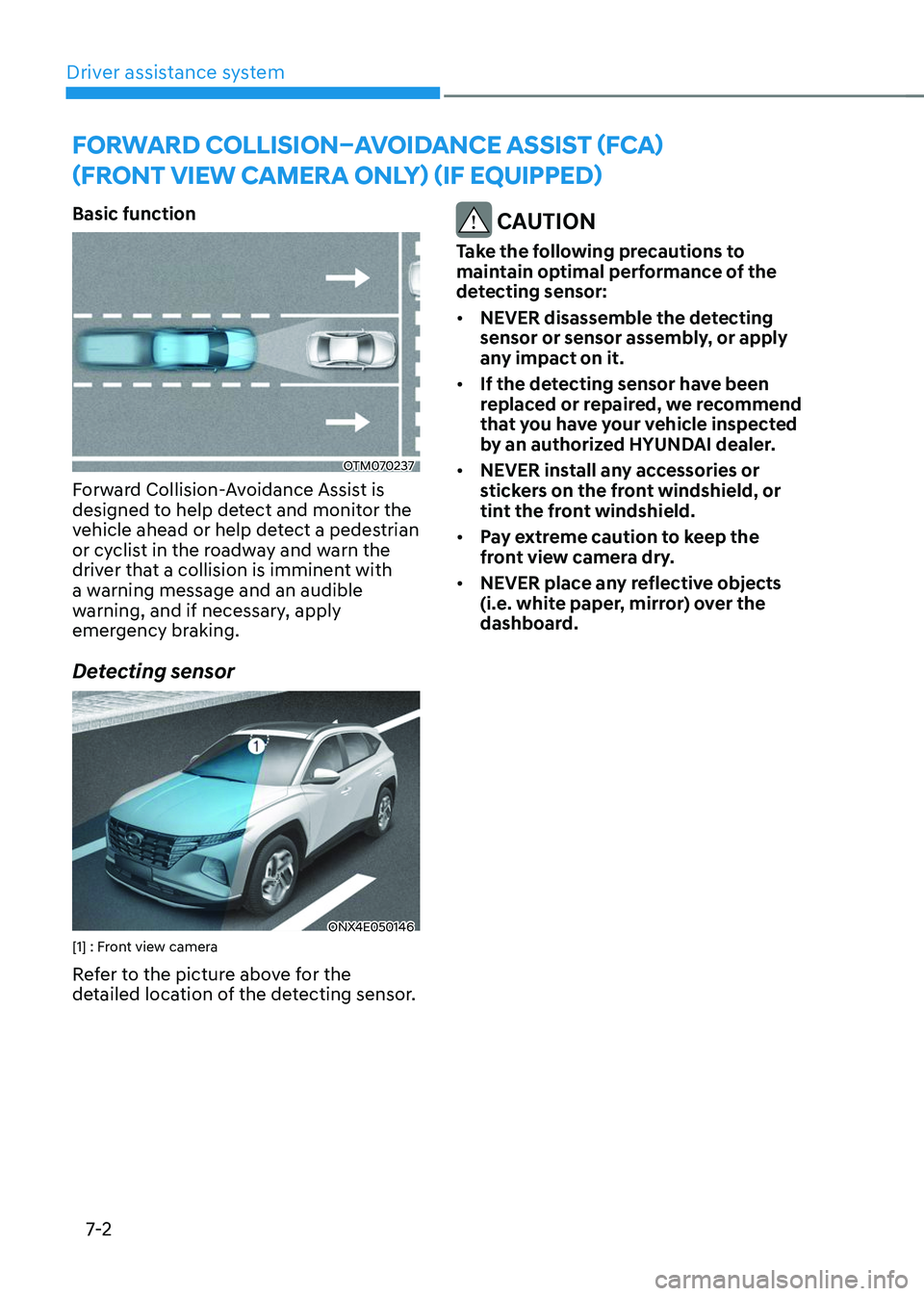
OTM070237
Forward Collision-Avoidance Assist is
designed to help detect and monitor the
vehicle ahead or help detect a pedestrian
or cyclist in the roadway and warn the
driver that a collision is imminent with
a warning message and an audible
warning, and if necessary, apply
emergency braking.
Detecting sensor
ONX4E050146[1] : Front view camera
Refer to the picture above for the
detailed location of the detecting sensor.
CAUTION
Take the following precautions to
maintain optimal performance of the
detecting sensor:
• NEVER disassemble the detecting
sensor or sensor assembly, or apply
any impact on it.
• If the detecting sensor have been
replaced or repaired, we recommend
that you have your vehicle inspected
by an authorized HYUNDAI dealer.
• NEVER install any accessories or
stickers on the front windshield, or
tint the front windshield.
• Pay extreme caution to keep the
front view camera dry.
• NEVER place any reflective objects
(i.e. white paper, mirror) over the
dashboard.
FORWARD COLLISION–AVOIDANCE ASSIST (FCA)
(FRONT VIEW CAMERA ONLY) (IF EQUIPPED)
Page 367 of 638
Driver assistance system
7-4
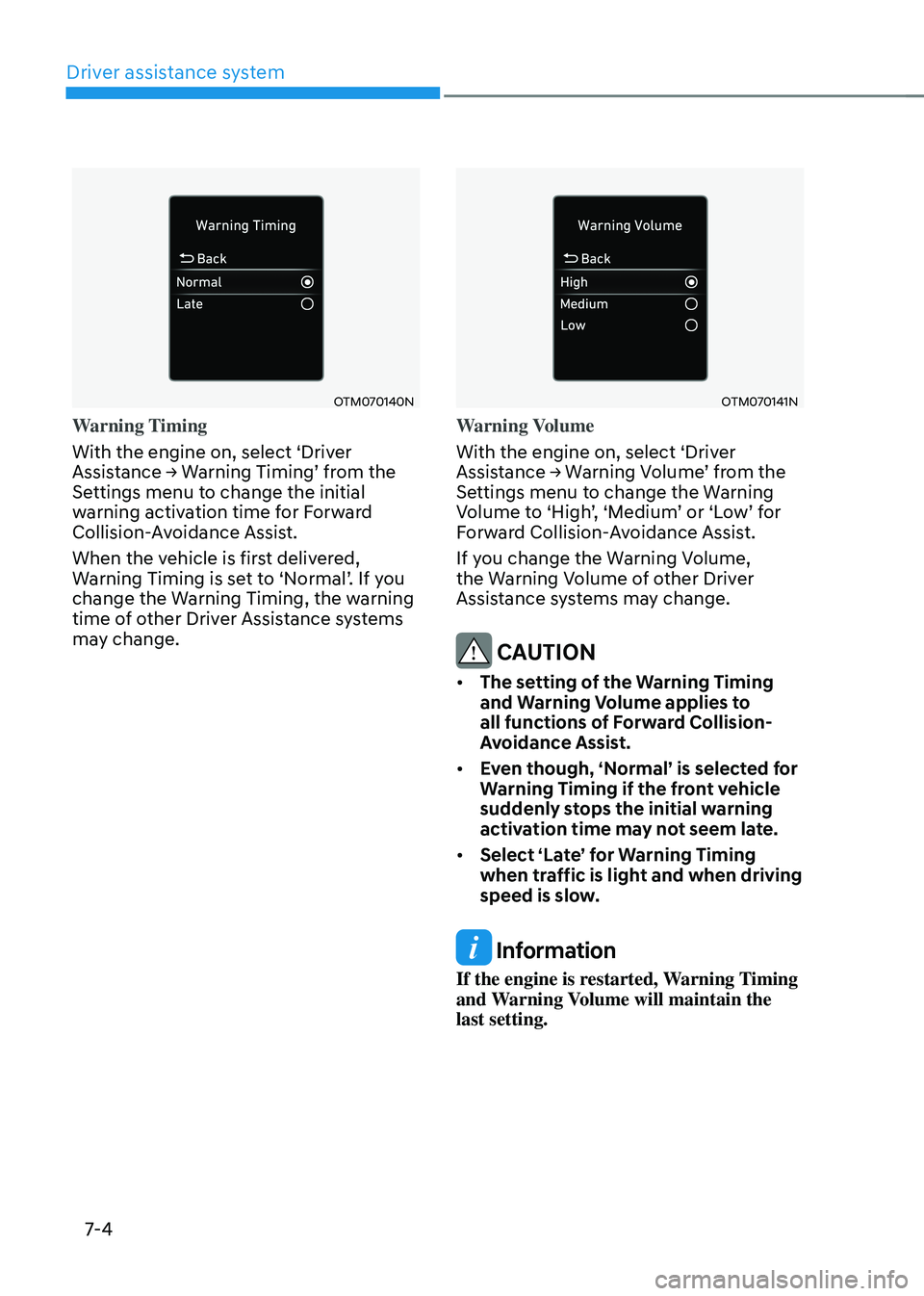
OTM070140N
Warning Timing
With the engine on, select ‘Driver
Assistance → Warning Timing’ from the Settings menu to change the initial
warning activation time for Forward
Collision-Avoidance Assist.
When the vehicle is first delivered,
Warning Timing is set to ‘Normal’. If you change the Warning Timing, the warning
time of other Driver Assistance systems
may change.
OTM070141N
Warning Volume
With the engine on, select ‘Driver
Assistance → Warning Volume’ from the Settings menu to change the Warning Volume to ‘High’, ‘Medium’ or ‘Low’ for Forward Collision-Avoidance Assist.
If you change the Warning Volume,
the Warning Volume of other Driver
Assistance systems may change.
CAUTION
• The setting of the Warning Timing
and Warning Volume applies to
all functions of Forward Collision-
Avoidance Assist.
• Even though, ‘Normal’ is selected for
Warning Timing if the front vehicle
suddenly stops the initial warning
activation time may not seem late.
• Select ‘Late’ for Warning Timing
when traffic is light and when driving
speed is slow.
Information
If the engine is restarted, Warning Timing
and Warning Volume will maintain the
last setting.
Page 369 of 638
Driver assistance system
7-6
ONX4E070003
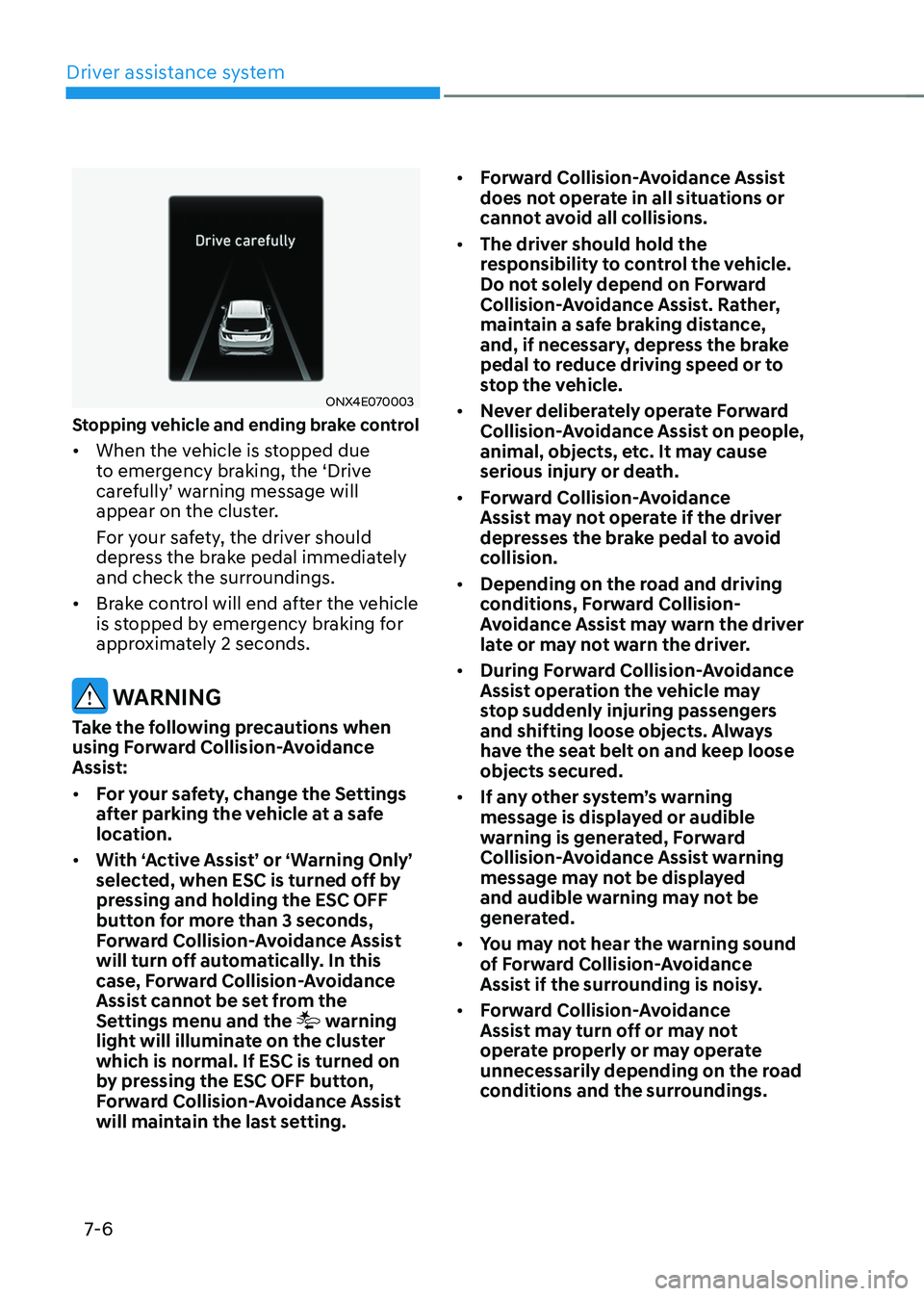
Stopping vehicle and ending brake control
• When the vehicle is stopped due
to emergency braking, the ‘Drive
carefully’ warning message will appear on the cluster.
For your safety, the driver should
depress the brake pedal immediately
and check the surroundings.
• Brake control will end after the vehicle
is stopped by emergency braking for
approximately 2 seconds.
WARNING
Take the following precautions when
using Forward Collision-Avoidance
Assist:
• For your safety, change the Settings
after parking the vehicle at a safe
location.
• With ‘Active Assist’ or ‘Warning Only’
selected, when ESC is turned off by
pressing and holding the ESC OFF
button for more than 3 seconds,
Forward Collision-Avoidance Assist
will turn off automatically. In this
case, Forward Collision-Avoidance
Assist cannot be set from the
Settings menu and the
warning
light will illuminate on the cluster
which is normal. If ESC is turned on
by pressing the ESC OFF button,
Forward Collision-Avoidance Assist
will maintain the last setting. •
Forward Collision-Avoidance Assist
does not operate in all situations or
cannot avoid all collisions.
• The driver should hold the
responsibility to control the vehicle.
Do not solely depend on Forward
Collision-Avoidance Assist. Rather,
maintain a safe braking distance,
and, if necessary, depress the brake
pedal to reduce driving speed or to
stop the vehicle.
• Never deliberately operate Forward
Collision-Avoidance Assist on people,
animal, objects, etc. It may cause
serious injury or death.
• Forward Collision-Avoidance
Assist may not operate if the driver
depresses the brake pedal to avoid
collision.
• Depending on the road and driving
conditions, Forward Collision-
Avoidance Assist may warn the driver
late or may not warn the driver.
• During Forward Collision-Avoidance
Assist operation the vehicle may
stop suddenly injuring passengers
and shifting loose objects. Always
have the seat belt on and keep loose
objects secured.
• If any other system’s warning
message is displayed or audible
warning is generated, Forward
Collision-Avoidance Assist warning
message may not be displayed
and audible warning may not be
generated.
• You may not hear the warning sound
of Forward Collision-Avoidance
Assist if the surrounding is noisy.
• Forward Collision-Avoidance
Assist may turn off or may not
operate properly or may operate
unnecessarily depending on the road
conditions and the surroundings.
Page 370 of 638
07
7-7
WARNING
• Even if there is a problem with
Forward Collision-Avoidance
Assist, the vehicle’s basic braking
performance will operate normally.
• During emergency braking, braking
control by Forward Collision-
Avoidance Assist will automatically
cancel when the driver excessively
depresses the accelerator pedal or
sharply steers the vehicle.
CAUTION
Depending on the condition of the
vehicle, pedestrian and cyclist in front
and the surroundings, the speed range
to operate Forward Collision-Avoidance
Assist may reduce. Forward Collision-
Avoidance Assist may only warn the
driver, or it may not operate.
Information
In a situation where collision is imminent,
braking may be assisted by Forward
Collision-Avoidance Assist when braking
is insufficient by the driver.
Forward Collision-Avoidance
Assist Malfunction and
Limitations
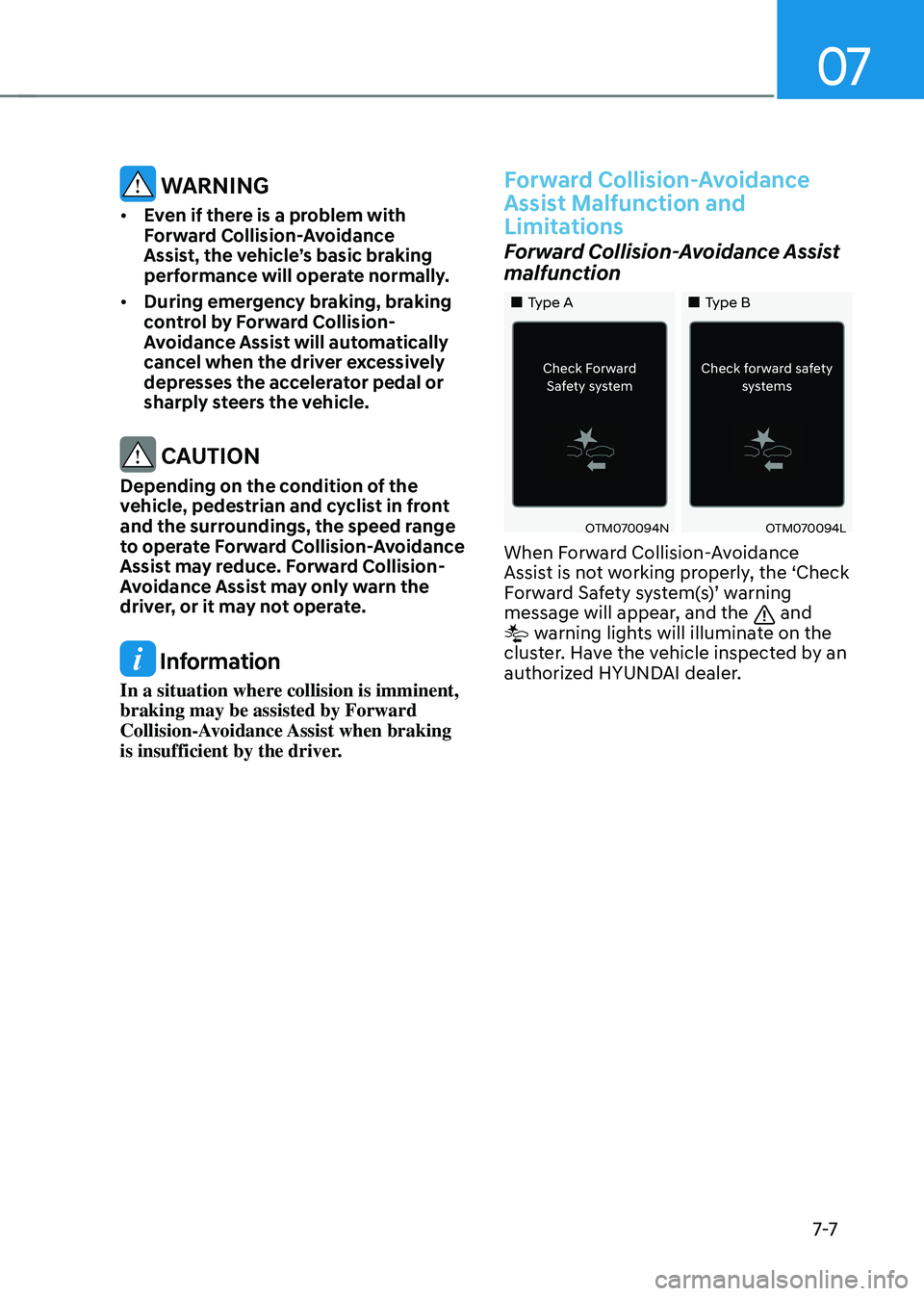
Forward Collision-Avoidance Assist
malfunction
„„Type A„„Type B
OTM070094NOTM070094L
When Forward Collision-Avoidance
Assist is not working properly, the ‘Check
Forward Safety system(s)’ warning message will appear, and the and warning lights will illuminate on the
cluster. Have the vehicle inspected by an
authorized HYUNDAI dealer.