fueling HYUNDAI TUCSON 2023 Owners Manual
[x] Cancel search | Manufacturer: HYUNDAI, Model Year: 2023, Model line: TUCSON, Model: HYUNDAI TUCSON 2023Pages: 638, PDF Size: 26.51 MB
Page 9 of 638
01
1-5
Gasoline engine
Unleaded
Your new vehicle is designed to use only unleaded fuel having an octane number
((R+M)/2) of 91 (Research Octane Number 95) or higher. (Do not use methanol blended
fuels)
Your new vehicle is designed to obtain maximum performance with UNLEADED FUEL,
as well as minimize exhaust emissions and spark plug fouling.
NOTICE
To prevent damage to the engine and engine components, never add any fuel
system cleaning agents to the fuel tank other than what has been specified.
Consult an authorized HYUNDAI dealer for additional information.
WARNING
• Do not “top off” after the nozzle automatically shuts off when refueling.
• Always check that the fuel cap is installed securely to prevent fuel spillage in the
event of an accident.
Gasoline containing alcohol and methanol
Gasohol, a mixture of gasoline and ethanol (also known as grain alcohol) are being
marketed along with or instead of leaded or unleaded gasoline. For example, “E15” is a
gasohol comprised of 15% ethanol and 85% gasoline.
Do not use gasohol containing more than 15% ethanol, and do not use gasoline or
gasohol containing any methanol. Either of these fuels may cause drivability problems
and damage to the fuel system, engine control system and emission control system.
Discontinue using gasohol of any kind if drivability problems occur.
“E85” fuel is an alternative fuel comprised of 85 percent ethanol and 15 percent
gasoline, and is manufactured exclusively for use in Flexible Fuel Vehicles. “E85” is
not compatible with your vehicle. Use of “E85” may result in poor engine performance
and damage to your vehicle’s engine and fuel system. HYUNDAI recommends that
customers do not use fuel with an ethanol content exceeding 15 percent.
NOTICE
To prevent damage to your vehicle’s engine and fuel system:
• Never use gasohol which contains methanol.
• Never use gasohol containing more than 15% ethanol.
• Never use leaded fuel or leaded gasohol.
• Never use “E85” fuel.
Your New Vehicle Limited Warranty does not cover damage to the fuel system or any
performance problems caused by the use of “E85” fuel.
FUEL REQUIREMENTS
Page 106 of 638
Instrument cluster
4-8
Distance to empty
„„4.2-inch„„10.25-inch
OAD048563LOCN7040016N
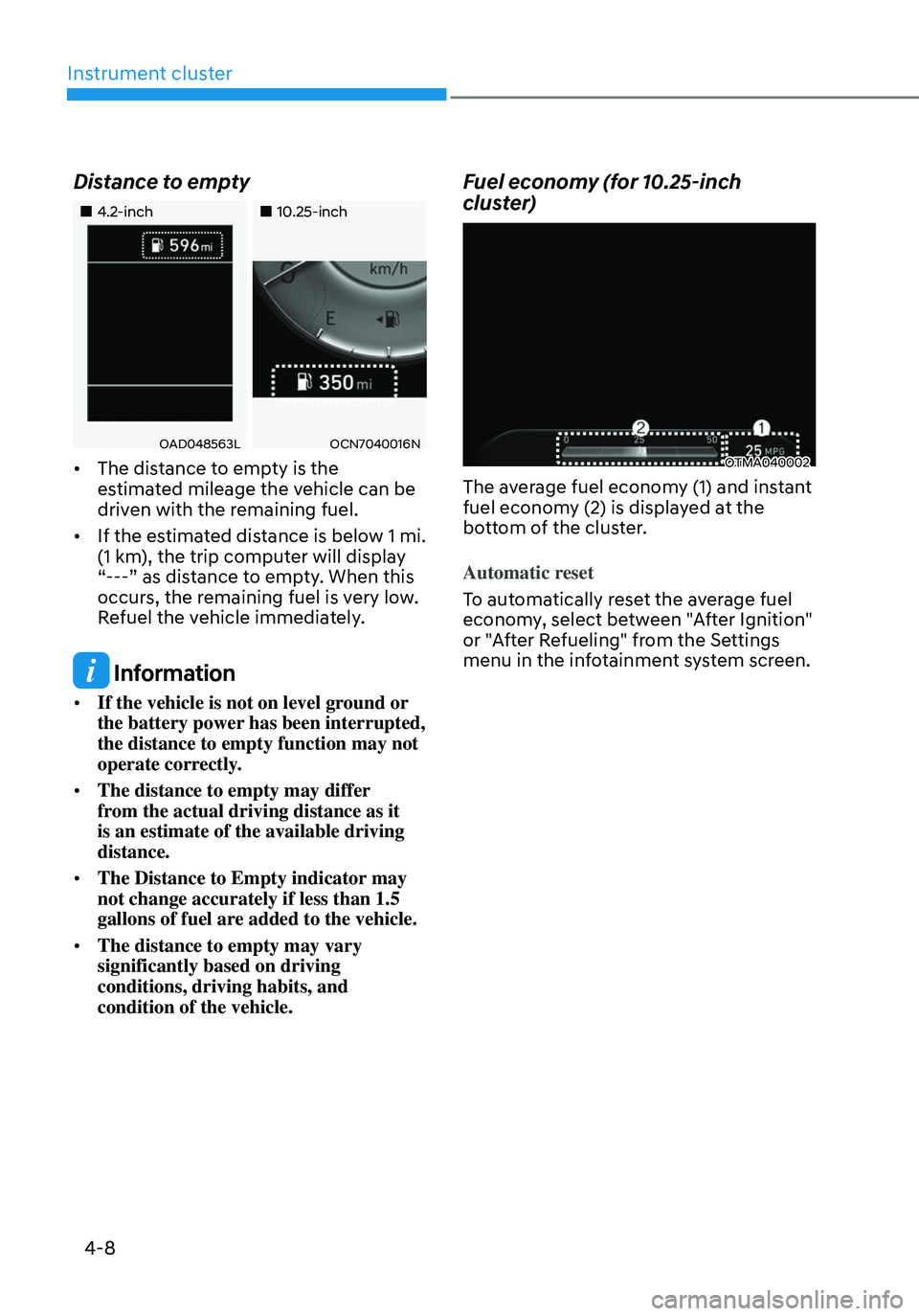
• The distance to empty is the
estimated mileage the vehicle can be
driven with the remaining fuel.
• If the estimated distance is below 1 mi.
(1 km), the trip computer will display
“---” as distance to empty. When this
occurs, the remaining fuel is very low.
Refuel the vehicle immediately.
Information
• If the vehicle is not on level ground or
the battery power has been interrupted,
the distance to empty function may not
operate correctly.
• The distance to empty may differ
from the actual driving distance as it
is an estimate of the available driving
distance.
• The Distance to Empty indicator may
not change accurately if less than 1.5
gallons of fuel are added to the vehicle.
• The distance to empty may vary
significantly based on driving
conditions, driving habits, and
condition of the vehicle.
Fuel economy (for 10.25-inch
cluster)
OTMA040002
The average fuel economy (1) and instant
fuel economy (2) is displayed at the
bottom of the cluster.
Automatic reset
To automatically reset the average fuel
economy, select between "After Ignition"
or "After Refueling" from the Settings
menu in the infotainment system screen.
Page 124 of 638
Instrument cluster
4-26
Lights
„„Type A„„Type B
OJX1049007LOJX1049062L
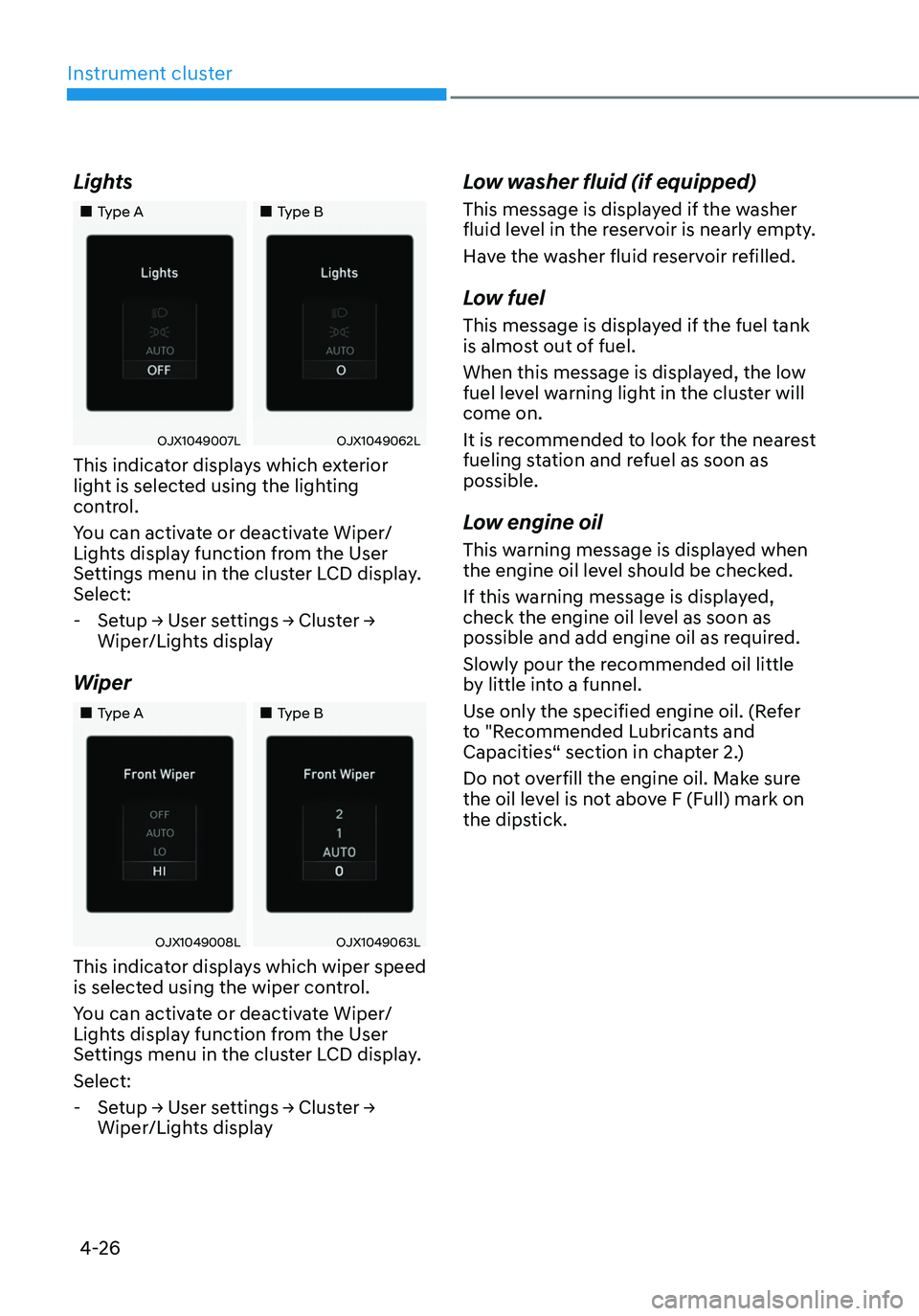
This indicator displays which exterior
light is selected using the lighting
control.
You can activate or deactivate Wiper/
Lights display function from the User
Settings menu in the cluster LCD display.
Select:
-Setup → User settings → Cluster →
Wiper/Lights display
Wiper
„„Type A„„Type B
OJX1049008LOJX1049063L
This indicator displays which wiper speed
is selected using the wiper control.
You can activate or deactivate Wiper/
Lights display function from the User
Settings menu in the cluster LCD display.
Select:
-Setup → User settings → Cluster →
Wiper/Lights display
Low washer fluid (if equipped)
This message is displayed if the washer
fluid level in the reservoir is nearly empty.
Have the washer fluid reservoir refilled.
Low fuel
This message is displayed if the fuel tank
is almost out of fuel.
When this message is displayed, the low
fuel level warning light in the cluster will
come on.
It is recommended to look for the nearest
fueling station and refuel as soon as
possible.
Low engine oil
This warning message is displayed when
the engine oil level should be checked.
If this warning message is displayed,
check the engine oil level as soon as
possible and add engine oil as required.
Slowly pour the recommended oil little
by little into a funnel.
Use only the specified engine oil. (Refer
to "Recommended Lubricants and
Capacities“ section in chapter 2.)
Do not overfill the engine oil. Make sure
the oil level is not above F (Full) mark on
the dipstick.
Page 134 of 638
Instrument cluster
4-36
2. Cluster
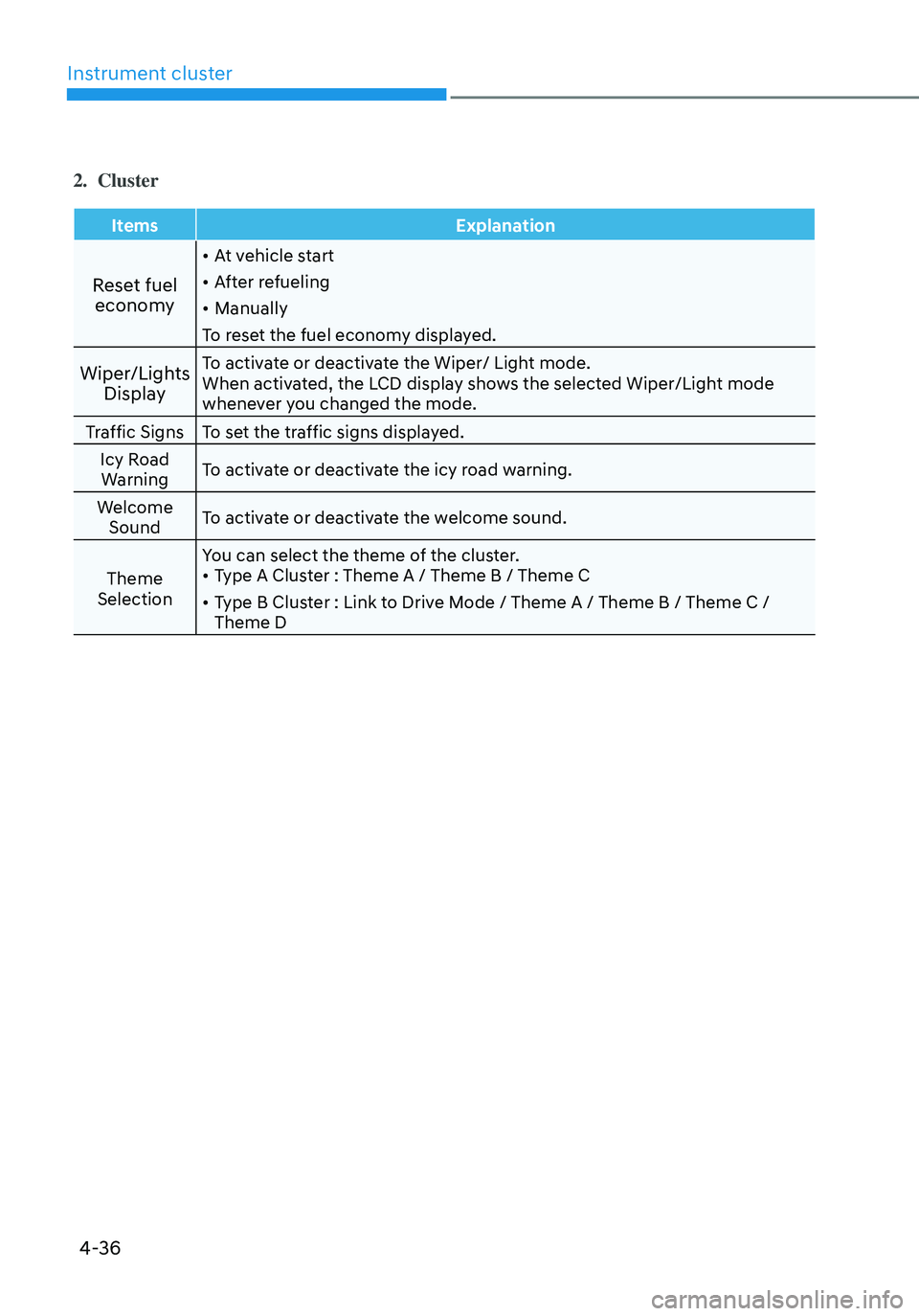
ItemsExplanation
Reset fuel
economy
• At vehicle start
• After refueling
• Manually
To reset the fuel economy displayed.
Wiper/Lights DisplayTo activate or deactivate the Wiper/ Light mode.
When activated, the LCD display shows the selected Wiper/Light mode
whenever you changed the mode.
Traffic Signs To set the traffic signs displayed.
Icy Road Warning To activate or deactivate the icy road warning.
Welcome Sound To activate or deactivate the welcome sound.
Theme
Selection You can select the theme of the cluster.
• Type A Cluster : Theme A / Theme B / Theme C
• Type B Cluster : Link to Drive Mode / Theme A / Theme B / Theme C /
Theme D
Page 138 of 638
Instrument cluster
4-40
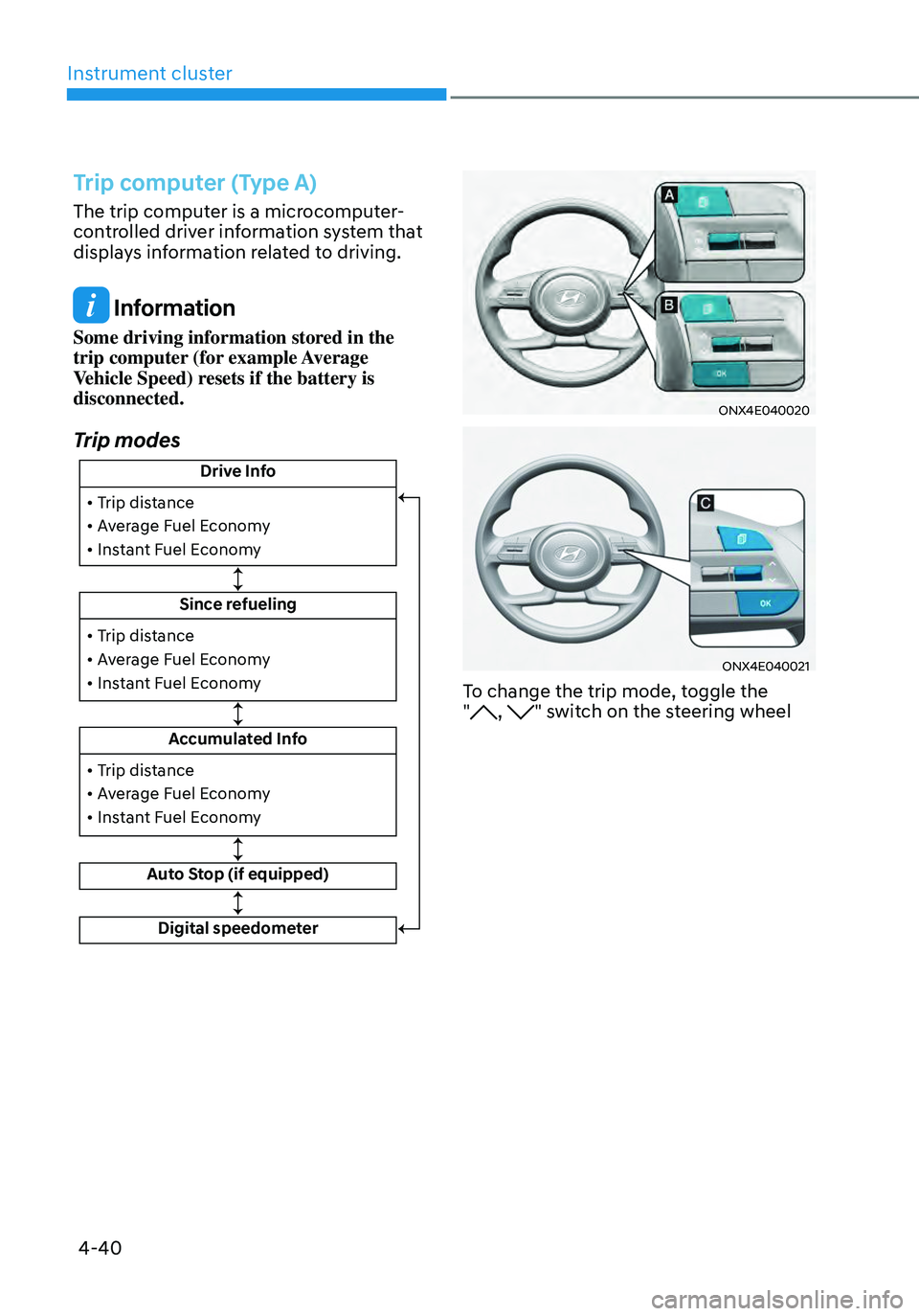
Trip computer (Type A)
The trip computer is a microcomputer-
controlled driver information system that
displays information related to driving.
Information
Some driving information stored in the
trip computer (for example Average
Vehicle Speed) resets if the battery is
disconnected.
Trip modes
Drive Info
Since refueling
Accumulated Info
Auto Stop (if equipped)
• Trip distance
• Average Fuel Economy
• Instant Fuel Economy
• Trip distance
• Average Fuel Economy
• Instant Fuel Economy
Digital speedometer
• Trip distance
• Average Fuel Economy
• Instant Fuel Economy
ONX4E040020
ONX4E040021
To change the trip mode, toggle the
", " switch on the steering wheel
Page 139 of 638
04
4-41
• Manual reset
To clear the average fuel economy
manually, press the OK switch on the
steering wheel for more than 1 second
when the Average Fuel Economy is
displayed.
• Automatic reset
To automatically reset the average
fuel economy, select between ‘After
Ignition’ or ‘After Refueling’ from
the Settings menu in the instrument
cluster.
-After Ignition: When the engine has
been OFF for 3 minutes or longer
the average fuel economy will reset
automatically.
-After Refueling: The average fuel
economy will reset automatically
after adding 6 liters (1.6 gallons) of
fuel or more and after driving speed
exceeds 1 mph (1 km/h).
à For 10.25-inch instrument cluster, you
can check the fuel economy in the
center bottom of the cluster.
„„Type A„„Type B
OTMA040004OTMA040005
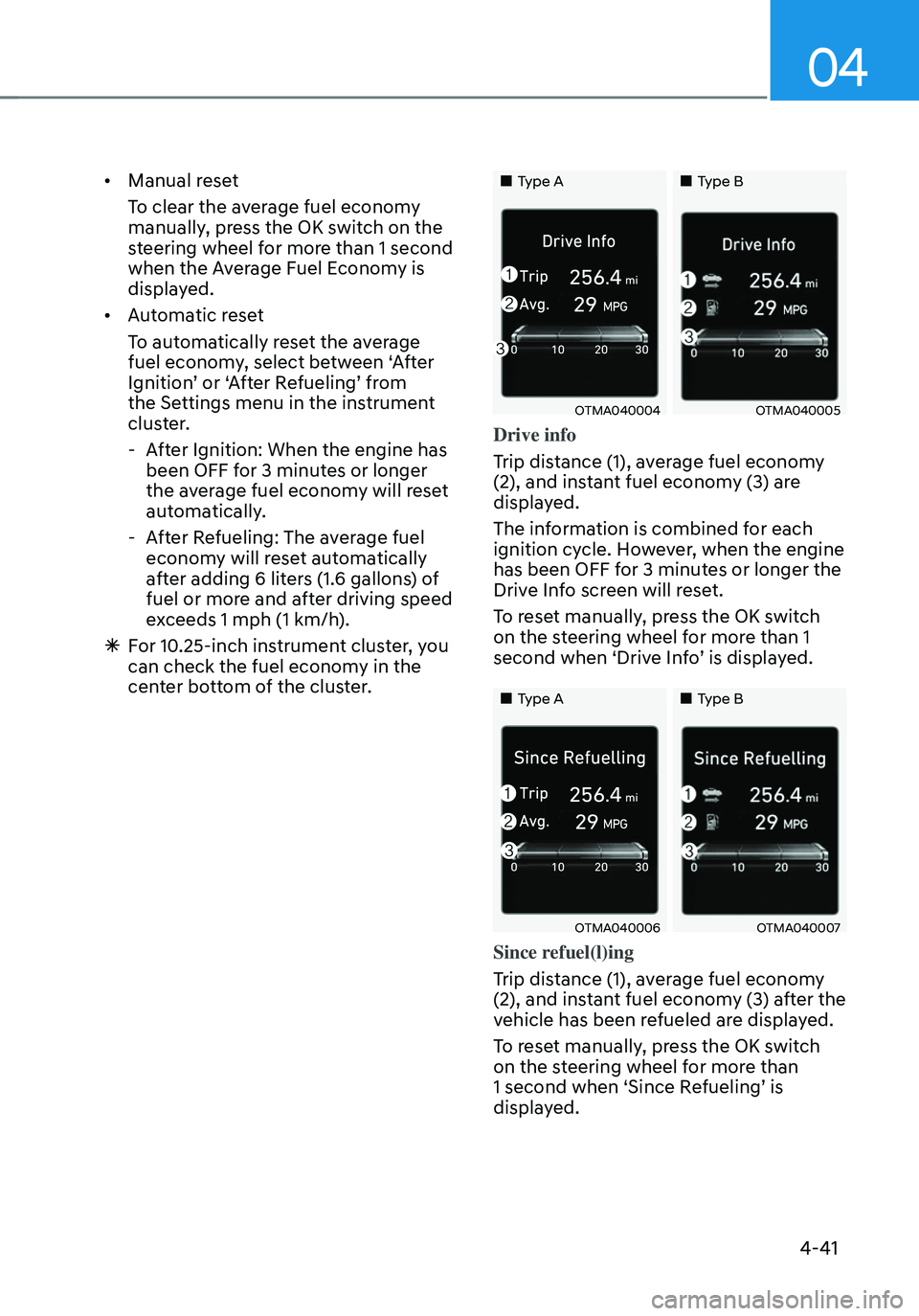
Drive info
Trip distance (1), average fuel economy
(2), and instant fuel economy (3) are
displayed.
The information is combined for each
ignition cycle. However, when the engine
has been OFF for 3 minutes or longer the
Drive Info screen will reset.
To reset manually, press the OK switch
on the steering wheel for more than 1
second when ‘Drive Info’ is displayed.
„„Type A„„Type B
OTMA040006OTMA040007
Since refuel(l)ing
Trip distance (1), average fuel economy
(2), and instant fuel economy (3) after the
vehicle has been refueled are displayed.
To reset manually, press the OK switch
on the steering wheel for more than
1 second when ‘Since Refueling’ is
displayed.
Page 141 of 638
04
4-43
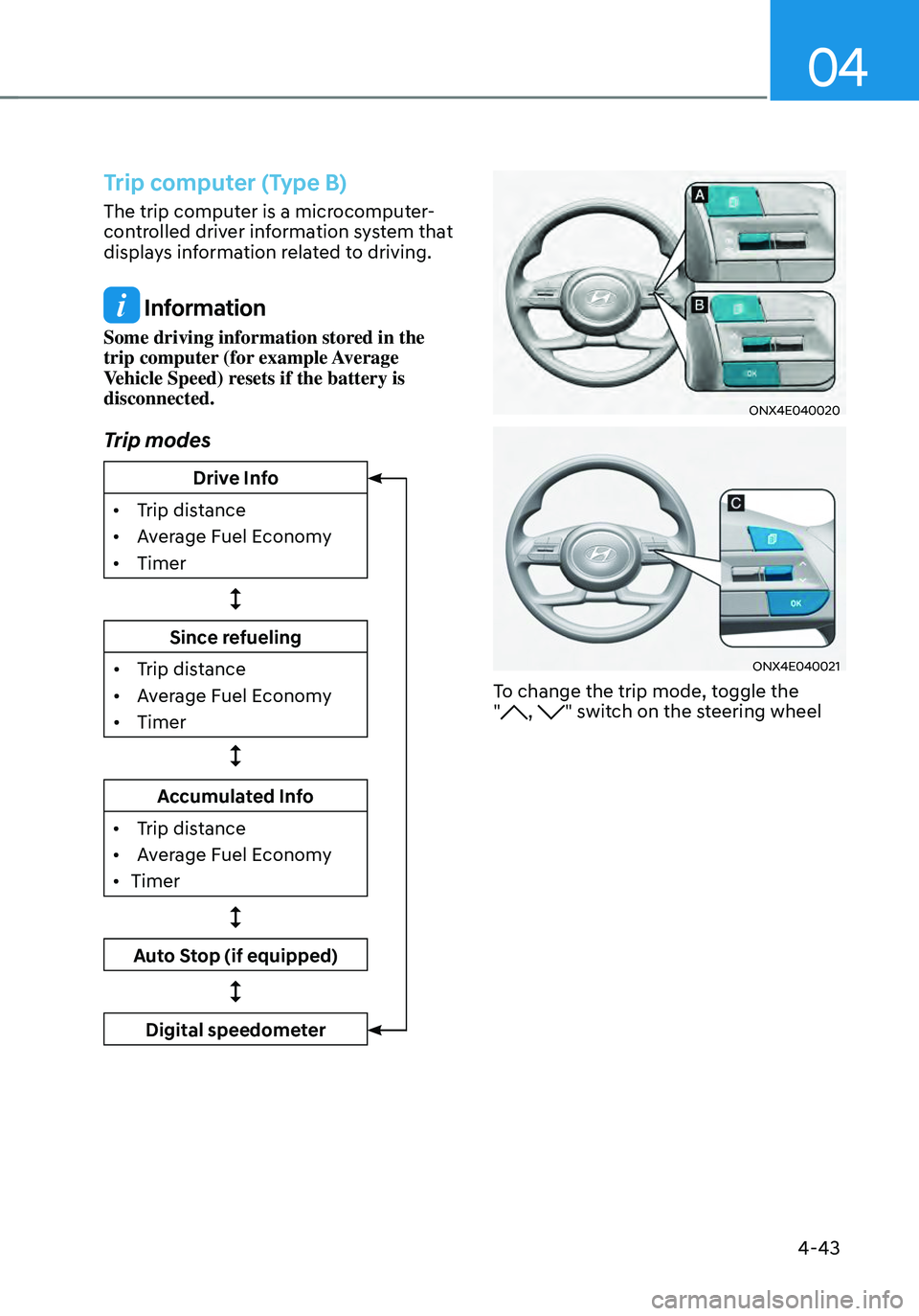
Trip computer (Type B)
The trip computer is a microcomputer-
controlled driver information system that
displays information related to driving.
Information
Some driving information stored in the
trip computer (for example Average
Vehicle Speed) resets if the battery is
disconnected.
Trip modes
Drive Info
•
Trip dis
tance
•
Av
erage Fuel Economy
•
Timer
Since refueling
•
Trip dis
tance
•
Av
erage Fuel Economy
•
Timer
Accumulated Info
•
Trip dis
tance
•
Av
erage Fuel Economy
•
Timer
Auto Stop (if equipped)
Digital speedometer
ONX4E040020
ONX4E040021
To change the trip mode, toggle the
", " switch on the steering wheel
Page 142 of 638
Instrument cluster
4-44
• Manual reset
To clear the average fuel economy
manually, press the OK switch on the
steering wheel for more than 1 second
when the Average Fuel Economy is
displayed.
• Automatic reset
To automatically reset the average
fuel economy, select between ‘After
Ignition’ or ‘After Refueling’ from
the Settings menu in the instrument
cluster.
-After Ignition: When the engine has
been OFF for 3 minutes or longer
the average fuel economy will reset
automatically.
-After Refueling: The average fuel
economy will reset automatically
after adding 6 liters (1.6 gallons) of
fuel or more and after driving speed
exceeds 1 mph (1 km/h).
à For 10.25-inch instrument cluster, you
can check the fuel economy in the
center bottom of the cluster.
„„Type A„„Type B
OTMA040012OTMA040013
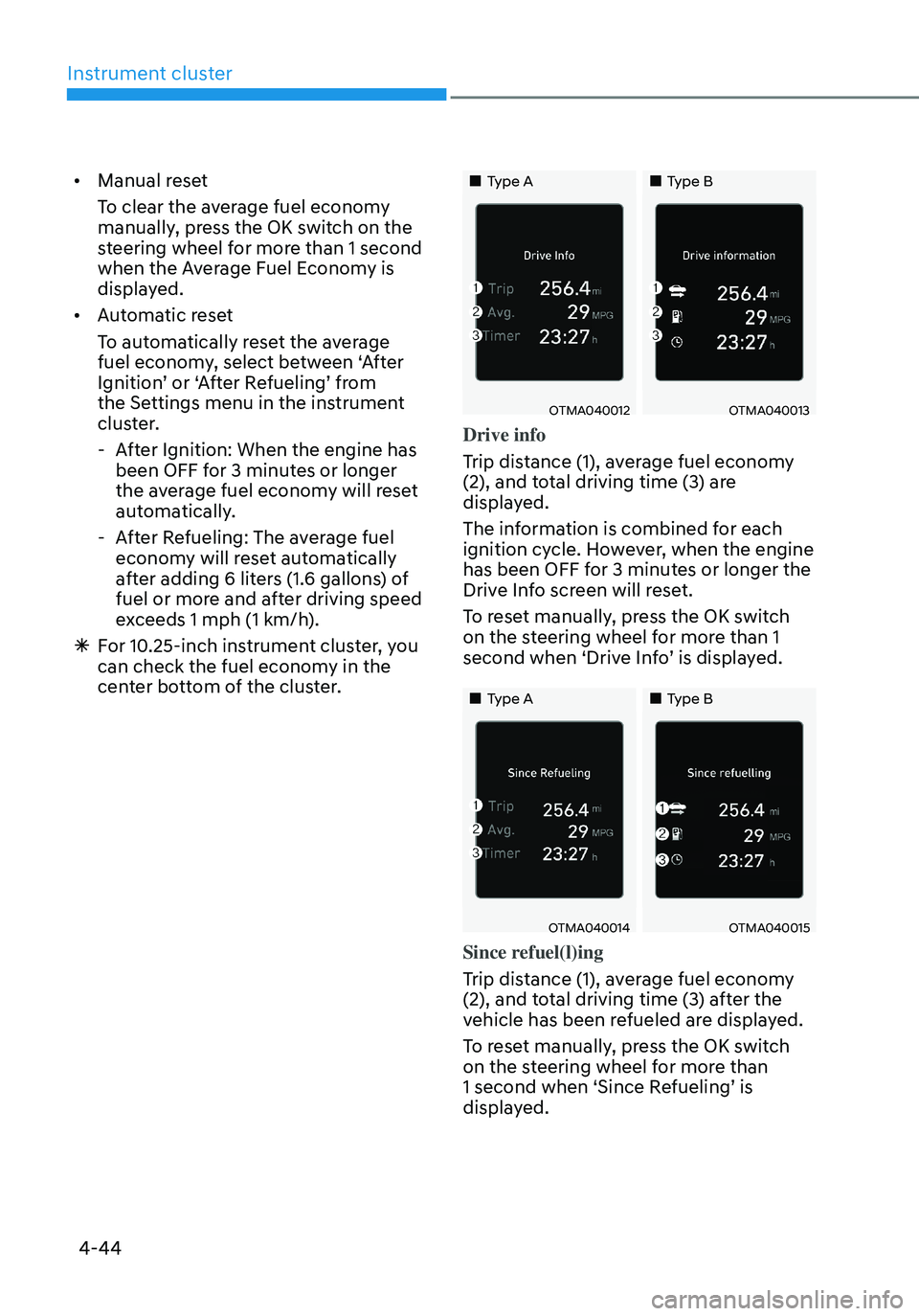
Drive info
Trip distance (1), average fuel economy
(2), and total driving time (3) are
displayed.
The information is combined for each
ignition cycle. However, when the engine
has been OFF for 3 minutes or longer the
Drive Info screen will reset.
To reset manually, press the OK switch
on the steering wheel for more than 1
second when ‘Drive Info’ is displayed.
„„Type A„„Type B
OTMA040014OTMA040015
Since refuel(l)ing
Trip distance (1), average fuel economy
(2), and total driving time (3) after the
vehicle has been refueled are displayed.
To reset manually, press the OK switch
on the steering wheel for more than
1 second when ‘Since Refueling’ is
displayed.
Page 221 of 638
05
5-77
Closing the fuel filler door
1. To install the fuel tank cap, turn it
clockwise until it “clicks” one time.
2. Close the fuel filler door until it is
latched securely.
Information
To lock the fuel filler door, make sure the
fuel filler door is completely closed. Press
the LOCK button on the remote key or
smart key to lock your vehicle. The fuel
filler door will also lock.
Note that if the fuel filler door is not
completely closed when the vehicle is
locked, the fuel filler door will not be
locked.
CAUTION
Make sure the fuel filler door is
completely closed before driving
through a car wash or operating a high
pressure spray washer.
WARNING
Automotive fuel is highly flammable
and explosive. Failure to follow these
guidelines may result in SERIOUS
INJURY or DEATH:
• Read and follow all warnings posted
at the gas station.
• Before refueling, note the location
of the Emergency Fuel Shut-Off, if
available, at the gas station.
• Before touching the fuel nozzle, you
should eliminate the potential build-
up of static electricity by touching
a metal part of the vehicle, a safe
distance away from the fuel filler
neck, nozzle, or other gas source,
with your bare hand.
• Do not use mobile phones while
refueling. Electric current and/or
electronic interference from cellular
phones can potentially ignite fuel
vapors and cause a fire. •
Do not get back into a vehicle
once you have begun refueling.
You can generate a buildup of
static electricity by touching,
rubbing or sliding against any item
or fabric capable of producing
static electricity. Static electricity
discharge can ignite fuel vapors
causing a fire. If you must re-enter
the vehicle, you should once again
eliminate potentially dangerous
static electricity discharge by
touching a metal part of the vehicle,
away from the fuel filler neck, nozzle
or other fuel source, with your bare
hand.
• When using an approved portable
fuel container, be sure to place the
container on the ground prior to
refueling. Static electricity discharge
from the container can ignite fuel
vapors causing a fire.
Once refueling has begun, contact
between your bare hand and the
vehicle should be maintained until
the filling is complete.
• Use only approved portable plastic
fuel containers designed to carry and
store fuel.
• When refueling, always shift the
gear to the P (Park) position, set
the parking brake, and press the
Engine Start/Stop button to the
OFF position. Sparks produced by
electrical components related to the
engine can ignite fuel vapors causing
a fire.
• Do not use matches or a lighter and
do not smoke or leave a lit cigarette
in your vehicle while at a gas station,
especially during refueling.
Page 222 of 638
Convenient features
5-78
• Do not over-fill or top-off your
vehicle tank, which can cause fuel
spillage.
• If a fire breaks out during refueling,
leave the vicinity of the vehicle, and
immediately contact the manager
of the gas station and then contact
the local fire department. Follow any
safety instructions they provide.
• If pressurized fuel sprays out, it can
cover your clothes or skin and thus
subject you to the risk of fire and
burns. Always remove the fuel cap
carefully and slowly. If the cap is
venting fuel or if you hear a hissing
sound, wait until the condition stops
before completely removing the cap.
• Always check that the fuel cap is
installed securely to prevent fuel
spillage in the event of an accident.
Information
Make sure to refuel your vehicle according
to the “Fuel Requirements” section in
suggested in chapter 1.
NOTICE
• Do not spill fuel on the exterior
surfaces of the vehicle. Any type of
fuel spilled on painted surfaces may
damage the paint.
• If the fuel filler cap requires
replacement, we recommend that
you use only a genuine HYUNDAI cap
or the equivalent specified for your
vehicle. An incorrect fuel filler cap
can result in a serious malfunction of
the fuel system or emission control
system.