ABS HYUNDAI TUCSON HYBRID 2022 User Guide
[x] Cancel search | Manufacturer: HYUNDAI, Model Year: 2022, Model line: TUCSON HYBRID, Model: HYUNDAI TUCSON HYBRID 2022Pages: 630, PDF Size: 77.98 MB
Page 308 of 630
06
6-21
Power brakes
Your vehicle has power-assisted brakes
that adjust automatically through normal
usage.
If the vehicle is not in the ready (
)
mode or the vehicle is turned off while
driving, the power assist for the brakes
will not work. You can still stop your
vehicle by applying greater force to the
brake pedal than typical. The stopping
distance, however, will be longer than
with power brakes.
When the vehicle is not in the ready
(
) mode, the reserve brake power is
partially depleted each time the brake
pedal is applied. Do not pump the brake
pedal when the power assist has been
interrupted.
WARNING
Take the following precautions:
• Do not drive with your foot resting
on the brake pedal. This will create
abnormal high brake temperatures,
excessive brake lining and pad wear,
and increased stopping distances.
• When descending down a long
or steep hill, downshift to a lower
gear in order to control your
speed without using the brake
pedal excessively. Applying the
brakes continuously will cause
the brakes to overheat and could
result in a temporary loss of braking
performance.
• Wet brakes may impair the vehicle's
ability to safely slow down; the
vehicle may also pull to one side
when the brakes are applied.
Applying the brakes lightly will
indicate whether they have been
affected in this way. Always test your
brakes in this fashion after driving
through deep water. To dry the
brakes, lightly tap the brake pedal to
heat up the brakes while maintaining
a safe forward speed until brake
performance returns to normal.
Avoid driving at high speeds until the
brakes function correctly.
NOTICE
• Do not continue depressing the
brake pedal if the "" indicator is
OFF. The battery may be discharged.
• Noise and vibration generated
during braking is normal.
• Under normal operation, electric
brake pump noise and motor
vibration may occur temporarily in
below cases.
-When the pedal is depressed
suddenly
.
- When the pedal is repea
tedly
depressed in short intervals.
- When the ABS function is activa
ted
while braking.
BrAking system
Page 317 of 630
Driving your vehicle
6-30
Anti-lock Brake System (ABS)
WARNING
An Anti-Lock Braking System (ABS) or
an Electronic Stability Control (ESC)
system will not prevent accidents
due to improper or dangerous driving
maneuvers. Even though vehicle
control is improved during emergency
braking, always maintain a safe
distance between you and objects
ahead of you. Vehicle speeds should
always be reduced during extreme
road conditions. The braking distance
for vehicles equipped with ABS or ESC
may be longer than for those without
these systems in the following road
conditions.
Drive your vehicle at reduced speeds
during the following conditions:
• Rough, gravel or snow-covered
roads.
• On roads where the road surface is
pitted or has different surface height.
• Tire chains are installed on your
vehicle.
The safety features of an ABS or ESC
equipped vehicle should not be tested
by high speed driving or cornering. This
could endanger the safety of yourself or
others.
ABS is an electronic braking system that
helps prevent a braking skid. ABS allows
the driver to steer and brake at the same
time.
Using ABS
To obtain the maximum benefit from
your ABS in an emergency situation,
do not attempt to modulate your brake
pressure and do not try to pump your
brakes. Depress your brake pedal as hard
as possible.
When you apply your brakes under
conditions which may lock the wheels,
you may hear sounds from the brakes,
or feel a corresponding sensation in the
brake pedal. This is normal and it means
your ABS is active.
ABS does not reduce the time or distance
it takes to stop the vehicle.
Always maintain a safe distance from the
vehicle in front of you.
ABS will not prevent a skid that results
from sudden changes in direction, such
as trying to take a corner too fast or
making a sudden lane change. Always
drive at a safe speed for the road and
weather conditions.
ABS cannot prevent a loss of stability.
Always steer moderately when braking
hard. Severe or sharp steering wheel
movement can still cause your vehicle to
veer into oncoming traffic or off the road.
On loose or uneven road surfaces,
operation of the anti-lock brake system
may result in a longer stopping distance
than for vehicles equipped with a
conventional brake system.
The ABS warning light (
) will stay on
for several seconds after the ignition
switch is in the ON position.
During that time, the ABS will go through
self-diagnosis and the light will go off
if everything is normal. If the light stays
on, you may have a problem with your
ABS. We recommend that you contact an
authorized HYUNDAI dealer as soon as
possible.
Page 318 of 630
06
6-31
WARNING
If the ABS warning light () is on and
stays on, you may have a problem with
the ABS. Your power brakes will work
normally. To reduce the risk of serious
injury or death, contact your HYUNDAI
dealer as soon as possible.
NOTICE
When you drive on a road having poor
traction, such as an icy road, and apply
your brakes continuously, the ABS will
be active continuously and the ABS
warning light (
) may illuminate. Pull
your vehicle over to a safe place and
turn the vehicle off.
Restart the vehicle. If the ABS warning
light is off, then your ABS system is
normal.
Otherwise, you may have a problem
with your ABS system. We recommend
that you contact an authorized
HYUNDAI dealer as soon as possible.
Information
When you jump start your vehicle because
of a drained battery, the ABS warning
light (
) may turn on at the same
time. This happens because of the low
battery voltage. It does not mean your
ABS is malfunctioning. Have the battery
recharged before driving the vehicle.
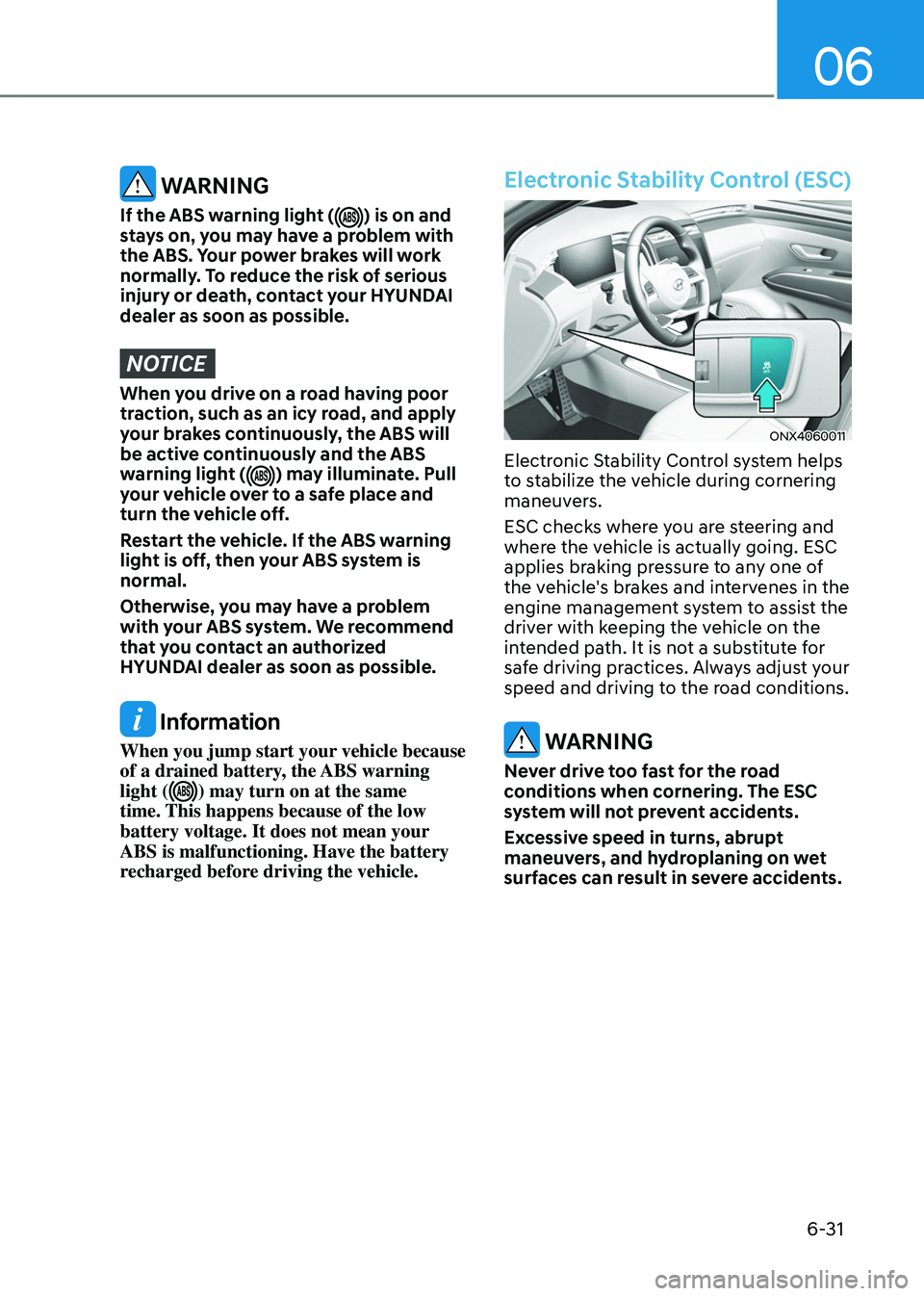
Electronic Stability Control (ESC)
ONX4060011
Electronic Stability Control system helps
to stabilize the vehicle during cornering
maneuvers.
ESC checks where you are steering and
where the vehicle is actually going. ESC
applies braking pressure to any one of
the vehicle's brakes and intervenes in the
engine management system to assist the
driver with keeping the vehicle on the
intended path. It is not a substitute for
safe driving practices. Always adjust your
speed and driving to the road conditions.
WARNING
Never drive too fast for the road
conditions when cornering. The ESC
system will not prevent accidents.
Excessive speed in turns, abrupt
maneuvers, and hydroplaning on wet
surfaces can result in severe accidents.
Page 320 of 630
06
6-33
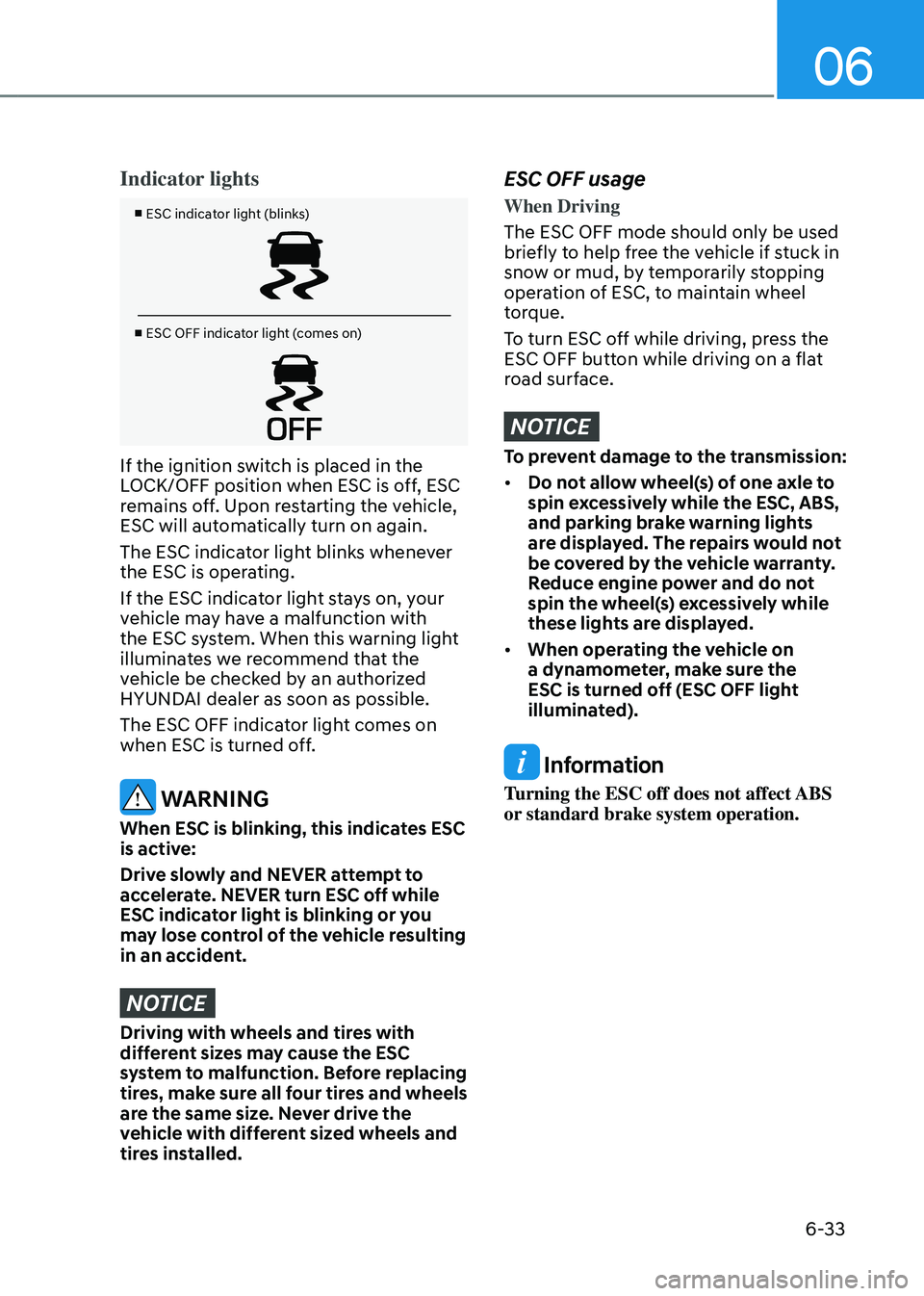
Indicator lights
■ ESC indicator light (blinks)
■ ESC OFF indicator light (comes on)
If the ignition switch is placed in the
LOCK/OFF position when ESC is off, ESC
remains off. Upon restarting the vehicle,
ESC will automatically turn on again.
The ESC indicator light blinks whenever
the ESC is operating.
If the ESC indicator light stays on, your
vehicle may have a malfunction with
the ESC system. When this warning light
illuminates we recommend that the
vehicle be checked by an authorized
HYUNDAI dealer as soon as possible.
The ESC OFF indicator light comes on
when ESC is turned off.
WARNING
When ESC is blinking, this indicates ESC
is active:
Drive slowly and NEVER attempt to
accelerate. NEVER turn ESC off while
ESC indicator light is blinking or you
may lose control of the vehicle resulting
in an accident.
NOTICE
Driving with wheels and tires with
different sizes may cause the ESC
system to malfunction. Before replacing
tires, make sure all four tires and wheels
are the same size. Never drive the
vehicle with different sized wheels and
tires installed.
ESC OFF usage
When Driving
The ESC OFF mode should only be used
briefly to help free the vehicle if stuck in
snow or mud, by temporarily stopping
operation of ESC, to maintain wheel
torque.
To turn ESC off while driving, press the
ESC OFF button while driving on a flat
road surface.
NOTICE
To prevent damage to the transmission:
• Do not allow wheel(s) of one axle to
spin excessively while the ESC, ABS,
and parking brake warning lights
are displayed. The repairs would not
be covered by the vehicle warranty.
Reduce engine power and do not
spin the wheel(s) excessively while
these lights are displayed.
• When operating the vehicle on
a dynamometer, make sure the
ESC is turned off (ESC OFF light
illuminated).
Information
Turning the ESC off does not affect ABS
or standard brake system operation.
Page 351 of 630
Driving your vehicle
6-64
Safety chains
You should always attach chains between
your vehicle and your trailer.
Instructions about safety chains may
be provided by the hitch manufacturer
or trailer manufacturer. Follow the
manufacturer’s recommendation for
attaching safety chains. Always leave just
enough slack so you can turn with your
trailer. And, never allow safety chains to
drag on the ground.
Trailer brakes
If your trailer is equipped with a braking
system, make sure it conforms to
your country’s regulations and that
it is properly installed and operating
correctly.
If your trailer weighs more than the
maximum trailer weight without trailer
brakes loaded, then it needs its own
brakes and they must be adequate. Be
sure to read and follow the instructions
for the trailer brakes so you’ll be able
to install, adjust and maintain them
properly. Be sure not to modify your
vehicle’s brake system.
WARNING
Do not use a trailer with its own brakes
unless you are absolutely certain that
you have properly set up the brake
system. This is not a task for amateurs.
Use an experienced, competent trailer
shop for this work.
Driving with a trailer
Towing a trailer requires a certain
amount of experience. Before setting
out for the open road, you must get to
know your trailer. Acquaint yourself with
the feel of handling and braking with the
added weight of the trailer. And always
keep in mind that the vehicle you are
driving is now longer and not nearly as
responsive as your vehicle is by itself.
Before you start, check the trailer hitch
and platform, safety chains, electrical
connector(s), lights, tires and brakes.
During your trip, occasionally check
to be sure that the load is secure, and
that the lights and trailer brakes are still
working.
Distance
Stay at least twice as far behind the
vehicle ahead as you would when driving
your vehicle without a trailer. This can
help you avoid situations that require
heavy braking and sudden turns.
Passing
You will need more passing distance up
ahead when you’re towing a trailer. And,
because of the increased vehicle length,
you’ll need to go much farther beyond
the passed vehicle before you can return
to your lane.
Page 353 of 630

Driving your vehicle
6-66
NOTICE
To prevent engine and/or transmission
overheating:
• When towing a trailer on steep
grades (in excess of 6%) pay close
attention to the engine coolant
temperature gauge to ensure the
engine does not overheat. If the
needle of the coolant temperature
gauge moves towards “H” (HOT),
pull over and stop as soon as it is
safe to do so, and allow the engine
to idle until it cools down. You may
proceed once the engine has cooled
sufficiently.
• If you tow a trailer with the maximum
gross vehicle weight and maximum
trailer weight, it can cause the
engine or transmission to overheat.
When driving in such conditions,
allow the engine to idle until it cools
down. You may proceed once the
engine or transmission has cooled
sufficiently.
• When towing a trailer, your vehicle
speed may be much slower than the
general flow of traffic, especially
when climbing an uphill grade. Use
the right hand lane when towing a
trailer on an uphill grade. Choose
your vehicle speed according to the
maximum posted speed limit for
vehicles with trailers, the steepness
of the grade, and your trailer weight.
Parking on hills
Generally, if you have a trailer attached
to your vehicle, you should not park your
vehicle on a hill.
However, if you ever have to park your
trailer on a hill, here’s how to do it:
1.
Pull the
vehicle into the parking space.
Turn the steering wheel in the
direction of the curb (right if headed
down hill, left if headed up hill).
2.
Shift the gear to P (P
ark).
3.
Set the parking br
ake and shut off the
vehicle.
4.
Place wheel chocks under the tr
ailer
wheels on the down hill side of the
wheels.
5.
Start the v
ehicle, hold the brakes, shift
to neutral, release the parking brake
and slowly release the brakes until the
trailer chocks absorb the load.
6.
Reapply the br
akes and parking
brakes.
7.
Shift the gear to P (P
ark) when the
vehicle is parked on a uphill grade and
in R (Reverse) on a downhill.
8.
Shut off the v
ehicle and release the
vehicle brakes but leave the parking
brake set.
WARNING
To prevent serious or fatal injury:
• Do not get out of the vehicle without
the parking brake firmly set. If you
have left the engine running, the
vehicle can move suddenly. You and
others could be seriously or fatally
injured.
• Do not apply the accelerator pedal to
hold the vehicle on an uphill.
Page 440 of 630
07
7-81
Smart Cruise Control Operation
Operating conditions
Smart Cruise Control will operate when
the following conditions are satisfied.
Basic function
• The gear is in D (Drive)
• The
driv
er’s
door is closed
• EPB (Electr
onic Parking Brake) is not
applied
• Your vehicle speed is within the
operating speed range
- 5~110 mph (10~180 km/h): when
ther
e is no vehicle in front
- 0~110 mph (0~180 km/h
): when
there is a vehicle in front
• ESC (Electronic Stability Control) or
ABS is on
• ESC (Electronic Stability Control) or
ABS is not controlling the vehicle
• Engine rpm is not in the red zone
• Forward Collision-Avoidance Assist
brake control is not operating
• Remote Smart Parking Assist brake
control is not operating (if equipped)
Information
At a stop, if there is no vehicle in front of
your vehicle, Smart Cruise Control will
turn on when the brake pedal is depressed. Overtaking Acceleration Assist
Overtaking Acceleration Assist will
operate when the turn signal indicator
is turned on to the left (left-hand drive)
or turned on to the right (right-hand
drive) while Smart Cruise Control is
operating, and the following conditions
are satisfied:
•
Your vehicle speed is above 40 mph
(60 km/h)
• The hazard warning flasher is off
• A vehicle is detected in front of your
vehicle
• Deceleration is not needed to
maintain distance with the vehicle in
front
WARNING
• When the turn signal indicator is
turned on to the left while there is
a vehicle ahead, the vehicle may
accelerate temporarily. Pay attention
to the road conditions at all times.
• Regardless of your countries driving
direction, Overtaking Acceleration
Assist will operate when the
conditions are satisfied. When
using the function in countries with
different driving direction, always
check the road conditions at all
times.
Page 493 of 630
Driver assistance system
7-134
WARNING
• Reverse Parking Distance Warning
is a supplemental function. The
operation of Reverse Parking
Distance Warning can be affected
by several factors (including
environmental conditions). It is the
responsibility of the driver to always
check the rear view before and while
parking.
• Your new vehicle warranty does not
cover any accidents or damage to
the vehicle due to the malfunction of
Reverse Parking Distance Warning.
• Pay close attention when driving
near objects, pedestrians, and
especially children. Some objects
may not be detected by the
ultrasonic sensors, due to the objects
distance, size or material, all of
which can limit the effectiveness of
the sensor.
Limitations of Reverse Parking
Distance Warning
• Reverse Parking Distance Warning
may not operate normally when:
- Mois
ture is frozen to the sensor
- Sensor is cov
ered with foreign
material, such as snow or water
(Reverse Parking Distance Warning
will operate normally when such
foreign material are removed.)
- The w
eather is extremely hot or cold
- The sensor or sensor assembly is disassembled
- The surface o
f the sensor is pressed
hard or an impact is applied with a
hard object
- The surface o
f the sensor is
scratched with a sharp object
- The sensors or its surr
ounding
area is directly sprayed with high
pressure washer •
Reverse Parking Distance Warning
may malfunction when:
- Hea
vy rain or water spray is present
- Wa
ter flows on the surface of the
sensor
- Aff
ected
b
y
ano
ther
v
ehicle’s
sensors
- The sensor is cov
ered with snow
- Driving on unev
en road, gravel
roads or bushes
- Objects that gener
ates ultrasonic
waves are near the sensor
- Installing the license pla
te
differently from the original location
- The vehicle bumper heigh
t or
ultrasonic sensor installation has
been modified
- Attaching equipmen
ts or
accessories around the ultrasonic
sensors
• The following objects may not be
detected:
-Sharp or slim objects, such as ropes,
chains or small poles.
- Objects, which tend t
o absorb
sensor frequency, such as clothes,
spongy material or snow.
- Objects smaller than 40 in. (100 cm) in length and narr
ower than 6 in. (14
cm) in diameter.
- Pedes
trians, animals or objects
that are very close to the ultrasonic
sensors
• Parking Distance Warning Indicators
may be displayed differently from
the actual detected location when
the obstacle is located between the
sensors.
• Parking Distance Warning indicator
may not occur sequentially depending
on vehicle speed or obstacle shape.
• If Reverse Parking Distance Warning
needs repair, have the vehicle
inspected by an authorized HYUNDAI
dealer.
Page 498 of 630
07
7-139
Limitations of Forward/Reverse
Parking Distance Warning
• Forward/Reverse Parking Distance
Warning may not operate normally
when:
- Mois
ture is frozen to the sensor
- Sensor is cov
ered with foreign
material, such as snow or water
(Forward/Reverse Parking Distance
Warning will operate normally when
such foreign material are removed.)
- The w
eather is extremely hot or cold
- The sensor or sensor assembly is disassembled
- The surface o
f the sensor is pressed
hard or an impact is applied with a
hard object
- The surface o
f the sensor is
scratched with a sharp object
- The sensors or its surr
ounding
area is directly sprayed with high
pressure washer
• Forward/Reverse Parking Distance
Warning may malfunction when:
- Hea
vy rain or water spray is present
- Wa
ter flows on the surface of the
sensor
- Aff
ected
b
y
ano
ther
v
ehicle’s
sensors
- The sensor is cov
ered with snow
- Driving on unev
en road, gravel
roads or bushes
- Objects that gener
ates ultrasonic
waves are near the sensor
- Installing the license pla
te
differently from the original location
- The vehicle bumper heigh
t or
ultrasonic sensor installation has
been modified
- Attaching equipmen
ts or
accessories around the ultrasonic
sensors •
The following objects may not be
detected: -Sharp or slim objects, such as ropes,
chains or small poles.
- Objects, which tend t
o absorb
sensor frequency, such as clothes,
spongy material or snow.
- Objects smaller than 40 in. (100 cm) in length and narr
ower than 6 in. (14
cm) in diameter.
- Pedes
trians, animals or objects
that are very close to the ultrasonic
sensors
• Parking Distance Warning Indicators
may be displayed differently from
the actual detected location when
the obstacle is located between the
sensors.
• Parking Distance Warning indicator
may not occur sequentially depending
on vehicle speed or obstacle shape.
• If Forward/Reverse Parking Distance
Warning needs repair, have the
vehicle inspected by an authorized
HYUNDAI dealer.
Page 514 of 630
07
7-155
• The vehicle moves 22 ft. (7 m)
while the smart key is pressed with
Remote Forward/Backward function
(maximum travel distance per button
press)
When Remote Forward/Backward
function is paused, the vehicle will stop.
If the condition that made the function
to pause disappears, the function may
operate again.
The function will cancel in the
following conditions when:
• The steering wheel is steered
• The gear is shifted while the vehicle is
moving
• Operating EPB while the vehicle is
moving
• The engine hood is open
• The brake pedal or accelerator pedal
is depressed when all the doors are
closed
• The smart key is outside the vehicle
when the brake pedal is depressed
while the driver's door is open
• Rapid acceleration occurs
• Vehicle skid occurs
• The wheel is stuck by an obstacle and
cannot move
• There are pedestrians, animals or
objects at the front and rear of the
vehicle at the same time •
Approximately 3 minutes and 50
seconds have past after Remote
Forward/Backward function has
started to operate
• The slope of the road exceeds the
operational range
• The function is paused for more than
1 minute
• The total travel distance of the vehicle
has exceeded 45 ft. (14 m) after
Remote Forward/Backward function
operation
• The steering wheel, gearshift, braking,
and drive controls are not working
normally
• There is a problem with the smart key
or the smart key battery is low
• ABS, TCS or ESC system operates due
to slippery road conditions
• The alarm of the Theft Alarm System
sounds
When Remote Forward/Backward
function is canceled, the vehicle will
automatically stop, shift the gear to
P (Park) and engage EPB (Electronic
Parking Brake).