AUX HYUNDAI TUCSON LIMITED 2017 User Guide
[x] Cancel search | Manufacturer: HYUNDAI, Model Year: 2017, Model line: TUCSON LIMITED, Model: HYUNDAI TUCSON LIMITED 2017Pages: 642, PDF Size: 9.78 MB
Page 302 of 642
4-39
Multimedia System
4
Repeat
Press the button to repeat the
current song. Press the button again
to turn the repeat feature off.
Repeat : Repeats the current song
List
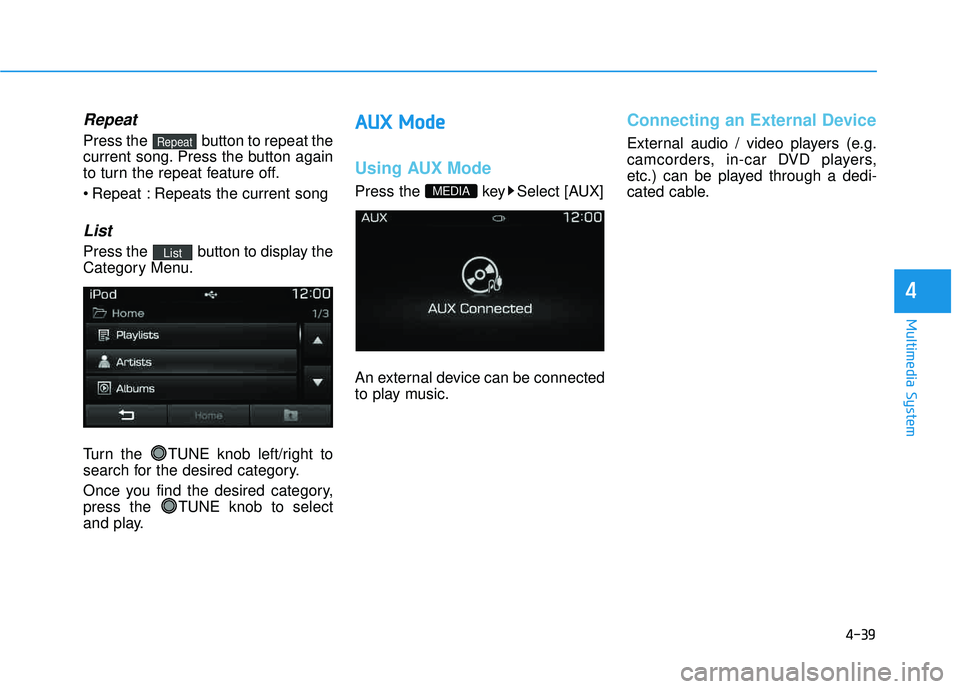
Press the button to display the
Category Menu.
Turn the TUNE knob left/right to
search for the desired category.
Once you find the desired category,
press the TUNE knob to select
and play.
AAUU XX MM ooddee
Using AUX Mode
Press the key Select [AUX]
An external device can be connected
to play music.
Connecting an External Device
External audio / video players (e.g.
camcorders, in-car DVD players,
etc.) can be played through a dedi-
cated cable.
MEDIA
List
Repeat
Page 324 of 642
4-61
Multimedia System
4
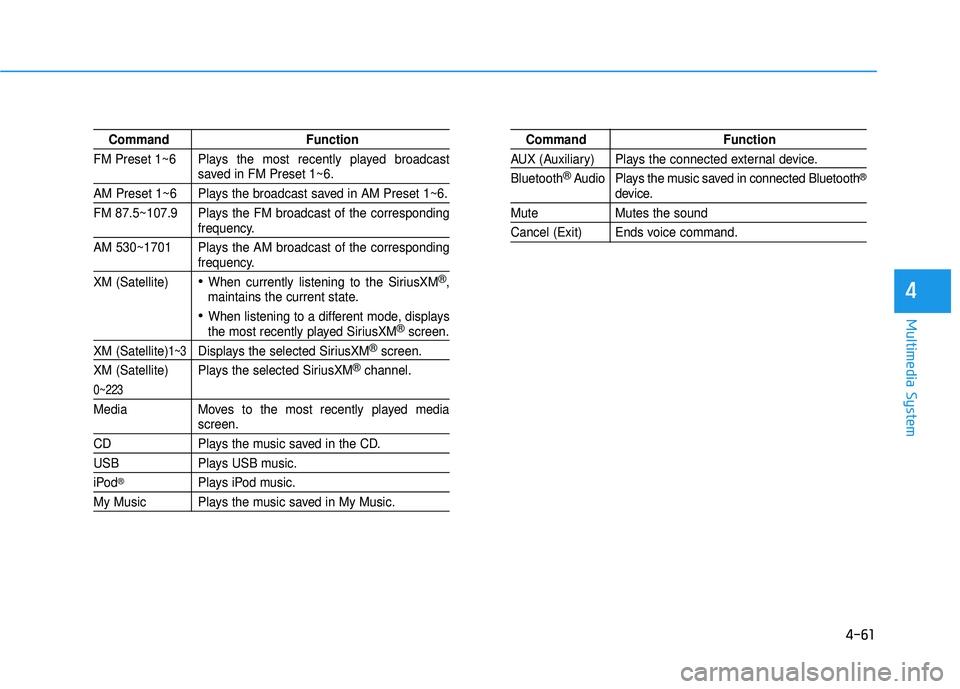
Command Function
FM Preset 1~6 Plays the most recently played broadcast
saved in FM Preset 1~6.
AM Preset 1~6 Plays the broadcast saved in AM Preset 1~6.
FM 87.5~107.9 Plays the FM broadcast of the corresponding
frequency.
AM 530~1701 Plays the AM broadcast of the corresponding
frequency.
XM (Satellite)
When currently listening to the SiriusXM®,
maintains the current state.
When listening to a different mode, displaysthe most recently played SiriusXM®screen.
XM (Satellite)1~3Displays the selected SiriusXM®screen.
XM (Satellite) Plays the selected SiriusXM
®channel.
0~223
Media Moves to the most recently played mediascreen.
CD Plays the music saved in the CD.
USB Plays USB music.
iPod®Plays iPod music.
My Music Plays the music saved in My Music.
Command Function
AUX (Auxiliary) Plays the connected external device. Bluetooth
®Audio Plays the music saved in connected Bluetooth®
device.
Mute Mutes the sound
Cancel (Exit) Ends voice command.
Page 334 of 642
4-71
Multimedia System
4
SSyyssttee mm CC oonnttrr oo llllee rrss aa nn dd FF uunn ccttiioo nnss
Audio Head Unit
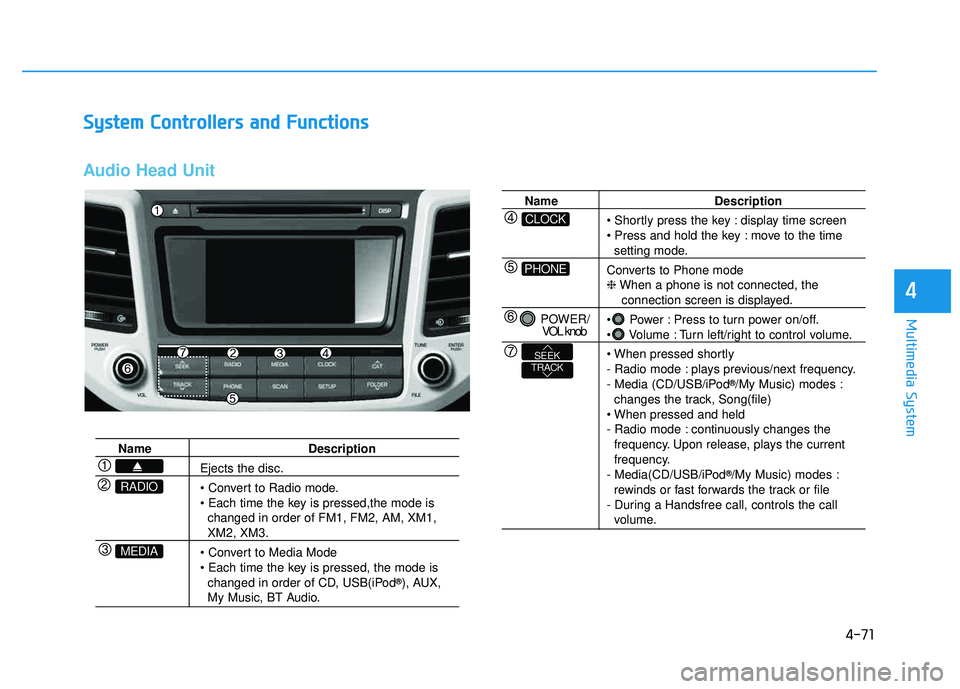
Name Description
Ejects the disc.
• Convert to Radio mode.
changed in order of FM1, FM2, AM, XM1,
XM2, XM3.
changed in order of CD, USB(iPod ®
), AUX,
My Music, BT Audio.
MEDIA
RADIO
Name Description
display time screen
move to the time
setting mode.
Converts to Phone mode ❈ When a phone is not connected, the
connection screen is displayed.
Power : Press to turn power on/off.
Volume : Turn left/right to control volume.
- Radio mode : plays previous/next frequency.
- Media (CD/USB/iPod ®
/My Music) modes :
changes the track, Song(file)
- Radio mode : continuously changes the frequency. Upon release, plays the current
frequency.
- Media(CD/USB/iPod ®
/My Music) modes :
rewinds or fast forwards the track or file
- During a Handsfree call, controls the call
volume.
PHONE
CLOCK
POWER/ VOL knob
TRACKSEEK
Page 336 of 642
4-73
Multimedia System
4
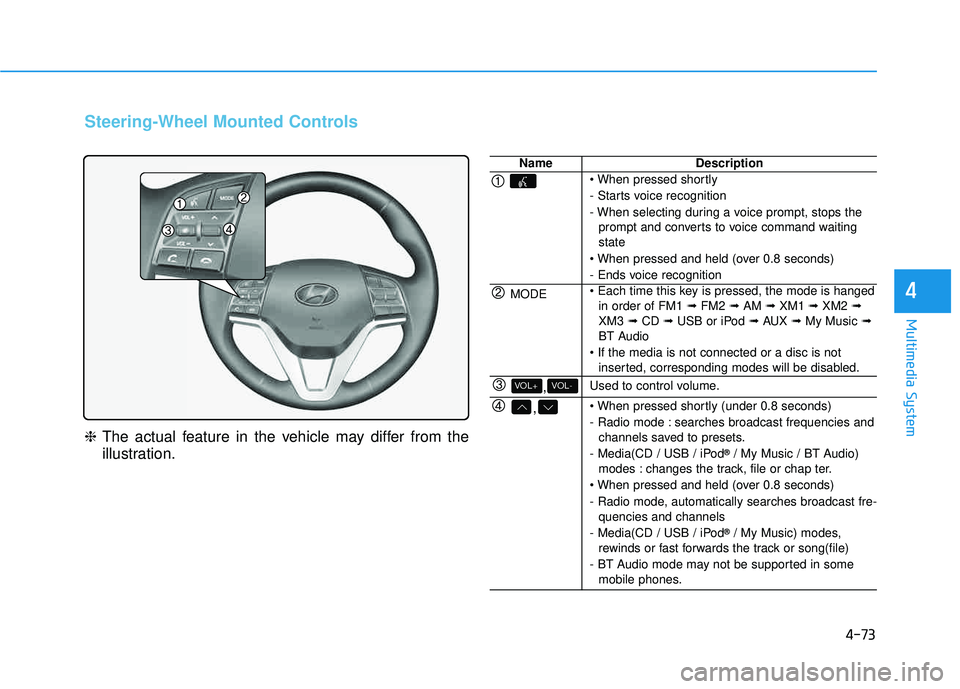
Steering-Wheel Mounted Controls
❈The actual feature in the vehicle may differ from the
illustration.
NameDescription
- Starts voice recognition
- When selecting during a voice prompt, stops the
prompt and converts to voice command waiting state
- Ends voice recognition
MODE in order of FM1 ➟FM2 ➟AM ➟XM1 ➟XM2 ➟
XM3 ➟CD ➟USB or iPod ➟AUX ➟My Music ➟
BT Audio
inserted, corresponding modes will be disabled.
,VOL-VOL+Used to control volume.
,
- Radio mode : searches broadcast frequencies andchannels saved to presets.
- Media(CD / USB / iPod ®
/ My Music / BT Audio)
modes : changes the track, file or chap ter.
- Radio mode, automatically searches broadcast fre- quencies and channels
- Media(CD / USB / iPod ®
/ My Music) modes,
rewinds or fast forwards the track or song(file)
- BT Audio mode may not be supported in some mobile phones.
Page 342 of 642
![HYUNDAI TUCSON LIMITED 2017 User Guide 4-79
Multimedia System
4
MMeedd iiaa MM ooddee
Pressing the key will change
the operating mode in order of CD
➟
USB(iPod®) ➟ AUX ➟ My Music ➟BT
Audio.
If [Mode Pop up] is turned on with](/img/35/56197/w960_56197-341.png "HYUNDAI TUCSON LIMITED 2017 User Guide 4-79
Multimedia System
4
MMeedd iiaa MM ooddee
Pressing the key will change
the operating mode in order of CD
➟
USB(iPod®) ➟ AUX ➟ My Music ➟BT
Audio.
If [Mode Pop up] is turned on with")
4-79
Multimedia System
4
MMeedd iiaa MM ooddee
Pressing the key will change
the operating mode in order of CD
➟
USB(iPod®) ➟ AUX ➟ My Music ➟BT
Audio.
If [Mode Pop up] is turned on within
[Display], then pressing the
key will display the Media
Pop-up Mode screen.
Turn the tune knob to highlight
each of the operating modes. Press
the know to select the desired mode.
Information
The media mode pop up screen can be
displayed only when there are two or
more media modes turned on.
Title Icon
When a Bluetooth®Wireless
Technology, iPod®, USB, or AUX
device is connected or a CD is
inserted, the corresponding mode
icon will be displayed.
Icon Title
Bluetooth®Wireless Technology
CD
iPod®
USB
AUX
i
MEDIA
SETUP
MEDIA
Page 353 of 642
4-90
Multimedia System
Repeat
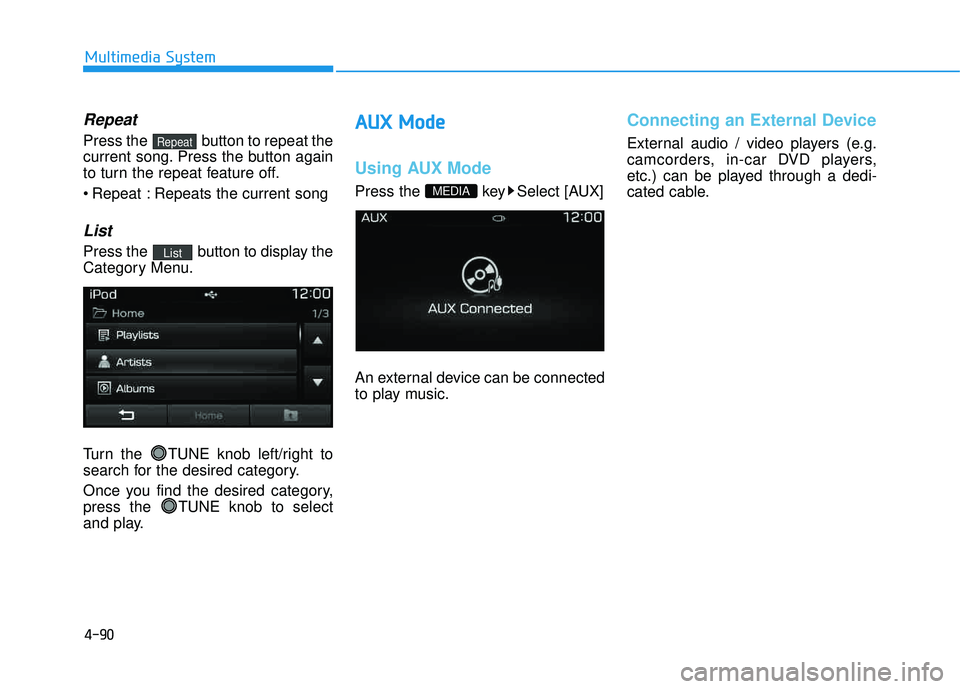
Press the button to repeat the
current song. Press the button again
to turn the repeat feature off.
Repeat : Repeats the current song
List
Press the button to display the
Category Menu.
Turn the TUNE knob left/right to
search for the desired category.
Once you find the desired category,
press the TUNE knob to select
and play.
AAUU XX MM ooddee
Using AUX Mode
Press the key Select [AUX]
An external device can be connected
to play music.
Connecting an External Device
External audio / video players (e.g.
camcorders, in-car DVD players,
etc.) can be played through a dedi-
cated cable.
MEDIA
List
Repeat
Page 375 of 642
4-112
Multimedia System
Command Function
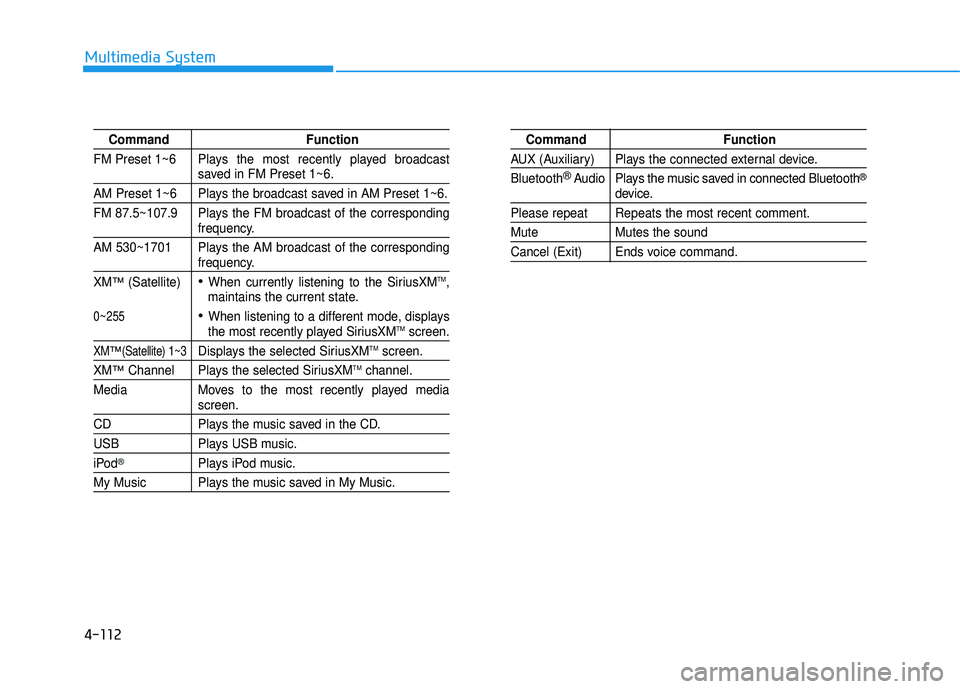
FM Preset 1~6 Plays the most recently played broadcast
saved in FM Preset 1~6.
AM Preset 1~6 Plays the broadcast saved in AM Preset 1~6.
FM 87.5~107.9 Plays the FM broadcast of the corresponding
frequency.
AM 530~1701 Plays the AM broadcast of the corresponding
frequency.
XM
™(Satellite)When currently listening to the SiriusXMTM,
maintains the current state.
When listening to a different mode, displaysthe most recently played SiriusXMTMscreen.
XM™(Satellite) 1~3Displays the selected SiriusXMTMscreen.
XM™Channel Plays the selected SiriusXMTMchannel.
Media Moves to the most recently played media
screen.
CD Plays the music saved in the CD.
USB Plays USB music.
iPod®Plays iPod music.
My Music Plays the music saved in My Music.
Command Function
AUX (Auxiliary) Plays the connected external device. Bluetooth
®Audio Plays the music saved in connected Bluetooth®
device.
Please repeat Repeats the most recent comment.
Mute Mutes the sound
Cancel (Exit) Ends voice command.
0~255
Page 633 of 642
I-2
Air bag warning labels....................................................2-71
Air bags ...........................................................................2-48Additional safety precautions .....................................2-70
Air bag warning labels ...............................................2-71
Do not install a child restraint on the front passenger seat..........................................................2-63
How does the air bags system operate? .....................2-53
Occupant Classification System (OCS) .....................2-58
SRS Care ....................................................................2-69
What to expect after an air bag inflates .....................2-58
Where are the air bags? ..............................................2-50
Why didn’t my air bag go off in a collision ..............2-64
Air cleaner.......................................................................7-38
Air conditioner compressor label....................................8-11
Airconditioning system Automatic climate control system............................3-137
Manual climate control system ................................3-127
Airventilation seat ...........................................................2-19
All wheel drive (AWD) ..................................................5-42
Antenna .............................................................................4-2
Anti-lock brake system (ABS) .......................................5-31
Audio...............................................................................4-17
Auto light position ........................................................3-107 Automatic climate control system ................................3-137
Air conditioning .......................................................3-145
Automatic heating and air conditioning ...................3-138
Climate control air filter ...........................................3-147
Manual heating and air conditioning .......................3-139
Automatic transmission ..................................................5-14 Shift lock system ........................................................5-24
Autonomous emergency braking (AEB) ........................5-59
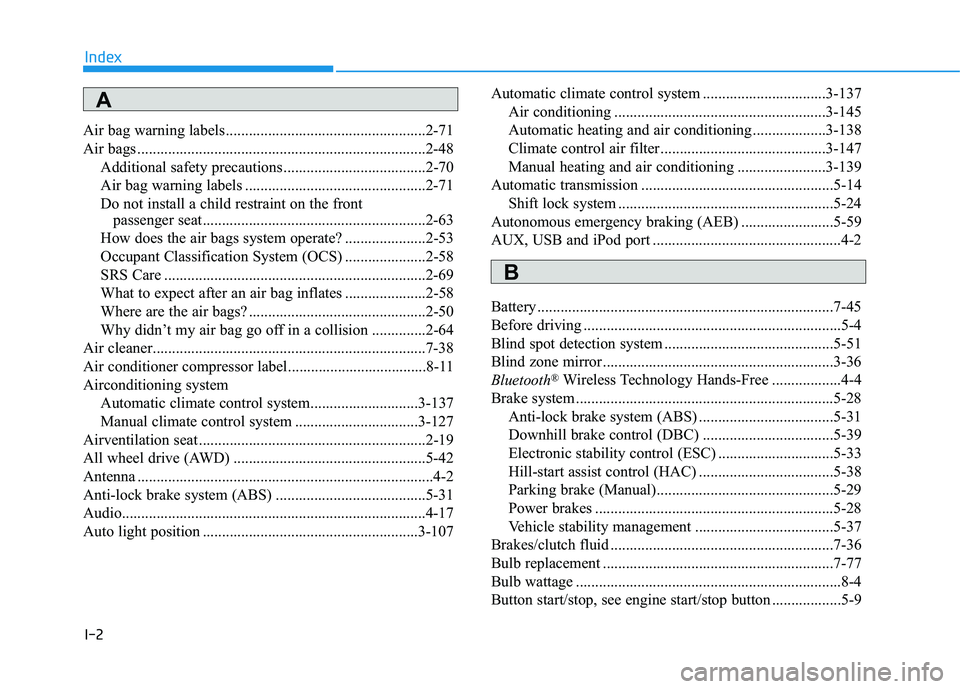
AUX, USB and iPod port .................................................4-2
Battery .............................................................................7-45
Before driving ...................................................................5-4
Blind spot detection system ............................................5-51
Blind zone mirror............................................................3-36
Bluetooth
®Wireless Technology Hands-Free ..................4-4
Brake system ...................................................................5-28 Anti-lock brake system (ABS) ...................................5-31
Downhill brake control (DBC) ..................................5-39
Electronic stability control (ESC) ..............................5-33
Hill-start assist control (HAC) ...................................5-38
Parking brake (Manual)..............................................5-29
Power brakes ..............................................................5-28
Vehicle stability management ....................................5-37
Brakes/clutch fluid ..........................................................7-36
Bulb replacement ............................................................7-77
Bulb wattage .....................................................................8-4
Button start/stop, see engine start/stop button ..................5-9
Index
A
B
Page 639 of 642
I-8
Manual climate control system .....................................3-127Air conditioning .......................................................3-132
Climate control air filter ...........................................3-135
Heating and air conditioning ....................................3-128
Mirrors ............................................................................3-23 Blind zone mirror .......................................................3-36
Day/night rearview mirror..........................................3-23
Electric chromic mirror (ECM) with homelink .........3-24
Electric chromic mirror (ECM) with homelink and compass ...................................................................3-28
Folding the outside rearview mirror...........................3-37
Inside rearview mirror ................................................3-23
Outside rearview mirror .............................................3-35
Outside rearview mirror control .................................3-37
Moonroof, see panorama sunroof ...................................3-42
Multi fuse ........................................................................7-68
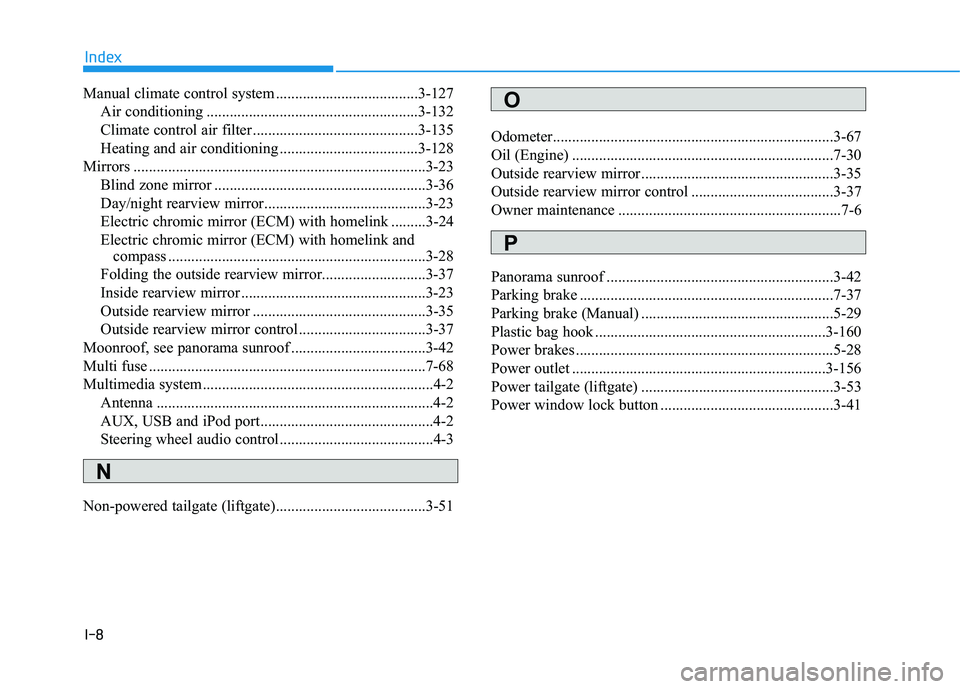
Multimedia system............................................................4-2 Antenna ........................................................................4-2
AUX, USB and iPod port.............................................4-2
Steering wheel audio control........................................4-3
Non-powered tailgate (liftgate).......................................3-51 Odometer.........................................................................3-67
Oil (Engine) ....................................................................7-30
Outside rearview mirror..................................................3-35
Outside rearview mirror control .....................................3-37
Owner maintenance ..........................................................7-6
Panorama sunroof ...........................................................3-42
Parking brake ..................................................................7-37
Parking brake (Manual) ..................................................5-29
Plastic bag hook ............................................................3-160
Power brakes ...................................................................5-28
Power outlet ..................................................................3-156
Power tailgate (liftgate) ..................................................3-53
Power window lock button .............................................3-41
Index
O
P
N