sunroof HYUNDAI TUCSON LIMITED 2017 User Guide
[x] Cancel search | Manufacturer: HYUNDAI, Model Year: 2017, Model line: TUCSON LIMITED, Model: HYUNDAI TUCSON LIMITED 2017Pages: 642, PDF Size: 9.78 MB
Page 182 of 642
3-84
Convenient features of your vehicle
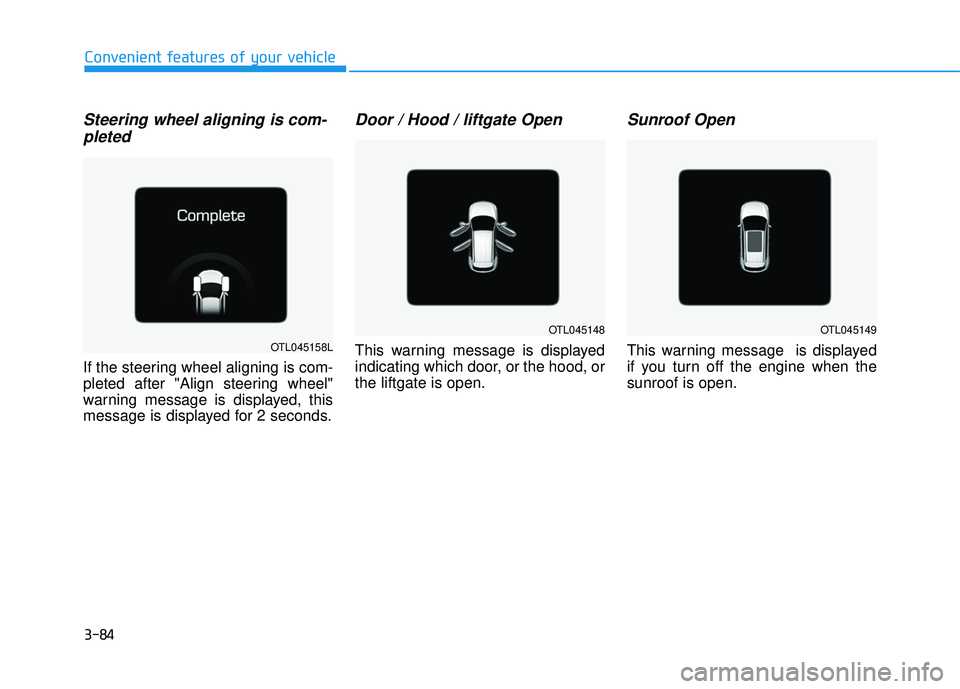
Steering wheel aligning is com-pleted
If the steering wheel aligning is com-
pleted after "Align steering wheel"
warning message is displayed, this
message is displayed for 2 seconds.
Door / Hood / liftgate Open
This warning message is displayed
indicating which door, or the hood, orthe liftgate is open.
Sunroof Open
This warning message is displayed
if you turn off the engine when thesunroof is open.OTL045158L
OTL045148OTL045149
Page 191 of 642

3-93
Convenient features of your vehicle
3
Digital Speedometer
This message shows the speed of
the vehicle (in mph.).
Driving Info Display
At the end of each driving cycle, the
Driving Info message is displayed.
This display shows the trip distance,
the average fuel economy, and the
remaining vehicle range.
This information is displayed for a
few seconds when you turn off theignition, and then goes off automati-
cally. The information is calculated
for each ignition cycle.
If the estimated remaining vehicle
range is below 1 mile (1.6 km), the
range will display as "- - -" and a
"Low Fuel" warning message will be
displayed.
Information
If "Sunroof Open" warning message
is displayed in the cluster, the Driving
Information message may not be dis-
played.
i
OTLA045193/OTLA045194
■Type A■Type A
OTLE045266
Page 232 of 642
3-134
Convenient features of your vehicle
When using the air conditioning
system, monitor the engine tem-
perature gauge closely while driv-
ing up hills or in heavy trafficwhen outside temperatures are
high. Air conditioning system
operation can cause engine over-
heating. Continue to use the blow-
er fan, but turn the air condition-ing system off if the engine tem-
perature gauge indicates engine
overheating.
Air conditioning system operation
tips
If the vehicle has been parked indirect sunlight during hot weather,
open the windows for a short time
to let the hot air inside the vehicle
escape.
After sufficient cooling has been achieved, switch back from therecirculated air to the fresh outsideair position.
To help reduce moisture inside of the windows on rainy or humid
days, decrease the humidity inside
the vehicle by operating the airconditioning system with the win-
dows and sunroof closed.
Use the air conditioning system every month for a few minutes to
ensure maximum system perform-
ance. If you operate the air conditioner
excessively, the difference
between the temperature of theoutside air and that of the wind-shield could cause the outer sur-
face of the windshield to fog up,
causing loss of visibility. In this
case, set the mode selection but-
ton to the position and set the
fan speed control knob to the low-est speed setting.
NOTICE
Page 245 of 642
3-147
Convenient features of your vehicle
3
Air conditioning system operation
tips
If the vehicle has been parked indirect sunlight during hot weather,
open the windows for a short time
to let the hot air inside the vehicle
escape.
After sufficient cooling has been achieved, switch back from therecirculated air to the fresh outsideair position.
To help reduce moisture inside of the windows on rainy or humid
days, decrease the humidity inside
the vehicle by operating the airconditioning system with the win-
dows and sunroof closed.
Use the air conditioning system every month for a few minutes to
ensure maximum system perform-
ance. If you operate the air conditioner
excessively, the difference
between the temperature of theoutside air and that of the wind-shield could cause the outer sur-
face of the windshield to fog up,
causing loss of visibility. In this
case, toggle the mode selection
button to the position and set
the fan speed control knob to the
lowest speed setting.
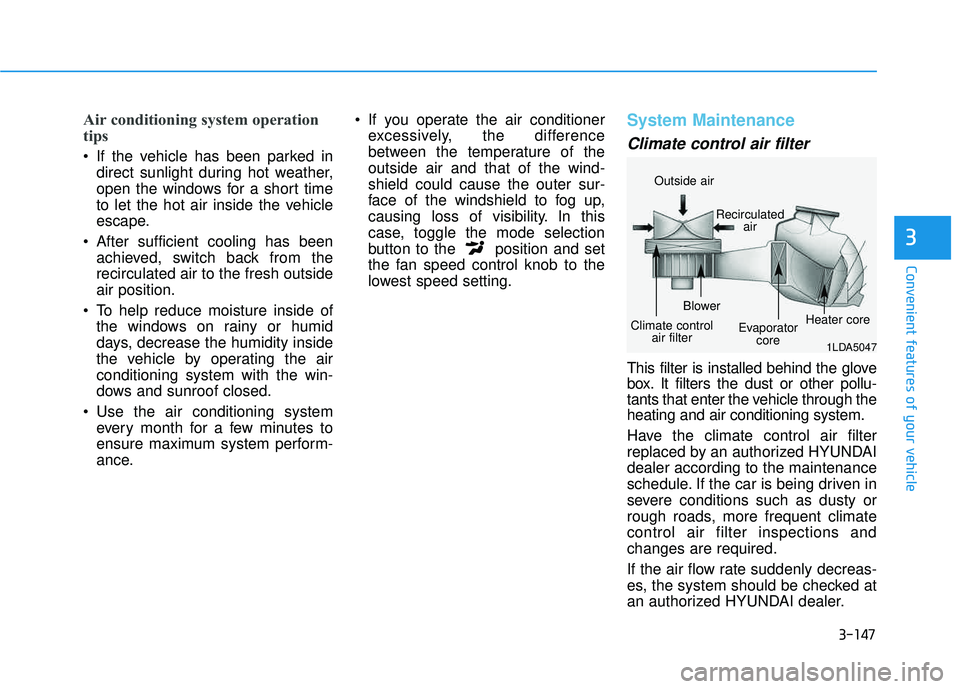
System Maintenance
Climate control air filter
This filter is installed behind the glove
box. It filters the dust or other pollu-
tants that enter the vehicle through theheating and air conditioning system.
Have the climate control air filter
replaced by an authorized HYUNDAIdealer according to the maintenance
schedule. If the car is being driven in
severe conditions such as dusty or
rough roads, more frequent climatecontrol air filter inspections andchanges are required.
If the air flow rate suddenly decreas-
es, the system should be checked at
an authorized HYUNDAI dealer.
1LDA5047
Outside air
Recirculatedair
Climate control air filter Blower
Evaporatorcore Heater core
Page 250 of 642
3-152
Convenient features of your vehicle
CCLLIIMM AATTEE CC OO NNTTRR OO LL AA DDDDIITT IIOO NNAALL FF EE AA TTUU RREESS
Automatic Ventilation
When the ignition is ON or when the
engine is running and the outside
temperature is below 59°F (15°C),
the automatic ventilation feature will
activate if the recirculated air intake
position is selected for more than 5
minutes while A/C is off and floor
mode is selected. In this condition
the air intake position will automati-
cally switch to the outside (fresh) air
intake position.
To cancel or reset the Automatic
Ventilation
When the air conditioning system is
on, select Face Level mode and
while pressing the A/C button, press
the recirculated air position button
five times within three seconds.
Sunroof Inside Air
Recirculation
When the heater or air conditioning system is on with the sunroofopened, the outside (fresh) air posi-
tion will be automatically selected. At
this time, if you press the recirculated
air position button, the recirculated
air position will be selected but will
change back to the outside (fresh) air
position after 3 minutes. When the sunroof is closed, the air
intake position will return to the orig-
inal position that was selected.
Page 263 of 642
3-165
Convenient features of your vehicle
3
EEXX TTEERR IIOO RR FF EE AA TTUU RREESS
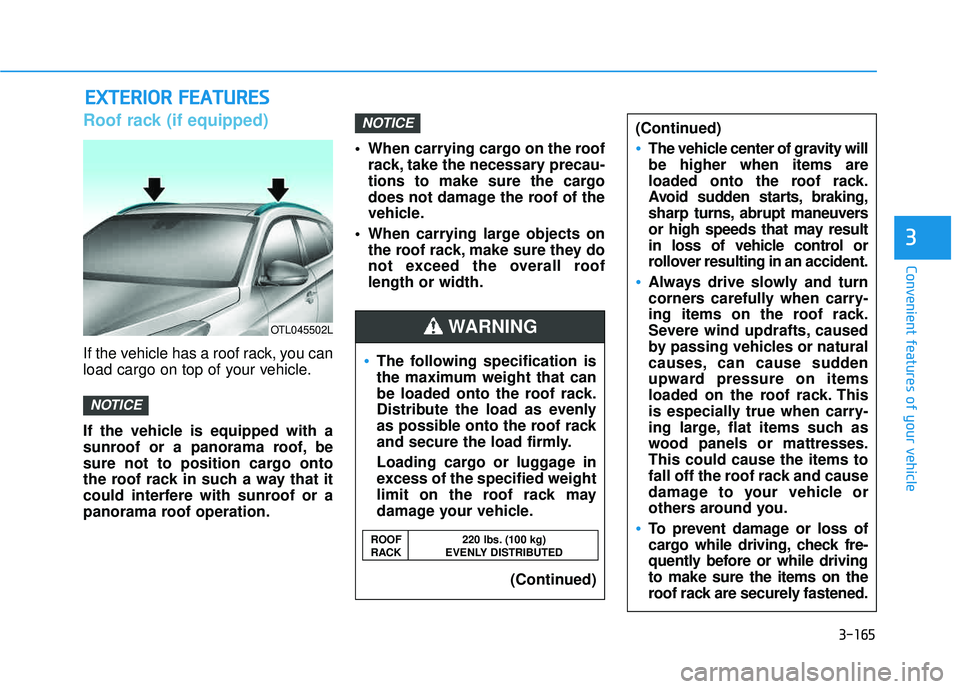
Roof rack (if equipped)
If the vehicle has a roof rack, you can
load cargo on top of your vehicle.
If the vehicle is equipped with a
sunroof or a panorama roof, be
sure not to position cargo onto
the roof rack in such a way that it
could interfere with sunroof or a
panorama roof operation. When carrying cargo on the roof
rack, take the necessary precau-
tions to make sure the cargo
does not damage the roof of the
vehicle.
When carrying large objects on the roof rack, make sure they do
not exceed the overall rooflength or width.
NOTICE
NOTICE
OTL045502L
The following specification is
the maximum weight that can
be loaded onto the roof rack.
Distribute the load as evenly
as possible onto the roof rack
and secure the load firmly.
Loading cargo or luggage in
excess of the specified weight
limit on the roof rack may
damage your vehicle.
(Continued)
(Continued)
The vehicle center of gravity will be higher when items are
loaded onto the roof rack.
Avoid sudden starts, braking,
sharp turns, abrupt maneuvers
or high speeds that may result
in loss of vehicle control or
rollover resulting in an accident.
Always drive slowly and turn
corners carefully when carry-
ing items on the roof rack.
Severe wind updrafts, caused
by passing vehicles or natural
causes, can cause sudden
upward pressure on items
loaded on the roof rack. This
is especially true when carry-
ing large, flat items such as
wood panels or mattresses.This could cause the items to
fall off the roof rack and cause
damage to your vehicle or
others around you.
To prevent damage or loss of
cargo while driving, check fre-
quently before or while drivingto make sure the items on the
roof rack are securely fastened.
WARNING
ROOF 220 lbs. (100 kg)
RACK EVENLY DISTRIBUTED
Page 279 of 642
4-16
(Continued)
Park the vehicle when connectingthe head unit with the mobile phone.
Bluetooth
®connection may become
intermittently disconnected in some
mobile phones. Follow these steps to
try again.
1. Within the mobile phone, turn the Bluetooth
®function off/on and try
again.
2. Turn the mobile phone power Off/On and try again.
3. Completely remove the mobile phone battery, reboot, and then
again.
4. Reboot the Audio System and try again.
5. Delete all paired devices, pair and try again.
Handsfree call quality and volume may differ depending on the model
of your mobile phone.
Information - Using the voicerecognition
When using the voice recognition feature, only commands listed with-
in the user's manual are supported.
Be aware that during the operation of the voice recognition system,
pressing any key other than the
key terminate voice recognition
mode.
For superior voice recognition per- formance, position the microphone
used for voice recognition above the
head of the driver’s seat and main-
tain a proper position when saying
commands.
Within the following situations, voice recognition may not function
properly due to external sound.
- When the windows and sunroof are open
- When the wind of the cooling / heating device is strong
- When entering and passing through tunnels
(Continued)(Continued)
- When driving on rugged anduneven roads
- During severe rain (heavy rains, windstorms)
Phone related voice commands can be used only when a Bluetooth
®
Wireless Technology device is con-
nected.
When making calls by stating a name, the corresponding contact
must be downloaded and stored
within the audio system.
After downloading the Bluetooth
®
Wireless Technology phone book, it
takes some times to convert the
phone book data into voice informa-
tion. During this time, voice recogni-
tion may not properly operate.
Pronounce the voice commands nat- urally and clearly as if in a normal
conversation.
i
Multimedia System
Page 560 of 642
7-47
7
Maintenance
By jump starting
After a jump start from a good bat-
tery, drive the vehicle for 20-30 min-
utes before it is shutoff. The vehicle
may not restart if you shut it off
before the battery had a chance to
adequately recharge. See "Jump
Starting" in chapter 6 for more infor-
mation on jump starting procedures.
Information
An inappropriately disposedbattery can be harmful to
the environment and human
health.
Dispose the battery according to your
local law(s) or regulation.
Reset features
Some items need to be reset after
the battery has been discharged or
the battery has been disconnected.
See chapter 3 for:
Power Windows
Trip Computer
Climate Control System
Clock
Audio System
Sunroof
Integrated Memory System
i
(Continued)
Watch the battery during
charging, and stop or reduce
the charging rate if the battery
cells begin boiling violently.
The negative battery cable
must be removed first and
installed last when the battery
is disconnected. Disconnect
the battery charger in the fol-
lowing order:
(1) Turn off the battery charg- er main switch.
(2) Unhook the negative
clamp from the negative
battery terminal.
(3) Unhook the positive clamp from the positive batteryterminal.
Always use a genuine
HYUNDAI approved battery
when you replace the battery.
Page 584 of 642
7-71
7
Maintenance
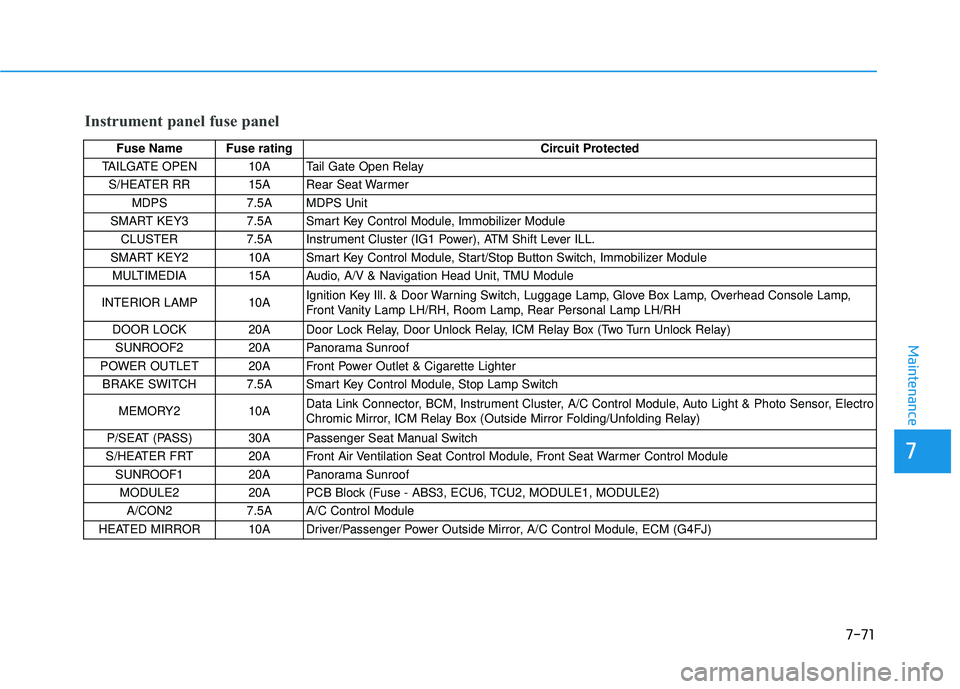
Instrument panel fuse panel
Fuse Name Fuse ratingCircuit Protected
TAILGATE OPEN 10A Tail Gate Open Relay
S/HEATER RR 15A Rear Seat Warmer MDPS 7.5A MDPS Unit
SMART KEY3 7.5A Smart Key Control Module, Immobilizer Module
CLUSTER 7.5A Instrument Cluster (IG1 Power), ATM Shift Lever ILL.
SMART KEY2 10A Smart Key Control Module, Start/Stop Button Switch, Immobilizer Module MULTIMEDIA 15A Audio, A/V & Navigation Head Unit, TMU Module
INTERIOR LAMP 10A Ignition Key Ill. & Door Warning Switch, Luggage Lamp, Glove Box Lamp, Overhead Console Lamp,
Front Vanity Lamp LH/RH, Room Lamp, Rear Personal Lamp LH/RH
DOOR LOCK 20A Door Lock Relay, Door Unlock Relay, ICM Relay Box (Two Turn Unlock Relay) SUNROOF2 20A Panorama Sunroof
POWER OUTLET 20A Front Power Outlet & Cigarette Lighter BRAKE SWITCH 7.5A Smart Key Control Module, Stop Lamp Switch
MEMORY2 10A Data Link Connector, BCM, Instrument Cluster, A/C Control Module, Auto Light & Photo Sensor, Electro
Chromic Mirror, ICM Relay Box (Outside Mirror Folding/Unfolding Relay)
P/SEAT (PASS) 30A Passenger Seat Manual Switch
S/HEATER FRT 20A Front Air Ventilation Seat Control Module, Front Seat Warmer Control Module
SUNROOF1 20A Panorama Sunroof
MODULE2 20A PCB Block (Fuse - ABS3, ECU6, TCU2, MODULE1, MODULE2) A/CON2 7.5A A/C Control Module
HEATED MIRROR 10A Driver/Passenger Power Outside Mirror, A/C Control Module, ECM (G4FJ)
Page 587 of 642
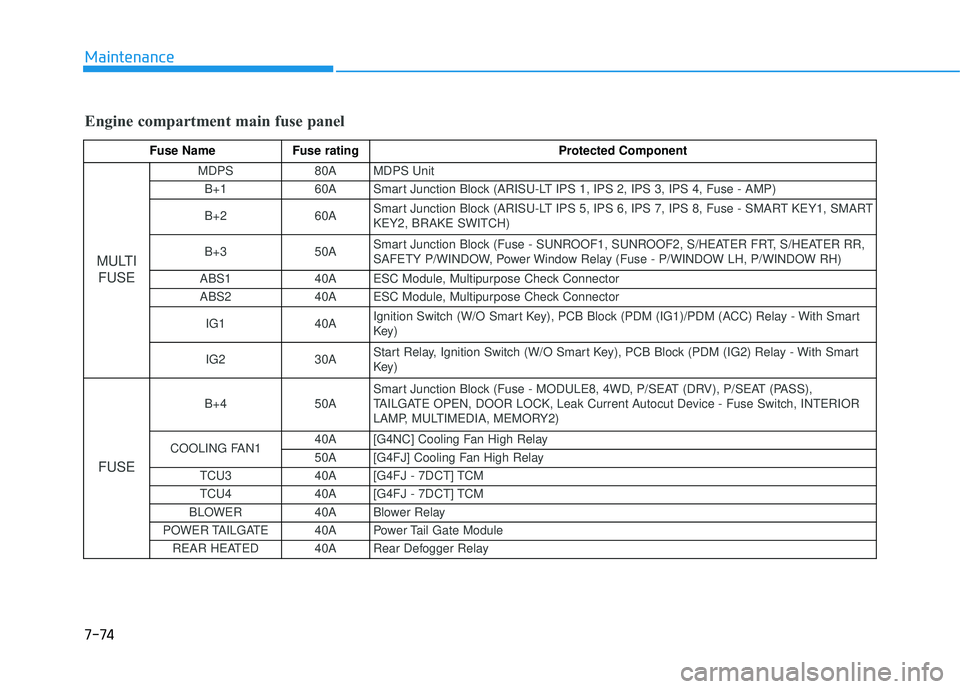
7-74
Maintenance
Engine compartment main fuse panel
Fuse Name Fuse rating Protected Component
MULTIFUSE
MDPS 80A MDPS Unit
B+1 60A Smart Junction Block (ARISU-LT IPS 1, IPS 2, IPS 3, IPS 4, Fuse - AMP) B+2 60A Smart Junction Block (ARISU-LT IPS 5, IPS 6, IPS 7, IPS 8, Fuse - SMART KEY1, SMART KEY2, BRAKE SWITCH)
B+3 50A Smart Junction Block (Fuse - SUNROOF1, SUNROOF2, S/HEATER FRT, S/HEATER RR,
SAFETY P/WINDOW, Power Window Relay (Fuse - P/WINDOW LH, P/WINDOW RH)
ABS1 40A ESC Module, Multipurpose Check Connector
ABS2 40A ESC Module, Multipurpose Check Connector
IG1 40A Ignition Switch (W/O Smart Key), PCB Block (PDM (IG1)/PDM (ACC) Relay - With Smart
Key)
IG2 30A Start Relay, Ignition Switch (W/O Smart Key), PCB Block (PDM (IG2) Relay - With Smart
Key)
FUSE
B+4 50A Smart Junction Block (Fuse - MODULE8, 4WD, P/SEAT (DRV), P/SEAT (PASS),
TAILGATE OPEN, DOOR LOCK, Leak Current Autocut Device - Fuse Switch, INTERIOR
LAMP, MULTIMEDIA, MEMORY2)
COOLING FAN1 40A [G4NC] Cooling Fan High Relay
50A [G4FJ] Cooling Fan High Relay
TCU3 40A [G4FJ - 7DCT] TCM
TCU4 40A [G4FJ - 7DCT] TCM
BLOWER 40A Blower Relay
POWER TAILGATE 40A Power Tail Gate Module REAR HEATED 40A Rear Defogger Relay