ECU HYUNDAI TUCSON LIMITED 2017 Owner's Manual
[x] Cancel search | Manufacturer: HYUNDAI, Model Year: 2017, Model line: TUCSON LIMITED, Model: HYUNDAI TUCSON LIMITED 2017Pages: 642, PDF Size: 9.78 MB
Page 129 of 642
3-31
Convenient features of your vehicle
3
To adjust the Zone setting:
1. Determine the desired ZoneNumber based upon your current
location on the Zone Map.
2. Press and hold the button for 6 seconds, the current Zone
Number will appear on the display.
3. Pressing and holding the button again will cause the numbers to
increment (Note: they will repeat
…13, 14, 15, 1, 2, …). Releasing
the button when the desired Zone
Number appears on the display
will set the new Zone.
4. Within about 5 seconds the com- pass will start displaying a com-pass heading again.
There are some conditions that can
cause changes to the vehicle mag-
nets, such as installing a ski rack or
a CB antenna. Body repair work on
the vehicle can also cause changes
to the vehicle’s magnetic field. In
these situations, the compass will
need to be re-calibrated to quickly
correct these changes. If you need to recalibrate the com-pass:
1. Press and hold the button for
more than 9 seconds. When the
compass memory is cleared a "C"
will appear in the display.
2. Drive the vehicle in 2 complete cir- cles at less than 5 mph (8 km/h).Integrated HomeLink ®
Wireless
Control System
The HomeLink®Wireless Control
System can replace up to three hand-
held radio-frequency (RF) transmit-
ters with a single built-in device. This
innovative feature will learn the radiofrequency codes of most current
transmitters to operate devices such
as gate operators, garage door open-
ers, entry door locks, security sys-
tems, even home lighting. Both stan-
dard and rolling code-equipped trans-
mitters can be programmed by fol-
lowing the outlined procedures. Additional HomeLink
®information
can be found at: www.homelink.com
or by calling 1-800-355-3515.
Retain the original transmitter of the
RF device you are programming for
use in other vehicles as well as forfuture HomeLink
®programming. It is
also suggested that upon the sale of
the vehicle, the programmedHomeLink
®buttons be erased for
security purposes.
Page 132 of 642

3-34
Convenient features of your vehicle
6. Firmly press and release the"learn" or "smart" button. (The
name and color of the button vary
by manufacturer). There are 30seconds to initiate step 7.
7. Return to the vehicle and firmly press, hold for 2 seconds and
release the programmedHomeLink
®button. Repeat the
"press/hold/release" sequence a
second time, and, depending on the
brand of the garage door opener (or
other rolling code equipped device),repeat this sequence a third time to
complete the programming
process.
HomeLink
®should now activate your
rolling code equipped device.
Gate operator & Canadian program-
ming
During programming, your handheld
transmitter may automatically stop
transmitting. Continue to press the
Integrated HomeLink
®Wireless
Control System button (note steps 2
through 3 in the Programming portion
of this document) while you press
and re-press ("cycle") your handheld
transmitter every two seconds untilthe frequency signal has been
learned. The indicator light will flash
slowly and then rapidly after several
seconds upon successful training.
Operating HomeLink®
To operate, simply press and release
the programmed HomeLink®button.
Activation will now occur for the
trained device (i.e. garage door
opener, gate operator, security sys-
tem, entry door lock, home/office
lighting, etc.). For convenience, the
hand-held transmitter of the device
may also be used at any time.
Reprogramming a single HomeLink®
button
To program a device to HomeLink®
using a HomeLink®button previously
trained, follow these steps:
1.Press and hold the desired HomeLink
®button. DO NOT
release the button.
2.The indicator light will begin to flash after 20 seconds. Without releasing the HomeLink
®button, proceed
with "Programming" step 2.
For questions or comments, contactHomeLink
®at www.homelink.comor
1-800-355-3515.
Page 145 of 642

3-47
Convenient features of your vehicle
Closing the hood
1. Before closing the hood, check thefollowing:
partment must be correctly installed.
bustible material must be
removed from the engine com-
partment.
2. Return the support rod to its clip to prevent it from rattling.
3. Lower the hood halfway and push down to securely lock in place.
Then double check to be sure the
hood is secure.
3
Before closing the hood, ensure all obstructions are
removed from around hoodopening.
Always double check to be
sure that the hood is firmly
latched before driving away. If
it is not latched, the hood
could open while the vehicle
is being driven, causing a
total loss of visibility, whichmight result in an accident.
Do not move the vehicle with the hood in the raised posi-
tion, as vision is obstructed.Doing so could result in an
accident. The hood could also
fall and become damaged.
WARNING
Grasp the support rod in the area
wrapped in rubber. The rubber
will help prevent you from being
burned by hot metal when theengine is hot.
WARNING
Page 147 of 642
3-49
Convenient features of your vehicle
3
Closing the fuel filler door
1. To install the fuel tank cap, turn itclockwise until it "clicks" one time.
2. Close the fuel filler door until it is latched securely. (Continued)Do not get back into a vehicle
once you have begun refuel-
ing. You can generate a build-
up of static electricity by
touching, rubbing or sliding
against any item or fabric
capable of producing static
electricity. Static electricity
discharge can ignite fuel
vapors causing a fire. If you
must re-enter the vehicle, you
should once again eliminate
potentially dangerous static
electricity discharge by touch-
ing a metal part of the vehicle,
away from the fuel filler neck,nozzle or other gasoline
source, with your bare hand.
When using an approved
portable fuel container, besure to place the container on
the ground prior to refueling.
Static electricity discharge
from the container can ignite
fuel vapors causing a fire.
(Continued)
Gasoline is highly flammable
and explosive. Failure to follow
these guidelines may result in
SERIOUS INJURY or DEATH:
Read and follow all warnings posted at the gas station.
Before refueling, note the
location of the Emergency
Gasoline Shut-Off, if available,at the gas station.
Before touching the fuel noz-
zle, you should eliminate the
potential build-up of static
electricity by touching a metal
part of the vehicle, a safe dis-
tance away from the fuel filler
neck, nozzle, or other gas
source, with your bare hand.
Do not use cellular phones
while refueling. Electric cur-
rent and/or electronic interfer-
ence from cellular phones can
potentially ignite fuel vapors
and cause a fire.(Continued)
WARNING
Page 148 of 642
3-50
Convenient features of your vehicle
Information
Make sure to refuel your vehicle
according to the "Fuel Requirements"
suggested in the Introduction chapter.
Do not spill fuel on the exteriorsurfaces of the vehicle. Any type of fuel spilled on painted sur-
faces may damage the paint.
If the fuel filler cap requires replacement, use only a genuine
HYUNDAI cap or the equivalent
specified for your vehicle. Anincorrect fuel filler cap canresult in a serious malfunctionof the fuel system or emission
control system.
NOTICE
i(Continued)
Once refueling has begun,
contact between your bare
hand and the vehicle shouldbe maintained until the filling
is complete.
Use only approved portable
plastic fuel containers designed
to carry and store gasoline.
When refueling, always move
the shift lever to the P (Park)
position, set the parking
brake, and place the ignition
switch to the LOCK/OFF posi-
tion. Sparks produced byelectrical components relatedto the engine can ignite fuel
vapors causing a fire.
Do not use matches or a lighter and do not smoke or
leave a lit cigarette in your
vehicle while at a gas station,
especially during refueling.
Do not over-fill or top-off your
vehicle tank, which can cause
gasoline spillage. (Continued)
(Continued)
If a fire breaks out during refu-
eling, leave the vicinity of the
vehicle, and immediately con-
tact the manager of the gasstation and then contact the
local fire department. Follow
any safety instructions they
provide.
If pressurized fuel sprays out,
it can cover your clothes or
skin and thus subject you to
the risk of fire and burns.
Always remove the fuel cap
carefully and slowly. If the cap
is venting fuel or if you hear a
hissing sound, wait until the
condition stops before com-
pletely removing the cap.
Always check that the fuel cap
is installed securely to pre-
vent fuel spillage in the eventof an accident.
Page 149 of 642
3-51
Convenient features of your vehicle
Non-Powered liftgate
Opening the liftgate
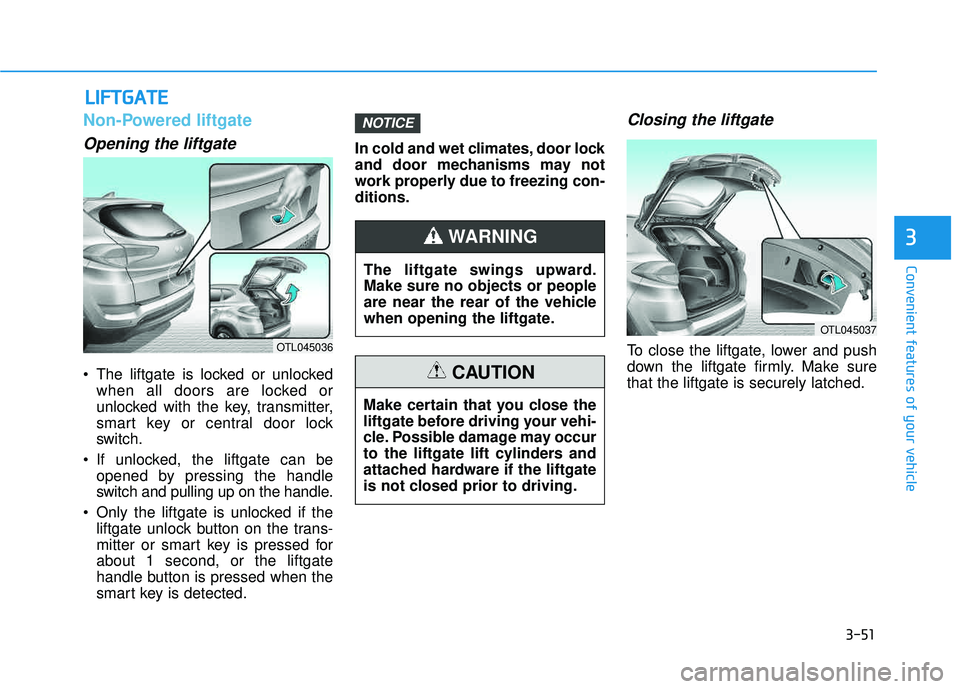
The liftgate is locked or unlockedwhen all doors are locked or
unlocked with the key, transmitter,
smart key or central door lock
switch.
If unlocked, the liftgate can be opened by pressing the handle
switch and pulling up on the handle.
Only the liftgate is unlocked if the liftgate unlock button on the trans-
mitter or smart key is pressed forabout 1 second, or the liftgate
handle button is pressed when the
smart key is detected. In cold and wet climates, door lock
and door mechanisms may not
work properly due to freezing con-ditions.
Closing the liftgate
To close the liftgate, lower and push
down the liftgate firmly. Make surethat the liftgate is securely latched.
NOTICE
LL
IIFF TT GG AATTEE
3
OTL045036
The liftgate swings upward. Make sure no objects or people
are near the rear of the vehicle
when opening the liftgate.
WARNING
Make certain that you close the
liftgate before driving your vehi-
cle. Possible damage may occur
to the liftgate lift cylinders and
attached hardware if the liftgate
is not closed prior to driving.
CAUTION
OTL045037
Page 214 of 642
3-116
Convenient features of your vehicle
Do not leave the lamp switches on
for an extended period of time
when the engine is turned off.
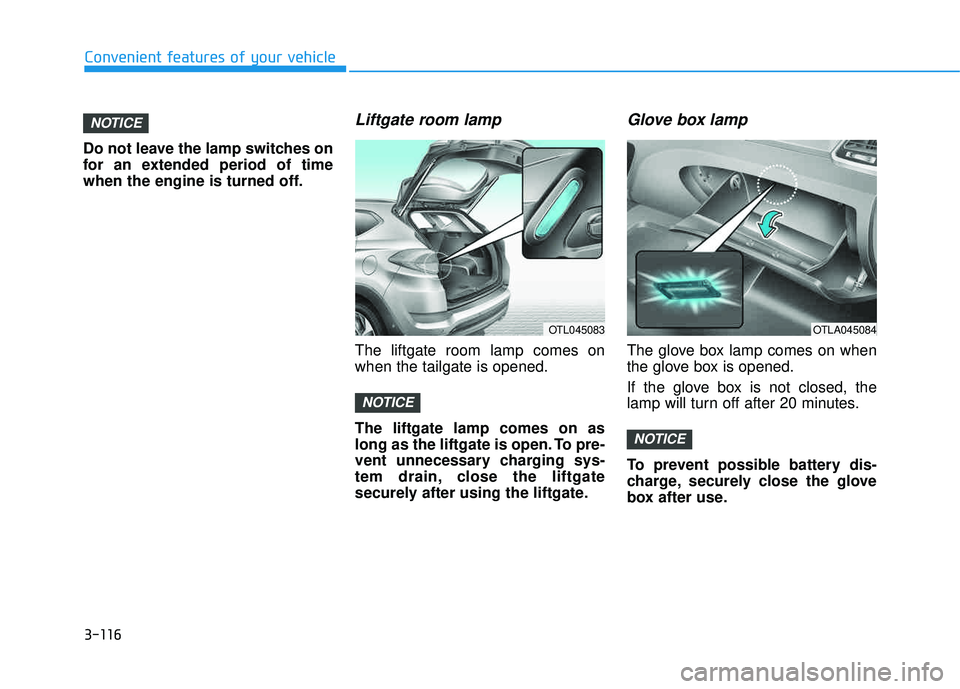
Liftgate room lamp
The liftgate room lamp comes onwhen the tailgate is opened. The liftgate lamp comes on as
long as the liftgate is open. To pre-
vent unnecessary charging sys-
tem drain, close the liftgate
securely after using the liftgate.
Glove box lamp
The glove box lamp comes on when
the glove box is opened.
If the glove box is not closed, the
lamp will turn off after 20 minutes.
To prevent possible battery dis-
charge, securely close the glove
box after use.
NOTICE
NOTICE
NOTICE
OTL045083OTLA045084
Page 251 of 642
3-153
Convenient features of your vehicle
3
SSTT OO RRAA GG EE CC OO MM PPAA RRTTMM EENN TT
To avoid possible theft, do not
leave valuables in the storage
compartments.
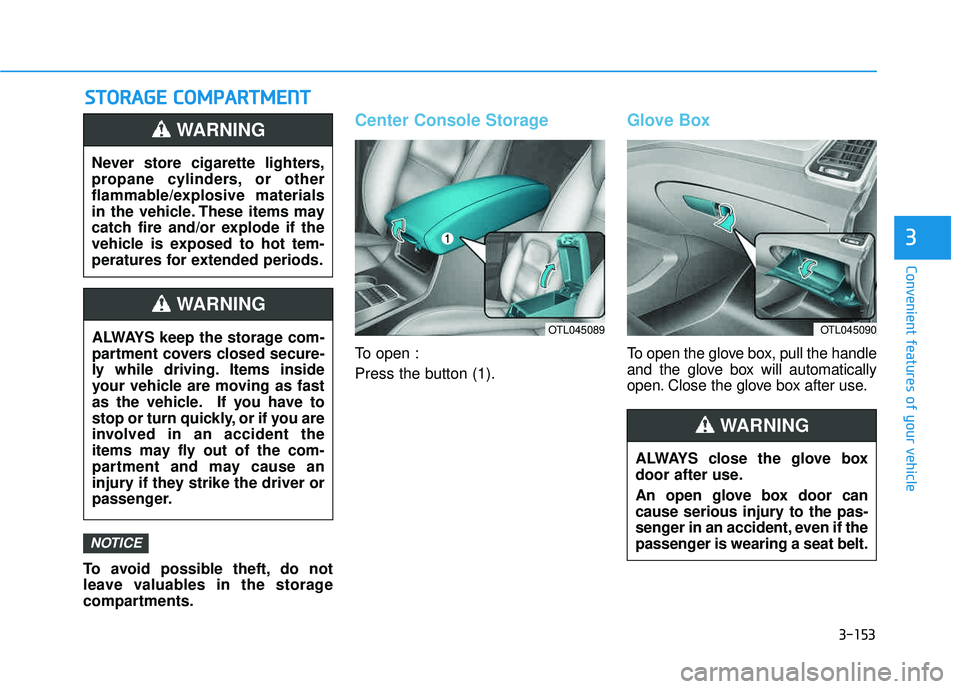
Center Console Storage
To open :
Press the button (1).
Glove Box
To open the glove box, pull the handle
and the glove box will automatically
open. Close the glove box after use.
NOTICE
Never store cigarette lighters,
propane cylinders, or other
flammable/explosive materials
in the vehicle. These items may
catch fire and/or explode if the
vehicle is exposed to hot tem-
peratures for extended periods.
WARNING
ALWAYS keep the storage com-
partment covers closed secure-
ly while driving. Items inside
your vehicle are moving as fast
as the vehicle. If you have to
stop or turn quickly, or if you are
involved in an accident the
items may fly out of the com-
partment and may cause an
injury if they strike the driver or
passenger.
WARNING
OTL045090
ALWAYS close the glove box
door after use.
An open glove box door can
cause serious injury to the pas-
senger in an accident, even if the
passenger is wearing a seat belt.
WARNING
OTL045089
Page 253 of 642
3-155
Convenient features of your vehicle
3
IINN TTEERR IIOO RR FF EE AA TTUU RREESS
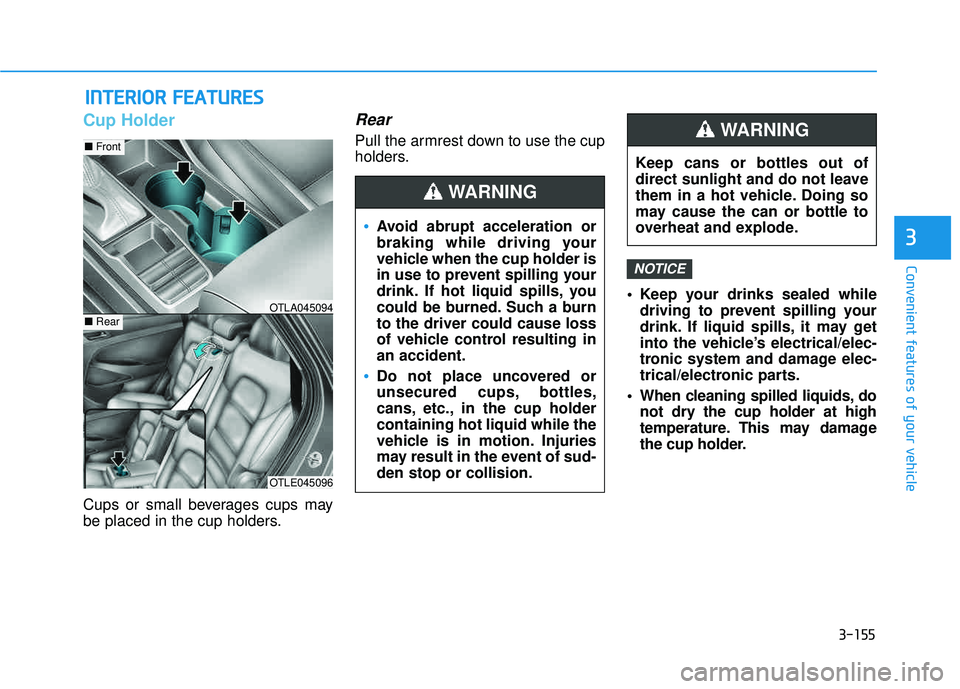
Cup Holder
Cups or small beverages cups may
be placed in the cup holders.
Rear
Pull the armrest down to use the cup
holders.
Keep your drinks sealed whiledriving to prevent spilling your
drink. If liquid spills, it may get
into the vehicle’s electrical/elec-
tronic system and damage elec-
trical/electronic parts.
When cleaning spilled liquids, do not dry the cup holder at high
temperature. This may damage
the cup holder.
NOTICE
OTLE045096
■Front
■RearOTLA045094
Avoid abrupt acceleration or
braking while driving your
vehicle when the cup holder is
in use to prevent spilling your
drink. If hot liquid spills, you
could be burned. Such a burnto the driver could cause loss
of vehicle control resulting inan accident.
Do not place uncovered or
unsecured cups, bottles,
cans, etc., in the cup holdercontaining hot liquid while the
vehicle is in motion. Injuries
may result in the event of sud-den stop or collision.
WARNING
Keep cans or bottles out of
direct sunlight and do not leave
them in a hot vehicle. Doing so
may cause the can or bottle to
overheat and explode.
WARNING
Page 254 of 642
3-156
Convenient features of your vehicle
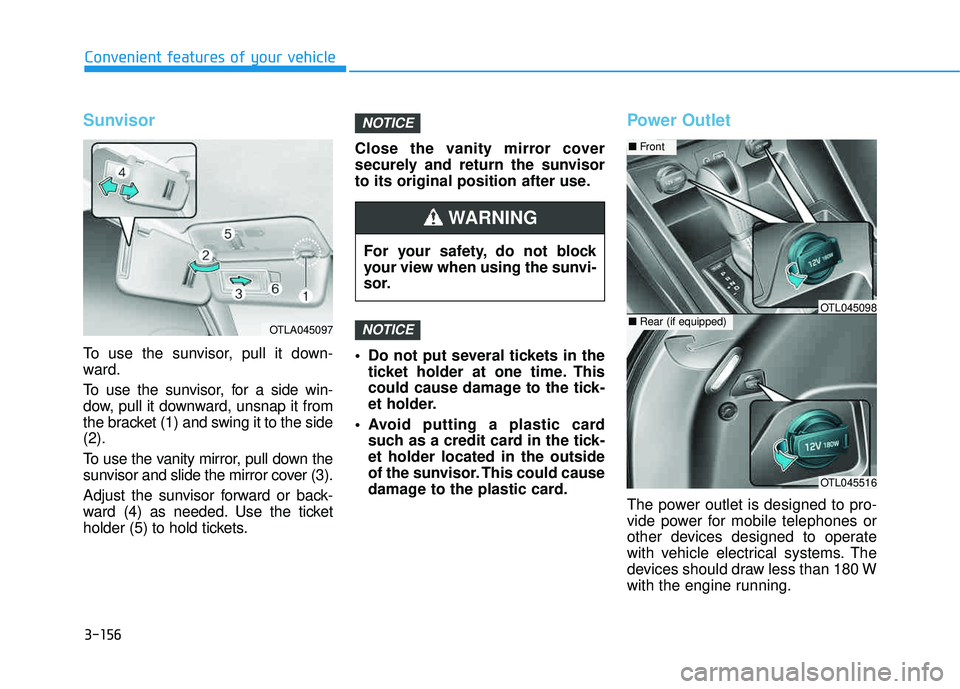
Sunvisor
To use the sunvisor, pull it down-
ward.
To use the sunvisor, for a side win-
dow, pull it downward, unsnap it from
the bracket (1) and swing it to the side(2).
To use the vanity mirror, pull down the
sunvisor and slide the mirror cover (3).
Adjust the sunvisor forward or back-
ward (4) as needed. Use the ticket
holder (5) to hold tickets.Close the vanity mirror cover
securely and return the sunvisor
to its original position after use.
Do not put several tickets in the
ticket holder at one time. This
could cause damage to the tick-
et holder.
Avoid putting a plastic card such as a credit card in the tick-et holder located in the outside
of the sunvisor. This could cause
damage to the plastic card.
Power Outlet
The power outlet is designed to pro-
vide power for mobile telephones or
other devices designed to operate
with vehicle electrical systems. The
devices should draw less than 180 W
with the engine running.
NOTICE
NOTICE
OTLA045097
For your safety, do not block
your view when using the sunvi-
sor.
WARNING
OTL045516
■Front
■Rear (if equipped)OTL045098