opening door HYUNDAI TUCSON LIMITED 2017 Owners Manual
[x] Cancel search | Manufacturer: HYUNDAI, Model Year: 2017, Model line: TUCSON LIMITED, Model: HYUNDAI TUCSON LIMITED 2017Pages: 642, PDF Size: 9.78 MB
Page 107 of 642
3-9
Convenient features of your vehicle
3
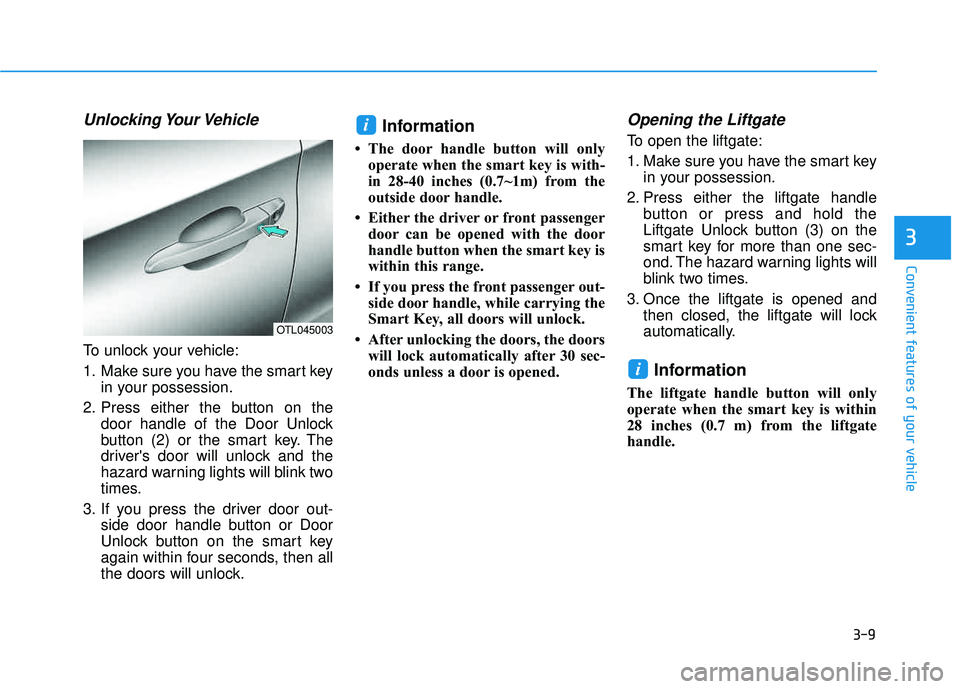
Unlocking Your Vehicle
To unlock your vehicle:
1. Make sure you have the smart keyin your possession.
2. Press either the button on the door handle of the Door Unlock
button (2) or the smart key. The
driver's door will unlock and the
hazard warning lights will blink two
times.
3. If you press the driver door out- side door handle button or Door
Unlock button on the smart key
again within four seconds, then all
the doors will unlock.
Information
The door handle button will onlyoperate when the smart key is with-
in 28-40 inches (0.7~1m) from the
outside door handle.
Either the driver or front passenger door can be opened with the door
handle button when the smart key is
within this range.
If you press the front passenger out- side door handle, while carrying the
Smart Key, all doors will unlock.
After unlocking the doors, the doors will lock automatically after 30 sec-
onds unless a door is opened.
Opening the Liftgate
To open the liftgate:
1. Make sure you have the smart key in your possession.
2. Press either the liftgate handle button or press and hold the
Liftgate Unlock button (3) on the
smart key for more than one sec-
ond. The hazard warning lights will
blink two times.
3. Once the liftgate is opened and then closed, the liftgate will lock
automatically.
Information
The liftgate handle button will only
operate when the smart key is within
28 inches (0.7 m) from the liftgate
handle.
i
i
OTL045003
Page 115 of 642
3-17
Convenient features of your vehicle
3
Auto Door Lock/Unlock Features
Impact sensing door unlocksystem
All doors will be automatically
unlocked when an impact causes the
air bags to deploy.
Speed sensing door lock system
All doors will be automatically locked
when vehicle speed exceeds 9 mph(15 km/h). All of the doors will be automatically
unlocked after the engine is turned off.
Shift lever auto door lock
All doors will be automatically locked
when shifting the shift lever out of P
(Park) with the engine running.
You can activate or deactivate the
Auto Door Lock/Unlock features fromthe User Settings Mode on the LCD
display.
For more information, refer to the
"LCD Display" section in this
chapter.
Always secure your vehicle.
Leaving your vehicle unlocked increases the potential risk to
you or others from someone
hiding in your vehicle.
To secure your vehicle, while
depressing the brake, move the
shift lever to the P (Park) posi-
tion, engage the parking brake,
and place the ignition switch in
the LOCK/OFF position, close
all windows, lock all doors, and
always take the key with you.WARNING
Opening a door when something
is approaching may cause dam-
age or injury. Be careful when
opening doors and watch for
vehicles, motorcycles, bicycles
or pedestrians approaching the
vehicle in the path of the door.
CAUTION
Page 116 of 642
3-18
Convenient features of your vehicle
Child-Protector Rear Door locks
The child safety lock is provided to
help prevent children seated in therear from accidentally opening the
rear doors. The rear door safety locks
should be used whenever children
are in the vehicle.
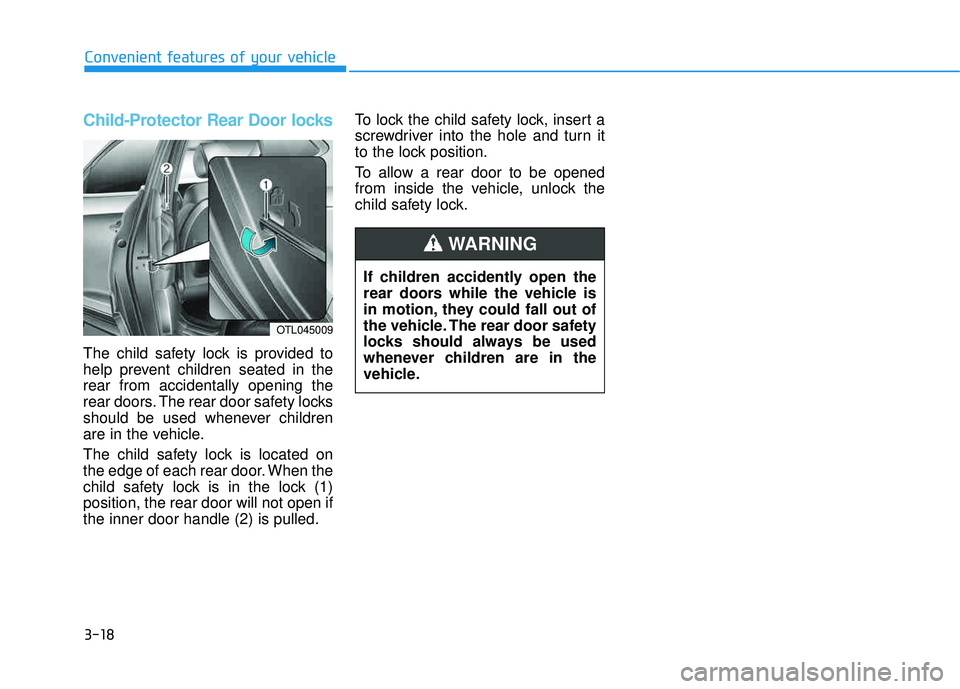
The child safety lock is located on
the edge of each rear door. When the
child safety lock is in the lock (1)position, the rear door will not open ifthe inner door handle (2) is pulled.To lock the child safety lock, insert a
screwdriver into the hole and turn it
to the lock position.
To allow a rear door to be opened
from inside the vehicle, unlock the
child safety lock.
If children accidently open the
rear doors while the vehicle is
in motion, they could fall out of
the vehicle. The rear door safety
locks should always be used
whenever children are in the
vehicle.
WARNING
OTL045009
Page 117 of 642
3-19
Convenient features of your vehicle
This system helps to protect your
vehicle and valuables. The horn will
sound and the hazard warning lights
will blink continuously if any of the
following occurs:
- A door is opened without using theremote key or smart key.
- The liftgate is opened without using the remote key or smart key.
- The engine hood is opened.
The alarm continues for 30 seconds,
then the system resets. To turn off
the alarm, unlock the doors with the
remote key or smart key.
The Theft Alarm System automatical-
ly sets 30 seconds after you lock the
doors and the liftgate. For the system
to activate, you must lock the doors
and the liftgate from outside the vehi-
cle with the remote key or smart key
or by pressing the button on the out-
side of the door handle with the smart
key in your possession.
The hazard warning lights will blink and the chime will sound once to
indicate the system is armed. Once the security system is set,
opening any door, the liftgate, or the
hood without using the remote key or
smart key will cause the alarm to
activate.
The Theft Alarm System will not set if
the hood, the liftgate, or any door is
not fully closed. If the system will not
set, check the hood, the liftgate, orthe doors are fully closed. Do not attempt to alter this system or
add other devices to it.Information
Do not lock the doors until all pas-
sengers have left the vehicle. If the
remaining passenger leaves the
vehicle when the system is armed,
the alarm will be activated.
If the vehicle is not disarmed with the remote key or smart key, open the
doors by using the mechanical key
and place the ignition switch in the
ON position (for remote key) or start
the engine (for smart key) by direct-
ly pressing the ignition switch with
the smart key.
If the system is disarmed by unlock- ing the vehicle, but neither a door or
the liftgate is opened within 30 sec-
onds, the doors will relock and the
system will rearm automatically.
i
TTHH EEFFTT --AA LLAA RRMM SS YY SSTT EEMM
3
Page 136 of 642
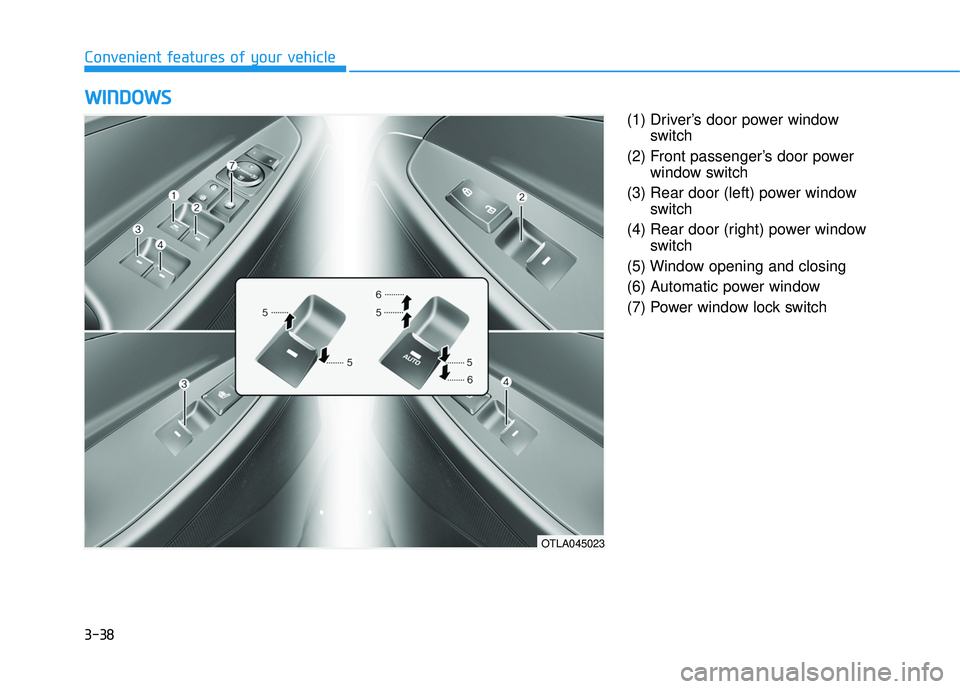
3-38
Convenient features of your vehicle
(1) Driver’s door power windowswitch
(2) Front passenger’s door power window switch
(3) Rear door (left) power window switch
(4) Rear door (right) power window switch
(5) Window opening and closing
(6) Automatic power window
(7) Power window lock switch
WW IINN DDOO WW SS
OTLA045023
Page 137 of 642
3-39
Convenient features of your vehicle
3
Power Windows
The ignition switch must be in the ON
position to be able to raise or lower
the windows. Each door has a Power
Window switch to control that door’s
window. The driver has a Power
Window Lock switch which can block
the operation of passenger windows.
The power windows will operate for
approximately 30 seconds after the
ignition switch is placed in the ACC
or LOCK/OFF position. However, ifthe front doors are opened, the
Power Windows cannot be operated
even within the 30 second period.
Information
In cold and wet climates, power win-dows may not work properly due to
freezing conditions.
While driving with the rear win- dows down or with the sunroof (if
equipped) opened (or partially
opened), your vehicle may demon-
strate a wind buffeting or pulsation
noise. This noise is normal and can
be reduced or eliminated by taking
the following actions. If the noise
occurs with one or both of the rear
windows down, partially lower both
front windows approximately one
inch. If you experience the noise
with the sunroof open, slightly close
the sunroof.
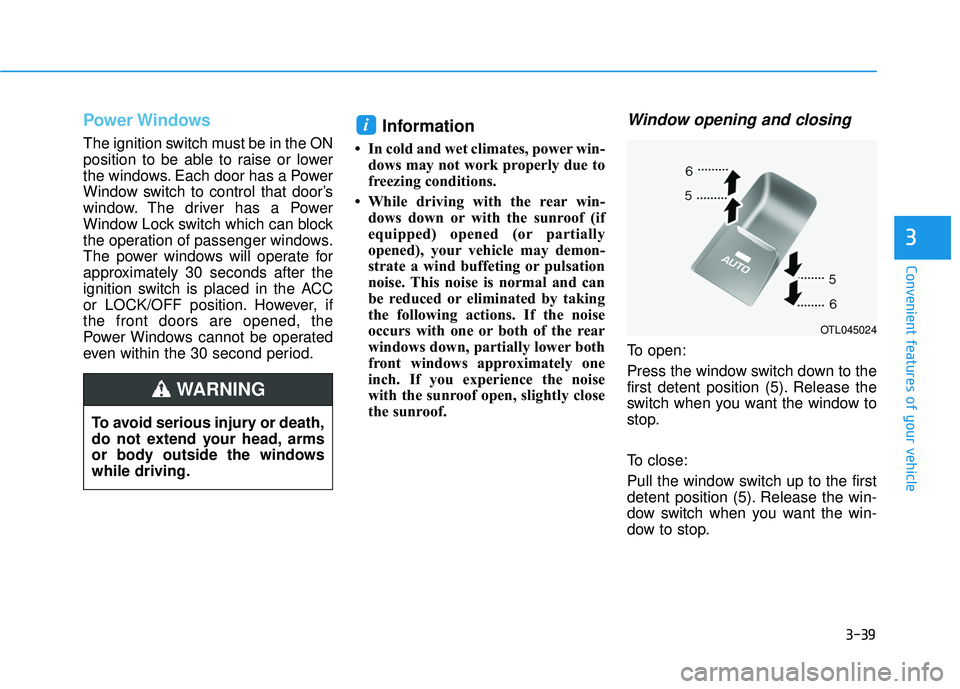
Window opening and closing
To open:
Press the window switch down to the
first detent position (5). Release the
switch when you want the window to
stop.
To close:
Pull the window switch up to the first
detent position (5). Release the win-
dow switch when you want the win-
dow to stop.
i
To avoid serious injury or death,
do not extend your head, arms
or body outside the windowswhile driving.
WARNING
OTL045024
Page 146 of 642
3-48
Convenient features of your vehicle
Fuel Filler Door
Opening the fuel filler door
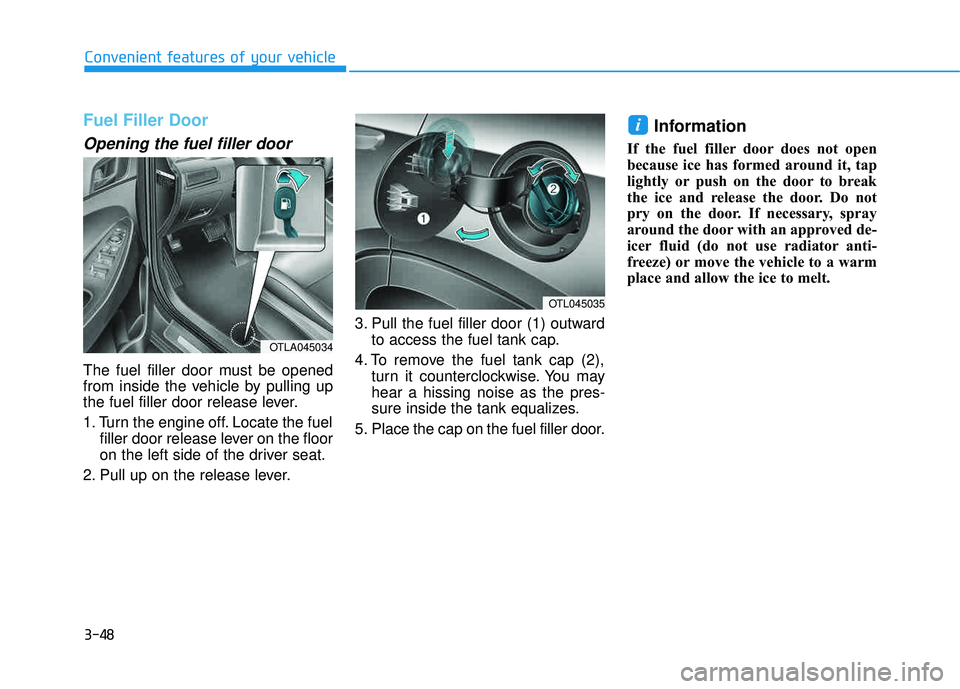
The fuel filler door must be opened
from inside the vehicle by pulling up
the fuel filler door release lever.
1. Turn the engine off. Locate the fuelfiller door release lever on the floor
on the left side of the driver seat.
2. Pull up on the release lever. 3. Pull the fuel filler door (1) outward
to access the fuel tank cap.
4. To remove the fuel tank cap (2), turn it counterclockwise. You mayhear a hissing noise as the pres-
sure inside the tank equalizes.
5. Place the cap on the fuel filler door.
Information
If the fuel filler door does not open
because ice has formed around it, tap
lightly or push on the door to break
the ice and release the door. Do not
pry on the door. If necessary, spray
around the door with an approved de-
icer fluid (do not use radiator anti-
freeze) or move the vehicle to a warm
place and allow the ice to melt.
i
OTL045035
OTLA045034
Page 149 of 642
3-51
Convenient features of your vehicle
Non-Powered liftgate
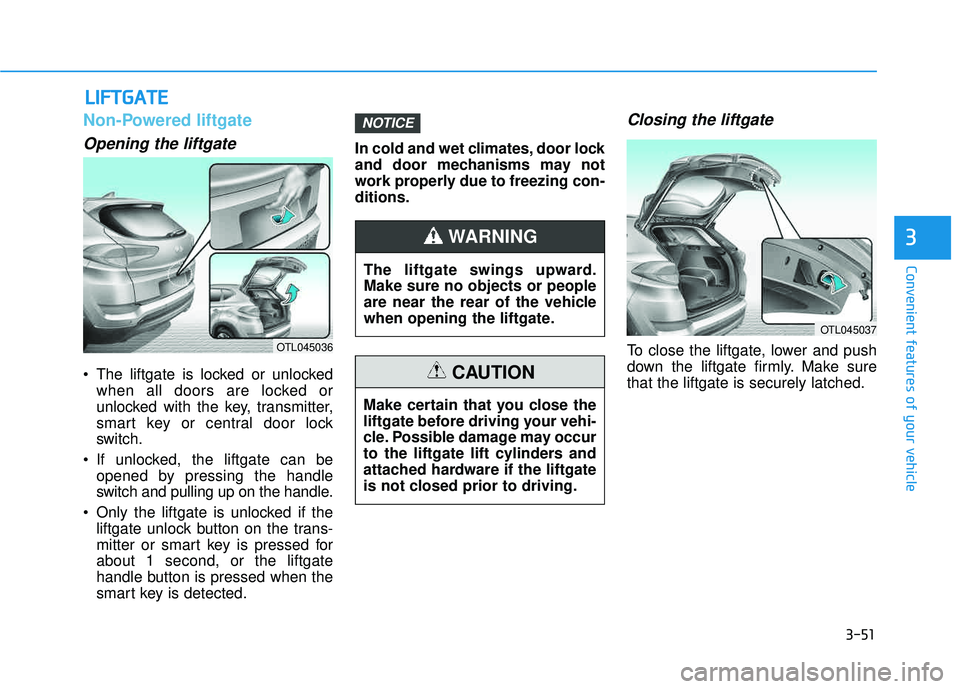
Opening the liftgate
The liftgate is locked or unlockedwhen all doors are locked or
unlocked with the key, transmitter,
smart key or central door lock
switch.
If unlocked, the liftgate can be opened by pressing the handle
switch and pulling up on the handle.
Only the liftgate is unlocked if the liftgate unlock button on the trans-
mitter or smart key is pressed forabout 1 second, or the liftgate
handle button is pressed when the
smart key is detected. In cold and wet climates, door lock
and door mechanisms may not
work properly due to freezing con-ditions.
Closing the liftgate
To close the liftgate, lower and push
down the liftgate firmly. Make surethat the liftgate is securely latched.
NOTICE
LL
IIFF TT GG AATTEE
3
OTL045036
The liftgate swings upward. Make sure no objects or people
are near the rear of the vehicle
when opening the liftgate.
WARNING
Make certain that you close the
liftgate before driving your vehi-
cle. Possible damage may occur
to the liftgate lift cylinders and
attached hardware if the liftgate
is not closed prior to driving.
CAUTION
OTL045037
Page 159 of 642

3-61
Convenient features of your vehicle
3. Automatic opening
After the hazard warning lights blink
and the chime sounds 2 times, the
power liftgate will open.
How to deactivate the SmartLiftgate function using thesmart key
1. Door lock
2. Door unlock
3. Liftgate open
4. Panic
If you press any button on the smart
key during the Detect and Alert
stage, the Smart Liftgate function will
be deactivated.
Make sure to be aware of how to
deactivate the Smart Liftgate func-
tion for emergency situations.
3
OLF044006
Make certain that you close
the liftgate before driving your
vehicle.
Make sure there are no people
or objects around the liftgate
before opening or closing the
liftgate.
Make sure objects in the rear
cargo area do not come out
when opening the liftgate,
especially if the vehicle is
parked on a grade or incline.
If you keep your vehicle
parked and locked on your
driveway, you may want to
temporarily deactivate the
Smart Liftgate system.
Otherwise, standing at the
rear of the vehicle with the
smart key may cause the lift-
gate to open unintentionally.
The key should be kept out of
reach of children. Children
may inadvertently open the
Smart Liftgate while playing
around the rear area of the
vehicle.
WARNING
OTL045045
Page 610 of 642
7-97
7
Maintenance
Thoroughly flush the vehicle under-
body and wheel openings with luke-
warm or cold water once a month,
after off-road driving and at the end
of each winter. Pay special attentionto these areas because it is difficult
to see all the mud and dirt. It will do
more harm than good to wet down
the road grime without removing it.
The lower edges of doors, rocker
panels, and frame members have
drain holes that should not be
allowed to clog with dirt; trapped
water in these areas can cause rust-ing.Aluminum wheel maintenance
The aluminum wheels are coated
with a clear protective finish.
Corrosion protection
Protecting your vehicle from corro-
sion
By using the most advanced design
and construction practices to combat
corrosion, HYUNDAI produces cars
of the highest quality. However, this is
only part of the job. To achieve the
long-term corrosion resistance your
vehicle can deliver, the owner’s
cooperation and assistance is alsorequired.
Common causes of corrosion
The most common causes of corro-
sion on your vehicle are:
Road salt, dirt and moisture that isallowed to accumulate underneath
the vehicle.
coatings by stones, gravel, abra-
sion or minor scrapes and dents
which leave unprotected metal
exposed to corrosion.
After washing the vehicle, test
the brakes while driving slowly
to see if they have been affected
by water. If braking performance
is impaired, dry the brakes by
applying them lightly while
maintaining a slow forwardspeed.
WARNING
Do not use abrasive cleaner,
polishing compound, solvent,
or wire brushes on aluminumwheels.
Clean the wheel when it has cooled.
Use only a mild soap or neu-
tral detergent, and rinse thor-
oughly with water. Also, cleanthe wheels after driving on
salted roads.
Do not wash the wheels with high-speed car wash brushes.
Do not use any cleaners con- taining acid or alkaline deter-
gents.
CAUTION