audio HYUNDAI TUCSON ULTIMATE 2020 User Guide
[x] Cancel search | Manufacturer: HYUNDAI, Model Year: 2020, Model line: TUCSON ULTIMATE, Model: HYUNDAI TUCSON ULTIMATE 2020Pages: 546, PDF Size: 57.48 MB
Page 345 of 546
5-79
Driving your vehicle
5
Do not tint the window or install
stickers, accessories around the
inside mirror where the camera
is installed.
NEVER locate any reflective
objects (i.e. white paper, mirror)
over the dashboard. Any light
reflection may cause a malfunc-
tion of the system.
Pay extreme caution to keep the
camera out of water.
NEVER arbitrarily disassemble
the camera assembly, nor apply
any impact on the camera
assembly.
The FCA warning chime may be
difficult to hear if the audio sys-
tem volume is set to a high level.
Information
Have the system checked by an
authorized HYUNDAI dealer when:
• The windshield glass is replaced.
• The front bumper is replaced.
• The radar sensor or cover gets dam-
aged or replaced.
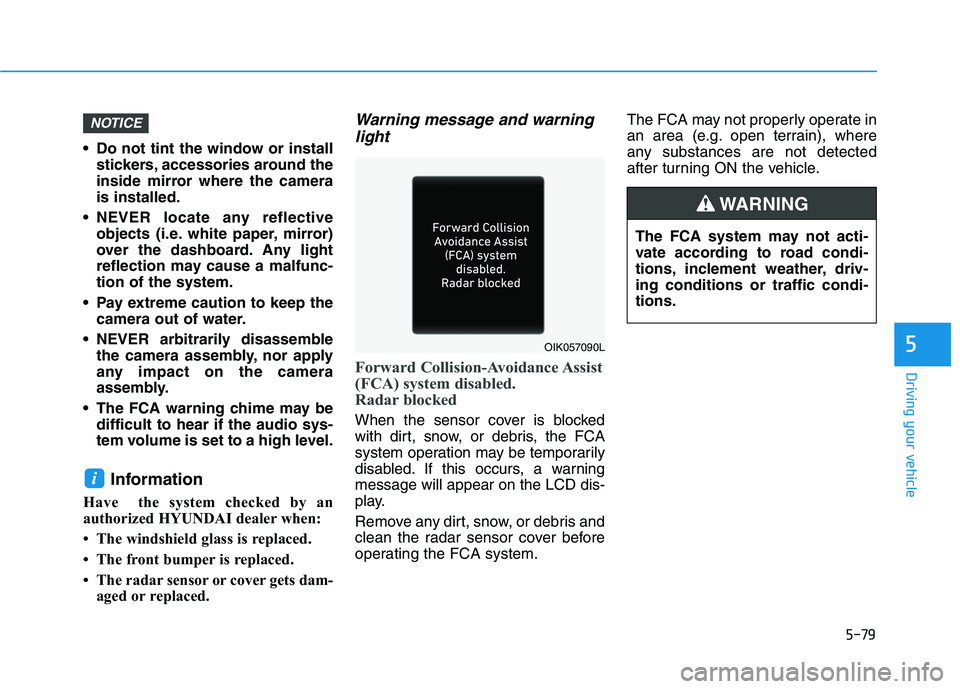
Warning message and warning
light
Forward Collision-Avoidance Assist
(FCA) system disabled.
Radar blocked
When the sensor cover is blocked
with dirt, snow, or debris, the FCA
system operation may be temporarily
disabled. If this occurs, a warning
message will appear on the LCD dis-
play.
Remove any dirt, snow, or debris and
clean the radar sensor cover before
operating the FCA system.The FCA may not properly operate in
an area (e.g. open terrain), where
any substances are not detected
after turning ON the vehicle.
i
NOTICE
OIK057090L
The FCA system may not acti-
vate according to road condi-
tions, inclement weather, driv-
ing conditions or traffic condi-
tions.
WARNING
Page 354 of 546
5-88
Driving your vehicle
Always have your hands on
the steering wheel while the
LKA system is activated. Also,
when Active LKA is selected
from the User Settings mode
and if you continue to drive
with your hands off the steer-
ing wheel after the "Keep
hands on steering wheel"
warning message appears,
the system will stop control-
ling the steering wheel.
However, if the driver has their
hands on the steering wheel
again, the system will start
controlling the steering
wheel.
The steering wheel is not con-
tinuously controlled so if the
vehicle speed is at a higher
speed when leaving a lane the
vehicle may not be able to be
controlled by the system. The
driver must always follow the
speed limit when using the
system.
If you attach objects to the
steering wheel, the system
may not assist steering or the
hands off alarm may not work
properly. When you tow a trail-
er, make sure that you turn off
the LKA system.
When you tow a trailer, make
sure that you turn off the LKA
system.
The system detects lane lines
and controls the steering
wheel by a camera, therefore,
if the lane lines are hard to
detect, the system may not
work properly.
Please refer to "Limitations of
the system".
Do not remove or damage the
related parts of LKA system.
You may not hear a warning
sound of LKA system
because of excessive audio
sound.
If any other warning sound
such as seat belt warning
chime is already generated,
the Lane Keeping Assist
(LKA) system warning may
not sound.
Do not place objects on the
dashboard that reflects light
such as mirrors, white paper,
etc. The system may malfunc-
tion if the sunlight is reflected.
Page 365 of 546
5-99
Driving your vehicle
5
The Driver Attention Warning sys-
tem utilizes the camera sensor on
the front windshield for its opera-
tion. To keep the camera sensor in
the best condition, you should
observe the followings:
Do not disassemble the camera
temporarily to tint the window or
to attach any types of coatings
and accessories. If you disas-
semble a camera and assemble
it again, take your vehicle to an
authorized HYUNDAI dealer and
have the system checked for cal-
ibration.
NEVER install any accessories
or stickers on the front wind-
shield, nor tint the front wind-
shield.
NEVER locate any reflective
objects (i.e. white paper, mirror)
over the dashboard. Any light
reflection may cause a malfunc-
tion of the Driver Attention Alert
(DAW) system.
Pay extreme caution to keep the
camera sensor out of water.
NOTICE
The Driver Attention Warning
(DAW) system may not properly
operate with limited alerting in
the following situations:
The lane detection perform-
ance is limited. (For more
details, refer to "Lane Keeping
Assist (LKA) system" in this
chapter.)
The vehicle is violently driven
or is abruptly turned for
obstacle avoidance (e.g. con-
struction area, other vehicles,
fallen objects, bumpy road).
Forward drivability of the
vehicle is severely under-
mined (possibly due to wide
variation in tire pressures,
uneven tire wear-out, toe-
in/toe-out alignment).
The vehicle drives on a curvy
road.
The vehicle drives on a
bumpy road.
The vehicle drives through a
windy area.
The vehicle is controlled by
the following driving assist
systems:
- Lane Keeping Assist (LKA)
system
- Forward Collision-Avoidance
Assist (FCA) system
- Smart Cruise Control (SCC)
system
CAUTION
The DAW system warning
chime may be difficult to hear if
the audio system volume is set
to a high level.
CAUTION
Page 378 of 546
5-112
Driving your vehicle
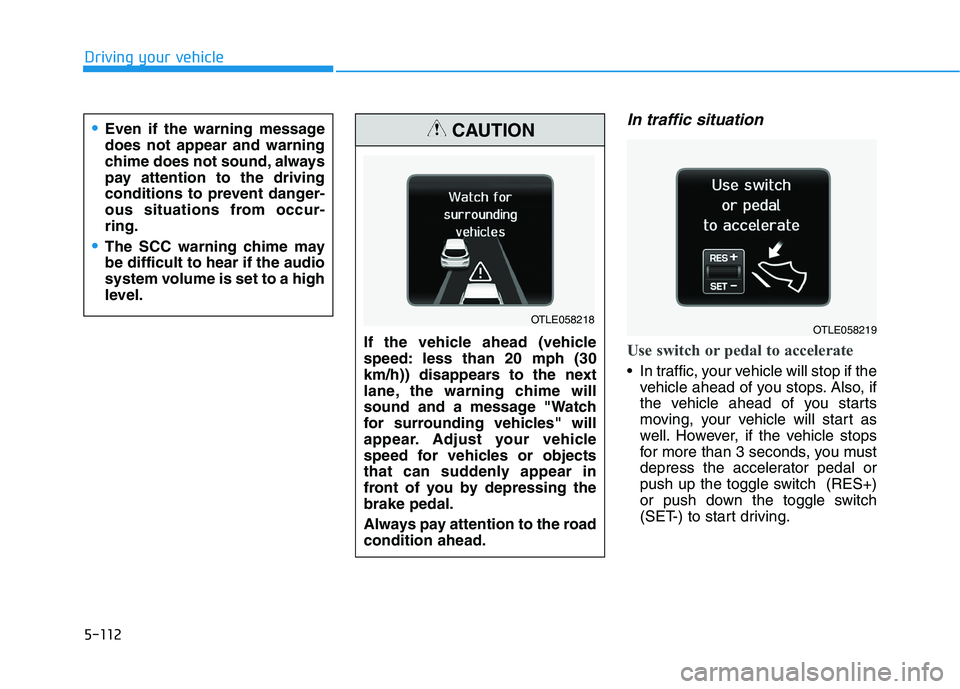
In traffic situation
Use switch or pedal to accelerate
In traffic, your vehicle will stop if the
vehicle ahead of you stops. Also, if
the vehicle ahead of you starts
moving, your vehicle will start as
well. However, if the vehicle stops
for more than 3 seconds, you must
depress the accelerator pedal or
push up the toggle switch (RES+)
or push down the toggle switch
(SET-) to start driving.
Even if the warning message
does not appear and warning
chime does not sound, always
pay attention to the driving
conditions to prevent danger-
ous situations from occur-
ring.
The SCC warning chime may
be difficult to hear if the audio
system volume is set to a high
level.
If the vehicle ahead (vehicle
speed: less than 20 mph (30
km/h)) disappears to the next
lane, the warning chime will
sound and a message "Watch
for surrounding vehicles" will
appear. Adjust your vehicle
speed for vehicles or objects
that can suddenly appear in
front of you by depressing the
brake pedal.
Always pay attention to the road
condition ahead.
CAUTION
OTLE058218OTLE058219
Page 469 of 546
7-35
7
Maintenance
By jump starting
After a jump start from a good bat-
tery, drive the vehicle for 20-30 min-
utes before it is shutoff. The vehicle
may not restart if you shut it off
before the battery had a chance to
adequately recharge. See "Jump
Starting" in chapter 6 for more infor-
mation on jump starting procedures.
Information
An inappropriately disposed
battery can be harmful to
the environment and human
health. Dispose of the bat-
tery according to your local
law(s) or regulations.
Reset Features
The following items may need to be
reset after the battery has been dis-
charged or the battery has been dis-
connected. See chapter 3 or 4 for:
Power Windows
Trip Computer
Climate Control System
Clock
Audio System
Sunroof
i
Watch the battery during
charging, and stop or reduce
the charging rate if the battery
cells begin boiling violently.
The negative battery cable
must be removed first and
installed last when the battery
is disconnected. Disconnect
the battery charger in the fol-
lowing order:
(1) Turn off the battery charg-
er main switch.
(2) Unhook the negative
clamp from the negative
battery terminal.
(3) Unhook the positive clamp
from the positive battery
terminal.
Always use a genuine
HYUNDAI approved battery
when you replace the battery.
Page 487 of 546
7-53
Maintenance
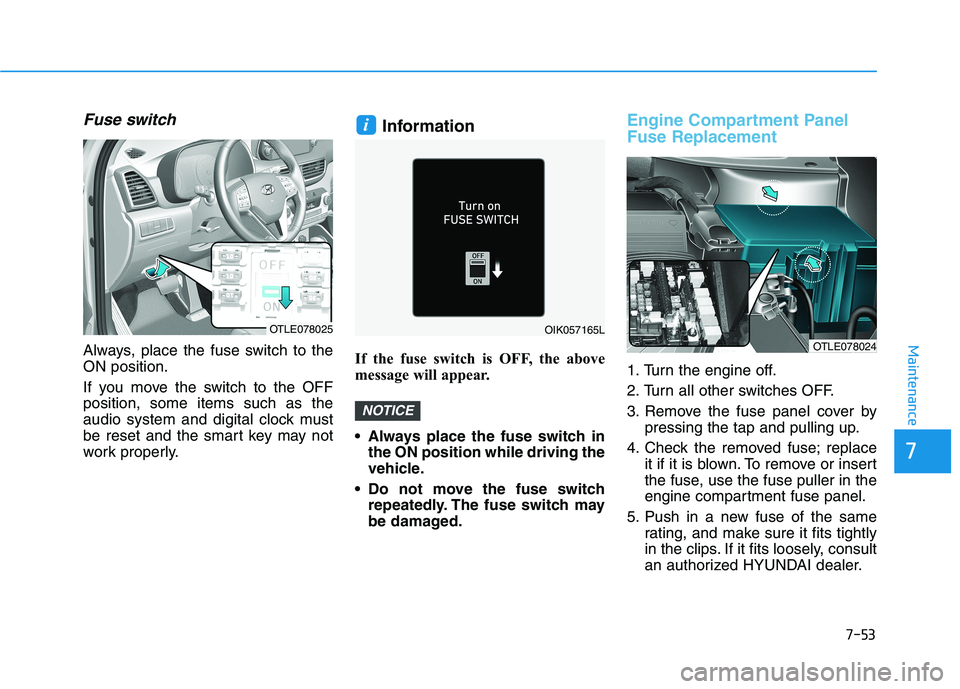
Fuse switch
Always, place the fuse switch to the
ON position.
If you move the switch to the OFF
position, some items such as the
audio system and digital clock must
be reset and the smart key may not
work properly.
Information
If the fuse switch is OFF, the above
message will appear.
Always place the fuse switch in
the ON position while driving the
vehicle.
Do not move the fuse switch
repeatedly. The fuse switch may
be damaged.
Engine Compartment Panel
Fuse Replacement
1. Turn the engine off.
2. Turn all other switches OFF.
3. Remove the fuse panel cover by
pressing the tap and pulling up.
4. Check the removed fuse; replace
it if it is blown. To remove or insert
the fuse, use the fuse puller in the
engine compartment fuse panel.
5. Push in a new fuse of the same
rating, and make sure it fits tightly
in the clips. If it fits loosely, consult
an authorized HYUNDAI dealer.
NOTICE
i
OIK057165LOTLE078025
OTLE078024
7
Page 491 of 546
7
Maintenance
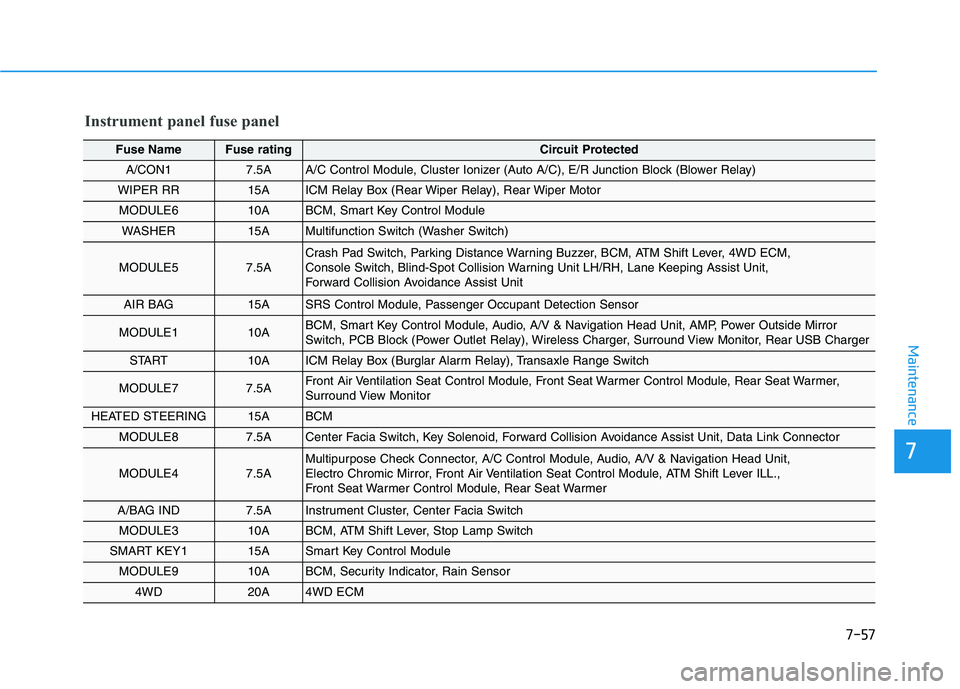
Instrument panel fuse panel
Fuse Name Fuse ratingCircuit Protected
A/CON1 7.5AA/C Control Module, Cluster Ionizer (Auto A/C), E/R Junction Block (Blower Relay)
WIPER RR 15AICM Relay Box (Rear Wiper Relay), Rear Wiper Motor
MODULE6 10ABCM, Smart Key Control Module
WASHER 15AMultifunction Switch (Washer Switch)
MODULE5 7.5ACrash Pad Switch, Parking Distance Warning Buzzer, BCM, ATM Shift Lever, 4WD ECM,
Console Switch, Blind-Spot Collision Warning Unit LH/RH, Lane Keeping Assist Unit,
Forward Collision Avoidance Assist Unit
AIR BAG 15ASRS Control Module, Passenger Occupant Detection Sensor
MODULE1 10ABCM, Smart Key Control Module, Audio, A/V & Navigation Head Unit, AMP, Power Outside Mirror
Switch, PCB Block (Power Outlet Relay), Wireless Charger, Surround View Monitor, Rear USB Charger
START 10AICM Relay Box (Burglar Alarm Relay), Transaxle Range Switch
MODULE7 7.5AFront Air Ventilation Seat Control Module, Front Seat Warmer Control Module, Rear Seat Warmer,
Surround View Monitor
HEATED STEERING 15ABCM
MODULE8 7.5ACenter Facia Switch, Key Solenoid, Forward Collision Avoidance Assist Unit, Data Link Connector
MODULE4 7.5AMultipurpose Check Connector, A/C Control Module, Audio, A/V & Navigation Head Unit,
Electro Chromic Mirror, Front Air Ventilation Seat Control Module, ATM Shift Lever ILL.,
Front Seat Warmer Control Module, Rear Seat Warmer
A/BAG IND 7.5AInstrument Cluster, Center Facia Switch
MODULE310ABCM, ATM Shift Lever, Stop Lamp Switch
SMART KEY115ASmart Key Control Module
MODULE910ABCM, Security Indicator, Rain Sensor
4WD20A4WD ECM
7-57
Page 492 of 546
7-58
Maintenance
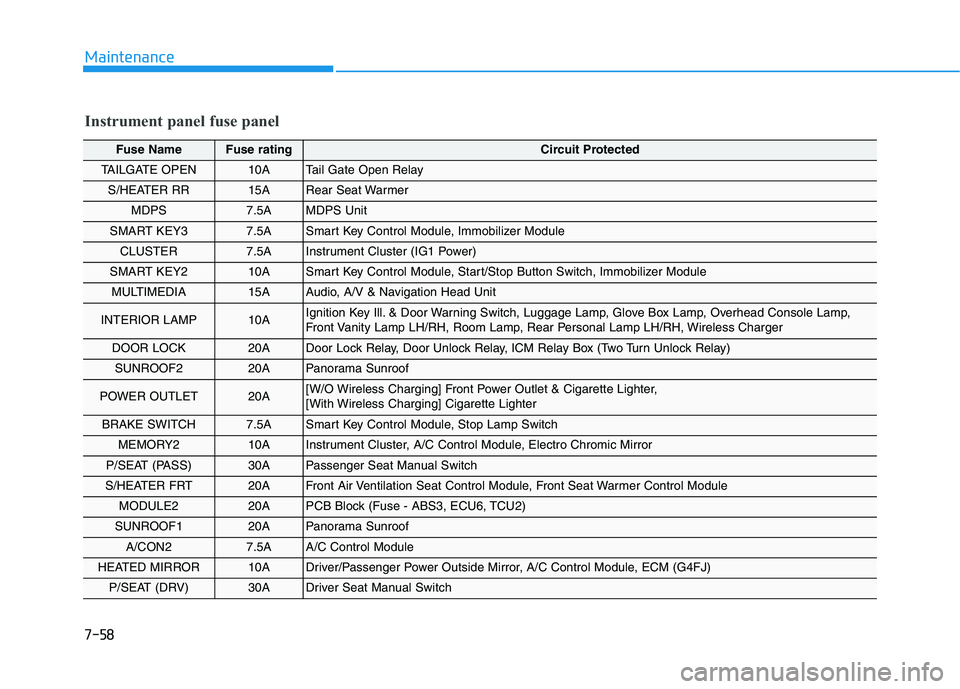
Instrument panel fuse panel
Fuse Name Fuse ratingCircuit Protected
TAILGATE OPEN10ATail Gate Open Relay
S/HEATER RR15ARear Seat Warmer
MDPS7.5AMDPS Unit
SMART KEY37.5A Smart Key Control Module, Immobilizer Module
CLUSTER7.5A Instrument Cluster (IG1 Power)
SMART KEY210A Smart Key Control Module, Start/Stop Button Switch, Immobilizer Module
MULTIMEDIA15A Audio, A/V & Navigation Head Unit
INTERIOR LAMP10A Ignition Key Ill. & Door Warning Switch, Luggage Lamp, Glove Box Lamp, Overhead Console Lamp,
Front Vanity Lamp LH/RH, Room Lamp, Rear Personal Lamp LH/RH, Wireless Charger
DOOR LOCK20A Door Lock Relay, Door Unlock Relay, ICM Relay Box (Two Turn Unlock Relay)
SUNROOF220A Panorama Sunroof
POWER OUTLET20A [W/O Wireless Charging] Front Power Outlet & Cigarette Lighter,
[With Wireless Charging] Cigarette Lighter
BRAKE SWITCH7.5A Smart Key Control Module, Stop Lamp Switch
MEMORY210A Instrument Cluster, A/C Control Module, Electro Chromic Mirror
P/SEAT (PASS)30A Passenger Seat Manual Switch
S/HEATER FRT20A Front Air Ventilation Seat Control Module, Front Seat Warmer Control Module
MODULE220A PCB Block (Fuse - ABS3, ECU6, TCU2)
SUNROOF120A Panorama Sunroof
A/CON27.5A A/C Control Module
HEATED MIRROR10ADriver/Passenger Power Outside Mirror, A/C Control Module, ECM (G4FJ)
P/SEAT (DRV)30ADriver Seat Manual Switch
Page 542 of 546
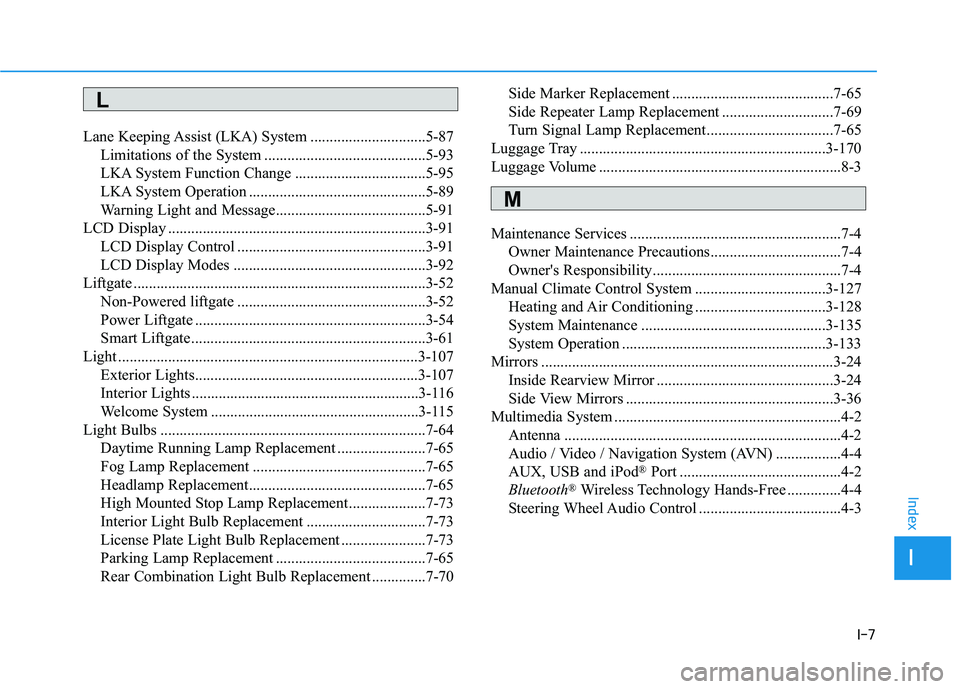
I-7
Lane Keeping Assist (LKA) System ..............................5-87Limitations of the System ..........................................5-93
LKA System Function Change ..................................5-95
LKA System Operation ..............................................5-89
Warning Light and Message.......................................5-91
LCD Display ...................................................................3-91 LCD Display Control .................................................3-91
LCD Display Modes ..................................................3-92
Liftgate ........................................................................\
....3-52 Non-Powered liftgate .................................................3-52
Power Liftgate ............................................................3-54
Smart Liftgate.............................................................3-61
Light ........................................................................\
......3-107 Exterior Lights..........................................................3-107
Interior Lights ...........................................................3-116
Welcome System ......................................................3-115
Light Bulbs .....................................................................7-6\
4 Daytime Running Lamp Replacement .......................7-65
Fog Lamp Replacement .............................................7-65
Headlamp Replacement..............................................7-65
High Mounted Stop Lamp Replacement....................7-73
Interior Light Bulb Replacement ...............................7-73
License Plate Light Bulb Replacement ......................7-73
Parking Lamp Replacement .......................................7-65
Rear Combination Light Bulb Replacement ..............7-70 Side Marker Replacement ..........................................7-65
Side Repeater Lamp Replacement .............................7-69
Turn Signal Lamp Replacement.................................7-65
Luggage Tray ................................................................3-170
Luggage Volume ...............................................................8-3
Maintenance Services .......................................................7-4 Owner Maintenance Precautions..................................7-4
Owner's Responsibility.................................................7-4
Manual Climate Control System ..................................3-127 Heating and Air Conditioning ..................................3-128
System Maintenance ................................................3-135
System Operation .....................................................3-133
Mirrors ........................................................................\
....3-24 Inside Rearview Mirror ..............................................3-24
Side View Mirrors ......................................................3-36
Multimedia System ...........................................................4-2 Antenna ........................................................................\
4-2
Audio / Video / Navigation System (AVN) .................4-4
AUX, USB and iPod
®Port ..........................................4-2
Bluetooth®Wireless Technology Hands-Free ..............4-4
Steering Wheel Audio Control .....................................4-3
I
Index
L
M