tow HYUNDAI TUCSON ULTIMATE 2020 Owner's Manual
[x] Cancel search | Manufacturer: HYUNDAI, Model Year: 2020, Model line: TUCSON ULTIMATE, Model: HYUNDAI TUCSON ULTIMATE 2020Pages: 546, PDF Size: 57.48 MB
Page 221 of 546
3-130
Convenient features of your vehicle
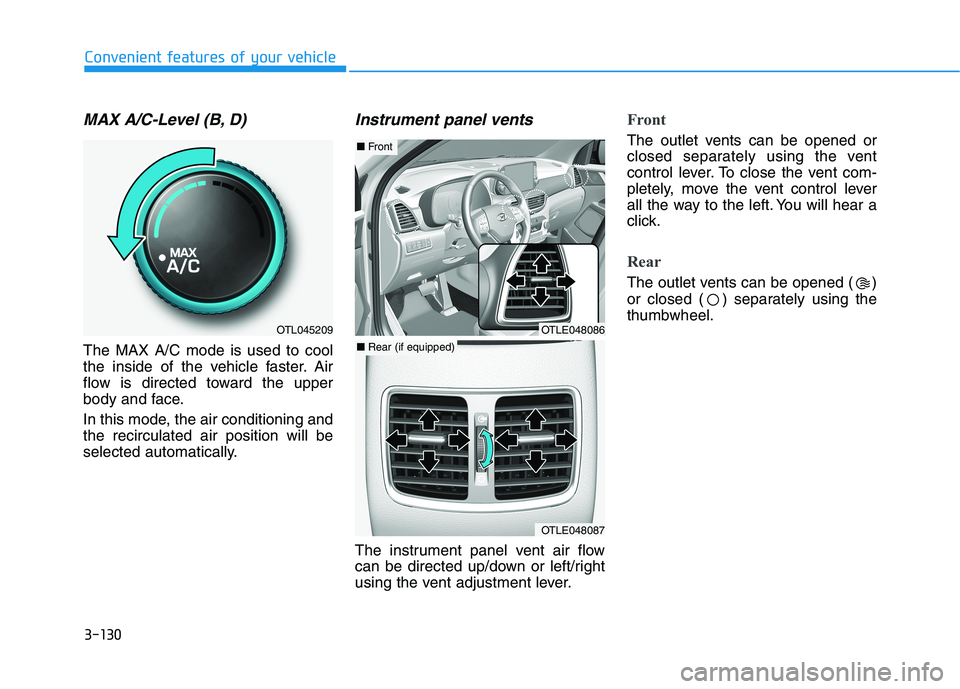
MAX A/C-Level (B, D)
The MAX A/C mode is used to cool
the inside of the vehicle faster. Air
flow is directed toward the upper
body and face.
In this mode, the air conditioning and
the recirculated air position will be
selected automatically.
Instrument panel vents
The instrument panel vent air flow
can be directed up/down or left/right
using the vent adjustment lever.
Front
The outlet vents can be opened or
closed separately using the vent
control lever. To close the vent com-
pletely, move the vent control lever
all the way to the left. You will hear a
click.
Rear
The outlet vents can be opened ( )
or closed ( ) separately using the
thumbwheel.
OTL045209OTLE048086
OTLE048087
■ Front
■ Rear (if equipped)
Page 232 of 546
3-141
Convenient features of your vehicle
3
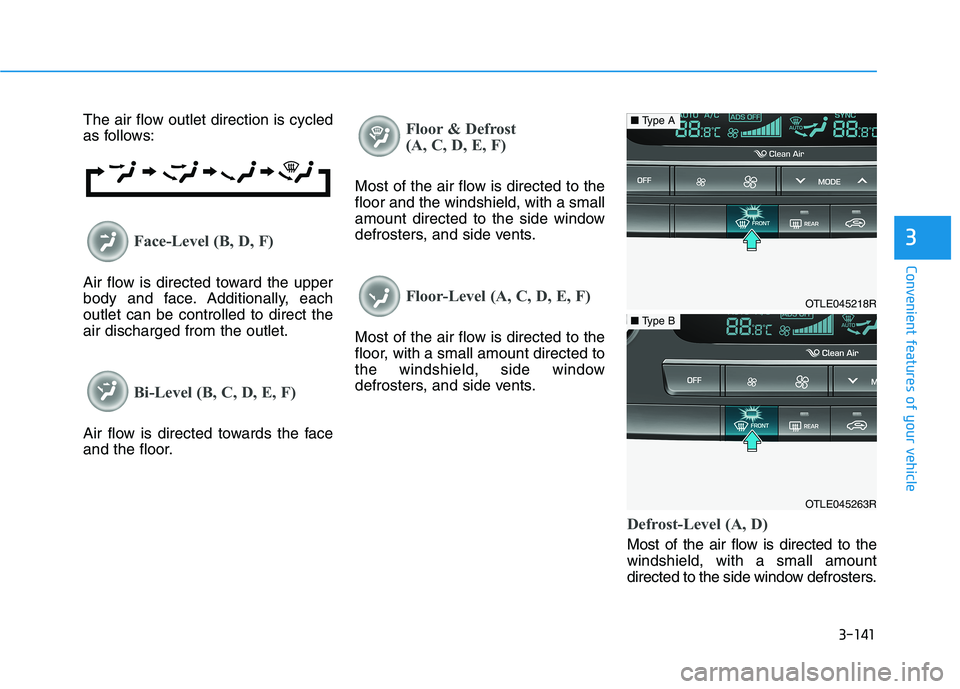
The air flow outlet direction is cycled
as follows:
Face-Level (B, D, F)
Air flow is directed toward the upper
body and face. Additionally, each
outlet can be controlled to direct the
air discharged from the outlet.
Bi-Level (B, C, D, E, F)
Air flow is directed towards the face
and the floor.
Floor & Defrost
(A, C, D, E, F)
Most of the air flow is directed to the
floor and the windshield, with a small
amount directed to the side window
defrosters, and side vents.
Floor-Level (A, C, D, E, F)
Most of the air flow is directed to the
floor, with a small amount directed to
the windshield, side window
defrosters, and side vents.
Defrost-Level (A, D)
Most of the air flow is directed to the
windshield, with a small amount
directed to the side window defrosters.
OTLE045218R
■Type A
OTLE045263R
■Type B
Page 244 of 546
3-153
Convenient features of your vehicle
3
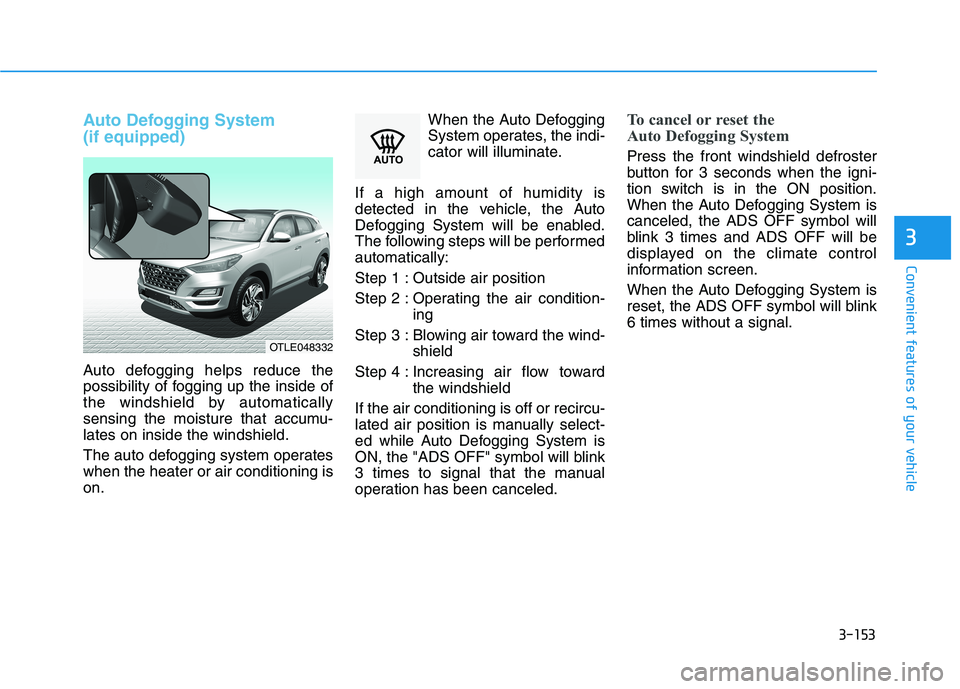
Auto Defogging System
(if equipped)
Auto defogging helps reduce the
possibility of fogging up the inside of
the windshield by automatically
sensing the moisture that accumu-
lates on inside the windshield.
The auto defogging system operates
when the heater or air conditioning is
on.When the Auto Defogging
System operates, the indi-
cator will illuminate.
If a high amount of humidity is
detected in the vehicle, the Auto
Defogging System will be enabled.
The following steps will be performed
automatically:
Step 1 : Outside air position
Step 2 : Operating the air condition-
ing
Step 3 : Blowing air toward the wind-
shield
Step 4 : Increasing air flow toward
the windshield
If the air conditioning is off or recircu-
lated air position is manually select-
ed while Auto Defogging System is
ON, the "ADS OFF" symbol will blink
3 times to signal that the manual
operation has been canceled.
To cancel or reset the
Auto Defogging System
Press the front windshield defroster
button for 3 seconds when the igni-
tion switch is in the ON position.
When the Auto Defogging System is
canceled, the ADS OFF symbol will
blink 3 times and ADS OFF will be
displayed on the climate control
information screen.
When the Auto Defogging System is
reset, the ADS OFF symbol will blink
6 times without a signal.
OTLE048332
Page 251 of 546
3-160
Convenient features of your vehicle
Keep your drinks sealed while
driving to prevent spilling your
drink. If liquid spills, it may get
into the vehicle's electrical/elec-
tronic system and damage elec-
trical/electronic parts.
When cleaning spilled liquids do
not use hot air to blow out or dry
the cup holder. This may dam-
age the interior.
Sunvisor
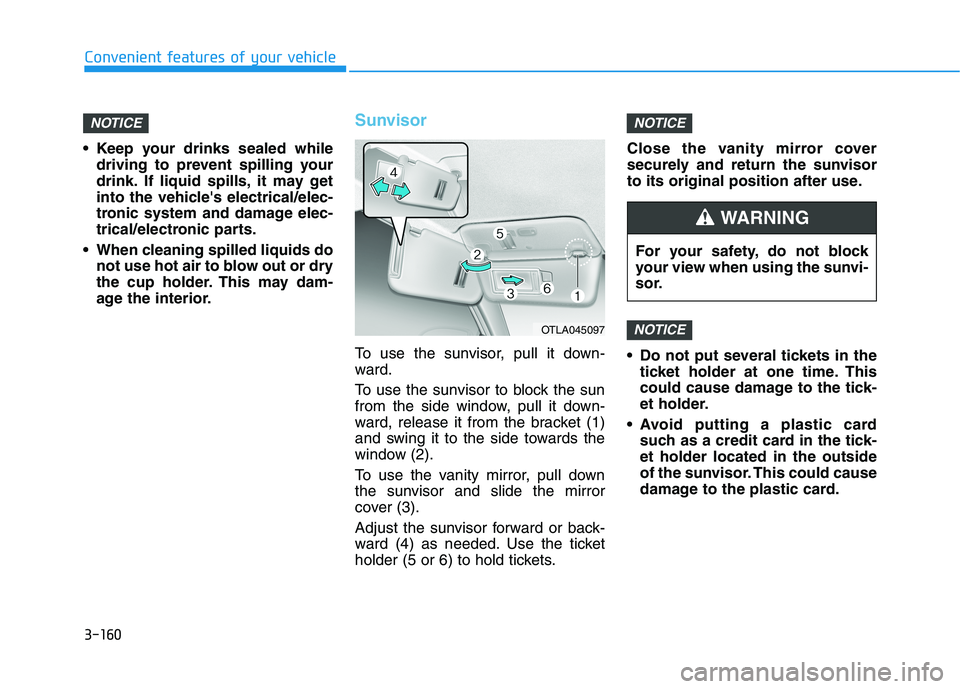
To use the sunvisor, pull it down-
ward.
To use the sunvisor to block the sun
from the side window, pull it down-
ward, release it from the bracket (1)
and swing it to the side towards the
window (2).
To use the vanity mirror, pull down
the sunvisor and slide the mirror
cover (3).
Adjust the sunvisor forward or back-
ward (4) as needed. Use the ticket
holder (5 or 6) to hold tickets.Close the vanity mirror cover
securely and return the sunvisor
to its original position after use.
Do not put several tickets in the
ticket holder at one time. This
could cause damage to the tick-
et holder.
Avoid putting a plastic card
such as a credit card in the tick-
et holder located in the outside
of the sunvisor. This could cause
damage to the plastic card.
NOTICE
NOTICENOTICE
OTLA045097
For your safety, do not block
your view when using the sunvi-
sor.
WARNING
Page 259 of 546
3-168
Convenient features of your vehicle
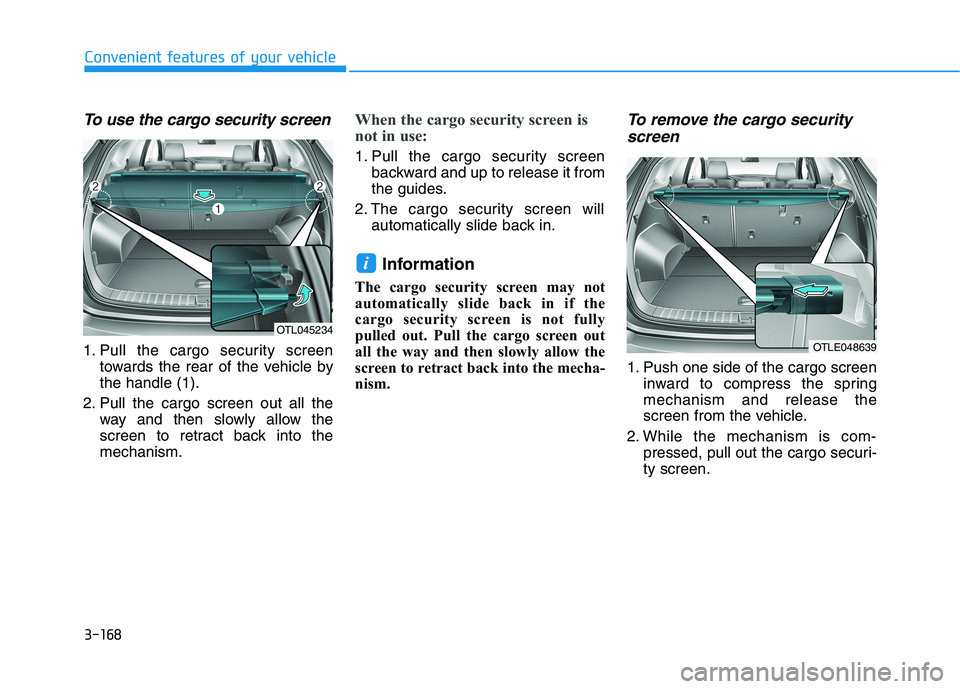
To use the cargo security screen
1. Pull the cargo security screen
towards the rear of the vehicle by
the handle (1).
2. Pull the cargo screen out all the
way and then slowly allow the
screen to retract back into the
mechanism.
When the cargo security screen is
not in use:
1. Pull the cargo security screen
backward and up to release it from
the guides.
2. The cargo security screen will
automatically slide back in.
Information
The cargo security screen may not
automatically slide back in if the
cargo security screen is not fully
pulled out. Pull the cargo screen out
all the way and then slowly allow the
screen to retract back into the mecha-
nism.
To remove the cargo security
screen
1. Push one side of the cargo screen
inward to compress the spring
mechanism and release the
screen from the vehicle.
2. While the mechanism is com-
pressed, pull out the cargo securi-
ty screen.
i
OTL045234
OTLE048639
Page 268 of 546
5
Lane Keeping Assist (LKA) System ...................5-87
LKA System Operation...................................................5-89
Warning Light and Message.........................................5-91
Limitations of the System .............................................5-93
LKA System Function Change......................................5-95
Driver Attention Warning (DAW) System .........5-96
System Setting and Activation.....................................5-96
Resetting the System .....................................................5-97
System Standby ...............................................................5-98
System Malfunction .......................................................5-98
Cruise Control .....................................................5-100
Cruise Control operation .............................................5-100
Smart Cruise Control With Stop &
Go System ...........................................................5-105
Smart Cruise Control Switch ......................................5-105
Smart Cruise Control Speed .......................................5-106
Smart Cruise Control Vehicle-to-Vehicle
Distance ...........................................................................5-110
Smart Cruise Control Radar Sensor .........................5-114
To Adjust the Sensitivity of
Smart Cruise Control ....................................................5-115
Conventional Cruise Control Mode ...........................5-116
Limitations of the System...........................................5-117
Special Driving Conditions ................................5-122
Hazardous driving conditions ....................................5-122
Rocking the vehicle ......................................................5-122
Smooth cornering .........................................................5-123
Driving at night ..............................................................5-123
Driving in the rain .........................................................5-123
Driving in flooded areas..............................................5-124
Highway driving .............................................................5-124
Reducing the risk of a rollover .................................5-125
Winter Driving ....................................................5-126
Snow or Icy Conditions................................................5-126
Winter Precautions .......................................................5-128
Trailer Towing .....................................................5-130
If you decide to pull a trailer .....................................5-130
Trailer towing equipment ............................................5-132
Driving with a trailer ....................................................5-133
Maintenance when trailer towing.............................5-136
Vehicle Load Limit..............................................5-138
Tire Loading Information Label .................................5-139
Page 273 of 546
5-7
Driving your vehicle
5
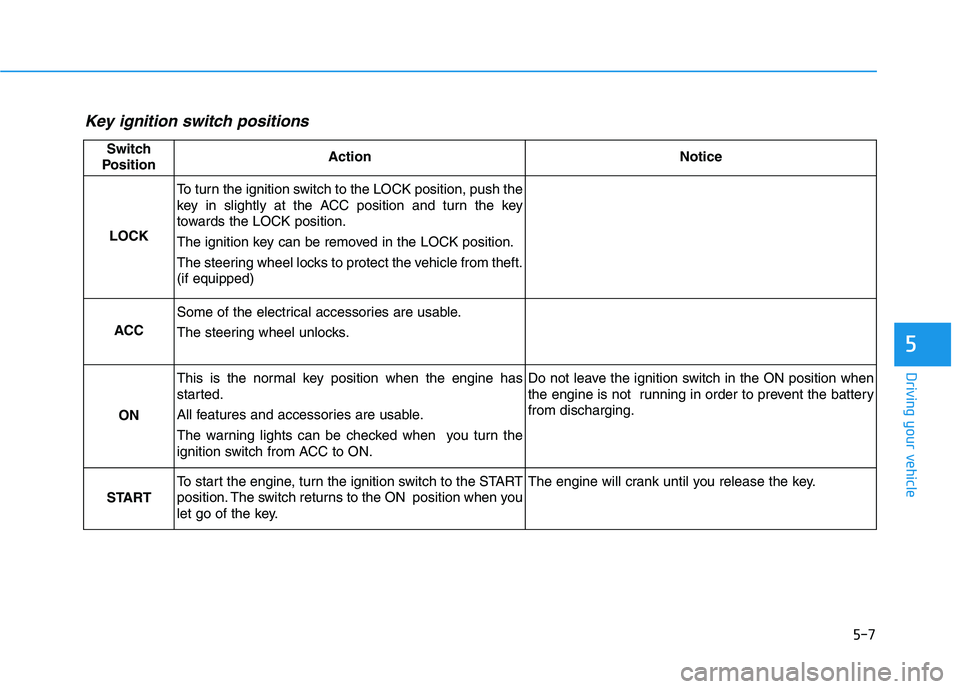
Key ignition switch positions
Switch
PositionActionNotice
LOCK
To turn the ignition switch to the LOCK position, push the
key in slightly at the ACC position and turn the key
towards the LOCK position.
The ignition key can be removed in the LOCK position.
The steering wheel locks to protect the vehicle from theft.
(if equipped)
ACC
Some of the electrical accessories are usable.
The steering wheel unlocks.
ON
This is the normal key position when the engine has
started.
All features and accessories are usable.
The warning lights can be checked when you turn the
ignition switch from ACC to ON.Do not leave the ignition switch in the ON position when
the engine is not running in order to prevent the battery
from discharging.
START
To start the engine, turn the ignition switch to the START
position. The switch returns to the ON position when you
let go of the key.The engine will crank until you release the key.
Page 274 of 546
5-8
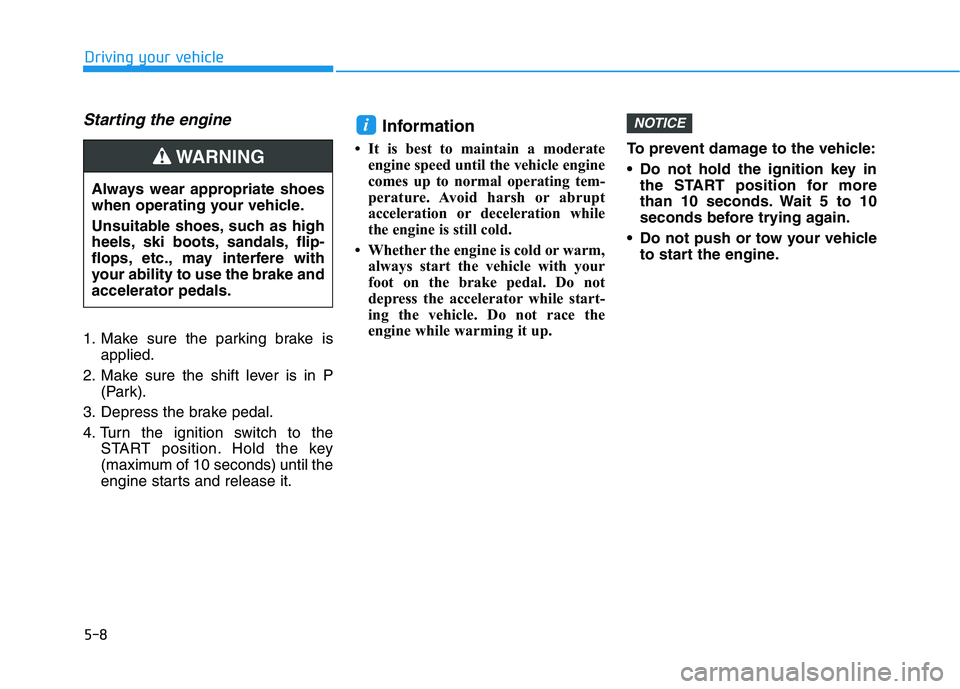
Starting the engine
1. Make sure the parking brake is
applied.
2. Make sure the shift lever is in P
(Park).
3. Depress the brake pedal.
4. Turn the ignition switch to the
START position. Hold the key
(maximum of 10 seconds) until the
engine starts and release it.
Information
• It is best to maintain a moderate
engine speed until the vehicle engine
comes up to normal operating tem-
perature. Avoid harsh or abrupt
acceleration or deceleration while
the engine is still cold.
• Whether the engine is cold or warm,
always start the vehicle with your
foot on the brake pedal. Do not
depress the accelerator while start-
ing the vehicle. Do not race the
engine while warming it up.To prevent damage to the vehicle:
Do not hold the ignition key in
the START position for more
than 10 seconds. Wait 5 to 10
seconds before trying again.
Do not push or tow your vehicle
to start the engine.
NOTICEi
Driving your vehicle
Always wear appropriate shoes
when operating your vehicle.
Unsuitable shoes, such as high
heels, ski boots, sandals, flip-
flops, etc., may interfere with
your ability to use the brake and
accelerator pedals.
WARNING
Page 279 of 546
5-13
Driving your vehicle
5
To prevent damage to the vehicle:
If the engine stalls while you are
in motion, do not attempt to
move the shift lever to the P
(Park) position.
If traffic and road conditions
permit, you may put the shift
lever in the N (Neutral) position
while the vehicle is still moving
and press the Engine Start/Stop
button in an attempt to restart
the engine.
Do not push or tow your vehicle
to start the engine.To prevent damage to the vehicle:
When the stop lamp fuse is blown,
you can't start the engine normal-
ly. Replace the fuse with a new
one. If you are not able to replace
the fuse, you can start the engine
by pressing and holding the
Engine Start/Stop button for 10
seconds with the Engine Start/
Stop button in the ACC position.
Do not press the Engine Start/Stop
button for more than 10 seconds
except when the stop lamp fuse is
blown.
For your safety always depress
the brake pedal before starting the
engine.
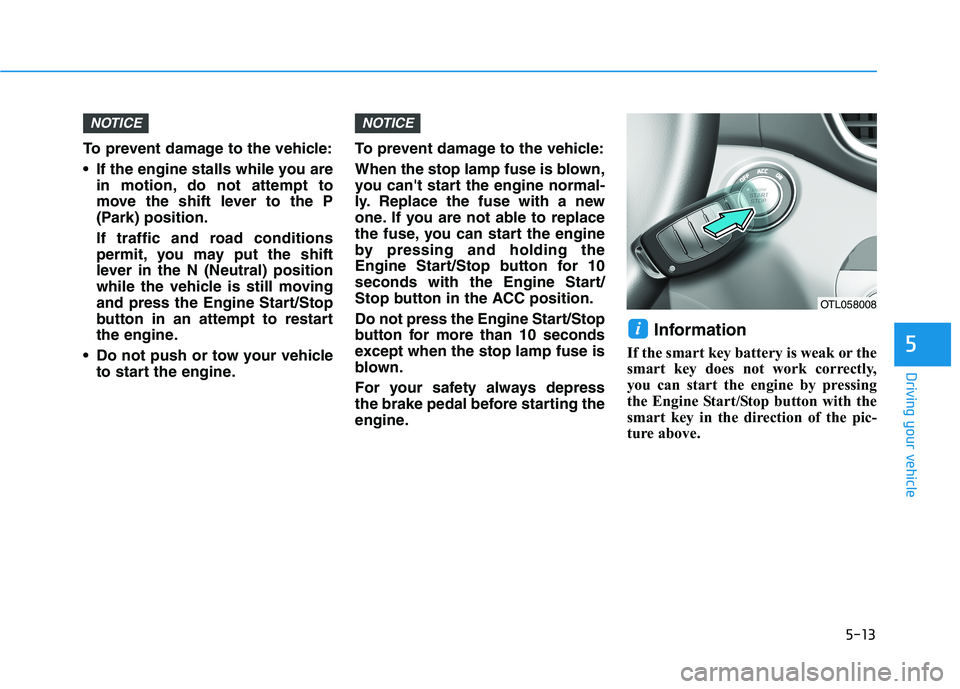
Information
If the smart key battery is weak or the
smart key does not work correctly,
you can start the engine by pressing
the Engine Start/Stop button with the
smart key in the direction of the pic-
ture above.
i
NOTICENOTICE
OTL058008
Page 295 of 546
5-29
Driving your vehicle
5
Parking brake warning light
Check the Parking
Brake Warning Light
by placing the ignition
switch to the ON posi-
tion (do not start the
engine).
This light will be illuminated when the
parking brake is applied with the igni-
tion switch in the START or ON posi-
tion.
Before driving, be sure the parking
brake is released and the Brake
Warning Light is OFF.
If the Parking Brake Warning Light
remains on after the parking brake is
released while engine is running,
there may be a malfunction in the
brake system. Immediate attention is
necessary.
If at all possible, cease driving the
vehicle immediately. If that is not pos-
sible, use extreme caution while
operating the vehicle and only con-
tinue to drive the vehicle until you
can reach a safe location.
Emergency braking
If there is a problem with the brake
pedal while driving, emergency brak-
ing is possible by pulling up and
holding the EPB switch. Braking is
possible only while you are holding
the EPB switch. However, braking
distance will be longer than normal.
Information
During emergency braking, the park-
ing brake warning light will illumi-
nate to indicate that the system is
operating.If you continuously notice a noise
or burning smell when the EPB is
used for emergency braking, have
system checked by an authorized
HYUNDAI dealer.
When the EPB (Electronic Parking
Brake) does not release
If the EPB does not release normal-
ly, we recommend that you contact
an authorized HYUNDAI dealer by
loading the vehicle on a flatbed tow
truck and have the system checked.
NOTICE
i
Do not operate the parking
brake while the vehicle is mov-
ing except in an emergency sit-
uation. It could damage the
brake system and lead to a
severe accident.
WARNING