navigation HYUNDAI VELOSTER 2011 Owners Manual
[x] Cancel search | Manufacturer: HYUNDAI, Model Year: 2011, Model line: VELOSTER, Model: HYUNDAI VELOSTER 2011Pages: 386, PDF Size: 7.79 MB
Page 176 of 386
Features of your vehicle
102 4
Temperature conversion
This allows you to set the unit of the dis-
tance and the temperature to the celsius
and the fahrenheit on your navigation
system.
- Units: Change the unit between the
“km” and “mls”.
- Temperature: Change the temperature
between the “C” and “F”.
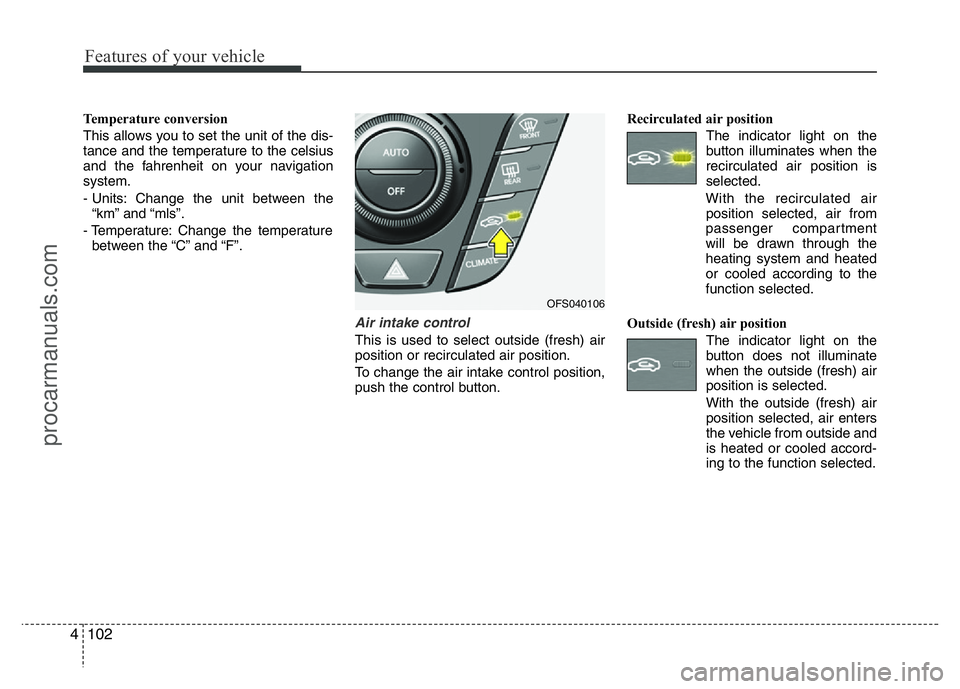
Air intake control
This is used to select outside (fresh) air
position or recirculated air position.
To change the air intake control position,
push the control button.Recirculated air position
The indicator light on the
button illuminates when the
recirculated air position is
selected.
With the recirculated air
position selected, air from
passenger compartment
will be drawn through the
heating system and heated
or cooled according to the
function selected.
Outside (fresh) air position
The indicator light on the
button does not illuminate
when the outside (fresh) air
position is selected.
With the outside (fresh) air
position selected, air enters
the vehicle from outside and
is heated or cooled accord-
ing to the function selected.
OFS040106
procarmanuals.com
Page 197 of 386
4123
Features of your vehicle
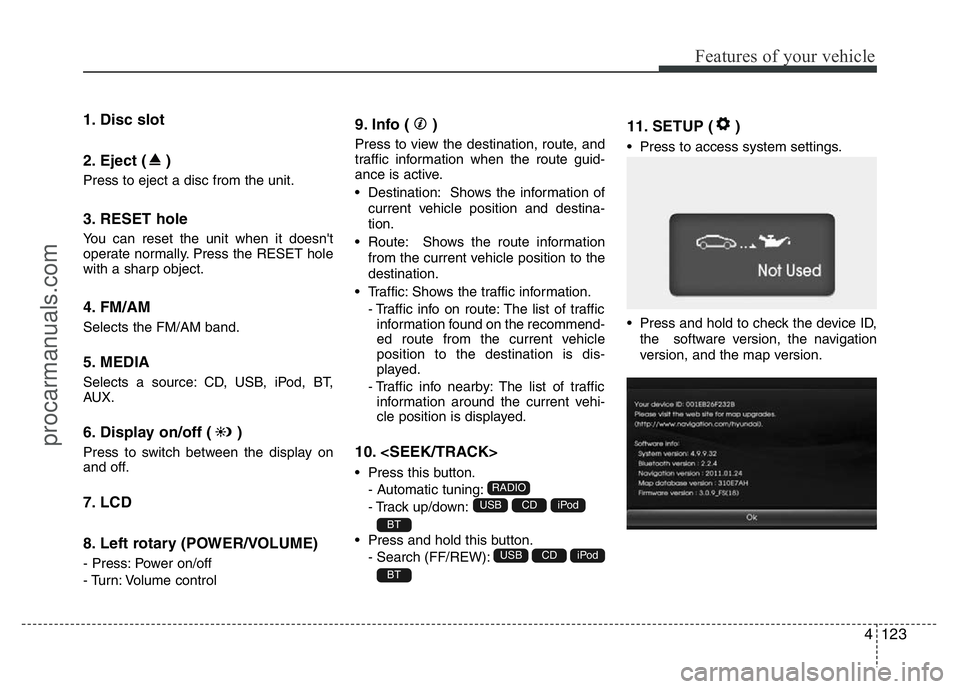
1. Disc slot
2. Eject ( )
Press to eject a disc from the unit.
3. RESET hole
You can reset the unit when it doesn't
operate normally. Press the RESET hole
with a sharp object.
4. FM/AM
Selects the FM/AM band.
5. MEDIA
Selects a source: CD, USB, iPod, BT,
AUX.
6. Display on/off ( )
Press to switch between the display on
and off.
7. LCD
8. Left rotary (POWER/VOLUME)
- Press: Power on/off
- Turn: Volume control
9. Info ( )
Press to view the destination, route, and
traffic information when the route guid-
ance is active.
• Destination: Shows the information of
current vehicle position and destina-
tion.
• Route: Shows the route information
from the current vehicle position to the
destination.
• Traffic: Shows the traffic information.
- Traffic info on route: The list of traffic
information found on the recommend-
ed route from the current vehicle
position to the destination is dis-
played.
- Traffic info nearby: The list of traffic
information around the current vehi-
cle position is displayed.
10.
• Press this button.
- Automatic tuning:
- Track up/down:
• Press and hold this button.
- Search (FF/REW):
11. SETUP ( )
• Press to access system settings.
• Press and hold to check the device ID,
the software version, the navigation
version, and the map version.
BT
iPodCDUSB
BT
iPodCDUSB
RADIO
procarmanuals.com
Page 199 of 386
4125
Features of your vehicle
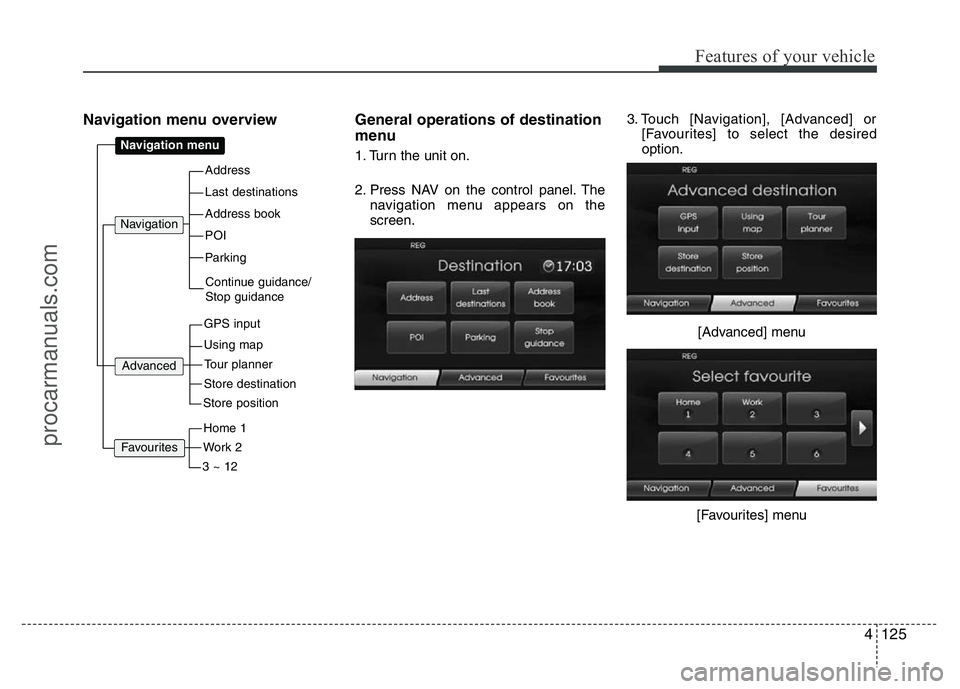
Navigation menu overview General operations of destination
menu
1. Turn the unit on.
2. Press NAV on the control panel. The
navigation menu appears on the
screen.3. Touch [Navigation], [Advanced] or
[Favourites] to select the desired
option.
[Advanced] menu
[Favourites] menuAddress
Last destinations
POI
Address book
Parking
Navigation menu
GPS input
Using map
Navigation
Continue guidance/
Stop guidance
Advanced
Store destination
Tour planner
Store position
Work 2
Home 1
3 ~ 12
Favourites
procarmanuals.com
Page 201 of 386
![HYUNDAI VELOSTER 2011 Owners Manual 4127
Features of your vehicle
[Route] menu
[Traffic] menu
5. Touch the preferred setting method.
Understanding Bluetooth wire-
less technology
Bluetooth wireless technology establish-
es a wireless l](/img/35/57922/w960_57922-200.png "HYUNDAI VELOSTER 2011 Owners Manual 4127
Features of your vehicle
[Route] menu
[Traffic] menu
5. Touch the preferred setting method.
Understanding Bluetooth wire-
less technology
Bluetooth wireless technology establish-
es a wireless l")
4127
Features of your vehicle
[Route] menu
[Traffic] menu
5. Touch the preferred setting method.
Understanding Bluetooth wire-
less technology
Bluetooth wireless technology establish-
es a wireless link between two devices,
such as your phone and the unit. The first
time you use two devices together you
must connect them by establishing a
relationship using a PIN code. After the
initial connecting, the two devices can
connect automatically each time you turn
them on.
NOTE:
• There may be restrictions on using
Bluetooth technology in some loca-
tions.
• Due to the variety of Bluetooth
phones and their firmware version,
your device may respond differently
when performing over Bluetooth.
• As difference in functional opera-
tion by model is mainly resulted
from feature of a hands-free phone,
consult manufacturer of a phone if
you have any question.
• You can check the Bluetooth phone
compatibility list on the web-site
(http://www.navigation.com/hyundai
).
Connecting your unit and blue-
tooth phone
To connect using the unit settings (1)
1. Press on the control panel.
2. Touch [Bluetooth].
3. Touch [Search for Bluetooth devices].
If you want to cancel, touch [Cancel].
procarmanuals.com
Page 206 of 386
Features of your vehicle
132 4
NOTE:
When a station is preset on the preset
station button number on which
another station of the same band has
already been preset, the previously
preset station is automatically erased.
Voice recognition
Voice recognition allows hands-free
operation of the AV system (RADIO, CD,
USB, iPod), navigation and other sys-
tems equipped on this vehicle, such as
the phone.
NOTE:
To get the best recognition perform-
ance out of voice recognition, observe
the following:
• Keep the interior of the vehicle as
quiet as possible. Close the win-
dows to eliminate the surrounding
noises (traffic noises, vibration
sounds, etc.), which may prevent
the system from recognizing the
voice commands correctly.
• Wait until a beep sounds before
speaking a command. Otherwise,
the command will not be recognized
properly.
• Speak in a natural voice without
pausing between words.
Giving voice commands
1. Press ( ) on the steering wheel
remote control.
2. After the beep sounds, say "Help". All
commands shall be listed which are
presented in active fields.
NOTE:
• If the command is not recognized,
the system announces, 1st time
"Pardon?", 2nd time "Please,
repeat", and 3rd time "Command is
not recognized".
• If you want to cancel the voice
recognition, press () one more time
or press the any button or touch
screen say "Cancel".
• If you want to adjust the volume of
the system feedback, press VOL+ or
VOL-on the steering wheel remote
control or use the volume knob
(VOLUME) on the control while the
voice recognition is active.
procarmanuals.com
Page 353 of 386
761
Maintenance
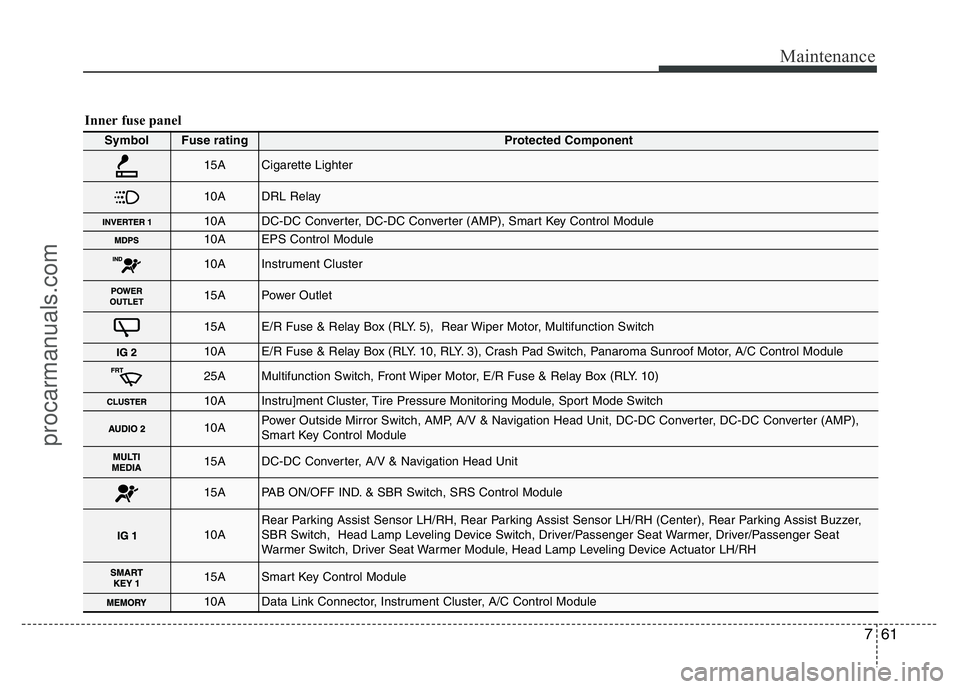
Inner fuse panel
Symbol Fuse ratingProtected Component
15ACigarette Lighter
10ADRL Relay
10ADC-DC Converter, DC-DC Converter (AMP), Smart Key Control Module
10AEPS Control Module
10AInstrument Cluster
15APower Outlet
15AE/R Fuse & Relay Box (RLY. 5), Rear Wiper Motor, Multifunction Switch
10AE/R Fuse & Relay Box (RLY. 10, RLY. 3), Crash Pad Switch, Panaroma Sunroof Motor, A/C Control Module
25AMultifunction Switch, Front Wiper Motor, E/R Fuse & Relay Box (RLY. 10)
10AInstru]ment Cluster, Tire Pressure Monitoring Module, Sport Mode Switch
10APower Outside Mirror Switch, AMP, A/V & Navigation Head Unit, DC-DC Converter, DC-DC Converter (AMP),
Smart Key Control Module
15ADC-DC Converter, A/V & Navigation Head Unit
15APAB ON/OFF IND. & SBR Switch, SRS Control Module
10ARear Parking Assist Sensor LH/RH, Rear Parking Assist Sensor LH/RH (Center), Rear Parking Assist Buzzer,
SBR Switch, Head Lamp Leveling Device Switch, Driver/Passenger Seat Warmer, Driver/Passenger Seat
Warmer Switch, Driver Seat Warmer Module, Head Lamp Leveling Device Actuator LH/RH
15ASmart Key Control Module
10AData Link Connector, Instrument Cluster, A/C Control Module
procarmanuals.com
Page 354 of 386
Maintenance
62 7
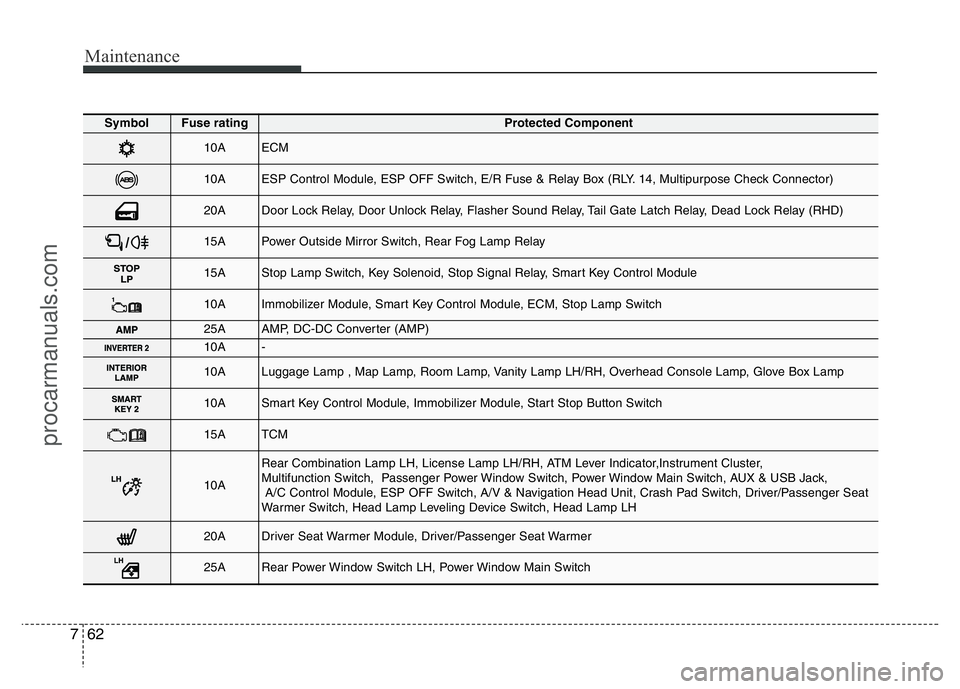
Symbol Fuse ratingProtected Component
10AECM
10AESP Control Module, ESP OFF Switch, E/R Fuse & Relay Box (RLY. 14, Multipurpose Check Connector)
20ADoor Lock Relay, Door Unlock Relay, Flasher Sound Relay, Tail Gate Latch Relay, Dead Lock Relay (RHD)
15APower Outside Mirror Switch, Rear Fog Lamp Relay
15AStop Lamp Switch, Key Solenoid, Stop Signal Relay, Smart Key Control Module
10AImmobilizer Module, Smart Key Control Module, ECM, Stop Lamp Switch
25AAMP, DC-DC Converter (AMP)
10A-
10ALuggage Lamp , Map Lamp, Room Lamp, Vanity Lamp LH/RH, Overhead Console Lamp, Glove Box Lamp
10ASmart Key Control Module, Immobilizer Module, Start Stop Button Switch
15ATCM
10A
Rear Combination Lamp LH, License Lamp LH/RH, ATM Lever Indicator,Instrument Cluster,
Multifunction Switch, Passenger Power Window Switch, Power Window Main Switch, AUX & USB Jack,
A/C Control Module, ESP OFF Switch, A/V & Navigation Head Unit, Crash Pad Switch, Driver/Passenger Seat
Warmer Switch, Head Lamp Leveling Device Switch, Head Lamp LH
20ADriver Seat Warmer Module, Driver/Passenger Seat Warmer
25ARear Power Window Switch LH, Power Window Main Switch
procarmanuals.com
Page 355 of 386
763
Maintenance
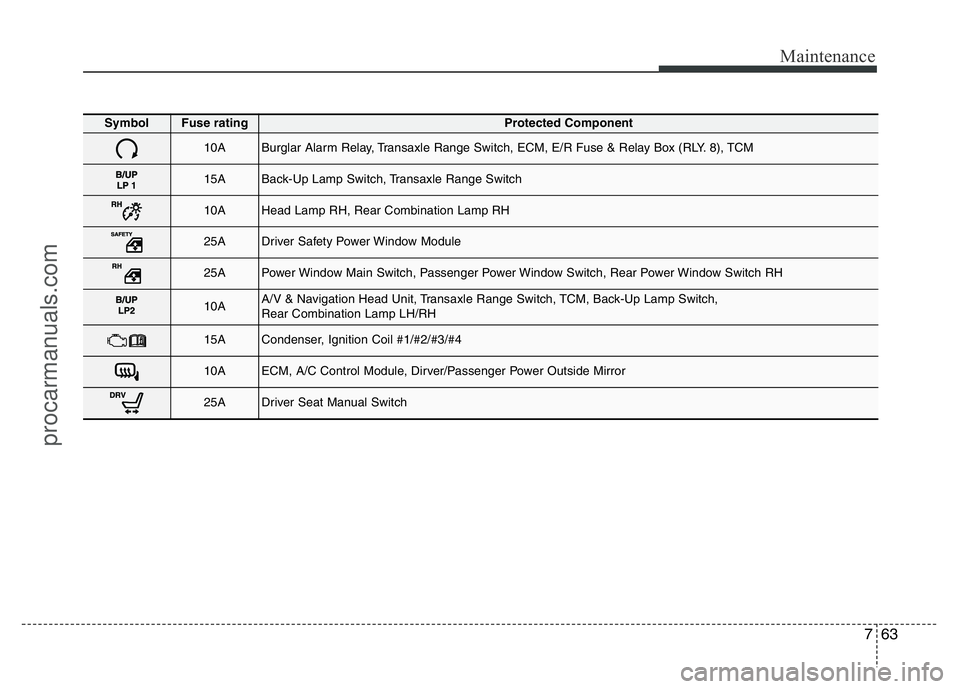
Symbol Fuse ratingProtected Component
10ABurglar Alarm Relay, Transaxle Range Switch, ECM, E/R Fuse & Relay Box (RLY. 8), TCM
15ABack-Up Lamp Switch, Transaxle Range Switch
10AHead Lamp RH, Rear Combination Lamp RH
25ADriver Safety Power Window Module
25APower Window Main Switch, Passenger Power Window Switch, Rear Power Window Switch RH
10AA/V & Navigation Head Unit, Transaxle Range Switch, TCM, Back-Up Lamp Switch,
Rear Combination Lamp LH/RH
15ACondenser, Ignition Coil #1/#2/#3/#4
10AECM, A/C Control Module, Dirver/Passenger Power Outside Mirror
25ADriver Seat Manual Switch
procarmanuals.com