phone HYUNDAI VELOSTER 2020 Owners Manual
[x] Cancel search | Manufacturer: HYUNDAI, Model Year: 2020, Model line: VELOSTER, Model: HYUNDAI VELOSTER 2020Pages: 480, PDF Size: 6.16 MB
Page 2 of 480

F2
Your HYUNDAI should not be modified in any way. Such modifications may adversely affect
the performance, safety or durability of your HYUNDAI and may, in addition, violate condi-
tions of the limited warranties covering the vehicle. Certain modifications may also be in vio-
lation of regulations established by the Department of Transportation and other government
agencies in your country.
Your vehicle is equipped with electronic fuel injection and other electronic components. It is
possible for an improperly installed/adjusted two-way radio or cellular telephone to adversely
affect electronic systems. For this reason, we recommend that you carefully follow the radio
manufacturer's instructions or consult your HYUNDAI dealer for precautionary measures or
special instructions if you choose to install one of these devices.
CAUTION: MODIFICATIONS TO YOUR HYUNDAI
TWO-WAY RADIO OR CELLULAR TELEPHONE INSTALLATION
Page 19 of 480
2-2
You will find many safety precautions
and recommendations throughout
this section, and throughout this man-
ual. The safety precautions in this sec-
tion are among the most important.
Always Wear Your Seat Belt
A seat belt is your best protection in
all types of accidents. Air bags are
designed to supplement seat belts,
not replace them. So even though
your vehicle is equipped with air bags,
ALWAYS make sure you and your
passengers wear your seat belts, and
wear them properly.
Restrain All Children
All children under age 13 should ride
in your vehicle properly restrained in
a rear seat, not the front seat. Infants
and small children should be
restrained in an appropriate child
restraint. Larger children should use
a booster seat with the lap/shoulder
belt until they can use the seat belt
properly without a booster seat.
Air Bag Hazards
While air bags can save lives, they can
also cause serious or fatal injuries to
occupants who sit too close to them, or
who are not properly restrained. Infants,
young children, and shorter adults are
at the greatest risk of being injured by
an inflating air bag. Follow all instruc-
tions and warnings in this manual.
Driver Distraction
Driver distraction presents a serious
and potentially deadly danger, espe-
cially for inexperienced drivers. Safety
should be the first concern when
behind the wheel and drivers need to
be aware of the wide array of potential
distractions, such as drowsiness,
reaching for objects, eating, personal
grooming, other passengers, and
using cellular phones.
Drivers can become distracted when
they take their eyes and attention off
the road or their hands off the wheel to
focus on activities other than driving. To
reduce your risk of distraction or get-
ting into an accident:
• ALWAYS set up your mobile devices
(i.e., MP3 players, phones, naviga-
tion units, etc.) when your vehicle is
parked or safely stopped. ONLY use your mobile device
when allowed by laws and when
conditions permit safe use. NEVER
text or email while driving. Most
countries have laws prohibiting
drivers from texting. Some coun-
tries and cities also prohibit drivers
from using handheld phones.
NEVER let the use of a mobile
device distract you from driving.
You have a responsibility to your
passengers and others on the road
to always drive safely, with your
hands on the wheel as well as your
eyes and attention on the road.
Control Your Speed
Excessive speed is a major factor in
crash injuries and deaths. Generally,
the higher the speed, the greater the
risk, but serious injuries can also occur
at lower speeds. Never drive faster than
is safe for current conditions, regard-
less of the maximum speed posted.
Keep Your Vehicle in Safe
Condition
Having a tire blowout or a mechanical
failure can be extremely hazardous. To
reduce the possibility of such prob-
lems, check your tire pressures and
condition frequently, and perform all
regularly scheduled maintenance.
I IM
MP
PO
OR
RT
TA
AN
NT
T
S
SA
AF
FE
ET
TY
Y
P
PR
RE
EC
CA
AU
UT
TI
IO
ON
NS
S
Safety system of your vehicle
Page 61 of 480
2-44
Safety system of your vehicle
Side air bags
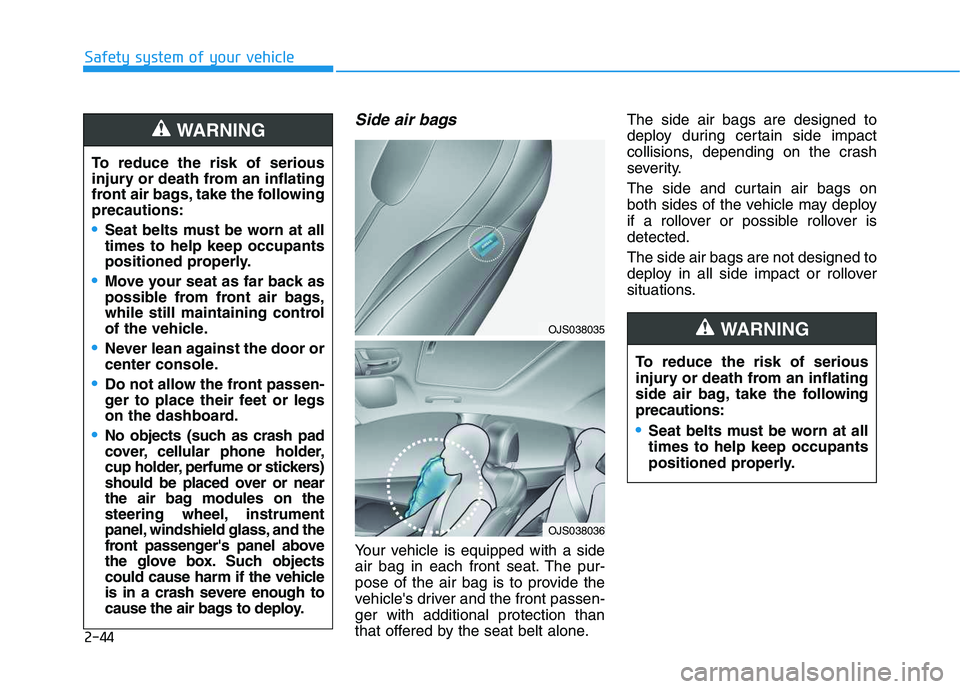
Your vehicle is equipped with a side
air bag in each front seat. The pur-
pose of the air bag is to provide the
vehicle's driver and the front passen-
ger with additional protection than
that offered by the seat belt alone.The side air bags are designed to
deploy during certain side impact
collisions, depending on the crash
severity.
The side and curtain air bags on
both sides of the vehicle may deploy
if a rollover or possible rollover is
detected.
The side air bags are not designed to
deploy in all side impact or rollover
situations. To reduce the risk of serious
injury or death from an inflating
front air bags, take the following
precautions:
Seat belts must be worn at all
times to help keep occupants
positioned properly.
Move your seat as far back as
possible from front air bags,
while still maintaining control
of the vehicle.
Never lean against the door or
center console.
Do not allow the front passen-
ger to place their feet or legs
on the dashboard.
No objects (such as crash pad
cover, cellular phone holder,
cup holder, perfume or stickers)
should be placed over or near
the air bag modules on the
steering wheel, instrument
panel, windshield glass, and the
front passenger's panel above
the glove box. Such objects
could cause harm if the vehicle
is in a crash severe enough to
cause the air bags to deploy.
WARNING
To reduce the risk of serious
injury or death from an inflating
side air bag, take the following
precautions:
Seat belts must be worn at all
times to help keep occupants
positioned properly.
WARNING OJS038035
OJS038036
Page 99 of 480
3-99
Convenient features of your vehicle
3
Conditions Where the Parking
Distance Warning (Reverse)
system
The Parking Distance Warning
(Reverse) system may not operate
normally when any of the following
occur:
The sensor is covered with dirt or
debris such as snow or ice, or the
sensor cover is blocked.
The Parking Distance Warning
(Reverse) system may experience a
malfunction when the following
occurs:
Driving on uneven road surfaces
such as unpaved roads, gravel,
bumps, or gradient.
Objects generating excessive noise
such as vehicle horns, loud motor-
cycle engines, or truck air brakes
can interfere with the sensor.
Heavy rain or water spray is present.
Wireless transmitters or mobile
phones are present near the sensor.
The sensor is covered with snow.
Any non-factory equipment or acces-
sories have been installed, or if the
vehicle bumper height or sensor
installation has been modified.
Detecting range may decrease when:
Outside air temperature is extreme-
ly hot or cold.
Undetectable objects smaller than
1 m (40 inches) and narrower than
14 cm (6 inches) in diameter.
The following objects may not be
recognized by the sensor:
Sharp or slim objects such as
ropes, chains or small poles.
Objects, which tend to absorb sen-
sor frequency such as clothes,
spongy material or snow.
Page 127 of 480
3-127
Convenient features of your vehicle
3
Sunvisor
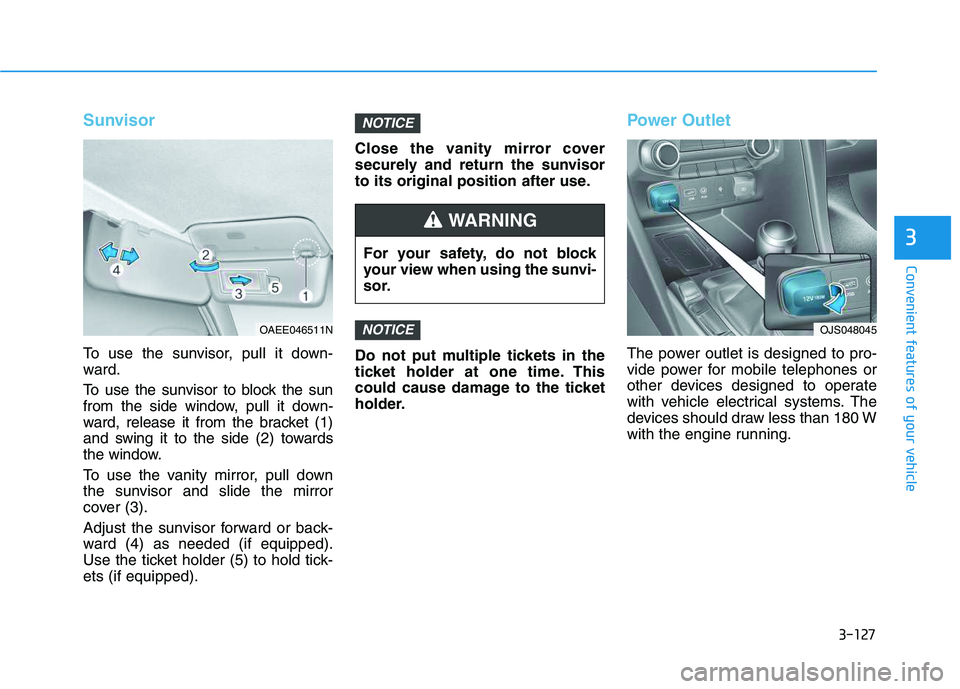
To use the sunvisor, pull it down-
ward.
To use the sunvisor to block the sun
from the side window, pull it down-
ward, release it from the bracket (1)
and swing it to the side (2) towards
the window.
To use the vanity mirror, pull down
the sunvisor and slide the mirror
cover (3).
Adjust the sunvisor forward or back-
ward (4) as needed (if equipped).
Use the ticket holder (5) to hold tick-
ets (if equipped).Close the vanity mirror cover
securely and return the sunvisor
to its original position after use.
Do not put multiple tickets in the
ticket holder at one time. This
could cause damage to the ticket
holder.
Power Outlet
The power outlet is designed to pro-
vide power for mobile telephones or
other devices designed to operate
with vehicle electrical systems. The
devices should draw less than 180 W
with the engine running.
NOTICE
NOTICE
For your safety, do not block
your view when using the sunvi-
sor.
WARNING
OAEE046511NOJS048045
Page 128 of 480
3-128
Convenient features of your vehicle
To prevent damage to the Power
Outlets :
Use the power outlet only when
the engine is running and
remove the accessory plug after
use. Using the accessory plug
for prolonged periods of time
with the engine off could cause
the battery to discharge.
Only use 12V electric acces-
sories which are less than 180 W
in electric capacity.
Adjust the air-conditioner or
heater to the lowest operating
level when using the power outlet.
Close the cover when not in use. Some electronic devices can
cause electronic interference
when plugged into a vehicle's
power outlet. These devices may
cause excessive audio static
and malfunctions in other elec-
tronic systems or devices used
in your vehicle.
Push the plug in as far as it will
go. If good contact is not made,
the plug may overheat and the
fuse may open.
Plug in battery equipped electri-
cal/electronic devices with
reverse current protection. The
current from the battery may
flow into the vehicle's electri-
cal/electronic system and cause
system malfunction.
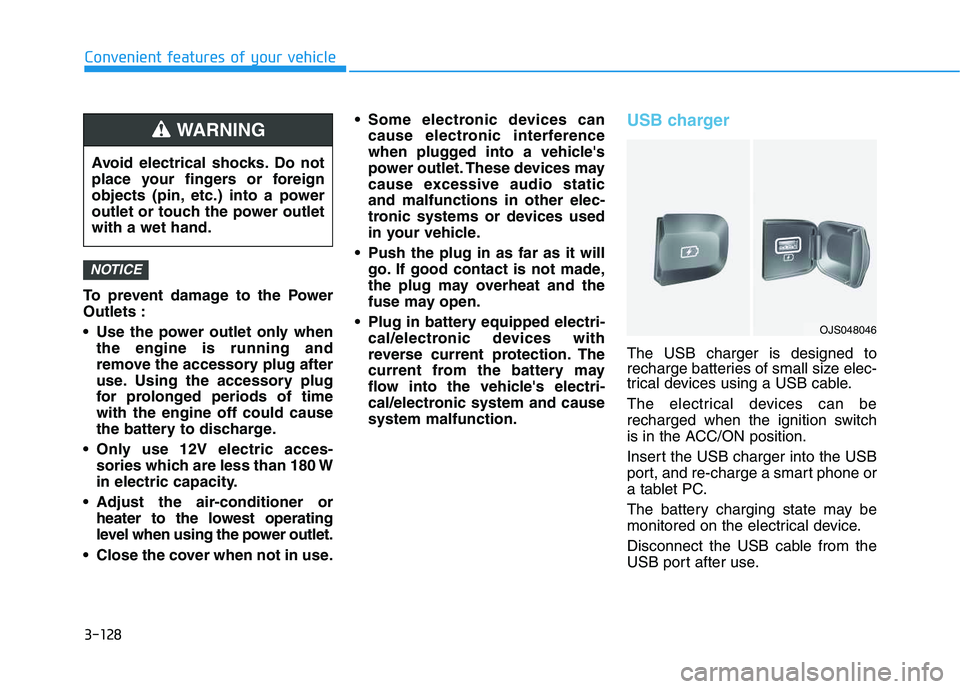
USB charger
The USB charger is designed to
recharge batteries of small size elec-
trical devices using a USB cable.
The electrical devices can be
recharged when the ignition switch
is in the ACC/ON position.
Insert the USB charger into the USB
port, and re-charge a smart phone or
a tablet PC.
The battery charging state may be
monitored on the electrical device.
Disconnect the USB cable from the
USB port after use.
NOTICE
Avoid electrical shocks. Do not
place your fingers or foreign
objects (pin, etc.) into a power
outlet or touch the power outlet
with a wet hand.
WARNING
OJS048046
Page 129 of 480
3-129
Convenient features of your vehicle
3
A smart phone or a tablet PC may
get warmer during the re-charging
process. It does not indicate any
malfunction with the charging sys-
tem.
A smart phone or a tablet PC,
which adopts a different re-charg-
ing method, may not be properly
re-charged. In this case, use an
exclusive charger of your device.
The charging terminal is only to
recharge a device. Do not use the
charging terminal either to turn ON
an audio or to play media on the
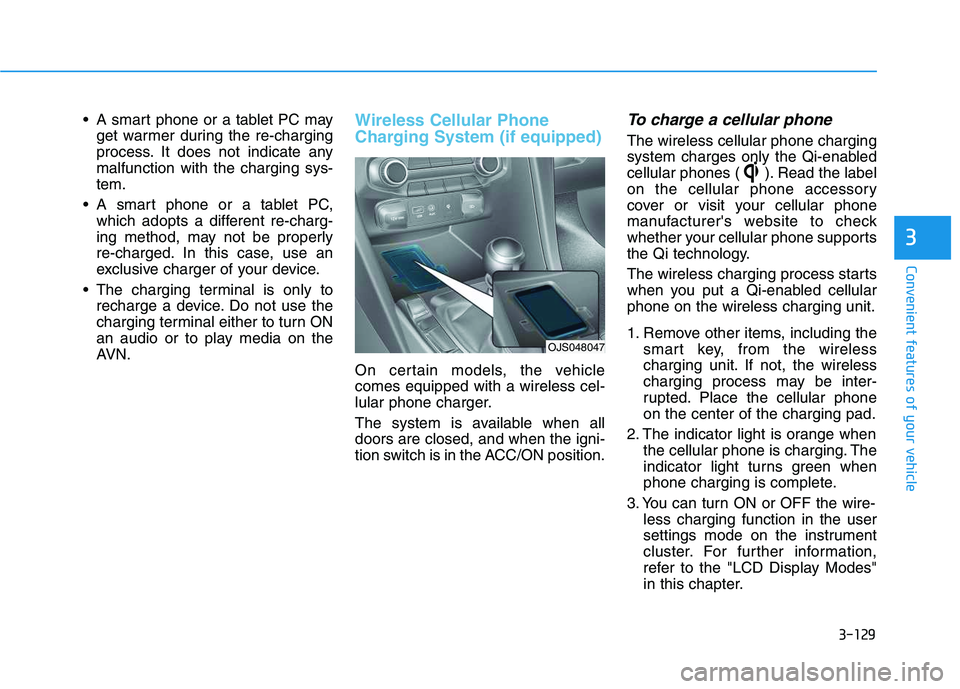
AVN.Wireless Cellular Phone
Charging System (if equipped)
On certain models, the vehicle
comes equipped with a wireless cel-
lular phone charger.
The system is available when all
doors are closed, and when the igni-
tion switch is in the ACC/ON position.
To charge a cellular phone
The wireless cellular phone charging
system charges only the Qi-enabled
cellular phones ( ). Read the label
on the cellular phone accessory
cover or visit your cellular phone
manufacturer's website to check
whether your cellular phone supports
the Qi technology.
The wireless charging process starts
when you put a Qi-enabled cellular
phone on the wireless charging unit.
1. Remove other items, including the
smart key, from the wireless
charging unit. If not, the wireless
charging process may be inter-
rupted. Place the cellular phone
on the center of the charging pad.
2. The indicator light is orange when
the cellular phone is charging. The
indicator light turns green when
phone charging is complete.
3. You can turn ON or OFF the wire-
less charging function in the user
settings mode on the instrument
cluster. For further information,
refer to the "LCD Display Modes"
in this chapter.
OJS048047
Page 130 of 480
3-130
Convenient features of your vehicle
If your cellular phone is not charging:
- Slightly change the position of the
cellular phone on the charging pad.
- Make sure the indicator light is
orange.
The indicator light will blink orange
for 10 seconds if there is a malfunc-
tion in the wireless charging system.
In this case, temporarily stop the
charging process, and re-attempt to
charge your cellular phone again.
The system warns you with a mes-
sage on the LCD display if the cellular
phone is still on the wireless charging
unit after the engine is turned OFF
and the front door is opened.
Information
For some manufacturer's cellular
phones, the system may not warn you
even though the cellular phone is left
on the wireless charging unit. This is
due to the particular characteristic of
the cellular phone and not a malfunc-
tion of the wireless charging. The wireless cellular phone
charging system may not sup-
port certain cellular phones,
which are not verified for the Qi
specification ( ).
When placing your cellular
phone on the charging mat,
position the phone in the middle
of the mat for optimal charging
performance. If your cell phone
is off to the side, the charging
rate may be less and in some
cases the cell phone may experi-
ence higher heat conduction.
In some cases, the wireless
charging may stop temporarily
when the Smart Key is used,
either when starting the vehicle or
locking/unlocking the doors, etc.
When charging certain cellular
phones, the charging indicator
may not change to green when
the cell phone is fully charged. The wireless charging process
may temporarily stop due to the
"self-protection" function of the
cellular phone, when tempera-
ture abnormally increases inside
the wireless cellular phone
charging system. The wireless
charging process restarts, when
temperature falls to a certain
level.
The wireless charging process
may temporarily stop when
there is any metallic item, such
as a coin, between the wireless
cellular phone charging system
and cellular phone.
When charging some cell phones
with the case still applied, the
wireless charging speed may
decrease and the wireless charg-
ing may stop.
If the cellular phone has a thick
cover, the wireless charging may
not be possible.
If the cell phone is not complete-
ly contacting the charging pad,
wireless charging may not oper-
ate properly.
NOTICE
i
Page 131 of 480
3-131
Convenient features of your vehicle
3
Some magnetic items like credit
cards, phone cards or rail tickets
may be damaged if left with the
cellular phone during the charg-
ing process.
If the cellular phone without the
wireless charging function or
the metallic items are placed on
the charging pad, it may cause
slight noise. This noise does not
affect the cellular phone and the
vehicle, because this noise is an
operating sound during deter-
mining the item on the charging
pad.
If the ignition switch is OFF, the
charging also stops.Information
This device complies with Industry
Canada RSS-210 standard.
Operation is subject to the following
two conditions:
1. This device may not cause harmful
interference, and
2. This device must accept any inter-
ference received, including interfer-
ence that may cause undesired
operation.
Clock
Vehicles with Audio system
Select the [SETUP]button on the
audio system ➟Select [Date/Time].
Set time: Set the time displayed on
the audio screen.
Time format: Choose between 12-
hour and 24-hour time formats.
Vehicles with Navigation system
Select the Settings menu on the
Navigation system➟Select
[Date/Time].
GPS time: Displays time according
to the received GNSS time.
24-hour: Switches to 12 hour or 24
hour.
i
Do not attempt to adjust the
clock while driving. Doing so
may result in distracted driving
which may lead to an accident
involving personal injury or
death.
WARNING
Page 136 of 480
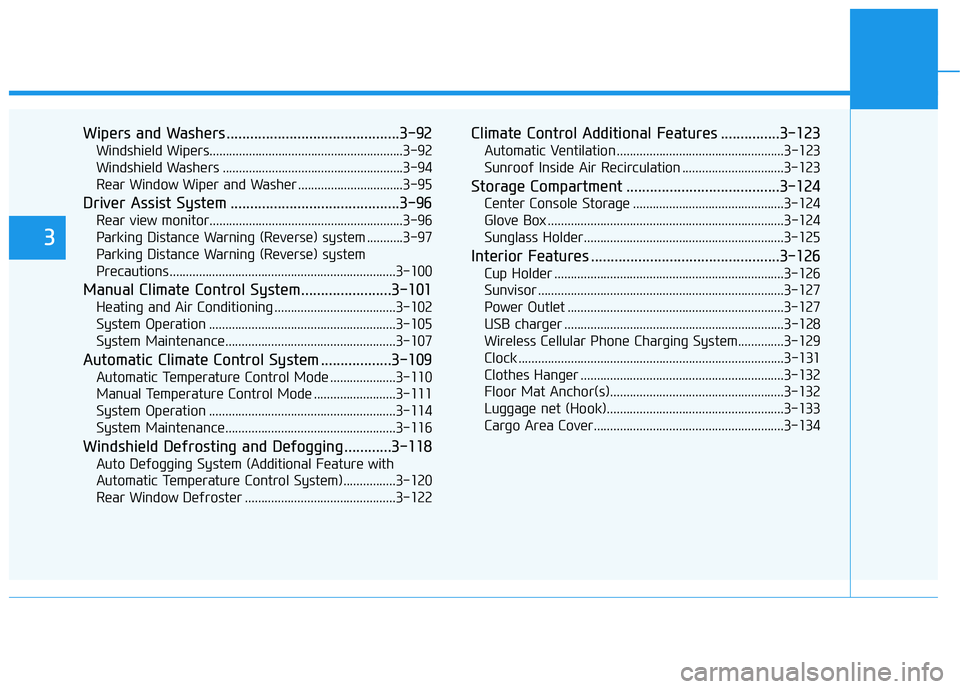
Wipers and Washers ............................................3-92
Windshield Wipers...........................................................3-92
Windshield Washers .......................................................3-94
Rear Window Wiper and Washer ................................3-95
Driver Assist System ...........................................3-96
Rear view monitor...........................................................3-96
Parking Distance Warning (Reverse) system ...........3-97
Parking Distance Warning (Reverse) system
Precautions.....................................................................3-100
Manual Climate Control System.......................3-101
Heating and Air Conditioning .....................................3-102
System Operation .........................................................3-105
System Maintenance....................................................3-107
Automatic Climate Control System ..................3-109
Automatic Temperature Control Mode ....................3-110
Manual Temperature Control Mode .........................3-111
System Operation .........................................................3-114
System Maintenance....................................................3-116
Windshield Defrosting and Defogging ............3-118
Auto Defogging System (Additional Feature with
Automatic Temperature Control System)................3-120
Rear Window Defroster ..............................................3-122
Climate Control Additional Features ...............3-123
Automatic Ventilation ...................................................3-123
Sunroof Inside Air Recirculation ...............................3-123
Storage Compartment .......................................3-124
Center Console Storage ..............................................3-124
Glove Box ........................................................................3-124
Sunglass Holder.............................................................3-125
Interior Features ................................................3-126
Cup Holder ......................................................................3-126
Sunvisor ...........................................................................3-127
Power Outlet ..................................................................3-127
USB charger ...................................................................3-128
Wireless Cellular Phone Charging System..............3-129
Clock .................................................................................3-131
Clothes Hanger ..............................................................3-132
Floor Mat Anchor(s).....................................................3-132
Luggage net (Hook)......................................................3-133
Cargo Area Cover..........................................................3-134
3