phone HYUNDAI VELOSTER 2020 User Guide
[x] Cancel search | Manufacturer: HYUNDAI, Model Year: 2020, Model line: VELOSTER, Model: HYUNDAI VELOSTER 2020Pages: 480, PDF Size: 6.16 MB
Page 139 of 480
3-5
Convenient features of your vehicle
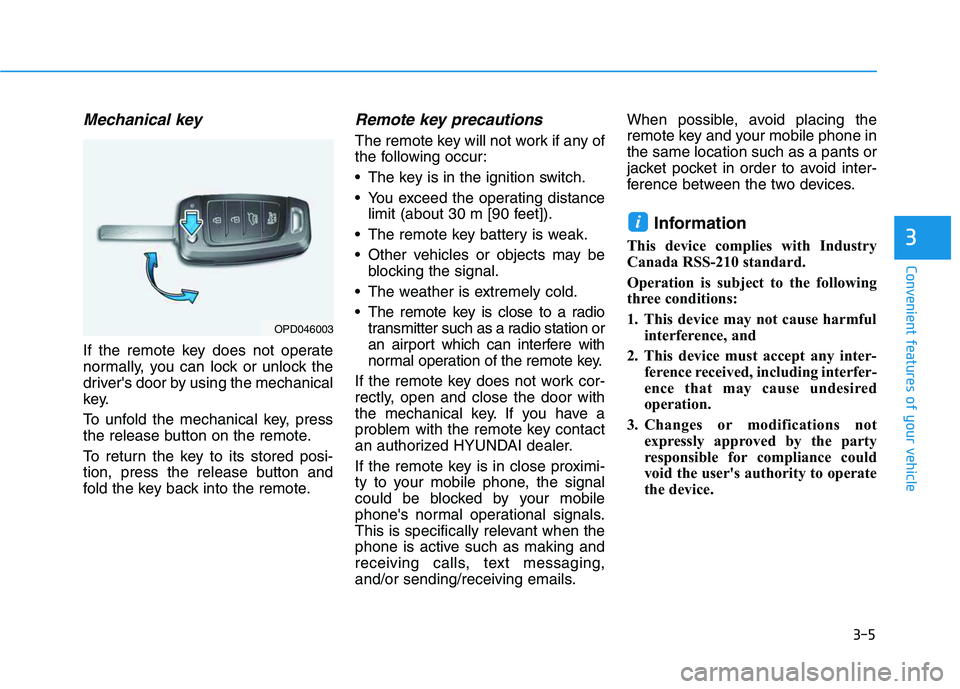
Mechanical key
If the remote key does not operate
normally, you can lock or unlock the
driver's door by using the mechanical
key.
To unfold the mechanical key, press
the release button on the remote.
To return the key to its stored posi-
tion, press the release button and
fold the key back into the remote.
Remote key precautions
The remote key will not work if any of
the following occur:
The key is in the ignition switch.
You exceed the operating distance
limit (about 30 m [90 feet]).
The remote key battery is weak.
Other vehicles or objects may be
blocking the signal.
The weather is extremely cold.
The remote key is close to a radio
transmitter such as a radio station or
an airport which can interfere with
normal operation of the remote key.
If the remote key does not work cor-
rectly, open and close the door with
the mechanical key. If you have a
problem with the remote key contact
an authorized HYUNDAI dealer.
If the remote key is in close proximi-
ty to your mobile phone, the signal
could be blocked by your mobile
phone's normal operational signals.
This is specifically relevant when the
phone is active such as making and
receiving calls, text messaging,
and/or sending/receiving emails.When possible, avoid placing the
remote key and your mobile phone in
the same location such as a pants or
jacket pocket in order to avoid inter-
ference between the two devices.
Information
This device complies with Industry
Canada RSS-210 standard.
Operation is subject to the following
three conditions:
1. This device may not cause harmful
interference, and
2. This device must accept any inter-
ference received, including interfer-
ence that may cause undesired
operation.
3. Changes or modifications not
expressly approved by the party
responsible for compliance could
void the user's authority to operate
the device.
i
3
OPD046003
Page 144 of 480
3-10
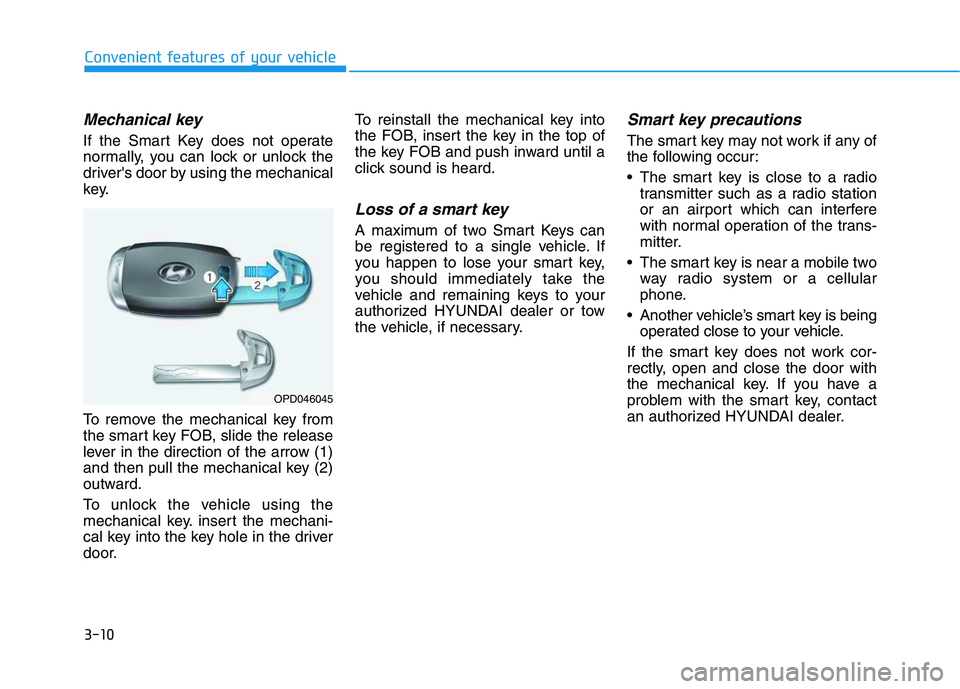
Mechanical key
If the Smart Key does not operate
normally, you can lock or unlock the
driver's door by using the mechanical
key.
To remove the mechanical key from
the smart key FOB, slide the release
lever in the direction of the arrow (1)
and then pull the mechanical key (2)
outward.
To unlock the vehicle using the
mechanical key. insert the mechani-
cal key into the key hole in the driver
door.To reinstall the mechanical key into
the FOB, insert the key in the top of
the key FOB and push inward until a
click sound is heard.
Loss of a smart key
A maximum of two Smart Keys can
be registered to a single vehicle. If
you happen to lose your smart key,
you should immediately take the
vehicle and remaining keys to your
authorized HYUNDAI dealer or tow
the vehicle, if necessary.
Smart key precautions
The smart key may not work if any of
the following occur:
The smart key is close to a radio
transmitter such as a radio station
or an airport which can interfere
with normal operation of the trans-
mitter.
The smart key is near a mobile two
way radio system or a cellular
phone.
Another vehicle’s smart key is being
operated close to your vehicle.
If the smart key does not work cor-
rectly, open and close the door with
the mechanical key. If you have a
problem with the smart key, contact
an authorized HYUNDAI dealer.
Convenient features of your vehicle
OPD046045
Page 145 of 480
3-11
Convenient features of your vehicle
If the smart key is in close proximity
to your mobile phone, the signal
could be blocked by your mobile
phone's normal operational signals.
This is specifically relevant when the
phone is active such as making and
receiving calls, text messaging,
and/or sending/receiving emails.
When possible, avoid keeping the
remote key and your mobile phone in
the same location such as a pants or
jacket pocket in order to avoid inter-
ference between the two devices.
Keep the smart key away from
electromagnetic materials that
blocks electromagnetic waves to
the key surface.
Always have the smart key with
you when leaving the vehicle. If
the smart key is left near the vehi-
cle, the vehicle battery may be dis-
charged.Information
This device complies with Industry
Canada RSS-210 standard.
Operation is subject to the following
three conditions:
1. This device may not cause harmful
interference, and
2. This device must accept any inter-
ference received, including interfer-
ence that may cause undesired
operation.
3. Changes or modifications not
expressly approved by the party
responsible for compliance could
void the user's authority to operate
the device.
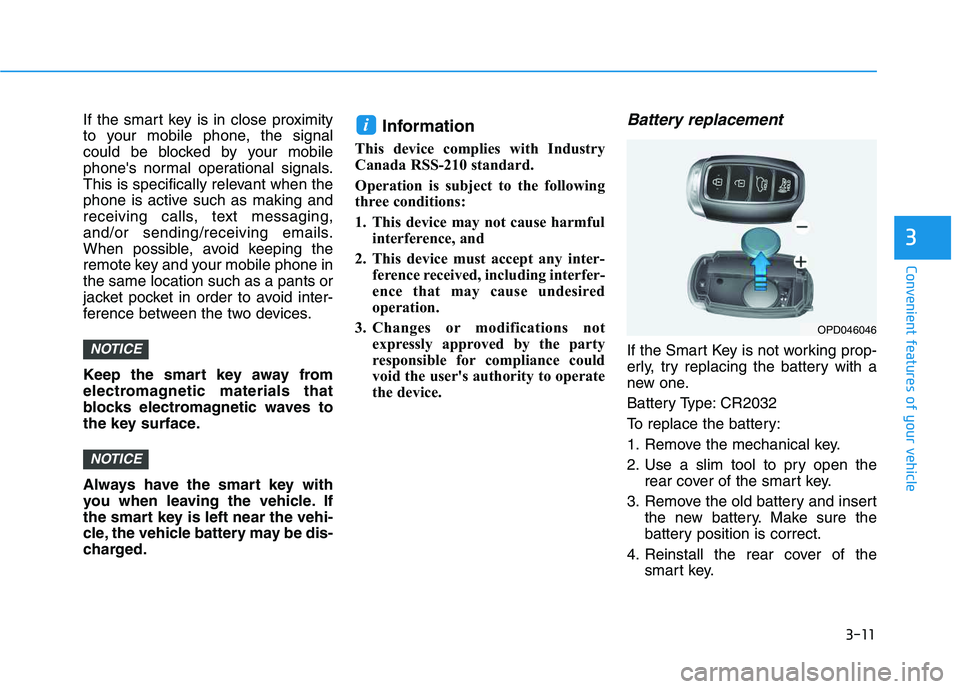
Battery replacement
If the Smart Key is not working prop-
erly, try replacing the battery with a
new one.
Battery Type: CR2032
To replace the battery:
1. Remove the mechanical key.
2. Use a slim tool to pry open the
rear cover of the smart key.
3. Remove the old battery and insert
the new battery. Make sure the
battery position is correct.
4. Reinstall the rear cover of the
smart key.
i
NOTICE
NOTICE
3
OPD046046
Page 173 of 480
3-39
Convenient features of your vehicle
3
Closing the fuel filler door
1. To install the fuel tank cap, turn it
clockwise until it "clicks" one time.
2. Close the fuel filler door until it is
latched securely.Do not get back into a vehicle
once you have begun refuel-
ing. You can generate a build-
up of static electricity by
touching, rubbing or sliding
against any item or fabric
capable of producing static
electricity. Static electricity
discharge can ignite fuel
vapors causing a fire. If you
must re-enter the vehicle, you
should once again eliminate
potentially dangerous static
electricity discharge by touch-
ing a metal part of the vehicle,
away from the fuel filler neck,
nozzle or other gasoline
source, with your bare hand.
When using an approved
portable fuel container, be
sure to place the container on
the ground prior to refueling.
Static electricity discharge
from the container can ignite
fuel vapors causing a fire.
Gasoline is highly flammable
and explosive. Failure to follow
these guidelines may result in
SERIOUS INJURY or DEATH:
Read and follow all warnings
posted at the gas station.
Before refueling, note the
location of the Emergency
Gasoline Shut-Off, if available,
at the gas station.
Before touching the fuel noz-
zle, you should eliminate the
potential build-up of static
electricity by touching a metal
part of the vehicle, a safe dis-
tance away from the fuel filler
neck, nozzle, or other gas
source, with your bare hand.
Do not use cellular phones
while refueling. Electric cur-
rent and/or electronic interfer-
ence from cellular phones can
potentially ignite fuel vapors
and cause a fire.
WARNING
Page 205 of 480
3-71
Convenient features of your vehicle
3
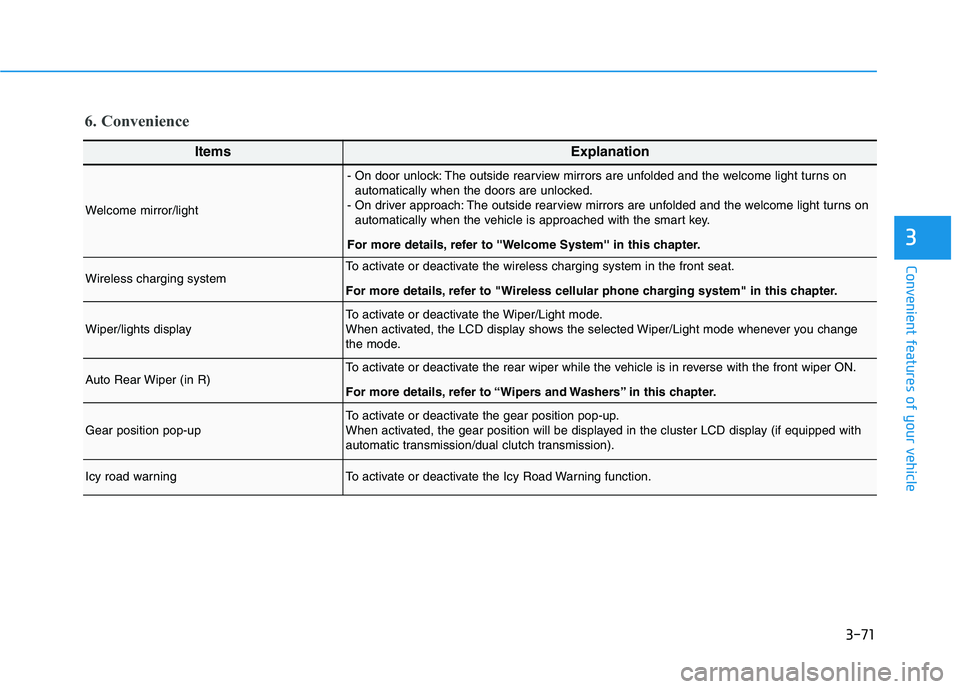
6. Convenience
ItemsExplanation
Welcome mirror/light
- On door unlock: The outside rearview mirrors are unfolded and the welcome light turns on
automatically when the doors are unlocked.
- On driver approach: The outside rearview mirrors are unfolded and the welcome light turns on
automatically when the vehicle is approached with the smart key.
For more details, refer to ''Welcome System'' in this chapter.
Wireless charging systemTo activate or deactivate the wireless charging system in the front seat.
For more details, refer to "Wireless cellular phone charging system" in this chapter.
Wiper/lights displayTo activate or deactivate the Wiper/Light mode.
When activated, the LCD display shows the selected Wiper/Light mode whenever you change
the mode.
Auto Rear Wiper (in R)To activate or deactivate the rear wiper while the vehicle is in reverse with the front wiper ON.
For more details, refer to “Wipers and Washers” in this chapter.
Gear position pop-upTo activate or deactivate the gear position pop-up.
When activated, the gear position will be displayed in the cluster LCD display (if equipped with
automatic transmission/dual clutch transmission).
Icy road warningTo activate or deactivate the Icy Road Warning function.
Page 218 of 480
4-4
Multimedia System
Bluetooth®Wireless
Technology Hands-Free
With the Bluetooth®Wireless
Technology in the vehicle, you can
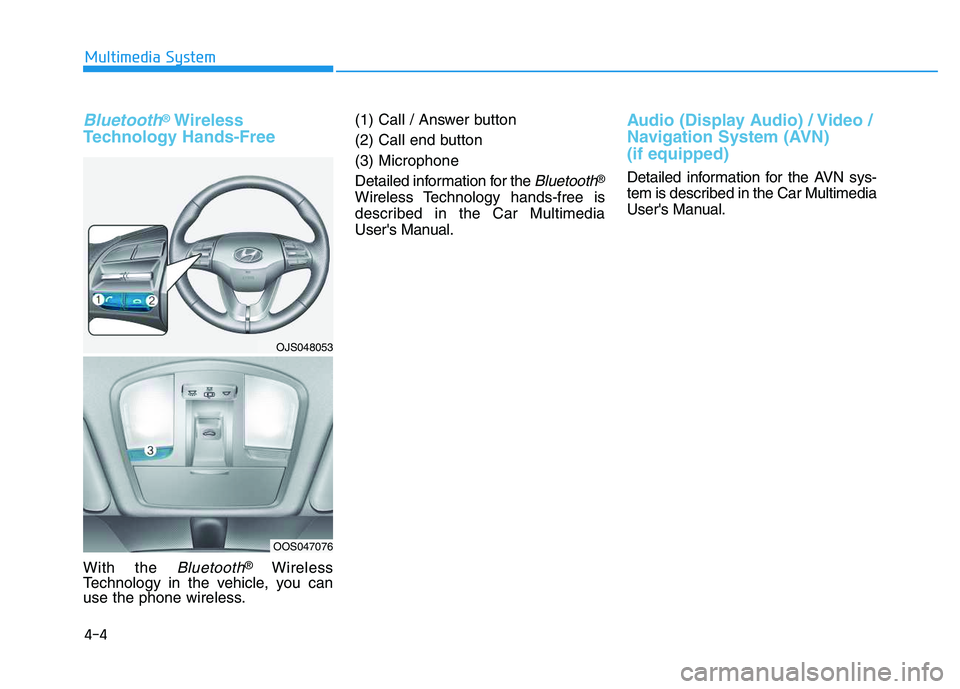
use the phone wireless.(1) Call / Answer button
(2) Call end button
(3) Microphone
Detailed information for the
Bluetooth®
Wireless Technology hands-free is
described in the Car Multimedia
User's Manual.
Audio (Display Audio) / Video /
Navigation System (AVN)
(if equipped)
Detailed information for the AVN sys-
tem is described in the Car Multimedia
User's Manual.
OJS048053
OOS047076
Page 475 of 480
I-6
If the Engine Overheats ....................................................6-6
If the Engine will not Start ...............................................6-3
If the Engine Doesn't Turn Over or
Turns Over Slowly ....................................................6-3
If the Engine Turns Over Normally but
Doesn't Start ..............................................................6-3
If you Have a Flat Tire (With Compact Spare Tire).........6-8
Changing Tires .............................................................6-9
Jack and Tools ..............................................................6-8
Ignition switch ..................................................................5-6
Engine Start/Stop Button ..............................................5-9
Key Ignition Switch .....................................................5-6
Immobilizer System ........................................................3-12
Important safety precautions.............................................2-2
Air Bag Hazards ...........................................................2-2
Always Wear Your Seat Belt ........................................2-2
Control Your Speed ......................................................2-2
Driver Distraction.........................................................2-2
Keep Your Vehicle in Safe Condition ..........................2-2
Restrain All Children....................................................2-2
In Case of an Emergency While Driving .........................6-2
If the Engine Stalls at a Crossroad or Crossing ...........6-2
If the Engine Stalls While Driving...............................6-2
If you Have a Flat Tire While Driving.........................6-3
Inside Rearview Mirror...................................................3-23Instrument Cluster...........................................................3-41
Gauges and Meters .....................................................3-43
Instrument Cluster Control .........................................3-42
LCD Display Messages ..............................................3-58
Transmission shift indicator .......................................3-46
Warning and Indicator Lights.....................................3-47
Instrument Cluster Control .............................................3-42
Instrument Panel Overview ..............................................1-5
Interior Care ....................................................................7-83
Interior Features ............................................................3-126
Cargo Area Cover .....................................................3-134
Clock ........................................................................3-131
Clothes Hanger .........................................................3-132
Cup Holder ...............................................................3-126
Floor Mat Anchor(s) .................................................3-132
Luggage net (Hook) .................................................3-133
Power Outlet.............................................................3-127
Sunvisor ....................................................................3-127
USB charger .............................................................3-128
Wireless Cellular Phone Charging System ..............3-129
Interior Light Bulb Replacement ....................................7-77
Interior Lights .................................................................3-88
Front Door Lamp........................................................3-89
Front Map Lamp ........................................................3-89
Front room lamp .........................................................3-89
Interior lamp AUTO cut .............................................3-88
Luggage compartment lamp .......................................3-90
Rear Room Lamp .......................................................3-89
Vanity mirror lamp .....................................................3-90
Interior Overview..............................................................1-4
Index
I
Page 480 of 480
I-11
Windshield Washers ........................................................3-94
Windshield Wipers ..........................................................3-92
Winter Driving ..............................................................5-124
Snow or Icy Conditions............................................5-124
Winter Precautions ...................................................5-124
Wiper Blades ...................................................................7-31
Blade Inspection .........................................................7-31
Blade Replacement .....................................................7-31
Wipers and Washers ........................................................3-92
Rear Window Wiper and Washer ...............................3-95
Windshield Washers ...................................................3-94
Windshield Wipers .....................................................3-92
Wireless Cellular Phone Charging System ...................3-129
I
Index