lights HYUNDAI VELOSTER 2022 Owner's Manual
[x] Cancel search | Manufacturer: HYUNDAI, Model Year: 2022, Model line: VELOSTER, Model: HYUNDAI VELOSTER 2022Pages: 446, PDF Size: 7.37 MB
Page 137 of 446
3-59
Convenient features of your vehicle
3
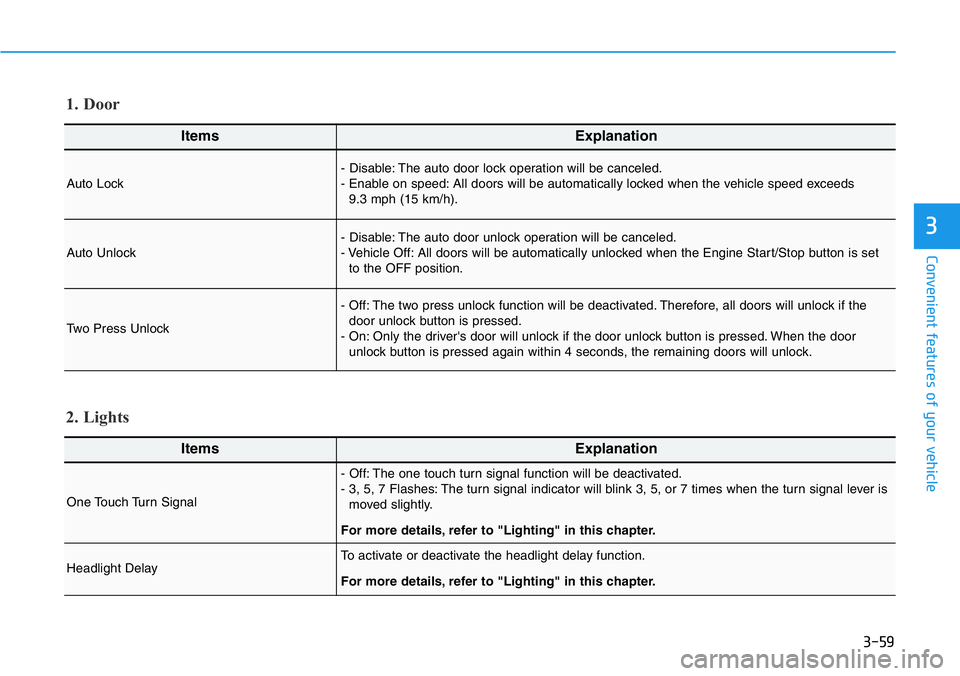
ItemsExplanation
Auto Lock- Disable: The auto door lock operation will be canceled.
- Enable on speed: All doors will be automatically locked when the vehicle speed exceeds
9.3 mph (15 km/h).
Auto Unlock- Disable: The auto door unlock operation will be canceled.
- Vehicle Off: All doors will be automatically unlocked when the Engine Start/Stop button is set
to the OFF position.
Two Press Unlock
- Off: The two press unlock function will be deactivated. Therefore, all doors will unlock if the
door unlock button is pressed.
- On: Only the driver's door will unlock if the door unlock button is pressed. When the door
unlock button is pressed again within 4 seconds, the remaining doors will unlock.
1. Door
ItemsExplanation
One Touch Turn Signal
- Off: The one touch turn signal function will be deactivated.
- 3, 5, 7 Flashes: The turn signal indicator will blink 3, 5, or 7 times when the turn signal lever is
moved slightly.
For more details, refer to "Lighting" in this chapter.
Headlight DelayTo activate or deactivate the headlight delay function.
For more details, refer to "Lighting" in this chapter.
2. Lights
Page 138 of 446
3-60
Convenient features of your vehicle
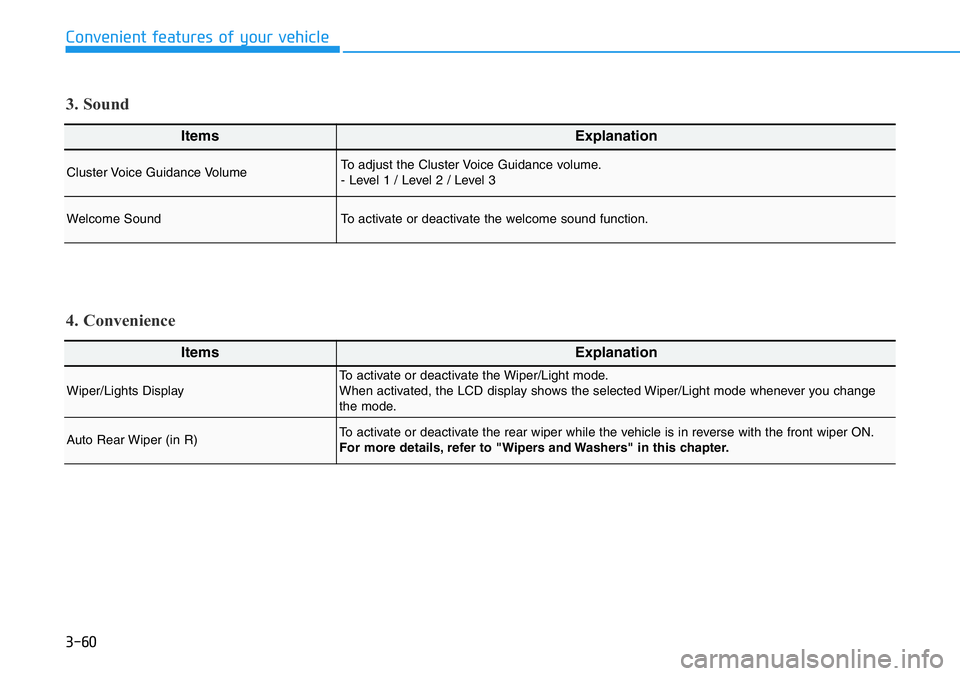
ItemsExplanation
Wiper/Lights DisplayTo activate or deactivate the Wiper/Light mode.
When activated, the LCD display shows the selected Wiper/Light mode whenever you change
the mode.
Auto Rear Wiper (in R)To activate or deactivate the rear wiper while the vehicle is in reverse with the front wiper ON.
For more details, refer to "Wipers and Washers" in this chapter.
4. Convenience
ItemsExplanation
Cluster Voice Guidance VolumeTo adjust the Cluster Voice Guidance volume.
- Level 1 / Level 2 / Level 3
Welcome SoundTo activate or deactivate the welcome sound function.
3. Sound
Page 146 of 446
3-68
Convenient features of your vehicle
LIGHTING
Exterior Lights
Lighting control
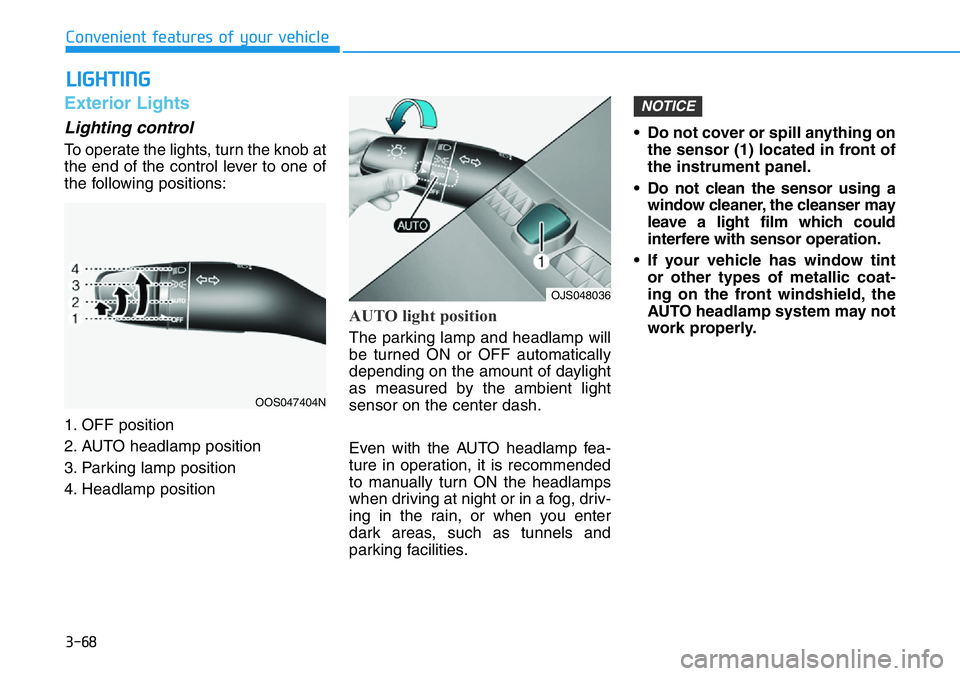
To operate the lights, turn the knob at
the end of the control lever to one of
the following positions:
1. OFF position
2. AUTO headlamp position
3. Parking lamp position
4. Headlamp position
AUTO light position
The parking lamp and headlamp will
be turned ON or OFF automatically
depending on the amount of daylight
as measured by the ambient light
sensor on the center dash.
Even with the AUTO headlamp fea-
ture in operation, it is recommended
to manually turn ON the headlamps
when driving at night or in a fog, driv-
ing in the rain, or when you enter
dark areas, such as tunnels and
parking facilities.• Do not cover or spill anything on
the sensor (1) located in front of
the instrument panel.
• Do not clean the sensor using a
window cleaner, the cleanser may
leave a light film which could
interfere with sensor operation.
• If your vehicle has window tint
or other types of metallic coat-
ing on the front windshield, the
AUTO headlamp system may not
work properly.
NOTICE
OOS047404N
OJS048036
Page 149 of 446
3-71
Convenient features of your vehicle
Battery saver function
The purpose of this feature is to pre-
vent the battery from being dis-
charged. The system automatically
turns off the parking lamp when the
driver turns the vehicle off and opens
the driver-side door.
With this feature, the parking lamps
will turn off automatically if the driver
parks on the side of road at night.
If necessary, to keep the lamps on
when the vehicle is turned off, perform
the following:
1) Open the driver-side door.
2) Turn the parking lamps OFF and
ON again using the headlamp
switch on the steering column.
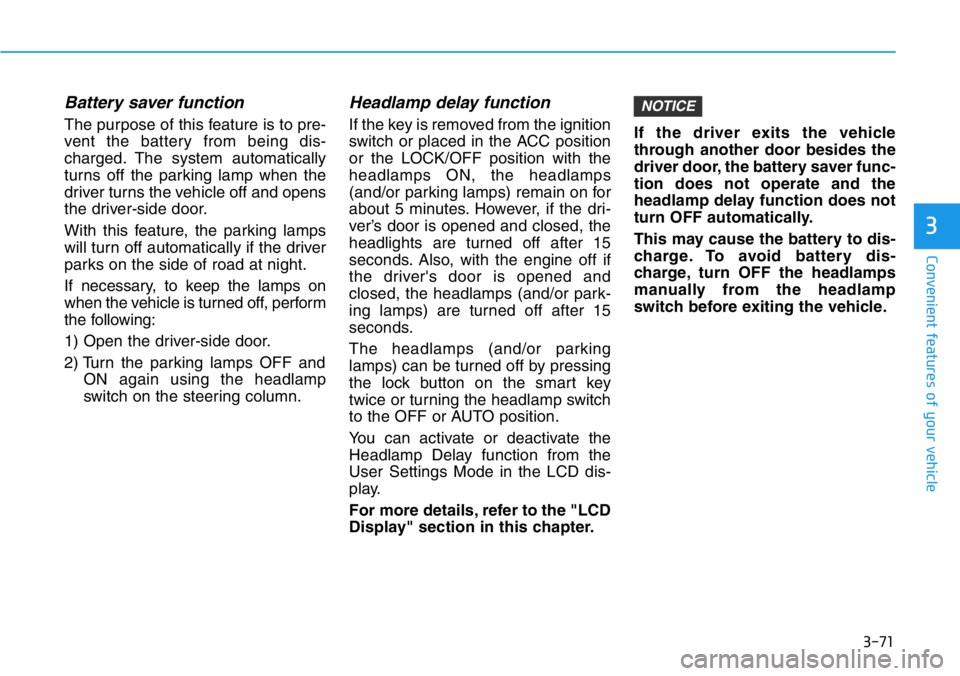
Headlamp delay function
If the key is removed from the ignition
switch or placed in the ACC position
or the LOCK/OFF position with the
headlamps ON, the headlamps
(and/or parking lamps) remain on for
about 5 minutes. However, if the dri-
ver’s door is opened and closed, the
headlights are turned off after 15
seconds. Also, with the engine off if
the driver's door is opened and
closed, the headlamps (and/or park-
ing lamps) are turned off after 15
seconds.
The headlamps (and/or parking
lamps) can be turned off by pressing
the lock button on the smart key
twice or turning the headlamp switch
to the OFF or AUTO position.
You can activate or deactivate the
Headlamp Delay function from the
User Settings Mode in the LCD dis-
play.
For more details, refer to the "LCD
Display" section in this chapter.If the driver exits the vehicle
through another door besides the
driver door, the battery saver func-
tion does not operate and the
headlamp delay function does not
turn OFF automatically.
This may cause the battery to dis-
charge. To avoid battery dis-
charge, turn OFF the headlamps
manually from the headlamp
switch before exiting the vehicle.
NOTICE
3
Page 150 of 446
3-72
Daytime running light (DRL)
The Daytime Running Lights (DRL)
can make it easier for others to see
the front of your vehicle during the
day, especially after dawn and before
sunset.
The DRL system will turn the dedi-
cated lamp OFF when :
• The headlamps are ON.
• The parking lamps are ON.
• The vehicle is turned off.
• The parking brake is engaged.
Interior Lights
Do not use the interior lights for
extended periods when the vehi-
cle is turned off or the battery will
discharge.
Interior lamp AUTO cut
The interior lamps will automatically
go off approximately 20 minutes after
the engine is turned off and the
doors are closed. If a door is opened,
the lamp will go off 40 minutes after
the engine is turned off. If the doors
are locked by the smart key and the
vehicle enters the armed stage of the
theft alarm system, the lamps will go
off five seconds later.
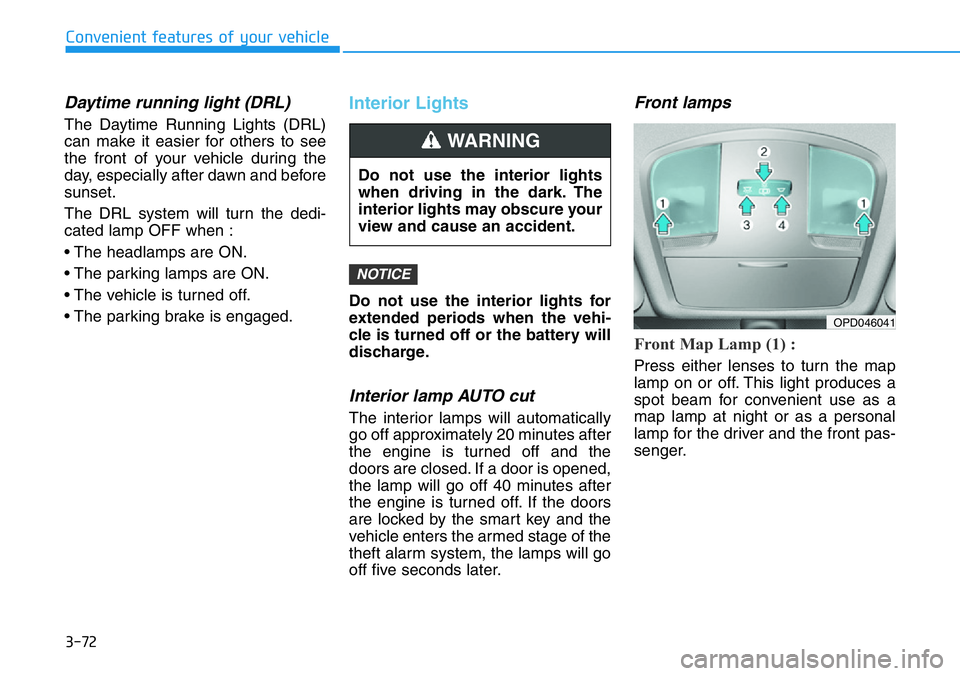
Front lamps
Front Map Lamp (1) :
Press either lenses to turn the map
lamp on or off. This light produces a
spot beam for convenient use as a
map lamp at night or as a personal
lamp for the driver and the front pas-
senger.
NOTICE
Convenient features of your vehicle
Do not use the interior lights
when driving in the dark. The
interior lights may obscure your
view and cause an accident.
WARNING
OPD046041
Page 154 of 446
3-76
Convenient features of your vehicle
System operation
Display and control
• High Beam Assist will operate by
following the procedure below.
- Place the headlamp switch in the
AUTO position and push the
headlamp lever towards the
instrument cluster. The High
Beam Assist ( ) indicator light
will illuminate on the cluster and
the system will be enabled.
- When the system is enabled,
high beam will turn on when vehi-
cle speed is above 25 mph (40
km/h). When vehicle speed is
below 15 mph (25 km/h), high
beam will not turn on.
- The High Beam ( ) indicator
light will illuminate on the cluster
when high beam is on.• When High Beam Assist is operat-
ing, if the headlamp lever or switch
is used, the system operates as
follow:
- If the headlamp lever is pulled
towards you when the high beam
is off, the high beam will turn on
without High Beam Assist can-
celed. When you let go of the
headlamp lever, the lever will
move to the middle and the high
beam will turn off.
- If the headlamp lever is pulled
towards you when the high beam
is on by High Beam Assist, low
beam will be on and the system
will turn off.
- If the headlamp switch is placed
from AUTO to another position
(headlamp/position/off), High
Beam Assist will turn off and the
corresponding lamp will turn on.• When High Beam Assist is operat-
ing, high beam switches to low
beam if any of the following condi-
tions occur:
- When the headlamp of an
oncoming vehicle is detected.
- When the tail lamp of a vehicle in
front is detected.
- When the headlamp or tail lamp
of a motorcycle or a bicycle is
detected.
- When the surrounding ambient
light is bright enough that high
beams are not required.
- When streetlights or other lights
are detected.
Page 198 of 446
5-4
Driving your vehicle
Before Entering the Vehicle
• Be sure all windows, outside mir-
ror(s), and outside lights are clean
and unobstructed.
• Remove frost, snow, or ice.
• Visually check the tires for uneven
wear and damage.
• Check under the vehicle for any
sign of leaks.
• Be sure there are no obstacles
behind you if you intend to back up.
Before Starting
• Make sure the hood, the liftgate,
and the doors are securely closed
and locked.
• Adjust the position of the seat and
steering wheel.
• Adjust the inside and side view mir-
rors.
• Verify all the lights work.
• Fasten your seatbelt. Check that all
passengers have fastened their
seatbelts.
• Check the gauges and indicators in
the instrument panel and the mes-
sages on the instrument display
when the ignition switch is in the
ON position.
• Check that any items you are car-
rying are stored properly or fas-
tened down securely. CALIFORNIA PROPOSITION 65
WARNING
Engine exhaust and a wide vari-
ety of automobile components
including components found in
the interior furnishings in a
vehicle, contain or emit harmful
chemicals known to the State of
California to cause cancer and
birth defects and reproductive
harm. In addition, certain fluids
contained in vehicles and cer-
tain products of components
contain or emit chemicals
known to the State of California
to cause cancer and birth
defects or other reproductive
harm.WARNING
BEFORE DRIVING
Page 202 of 446
5-8
Driving your vehicle
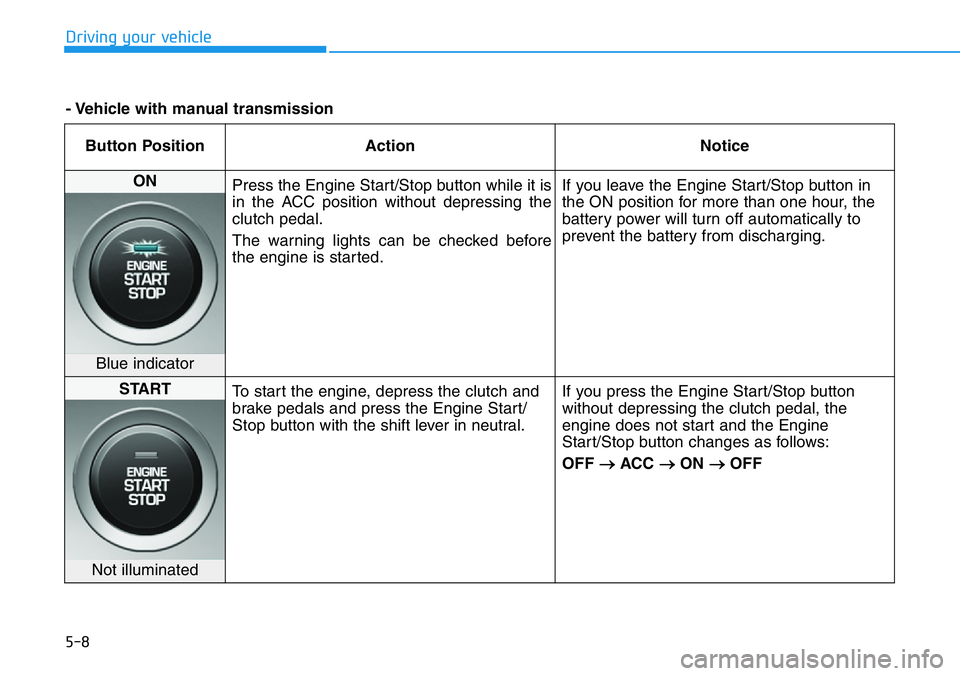
Button Position Action Notice
ON
Press the Engine Start/Stop button while it is
in the ACC position without depressing the
clutch pedal.
The warning lights can be checked before
the engine is started.If you leave the Engine Start/Stop button in
the ON position for more than one hour, the
battery power will turn off automatically to
prevent the battery from discharging.
Blue indicator
START
To start the engine, depress the clutch and
brake pedals and press the Engine Start/
Stop button with the shift lever in neutral.If you press the Engine Start/Stop button
without depressing the clutch pedal, the
engine does not start and the Engine
Start/Stop button changes as follows:
OFF
→ACC →ON →OFF
Not illuminated
- Vehicle with manual transmission
Page 231 of 446
5-37
Driving your vehicle
5
ESC operation
ESC ON condition
When the ignition switch is
in the ON position, the ESC
and the ESC OFF indicator
lights illuminate for approxi-
mately three seconds and goes off,
then the ESC is turned on. (After a
new ignition cycle, the ESC ON
mode is always activated (default
setting).)
You may select between the follow-
ing state of ESC:
• ESC NORMAL activated (ESC
ON)
• ESC SPORT activated (ESC
SPORT indicator illuminates)
• ESC deactivated (ESC OFF indi-
cator illuminates)
When operating
When the ESC is in operation, the
ESC indicator light blinks:
• When you apply your brakes under
conditions which may lock the
wheels, you may hear sounds from
the brakes, or feel a corresponding
sensation in the brake pedal. This
is normal and it means your ESC is
active.
• When the ESC operates, the
engine may not respond to the
accelerator as it does under rou-
tine conditions.
• If the Cruise Control was in use
when the ESC activates, the
Cruise Control automatically disen-
gages. The Cruise Control can be
reengaged when the road condi-
tions allow.See "Cruise Control
System" later in this chapter.(if
equipped)• When moving out of the mud or
driving on a slippery road, the
engine rpm (revolutions per
minute) may not increase even if
you press the accelerator pedal
deeply. This is to maintain the sta-
bility and traction of the vehicle and
does not indicate a problem.
Page 234 of 446
5-40
Driving your vehicle
Indicator lights
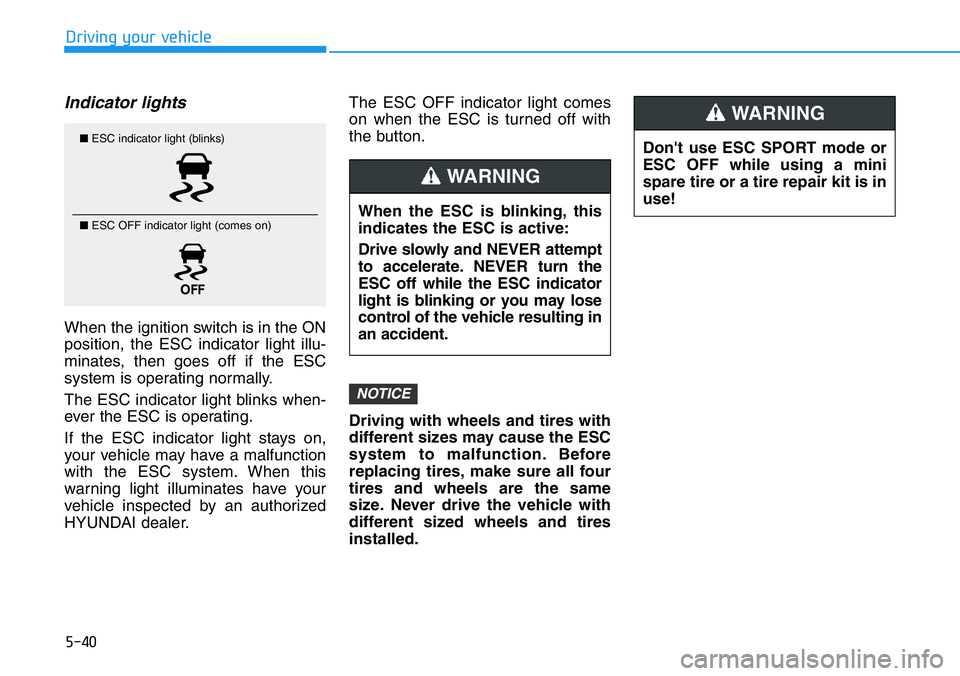
When the ignition switch is in the ON
position, the ESC indicator light illu-
minates, then goes off if the ESC
system is operating normally.
The ESC indicator light blinks when-
ever the ESC is operating.
If the ESC indicator light stays on,
your vehicle may have a malfunction
with the ESC system. When this
warning light illuminates have your
vehicle inspected by an authorized
HYUNDAI dealer.The ESC OFF indicator light comes
on when the ESC is turned off with
the button.
Driving with wheels and tires with
different sizes may cause the ESC
system to malfunction. Before
replacing tires, make sure all four
tires and wheels are the same
size. Never drive the vehicle with
different sized wheels and tires
installed.
NOTICE
Don't use ESC SPORT mode or
ESC OFF while using a mini
spare tire or a tire repair kit is in
use!
WARNING
When the ESC is blinking, this
indicates the ESC is active:
Drive slowly and NEVER attempt
to accelerate. NEVER turn the
ESC off while the ESC indicator
light is blinking or you may lose
control of the vehicle resulting in
an accident.
WARNING
■ESC indicator light (blinks)
■ ESC OFF indicator light (comes on)