clutch HYUNDAI VELOSTER N 2022 User Guide
[x] Cancel search | Manufacturer: HYUNDAI, Model Year: 2022, Model line: VELOSTER N, Model: HYUNDAI VELOSTER N 2022Pages: 446, PDF Size: 9.71 MB
Page 209 of 446
5-15
Driving your vehicle
5
Rev matching
The Rev Matching system automati-
cally helps synchronize engine rpm
with the optimal speed of the gear
about to be engaged which reduces
the impact of clutch connection and
improves gear shift response.
Information
• Fully depress the clutch pedal.
Without the clutch pedal fully
depressed, the system may not
response correctly.
• The system does not operate when
backing up.
• Rev Matching controls the engine
speed up to the rev limit, but the
function cannot prevent over-
revving caused by shifting mistake.
i
•In the event your vehicle
leaves the roadway, do not
steer sharply. Instead, slow
down before pulling back into
the travel lanes.
•HYUNDAI recommends you
follow all posted speed limits.
To reduce the risk of SERIOUS
INJURY or DEATH:
•ALWAYS wear your seatbelt.
In a collision, an unbelted
occupant is significantly more
likely to be seriously injured
or killed than a properly belt-
ed occupant.
•Avoid high speeds when cor-
nering or turning.
•Do not make quick steering
wheel movements, such as
sharp lane changes or fast,
sharp turns.
•The risk of rollover is greatly
increased if you lose control
of your vehicle at highway
speeds.
•Loss of control often occurs if
two or more wheels drop off
the roadway and the driver
over steers to reenter the
roadway.
WARNING
Page 211 of 446
5-17
Driving your vehicle
5
Rev Matching operation
Engine speed is automatically syn-
chronized with the next selected
gear. The accelerator pedal does not
have to be depressed to speed up
the engine rpm.
• Clutch depressed with the gear
engaged
At once, engine speed automatically
decreases right after the clutch is
disengaged, but the selected gear is
fixed and then the engine rpm
reverts to the selected gear's target
speed. This operation method gives
more comfortable feeling in public
road driving.
• Upshifting
Engine speed will automatically
decrease and stay at the target
engine speed before the clutch is
engaged.
• Downshifting
Engine speed will automatically
increase and stay at the target
engine speed.
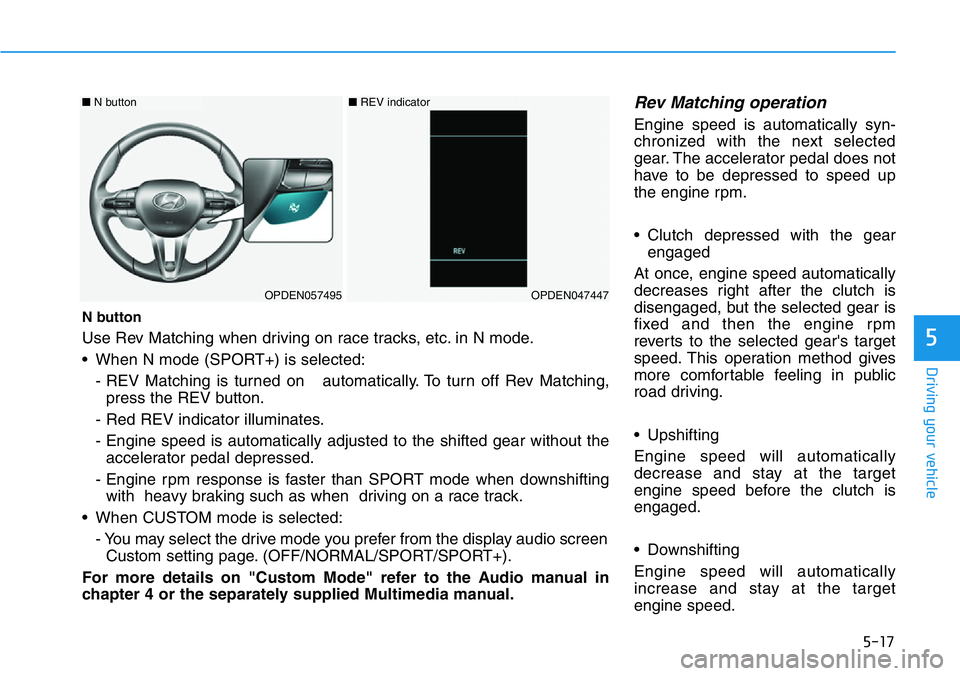
N button
Use Rev Matching when driving on race tracks, etc. in N mode.
• When N mode (SPORT+) is selected:
- REV Matching is turned on automatically. To turn off Rev Matching,
press the REV button.
- Red REV indicator illuminates.
- Engine speed is automatically adjusted to the shifted gear without the
accelerator pedal depressed.
- Engine rpm response is faster than SPORT mode when downshifting
with heavy braking such as when driving on a race track.
• When CUSTOM mode is selected:
- You may select the drive mode you prefer from the display audio screen
Custom setting page. (OFF/NORMAL/SPORT/SPORT+).
For more details on "Custom Mode" refer to the Audio manual in
chapter 4 or the separately supplied Multimedia manual.
OPDEN057495OPDEN047447
■N button ■REV indicator
Page 213 of 446
5-19
Driving your vehicle
5
Dual clutch transmission oper-
ation
The dual clutch transmission has
eight forward speeds and one
reverse speed. The individual speeds
are selected automatically when the
shift lever is in the D (Drive) position.
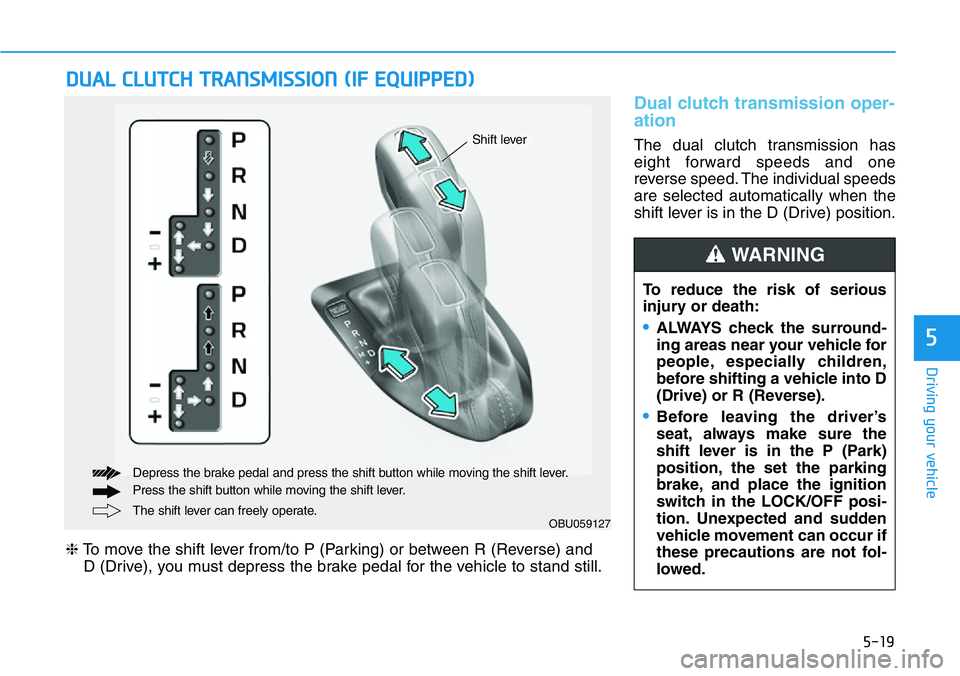
DUAL CLUTCH TRANSMISSION (IF EQUIPPED)
OBU059127The shift lever can freely operate. Depress the brake pedal and press the shift button while moving the shift lever.
Press the shift button while moving the shift lever.
❈To move the shift lever from/to P (Parking) or between R (Reverse) and
D (Drive), you must depress the brake pedal for the vehicle to stand still.
Shift lever
To reduce the risk of serious
injury or death:
•ALWAYS check the surround-
ing areas near your vehicle for
people, especially children,
before shifting a vehicle into D
(Drive) or R (Reverse).
•Before leaving the driver’s
seat, always make sure the
shift lever is in the P (Park)
position, the set the parking
brake, and place the ignition
switch in the LOCK/OFF posi-
tion. Unexpected and sudden
vehicle movement can occur if
these precautions are not fol-
lowed.
WARNING
Page 214 of 446
5-20
Driving your vehicle
• The Dual Clutch Transmission gives
the driving feel of a manual trans-
mission, yet provides the ease of a
fully automatic transmission. Unlike
a traditional automatic transmis-
sion, the gear shifting can be felt
(and heard) on the dual clutch
transmission.
- Think of it as an automatically
shifting manual transmission.
- Shift into Drive range and get fully
automatic shifting, similar to a
conventional automatic transmis-
sion.
• Dual clutch transmission adopts
wet-type dual clutch, which is dif-
ferent from torque converter of
automatic transmission, and
shows better acceleration perform-
ance during driving. But, initial
launch might be little bit slower
than Automatic Transmission.
• The wet-type clutch transfers
torque and provides a direct driving
feeling which may feel different
from a conventional automatic
transmission with a torque convert-
er. This may be more noticeable
when starting from a stop or low
vehicle speed.• When rapidly accelerating at low
vehicle speed, engine could rev at
high rpm depending on vehicle
drive condition.
• For smooth launch uphill, press
down the accelerator pedal
smoothly depending on the current
conditions.
• If you release your foot from the
accelerator pedal at low vehicle
speed, you may feel strong engine
brake, which is similar to manual
transmission.
• When driving downhill, you may
use Sports Mode to downshift to a
lower gear in order to control your
speed without using the brake
pedal excessively.
• When you turn the engine on and
off, you may hear clicking sounds
as the system goes through a self
test. This is a normal sound for the
Dual Clutch Transmission.
• Always come to a complete stop
before shifting into D (Drive) or R
(Reverse).
• Do not put the shift lever in N
(Neutral) while driving.
•When using Manual Shift Mode,
use caution when shifting from
a higher gear to a lower gear on
slippery roads. This could
cause the tires to slip and may
result in an accident.
•To avoid damage to your
transmission, do not try to
accelerate with the shift lever
in R (Reverse) or any forward
gear position with the brake
engaged.
•When stopped on a slope, do
not hold the vehicle with accel-
erator pedal. Engage the serv-
ice brake or the parking brake.
Page 215 of 446
5-21
Driving your vehicle
5
• Always come to a complete stop
before shifting into D (Drive) or
R (Reverse).
• Do not put the shift lever in N
(Neutral) while driving.
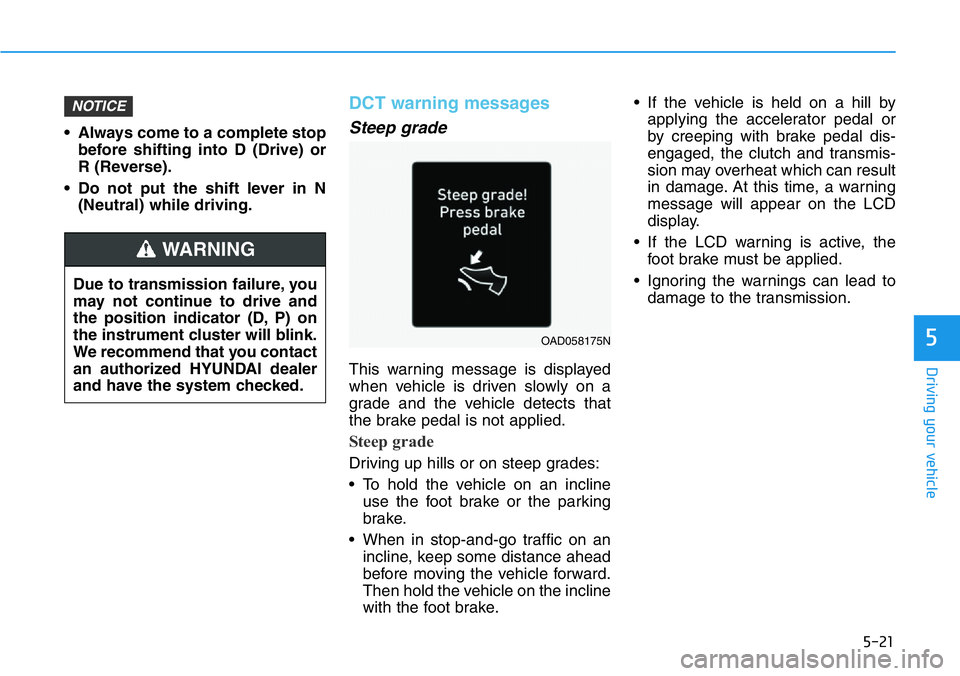
DCT warning messages
Steep grade
This warning message is displayed
when vehicle is driven slowly on a
grade and the vehicle detects that
the brake pedal is not applied.
Steep grade
Driving up hills or on steep grades:
• To hold the vehicle on an incline
use the foot brake or the parking
brake.
• When in stop-and-go traffic on an
incline, keep some distance ahead
before moving the vehicle forward.
Then hold the vehicle on the incline
with the foot brake.• If the vehicle is held on a hill by
applying the accelerator pedal or
by creeping with brake pedal dis-
engaged, the clutch and transmis-
sion may overheat which can result
in damage. At this time, a warning
message will appear on the LCD
display.
• If the LCD warning is active, the
foot brake must be applied.
• Ignoring the warnings can lead to
damage to the transmission.
NOTICE
Due to transmission failure, you
may not continue to drive and
the position indicator (D, P) on
the instrument cluster will blink.
We recommend that you contact
an authorized HYUNDAI dealer
and have the system checked.
WARNING
OAD058175N
Page 216 of 446
5-22
Driving your vehicle
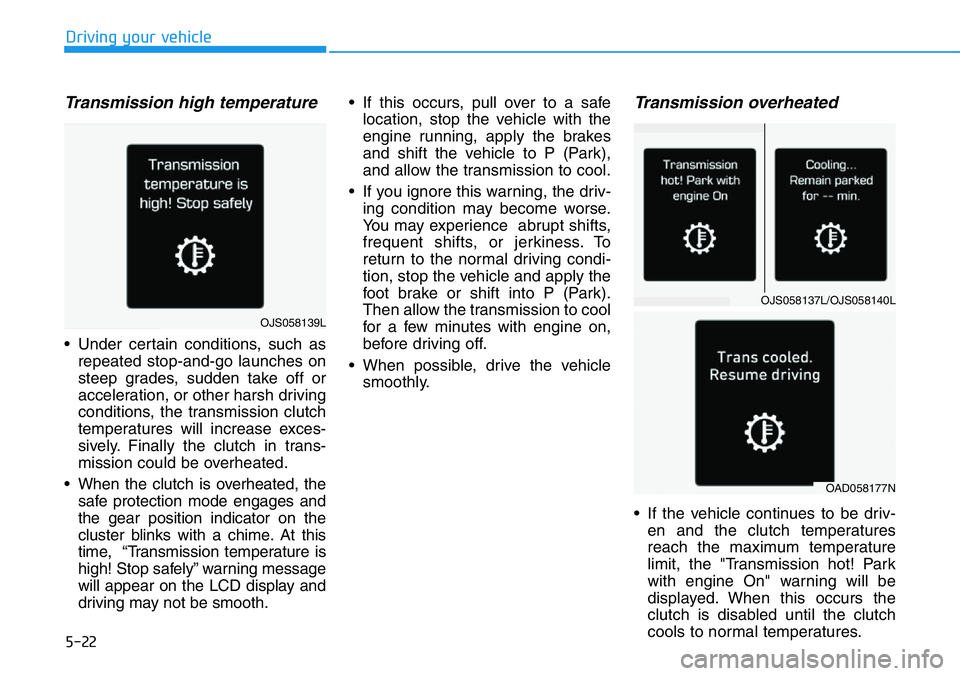
Transmission high temperature
• Under certain conditions, such as
repeated stop-and-go launches on
steep grades, sudden take off or
acceleration, or other harsh driving
conditions, the transmission clutch
temperatures will increase exces-
sively. Finally the clutch in trans-
mission could be overheated.
• When the clutch is overheated, the
safe protection mode engages and
the gear position indicator on the
cluster blinks with a chime. At this
time, “Transmission temperature is
high! Stop safely” warning message
will appear on the LCD display and
driving may not be smooth.• If this occurs, pull over to a safe
location, stop the vehicle with the
engine running, apply the brakes
and shift the vehicle to P (Park),
and allow the transmission to cool.
• If you ignore this warning, the driv-
ing condition may become worse.
You may experience abrupt shifts,
frequent shifts, or jerkiness. To
return to the normal driving condi-
tion, stop the vehicle and apply the
foot brake or shift into P (Park).
Then allow the transmission to cool
for a few minutes with engine on,
before driving off.
• When possible, drive the vehicle
smoothly.
Transmission overheated
• If the vehicle continues to be driv-
en and the clutch temperatures
reach the maximum temperature
limit, the "Transmission hot! Park
with engine On" warning will be
displayed. When this occurs the
clutch is disabled until the clutch
cools to normal temperatures.
OJS058137L/OJS058140L
OAD058177N
OJS058139L
Page 222 of 446
5-28
Driving your vehicle
Shift-lock system
For your safety, the dual clutch trans-
mission has a shift-lock system
which prevents shifting the transmis-
sion from P (Park) into R (Reverse)
unless the brake pedal is depressed.
To shift the transmission from P
(Park) into R (Reverse):
1. Depress and hold the brake pedal.
2. Start the engine or place the igni-
tion switch in the ON position.
3. Move the shift lever.
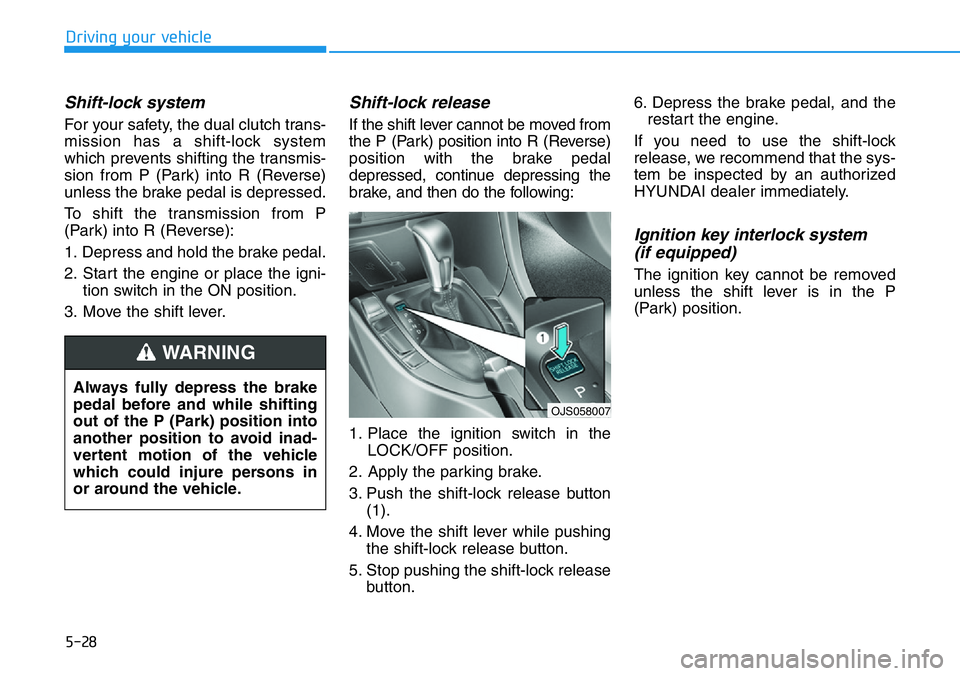
Shift-lock release
If the shift lever cannot be moved from
the P (Park) position into R (Reverse)
position with the brake pedal
depressed, continue depressing the
brake, and then do the following:
1. Place the ignition switch in the
LOCK/OFF position.
2. Apply the parking brake.
3. Push the shift-lock release button
(1).
4. Move the shift lever while pushing
the shift-lock release button.
5. Stop pushing the shift-lock release
button.6. Depress the brake pedal, and the
restart the engine.
If you need to use the shift-lock
release, we recommend that the sys-
tem be inspected by an authorized
HYUNDAI dealer immediately.
Ignition key interlock system
(if equipped)
The ignition key cannot be removed
unless the shift lever is in the P
(Park) position.
Always fully depress the brake
pedal before and while shifting
out of the P (Park) position into
another position to avoid inad-
vertent motion of the vehicle
which could injure persons in
or around the vehicle.
WARNING
OJS058007
Page 249 of 446

5-55
Driving your vehicle
5
DCTComponentDRIVE MODE ButtonN ButtonNGS Button
(N Grin Shfit)
ECO modeNORMAL modeSPORT modeN modeCUSTOM mode
Engine &
Driving
EngineECONORMALSPORTSPORT+NORMAL / SPORT /
SPORT+SPORT+
Transmission*4ECONORMALSPORTSPORT+NORMAL / SPORT /
SPORT+SPORT+
e-LSD *1NORMALNORMALSPORTSPORTNORMAL / SPORT
Maintain mode
before entering NGS
Chassis
SuspensionNORMALNORMALSPORTSPORT+NORMAL / SPORT /
SPORT+
SteeringNORMALNORMALSPORTSPORT+NORMAL / SPORT /
SPORT+
ESC *2NORMALNORMALNORMALSPORTNORMAL / SPORT /
OFF
SoundExhaust sound *3ECONORMALSPORTSPORT+NORMAL / SPORT /
SPORT+SPORT+
*1: Electronic Limited Slip Differential
*2: Electronic Stability Control
*3: a) The volume of the exhaust sound made by the exhaust gas flap (if equipped) changes according to the mode selected.
[Quietest]ECO/NORMAL mode < SPORT mode < N mode [Loudest]
b) An exhaust crackle sound, to deliver emotional effect, is produced while driving when the accelerator pedal is released right after being depressed.
This exhaust sound effect will be heard when SPORT+ is selected for the Sound component. To turn it off, select NORMAL or SPORT for the Engine component
in CUSTOM mode.
c) Please be aware and be mindful when using exhaust sound system in SPORT+ mode as the pops and bangs can cause disturbance to your neighbors when
using it in a crowded public area, closed parking spaces, and/or residential area. We strongly recommend to use it with consideration.
*
4: Automatic creep start function can be turned ON / OFF in CUSTOM setup menu.
DCT : Dual Clutch Transmission
Page 251 of 446
5-57
Driving your vehicle
5
• Warm up the tires before using
launch control for the best
result.
• Launch Control is intended for
use at a closed race track with
dry road surface and not intend-
ed for use on public roads. It will
not compensate for driver's who
are inexperienced or lack famil-
iarity with the race track.
• Do not use Launch Control in
poor road condition (ex. wet,
sand, snow). Control over vehi-
cle may be lost with poor road
condition and driver inatten-
tions. Do not endanger other
road users by using Launch
Control.
• Do not use Launch Control dur-
ing break-in period of the vehi-
cle.
• Constant use of Launch Control
can put enormous stress on the
vehicle resulting in premature
wear of related components.
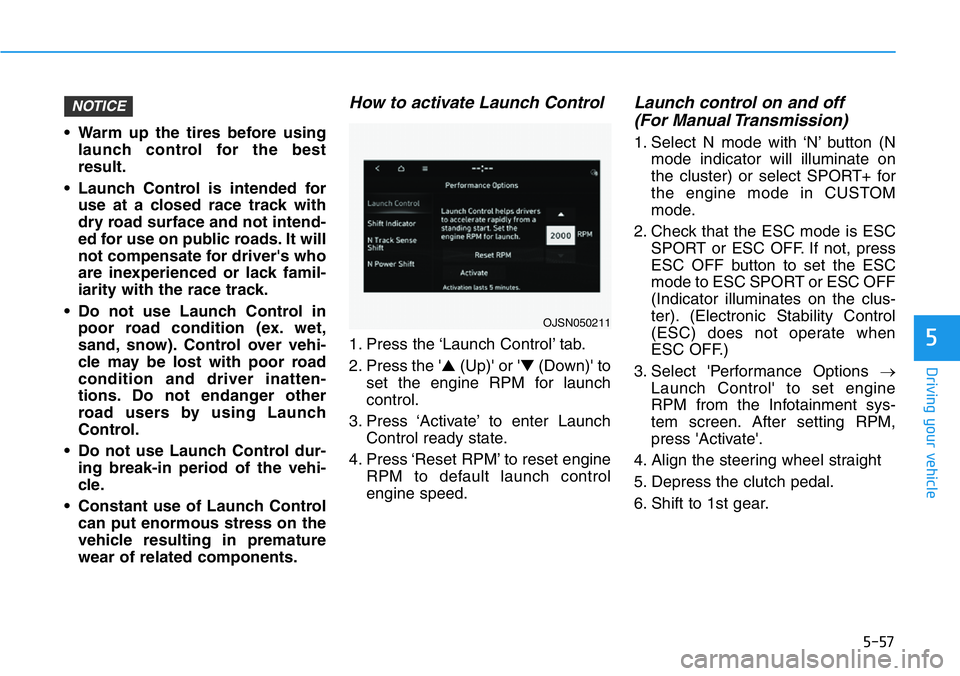
How to activate Launch Control
1. Press the ‘Launch Control’ tab.
2. Press the '▲(Up)' or '▼(Down)' to
set the engine RPM for launch
control.
3. Press ‘Activate’ to enter Launch
Control ready state.
4. Press ‘Reset RPM’ to reset engine
RPM to default launch control
engine speed.
Launch control on and off
(For Manual Transmission)
1. Select N mode with ‘N’ button (N
mode indicator will illuminate on
the cluster) or select SPORT+ for
the engine mode in CUSTOM
mode.
2. Check that the ESC mode is ESC
SPORT or ESC OFF. If not, press
ESC OFF button to set the ESC
mode to ESC SPORT or ESC OFF
(Indicator illuminates on the clus-
ter). (Electronic Stability Control
(ESC) does not operate when
ESC OFF.)
3. Select 'Performance Options →
Launch Control' to set engine
RPM from the Infotainment sys-
tem screen. After setting RPM,
press 'Activate'.
4. Align the steering wheel straight
5. Depress the clutch pedal.
6. Shift to 1st gear.
NOTICE
OJSN050211
Page 252 of 446
5-58
Driving your vehicle
7. While depressing the clutch pedal
with your left foot, quickly and fully
depress the accelerator pedal with
your right foot. Launch control will
be in the ready state. The mes-
sage 'Launch Control Ready' will
appear on the cluster. If neces-
sary, adjust engine rpm with the
cruise control switch (+/-).
8. A smooth, quick release of the
clutch pedal within 8 seconds,
while maintaining full depression
of the accelerator pedal will initiate
launching of the vehicle. The mes-
sage 'Launch Control Active' will
appear on the cluster.
9. Control will deactivate when the
accelerator pedal is released.
Launch control on and off
(For Dual Clutch Transmission)
1. Select N mode with 'N' button (N
mode indicator will illuminate on
the cluster) or select SPORT+ for
the engine mode in CUSTOM
mode.
2. Check that the ESC mode is ESC
SPORT or ESC OFF. If not, press
ESC OFF button to set the ESC
mode to ESC SPORT or ESC OFF
(Indicator illuminates on the clus-
ter). (Electronic Stability Control
(ESC) does not operate when
ESC OFF.)
3. Shift the gear to D (Drive) or M
(Manual shift mode). (When
Manual shift mode is selected,
driver must shift manually.)
4. Select 'Performance Options →
Launch Control' to set engine
RPM from the Infotainment sys-
tem screen. After setting RPM,
press 'Activate’.
5. Align the steering wheel straight
6. Depress the brake pedal to the
maximum with your left foot.7. While depressing the brake pedal
with your left foot, quickly and fully
depress the accelerator pedal with
your right foot. Launch control will
be in the ready state. The mes-
sage 'Launch Control Ready' will
appear on the cluster. If neces-
sary, adjust engine rpm with the
cruise control switch (+/-).
8. A smooth, quick release of the
brake pedal within 8 seconds,
while maintaining full depression
of the accelerator pedal will initiate
launching of the vehicle. The mes-
sage 'Launch Control Active' will
appear on the cluster.
9. Launch Control will deactivate
when the accelerator pedal is
released.