shift HYUNDAI VELOSTER N 2022 Workshop Manual
[x] Cancel search | Manufacturer: HYUNDAI, Model Year: 2022, Model line: VELOSTER N, Model: HYUNDAI VELOSTER N 2022Pages: 446, PDF Size: 9.71 MB
Page 252 of 446
5-58
Driving your vehicle
7. While depressing the clutch pedal
with your left foot, quickly and fully
depress the accelerator pedal with
your right foot. Launch control will
be in the ready state. The mes-
sage 'Launch Control Ready' will
appear on the cluster. If neces-
sary, adjust engine rpm with the
cruise control switch (+/-).
8. A smooth, quick release of the
clutch pedal within 8 seconds,
while maintaining full depression
of the accelerator pedal will initiate
launching of the vehicle. The mes-
sage 'Launch Control Active' will
appear on the cluster.
9. Control will deactivate when the
accelerator pedal is released.
Launch control on and off
(For Dual Clutch Transmission)
1. Select N mode with 'N' button (N
mode indicator will illuminate on
the cluster) or select SPORT+ for
the engine mode in CUSTOM
mode.
2. Check that the ESC mode is ESC
SPORT or ESC OFF. If not, press
ESC OFF button to set the ESC
mode to ESC SPORT or ESC OFF
(Indicator illuminates on the clus-
ter). (Electronic Stability Control
(ESC) does not operate when
ESC OFF.)
3. Shift the gear to D (Drive) or M
(Manual shift mode). (When
Manual shift mode is selected,
driver must shift manually.)
4. Select 'Performance Options →
Launch Control' to set engine
RPM from the Infotainment sys-
tem screen. After setting RPM,
press 'Activate’.
5. Align the steering wheel straight
6. Depress the brake pedal to the
maximum with your left foot.7. While depressing the brake pedal
with your left foot, quickly and fully
depress the accelerator pedal with
your right foot. Launch control will
be in the ready state. The mes-
sage 'Launch Control Ready' will
appear on the cluster. If neces-
sary, adjust engine rpm with the
cruise control switch (+/-).
8. A smooth, quick release of the
brake pedal within 8 seconds,
while maintaining full depression
of the accelerator pedal will initiate
launching of the vehicle. The mes-
sage 'Launch Control Active' will
appear on the cluster.
9. Launch Control will deactivate
when the accelerator pedal is
released.
Page 254 of 446
5-60
Driving your vehicle
Shift Indicator
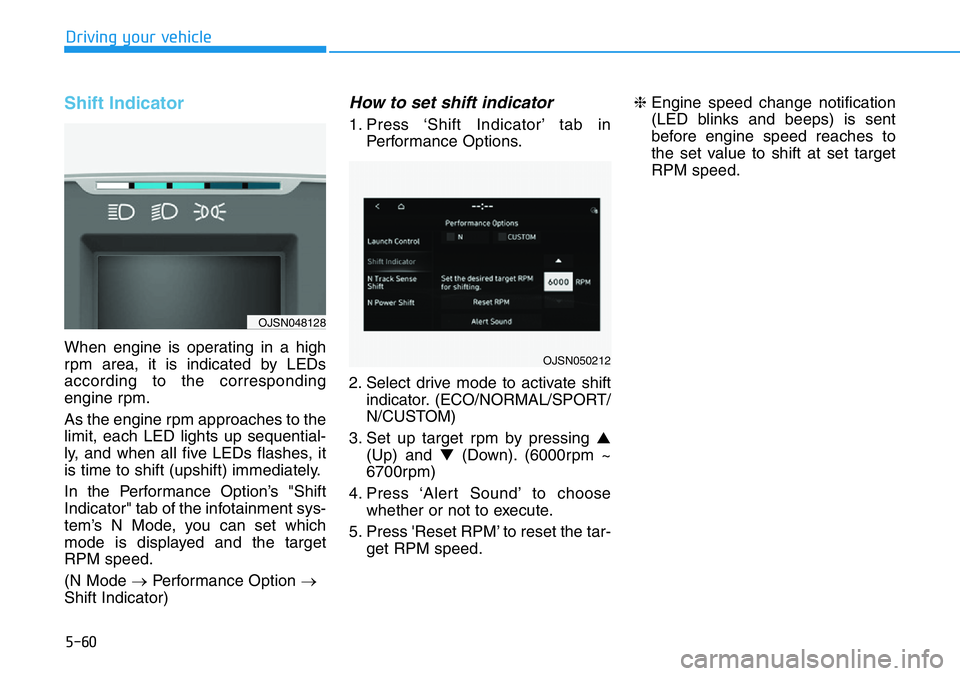
When engine is operating in a high
rpm area, it is indicated by LEDs
according to the corresponding
engine rpm.
As the engine rpm approaches to the
limit, each LED lights up sequential-
ly, and when all five LEDs flashes, it
is time to shift (upshift) immediately.
In the Performance Option’s "Shift
Indicator" tab of the infotainment sys-
tem’s N Mode, you can set which
mode is displayed and the target
RPM speed.
(N Mode →Performance Option →
Shift Indicator)
How to set shift indicator
1. Press ‘Shift Indicator’ tab in
Performance Options.
2. Select drive mode to activate shift
indicator. (ECO/NORMAL/SPORT/
N/CUSTOM)
3. Set up target rpm by pressing ▲
(Up) and ▼(Down). (6000rpm ~
6700rpm)
4. Press ‘Alert Sound’ to choose
whether or not to execute.
5. Press 'Reset RPM’ to reset the tar-
get RPM speed.❈Engine speed change notification
(LED blinks and beeps) is sent
before engine speed reaches to
the set value to shift at set target
RPM speed.
OJSN050212
OJSN048128
Page 255 of 446
5-61
Driving your vehicle
5
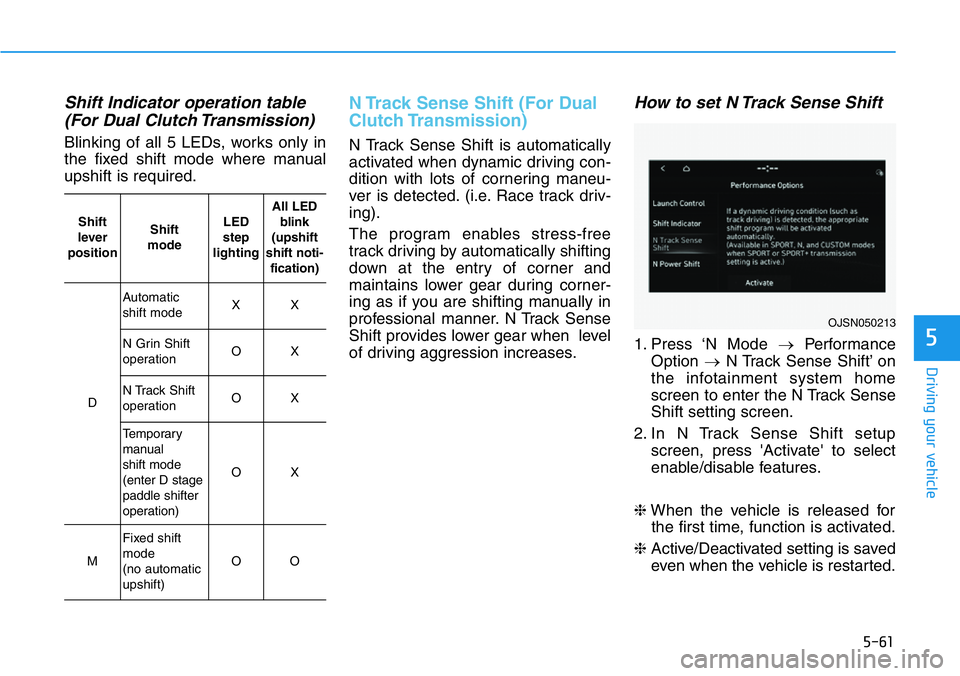
Shift Indicator operation table
(For Dual Clutch Transmission)
Blinking of all 5 LEDs, works only in
the fixed shift mode where manual
upshift is required.
N Track Sense Shift (For Dual
Clutch Transmission)
N Track Sense Shift is automatically
activated when dynamic driving con-
dition with lots of cornering maneu-
ver is detected. (i.e. Race track driv-
ing).
The program enables stress-free
track driving by automatically shifting
down at the entry of corner and
maintains lower gear during corner-
ing as if you are shifting manually in
professional manner. N Track Sense
Shift provides lower gear when level
of driving aggression increases.
How to set N Track Sense Shift
1. Press ‘N Mode →Performance
Option →N Track Sense Shift’ on
the infotainment system home
screen to enter the N Track Sense
Shift setting screen.
2. In N Track Sense Shift setup
screen, press 'Activate' to select
enable/disable features.
❈When the vehicle is released for
the first time, function is activated.
❈Active/Deactivated setting is saved
even when the vehicle is restarted.
OJSN050213
Shift
lever
positionShift
modeLED
step
lightingAll LED
blink
(upshift
shift noti-
fication)
D
Automatic
shift modeXX
N Grin Shift
operationOX
N Track Shift
operationOX
Temporary
manual
shift mode
(enter D stage
paddle shifter
operation)
OX
M
Fixed shift
mode
(no automatic
upshift)
OO
Page 256 of 446
5-62
Driving your vehicle
Operating condition
• N Track Sense Shift is enabled in the
Performance Options settings
• Shift lever in D (Drive) position
• Transmission mode is SPORT or
SPORT+ (Including SPORT or N
Riding Mode)
• Vehicle speed is above 21 mph
(35km/h)
• Cornering-oriented dynamic driving
detection
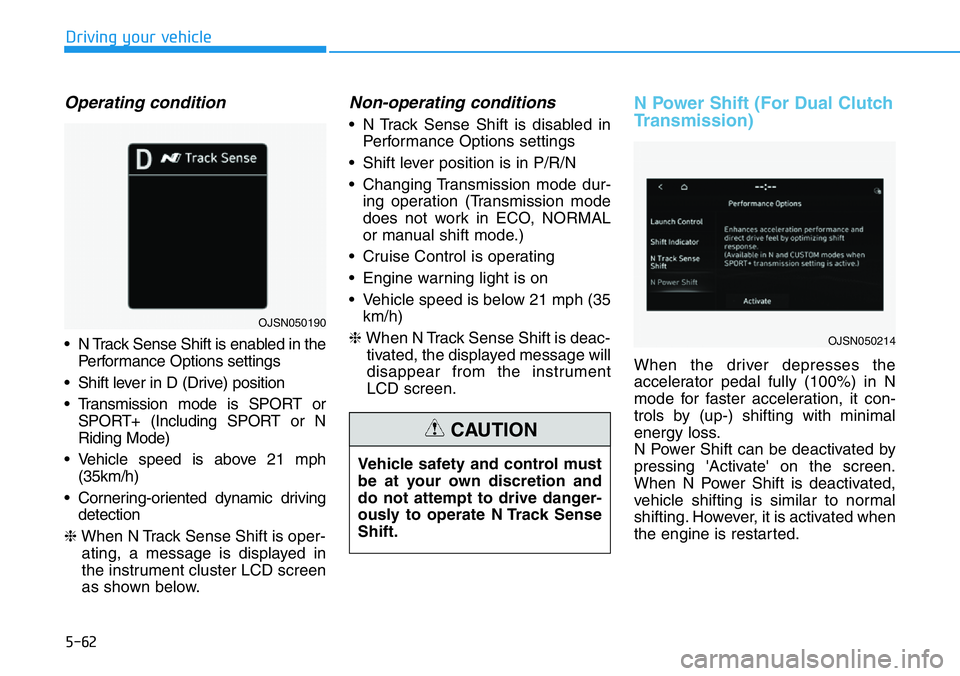
❈When N Track Sense Shift is oper-
ating, a message is displayed in
the instrument cluster LCD screen
as shown below.
Non-operating conditions
• N Track Sense Shift is disabled in
Performance Options settings
• Shift lever position is in P/R/N
• Changing Transmission mode dur-
ing operation (Transmission mode
does not work in ECO, NORMAL
or manual shift mode.)
• Cruise Control is operating
• Engine warning light is on
• Vehicle speed is below 21 mph (35
km/h)
❈When N Track Sense Shift is deac-
tivated, the displayed message will
disappear from the instrument
LCD screen.
N Power Shift (For Dual Clutch
Transmission)
When the driver depresses the
accelerator pedal fully (100%) in N
mode for faster acceleration, it con-
trols by (up-) shifting with minimal
energy loss.
N Power Shift can be deactivated by
pressing 'Activate' on the screen.
When N Power Shift is deactivated,
vehicle shifting is similar to normal
shifting. However, it is activated when
the engine is restarted. Vehicle safety and control must
be at your own discretion and
do not attempt to drive danger-
ously to operate N Track Sense
Shift.
CAUTION
OJSN050214
OJSN050190
Page 263 of 446
5-69
Driving your vehicle
5
Information
In a situation collision is imminent,
braking may be assisted by Forward
Collision-Avoidance Assist when
braking is insufficient by the driver.
i
•During Forward Collision-
Avoidance Assist operation,
the vehicle may stop sudden-
ly injuring passengers and
shifting loose objects. Always
have the seat belt on and keep
loose objects secured.
•If any other system’s warning
message is displayed or audi-
ble warning is generated,
Forward Collision-Avoidance
Assist warning message may
not be displayed and audible
warning may not be generat-
ed.
•You may not hear the warning
sound of Forward Collision-
Avoidance Assist if the sur-
rounding is noisy.
•Forward Collision-Avoidance
Assist may turn off or may not
operate properly or may oper-
ate unnecessarily depending
on the road conditions and
the surroundings.
•Even if there is a problem with
Forward Collision-Avoidance
Assist, the vehicle’s basic
braking performance will
operate normally.
•During emergency braking,
braking control by the system
will automatically cancel
when the driver excessively
depresses the accelerator
pedal or sharply steers the
vehicle.
WARNING
Depending on the condition of
the vehicle, pedestrian in front
and the surroundings, the
speed range to operate Forward
Collision-Avoidance Assist may
reduce. The system may only
warn the driver, or the system
may not operate.
CAUTION
Page 272 of 446
5-78
Driving your vehicle
- If ‘Lane Departure Warning’ is
selected, the functions for the sys-
tem will warn the driver with an
audible warning when lane depar-
ture is detected. The driver must
steer the vehicle.
- If ‘Off’ is selected, the functions for
the system will turn off. The
indicator light will turn off on the
cluster.
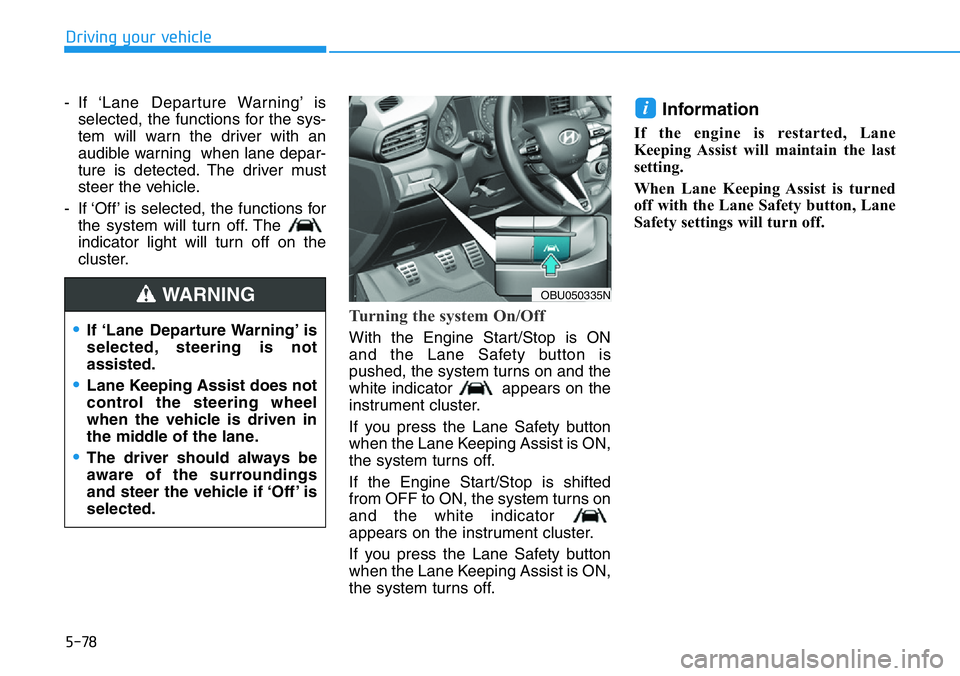
Turning the system On/Off
With the Engine Start/Stop is ON
and the Lane Safety button is
pushed, the system turns on and the
white indicator appears on the
instrument cluster.
If you press the Lane Safety button
when the Lane Keeping Assist is ON,
the system turns off.
If the Engine Start/Stop is shifted
from OFF to ON, the system turns on
and the white indicator
appears on the instrument cluster.
If you press the Lane Safety button
when the Lane Keeping Assist is ON,
the system turns off.
Information
If the engine is restarted, Lane
Keeping Assist will maintain the last
setting.
When Lane Keeping Assist is turned
off with the Lane Safety button, Lane
Safety settings will turn off.
i
OBU050335N
•If ‘Lane Departure Warning’ is
selected, steering is not
assisted.
•Lane Keeping Assist does not
control the steering wheel
when the vehicle is driven in
the middle of the lane.
•The driver should always be
aware of the surroundings
and steer the vehicle if ‘Off’ is
selected.
WARNING
Page 298 of 446
5-104
Driving your vehicle
To temporarily pause the sys-
tem
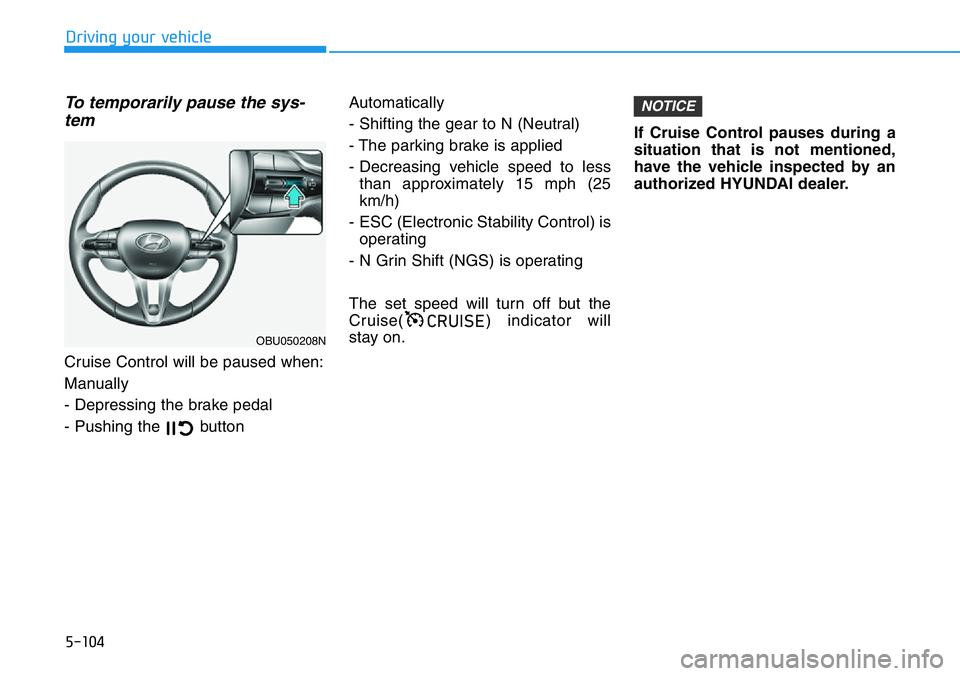
Cruise Control will be paused when:
Manually
- Depressing the brake pedal
- Pushing the button Automatically
- Shifting the gear to N (Neutral)
- The parking brake is applied
- Decreasing vehicle speed to less
than approximately 15 mph (25
km/h)
- ESC (Electronic Stability Control) is
operating
- N Grin Shift (NGS) is operating
The set speed will turn off but the
Cruise( ) indicator will
stay on.If Cruise Control pauses during a
situation that is not mentioned,
have the vehicle inspected by an
authorized HYUNDAI dealer.
NOTICE
&58,6(
OBU050208N
Page 309 of 446
5-115
Driving your vehicle
5
Collision Warning
• To warn the driver of an approach-
ing vehicle from the rear left/right
side of your vehicle, the side view
mirror will blink and a warning will
appear on the cluster. At the same
time, an audible warning will
sound. If the Rear View Monitor is
operating, a warning will also
appear on the infotainment system
screen.• The system will operate when all
the following conditions are satis-
fied:
- The gear is shifted to R (Reverse)
- Vehicle speed is below 5 mph (8
km/h)
- The approaching vehicle is within
approximately 82 ft. (25 m) from
the left and right side of your vehi-
cle
- The speed of the vehicle
approaching from the left and
right is above 3 mph (5 km/h)
Information
If the operating conditions are satis-
fied, there will be a warning whenever
the vehicle approaches from the left or
right side even though your vehicle
speed is 0 mph (0 km/h).
i
Take the following precautions
when using Rear Cross-Traffic
Safety system:
•For your safety, change the
Settings after parking the
vehicle at a safe location.
•If any other system’s warning
message is displayed or audi-
ble warning is generated,
Rear Cross-Traffic Safety sys-
tem’s warning message may
not be displayed and audible
warning may not be generat-
ed.
•You may not hear the warning
sound of Rear Cross-Traffic
Safety system if the surround-
ing is noisy.
•Rear Cross-Traffic Safety sys-
tem may warn the driver late
or may not warn the driver
depending on the road and
driving conditions.
WARNING
Page 314 of 446
5-120
Driving your vehicle
Hazardous Driving Conditions
When hazardous driving elements
are encountered such as water,
snow, ice, mud and sand, take the
below suggestions:
• Drive cautiously and keep a longer
braking distance.
• Avoid abrupt braking or steering.
• When your vehicle is stuck in snow,
mud, or sand, use second gear.
Accelerate slowly to avoid unnec-
essary wheel spin.
• Put sand, rock salt, tire chains or
other non-slip materials under the
wheels to provide additional trac-
tion while the vehicle becomes
stuck in ice, snow, or mud.
Rocking the Vehicle
If it is necessary to rock the vehicle
to free it from snow, sand, or mud,
first turn the steering wheel right and
left to clear the area around your
front wheels. Then, shift back and
forth between R (Reverse) and a for-
ward gear.
Try to avoid spinning the wheels, and
do not race the engine.
To prevent transmission wear, wait
until the wheels stop spinning before
shifting gears. Release the accelera-
tor pedal while shifting, and press
lightly on the accelerator pedal while
the transmission is in gear. Slowly
spinning the wheels in forward and
reverse directions causes a rocking
motion that may free the vehicle.
SPECIAL DRIVING CONDITIONS
If the vehicle is stuck and
excessive wheel spin occurs,
the temperature in the tires can
increase very quickly. If the tires
become damaged, a tire blow
out or tire explosion can occur.
This condition is dangerous -
you and others may be injured.
Do not attempt this procedure if
people or objects are anywhere
near the vehicle.
If you attempt to free the vehicle,
the vehicle can overheat quickly,
possibly causing damage to the
engine and other components.
Try to avoid spinning the wheels
as much as possible to prevent
overheating of either the tires or
the engine. DO NOT allow the
vehicle to spin the wheels above
35 mph (56 km/h).
WARNING
Page 329 of 446
6-2
The hazard warning flasher serves
as a warning to other drivers to exer-
cise extreme caution when approach-
ing, overtaking, or passing your vehi-
cle.
It should be used whenever emer-
gency repairs are being made or
when the vehicle is stopped near the
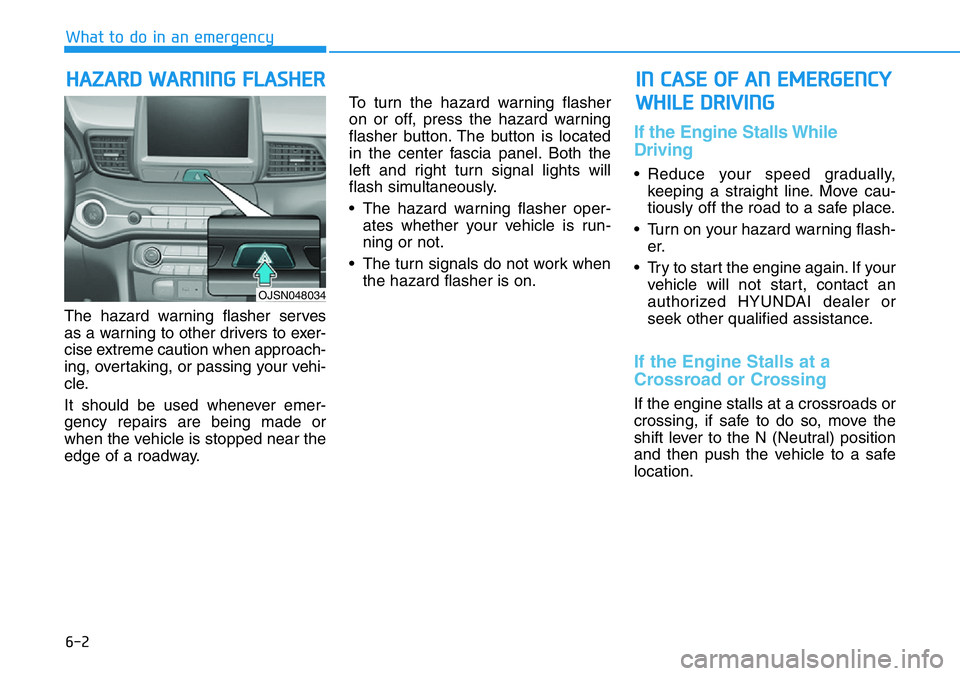
edge of a roadway.To turn the hazard warning flasher
on or off, press the hazard warning
flasher button. The button is located
in the center fascia panel. Both the
left and right turn signal lights will
flash simultaneously.
• The hazard warning flasher oper-
ates whether your vehicle is run-
ning or not.
• The turn signals do not work when
the hazard flasher is on.
If the Engine Stalls While
Driving
• Reduce your speed gradually,
keeping a straight line. Move cau-
tiously off the road to a safe place.
• Turn on your hazard warning flash-
er.
• Try to start the engine again. If your
vehicle will not start, contact an
authorized HYUNDAI dealer or
seek other qualified assistance.
If the Engine Stalls at a
Crossroad or Crossing
If the engine stalls at a crossroads or
crossing, if safe to do so, move the
shift lever to the N (Neutral) position
and then push the vehicle to a safe
location.
HAZARD WARNING FLASHER
What to do in an emergency
IN CASE OF AN EMERGENCY
WHILE DRIVING
OJSN048034