lock HYUNDAI VERACRUZ 2007 Repair Manual
[x] Cancel search | Manufacturer: HYUNDAI, Model Year: 2007, Model line: VERACRUZ, Model: HYUNDAI VERACRUZ 2007Pages: 441, PDF Size: 7.99 MB
Page 162 of 441
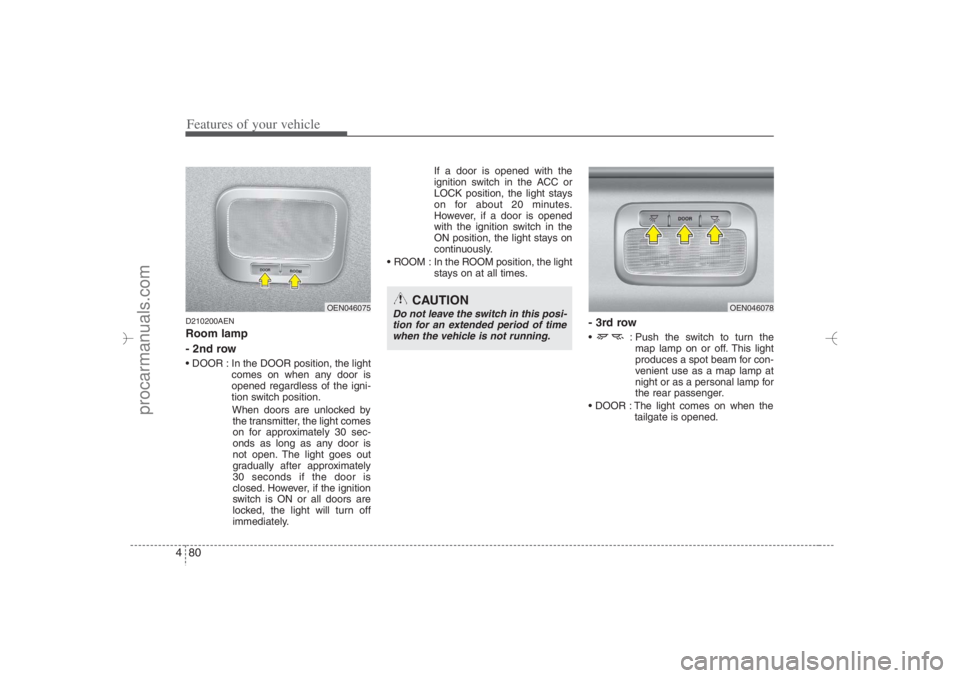
Features of your vehicle80 4D210200AENRoom lamp
- 2nd row DOOR : In the DOOR position, the light
comes on when any door is
opened regardless of the igni-
tion switch position.
When doors are unlocked by
the transmitter, the light comes
on for approximately 30 sec-
onds as long as any door is
not open. The light goes out
gradually after approximately
30 seconds if the door is
closed. However, if the ignition
switch is ON or all doors are
locked, the light will turn off
immediately.If a door is opened with the
ignition switch in the ACC or
LOCK position, the light stays
on for about 20 minutes.
However, if a door is opened
with the ignition switch in the
ON position, the light stays on
continuously.
ROOM : In the ROOM position, the light
stays on at all times.
- 3rd row : Push the switch to turn the
map lamp on or off. This light
produces a spot beam for con-
venient use as a map lamp at
night or as a personal lamp for
the rear passenger.
DOOR : The light comes on when the
tailgate is opened.
OEN046078
OEN046075
CAUTION
Do not leave the switch in this posi-
tion for an extended period of time
when the vehicle is not running.
EN hma 4~83.qxd 11/28/2006 3:38 PM Page 80
procarmanuals.com
Page 163 of 441
481
Features of your vehicle
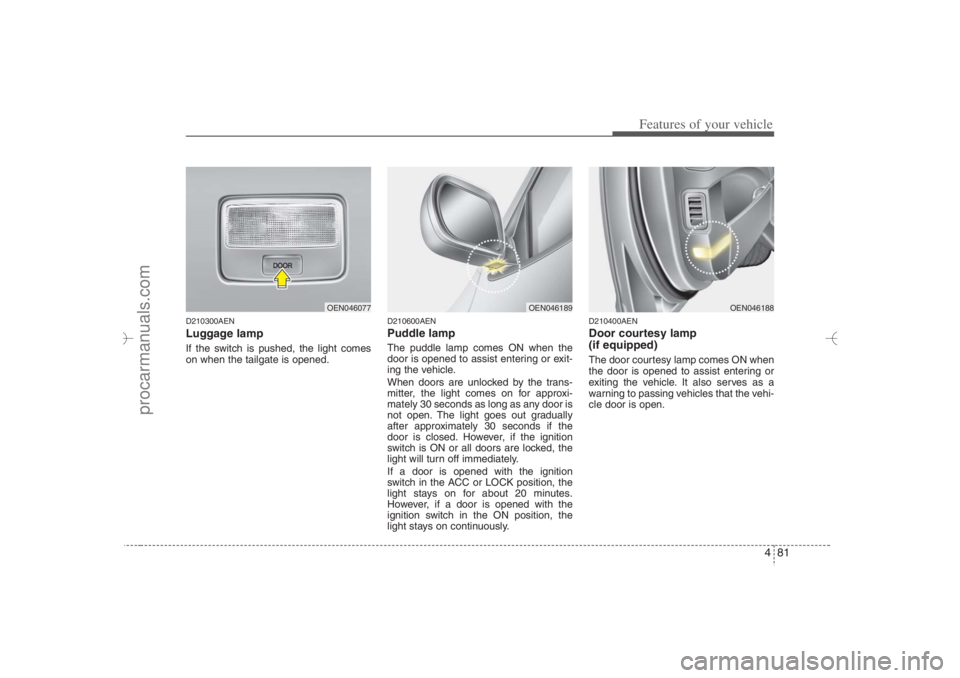
D210300AENLuggage lamp If the switch is pushed, the light comes
on when the tailgate is opened.
D210600AENPuddle lampThe puddle lamp comes ON when the
door is opened to assist entering or exit-
ing the vehicle.
When doors are unlocked by the trans-
mitter, the light comes on for approxi-
mately 30 seconds as long as any door is
not open. The light goes out gradually
after approximately 30 seconds if the
door is closed. However, if the ignition
switch is ON or all doors are locked, the
light will turn off immediately.
If a door is opened with the ignition
switch in the ACC or LOCK position, the
light stays on for about 20 minutes.
However, if a door is opened with the
ignition switch in the ON position, the
light stays on continuously.
D210400AENDoor courtesy lamp
(if equipped)The door courtesy lamp comes ON when
the door is opened to assist entering or
exiting the vehicle. It also serves as a
warning to passing vehicles that the vehi-
cle door is open.
OEN046077
OEN046189
OEN046188
EN hma 4~83.qxd 11/28/2006 3:38 PM Page 81
procarmanuals.com
Page 174 of 441
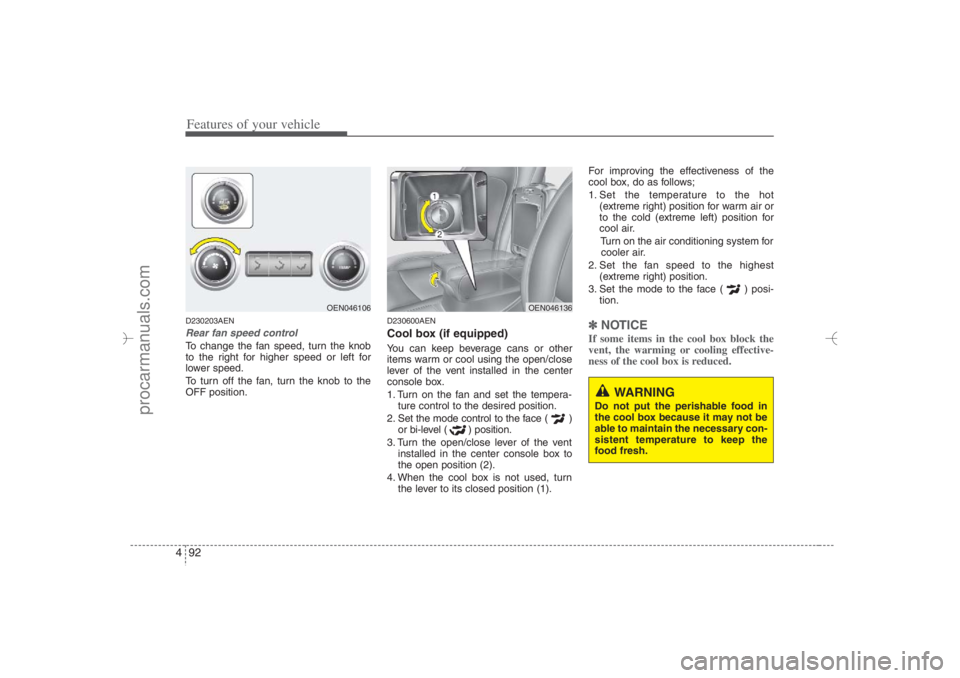
Features of your vehicle92 4D230203AENRear fan speed controlTo change the fan speed, turn the knob
to the right for higher speed or left for
lower speed.
To turn off the fan, turn the knob to the
OFF position.
D230600AENCool box (if equipped)You can keep beverage cans or other
items warm or cool using the open/close
lever of the vent installed in the center
console box.
1. Turn on the fan and set the tempera-
ture control to the desired position.
2. Set the mode control to the face ( )
or bi-level ( ) position.
3. Turn the open/close lever of the vent
installed in the center console box to
the open position (2).
4. When the cool box is not used, turn
the lever to its closed position (1).For improving the effectiveness of the
cool box, do as follows;
1. Set the temperature to the hot
(extreme right) position for warm air or
to the cold (extreme left) position for
cool air.
Turn on the air conditioning system for
cooler air.
2. Set the fan speed to the highest
(extreme right) position.
3. Set the mode to the face ( ) posi-
tion.
✽ ✽
NOTICEIf some items in the cool box block the
vent, the warming or cooling effective-
ness of the cool box is reduced.
OEN046106
OEN046136
WARNING
Do not put the perishable food in
the cool box because it may not be
able to maintain the necessary con-
sistent temperature to keep the
food fresh.
EN hma 4-84~120.qxd 11/27/2006 5:31 PM Page 92
procarmanuals.com
Page 175 of 441
493
Features of your vehicle
System operationD230501AUNVentilation1. Set the mode to the position.
2. Set the air intake control to the outside
(fresh) air position.
3. Set the temperature control to the
desired position.
4. Set the fan speed control to the
desired speed.D230502AUNHeating1. Set the mode to the position.
2. Set the air intake control to the outside
(fresh) air position.
3. Set the temperature control to the
desired position.
4. Set the fan speed control to the
desired speed.
5. If dehumidified heating is desired, turn
the air conditioning system on.
If the windshield fogs up, set the mode
to the
or
position.Operation Tips
To keep dust or unpleasant fumes from
entering the car through the ventilation
system, temporarily set the air intake
control to the recirculated air position.
Be sure to return the control to the
fresh air position when the irritation
has passed to keep fresh air in the
vehicle. This will help keep the driver
alert and comfortable.
Air for the heating/cooling system is
drawn in through the grilles just ahead
of the windshield. Care should be
taken that these are not blocked by
leaves, snow, ice or other obstructions.
To prevent interior fog on the wind-
shield, set the air intake control to the
fresh air position and fan speed to the
desired position, turn on the air condi-
tioning system, and adjust the temper-
ature control to desired temperature.
D230503AENAir conditioning All HYUNDAI Air Conditioning Systems
are filled with environmentally friendly
R-134a refrigerant which does not dam-
age the ozone layer.
1. Start the engine. Push the air condi-
tioning button.
2. Set the mode to the position.
3. Set the air intake control to the outside
air or recirculated air position.
4. Adjust the fan speed control and tem-
perature control to maintain maximum
comfort.
When maximum cooling is desired, set
the temperature control to the extreme
left position, set the mode control to
the MAX A/C position, then set the fan
speed control to the highest speed.
EN hma 4-84~120.qxd 11/27/2006 5:31 PM Page 93
procarmanuals.com
Page 191 of 441
4 109
Features of your vehicle
D270000AUNThese compartments can be used to
store small items required by the driver
or passengers.
D270100AENCenter console storage These compartments can be used to
store small items required by the driver
or front passenger.
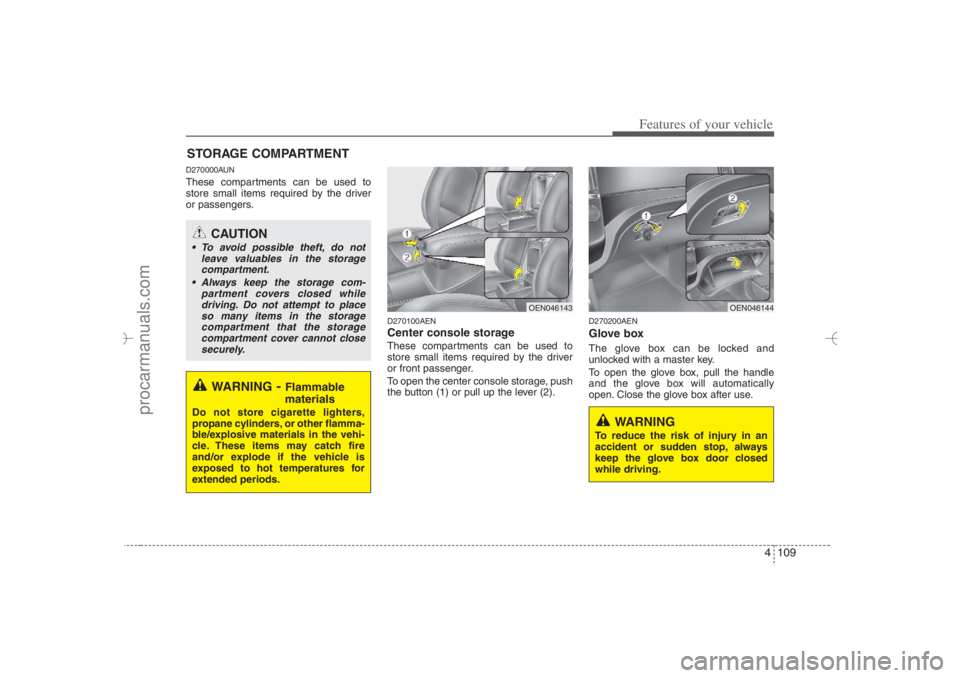
To open the center console storage, push
the button (1) or pull up the lever (2).
D270200AENGlove boxThe glove box can be locked and
unlocked with a master key.
To open the glove box, pull the handle
and the glove box will automatically
open. Close the glove box after use.
STORAGE COMPARTMENT
WARNING
- Flammable
materials
Do not store cigarette lighters,
propane cylinders, or other flamma-
ble/explosive materials in the vehi-
cle. These items may catch fire
and/or explode if the vehicle is
exposed to hot temperatures for
extended periods.
CAUTION
To avoid possible theft, do not
leave valuables in the storage
compartment.
Always keep the storage com-
partment covers closed while
driving. Do not attempt to place
so many items in the storage
compartment that the storage
compartment cover cannot close
securely.
OEN046144
OEN046143
WARNING
To reduce the risk of injury in an
accident or sudden stop, always
keep the glove box door closed
while driving.
EN hma 4-84~120.qxd 11/27/2006 5:35 PM Page 109
procarmanuals.com
Page 192 of 441
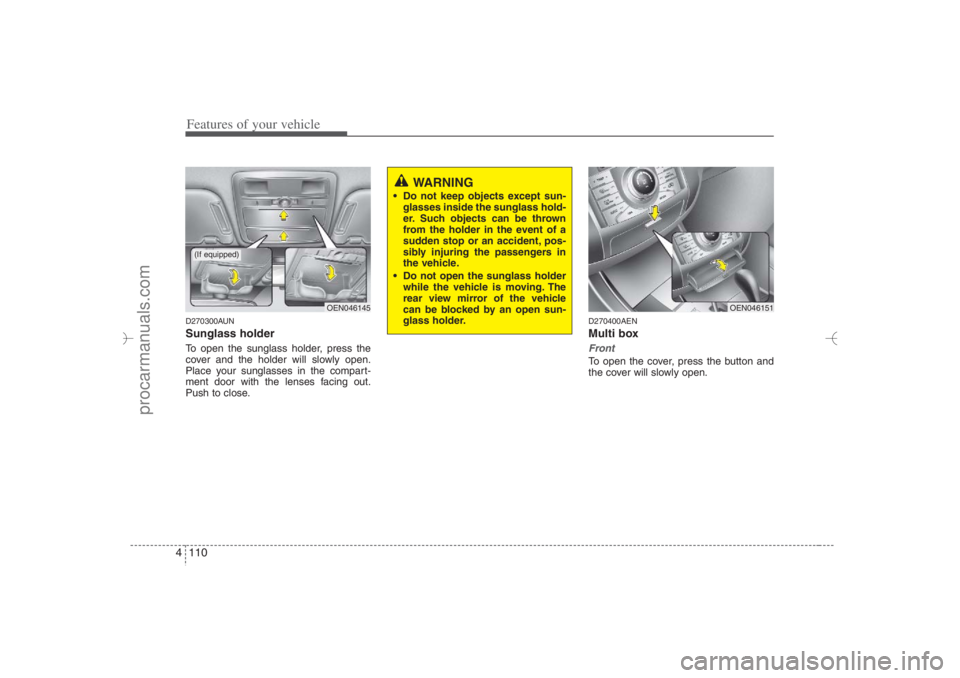
Features of your vehicle110 4D270300AUNSunglass holder To open the sunglass holder, press the
cover and the holder will slowly open.
Place your sunglasses in the compart-
ment door with the lenses facing out.
Push to close.
D270400AENMulti boxFrontTo open the cover, press the button and
the cover will slowly open.
OEN046145
OEN046151
WARNING
Do not keep objects except sun-
glasses inside the sunglass hold-
er. Such objects can be thrown
from the holder in the event of a
sudden stop or an accident, pos-
sibly injuring the passengers in
the vehicle.
Do not open the sunglass holder
while the vehicle is moving. The
rear view mirror of the vehicle
can be blocked by an open sun-
glass holder.
(If equipped)
EN hma 4-84~120.qxd 11/27/2006 5:36 PM Page 110
procarmanuals.com
Page 199 of 441
4 117
Features of your vehicle
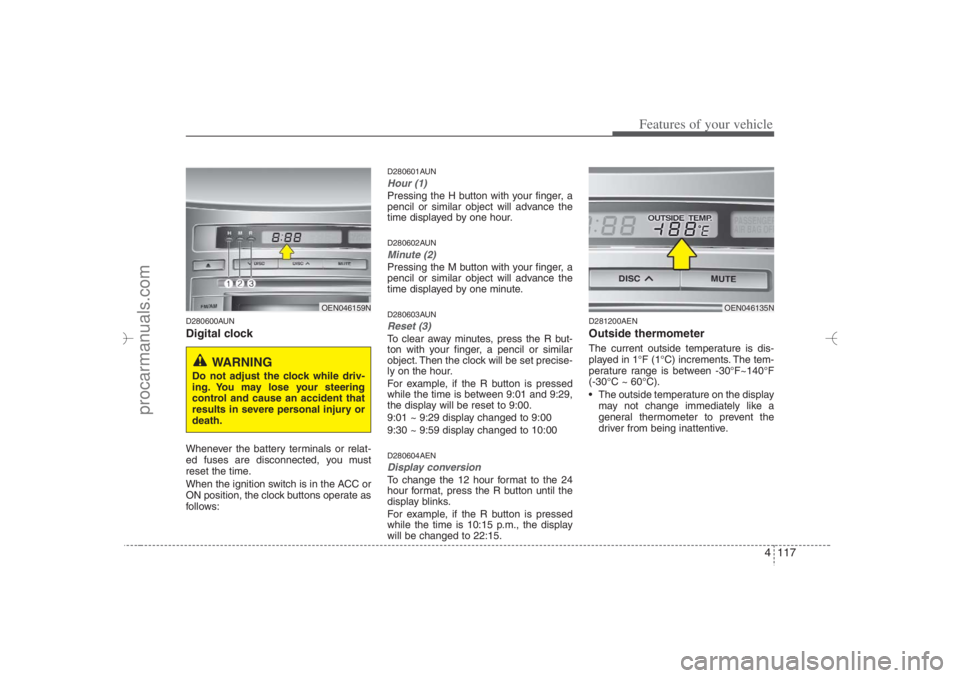
D280600AUNDigital clockWhenever the battery terminals or relat-
ed fuses are disconnected, you must
reset the time.
When the ignition switch is in the ACC or
ON position, the clock buttons operate as
follows:
D280601AUNHour (1)Pressing the H button with your finger, a
pencil or similar object will advance the
time displayed by one hour.D280602AUNMinute (2)Pressing the M button with your finger, a
pencil or similar object will advance the
time displayed by one minute.D280603AUNReset (3)To clear away minutes, press the R but-
ton with your finger, a pencil or similar
object. Then the clock will be set precise-
ly on the hour.
For example, if the R button is pressed
while the time is between 9:01 and 9:29,
the display will be reset to 9:00.
9:01 ~ 9:29 display changed to 9:00
9:30 ~ 9:59 display changed to 10:00D280604AENDisplay conversionTo change the 12 hour format to the 24
hour format, press the R button until the
display blinks.
For example, if the R button is pressed
while the time is 10:15 p.m., the display
will be changed to 22:15.
D281200AENOutside thermometerThe current outside temperature is dis-
played in 1°F (1°C) increments. The tem-
perature range is between -30°F~140°F
(-30°C ~ 60°C).
The outside temperature on the display
may not change immediately like a
general thermometer to prevent the
driver from being inattentive.
OEN046159N
WARNING
Do not adjust the clock while driv-
ing. You may lose your steering
control and cause an accident that
results in severe personal injury or
death.
OEN046135N
EN hma 4-84~120.qxd 11/27/2006 5:38 PM Page 117
procarmanuals.com
Page 201 of 441
4 119
Features of your vehicle
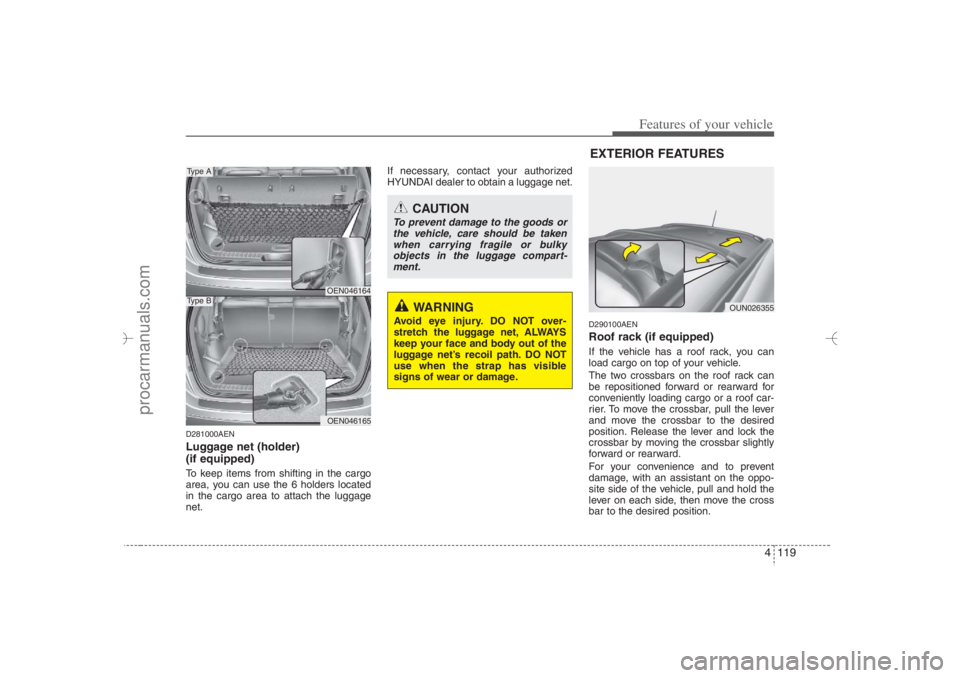
D281000AENLuggage net (holder)
(if equipped)To keep items from shifting in the cargo
area, you can use the 6 holders located
in the cargo area to attach the luggage
net.If necessary, contact your authorized
HYUNDAI dealer to obtain a luggage net.
D290100AENRoof rack (if equipped)If the vehicle has a roof rack, you can
load cargo on top of your vehicle.
The two crossbars on the roof rack can
be repositioned forward or rearward for
conveniently loading cargo or a roof car-
rier. To move the crossbar, pull the lever
and move the crossbar to the desired
position. Release the lever and lock the
crossbar by moving the crossbar slightly
forward or rearward.
For your convenience and to prevent
damage, with an assistant on the oppo-
site side of the vehicle, pull and hold the
lever on each side, then move the cross
bar to the desired position.
OEN046164OEN046165
Type AType B
CAUTION
To prevent damage to the goods or
the vehicle, care should be taken
when carrying fragile or bulky
objects in the luggage compart-
ment.
WARNING
Avoid eye injury. DO NOT over-
stretch the luggage net, ALWAYS
keep your face and body out of the
luggage net’s recoil path. DO NOT
use when the strap has visible
signs of wear or damage.
OUN026355
EXTERIOR FEATURES
EN hma 4-84~120.qxd 11/27/2006 5:38 PM Page 119
procarmanuals.com
Page 203 of 441
4121
Features of your vehicle
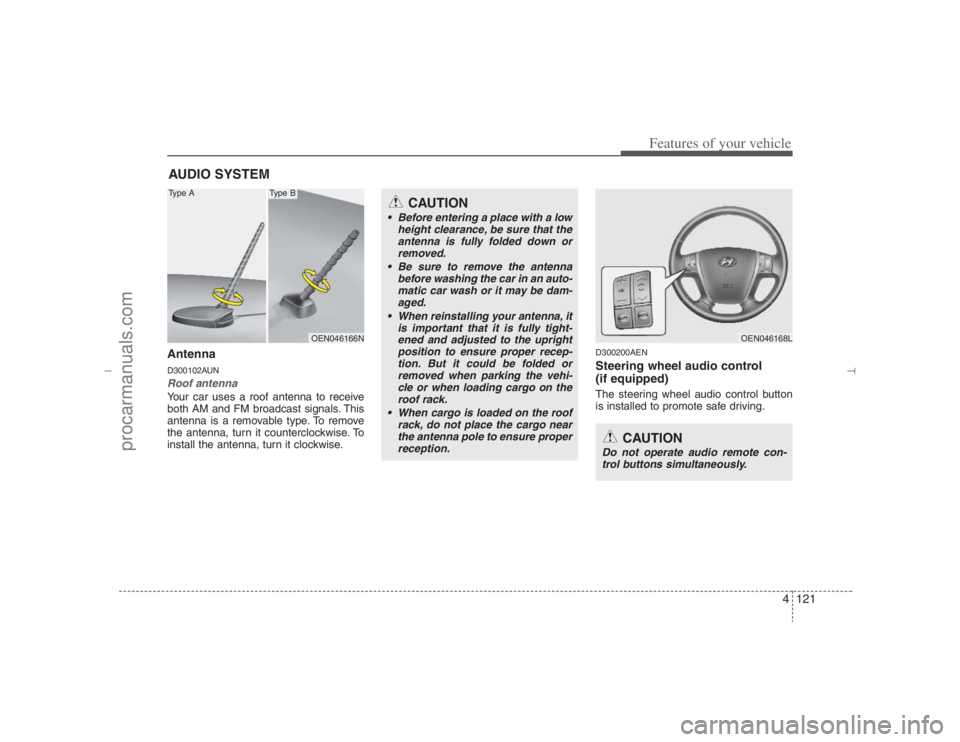
AntennaD300102AUNRoof antenna Your car uses a roof antenna to receive
both AM and FM broadcast signals. This
antenna is a removable type. To remove
the antenna, turn it counterclockwise. To
install the antenna, turn it clockwise.
D300200AENSteering wheel audio control
(if equipped) The steering wheel audio control button
is installed to promote safe driving.
AUDIO SYSTEM
OEN046166N
CAUTION
• Before entering a place with a low
height clearance, be sure that the
antenna is fully folded down or
removed.
Be sure to remove the antenna
before washing the car in an auto-
matic car wash or it may be dam-
aged.
When reinstalling your antenna, it
is important that it is fully tight-
ened and adjusted to the upright
position to ensure proper recep-
tion. But it could be folded or
removed when parking the vehi-
cle or when loading cargo on the
roof rack.
When cargo is loaded on the roof
rack, do not place the cargo near
the antenna pole to ensure proper
reception.
OEN046168L
CAUTION
Do not operate audio remote con-
trol buttons simultaneously.
Type A
Type B
EN hma 4-121~(Audio).qxd 11/28/2006 3:06 PM Page 121
procarmanuals.com
Page 206 of 441
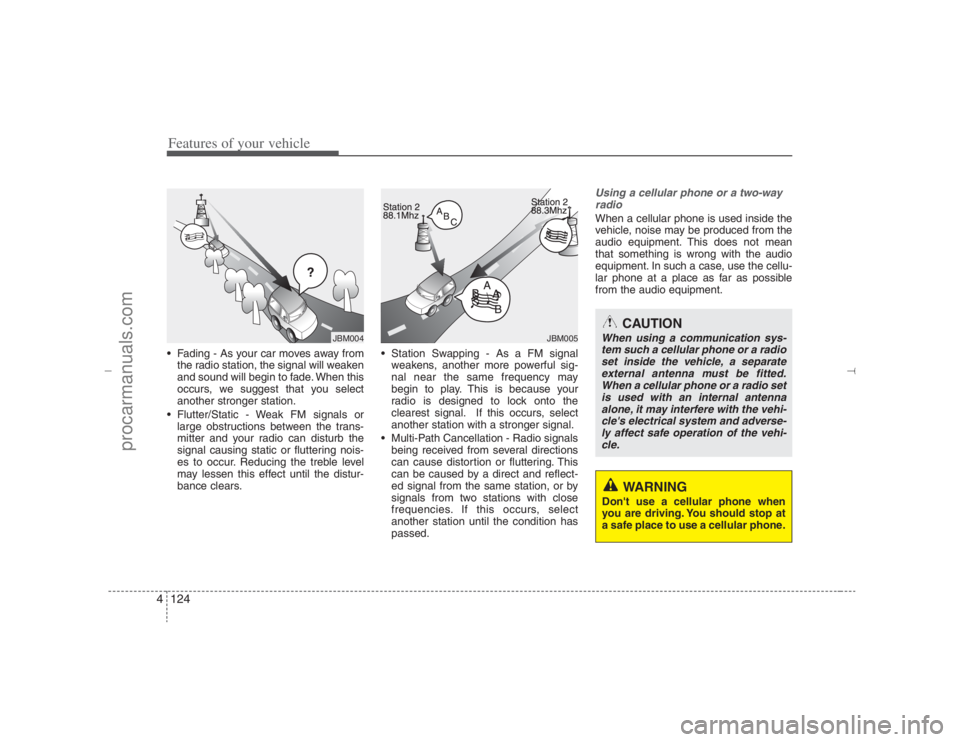
Features of your vehicle124 4 Fading - As your car moves away from
the radio station, the signal will weaken
and sound will begin to fade. When this
occurs, we suggest that you select
another stronger station.
Flutter/Static - Weak FM signals or
large obstructions between the trans-
mitter and your radio can disturb the
signal causing static or fluttering nois-
es to occur. Reducing the treble level
may lessen this effect until the distur-
bance clears. Station Swapping - As a FM signal
weakens, another more powerful sig-
nal near the same frequency may
begin to play. This is because your
radio is designed to lock onto the
clearest signal. If this occurs, select
another station with a stronger signal.
Multi-Path Cancellation - Radio signals
being received from several directions
can cause distortion or fluttering. This
can be caused by a direct and reflect-
ed signal from the same station, or by
signals from two stations with close
frequencies. If this occurs, select
another station until the condition has
passed.
Using a cellular phone or a two-way
radio When a cellular phone is used inside the
vehicle, noise may be produced from the
audio equipment. This does not mean
that something is wrong with the audio
equipment. In such a case, use the cellu-
lar phone at a place as far as possible
from the audio equipment.
JBM005
CAUTION
When using a communication sys-
tem such a cellular phone or a radio
set inside the vehicle, a separate
external antenna must be fitted.
When a cellular phone or a radio set
is used with an internal antenna
alone, it may interfere with the vehi-
cle's electrical system and adverse-
ly affect safe operation of the vehi-
cle.
WARNING
Don't use a cellular phone when
you are driving. You should stop at
a safe place to use a cellular phone.
ÿýþ
JBM004
EN hma 4-121~(Audio).qxd 11/28/2006 3:06 PM Page 124
procarmanuals.com