clock HYUNDAI VERACRUZ 2011 Owners Manual
[x] Cancel search | Manufacturer: HYUNDAI, Model Year: 2011, Model line: VERACRUZ, Model: HYUNDAI VERACRUZ 2011Pages: 419, PDF Size: 47.93 MB
Page 16 of 419
23
Your vehicle at a glance
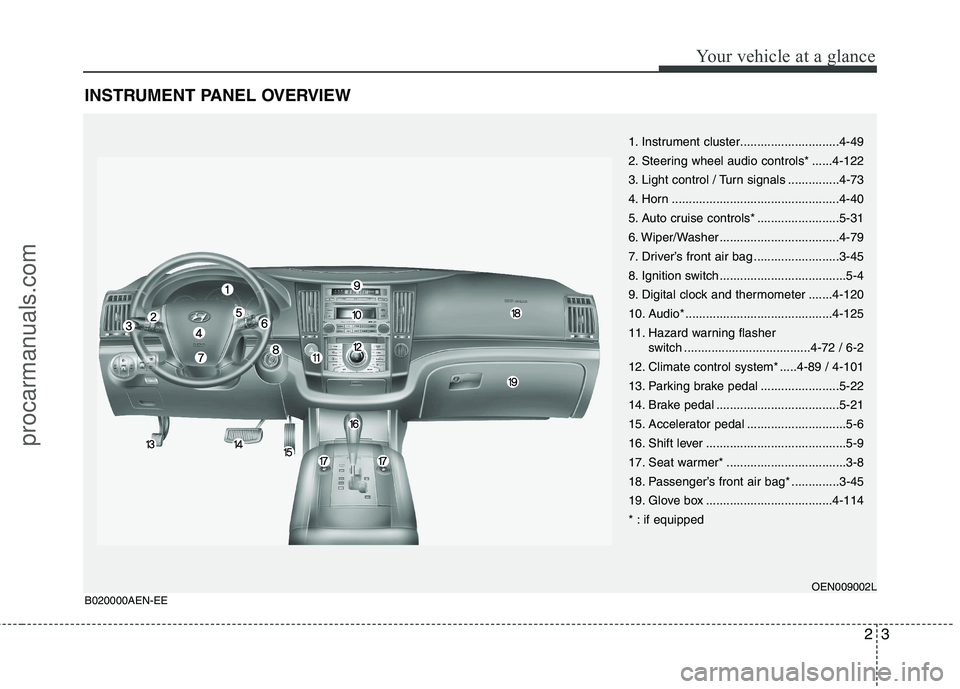
INSTRUMENT PANEL OVERVIEW
1. Instrument cluster.............................4-49
2. Steering wheel audio controls* ......4-122
3. Light control / Turn signals ...............4-73
4. Horn .................................................4-40
5. Auto cruise controls* ........................5-31
6. Wiper/Washer ...................................4-79
7. Driver’s front air bag .........................3-45
8. Ignition switch .....................................5-4
9. Digital clock and thermometer .......4-120
10. Audio* ...........................................4-125
11. Hazard warning flasher switch .....................................4-72 / 6-2
12. Climate control system* .....4-89 / 4-101
13. Parking brake pedal .......................5-22
14. Brake pedal ....................................5-21
15. Accelerator pedal .............................5-6
16. Shift lever .........................................5-9
17. Seat warmer* ...................................3-8
18. Passenger’s front air bag* ..............3-45
19. Glove box .....................................4-114
* : if equipped
OEN009002L
B020000AEN-EE
procarmanuals.com
Page 108 of 419
Features of your vehicle
30
4
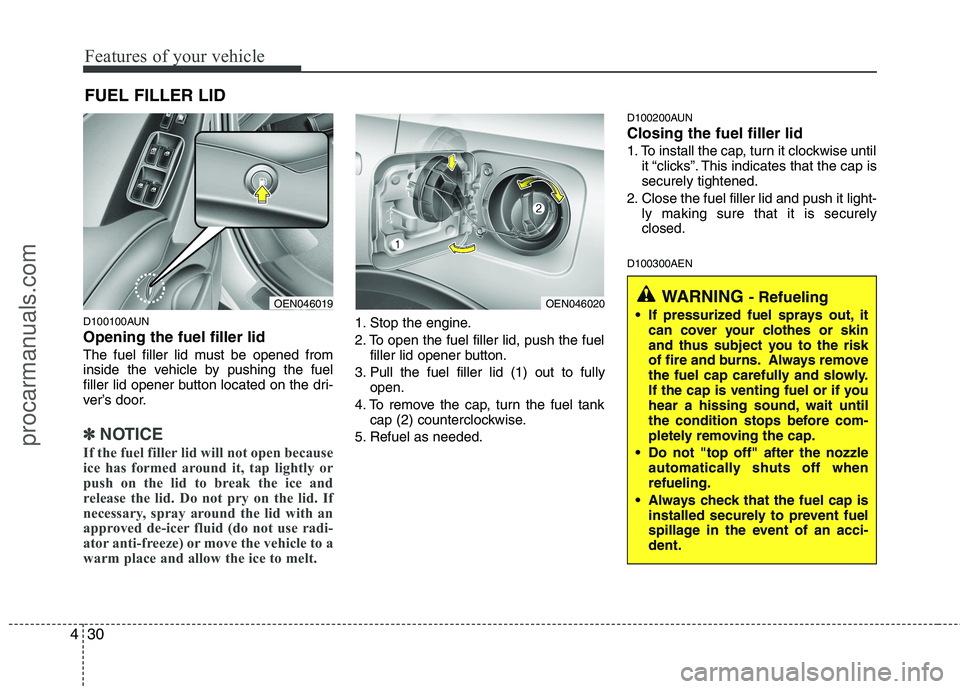
D100100AUN Opening the fuel filler lid
The fuel filler lid must be opened from
inside the vehicle by pushing the fuel
filler lid opener button located on the dri-
ver’s door.
✽✽
NOTICE
If the fuel filler lid will not open because
ice has formed around it, tap lightly or
push on the lid to break the ice and
release the lid. Do not pry on the lid. If
necessary, spray around the lid with an
approved de-icer fluid (do not use radi-
ator anti-freeze) or move the vehicle to a
warm place and allow the ice to melt.
1. Stop the engine.
2. To open the fuel filler lid, push the fuel filler lid opener button.
3. Pull the fuel filler lid (1) out to fully open.
4. To remove the cap, turn the fuel tank cap (2) counterclockwise.
5. Refuel as needed. D100200AUN Closing the fuel filler lid
1. To install the cap, turn it clockwise until
it “clicks”. This indicates that the cap is securely tightened.
2. Close the fuel filler lid and push it light- ly making sure that it is securelyclosed.
D100300AEN
FUEL FILLER LID
OEN046019OEN046020WARNING
- Refueling
If pressurized fuel sprays out, it can cover your clothes or skin
and thus subject you to the risk
of fire and burns. Always remove
the fuel cap carefully and slowly.
If the cap is venting fuel or if you
hear a hissing sound, wait until
the condition stops before com-
pletely removing the cap.
Do not "top off" after the nozzle automatically shuts off whenrefueling.
Always check that the fuel cap is installed securely to prevent fuel
spillage in the event of an acci-dent.
procarmanuals.com
Page 122 of 419
Features of your vehicle
44
4
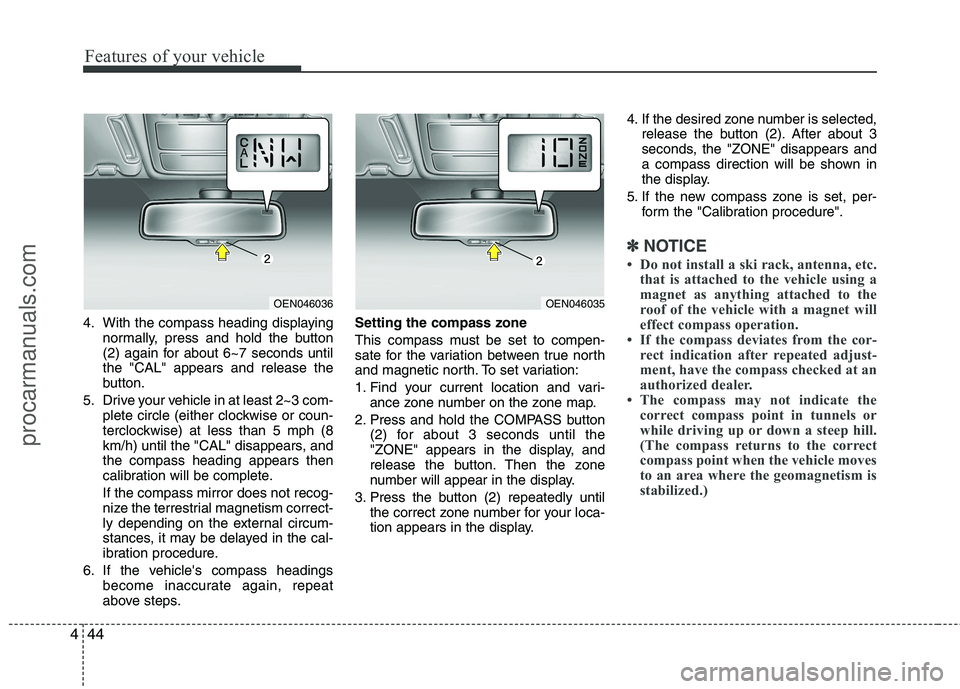
4. With the compass heading displaying
normally, press and hold the button
(2) again for about 6~7 seconds untilthe "CAL" appears and release the
button.
5. Drive your vehicle in at least 2~3 com- plete circle (either clockwise or coun-
terclockwise) at less than 5 mph (8
km/h) until the "CAL" disappears, andthe compass heading appears then
calibration will be complete. If the compass mirror does not recog-
nize the terrestrial magnetism correct-
ly depending on the external circum-
stances, it may be delayed in the cal-
ibration procedure.
6. If the vehicle's compass headings become inaccurate again, repeat
above steps. Setting the compass zone
This compass must be set to compen-
sate for the variation between true north
and magnetic north. To set variation:
1. Find your current location and vari-
ance zone number on the zone map.
2. Press and hold the COMPASS button (2) for about 3 seconds until the
"ZONE" appears in the display, and
release the button. Then the zone
number will appear in the display.
3. Press the button (2) repeatedly until the correct zone number for your loca-
tion appears in the display. 4. If the desired zone number is selected,
release the button (2). After about 3
seconds, the "ZONE" disappears and
a compass direction will be shown in
the display.
5. If the new compass zone is set, per- form the "Calibration procedure".
✽✽ NOTICE
Do not install a ski rack, antenna, etc. that is attached to the vehicle using a
magnet as anything attached to the
roof of the vehicle with a magnet will
effect compass operation.
If the compass deviates from the cor-
rect indication after repeated adjust-
ment, have the compass checked at an
authorized dealer.
The compass may not indicate the
correct compass point in tunnels or
while driving up or down a steep hill.
(The compass returns to the correct
compass point when the vehicle moves
to an area where the geomagnetism is
stabilized.)
OEN046036OEN046035
procarmanuals.com
Page 198 of 419
Features of your vehicle
120
4
The power outlet is designed to provide
power for mobile telephones or other
devices designed to operate with vehicle
electrical systems. The devices should
draw less than 10 amps with the engine
running.
D280600AEN
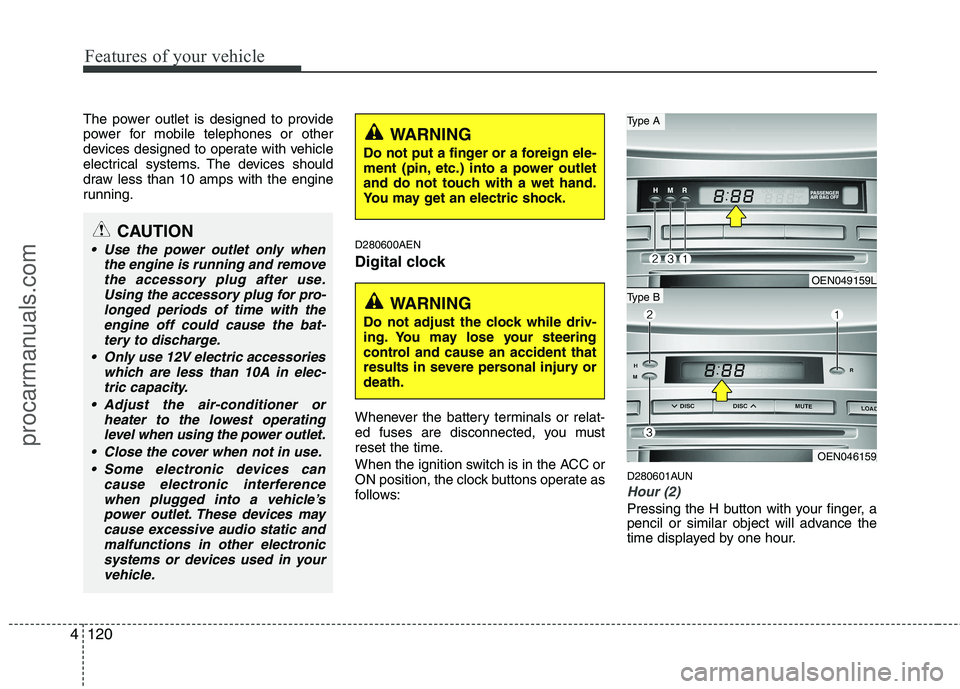
Digital clock
Whenever the battery terminals or relat-
ed fuses are disconnected, you must
reset the time.
When the ignition switch is in the ACC or
ON position, the clock buttons operate as
follows:D280601AUN
Hour (2)
Pressing the H button with your finger, a
pencil or similar object will advance the
time displayed by one hour.
CAUTION
Use the power outlet only when
the engine is running and removethe accessory plug after use.
Using the accessory plug for pro-longed periods of time with theengine off could cause the bat-tery to discharge.
Only use 12V electric accessories which are less than 10A in elec-tric capacity.
Adjust the air-conditioner or heater to the lowest operatinglevel when using the power outlet.
Close the cover when not in use. Some electronic devices can cause electronic interferencewhen plugged into a vehicle’spower outlet. These devices may
cause excessive audio static andmalfunctions in other electronic systems or devices used in your vehicle.
WARNING
Do not adjust the clock while driv-
ing. You may lose your steering
control and cause an accident that
results in severe personal injury ordeath.
WARNING
Do not put a finger or a foreign ele-
ment (pin, etc.) into a power outlet
and do not touch with a wet hand.
You may get an electric shock.
OEN049159L
OEN046159
Type B
Type A
procarmanuals.com
Page 199 of 419
4121
Features of your vehicle
D280602AUN
Minute (3)
Pressing the M button with your finger, a
pencil or similar object will advance the
time displayed by one minute.
D280603AUN
Reset (1)
To clear away minutes, press the R but-
ton with your finger, a pencil or similar
object. Then the clock will be set precise-
ly on the hour.
For example, if the R button is pressed
while the time is between 9:01 and 9:29,
the display will be reset to 9:00.
9:01 ~ 9:29 display changed to 9:00
9:30 ~ 9:59 display changed to 10:00 D280604AEN
Display conversion
To change the 12 hour format to the 24
hour format, press the R button until the
display blinks.
For example, if the R button is pressed
while the time is 10:15 p.m., the displaywill be changed to 22:15.D281200AEN Outside thermometer
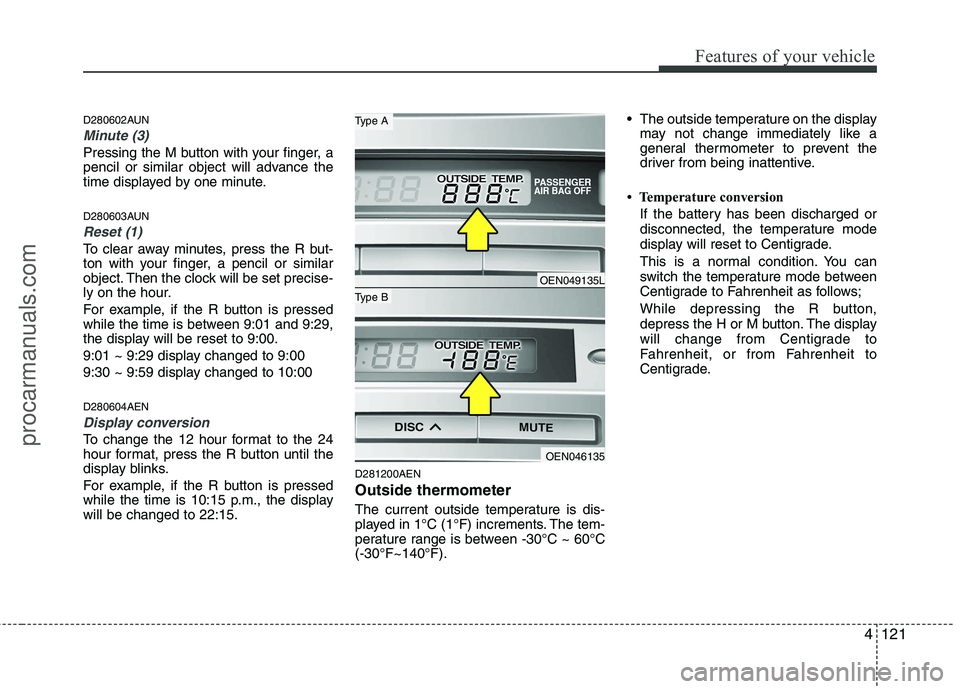
The current outside temperature is dis-
played in 1°C (1°F) increments. The tem-
perature range is between -30°C ~ 60°C(-30°F~140°F). The outside temperature on the display
may not change immediately like a
general thermometer to prevent the
driver from being inattentive.
Temperature conversion If the battery has been discharged or
disconnected, the temperature mode
display will reset to Centigrade.
This is a normal condition. You can
switch the temperature mode between
Centigrade to Fahrenheit as follows;
While depressing the R button,
depress the H or M button. The display
will change from Centigrade to
Fahrenheit, or from Fahrenheit to
Centigrade.
OEN049135L
OEN046135
Type B
Type A
procarmanuals.com
Page 203 of 419
4125
Features of your vehicle
✽✽NOTICE
If you install an aftermarket HID head
lamp, your vehicle’s audio and electron-
ic device may malfunction.
Antenna
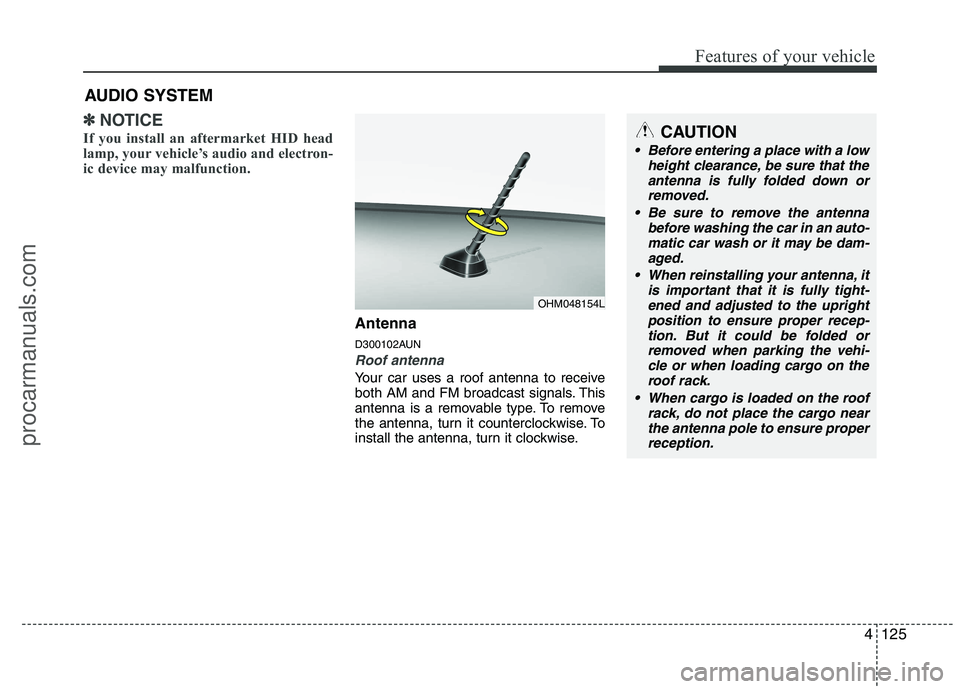
D300102AUN
Roof antenna
Your car uses a roof antenna to receive
both AM and FM broadcast signals. This
antenna is a removable type. To remove
the antenna, turn it counterclockwise. To
install the antenna, turn it clockwise.
AUDIO SYSTEM
OHM048154L
CAUTION
• Before entering a place with a low
height clearance, be sure that the
antenna is fully folded down or removed.
Be sure to remove the antenna before washing the car in an auto-
matic car wash or it may be dam- aged.
When reinstalling your antenna, it is important that it is fully tight-ened and adjusted to the upright
position to ensure proper recep-tion. But it could be folded orremoved when parking the vehi- cle or when loading cargo on the
roof rack.
When cargo is loaded on the roof rack, do not place the cargo nearthe antenna pole to ensure properreception.
procarmanuals.com
Page 214 of 419
Features of your vehicle
136
4
1. Power ON/OFF Button &
Volume Control Knob
Turns the set on/off when the ignition
switch is on ACC or ON. If the button is
turned to the right, it increases the vol-
ume and left, it decreases the volume.
2. FM/AM Selection Button
Turns to FM or AM mode, and toggles in the order of FM1 ➟ FM2 ➟ AM ➟ FM1...
when the button is pressed each time.
3. Automatic Channel Selection
Button
] button is pressed, it increases the band frequency to auto- matically select a channel.
Stops at the previous frequency if no
channel is found.
] button is press- ed, it reduces the band frequency toautomatically select a channel.
Stops at the previous frequency if no
channel is found. 4. Preset Button
Push [1]~[6] buttons less than 0.8 sec-
ond to play the channel saved in each
button. Push Preset button for 0.8 sec-
ond or longer to save current channel to
the respective button with a beep.
5. AST(AUTO STORE) Button
When the button is pressed, it automati-
cally selects and saves channels with
high reception rate to PRESET buttons
[1]~[6] and plays the channel saved in
PRESET1. If no channel is saved after
AST, it will play the previous channel.
6. Manual Channel Selection
Knob & SETUP Button
Manual Channel Selection knob
Turn this control while listening to a radio
channel to manually adjust frequency.
Turn clockwise to increase frequency and
counterclockwise to reduce frequency. SETUP Button
PA710/715/760
Press this button to turn to the SCROLL
adjustment mode. If no action is taken for
5 seconds after pressing the button, it will
return to the play mode. (After entering
SETUP mode, PUSH functions of the
[TUNE] button to adjust SCROLL.)
PA710R/760R
Press this button to turn to the RDS
option, SCROLL adjustment mode. If no
action is taken for 5 seconds after press-
ing the button, it will return to the play
mode.(After entering SETUP mode,
move between items using the left, right
and PUSH functions of the [TUNE] but-
ton.) The setup item changes from
SCROLL
➟
AF ➟ RDSNEWS ➟ REGION
➟ TA V O L
Sound Quality Control Knob
Pressing the button changes the TONE
and POSITION mode. The mode select-
ed is shown on the display. After select-
ing each mode, rotate the Audio control
knob clockwise or counterclockwise.
procarmanuals.com
Page 215 of 419
4137
Features of your vehicle
BASS Control
To increase the BASS, rotate the knob
clockwise, while to decrease the BASS,
rotate the knob counterclockwise.
MIDDLE Control
To increase the MIDDLE, rotate the knob
clockwise, while to decrease the MID-
DLE, rotate the knob counterclockwise.
TREBLE Control
To increase the TREBLE, rotate the knob
clockwise, while to decrease the TRE-
BLE, rotate the knob counterclockwise.
FADER Control
Turn the control knob clockwise to empha-
size rear speaker sound(front speaker
sound will be attenuated). When the con-
trol knob is turned counterclockwise, front
speaker sound will be emphasized(rear
speaker sound will be attenuated).
BALANCE Control
Rotate the knob clockwise to emphasize
right speaker sound(left speaker sound
will be attenuated). When the control
knob is turned counter clockwise, left
speaker sound will be emphasized(right
speaker sound will be attenuated).7. TA Selection Button
In FM, CD, AUX mode, turns on/off the
reception of TA channels of RDS.
8. PTY(FLDR) Button
] button when search-
ing PTY in RDS Broadcasting Program
Type selection.
] button when searching PTY in RDS Broadcasting Program
Type selection.
9. MUTE Button
Press [MUTE] button to stop sound and
“Audio Mute” is displayed on the LCD.
procarmanuals.com
Page 222 of 419
Features of your vehicle
144
4
9. SCAN Play Button
Plays first 10 seconds of each song in
the DISC. To cancel the mode, press the
button once again.
10. INFO Button
Displays the information of the current
CD TRACK(FILE) as below when the
button is pressed each time.
DISC TITLE ➟
DISC ARTIST ➟
TRACK TITLE ➟ TRACK ARTIST ➟
TOTAL TRACK...
FILE NAME ➟ TITLE ➟
ARTIST ➟ ALBUME ➟ FOLDER NAME
➟ TOTAL FILE... (not displayed if the
information is not available on the
DISC.)
11. SEARCH Knob & ENTER Button
Turn this button clockwise to display the
songs next to the currently played song.
Turn the button counterclockwise to dis-
play the songs before the currently
played song. Press the button to skip and
play the selected song. 12. FOLDER Moving Button
], [PTY ] button child
folder of the current folder and displays
the first song in the folder. Press
TUNE/ENTER knob to move to the fold-
er displayed. It will play the first song in
the folder.
], [FLDR ] button par- ent folder and displays the first song in
the folder.
Press TUNE/ENTER knob to move to
the folder displayed.
13. DISC Selection Button
] Change button Changes disc to the previous disc.
] Change button Changes disc to the next disc.
14. MUTE Button
Press [MUTE] button to stop sound and
“Audio Mute” is displayed on the LCD. 15. CD LOAD Button
Push [LOAD] button to load CDs to avail-
able CDC deck (from 1~6).
Push [LOAD] button for more than 2 sec-
onds to load into all available decks.
The last CD will play. 10 seconds idle sta-
tus will disable loading process.
procarmanuals.com
Page 230 of 419
Features of your vehicle
152
4
1. INFO Selection Button
Displays the information of the file cur-
rently played in the order of FILE NAME➟ TITLE ➟ ARTIST ➟ ALBUM ➟ FOLD-
ER ➟ TOTAL FILE ➟ NORMAL DISPLAY
➟ FILE NAME ➟... (Displays no informa-
tion if the file has no song information.)
2. TRACK Moving Button
] button for less than 0.8 second to play from the begin-
ning of the song currently played. Press
the button for less than 0.8 second and
press it again within 1 seconds to move
and play the previous track.
] button for less than 0.8 second to move to the next-
track.
3. RANDOM Playback Button
Press this button for less than 0.8 second
to activate 'RDM' mode and more than
0.8 second to activate 'ALL RDM' mode.
Only files in a folder are played back in a random sequence.
All files in a USB memory are played back in the random
sequence. 4. REPEAT Button
Press this button for less than 0.8 second
to activate 'RPT' mode and more than
0.8 second to activate 'FLD RPT' mode.
Only a file is repeatedly played
back.
Only files in a folder are repeatedly played back.
5. USB Selection Button
If USB is connected, it switches to the
USB mode from the other mode to play
the song files stored in the USB.
If no CD and auxiliary device is connect-
ed, it displays "No Media" for 3 seconds
and returns to the previous mode.
6. FOLDER Moving Button
], [PTY ] button sub folder of the current folder and displays
the first song in the folder.
Press TUNE/ENTER knob to move to
the folder displayed. It will play the first
song in the folder.
], [FLDR ] button main folder and displays the first song in the
folder.
Press TUNE/ENTER knob to move to
the folder displayed. 7. SEARCH Knob & ENTER
Button
Turn this button clockwise to display the
songs next to the currently played song.
Turn the button counterclockwise to dis-
play the songs before the currently
played song.
Press the button to skip and play the selected song.
8. SCAN Selection Button
Plays 10 seconds of each song in the
USB device.
Press the button once again to cancel scanning.
9. Fast Search Button
Push [FF] button for 0.8 second or longer to initiate high speed sound search ofcurrent song.
Push [REW] button for 0.8 second or
longer to initiate reverse direction highspeed sound search of current song.
10. MUTE Button
Press [MUTE] to stop sound and “Audio
Mute” is displayed on the LCD.
procarmanuals.com