CD player HYUNDAI VERACRUZ 2012 User Guide
[x] Cancel search | Manufacturer: HYUNDAI, Model Year: 2012, Model line: VERACRUZ, Model: HYUNDAI VERACRUZ 2012Pages: 429, PDF Size: 7.11 MB
Page 246 of 429
Features of your vehicle
162
4
5. SRC (Source) Button
After inserting a disc in the RSE, it will
automatically use that as the source and
begin playing that disc. The RSE control
panel will display "DISC IN" when there is
disc loaded in the player.
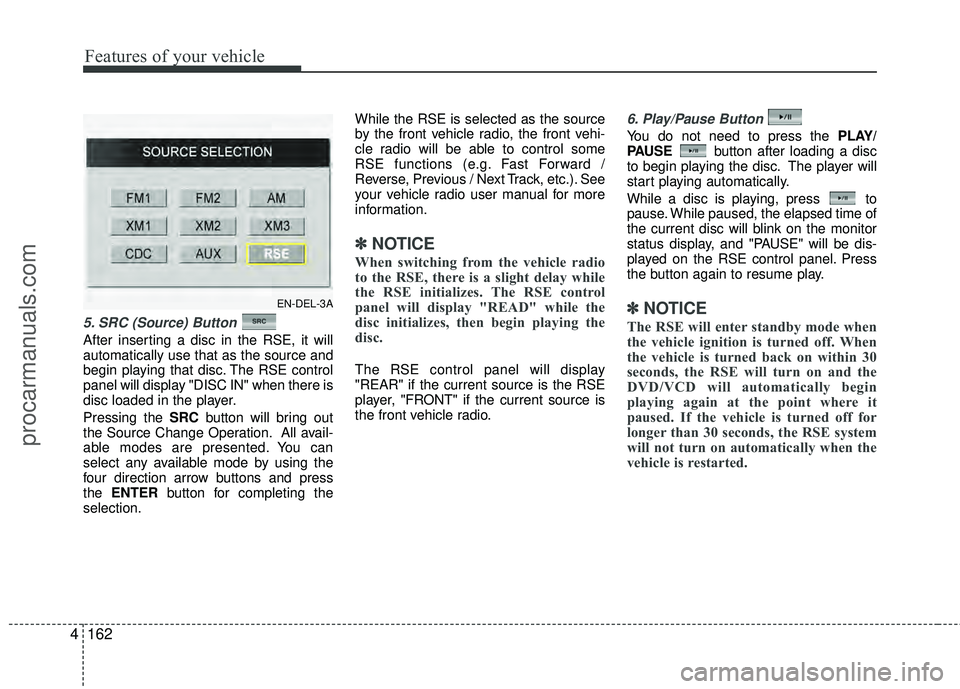
Pressing the SRC button will bring out
the Source Change Operation. All avail-
able modes are presented. You can
select any available mode by using the
four direction arrow buttons and press
the ENTER button for completing the
selection. While the RSE is selected as the source
by the front vehicle radio, the front vehi-
cle radio will be able to control some
RSE functions (e.g. Fast Forward /
Reverse, Previous / Next Track, etc.). See
your vehicle radio user manual for more
information.
✽ ✽
NOTICE
When switching from the vehicle radio
to the RSE, there is a slight delay while
the RSE initializes. The RSE control
panel will display "READ" while the
disc initializes, then begin playing the
disc.
The RSE control panel will display
"REAR" if the current source is the RSE
player, "FRONT" if the current source is
the front vehicle radio.
6. Play/Pause Button
You do not need to press the PLAY/
PAUSE button after loading a disc
to begin playing the disc. The player will
start playing automatically.
While a disc is playing, press to
pause. While paused, the elapsed time of
the current disc will blink on the monitor
status display, and "PAUSE" will be dis-
played on the RSE control panel. Press
the button again to resume play.
✽ ✽ NOTICE
The RSE will enter standby mode when
the vehicle ignition is turned off. When
the vehicle is turned back on within 30
seconds, the RSE will turn on and the
DVD/VCD will automatically begin
playing again at the point where it
paused. If the vehicle is turned off for
longer than 30 seconds, the RSE system
will not turn on automatically when the
vehicle is restarted.
EN-DEL-3A
procarmanuals.com
Page 247 of 429
4163
Features of your vehicle
7 - 11 Next / Prev (Next/Previous)and < REW/FF > (Rewind/FastForward) and ENTER Buttons
The NEXT/ PREV and
buttons provide a variety of functions,
depending on the media currently being
played in the RSE or the source selected.
For some of the functions, you will use
these buttons to navigate to the desired
location or option, then press the ENTER
button in the center to confirm your
selection.
For specific information about using
these buttons, see the appropriate sec-
tion for the various media types in this
manual.
DVD/VCD Player Operation
Disc/Format Compatibility
Your RSE player accepts and plays all
DVDs in 4:3 (normal) and 16:9
(widescreen) video formats. With DVDs
that offer multiple formats, the default for-
mat is 16:9 and will stay that way unless
changed by the user. See "Adjusting the
Monitor" to learn how to adjust the for-
mat.
The DVD player has the capability to play
DVD-Video, DVD-R, DVD-RW, CD-DA,
CD-R, CD-RW, VCD and Video-CD.
The DVD player was factory programmed
with a region code for the assigned mar-
ket or country. If a DVD is inserted for a
region code that doesn't match with the
player, an error message will be shown
on the overhead monitor and the RSE
control panel display.
✽ ✽ NOTICE
Because there is no universal standard
for DVD/VCD programming, your disc
may behave differently. Some DVDs
may present warning messages about
unauthorized duplication, some will go
directly to a menu, some may have dif-
ferent on-disc menu and start playing
the movie immediately, and some may
be unreadable or damaged and an error
message will be shown on the monitor.
✽ ✽NOTICE
While the player will accept DVD ROM
and CD ROM discs, the RSE cannot
play discs in these formats.
procarmanuals.com
Page 248 of 429
Features of your vehicle
164
4
The player is only capable of reading the
bottom side of a disc. When inserting a
single-sided disc, the label side should
be up. When inserting a two-sided disc,
the desired play side should be down.
Press DISP on the RSE control panel or
the remote controller, then press the
NEXT or PREVbuttons to cycle
through monitor adjustments (SCREEN
SIZE, BRIGHTNESS, CONTRAST,
CHROMA, HUE). When the adjustment
for the SCREEN SIZE, use the < REW or
FF > buttons to select the preferred
screen size.Menu
DVDs can be controlled, and any special
programming or features accessed, by
using the menu. To access the menu
while playing a DVD, press the MENU
button. Press the button a second time to
exit the menu and return to the DVD pro-
gram at the point it was being viewed.
The menu is not available during disc ini-
tialization, the beginning credits or any
copyright and FBI warnings.
While viewing the menu, press the
NEXT button to move the cursor up and
the PREVbutton to move the cursor
down the menu. Press the FF > button
to move the cursor to the right, and the
< REW button to move the cursor to the
left.
✽ ✽ NOTICE
You must repeatedly push any button to
move through several items. Pressing
and holding a button will not advance
the cursor beyond the first item.
Press ENTER or Play/Pause to select the
desired menu choice.
Playing a DVD/VCD
You can control your DVD or VCD by
using the buttons on the RSE control
panel or by using the remote control.
Instructions for the controls listed below
are the same whether using the RSE
control panel or the remote control.
However, there are some additional func-
tions that are only available from the
remote control. These buttons and their
functions are discussed in the "Remote
Control" section of this manual.
procarmanuals.com
Page 249 of 429
4165
Features of your vehicle
Play/Pause Button
You do not need to press the
PLAY/PAUSEbutton after loading a disc
to begin playing the disc. The player will
start playing automatically.
While a disc is playing, press PLAY/
PAUSE to pause. While paused, the
elapsed time of the current disc will blink
on the monitor status display, and
"PAUSE" will be displayed on the RSE
control panel. Press the button again to
resume play.
✽ ✽ NOTICE
The RSE will enter standby mode when
the vehicle ignition is turned off. When
the vehicle is turned back on within 30
seconds, the RSE will turn on and the
CD will automatically begin playing
again at the point where it paused. If the
vehicle is turned off for longer than 30
seconds, the RSE system will not turn on
automatically when the vehicle is
restarted.
Fast Forward/Reverse
Press and hold the FF > or < REW but-
ton and the player will fast forward or
reverse at 32 times the normal speed.
Release the FWD > or < REW button to
return to normal speed play.
Previous/Next Chapter
While a DVD/VCD is playing, press the
NEXT button to skip to the next chapter.
Press the PREVbutton to jump to
the beginning of the current chapter.
Press PREVagain to go move
through earlier chapters. Press the but-
ton repeatedly to move quickly through
chapters.
✽ ✽ NOTICE
Some VCDs do not have track informa-
tion. If the VCD has no chapter infor-
mation, pressing either of these buttons
will restart the VCD.
While pressing the NEXTor
PREV buttons, the Status Display, includ-
ing the current medium (DVD or VCD),
chapter and title information is displayed.
It will automatically disappear after five
seconds.
✽ ✽ NOTICE
Some DVDs do not permit chapter nav-
igation.
Instead of using the PREV /
NEXT buttons, you can also enter the
chapter number using the numbers on
the remote controller. While a DVD/VCD
is playing, press the number button(s)
that correspond to the desired chapter
and press ENTER.
procarmanuals.com
Page 250 of 429
Features of your vehicle
166
4
Stop a Disc
The disc will automatically stop when any
other source (e.g. the vehicle radio or an
external game) is selected. When you
switch back to the DVD, it will begin play-
ing at the point where it stopped.
While the player is running, press the
RSE control panel POWER/VOLUME
knob, or the POWER ON/OFF button
on the remote control, to stop a
disc and turn off the RSE system and the
DVD player. When the RSE is turned on
again, the disc will begin playing at the
point where it stopped.
Eject a Disc
To eject a disc press the button. A
disc can be ejected even when the unit is
not turned on.
✽ ✽ NOTICE
The player has an Auto-Reload Disc
Protection feature to protect discs from
accidental damage. If a disc is not
removed within 12 seconds after being
ejected, it will be pulled back into the
player.
CD Player Operation
The RSE will play audio CDs and mix
CDs in standard (12 cm) format.
✽ ✽NOTICE
While the player will accept DVD ROM
and CD ROM discs, the RSE cannot
play discs in these formats.
While the player is playing mix CD, only
the audio track will be played. The data
file will not be played by system.
procarmanuals.com
Page 251 of 429
4167
Features of your vehicle
Volume Control
You can adjust the volume of the audio
heard in the vehicle speakers from the
RSE control panel or the remote control.
From the RSE control panel, rotate the
POWER/VOLUMEknob. From the
remote control, press "VOL +" to
increase and "VOL -" to decrease the
volume.
Adjusting the volume in this way will not
adjust the wireless headphone volume.
To adjust the headphones, roll the VOL
control wheel.
Play/Pause
When a CD is inserted, the RSE will
automatically begin playing the first track.
Press the PLAY/PAUSE button to
pause the CD. Press the button again to
resume play. While paused, the elapsed
time in the status display at the top of the
monitor will blink. The RSE control will
display "PAUSE."
When the player reaches the end of the
disc, the player will automatically return
to the first track and continue playing.
Fast Forward / Reverse
Press and hold the FF > or < REW but-
ton and the player will fast forward or
reverse at 10 times the normal speed.
Release the button to return to normal
speed play.
The audio is muted while the player fast
forwards or fast reverses.
Previous/Next Track
While a CD is playing, press the
PREV button to jump to the beginning of
the current track. If less than 10 seconds
has elapsed on the current track, press-
ing PREVwill go to the previous
track. Press the button repeatedly to con-
tinue moving through previous tracks.
Press the NEXTbutton to jump to the
beginning of the next track. Press the
button repeatedly to continue moving
through the following tracks.
Instead of using the PREV /
NEXT buttons, you can also enter the
track number using the numbers on the
remote control. While a CD is playing,
press the number button(s) that corre-
spond to the desired track and press
ENTER.
The current track number is shown in the
Status Display at the top of the monitor.
Stop
The CD will automatically stop when any
other source (e.g. the vehicle radio or an
external game) is selected. When you
switch back to the CD, it will begin play-
ing at the point where it stopped.
While a CD is playing, you can stop the
CD by pressing the POWER ON/OFF
button on the remote control or the
POWER/VOLUME knob on the RSE
control panel. When the RSE is turned on
again, it will automatically begin playing
the CD at the point where it was stopped.
Turning the vehicle off, or selecting a dif-
ferent RSE Source, will also stop playing
the CD.
Eject
Press the EJECT button to eject the
CD. Discs can be ejected even when the
unit is not turned on.
✽ ✽ NOTICE
The player has an Auto-Reload Disc
Protection feature to protect discs from
accidental damage. If a disc is not
removed within 12 seconds after being
ejected, it will be pulled back into the
player. This is to protect the disc from
accidental damage.
procarmanuals.com
Page 252 of 429
Features of your vehicle
168
4
Using the MP3 Player
Most RSE functions work the same for
audio CDs and MP3 discs. The major dif-
ference is that audio CDs are organized
by "tracks," while MP3 discs are organ-
ized using folders and files. Therefore,
the navigation functions are somewhat
different for MP3 discs. If the discs
including CD and MP3 file, the system
only will play the CD track, not the MP3
data file.
✽ ✽
NOTICE
While the player will accept DVD ROM
and CD ROM discs, the RSE cannot
play discs in these formats.
Pause/Play
When an MP3 disc is inserted, the RSE
will automatically begin playing the first
file in the disc. Press the PLAY/PAUSE
button to pause the file. Press the
button again to resume play. While
paused, the elapsed time in the status
display at the top of the monitor will blink.
The RSE control panel will display
"PAUSE."
At the end of the disc, the player will
automatically return to the first file and
continue playing.
Fast Forward/Reverse
Press and hold the FF > or < REW but-
ton and the player will fast forward or
reverse at 10 times the normal speed.
Release the button to return to normal
speed play.
The audio is muted while the player fast
forwards or fast reverses.
Song List : Navigating Folders and Files
MP3 discs are organized by named fold-
ers, with each folder containing a collec-
tion of named music files. You can quick-
ly navigate through the folders and files
using the Song List function.
Press the MENU button on the RSE con-
trol panel or remote control to display the
song list. The focused song will be high-
lighted. And the music note icon appears
to left of the song currently playing.
To navigate through the folders, press
the < REW or FF > button to highlight the
FOLDER UP, FOLDER DOWN, or
HOME buttons on the monitor, the press
ENTER to move up or down the folders.
Press ENTER repeatedly to move
through all the folders.
When you reach the desired folder, press
the PREVor NEXTbuttons to
scroll through the list of files in that folder
and press ENTER to select the desired
file. The player will switch to the selected
folder and begin playing the desired file.
procarmanuals.com
Page 254 of 429
Features of your vehicle
170
4
Stop
The disc will automatically stop when any
other source (e.g. the vehicle radio or an
external game) is selected. When you
switch back to the disc, it will begin play-
ing at the point where it stopped.
While a disc is playing, you can stop the
disc by pressing the POWER ON/OFF
button on the remote control or the
POWER/VOLUME knob on the RSE
control panel. When the RSE is turned on
again, it will automatically begin playing
the disc at the point where it was
stopped.
Turning the vehicle off, or selecting a dif-
ferent RSE Source, will also stop playing
the disc. When the vehicle is turned on
again, or the disc is again selected as the
source, the disc will begin playing at the
point where it was stopped. The player
will automatically resume play at the
point where it was stopped unless the
disc is ejected.✽ ✽ NOTICE
The player has an Auto-Reload Disc
Protection feature to protect discs from
accidental damage. If a disc is not
removed within 12 seconds after being
ejected, it will be pulled back into the
player. This is to protect the disc from
accidental damage.
Eject
Press the EJECT button to eject the
disc. Discs can be ejected even when the
unit is not turned on.
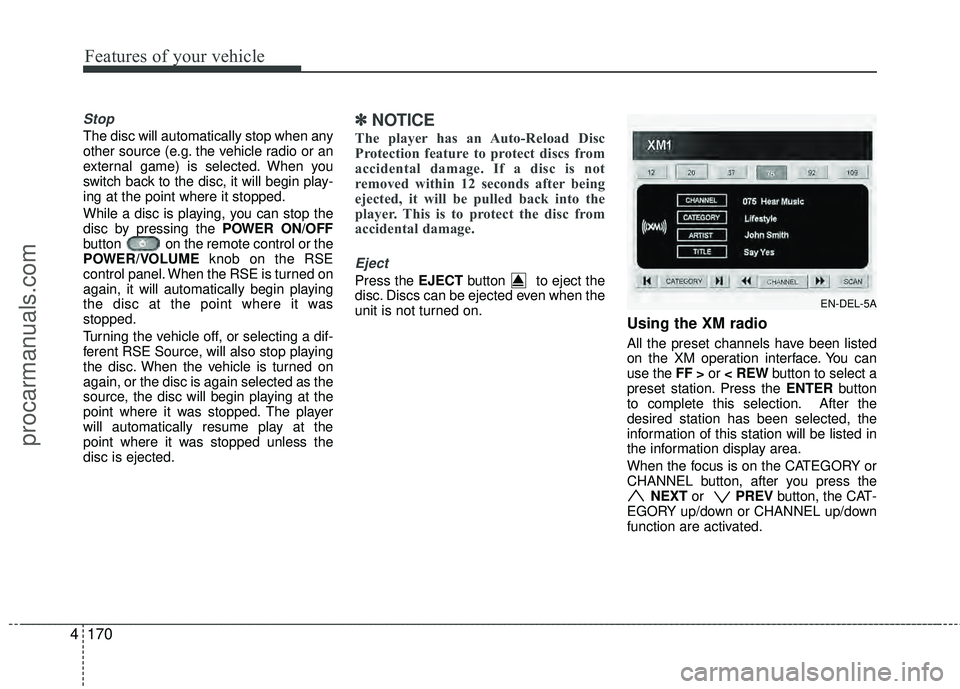
Using the XM radio
All the preset channels have been listed
on the XM operation interface. You can
use the FF > or < REW button to select a
preset station. Press the ENTER button
to complete this selection. After the
desired station has been selected, the
information of this station will be listed in
the information display area.
When the focus is on the CATEGORY or
CHANNEL button, after you press the NEXT or PREV button, the CAT-
EGORY up/down or CHANNEL up/down
function are activated.
EN-DEL-5A
procarmanuals.com
Page 258 of 429
Features of your vehicle
174
4
1. POWER On/Off
Press the RSE control panel POWER
button or the POWER ON/OFF button
on the remote control to turn the
RSE on or off. If a disc is loaded and
playing when the RSE is turned off, when
the RSE is turned back on the disc will
automatically resume playback at the
point where it was stopped.
2. Mute
Press the MUTE button to mute the
audio in the vehicle speakers. The MUTE
button has no effect on the wireless
headphones.
While muted, the RSE control panel,
vehicle radio and RSE monitor will all dis-
play "MUTE." Press the button again, or
adjust the volume at RSE control panel
or vehicle radio, to un-mute the audio.
3. Number Buttons ~
The number buttons ( 0 through 9) can
be used to directly enter information such
as chapters in a DVD, track or file num-
bers for audio CDs, and preset radio.
To select a DVD or VCD chapter, while a
DVD/VCD is playing, press the number
button(s) that correspond to the desired
chapter and press ENTER.
To select a CD track, while a CD is play-
ing press the number button(s) that cor-
respond to the track and press ENTER.
To select a radio station preset, while the
desired band (AM, FM1 or FM2) is
selected, press the numbered button that
corresponds to the preset on the vehicle
radio. There is no need to press ENTER.
4. Source
Pressing this SOURCE button will bring
out the Source Change selection opera-
tion. You can select any available mode
by using the four direction arrow buttons
and press the ENTER button for com-
pleting the selection.
The RSE control panel will display
"REAR" if the current source is the RSE
player, and will display "FRONT" if the
current source is the vehicle radio.
5. A.LANG - Alternate Language Folder -
Where alternate languages are available
on a DVD, pressing the A.LANG button
will allow you to select your preferred lan-
guage. Press the button repeatedly to
cycle through the available languages.
When the desired language is displayed,
press ENTER.
Pressing the A.LANG (or FOLD-) button
during MP3 normal play will immediately
bring the player to the first file of the pre-
vious folder.
Pressing the A.LANG (or FOLD-) button
during CD or VCD play will do nothing.
procarmanuals.com
Page 259 of 429
4175
Features of your vehicle
6. S.Title - Subtitles, Folders +
The S.TITLE button allows you to display
or remove language subtitles while play-
ing DVDs. If no language subtitles are
available, the display will show an invalid
icon. Press the S. TITLEbutton repeat-
edly to cycle through all of the available
languages.
Pressing the S. TITLE (or FOLD+) button
during MP3 normal play will immediately
bring the player to the first file of the next
folder.
Pressing the S. TITLE (or FOLD+) button
during CD or VCD play will do nothing.
7. Menu
Pressing the MENU button during DVD
play will present the DVD menu.
Pressing the MENU button during MP3
disc play will display the Song List on the
monitor.
Pressing the MENU button during CD or
VCD play has no effect.
Press the button again to return to the
program. After five seconds with no but-
ton press, the menu will automatically
close and the program begin playing.
8. Title/PBC
While viewing a DVD, press the TITLE
button on the remote control to jump to
the top menu. Press the < REW / FF > or
PREV / NEXT buttons to highlight
the desired selection, then press ENTER
to make your selection.
Press TITLE again to return to the DVD.
While viewing a VCD, pressing the
TITLE/PBC button will switch the PBC
function on and off.
9. Return
While viewing any operation, pressing
the RETURN button will exit the current
operation on screen display and resume
last play.
10. Speaker Volume "VOL +" and "VOL -"
If the audio from the RSE is being played
through the vehicle speakers, you can
adjust the volume of the speakers with
the "VOL +" and "VOL -" buttons.
Adjusting the volume in this way will not
adjust the wireless headphone volume.
To adjust the headphones, roll the VOL
control wheel.
Batteries
The remote control requires a CR2025
battery (included).
procarmanuals.com