turn signal INFINITI EX 2012 Owners Manual
[x] Cancel search | Manufacturer: INFINITI, Model Year: 2012, Model line: EX, Model: INFINITI EX 2012Pages: 506, PDF Size: 7.27 MB
Page 10 of 506
GUID-C0DAB6C4-2638-4210-92D1-C51ED7B201A0
SSI0383
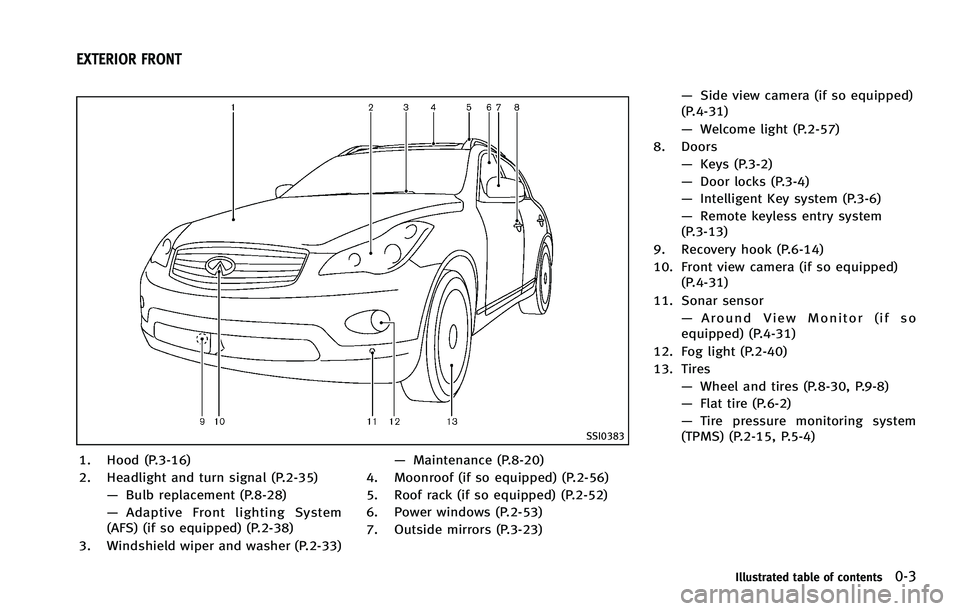
1. Hood (P.3-16)
2. Headlight and turn signal (P.2-35)—Bulb replacement (P.8-28)
— Adaptive Front lighting System
(AFS) (if so equipped) (P.2-38)
3. Windshield wiper and washer (P.2-33) —
Maintenance (P.8-20)
4. Moonroof (if so equipped) (P.2-56)
5. Roof rack (if so equipped) (P.2-52)
6. Power windows (P.2-53)
7. Outside mirrors (P.3-23) —
Side view camera (if so equipped)
(P.4-31)
— Welcome light (P.2-57)
8. Doors —Keys (P.3-2)
— Door locks (P.3-4)
— Intelligent Key system (P.3-6)
— Remote keyless entry system
(P.3-13)
9. Recovery hook (P.6-14)
10. Front view camera (if so equipped) (P.4-31)
11. Sonar sensor —Around View Monitor (if so
equipped) (P.4-31)
12. Fog light (P.2-40)
13. Tires —Wheel and tires (P.8-30, P.9-8)
— Flat tire (P.6-2)
— Tire pressure monitoring system
(TPMS) (P.2-15, P.5-4)
Illustrated table of contents0-3
EXTERIOR FRONT
Page 13 of 506

0-6Illustrated table of contents
GUID-A35345A9-ABF1-4847-AB93-479406197157
SSI0623
1. TRIP/RESET switch for twin trip od-ometer (P.2-7)
2. Instrument brightness control switch (P.2-39)
3. Headlight, fog light and turn signal switch (P.2-35) 4. Trip computer switch (P.2-28)
5. Windshield wiper and washer switch
(P.2-33)
6. Warning systems switch (if so
equipped)
—Forward Collision Warning (FCW) (P.5-71)
—
Lane Departure Warning (LDW)
(P.5-19)
— Blind Spot Warning (BSW)
(P.5-27)
7. Hood release handle (P.3-16)
8. Intelligent Key port (P.5-12)
9. Vehicle Dynamic Control (VDC) OFF switch (P.5-86)
10. Intelligent Brake Assist (IBA) off
switch (if so equipped) (P.2-44)
11. Electric tilting/telescopic steering
wheel lever (if so equipped) (P.3-20)
12. Steering-wheel-mounted controls (Left side)
—For audio system (P.4-95)
— For Bluetooth
®Hands-Free Phone
System (with navigation system)
(P.4-98)
— For Bluetooth
®Hands-Free Phone
System (without navigation system)
(P.4-109)
— For INFINITI Voice Recognition Sys-
tem (if so equipped) (P.4-123)
13. Manual tilting/telescopic steering
wheel lever (if so equipped) (P.3-20)
14. Steering wheel
COCKPIT
Page 18 of 506
GUID-51FCA61D-4AC4-45D9-AAF2-51D6E1DAD39F
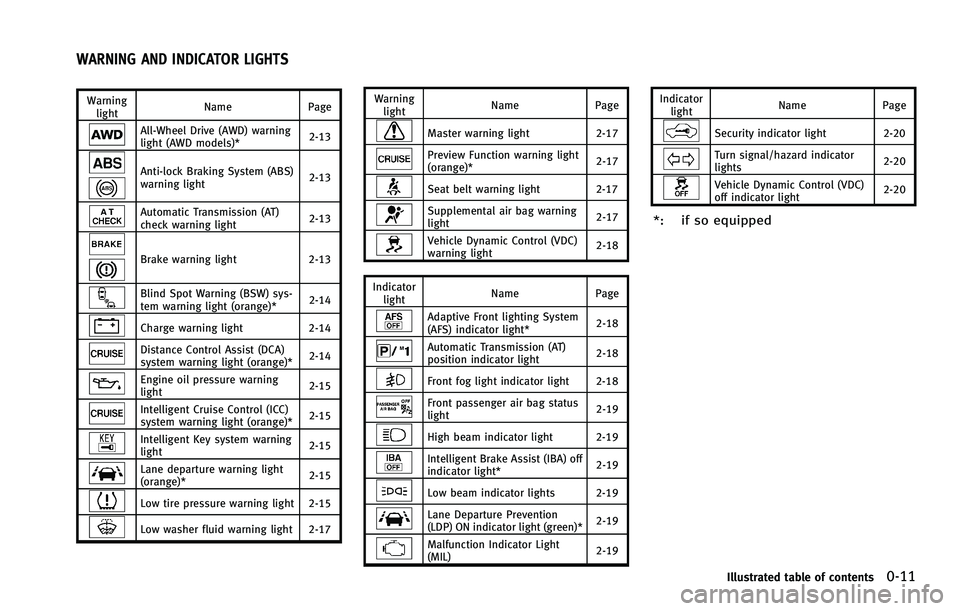
All-Wheel Drive (AWD) warning
light (AWD models)*2-13
Anti-lock Braking System (ABS)
warning light2-13
Automatic Transmission (AT)
check warning light
2-13
Brake warning light
2-13
Blind Spot Warning (BSW) sys-
tem warning light (orange)* 2-14
Charge warning light
2-14
Distance Control Assist (DCA)
system warning light (orange)* 2-14
Engine oil pressure warning
light2-15
Intelligent Cruise Control (ICC)
system warning light (orange)*2-15
Intelligent Key system warning
light
2-15
Lane departure warning light
(orange)*2-15
Low tire pressure warning light 2-15
Low washer fluid warning light 2-17 Warning
light Name
Page
Master warning light 2-17
Preview Function warning light
(orange)* 2-17
Seat belt warning light 2-17
Supplemental air bag warning
light2-17
Vehicle Dynamic Control (VDC)
warning light2-18
Indicator light Name
Page
Adaptive Front lighting System
(AFS) indicator light* 2-18
Automatic Transmission (AT)
position indicator light2-18
Front fog light indicator light 2-18
Front passenger air bag status
light2-19
High beam indicator light 2-19
Intelligent Brake Assist (IBA) off
indicator light*2-19
Low beam indicator lights 2-19
Lane Departure Prevention
(LDP) ON indicator light (green)*2-19
Malfunction Indicator Light
(MIL)
2-19Indicator
light Name
Page
Security indicator light 2-20
Turn signal/hazard indicator
lights 2-20
Vehicle Dynamic Control (VDC)
off indicator light2-20
*: if so equipped
Illustrated table of contents0-11
WARNING AND INDICATOR LIGHTS
Page 76 of 506

GUID-D50D6554-A3E9-4B15-AC48-BC6908CCC6C1
SSI0623
1. TRIP/RESET switch for twin trip od-ometer (P.2-7)
2. Instrument brightness control switch (P.2-39)
3. Headlight, fog light and turn signal switch (P.2-35) 4. Trip computer switch (P.2-28)
5. Windshield wiper and washer switch
(P.2-33)
6. Warning systems switch (if so
equipped)
—Forward Collision Warning (FCW) (P.5-71)
—
Lane Departure Warning (LDW)
(P.5-19)
— Blind Spot Warning (BSW)
(P.5-27)
7. Hood release handle (P.3-16)
8. Intelligent Key port (P.5-12)
9. Vehicle Dynamic Control (VDC) OFF switch (P.5-86)
10. Intelligent Brake Assist (IBA) off
switch (if so equipped) (P.2-44)
11. Electric tilting/telescopic steering
wheel lever (if so equipped) (P.3-20)
12. Steering-wheel-mounted controls (Left side)
—For audio system (P.4-95)
— For Bluetooth
®Hands-Free Phone
System (with navigation system)
(P.4-98)
— For Bluetooth
®Hands-Free Phone
System (without navigation system)
(P.4-109)
— For INFINITI Voice Recognition Sys-
tem (if so equipped) (P.4-123)
13. Manual tilting/telescopic steering
wheel lever (if so equipped) (P.3-20)
14. Steering wheel
Instruments and controls2-3
COCKPIT
Page 85 of 506
2-12Instruments and controls
GUID-6AAEFF3D-0DD3-4C79-B5F3-C17FD9AE3F5E
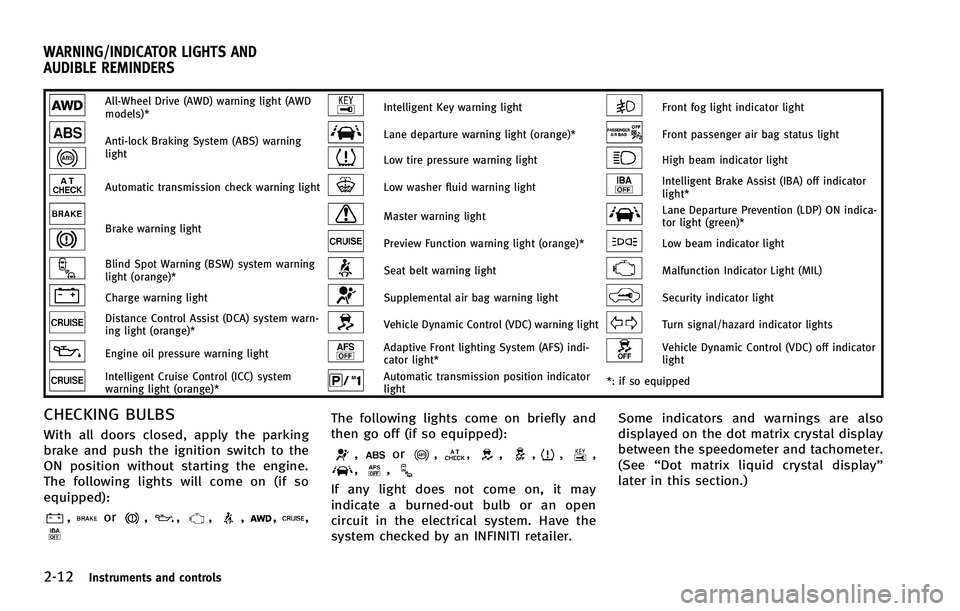
All-Wheel Drive (AWD) warning light (AWD
models)*Intelligent Key warning lightFront fog light indicator light
Anti-lock Braking System (ABS) warning
lightLane departure warning light (orange)*Front passenger air bag status light
Low tire pressure warning lightHigh beam indicator light
Automatic transmission check warning lightLow washer fluid warning lightIntelligent Brake Assist (IBA) off indicator
light*
Brake warning lightMaster warning lightLane Departure Prevention (LDP) ON indica-
tor light (green)*
Preview Function warning light (orange)*Low beam indicator light
Blind Spot Warning (BSW) system warning
light (orange)*Seat belt warning lightMalfunction Indicator Light (MIL)
Charge warning lightSupplemental air bag warning lightSecurity indicator light
Distance Control Assist (DCA) system warn-
ing light (orange)*Vehicle Dynamic Control (VDC) warning lightTurn signal/hazard indicator lights
Engine oil pressure warning lightAdaptive Front lighting System (AFS) indi-
cator light*Vehicle Dynamic Control (VDC) off indicator
light
Intelligent Cruise Control (ICC) system
warning light (orange)*Automatic transmission position indicator
light*: if so equipped
CHECKING BULBSGUID-38FC5737-A834-4040-96EA-92B7DF1FF61D
,or,,,,,,
The following lights come on briefly and
then go off (if so equipped):
,or,,,,,,,,
If any light does not come on, it may
indicate a burned-out bulb or an open
circuit in the electrical system. Have the
system checked by an INFINITI retailer. Some indicators and warnings are also
displayed on the dot matrix crystal display
between the speedometer and tachometer.
(See
“Dot matrix liquid crystal display”
later in this section.)
WARNING/INDICATOR LIGHTS AND
AUDIBLE REMINDERS
Page 93 of 506

2-20Instruments and controls
light should turn off
after a few driving trips. If thelight
does not turn off after a few driving
trips, have the vehicle inspected by an
INFINITI retailer. You do not need to
have your vehicle towed to the retailer.
. Malfunction indicator light blinking —
An engine misfire has been detected
which may damage the emission con-
trol system.
To reduce or avoid emission control system damage:
1) Do not drive at speeds above 45
MPH (72 km/h).
2) Avoid hard acceleration or decelera- tion.
3) Avoid steep uphill grades.
4) If possible, reduce the amount of cargo being hauled or towed.
The malfunction indicator light may
stop blinking and remain on.
Have the vehicle inspected by an
INFINITI retailer. You do not need to
have your vehicle towed to the retailer.
CAUTION
Continued vehicle operation without having
the emission control system checked and
repaired as necessary could lead to poor
driveability, reduced fuel economy, and
possible damage to the emission control
system.
Security indicator lightGUID-F283CFB3-5490-40E8-A11A-48F8F334CA30
Turn signal/hazard indicator
lights
GUID-03F65A59-AF9A-4CAE-937B-1BFA717FB4C0
Vehicle Dynamic Control (VDC)
off indicator light
GUID-FD6F2BFB-B634-4CE2-B8F8-10BADA39BBF3
Page 108 of 506
GUID-70C29E9A-49AD-4C5F-9A21-B7EEF9AD71A0
SIC3239
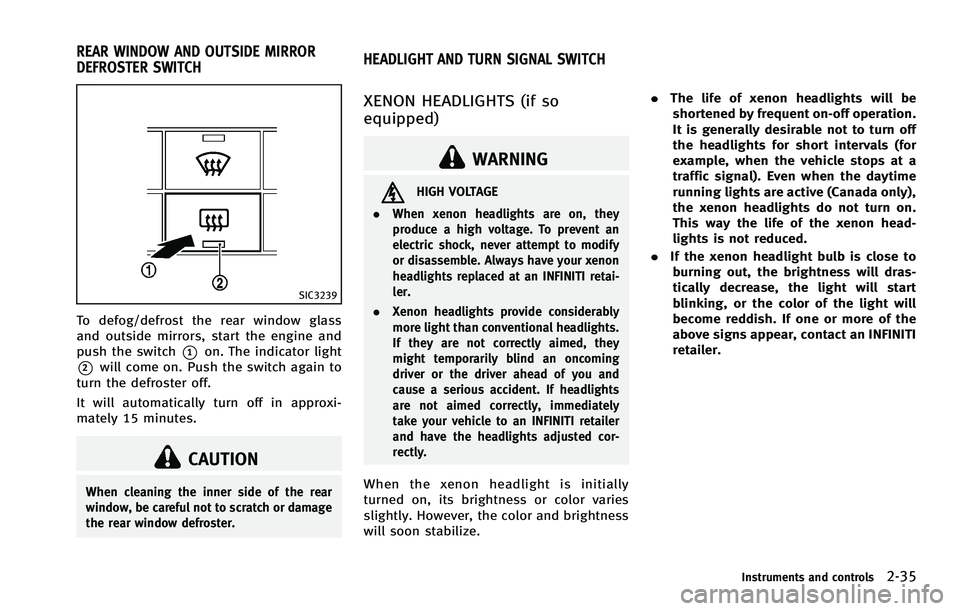
To defog/defrost the rear window glass
and outside mirrors, start the engine and
push the switch
*1on. The indicator light
*2will come on. Push the switch again to
turn the defroster off.
It will automatically turn off in approxi-
mately 15 minutes.
CAUTION
When cleaning the inner side of the rear
window, be careful not to scratch or damage
the rear window defroster.
GUID-F39E5805-C881-4ED9-B63E-554EB445040A
WARNING
HIGH VOLTAGE
. When xenon headlights are on, they
produce a high voltage. To prevent an
electric shock, never attempt to modify
or disassemble. Always have your xenon
headlights replaced at an INFINITI retai-
ler.
. Xenon headlights provide considerably
more light than conventional headlights.
If they are not correctly aimed, they
might temporarily blind an oncoming
driver or the driver ahead of you and
cause a serious accident. If headlights
are not aimed correctly, immediately
take your vehicle to an INFINITI retailer
and have the headlights adjusted cor-
rectly.
When the xenon headlight is initially
turned on, its brightness or color varies
slightly. However, the color and brightness
will soon stabilize. .
The life of xenon headlights will be
shortened by frequent on-off operation.
It is generally desirable not to turn off
the headlights for short intervals (for
example, when the vehicle stops at a
traffic signal). Even when the daytime
running lights are active (Canada only),
the xenon headlights do not turn on.
This way the life of the xenon head-
lights is not reduced.
. If the xenon headlight bulb is close to
burning out, the brightness will dras-
tically decrease, the light will start
blinking, or the color of the light will
become reddish. If one or more of the
above signs appear, contact an INFINITI
retailer.
Instruments and controls2-35
REAR WINDOW AND OUTSIDE MIRROR
DEFROSTER SWITCH HEADLIGHT AND TURN SIGNAL SWITCH
Page 113 of 506
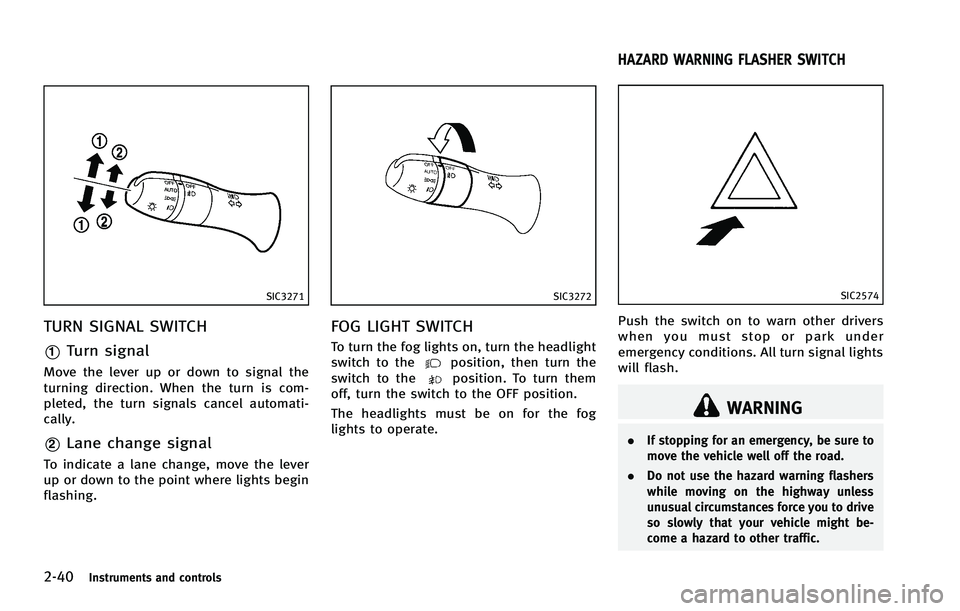
2-40Instruments and controls
SIC3271
TURN SIGNAL SWITCHGUID-E1C56177-E1D2-4496-9D69-2D8E1B7E7D8C
SIC3272
FOG LIGHT SWITCHGUID-33BDF6EA-9062-427F-9AB6-3D01A86E20DC
position, then turn the
switch to theposition. To turn them
off, turn the switch to the OFF position.
The headlights must be on for the fog
lights to operate.
GUID-ACF6D47C-7AAA-4B7A-B02A-0F1F6CF62D6C
SIC2574
Push the switch on to warn other drivers
when you must stop or park under
emergency conditions. All turn signal lights
will flash.
WARNING
. If stopping for an emergency, be sure to
move the vehicle well off the road.
. Do not use the hazard warning flashers
while moving on the highway unless
unusual circumstances force you to drive
so slowly that your vehicle might be-
come a hazard to other traffic.
HAZARD WARNING FLASHER SWITCH
Page 116 of 506
GUID-3516DC6E-9566-4A0B-B66F-0C326A5AC4A3
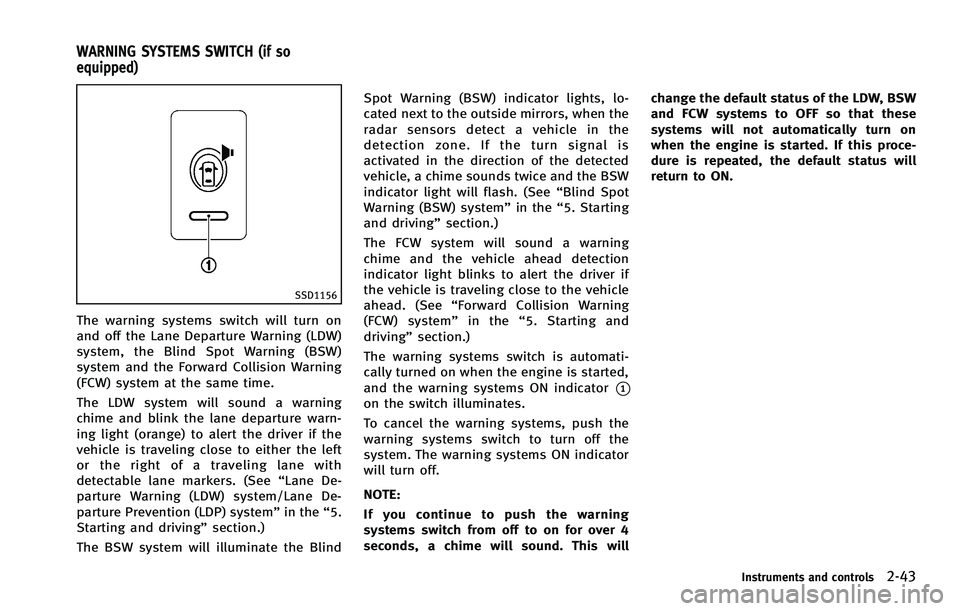
SSD1156
The warning systems switch will turn on
and off the Lane Departure Warning (LDW)
system, the Blind Spot Warning (BSW)
system and the Forward Collision Warning
(FCW) system at the same time.
The LDW system will sound a warning
chime and blink the lane departure warn-
ing light (orange) to alert the driver if the
vehicle is traveling close to either the left
or the right of a traveling lane with
detectable lane markers. (See“Lane De-
parture Warning (LDW) system/Lane De-
parture Prevention (LDP) system” in the“5.
Starting and driving” section.)
The BSW system will illuminate the Blind Spot Warning (BSW) indicator lights, lo-
cated next to the outside mirrors, when the
radar sensors detect a vehicle in the
detection zone. If the turn signal is
activated in the direction of the detected
vehicle, a chime sounds twice and the BSW
indicator light will flash. (See
“Blind Spot
Warning (BSW) system” in the“5. Starting
and driving” section.)
The FCW system will sound a warning
chime and the vehicle ahead detection
indicator light blinks to alert the driver if
the vehicle is traveling close to the vehicle
ahead. (See “Forward Collision Warning
(FCW) system” in the“5. Starting and
driving” section.)
The warning systems switch is automati-
cally turned on when the engine is started,
and the warning systems ON indicator
*1on the switch illuminates.
To cancel the warning systems, push the
warning systems switch to turn off the
system. The warning systems ON indicator
will turn off.
NOTE:
If you continue to push the warning
systems switch from off to on for over 4
seconds, a chime will sound. This will change the default status of the LDW, BSW
and FCW systems to OFF so that these
systems will not automatically turn on
when the engine is started. If this proce-
dure is repeated, the default status will
return to ON.
Instruments and controls2-43
WARNING SYSTEMS SWITCH (if so
equipped)
Page 135 of 506

2-62Instruments and controls
SIC3183
3. Using both hands, simultaneously pushand hold both the HomeLink®button
you want to program and the hand-held
transmitter button.
DO NOT release the buttons until step 4
has been completed.
4. Hold down both buttons until the
indicator light on HomeLink
®flashes,
changing from a “slow blink”to a
“rapid blink”. This could take up to 90
seconds. When the indicator light
blinks rapidly, both buttons may be
released. The rapidly flashing light
indicates successful programming. To
activate the garage door or other programmed device, push and hold
the programmed HomeLink
®button -
releasing when the device begins to
activate.
5. If the indicator light on HomeLink
®
blinks rapidly for two seconds and then
turns solid, HomeLink®has picked up a
“rolling code” garage door opener
signal. You will need to proceed with
the next steps to train HomeLink
®,
completing the programming may re-
quire a ladder and another person for
convenience.
6. Push and release the program button located on the garage door opener’s
motor to activate the “training mode”.
This button is usually located near the
antenna wire that hangs down from the
motor. If the wire originates from under
a light lens, you will need to remove the
lens to access the training button.
NOTE:
Once you have pushed and released
the training button on the garage door
opener’s motor and the “training light”
is lit, you have 30 seconds in which to
perform step 7. For convenience, use
the help of a second person to assist
when performing this step. 7. Quickly (within 30 seconds of pushing
and releasing the garage door opener
training button) and firmly push and
release the HomeLink
®button you’ve
just programmed. Push and release the
HomeLink
®button up to three times to
complete the training.
8. Your HomeLink
®button should now be
programmed. To program the remaining
HomeLink
®buttons for additional door
or gate openers, follow steps 2 through
8 only.
NOTE:
Do not repeat step 1 unless you want to
“clear” all previously programmed
HomeLink
®buttons.
If you have any questions or are having
difficulty programming your HomeLink
®
buttons, please refer to the HomeLink®
web site at: www.homelink.com or call 1-
800-355-3515.