brake INFINITI EX 2013 User Guide
[x] Cancel search | Manufacturer: INFINITI, Model Year: 2013, Model line: EX, Model: INFINITI EX 2013Pages: 498, PDF Size: 2.5 MB
Page 86 of 498
possible for tire replacement and/or
system resetting.
. Replacing tires with those not originally
specified by INFINITI could affect the
proper operation of the TPMS.
CAUTION
.The TPMS is not a substitute for the
regular tire pressure check. Be sure to
check the tire pressure regularly.
. If the vehicle is being driven at speeds of
less than 16 MPH (25 km/h), the TPMS
may not operate correctly.
. Be sure to install the specified size of
tires to the four wheels correctly.
Low washer fluid warning light
This light comes on when the washer tank
fluid is at a low level. Add washer fluid as
necessary. (See “Window washer fluid”in
the “8. Maintenance and do-it-yourself”
section.)
Master warning light
When the ignition switch is in the ON
position, the master warning light illumi-
nates if any of the following are displayed
on the dot matrix liquid crystal display:
. No key warning
. Low fuel warning
. Low washer fluid warning
. Parking brake release warning
. Door/lift gate open warning
. Loose fuel cap warning
. Check tire pressure warning
See “Dot matrix liquid crystal display” later
in this section.
Preview Function warning light
(orange; if so equipped)
The light comes on if there is a malfunction
in the Preview Braking system.
If the warning light comes on, park the
vehicle in a safe place. Turn the engine off,
restart the engine, resume driving and set
the ICC system again.
If it is not possible to set the system or the
indicator stays on, it may indicate that the
system is malfunctioning. Although the
vehicle is still driveable under normal
conditions, have the vehicle checked at an INFINITI retailer.
Seat belt warning light and
chime
The light and chime remind you to fasten
seat belts. The light illuminates whenever
the ignition switch is pushed to the ON
position, and will remain illuminated until
the driver’s seat belt is fastened. At the
same time, the chime will sound for about
6 seconds unless the driver’s seat belt is
securely fastened.
The seat belt warning light for the front
passenger will illuminate if the seat belt is
not fastened when the front passenger’s
seat is occupied. For 5 seconds after the
ignition switch is in the ON position, the
system does not activate the warning light
for the front passenger.
See “Seat belts” in the“1. Safety —Seats,
seat belts and supplemental restraint
system” section for precautions on seat
belt usage.
Supplemental air bag warning
light
After pushing the ignition switch to the ON
position, the supplemental air bag warning
light will illuminate. The supplemental air
Instruments and controls2-15
Page 88 of 498

transmission does not shift to the selected
gear due to a transmission protection
mode, the AT position indicator light will
blink and a buzzer will sound.
(See“Automatic transmission” in the“5.
Starting and driving” section.)
Exterior light indicator
This indicator illuminates when the head-
light switch is turned to the AUTO,orposition and the front parking lights,
instrument panel lights, tail lights, license
plate lights or headlights are on. The
indicator turns off when these lights are
turned off.
Front fog light indicator light
The front fog light indicator light illumi-
nates when the front fog lights are on. (See
“Fog light switch” later in this section.)
Front passenger air bag status
light
The front passenger air bag status light
() will be lit and the passenger front air
bag will be OFF depending on how the front
passenger seat is being used.
For front passenger air bag status light
operation, see “INFINITI Advanced Air Bag System (front seats)”
in the“1. Safety —
Seats, seat belts and supplemental re-
straint system” section of this manual.
High beam indicator light
This light comes on when the headlight
high beam is on and goes out when the low
beam is selected.
Intelligent Brake Assist (IBA)
off indicator light (if so equipped)
The light illuminates when the Intelligent
Brake Assist (IBA) off switch is pushed to
OFF. This indicates that the Intelligent
Brake Assist (IBA) system is not operating.
When the IBA off indicator light illuminates
while the system is turned on (without the
warning chime sound), this light indicates
that the system control is temporarily
unavailable.
When the IBA off indicator light illuminates
with the warning chime sound while the
IBA system is turned on, this light indicates
that the system may not be functioning
properly. Park the vehicle in a safe place.
Check to see if the laser sensor is clean.
Turn the engine off, then restart the
engine.
If the IBA off indicator light illuminates after following the procedures above, it
may indicate that the system is malfunc-
tioning. Although the vehicle is still drive-
able under normal conditions, have the
vehicle checked at an INFINITI retailer. (See
“Intelligent Brake Assist (IBA) system”
in
the “5. Starting and driving” section.)
Lane Departure Prevention
(LDP) ON indicator light (green; if so
equipped)
The light comes on in green when the Lane
Departure Prevention (LDP) system is
turned on. The light turns off when the
system is turned off.
NOTE:
This light is common with the lane
departure warning light (orange). (See
“Lane departure warning light” earlier in
this section.)
For more details, see “Lane Departure
Warning (LDW) system/Lane Departure
Prevention (LDP) system” in the“5. Start-
ing and driving” section.
Malfunction Indicator Light
(MIL)
If the malfunction indicator light comes on
steady or blinks while the engine is
Instruments and controls2-17
Page 90 of 498

Vehicle Dynamic Control (VDC)
off indicator light
The light comes on when the vehicle
dynamic control off switch is pushed to
OFF. This indicates that the vehicle dynamic
control system and traction control system
are not operating.
AUDIBLE REMINDERS
Key reminder chime
A chime will sound if the driver side door is
opened while the ignition switch is pushed
to the ACC position or pushed to the OFF or
LOCK position with the Intelligent Key left
in the Intelligent Key port. Make sure the
ignition switch is pushed to the OFF
position, and take the Intelligent Key with
you when leaving the vehicle.
Light reminder chime
A chime will sound when the driver side
door is opened with the light switch in the
orposition and the ignition switch
in the ACC, OFF or LOCK position.
Turn the light switch off when you leave the
vehicle.
Parking brake reminder chime
The parking brake reminder chime will
sound if the vehicle is driven at more than
4 MPH (7 km/h) with the parking brake
applied. Stop the vehicle and release the
parking brake.
Brake pad wear warning
The disc brake pads have audible wear
warnings. When a brake pad requires
replacement, it will make a high pitched
scraping sound when the vehicle is in
motion. This scraping sound will first occur
only when the brake pedal is depressed.
After more wear of the brake pad, the
sound will always be heard even if the
brake pedal is not depressed. Have the
brakes checked as soon as possible if the
warning sound is heard.
Lane departure warning chime (if
so equipped)
When the Lane Departure Warning (LDW) or
Lane Departure Prevention (LDP) system is
on, the chime sounds if the vehicle is
traveling close to either the left or the right
of a traveling lane with detectable lane
markers.
See “Lane Departure Warning (LDW) sys- tem/Lane Departure Prevention (LDP) sys-
tem”
in the “5. Starting and driving”
section for more details.
Instruments and controls2-19
Page 93 of 498

2-22Instruments and controls
INDICATORS FOR OPERATION
1. Engine start operation indicator
This indicator appears when the selector
lever is in the P (Park) position.
This indicator means that the engine will
start by pushing the ignition switch with
the brake pedal depressed.
2. Intelligent Key insertion indicator
This indicator appears when the Intelligent
Key needs to be inserted into the Intelli-
gent Key port. (For example, the Intelligent
Key battery is discharged.)
If this indicator appears, insert the Intelli-
gent Key into the Intelligent Key port in the
correct direction. (See“Push-button igni-
tion switch” in the“5. Starting and driving”
section.)
3. Intelligent Key removal indicator
This indicator appears when the driver’s
door is opened with the ignition switch in
the OFF or LOCK position and the Intelli-
gent Key placed in the Intelligent Key port.
A key reminder chime also sounds.
If this indicator appears, remove the
Intelligent Key from the Intelligent Key port
and take it with you when leaving the vehicle.
4. NO KEY warning
This warning appears in either of the
following conditions.
No key inside the vehicle:
The warning appears when the door is
closed with the Intelligent Key left outside
the vehicle and the ignition switch in the
ACC or ON position. Make sure that the
Intelligent Key is inside the vehicle.
Unregistered Intelligent Key:
The warning appears when the ignition
switch is pushed from the LOCK position
and the Intelligent Key cannot be recog-
nized by the system. You cannot start the
engine with an unregistered key. Use the
registered Intelligent Key.
See
“Intelligent Key system” in the“3. Pre-
driving checks and adjustments” section
for more details.
5. SHIFT “P”warning
This warning appears when the ignition
switch is pushed to stop the engine with
the selector lever in any position except
the P (Park) position.
If this warning appears, move the selector lever to the P (Park) position or push the
ignition switch to the ON position.
An inside warning chime will also sound.
(See
“Intelligent Key system” in the“3.
Pre-driving checks and adjustments” sec-
tion.)
6. “PUSH” warning
This warning appears when the selector
lever is moved to the P (Park) position with
the ignition switch in the ACC position after
the SHIFT “P”warning appears.
To push the ignition switch to the OFF
position, perform the following procedure:
SHIFT “P”warning ?(Move the selector
lever to “P”)?PUSH warning ?(Push the
ignition switch ?ignition switch position
is turned to ON) ?PUSH warning ?(Push
the ignition switch ?ignition switch
position is turned to OFF)
7. Intelligent Key battery discharge
indicator
This indicator appears when the Intelligent
Key battery is running out of power.
If this indicator appears, replace the
battery with a new one. (See “Intelligent
Key battery replacement” in the“8. Main-
tenance and do-it-yourself” section.)
Page 94 of 498

8. Parking brake release warning
This warning appears when the vehicle
speed is above 4 MPH (7 km/h) and the
parking brake is applied.
9. Low fuel warning
This warning appears when the fuel level in
the tank is getting low. Refuel as soon as it
is convenient, preferably before the fuel
gauge reaches the empty (E) position.
There is a small reserve of fuel remaining
in the tank when the fuel gauge reaches
the empty (E) position.
10. Low washer fluid warning
This warning appears when the washer
tank fluid is at a low level. Add washer fluid
as necessary. (See“Window washer fluid”
in the “8. Maintenance and do-it-yourself”
section.)
11. Door/lift gate open warning
(ignition switch is in the ON posi-
tion)
This warning appears if any of the doors
and/or the lift gate are open or not closed
securely. The vehicle icon indicates which
door or the lift gate is open on the display.
12. “Time to rest” indicator
This indicator appears when the set “time
to rest” indicator activates. You can set the
time for up to 6 hours. (See “Trip
computer” later in this section.)
13. Loose fuel cap warning
This warning appears when the fuel-filler
cap is not tightened correctly after the
vehicle has been refueled. (See “Fuel-filler
cap ”in the “3. Pre-driving checks and
adjustments” section.)
14. Check tire pressure warning
This warning appears when the low tire
pressure warning light in the meter illumi-
nates and low tire pressure is detected.
The warning appears each time the ignition
switch is placed in the ON position as long
as the low tire pressure warning light
remains illuminated. If this warning ap-
pears, stop the vehicle and adjust the tire
pressure to the recommended COLD tire
pressure shown on the Tire and Loading
Information label. (See “Low tire pressure
warning light” earlier in this section and
“Tire Pressure Monitoring System (TPMS)”
in the “5. Starting and driving” section.)
15. Low outside temperature warn-
ing
This warning appears if the outside tem-
perature is below 378F(3 8C). The warning
can be set not to be displayed. (See “Trip
computer” later in this section.)
16. Cruise indicator
Cruise main switch indicator:
The indicator is displayed when the cruise
control main switch is pushed. When the
main switch is pushed again, the indicator
disappears. When the cruise control main
switch indicator is displayed, the cruise
control system is operational.
Cruise set switch indicator:
The indicator is displayed while the vehicle
speed is controlled by the cruise control
system. If the indicator blinks while the
engine is running, it may indicate that the
cruise control system is not functioning
properly. Have the system checked by an
INFINITI retailer.
See“Cruise control” in the“5. Starting and
driving” section for details.
Instruments and controls2-23
Page 108 of 498
Battery saver system
A chime will sound when the driver side
door is opened with the light switch in the
orposition and the ignition switch
in the ACC, OFF or LOCK position.
When the headlight switch is in the
orposition while the ignition switch is in
the ON position, the lights will automati-
cally turn off within a period of time after
the ignition switch has been pushed to the
OFF position.
When the headlight switch remains in the
orposition after the lights
automatically turn off, the lights will turn
on when the ignition switch is pushed to
the ON position.
CAUTION
. When you turn on the headlight switch
again after the lights automatically turn
off, the lights will not turn off auto-
matically. Be sure to turn the light
switch to the OFF position when you
leave the vehicle for extended periods of
time, otherwise the battery will be
discharged. .
Never leave the light switch on when the
engine is not running for extended
periods of time even if the headlights
turn off automatically.
Daytime running light system (Ca-
nada only)
The daytime running lights automatically
illuminate when the engine is started with
the parking brake released. The daytime
running lights operate with the headlight
switch in the OFF position or in the
position. Turn the headlight switch to theposition for full illumination when
driving at night.
If the parking brake is applied before the
engine is started, the daytime running
lights do not illuminate. The daytime
running lights illuminate once the parking
brake is released. The daytime running
lights will remain on until the ignition
switch is pushed to the OFF position.
WARNING
When the daytime running light system is
active, tail lights on your vehicle are not on.
It is necessary at dusk to turn on your headlights. Failure to do so could cause an
accident injuring yourself and others.
Adaptive Front lighting System
(AFS) (if so equipped)
The Adaptive Front lighting System (AFS)
will automatically adjust the headlights
(low beam) toward the turning direction to
improve the driver’s view. When the head-
light switch is ON and the driver operates
the steering wheel in a turn, the AFS
system will be activated.
The AFS will operate:
.
when the headlight switch is ON.
. when the selector lever is in any
position other than P (Park) or R
(Reverse).
. when the vehicle is driven at above 16
MPH (25 km/h) for the left-side head-
light. Note that the right-side low beam
headlight will swivel but the left side
will not swivel when the vehicle is at a
stop and the steering wheel is turned.
The vehicle must attain a speed above
16 MPH (25 km/h) before AFS activates
the left-side headlight.
AFS will also adjust the headlight to a
proper axis automatically, depending on
Instruments and controls2-37
Page 114 of 498

SIC3844
The vehicle should be driven with the
Intelligent Brake Assist (IBA) system on
for most driving conditions.
The Intelligent Brake Assist (IBA) system
will sound a warning chime to alert the
driver when the vehicle is traveling too
close to the vehicle ahead and will apply
the brake control if necessary.
To turn off the system, push the IBA OFF
switch. The
indicator will illuminate.
The IBA system will remain in the last ON
or OFF state it was left in until it is
manually changed by pushing the IBA OFF
switch.
JVS0033X
The vehicle should be driven with the
Vehicle Dynamic Control (VDC) system on
for most driving conditions.
If the vehicle is stuck in mud or snow, the
VDC system reduces the engine output to
reduce wheel spin. The engine speed will
be reduced even if the accelerator is
depressed to the floor. If maximum engine
power is needed to free a stuck vehicle,
turn the VDC system off.
To turn off the VDC system, push the VDC
OFF switch. The
indicator will illumi-
nate.
Push the VDC OFF switch again or restart the engine to turn on the system. (See
“Vehicle Dynamic Control (VDC) system”
in
the “5. Starting and driving” section.)
Instruments and controls2-43
INTELLIGENT BRAKE ASSIST (IBA) OFF
SWITCH (if so equipped) VEHICLE DYNAMIC CONTROL (VDC) OFF
SWITCH
Page 168 of 498
WARNING
.Do not disassemble or modify this
system. If you do, it may result in
accidents, fire, or electric shock.
. Do not use this system if you notice any
abnormality, such as a frozen screen or
lack of sound. Continued use of the
system may result in accident, fire or
electric shock.
. In case you notice any foreign object in
the system hardware, spill liquid on it,
or notice smoke or smell coming from it,
stop using the system immediately and
contact your nearest INFINITI retailer.
Ignoring such conditions may lead to
accidents, fire, or electric shock.
. Park the vehicle in a safe location and
apply the parking brake to view the
images on the front center display
screen.
Do not attempt to operate the system in
extreme temperature conditions [below
−48F( −208C) and above 1588F (708C)].
Operating this system under these condi-
tions may result in system malfunctions.
SAA1836
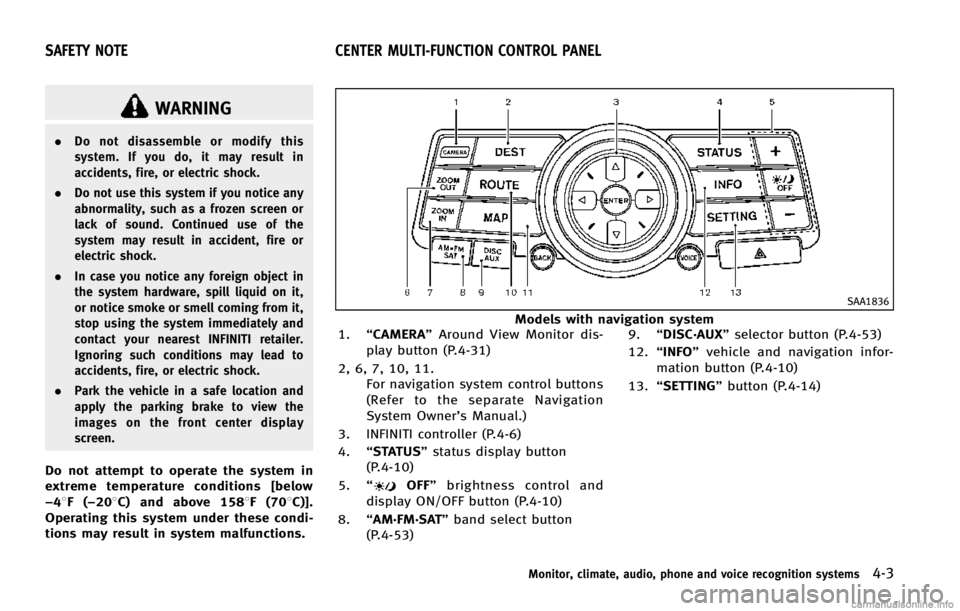
Models with navigation system
1. “CAMERA” Around View Monitor dis-
play button (P.4-31)
2, 6, 7, 10, 11. For navigation system control buttons
(Refer to the separate Navigation
System Owner’s Manual.)
3. INFINITI controller (P.4-6)
4. “STATUS” status display button
(P.4-10)
5. “
OFF” brightness control and
display ON/OFF button (P.4-10)
8. “AM·FM·SAT” band select button
(P.4-53) 9.
“DISC·AUX” selector button (P.4-53)
12. “INFO” vehicle and navigation infor-
mation button (P.4-10)
13. “SETTING” button (P.4-14)
Monitor, climate, audio, phone and voice recognition systems4-3
SAFETY NOTE CENTER MULTI-FUNCTION CONTROL PANEL
Page 184 of 498

To turn on the screen, set this item to the
“ON” position or push the “OFF”
button.
Brightness/Contrast/Background Color:
To adjust the brightness, contrast and
background color of the screen, select the
appropriate “Brightness” ,“Contrast” or
“ Background Color” key and push the
ENTER button.
Then, you can adjust the brightness, and
the contrast using the INFINITI controller.
Switch the background color to the day-
time mode or the nighttime mode by
pushing the ENTERbutton.
SAA2487
Clock settings (models with navi-
gation system)
The display as illustrated will appear when
pushing the SETTING button and selecting
the“Clock” key.
The clock settings display cannot be
operated while driving. Stop the vehicle
in a safe place and apply the parking brake
before setting the clock.
On-screen Clock:
When this item is turned to ON, a clock is
always displayed in the upper right corner
of the screen. This clock will indicate the time almost
exactly because it is always adjusted by
the GPS system.
Clock Format (24h):
When this item is turned to ON, the 24-
hour clock is displayed. When this item is
not turned to ON, the 12-hour clock is
displayed.
Offset (hour)/(min):
Adjust the time by increasing or decreasing
per hour or per minute.
Daylight Saving Time:
Turn this item to ON for daylight saving
time application.
Time Zone:
Choose the time zone from the following
. Pacific
. Mountain
. Central
. Eastern
. Atlantic
. Newfoundland
. Hawaii
. Alaska
Monitor, climate, audio, phone and voice recognition systems4-19
Page 188 of 498

SAA2491
Image Viewer (models with naviga-
tion system)
The image files in the USB memory will be
displayed. To display the Image Viewer,
push the SETTING button, select the
“Other”key and then select the “Image
Viewer” key. The image of the selected file
is displayed on the right side of the screen.
When a number of folders are included in
the USB memory, select a folder from the
list to display the file list.
Images will not be shown on the display
while the vehicle is in any drive position in
order to reduce driver distraction. To view images, stop the vehicle in a safe location
and apply the parking brake.
SAA2492
Full Screen Display:
The full screen display will appear when
selecting the
“Full Screen Display” key.
To operate the Image Viewer or to change
the settings, select the desired key using
the INFINITI controller.
.
(Start)
Select the “
”key to start playing
the slideshow.
.
(Stop)
Select the “
”key to stop the
slideshow.
.
(Next)
Select the “
”key to display the next
Monitor, climate, audio, phone and voice recognition systems4-23