fuel INFINITI EX 2013 Owner's Guide
[x] Cancel search | Manufacturer: INFINITI, Model Year: 2013, Model line: EX, Model: INFINITI EX 2013Pages: 498, PDF Size: 2.5 MB
Page 199 of 498

4-34Monitor, climate, audio, phone and voice recognition systems
.The view on the screen on the passen-
ger’s side switches to the front-side
view
*Cwhen the CAMERAbutton is
pushed
*3. When the CAMERAbutton
is pushed again
*5, the rear-wide view
*Dis displayed. When the CAMERA
button is pushed again
*7, the view on
the screen on the passenger’s side
switches to the bird-eye view
*B.
The passenger’s side screen returns to
another by operating the same proce-
dures again.
When selecting the “Wide”,“Side”or
“Top ”key on the screen using the
INFINITI controller and pushing the
ENTER button, the view on the screen
will change to the one previously
selected
*4,*6,*8.
. Once you have changed the view on the
screen on the passenger’s side, the
view on the driver’s side will change to
the front view by shifting the selector
lever out of the R (Reverse) position
*12,
*14.
When the selector lever is moved to any
other position than the R (Reverse)
position while the rear-wide view
*D
is displayed, another view that is set to
a higher priority will be displayed
*16.
Starting with the CAMERA button
operation
. When the CAMERAbutton is pushed*9
while another screen*Ais displayed,
Around View Monitor operates and the
front view and bird-eye view
*Eare
displayed.
. The view on the screen on the passen-
ger’s side switches to the front-side
view
*Fwhen the CAMERAbutton is
pushed
*10. When the CAMERAbutton
is pushed again
*17, the screen*Ais
displayed.
. When selecting the “Side”or“Top ”key
on the screen using the INFINITI con-
troller and pushing the ENTER button,
the view on the screen will change to
the one previously selected
*11.
. The left screen switches to the rearview
*B,*Cwhen the selector lever is
shifted into the R (Reverse) position
*13,*15and returns to the front view
*E,*Fwhen the selector lever is
shifted out of the R (Reverse) position
*12,*14.
. Push another button on the control
panel to quit the Around View Monitor.
HOW TO SEE EACH VIEW
WARNING
. The distance guide line and the vehicle
width line should be used as a reference
only when the vehicle is on a paved,
level surface. The distance viewed on the
monitor is for reference only and may be
different than the actual distance be-
tween the vehicle and displayed objects.
. Use the displayed lines and the bird-eye
view as a reference. The lines and the
bird-eye view are greatly affected by the
number of occupants, fuel level, vehicle
position, road condition and road grade.
. If the tires are replaced with different
sized tires, the predictive course line
and the bird-eye view may be displayed
incorrectly.
. When driving the vehicle up a hill,
objects viewed in the monitor are further
than they appear. When driving the
vehicle down a hill, objects viewed in
the monitor are closer than they appear.
Use the mirrors or actually look to
properly judge distances to other ob-
jects.
Page 217 of 498

4-52Monitor, climate, audio, phone and voice recognition systems
OPERATING TIPS
When the engine coolant temperature and
outside air temperature are low, the air
flow from the foot outlets may not operate.
This is not a malfunction. After the coolant
temperature warms up, air will flow nor-
mally from the foot outlets.
SAA1983
The sunload sensor*Aon the instrument
panel helps maintain a constant tempera-
ture. Do not put anything on or around this
sensor.
IN-CABIN MICROFILTER
To make sure that the air conditioner
heats, defogs/defrosts and ventilates effi-
ciently, replace the filter according the
specified maintenance intervals listed in
the INFINITI Service and Maintenance
Guide. To replace the filter, contact an
INFINITI retailer.
The filter should be replaced if the air flow
decreases significantly or if windows fog up easily when operating the heater or air
conditioner. A natural grape seed polyphe-
nol filter (if so equipped) collects and
neutralizes dirt, pollen, dust, etc.
SERVICING CLIMATE CONTROL
The climate control system in your INFINITI
is charged with a refrigerant designed with
the environment in mind.
This refrigerant
will not harm the earth’s ozone layer.
However, special charging equipment and
lubricant are required when servicing your
INFINITI air conditioner. Using improper
refrigerants or lubricants will cause severe
damage to your climate control system.
(See “Capacities and recommended fuel/
lubricants” in the“9. Technical and con-
sumer information” section for climate
control system refrigerant and lubricant
recommendations.)
Your INFINITI retailer will be able to service
your environmentally friendly climate con-
trol system.
WARNING
The system contains refrigerant under high
pressure. To avoid personal injury, any air
conditioner service should be done only by
Page 291 of 498

4-126Monitor, climate, audio, phone and voice recognition systems
CommandAction
Previous Destinations Sets a route to a previous destination.
.
Information Command:
Command Action
Fuel Economy Displays fuel economy information.
Maintenance Displays maintenance information.
Traffic Information Displays the [Info On Route] screen when a route to the destination is set.
Displays the [Nearby Traffic Info.] screen when a route to the destination is not set.
Where am I? Displays your current location.
.
Audio Command:
Command Action
AM Turns to the AM band, selecting the station last played.
FM Turns to the FM band, selecting the station last played.
XM Turns to the SiriusXM Satellite Radio band, selecting the channel last played.
CD Starts to play a CD.
.
General Commands
Command Action
Go back Corrects the last recognition result to return to the previous screen
Exit Cancels Voice Recognition
Page 301 of 498

4-136Monitor, climate, audio, phone and voice recognition systems
Information Commands:
CommandAction
Fuel Economy Displays fuel economy information.
Maintenance Displays maintenance information.
Where am I? Displays your current location.
Traffic Information Displays the [Info On Route] screen when a route to the destination is set.
Displays the [Nearby Traffic Info.] screen when a route to the destination is not set.
Weather Information Displays weather information.
Weather Map Displays a weather map.
Page 313 of 498

Conventional (fixed speed) cruise
control mode ................................................. 5-55
Preview function (for Intelligent Cruise Control
system equipped models) ............................. 5-58
Distance Control Assist (DCA) system (if
so equipped) ..................................................... 5-59 Precautions on Distance Control
Assist system ................................................ 5-59
Distance Control Assist operation .................. 5-61
Forward Collision Warning (FCW) system (if
so equipped) ..................................................... 5-71
Precautions on FCW system ........................... 5-72
Intelligent Brake Assist (IBA) system (if
so equipped) ..................................................... 5-74
Precautions on IBA system ............................ 5-75
Break-in schedule .............................................. 5-78
Increasing fuel economy .................................... 5-78
All-Wheel Drive (AWD) (if so equipped) .............. 5-79
Parking/parking on hills .................................... 5-80
Power steering................................................... 5-81 Brake system .................................................... 5-81
Braking precautions ..................................... 5-81
Parking brake break-in................................. 5-82
Brake assist ...................................................... 5-82
Brake assist................................................. 5-82
Preview function (Intelligent Cruise Control
system equipped models) ............................ 5-82
Anti-lock Braking System (ABS) .................... 5-85
Vehicle Dynamic Control (VDC) system .............. 5-86
Cold weather driving ......................................... 5-88 Freeing a frozen door lock ........................... 5-88
Antifreeze .................................................... 5-88
Battery......................................................... 5-88
Draining of coolant water............................. 5-88
Tire equipment ............................................ 5-88
Special winter equipment ............................ 5-88
Driving on snow or ice ................................. 5-89
Engine block heater (if so equipped)............ 5-89
Page 315 of 498
5-4Starting and driving
cause a fire.
CAUTION
.Do not use leaded gasoline. Deposits
from leaded gasoline seriously reduce
the three-way catalyst’s ability to help
reduce exhaust pollutants.
. Keep your engine tuned up. Malfunctions
in the ignition, fuel injection, or elec-
trical systems can cause overrich fuel
flow into the three-way catalyst, causing
it to overheat. Do not keep driving if the
engine misfires, or if noticeable loss of
performance or other unusual operating
conditions are detected. Have the vehicle
inspected promptly by an INFINITI retai-
ler.
. Avoid driving with an extremely low fuel
level. Running out of fuel could cause
the engine to misfire, damaging the
three-way catalyst.
. Do not race the engine while warming it
up.
. Do not push or tow your vehicle to start
the engine.
TIRE PRESSURE MONITORING SYS-
TEM (TPMS)
Each tire, including the spare (if provided),
should be checked monthly when cold and
inflated to the inflation pressure recom-
mended by the vehicle manufacturer on the
vehicle placard or tire inflation pressure
label. (If your vehicle has tires of a different
size than the size indicated on the vehicle
placard or tire inflation pressure label, you
should determine the proper tire inflation
pressure for those tires.)
As an added safety feature, your vehicle
has been equipped with a Tire Pressure
Monitoring System (TPMS) that illuminates
a low tire pressure telltale when one or
more of your tires is significantly under-
inflated. Accordingly, when the low tire
pressure telltale illuminates, you should
stop and check your tires as soon as
possible, and inflate them to the proper
pressure. Driving on a significantly under-
inflated tire causes the tire to overheat and
can lead to tire failure. Under-inflation also
reduces fuel efficiency and tire tread life,
and may affect the vehicle’s handling and
stopping ability.
Please note that the TPMS is not a
substitute for proper tire maintenance, and it is the driver’
s responsibility to
maintain correct tire pressure, even if
under-inflation has not reached the level
to trigger illumination of the TPMS low tire
pressure telltale.
Your vehicle has also been equipped with a
TPMS malfunction indicator to indicate
when the system is not operating properly.
The TPMS malfunction indicator is com-
bined with the low tire pressure telltale.
When the system detects a malfunction,
the telltale will flash for approximately one
minute and then remain continuously
illuminated. This sequence will continue
upon subsequent vehicle start-ups as long
as the malfunction exists. When the mal-
function indicator is illuminated, the sys-
tem may not be able to detect or signal low
tire pressure as intended. TPMS malfunc-
tions may occur for a variety of reasons,
including the installation of replacement or
alternate tires or wheels on the vehicle that
prevent the TPMS from functioning prop-
erly. Always check the TPMS malfunction
telltale after replacing one or more tires or
wheels on your vehicle to ensure that the
replacement or alternate tires and wheels
allow the TPMS to continue to function
properly.
Page 323 of 498
5-12Starting and driving
SSD0785
INTELLIGENT KEY BATTERY DIS-
CHARGE
If the battery of the Intelligent Key is
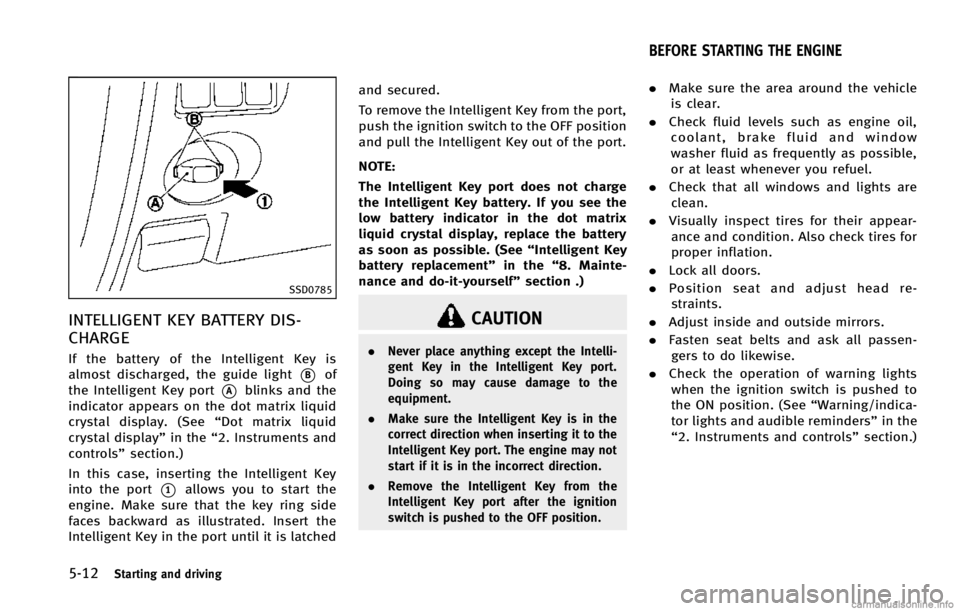
almost discharged, the guide light
*Bof
the Intelligent Key port
*Ablinks and the
indicator appears on the dot matrix liquid
crystal display. (See “Dot matrix liquid
crystal display” in the“2. Instruments and
controls” section.)
In this case, inserting the Intelligent Key
into the port
*1allows you to start the
engine. Make sure that the key ring side
faces backward as illustrated. Insert the
Intelligent Key in the port until it is latched and secured.
To remove the Intelligent Key from the port,
push the ignition switch to the OFF position
and pull the Intelligent Key out of the port.
NOTE:
The Intelligent Key port does not charge
the Intelligent Key battery. If you see the
low battery indicator in the dot matrix
liquid crystal display, replace the battery
as soon as possible. (See
“Intelligent Key
battery replacement” in the“8. Mainte-
nance and do-it-yourself” section .)
CAUTION
.Never place anything except the Intelli-
gent Key in the Intelligent Key port.
Doing so may cause damage to the
equipment.
. Make sure the Intelligent Key is in the
correct direction when inserting it to the
Intelligent Key port. The engine may not
start if it is in the incorrect direction.
. Remove the Intelligent Key from the
Intelligent Key port after the ignition
switch is pushed to the OFF position.
.Make sure the area around the vehicle
is clear.
. Check fluid levels such as engine oil,
coolant, brake fluid and window
washer fluid as frequently as possible,
or at least whenever you refuel.
. Check that all windows and lights are
clean.
. Visually inspect tires for their appear-
ance and condition. Also check tires for
proper inflation.
. Lock all doors.
. Position seat and adjust head re-
straints.
. Adjust inside and outside mirrors.
. Fasten seat belts and ask all passen-
gers to do likewise.
. Check the operation of warning lights
when the ignition switch is pushed to
the ON position. (See “Warning/indica-
tor lights and audible reminders” in the
“2. Instruments and controls” section.)
BEFORE STARTING THE ENGINE
Page 327 of 498

5-16Starting and driving
DS (Drive Sport) mode
Move the selector lever from D (Drive) to
the left into the manual shift gate. The
transmission position indicator in the
meter shows“DS”.
In the DS (Drive Sport) mode, the transmis-
sion changes to the “sporty”driving shift
operation, creating a more aggressive
acceleration feeling than the D (Drive)
mode and providing a gear change sensa-
tion when the driver accelerates quickly.
When the driver selects the manual shift
mode using the selector lever during the
DS (Drive Sport) mode operation, the driver
must move the selector lever from DS
(Drive Sport) to D (Drive) and back again
to re-select the DS (Drive Sport) mode.
Manual shift mode
When the selector lever is in the DS (Drive
Sport) position, the transmission is ready
for the manual shift mode. Shift ranges can
be selected manually by moving the
selector lever up or down.
When shifting up, move the selector lever
to the + (up) side. The transmission shifts
to the higher range.
When shifting down, move the selector lever to the
−(down) side. The transmis-
sion shifts to the lower range.
When canceling the manual shift mode,
return the selector lever to the D (Drive)
position. The transmission returns to the
normal driving mode.
In the manual shift mode, the shift range is
displayed on the position indicator in the
meter.
Shift ranges up or down one by one as
follows:
M1 ?M2?M3?M4?M5?M6?M7
///// /
M7 (7th):
Use these positions for all normal forward
driving at highway speeds.
M6 (6th) andM5 (5th):
Use this position when driving up long
slopes, or for engine braking when driving
down long slopes.
M4 (4th),M3 (3rd) andM2 (2nd):
Use these positions for hill climbing or
engine braking on downhill grades.
M1 (1st):
Use this position when climbing steep hills
slowly or driving slowly through deep snow, or for maximum engine braking on
steep downhill grades.
.
Remember not to drive at high speeds
for extended periods of time in lower
than 7th gear. This reduces fuel econ-
omy.
. Moving the selector lever rapidly to the
same side twice will shift the ranges in
succession. However, if this motion is
done rapidly, the second shifting may
not be completed properly.
. In the manual shift mode, the transmis-
sion may not shift to the selected gear
or may automatically shift to the other
gear depending on conditions. This
helps maintain driving performance
and reduces the chance of vehicle
damage or loss of control.
. When the transmission does not shift
to the selected gear, the Automatic
Transmission (AT) position indicator
light (on the dot matrix liquid crystal
display) will blink and the buzzer will
sound.
. In the manual shift mode, the transmis-
sion automatically shifts down to 1st
gear before the vehicle comes to a
stop. When accelerating again, it is
necessary to shift up to the desired
Page 389 of 498
5-78Starting and driving
pushed again, the system will turn on and
the IBA OFF indicator light will turn off.
The IBA system will remain in the last ON
or OFF state it was left in until it is
manually changed by pressing the IBA
OFF switch.
Illumination of the IBA OFF indicator light
without the warning chime sound is an
indication that the IBA system is tempora-
rily unavailable. It will occur under the
following conditions:
.When driving into a strong light (for
example, sunlight)
The IBA OFF indicator light will turn off
when the system returns to its normal
operating conditions.
For the sensor maintenance, see “Intelli-
gent Cruise Control (ICC) system (FULL
SPEED RANGE)” earlier in this section.
CAUTION
During the first 1,200 miles (2,000 km),
follow these recommendations to obtain
maximum engine performance and ensure
the future reliability and economy of your
new vehicle.
Failure to follow these recommendations
may result in shortened engine life and
reduced engine performance.
.Avoid driving for long periods at con-
stant speed, either fast or slow. Do not
run the engine over 4,000 rpm.
. Do not accelerate at full throttle in any
gear.
. Avoid quick starts.
. Avoid hard braking as much as possi-
ble. .
Accelerate slowly and smoothly. Main-
tain cruising speeds with a constant
accelerator position.
. Drive at moderate speeds on the high-
way.
. Avoid unnecessary stopping and brak-
ing. Keep a safe distance behind other
vehicles.
. Select a gear range suitable to road
conditions.
. Avoid unnecessary prolonged engine
idling.
. Keep your engine tuned up.
. Follow the recommended periodic main-
tenance schedule.
. Keep the tires inflated at the correct
pressure. Improper tire pressure will
increase wear and waste fuel.
. Make sure the front wheels are properly
aligned. Improper alignment will cause
premature tire wear and lower fuel
economy.
. Climate control operation lowers fuel
economy. Use the air conditioner only
when necessary.
. When cruising at highway speeds, it is
more economical to use the air condi-
tioner and leave the windows closed to
reduce drag.
BREAK-IN SCHEDULE INCREASING FUEL ECONOMY
Page 422 of 498

MOST COMMON FACTORS CONTRI-
BUTING TO VEHICLE CORROSION
.The accumulation of moisture-retaining
dirt and debris in body panel sections,
cavities, and other areas.
. Damage to paint and other protective
coatings caused by gravel and stone
chips or minor traffic accidents.
ENVIRONMENTAL FACTORS INFLU-
ENCE THE RATE OF CORROSION
Moisture
Accumulation of sand, dirt and water on
the vehicle body underside can accelerate
corrosion. Wet floor coverings will not dry
completely inside the vehicle, and should
be removed for drying to avoid floor panel
corrosion.
Relative humidity
Corrosion will be accelerated in areas of
high relative humidity, especially those
areas where the temperatures stay above
freezing where atmospheric pollution ex-
ists, or where road salt is used.
Temperature
A temperature increase will accelerate the
rate of corrosion to those parts which are
not well ventilated.
Air pollution
Industrial pollution, the presence of salt in
the air in coastal areas, or heavy road salt
use will accelerate the corrosion process.
Road salt will also accelerate the disinte-
gration of paint surfaces.
TO PROTECT YOUR VEHICLE FROM
CORROSION
. Wash and wax your vehicle often to
keep the vehicle clean.
. Always check for minor damage to the
paint and repair it as soon as possible.
. Keep drain holes at the bottom of the
doors open to avoid water accumula-
tion.
. Check the underbody for accumulation
of sand, dirt or salt. If present, wash
with water as soon as possible.
CAUTION
. NEVER remove dirt, sand or other debris
from the passenger compartment by
washing it out with a hose. Remove dirt
with a vacuum cleaner.
. Never allow water or other liquids to
come in contact with electronic compo-
nents inside the vehicle as this may
damage them.
Chemicals used for road surface deicing
are extremely corrosive. They accelerate
corrosion and deterioration of underbody
components such as the exhaust system,
fuel and brake lines, brake cables, floor
pan and fenders.
In winter, the underbody must be cleaned
periodically.
For additional protection against rust and
corrosion, which may be required in some
areas, consult an INFINITI retailer.
Appearance and care7-7
CORROSION PROTECTION