around view monitor INFINITI FX 2012 User Guide
[x] Cancel search | Manufacturer: INFINITI, Model Year: 2012, Model line: FX, Model: INFINITI FX 2012Pages: 522, PDF Size: 3.51 MB
Page 210 of 522

: Shift the selector lever
: Select the“Wide”,“Side”or“Top ”key on the
screen.
: Push the CAMERA button
*A: Original screen before the Around View Monitor is operated
*B: Rear view/bird’s-eye view screen
*C: Rear view/front-side view screen
*D: Rear-wide view screen
*E: Front view/bird’s-eye view screen
*F: Front view/front-side view screen
HOW TO SWITCH THE DISPLAY
The Around View Monitor display consists
of the left and the right screens. You can
see a combination of different views on the
screens as illustrated above.
Starting with the selector lever
operation
.When the selector lever is shifted into
the R (Reverse) position
*1while
another screen
*Ais displayed, Around
View Monitor operates and the rearview
and bird-eye view
*Bare displayed.
The Around View Monitor screen
switches to the previous screen when
the selector is shifted out of the R
(Reverse) position
*2. .
The view on the screen on the passen-
ger’s side switches to the front-side
view
*Cwhen the CAMERA button is
pushed
*3. When the CAMERA button
is pushed again
*5, the rear-wide view
*Dis displayed. When the CAMERA
button is pushed again
*7, the view on
the screen on the passenger’s side
switches to the bird-eye view
*B.
The passenger’s side screen returns to
another by operating the same proce-
dures again.
When selecting the “Wide”,“Side”or
“Top ”key on the screen using the
INFINITI controller and pushing the
ENTER button, the view on the screen
will change to the one previously
selected
*4,*6,*8.
. Once you have changed the view on the
screen on the passenger’s side, the
view on the driver’s side will change to
the front view by shifting the selector
lever out of the R (Reverse) position
*12,
*14.
When the selector lever is moved to any
other position than the R (Reverse)
position while the rear-wide view
*Dis displayed, another view that is set to
a higher priority will be displayed
*16.
Starting with the CAMERA button
operation
. When the CAMERA button is pushed*9while another screen*Ais displayed,
Around View Monitor operates and the
front view and bird-eye view
*Eare
displayed.
. The view on the screen on the passen-
ger’s side switches to the front-side
view
*Fwhen the CAMERA button is
pushed
*10. When the CAMERA button
is pushed again
*17, the screen*Ais
displayed.
. When selecting the “Side”or“Top ”key
on the screen using the INFINITI con-
troller and pushing the ENTER button,
the view on the screen will change to
the one previously selected
*11.
. The left screen switches to the rearview
*B,*Cwhen the selector lever is
shifted into the R (Reverse) position
*13,*15and returns to the front view
*E,*Fwhen the selector lever is
shifted out of the R (Reverse) position
*12,*14.
. Push another button on the control
panel to quit the Around View Monitor.
Monitor, climate, audio, phone and voice recognition systems4-33
Page 214 of 522
when a corner of the vehicle moves closer
to an object.
The corner sonar indicator
*4can be
turned off. See “Around view monitor
settings” (P.4-41).
CAUTION
The turn signal light may overlap with the
side-of-vehicle line. This is not a malfunc-
tion.
Infrared illumination:
The images on the front-side view can be
displayed at night using the infrared
illumination on the outside mirror.SAA2629
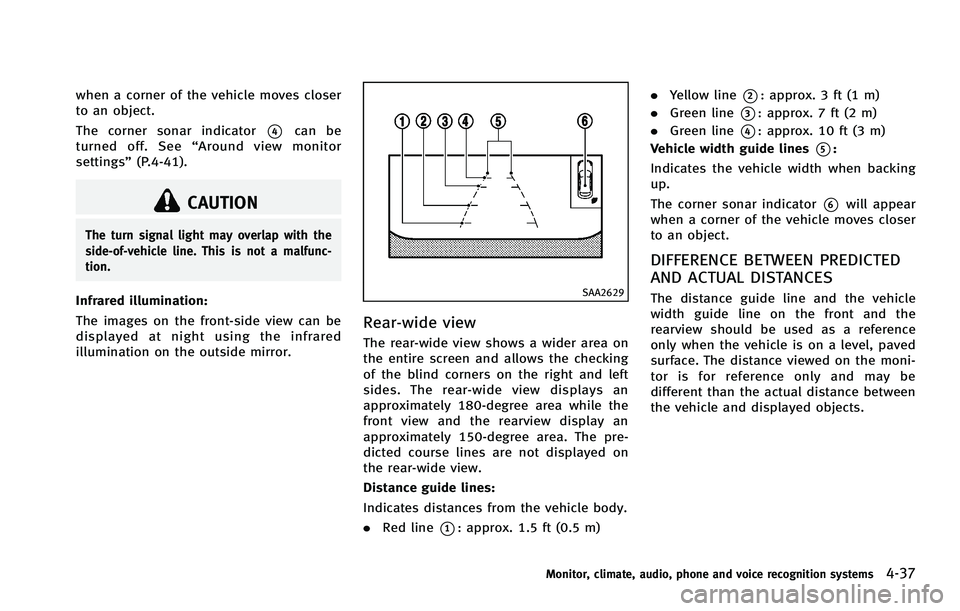
Rear-wide view
The rear-wide view shows a wider area on
the entire screen and allows the checking
of the blind corners on the right and left
sides. The rear-wide view displays an
approximately 180-degree area while the
front view and the rearview display an
approximately 150-degree area. The pre-
dicted course lines are not displayed on
the rear-wide view.
Distance guide lines:
Indicates distances from the vehicle body.
.Red line
*1: approx. 1.5 ft (0.5 m) .
Yellow line
*2: approx. 3 ft (1 m)
. Green line
*3: approx. 7 ft (2 m)
. Green line
*4: approx. 10 ft (3 m)
Vehicle width guide lines
*5:
Indicates the vehicle width when backing
up.
The corner sonar indicator
*6will appear
when a corner of the vehicle moves closer
to an object.
DIFFERENCE BETWEEN PREDICTED
AND ACTUAL DISTANCES
The distance guide line and the vehicle
width guide line on the front and the
rearview should be used as a reference
only when the vehicle is on a level, paved
surface. The distance viewed on the moni-
tor is for reference only and may be
different than the actual distance between
the vehicle and displayed objects.
Monitor, climate, audio, phone and voice recognition systems4-37
Page 217 of 522
4-40Monitor, climate, audio, phone and voice recognition systems
actual moving course.
CAMERA AIDING CORNER SONAR
FUNCTION
When the corner of the vehicle moves
closer to the object while the Around View
Monitor is displayed, an indicator is
displayed and a tone is sounded by the
corner sonar function to warn the driver.
The color of the corner sonar indicator and
the pattern of the tone vary according to
the distance to the object.
When the object is detected, the indicator
(green) appears and blinks and the tone
sounds intermittently. When the vehicle
moves closer to the object, the color of the
indicator turns yellow and the rate of the
blinking and the volume of the tone
increase. When the corner of the vehicle
is very close to the object, the indicator
stops blinking and turns red, and the tone
sounds continuously.
Keep the corner sonars (located on the
front and rear bumper fascia) free from
snow, ice and large accumulations of dirt.
Do not clean the sensors with sharp
objects. If the sensors are covered, the
accuracy of the corner sonar function will
be diminished.
WARNING
.The corner sonar function is not de-
signed to prevent the object.
. The colors of the corner sonar indicator
and the distance guide lines in the front/
rearview indicate different distances to
the object.
. Inclement weather may affect the func-
tion of the corner sonar system; this
may include reduced performance or a
false activation.
. This function is designed as an aid to
the driver in detecting large stationary
objects to help avoid damaging the
vehicle. The system will not detect small
objects below the bumper, and may not
detect objects close to the bumper or on
the ground.
. If your vehicle sustains damage to the
bumper fascia, leaving it misaligned or
bent, the sensing zone may be altered
causing inaccurate measurement of ob-
stacles or false alarms.
CAUTION
Keep the interior of the vehicle as quiet as
possible to hear the tone clearly.
HOW TO ADJUST THE SCREEN VIEW
To adjust the Display ON/OFF, Brightness,
Tint, Color, Contrast and Black Level of the
Around View Monitor, push the SETTING
button with the Around View Monitor on,
select the item key and adjust the level
using the INFINITI controller.
Do not adjust the Brightness, Tint, Color,
Contrast and Black Level of the Around
View Monitor while the vehicle is moving.
Make sure the parking brake is firmly
applied.
Page 218 of 522
SAA3649
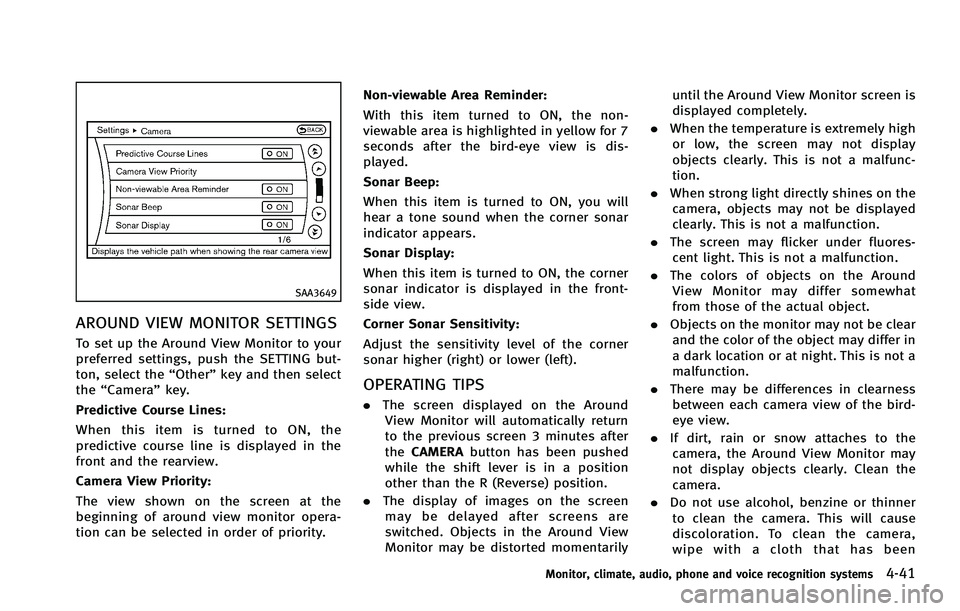
AROUND VIEW MONITOR SETTINGS
To set up the Around View Monitor to your
preferred settings, push the SETTING but-
ton, select the“Other”key and then select
the “Camera ”key.
Predictive Course Lines:
When this item is turned to ON, the
predictive course line is displayed in the
front and the rearview.
Camera View Priority:
The view shown on the screen at the
beginning of around view monitor opera-
tion can be selected in order of priority. Non-viewable Area Reminder:
With this item turned to ON, the non-
viewable area is highlighted in yellow for 7
seconds after the bird-eye view is dis-
played.
Sonar Beep:
When this item is turned to ON, you will
hear a tone sound when the corner sonar
indicator appears.
Sonar Display:
When this item is turned to ON, the corner
sonar indicator is displayed in the front-
side view.
Corner Sonar Sensitivity:
Adjust the sensitivity level of the corner
sonar higher (right) or lower (left).
OPERATING TIPS
.
The screen displayed on the Around
View Monitor will automatically return
to the previous screen 3 minutes after
the CAMERA button has been pushed
while the shift lever is in a position
other than the R (Reverse) position.
. The display of images on the screen
may be delayed after screens are
switched. Objects in the Around View
Monitor may be distorted momentarily until the Around View Monitor screen is
displayed completely.
. When the temperature is extremely high
or low, the screen may not display
objects clearly. This is not a malfunc-
tion.
. When strong light directly shines on the
camera, objects may not be displayed
clearly. This is not a malfunction.
. The screen may flicker under fluores-
cent light. This is not a malfunction.
. The colors of objects on the Around
View Monitor may differ somewhat
from those of the actual object.
. Objects on the monitor may not be clear
and the color of the object may differ in
a dark location or at night. This is not a
malfunction.
. There may be differences in clearness
between each camera view of the bird-
eye view.
. If dirt, rain or snow attaches to the
camera, the Around View Monitor may
not display objects clearly. Clean the
camera.
. Do not use alcohol, benzine or thinner
to clean the camera. This will cause
discoloration. To clean the camera,
wipe with a cloth that has been
Monitor, climate, audio, phone and voice recognition systems4-41