lane assist INFINITI FX 2012 User Guide
[x] Cancel search | Manufacturer: INFINITI, Model Year: 2012, Model line: FX, Model: INFINITI FX 2012Pages: 522, PDF Size: 3.51 MB
Page 351 of 522

5-26Starting and driving
the vehicle to the center of the traveling
lane.
The warning and assist functions will stop
when the vehicle returns to a position
inside of the lane marker.
SSD0912
Dynamic driver assistance switch
To turn on the LDP system, push the
dynamic driver assistance switch on the
steering wheel after starting the engine.
The LDP ON indicator light (green) on the
instrument panel will illuminate. Push the
dynamic driver assistance switch again to
turn off the LDP system. The LDP ON
indicator light will turn off.
The dynamic driver assistance switch is
used as both the LDP and DCA system.
When the dynamic driver assistance switch
is pushed, the DCA system will also turn on
or off simultaneously. The LDP system can
be individually set to on or off on the
display. If the system is set to off, the system will not turn on even if the dynamic
driver assistance switch is pushed to on. To
set the system to on or off on the display,
see
“Setting LDP system to ON/OFF” (P.5-
27).
Page 352 of 522
SSD0884
SSD0885
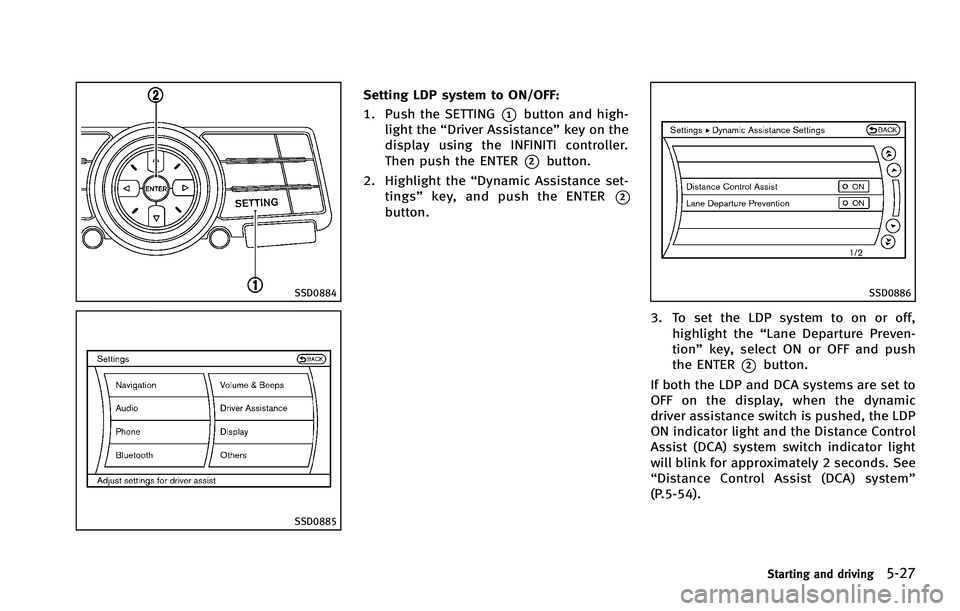
Setting LDP system to ON/OFF:
1. Push the SETTING
*1button and high-
light the “Driver Assistance” key on the
display using the INFINITI controller.
Then push the ENTER
*2button.
2. Highlight the “Dynamic Assistance set-
tings” key, and push the ENTER
*2button.
SSD0886
3. To set the LDP system to on or off,
highlight the “Lane Departure Preven-
tion” key, select ON or OFF and push
the ENTER
*2button.
If both the LDP and DCA systems are set to
OFF on the display, when the dynamic
driver assistance switch is pushed, the LDP
ON indicator light and the Distance Control
Assist (DCA) system switch indicator light
will blink for approximately 2 seconds. See
“ Distance Control Assist (DCA) system”
(P.5-54).
Starting and driving5-27
Page 353 of 522

5-28Starting and driving
Automatic deactivation
Condition A:
The warning and assist functions of the
LDP system are not designed to work under
the following conditions:
.When you operate the lane change
signal and change the traveling lanes
in the direction of the signal. (The LDP
system will be deactivated for approxi-
mately 2 seconds after the lane change
signal is turned off.)
. When the vehicle speed lowers to less
than approximately 45 MPH (70 km/h).
After the above conditions have finished
and the necessary operating conditions are
satisfied, the warning and assist functions
will resume.
Condition B:
The assist function of the LDP system is not
designed to work under the following
conditions (warning is still functional):
. When the brake pedal is depressed.
. When the steering wheel is turned as
far as necessary for the vehicle to
change lanes.
. When the accelerator pedal is de-
pressed while the brake control assist is provided.
. When the Intelligent Cruise Control (ICC)
approach warning occurs.
. When the hazard warning flashers are
operated.
. When driving on a curve at high speed.
After the above conditions have finished
and the necessary operating conditions are
satisfied, the LDP brake control assist
function will resume.
Condition C:
Under the following conditions, a beep will
sound and the LDP system will be canceled
automatically. The LDP ON indicator light
will blink in green, and the LDP system
cannot be activated:
. When the VDC system (except TCS
function) or ABS operates.
. When the VDC system is turned off.
. When the SNOW mode switch is turned
on.
Action to take:
When the above conditions no longer exist,
turn off the LDP system. Push the dynamic
driver assistance switch again to turn the
LDP system back on. Temporary disabled status at high tem-
perature:
If the vehicle is parked in direct sunlight
under high temperature conditions (over
approximately 1048F (408C)) and then the
LDP system is turned on, the LDP system
may be deactivated automatically. The LDP
ON indicator (green) will blink.
When the interior temperature is reduced,
the system will resume operating automa-
tically and the LDP ON indicator will stop
blinking.
Page 358 of 522
SELECTING THE VEHICLE-TO-VEHI-
CLE DISTANCE CONTROL MODE
To choose the vehicle-to-vehicle distance
control mode
*1, quickly push and release
the MAIN switch
*A.
VEHICLE-TO-VEHICLE DISTANCE
CONTROL MODE
In the vehicle-to-vehicle distance control
mode, the Intelligent Cruise Control (ICC)
system automatically maintains a selected
distance from the vehicle traveling in front
of you according to that vehicle’s speed
(up to the set speed), or at the set speed
when the road ahead is clear.
With ICC, the driver can maintain the same
speed as other vehicles without the con-
stant need to adjust the set speed as you
would with a normal cruise control system.
SSD0738
PRECAUTIONS ON VEHICLE-TO-VE-
HICLE DISTANCE CONTROL MODE
The system is intended to enhance the
operation of the vehicle when following a
vehicle traveling in the same lane and
direction.
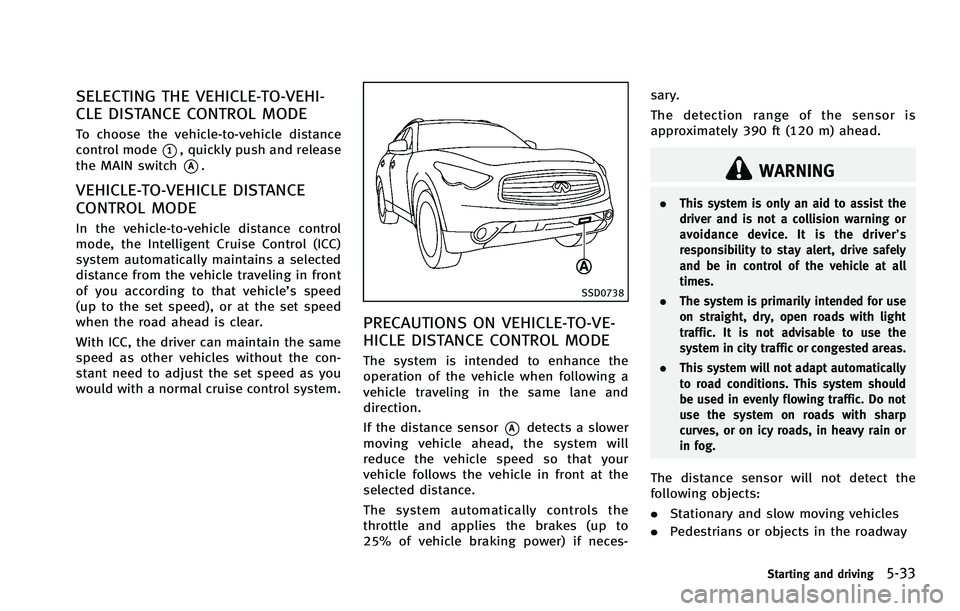
If the distance sensor
*Adetects a slower
moving vehicle ahead, the system will
reduce the vehicle speed so that your
vehicle follows the vehicle in front at the
selected distance.
The system automatically controls the
throttle and applies the brakes (up to
25% of vehicle braking power) if neces- sary.
The detection range of the sensor is
approximately 390 ft (120 m) ahead.
WARNING
.
This system is only an aid to assist the
driver and is not a collision warning or
avoidance device. It is the driver’ s
responsibility to stay alert, drive safely
and be in control of the vehicle at all
times.
. The system is primarily intended for use
on straight, dry, open roads with light
traffic. It is not advisable to use the
system in city traffic or congested areas.
. This system will not adapt automatically
to road conditions. This system should
be used in evenly flowing traffic. Do not
use the system on roads with sharp
curves, or on icy roads, in heavy rain or
in fog.
The distance sensor will not detect the
following objects:
.Stationary and slow moving vehicles
. Pedestrians or objects in the roadway
Starting and driving5-33
Page 379 of 522

5-54Starting and driving
retailer.
PREVIEW FUNCTION (for Intelligent
Cruise Control system equipped
models)
The ICC system with the preview function
identifies the need to apply emergency
braking by sensing the vehicle ahead in
the same lane and the distance to the
vehicle ahead and relative speed from it, it
applies the brake pre-pressure before the
driver depresses the brake pedal and helps
improve brake response by reducing pedal
free play.
For more details, see“Brake assist”(P.5-
79). The Distance Control Assist (DCA) system
brakes and moves the accelerator pedal
upward according to the distance from and
the relative speed of the vehicle ahead to
help assist the driver to maintain a
following distance.
WARNING
.
Always drive carefully and attentively
when using the Distance Control Assist
system. Read and understand the Own-
er’s Manual thoroughly before using the
DCA system. To avoid serious injury or
death, do not rely on the system to
prevent accidents or to control the
vehicle’s speed in emergency situations.
Do not use the Distance Control Assist
system except in appropriate road and
traffic conditions.
. If the vehicle ahead comes to a stop, the
vehicle decelerates to a standstill within
the limitations of the system. The
system will cancel once it judges that
the vehicle has come to a standstill with
a warning chime. To prevent the vehicle
from moving, the driver must depress
the brake pedal. .
The DCA system will not apply brake
control while the driver’s foot is on the
accelerator pedal.
DISTANCE CONTROL ASSIST (DCA) SYSTEM
(if so equipped)
Page 380 of 522

SSD0738
PRECAUTIONS ON DISTANCE CON-
TROL ASSIST SYSTEM
The system is intended to assist the driver
to keep a following distance from the
vehicle ahead traveling in the same lane
and direction.
If the distance sensor
*Adetects a slower
moving vehicle ahead, the system will
reduce the vehicle speed to help assist
the driver to maintain a following distance.
The system automatically controls the
throttle and applies the brakes (up to
25% of vehicle braking power) if neces-
sary. The detection range of the sensor is
approximately 390 ft (120 m) ahead.
WARNING
.
This system is only an aid to assist the
driver and is not a collision warning or
avoidance device. It is the driver’ s
responsibility to stay alert, drive safely
and be in control of the vehicle at all
times.
. This system will not adapt automatically
to road conditions. Do not use the
system on roads with sharp curves, or
on icy roads, in heavy rain or in fog.
The distance sensor will not detect the
following objects:
.Stationary and slow moving vehicles
. Pedestrians or objects in the roadway
. Oncoming vehicles in the same lane
. Motorcycles traveling offset in the travel
lane
WARNING
. As there is a performance limit to the
distance control function, never rely
solely on the Distance Control Assist
system. This system does not correct
careless, inattentive or absent-minded
driving, or overcome poor visibility in
rain, fog, or other bad weather. Decele-
rate the vehicle speed by depressing the
brake pedal, depending on the distance
to the vehicle ahead and the surround-
ing circumstances in order to maintain a
safe distance between vehicles.
. The system may not detect the vehicle in
front of you in certain road or weather
conditions. To avoid accidents, never use
the Distance Control Assist system
under the following conditions:
—On roads with sharp curves
—On slippery road surfaces such as
on ice or snow, etc.
—During bad weather (rain, fog, snow,etc.)
—When strong light (for example, atsunrise or sunset) is directly shining
on the front of the vehicle
Starting and driving5-55
Page 382 of 522

In these instances, the Distance Control
Assist (DCA) system may not be able to
decelerate the vehicle properly. Be sure to
check and clean the sensor regularly.
The DCA system is designed to help assist
the driver to maintain a following distance
from the vehicle ahead. The system will
decelerate as necessary and if the vehicle
ahead comes to a stop, the vehicle
decelerates to a standstill. However, the
DCA system can only apply up to 25% of
the vehicles total braking power. If a
vehicle moves into the traveling lane ahead
or if a vehicle traveling ahead rapidly
decelerates, the distance between vehicles
may become closer because the DCA
system cannot decelerate the vehicle
quickly enough. If this occurs, the DCA
system will sound a warning chime and
blink the system display to notify the driver
to take necessary action.
See“Approach warning” (P.5-46).
This system only brakes and moves the
accelerator pedal upward to help assist the
driver to maintain a following distance
from the vehicle ahead. Acceleration
should be operated by the driver.
The DCA system does not control vehicle
speed or warn you when you approach stationary and slow moving vehicles. You
must pay attention to vehicle operation to
maintain proper distance from vehicles
ahead.
Starting and driving5-57
Page 384 of 522

SSD0253
When driving on some roads, such as
winding, hilly, curved, narrow roads, or
roads which are under construction, the
sensor may detect vehicles in a different
lane, or may temporarily not detect a
vehicle traveling ahead. This may cause
the system to work inappropriately.
The detection of vehicles may also be
affected by vehicle operation (steering
maneuver or traveling position in the lane,
etc.) or vehicle condition.If this occurs, the
system may warn you by blinking the
system indicator and sounding the chime
unexpectedly. You will have to manually
control the proper distance away from the vehicle traveling ahead.
SSD0770
Distance Control Assist system
display and indicators
The display is located between the speed-
ometer and tachometer.
1. Distance Control Assist (DCA) system
switch indicator:
Indicates that the dynamic driver assis-
tance switch is ON.
2. Vehicle ahead detection indicator: Indicates whether it detects a vehicle in
front of you.
3. Distance Control Assist system warning light (orange):
Starting and driving5-59
Page 386 of 522
SSD0884
SSD0885
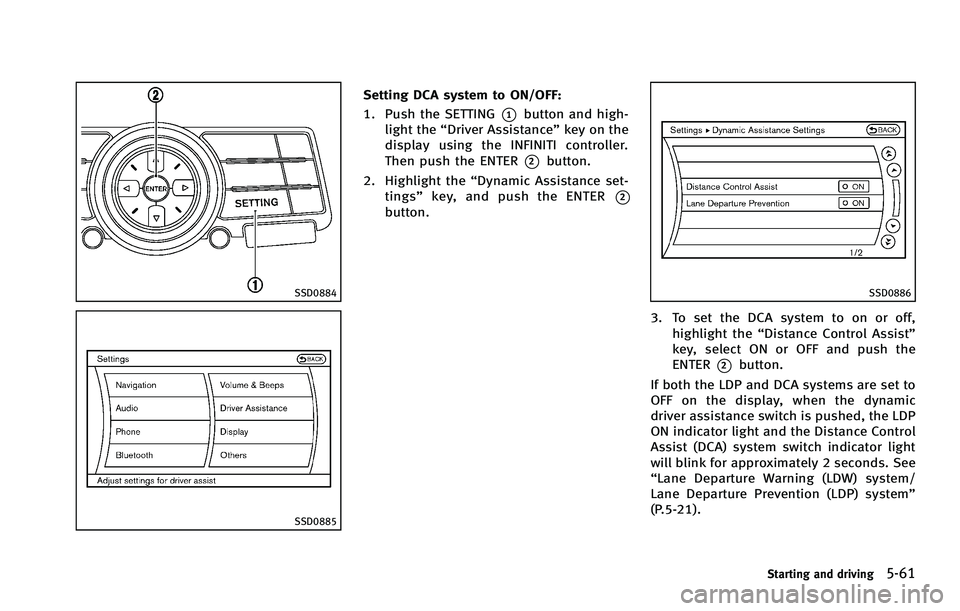
Setting DCA system to ON/OFF:
1. Push the SETTING
*1button and high-
light the “Driver Assistance” key on the
display using the INFINITI controller.
Then push the ENTER
*2button.
2. Highlight the “Dynamic Assistance set-
tings” key, and push the ENTER
*2button.
SSD0886
3. To set the DCA system to on or off,
highlight the “Distance Control Assist”
key, select ON or OFF and push the
ENTER
*2button.
If both the LDP and DCA systems are set to
OFF on the display, when the dynamic
driver assistance switch is pushed, the LDP
ON indicator light and the Distance Control
Assist (DCA) system switch indicator light
will blink for approximately 2 seconds. See
“Lane Departure Warning (LDW) system/
Lane Departure Prevention (LDP) system”
(P.5-21).
Starting and driving5-61
Page 390 of 522

SSD0284A
NOTE:
The approach warning chime may sound
and the system display may blink when
the sensor detects some reflectors
*Awhich are fitted on vehicles in other lanes
or on the side of the road. This may cause
the DCA system to operate inappropriately.
The sensor may detect these reflectors
when the vehicle is driven on winding
roads, hilly roads or when entering or
exiting a curve. The sensor may also detect
reflectors on narrow roads or in road
construction zones. In these cases you
will have to manually control the proper
distance ahead of your vehicle.Also, the sensor sensitivity can be affected
by vehicle operation (steering maneuver or
driving position in the lane) or traffic or
vehicle condition (for example, if a vehicle
is being driven with some damage).
SSD0771
Automatic cancellation
Condition A:
Under the following conditions, the Dis-
tance Control Assist system is automati-
cally canceled. The chime will sound and
the Distance Control Assist (DCA) system
switch indicator light will blink. The system
will not be able to be set.
.
When the VDC system is turned off
. When the VDC or ABS (including the
traction control system) operates
. When the SNOW mode switch is turned
ON
Starting and driving5-65