fuel INFINITI FX 2012 Owner's Manual
[x] Cancel search | Manufacturer: INFINITI, Model Year: 2012, Model line: FX, Model: INFINITI FX 2012Pages: 522, PDF Size: 3.51 MB
Page 166 of 522
.Insert the mechanical key into the door
lock cylinder and turn it to the rear of
the vehicle.
. Push the power door lock switch to the
UNLOCK position.
To lock, close the fuel-filler door securely
and lock all doors by operating the door
handle request switch, the LOCK button on
the Intelligent Key, the mechanical key or
the power door lock switch.
FUEL-FILLER CAP
WARNING
. Gasoline is extremely flammable and
highly explosive under certain condi-
tions. You could be burned or seriously
injured if it is misused or mishandled.
Always stop engine and do not smoke or
allow open flames or sparks near the
vehicle when refueling.
. Do not attempt to top off the fuel tank
after the fuel pump nozzle shuts off
automatically. Continued refueling may
cause fuel overflow, resulting in fuel
spray and possibly a fire.
. Use only an original equipment type
fuel-filler cap as a replacement. It has a built-in safety valve needed for proper
operation of the fuel system and emis-
sion control system. An incorrect cap can
result in a serious malfunction and
possible injury. It could also cause the
malfunction indicator light to come on.
. Never pour fuel into the throttle body to
attempt to start your vehicle.
. Do not fill a portable fuel container in
the vehicle or trailer. Static electricity
can cause an explosion of flammable
liquid, vapor or gas in any vehicle or
trailer. To reduce the risk of serious
injury or death when filling portable fuel
containers:—Always place the container on the
ground when filling.
—Do not use electronic devices when
filling.
—Keep the pump nozzle in contactwith the container while you are
filling it.
—Use only approved portable fuelcontainers for flammable liquid.
CAUTION
. If fuel is spilled on the vehicle body,
flush it away with water to avoid paint
damage.
. Insert the cap straight into the fuel-filler
tube, then tighten until a single click is
heard. Failure to tighten the fuel-filler
cap properly may cause the
mal-
function indicator light (MIL) to illumi-
nate. If the
light illuminates
because the fuel-filler cap is loose or
missing, tighten or install the cap and
continue to drive the vehicle. The
light should turn off after a few driving
trips. If thelight does not turn off
after a few driving trips, have the vehicle
inspected by an INFINITI retailer.
For additional information, see “Mal-
function Indicator Light (MIL)” (P.2-19).
. The LOOSE FUEL CAP warning will appear
if the fuel-filler cap is not properly
tightened. It may take a few driving
trips for the message to be displayed.
Failure to tighten the fuel-filler cap
properly after the LOOSE FUEL CAP
warning appears may cause the
Pre-driving checks and adjustments3-25
Page 167 of 522
3-26Pre-driving checks and adjustments
Malfunction Indicator Light (MIL) to
illuminate.
SPA2524
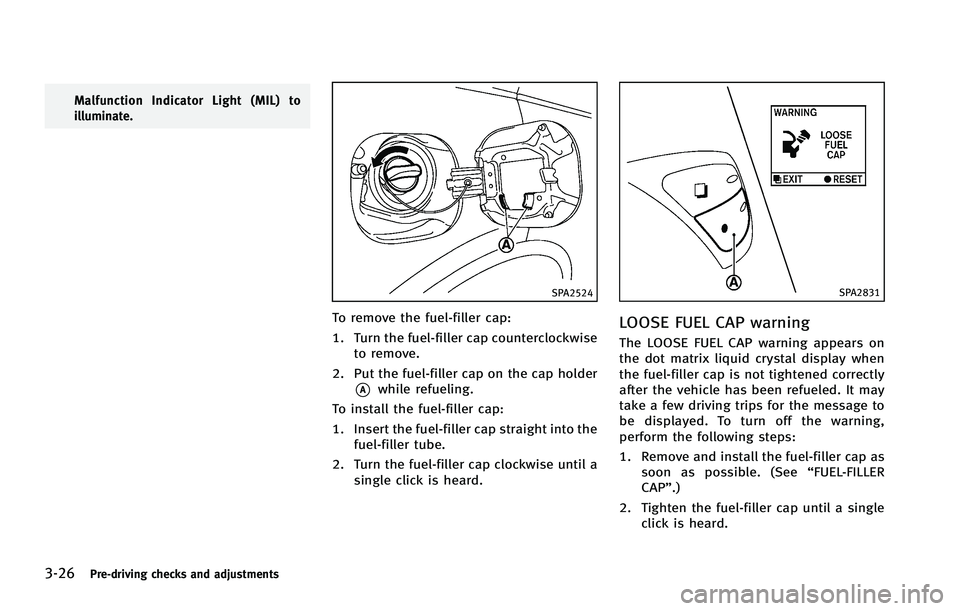
To remove the fuel-filler cap:
1. Turn the fuel-filler cap counterclockwiseto remove.
2. Put the fuel-filler cap on the cap holder
*Awhile refueling.
To install the fuel-filler cap:
1. Insert the fuel-filler cap straight into the fuel-filler tube.
2. Turn the fuel-filler cap clockwise until a single click is heard.
SPA2831
LOOSE FUEL CAP warning
The LOOSE FUEL CAP warning appears on
the dot matrix liquid crystal display when
the fuel-filler cap is not tightened correctly
after the vehicle has been refueled. It may
take a few driving trips for the message to
be displayed. To turn off the warning,
perform the following steps:
1. Remove and install the fuel-filler cap assoon as possible. (See “FUEL-FILLER
CAP”.)
2. Tighten the fuel-filler cap until a single click is heard.
Page 168 of 522
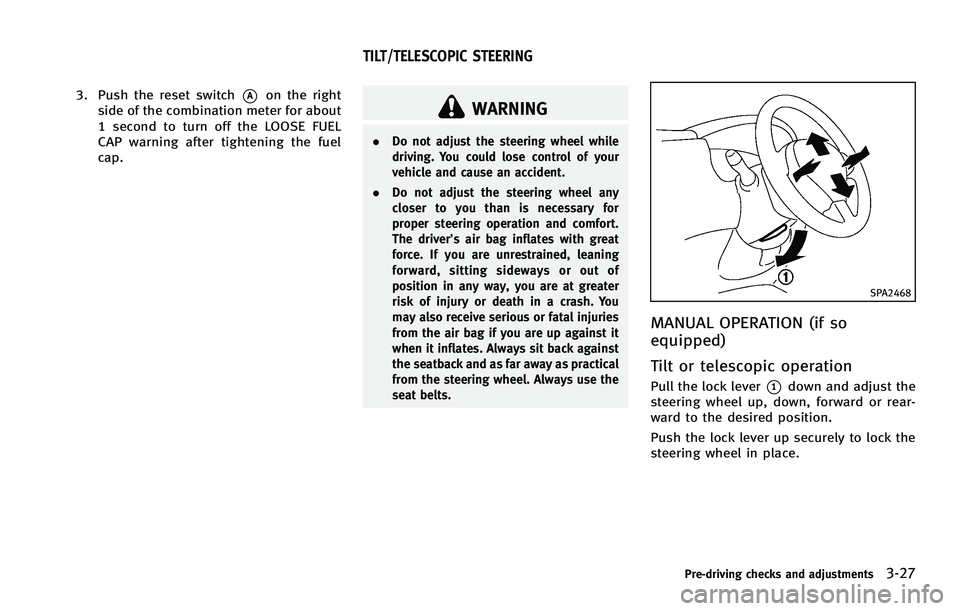
3. Push the reset switch*Aon the right
side of the combination meter for about
1 second to turn off the LOOSE FUEL
CAP warning after tightening the fuel
cap.WARNING
. Do not adjust the steering wheel while
driving. You could lose control of your
vehicle and cause an accident.
. Do not adjust the steering wheel any
closer to you than is necessary for
proper steering operation and comfort.
The driver’s air bag inflates with great
force. If you are unrestrained, leaning
forward, sitting sideways or out of
position in any way, you are at greater
risk of injury or death in a crash. You
may also receive serious or fatal injuries
from the air bag if you are up against it
when it inflates. Always sit back against
the seatback and as far away as practical
from the steering wheel. Always use the
seat belts.
SPA2468
MANUAL OPERATION (if so
equipped)
Tilt or telescopic operation
Pull the lock lever*1down and adjust the
steering wheel up, down, forward or rear-
ward to the desired position.
Push the lock lever up securely to lock the
steering wheel in place.
Pre-driving checks and adjustments3-27
TILT/TELESCOPIC STEERING
Page 186 of 522

HOW TO USE STATUS BUTTON
You can check information related to the
audio, climate control system, fuel con-
sumption and navigation system (if
equipped) by pressing the STATUS button
repeatedly.
HOW TO USE BRIGHTNESS CON-
TROL AND DISPLAY ON/OFF BUTTON
Push the“OFF”button to switch the
display brightness to the daytime mode or
the nighttime mode, and to adjust the
display brightness using the INFINITI con-
troller while the indicator is displayed at
the bottom of the screen.
Push and hold the “
OFF”button for
more than 2 seconds to turn the display
off. Push the button again to turn the
display on.
Models with navigation system
The display brightness can also be ad-
justed using the brightness UP button (+)
or brightness DOWN button (−).
HOW TO USE INFO BUTTON
The display screen shows vehicle and
navigation (if so equipped) information
for your convenience.
The information shown on the screen
should be a guide to determine the
condition of the vehicle. See the following
for details.
SAA3144
Models with navigation system
SAA2145
Models without navigation system
Monitor, climate, audio, phone and voice recognition systems4-9
VEHICLE INFORMATION AND SETTINGS
Page 188 of 522
Fuel Economy information
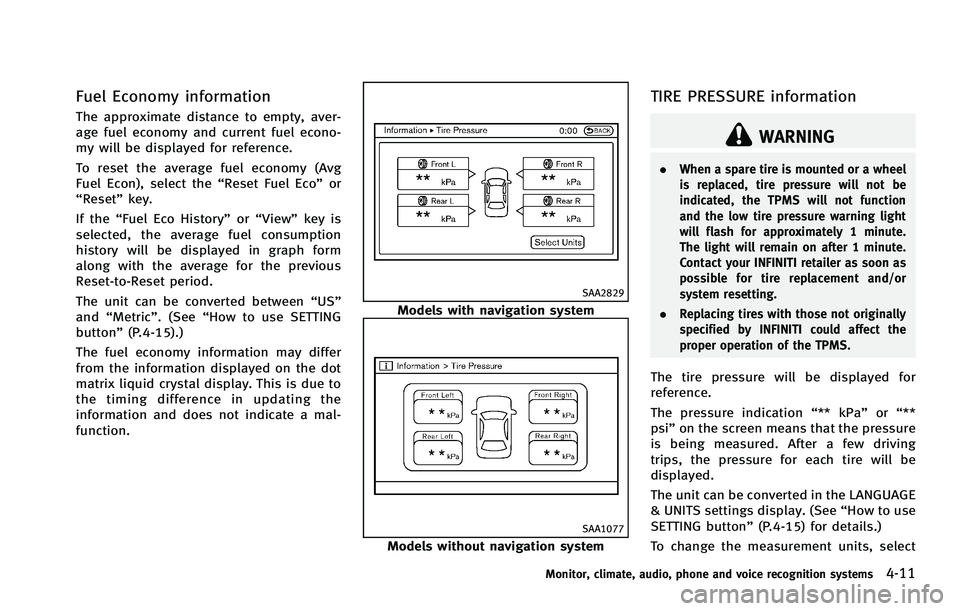
The approximate distance to empty, aver-
age fuel economy and current fuel econo-
my will be displayed for reference.
To reset the average fuel economy (Avg
Fuel Econ), select the“Reset Fuel Eco”or
“Reset” key.
If the “Fuel Eco History” or“View” key is
selected, the average fuel consumption
history will be displayed in graph form
along with the average for the previous
Reset-to-Reset period.
The unit can be converted between “US”
and “Metric”. (See “How to use SETTING
button” (P.4-15).)
The fuel economy information may differ
from the information displayed on the dot
matrix liquid crystal display. This is due to
the timing difference in updating the
information and does not indicate a mal-
function.
SAA2829
Models with navigation system
SAA1077
Models without navigation system
TIRE PRESSURE information
WARNING
. When a spare tire is mounted or a wheel
is replaced, tire pressure will not be
indicated, the TPMS will not function
and the low tire pressure warning light
will flash for approximately 1 minute.
The light will remain on after 1 minute.
Contact your INFINITI retailer as soon as
possible for tire replacement and/or
system resetting.
. Replacing tires with those not originally
specified by INFINITI could affect the
proper operation of the TPMS.
The tire pressure will be displayed for
reference.
The pressure indication “** kPa”or“**
psi ”on the screen means that the pressure
is being measured. After a few driving
trips, the pressure for each tire will be
displayed.
The unit can be converted in the LANGUAGE
& UNITS settings display. (See “How to use
SETTING button” (P.4-15) for details.)
To change the measurement units, select
Monitor, climate, audio, phone and voice recognition systems4-11
Page 202 of 522
SAA1896
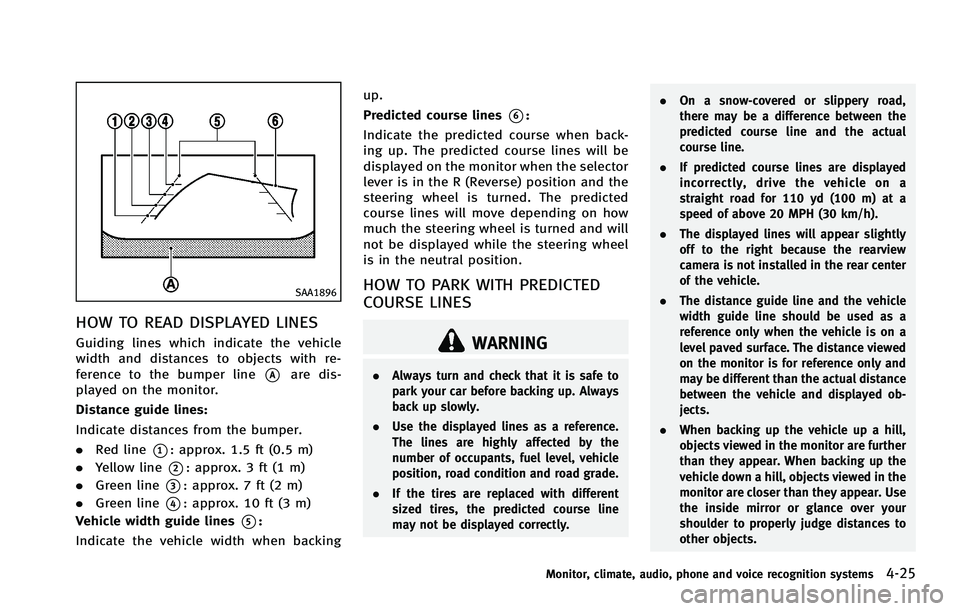
HOW TO READ DISPLAYED LINES
Guiding lines which indicate the vehicle
width and distances to objects with re-
ference to the bumper line
*Aare dis-
played on the monitor.
Distance guide lines:
Indicate distances from the bumper.
. Red line
*1: approx. 1.5 ft (0.5 m)
. Yellow line
*2: approx. 3 ft (1 m)
. Green line
*3: approx. 7 ft (2 m)
. Green line
*4: approx. 10 ft (3 m)
Vehicle width guide lines
*5:
Indicate the vehicle width when backing up.
Predicted course lines
*6:
Indicate the predicted course when back-
ing up. The predicted course lines will be
displayed on the monitor when the selector
lever is in the R (Reverse) position and the
steering wheel is turned. The predicted
course lines will move depending on how
much the steering wheel is turned and will
not be displayed while the steering wheel
is in the neutral position.
HOW TO PARK WITH PREDICTED
COURSE LINES
WARNING
. Always turn and check that it is safe to
park your car before backing up. Always
back up slowly.
. Use the displayed lines as a reference.
The lines are highly affected by the
number of occupants, fuel level, vehicle
position, road condition and road grade.
. If the tires are replaced with different
sized tires, the predicted course line
may not be displayed correctly. .
On a snow-covered or slippery road,
there may be a difference between the
predicted course line and the actual
course line.
. If predicted course lines are displayed
incorrectly, drive the vehicle on a
straight road for 110 yd (100 m) at a
speed of above 20 MPH (30 km/h).
. The displayed lines will appear slightly
off to the right because the rearview
camera is not installed in the rear center
of the vehicle.
. The distance guide line and the vehicle
width guide line should be used as a
reference only when the vehicle is on a
level paved surface. The distance viewed
on the monitor is for reference only and
may be different than the actual distance
between the vehicle and displayed ob-
jects.
. When backing up the vehicle up a hill,
objects viewed in the monitor are further
than they appear. When backing up the
vehicle down a hill, objects viewed in the
monitor are closer than they appear. Use
the inside mirror or glance over your
shoulder to properly judge distances to
other objects.
Monitor, climate, audio, phone and voice recognition systems4-25
Page 211 of 522
4-34Monitor, climate, audio, phone and voice recognition systems
HOW TO SEE EACH VIEW
WARNING
.The distance guide line and the vehicle
width line should be used as a reference
only when the vehicle is on a paved,
level surface. The distance viewed on the
monitor is for reference only and may be
different than the actual distance be-
tween the vehicle and displayed objects.
. Use the displayed lines and the bird-eye
view as a reference. The lines and the
bird-eye view are greatly affected by the
number of occupants, fuel level, vehicle
position, road condition and road grade.
. If the tires are replaced with different
sized tires, the predicted course line and
the bird-eye view may be displayed
incorrectly.
. When driving the vehicle up a hill,
objects viewed in the monitor are further
than they appear. When driving the
vehicle down a hill, objects viewed in
the monitor are closer than they appear.
Use the mirrors or actually look to
properly judge distances to other ob-
jects.
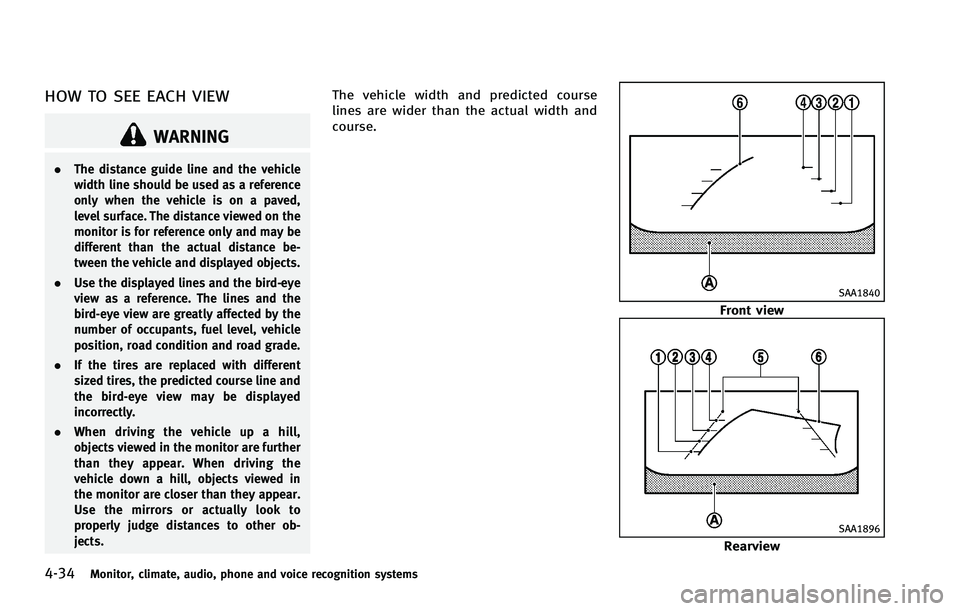
The vehicle width and predicted course
lines are wider than the actual width and
course.
SAA1840
Front view
SAA1896
Rearview
Page 225 of 522
4-48Monitor, climate, audio, phone and voice recognition systems
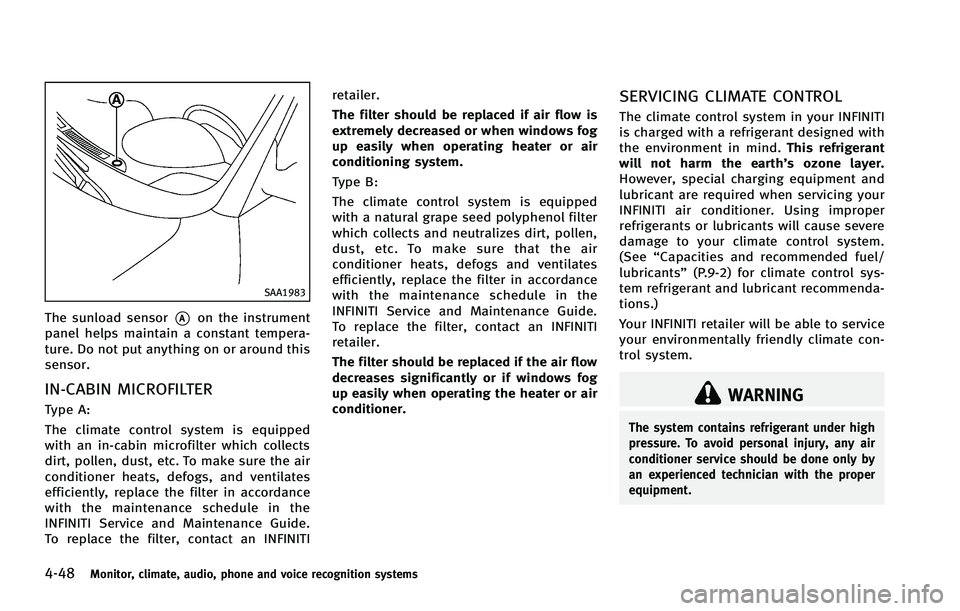
SAA1983
The sunload sensor*Aon the instrument
panel helps maintain a constant tempera-
ture. Do not put anything on or around this
sensor.
IN-CABIN MICROFILTER
Type A:
The climate control system is equipped
with an in-cabin microfilter which collects
dirt, pollen, dust, etc. To make sure the air
conditioner heats, defogs, and ventilates
efficiently, replace the filter in accordance
with the maintenance schedule in the
INFINITI Service and Maintenance Guide.
To replace the filter, contact an INFINITI retailer.
The filter should be replaced if air flow is
extremely decreased or when windows fog
up easily when operating heater or air
conditioning system.
Type B:
The climate control system is equipped
with a natural grape seed polyphenol filter
which collects and neutralizes dirt, pollen,
dust, etc. To make sure that the air
conditioner heats, defogs and ventilates
efficiently, replace the filter in accordance
with the maintenance schedule in the
INFINITI Service and Maintenance Guide.
To replace the filter, contact an INFINITI
retailer.
The filter should be replaced if the air flow
decreases significantly or if windows fog
up easily when operating the heater or air
conditioner.
SERVICING CLIMATE CONTROL
The climate control system in your INFINITI
is charged with a refrigerant designed with
the environment in mind.
This refrigerant
will not harm the earth’s ozone layer.
However, special charging equipment and
lubricant are required when servicing your
INFINITI air conditioner. Using improper
refrigerants or lubricants will cause severe
damage to your climate control system.
(See “Capacities and recommended fuel/
lubricants” (P.9-2) for climate control sys-
tem refrigerant and lubricant recommenda-
tions.)
Your INFINITI retailer will be able to service
your environmentally friendly climate con-
trol system.
WARNING
The system contains refrigerant under high
pressure. To avoid personal injury, any air
conditioner service should be done only by
an experienced technician with the proper
equipment.
Page 304 of 522

CommandAction
Previous Destinations Sets a route to a previous destination.
.Information Command:
Command Action
Fuel Economy Displays fuel economy information.
Maintenance Displays maintenance information.
Traffic Information Turns the traffic information system ON and OFF.
Tire Pressure Displays tire pressure information.
Where am I? Displays your current location.
.Audio Command:
Command Action
AM Turns to the AM band, selecting the station last played.
FM Turns to the FM band, selecting the station last played.
XM Turns to the XM Satellite band, selecting the channel last played.
Music Box (if so equipped) Turns on the“Music Box”hard disk drive audio system.
CD Starts to play a CD.
.General Commands
Command Action
Go back Corrects the last recognition result to return to the previous screen
Exit Cancels Voice Recognition
Monitor, climate, audio, phone and voice recognition systems4-127
Page 314 of 522
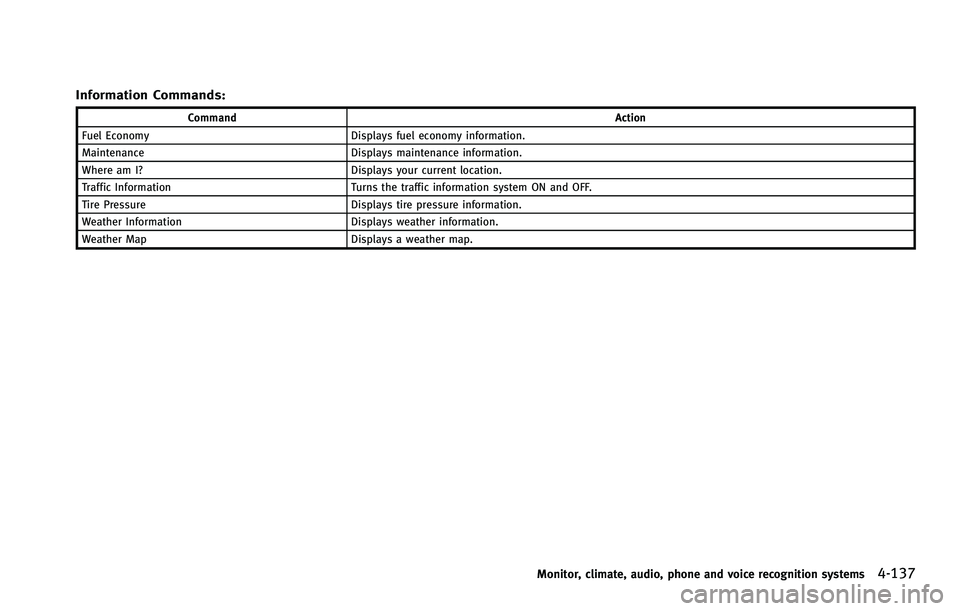
Information Commands:
CommandAction
Fuel Economy Displays fuel economy information.
Maintenance Displays maintenance information.
Where am I? Displays your current location.
Traffic Information Turns the traffic information system ON and OFF.
Tire Pressure Displays tire pressure information.
Weather Information Displays weather information.
Weather Map Displays a weather map.
Monitor, climate, audio, phone and voice recognition systems4-137