warning INFINITI FX 2013 Owners Manual
[x] Cancel search | Manufacturer: INFINITI, Model Year: 2013, Model line: FX, Model: INFINITI FX 2013Pages: 522, PDF Size: 7.53 MB
Page 219 of 522

4-42Monitor, climate, audio, phone and voice recognition systems
JVH0266X
When the“”*1is selected, the
indicator
*2will turn off and the sonar
will be turned off temporarily. The Moving
Object Detection (MOD) system will also be
turned off at the same time. (See “Moving
Object Detection (MOD)” (P.4-42).) When
the switch is selected again, the indicator
will turn on and the sonar will turn back on.
In the below cases, the sonar will be
turned back on automatically:
. When the selector lever is in the R
(Reverse) position.
. When the CAMERA button is pressed
and a screen other than the camera
view is shown on the display. .
When vehicle speed decreases below
approximately 6 MPH (10 km/h).
. When the ignition switch is placed in
the “OFF” position and turned back to
the “ON” position again.
. When the switch is selected, the MOD
function will also be turned off.
To prevent the sonar system from activat-
ing altogether, use the “Camera Settings”
menu. For more information, see “Around
view monitor settings” (P.4-45) in this
section.
MOVING OBJECT DETECTION (MOD)GUID-B70B622B-445F-4D37-8097-66DF258B4A18
WARNING
. The MOD system is not a substitute for
proper vehicle operation and is not
designed to prevent contact with the
objects surrounding the vehicle. When
maneuvering, always use the outside
mirror and rear view mirror and turn and
Page 221 of 522
4-44Monitor, climate, audio, phone and voice recognition systems
WARNING
.Do not use the MOD system when
towing a trailer. The system may not
function properly.
. Excessive noise (for example, audio
system volume or open vehicle window)
will interfere with the chime sound, and
it may not be heard.
. The MOD system performance will be
limited according to environmental con-
ditions and surrounding objects such as:
—When there is low contrast between
background and the moving objects.
—When there is blinking source oflight.
—When strong light such as anothervehicle’s headlight or sunlight is
present.
—When camera orientation is not inits usual position, such as when
mirror is folded.
—When there is dirt, water drops orsnow on the camera lens.
—When the position of the movingobjects in the display is not changed.
. The MOD system might detect some-
thing like flowing water droplets on the
camera lens, white smoke from the
muffler, moving shadows, etc.
. The MOD system may not function
properly depending on the speed, direc-
tion, distance or shape of the moving
objects.
. If your vehicle sustains damage to the
parts where the camera is installed,
leaving it misaligned or bent, the sen-
sing zone may be altered and the MOD
system may not detect objects properly.
HOW TO ADJUST THE SCREEN VIEWGUID-A7187DDC-6FEA-465F-97D2-B9E1927DD9EB
Page 225 of 522

4-48Monitor, climate, audio, phone and voice recognition systems
GUID-3937E88E-58B2-4D4C-A81D-034656C15E84
SAA2149
Center ventilators
SAA2150
Side ventilators
SAA2151
Rear ventilators
Open or close, and adjust the air flow
direction of ventilators.
: This symbol indicates that the ventilators are closed.
: This symbol indicates that the ventilators areopen.
GUID-83C5DBDC-2EF4-436C-B8F0-F68300F11357
WARNING
. The air conditioner cooling function
operates only when the engine is run-
ning.
. Do not leave children or adults who
would normally require the support of
others alone in your vehicle. Pets should
not be left alone either. On hot, sunny
days, temperatures in a closed vehicle
could quickly become high enough to
cause severe or possibly fatal injuries to
people or animals.
. Do not use the recirculation mode for
long periods as it may cause the interior
air to become stale and the windows to
fog up.
Start the engine and operate the automatic
climate control system.
When the “STATUS”button is pushed, the
automatic climate control status screen
will appear. (See “How to use STATUS
button” (P.4-9).)
VENTILATORS AUTOMATIC CLIMATE CONTROL
Page 231 of 522
4-54Monitor, climate, audio, phone and voice recognition systems
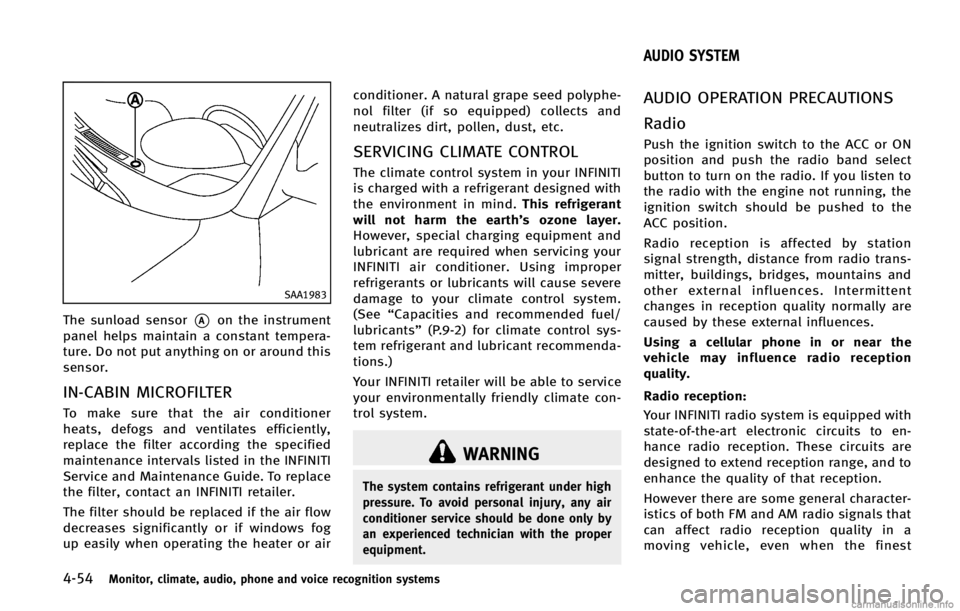
SAA1983
The sunload sensor*Aon the instrument
panel helps maintain a constant tempera-
ture. Do not put anything on or around this
sensor.
IN-CABIN MICROFILTERGUID-B5FB0932-D5C6-4573-A11E-E201E99F47D1
WARNING
The system contains refrigerant under high
pressure. To avoid personal injury, any air
conditioner service should be done only by
an experienced technician with the proper
equipment.
GUID-3EAB71B4-A10F-4A54-9F10-43B665795E96
Page 237 of 522

4-60Monitor, climate, audio, phone and voice recognition systems
”are
trademarks of Dolby Laboratories, Inc.
. DTS and DTS Digital Surround “
”are
registered trademarks of Digital Theater
Systems, Inc.
Parental level (parental control):
GUID-D73A39BF-43C8-459F-9C24-47B7F579C407
WARNING
Do not connect or disconnect the USB device
while driving. Doing so can be a distraction.
If distracted you could lose control of your
vehicle and cause an accident or serious
injury.
CAUTION
. Do not force the USB device into the USB
port. Inserting the USB device tilted or
up-side-down into the port may damage
the USB device and the port. Make sure
that the USB device is connected cor-
rectly into the USB port.
. Do not grab the USB port cover (if so
equipped) when pulling the USB device
out of the port. This could damage the
port and the cover.
. Do not leave the USB cable in a place
where it can be pulled unintentionally.
Pulling the cable may break the wire,
USB device or the port.
Page 251 of 522

4-74Monitor, climate, audio, phone and voice recognition systems
Next/Previous Track and Fast-
Forward/Rewind:
GUID-D73A39BF-43C8-459F-9C24-47B7F579C407
REPEAT (RPT), RANDOM (RDM):GUID-D73A39BF-43C8-459F-9C24-47B7F579C407
NOS2606
NOS2607
CD EJECT:GUID-D73A39BF-43C8-459F-9C24-47B7F579C407
WARNING
. The driver must not attempt to operate
the DVD system or wear the headphones
while the vehicle is in motion so that full
attention may be given to vehicle opera-
tion.
Page 270 of 522

WARNING
.A cellular phone should not be used for
any purpose while driving so full atten-
tion may be given to vehicle operation.
Some jurisdictions prohibit the use of
cellular phones while driving.
. If you must make a call while your
vehicle is in motion, the hands-free
cellular phone operational mode (if so
equipped) is highly recommended. Ex-
ercise extreme caution at all times so full
attention may be given to vehicle opera-
tion.
. If a conversation in a moving vehicle
requires you to take notes, pull off the
road to a safe location and stop your
vehicle before doing so.
CAUTION
.Keep the antenna as far away as
possible from the electronic control
modules.
. Keep the antenna wire more than 8 in
(20 cm) away from the electronic control
system harness. Do not route the anten-
na wire next to any harness.
. Adjust the antenna standing-wave ratio
as recommended by the manufacturer.
. Connect the ground wire from the CB
radio chassis to the body.
. For details, consult an INFINITI retailer.
Monitor, climate, audio, phone and voice recognition systems4-93
CAR PHONE OR CB RADIO
Page 271 of 522

4-94Monitor, climate, audio, phone and voice recognition systems
GUID-61CB5DE5-0726-4AEF-AD72-315D1B535D73
WARNING
.Use a phone after stopping your vehicle
in a safe location. If you have to use a
phone while driving, exercise extreme
caution at all times so full attention may
be given to vehicle operation.
. If you find yourself unable to devote full
attention to vehicle operation while
talking on the phone, pull off the road
to a safe location and stop your vehicle
before doing so.
CAUTION
To avoid draining the vehicle battery, use a
phone after starting the engine.
Your INFINITI is equipped with Bluetooth®
Hands-Free Phone System. If you are an
owner of a compatible Bluetooth®enabled
cellular phone, you can set up the wireless
connection between your cellular phone
and the in-vehicle phone module. With
Bluetooth
®wireless technology, you can
make or receive a telephone call with your
cellular phone in your pocket. Once a cellular phone is connected to the
in-vehicle phone module, no phone con-
necting procedure is required anymore.
Your phone is automatically connected
with the in-vehicle phone module when
the ignition switch is pushed to the ON
position with the registered cellular phone
turned on and carried in the vehicle.
You can register up to 5 different Blue-
tooth
®cellular phones in the in-vehicle
phone module. However, you can talk on
only one cellular phone at a time.
The INFINITI Voice Recognition system
supports the phone commands, so dialing
a phone number using your voice is
possible. For more details, see “INFINITI
Voice Recognition System (models with
navigation system)” (P.4-119).
Before using the Bluetooth
®Hands-Free
Phone System, refer to the following notes.
. Wireless LAN (Wi-Fi) and the Bluetooth
®
functions share the same frequency
band (2.4 GHz). Using the Bluetooth®
and the wireless LAN functions at the
same time may slow down or discon-
nect the communication and cause
undesired noise. It is recommended
that you turn off the wireless LAN (Wi-
Fi) when using the Bluetooth
®func- tions.
. Set up the wireless connection between
a compatible cellular phone and the in-
vehicle phone module before using the
Bluetooth
®Hands-Free Phone System.
. Some Bluetooth®enabled cellular
phones may not be recognized by the
in-vehicle phone module. Please visit
www.InfinitiUSA.com/bluetooth for a
recommended phone list.
. You will not be able to use a hands-free
phone under the following conditions:
— Your vehicle is outside of the tele-
phone service area.
— Your vehicle is in an area where it is
difficult to receive radio waves; such
as in a tunnel, in an underground
parking garage, behind a tall build-
ing or in a mountainous area.
— Your cellular phone is locked in
order not to be dialed.
. When the radio wave condition is not
ideal or ambient sound is too loud, it
may be difficult to hear the other
person’s voice during a call.
. Immediately after the ignition switch is
pushed to the ON position, it may be
impossible to receive a call for a short
period of time.
Bluetooth®HANDS-FREE PHONE SYSTEM
(models with navigation system)
Page 281 of 522

4-104Monitor, climate, audio, phone and voice recognition systems
GUID-15D0990F-B975-4602-B3D0-498739F41B2C
WARNING
.Use a phone after stopping your vehicle
in a safe location. If you have to use a
phone while driving, exercise extreme
caution at all times so full attention may
be given to vehicle operation.
. If you find yourself unable to devote full
attention to vehicle operation while
talking on the phone, pull off the road
to a safe location and stop your vehicle
before doing so.
CAUTION
To avoid draining the vehicle battery, use a
phone after starting the engine.
Your vehicle is equipped with Bluetooth®
Hands-Free Phone System. If you are an
owner of a Bluetooth®enabled cellular
phone, you can set up the wireless
connection between your cellular phone
and the in-vehicle phone module. With
Bluetooth
®wireless technology, you can
make or receive a telephone call with your
cellular phone in your pocket. Once your cellular phone is paired to the
in-vehicle phone module, no phone con-
necting procedure is required. Your phone
is automatically connected with the in-
vehicle phone module when the ignition
switch is pushed to the
“ON”position with
the registered cellular phone turned on
and carried in the vehicle.
You can register up to 5 different Blue-
tooth
®cellular phones in the in-vehicle
phone module. However, you can talk on
only one cellular phone at a time.
When a call is active, the audio system and
microphone (located in the ceiling in front
of the rearview mirror) are used for the
handsfree communications.
If the audio system is being used at the
time, the audio mode will mute and will
stay muted until the active call is ended.
The INFINITI Voice Recognition system
supports the phone commands, so dialing
a phone number using your voice is
possible.
Before using the Bluetooth
®Hands-Free
Phone System, refer to the following notes.
. Wireless LAN (Wi-Fi) and the Bluetooth
®
functions share the same frequency
band (2.4 GHz). Using the Bluetooth®
and the wireless LAN functions at the
same time may slow down or discon-
nect the communication and cause
undesired noise. It is recommended
that you turn off the wireless LAN (Wi-
Fi) when using the Bluetooth
®func-
tions.
. Set up the wireless connection between
a cellular phone and the in-vehicle
phone module before using the Blue-
tooth
®Hands-Free Phone System.
. Some Bluetooth®enabled cellular
phones may not be recognized by the
in-vehicle phone module. Please visit
www.InfinitiUSA.com/bluetooth for a
recommended phone list.
. You will not be able to use a hands-free
phone under the following conditions:
— Your vehicle is outside of the tele-
phone service area.
— Your vehicle is in an area where it is
difficult to receive radio waves; such
as in a tunnel, in an underground
parking garage, behind a tall build-
ing or in a mountainous area.
— Your cellular phone is locked in
order not to be dialed.
. When the radio wave condition is not
ideal or ambient sound is too loud, it
Bluetooth®HANDS-FREE PHONE SYSTEM
(models without navigation system)
Page 326 of 522
GUID-D68C0968-2C03-4229-A9B4-5A1EDD2A115A
WARNING
.Do not leave children or adults who
would normally require the support of
others alone in your vehicle. Pets should
not be left alone either. They could
accidentally injure themselves or others
through inadvertent operation of the
vehicle. Also, on hot, sunny days,
temperatures in a closed vehicle could
quickly become high enough to cause
severe or possibly fatal injuries to
people or animals.
. Properly secure all cargo to help prevent
it from sliding or shifting. Do not place
cargo higher than the seatbacks. In a
sudden stop or collision, unsecured
cargo could cause personal injury.
EXHAUST GAS (carbon monoxide)GUID-5A09DFF4-65AD-462D-9E65-B939613D79D6
WARNING
.Do not breathe exhaust gases; they
contain colorless and odorless carbon
monoxide. Carbon monoxide is danger-
ous. It can cause unconsciousness or death.
. If you suspect that exhaust fumes are
entering the vehicle, drive with all
windows fully open, and have the
vehicle inspected immediately.
. Do not run the engine in closed spaces
such as a garage.
. Do not park the vehicle with the engine
running for any extended length of time.
. Keep the lift gate closed while driving,
otherwise exhaust gases could be drawn
into the passenger compartment. If you
must drive with the lift gate open, follow
these precautions:
1) Open all the windows.
2) Set the
air recirculation to off
and the fan control to high to
circulate the air.
. If electrical wiring or other cable con-
nections must pass to a trailer through
the seal on the lift gate or the body,
follow the manufacturer’s recommenda-
tion to prevent carbon monoxide entry
into the vehicle.
. The exhaust system and body should be
inspected by a qualified mechanic when-
ever:
—The vehicle is raised for service.
—You suspect that exhaust fumes are
entering into the passenger compart-
ment.
—You notice a change in the sound ofthe exhaust system.
—You have had an accident involvingdamage to the exhaust system,
underbody, or rear of the vehicle.
THREE-WAY CATALYSTGUID-0B35F258-D470-46BC-A166-38F227DAACD3
WARNING
. The exhaust gas and the exhaust system
are very hot. Keep people, animals or
flammable materials away from the
exhaust system components.
. Do not stop or park the vehicle over
flammable materials such as dry grass,
waste paper or rags. They may ignite and
Starting and driving5-3
PRECAUTIONS WHEN STARTING AND
DRIVING