brake INFINITI FX 2013 User Guide
[x] Cancel search | Manufacturer: INFINITI, Model Year: 2013, Model line: FX, Model: INFINITI FX 2013Pages: 522, PDF Size: 7.53 MB
Page 111 of 522
2-40Instruments and controls
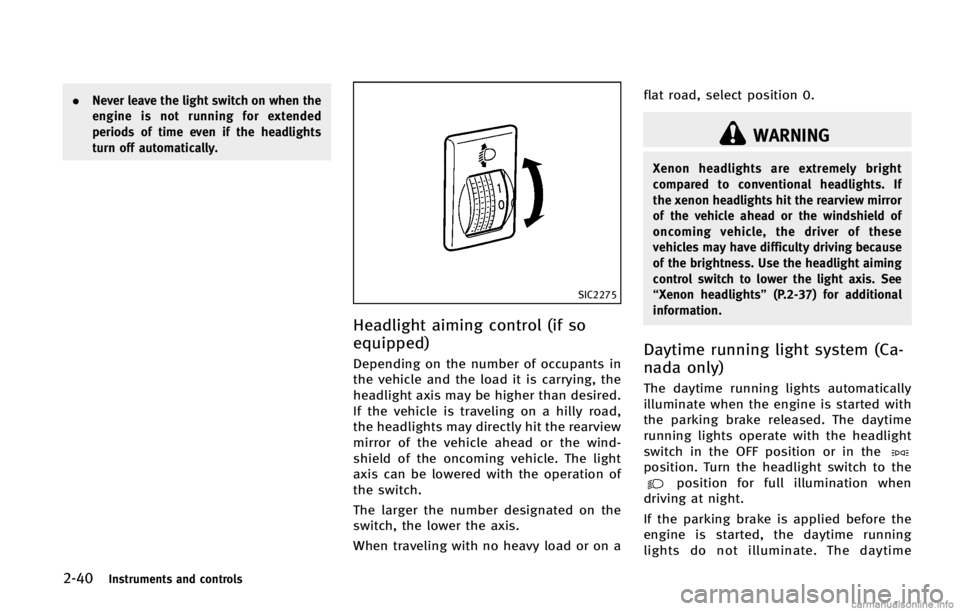
SIC2275
Headlight aiming control (if so
equipped)
GUID-980E128C-206E-49A3-8E40-A7785E7ED87C
WARNING
Xenon headlights are extremely bright
compared to conventional headlights. If
the xenon headlights hit the rearview mirror
of the vehicle ahead or the windshield of
oncoming vehicle, the driver of these
vehicles may have difficulty driving because
of the brightness. Use the headlight aiming
control switch to lower the light axis. See
“Xenon headlights”(P.2-37) for additional
information.
Daytime running light system (Ca-
nada only)
GUID-6BE117E5-533D-42FF-9E30-D7292D09AE24
position. Turn the headlight switch to theposition for full illumination when
driving at night.
If the parking brake is applied before the
engine is started, the daytime running
lights do not illuminate. The daytime
Page 119 of 522

2-48Instruments and controls
GUID-737068A6-79F1-4242-A5D8-DD8B33CBC7DE
SIC3844
The vehicle should be driven with the
Intelligent Brake Assist (IBA) system on
for most driving conditions.
The Intelligent Brake Assist (IBA) system
will sound a warning chime to alert the
driver when the vehicle is traveling too
close to the vehicle ahead and will apply
the brake control if necessary.
To turn off the system, push the IBA OFF
switch. The
indicator will illuminate.
The IBA system will remain in the last ON
or OFF state it was left in until it is
manually changed by pushing the IBA OFF
switch.
GUID-0E75EF3A-E6E0-4B47-9774-CB5CF10EBEA4
JVS0033X
The vehicle should be driven with the
Vehicle Dynamic Control (VDC) system on
for most driving conditions.
If the vehicle is stuck in mud or snow, the
VDC system reduces the engine output to
reduce wheel spin. The engine speed will
be reduced even if the accelerator is
depressed to the floor. If maximum engine
power is needed to free a stuck vehicle,
turn the VDC system off.
To turn off the VDC system, push the VDC
OFF switch. The
indicator will illumi-
nate.
Push the VDC OFF switch again or restart the engine to turn on the system. (See
“Vehicle Dynamic Control (VDC) system”
(P.5-83).)
INTELLIGENT BRAKE ASSIST (IBA) OFF
SWITCH (if so equipped)
VEHICLE DYNAMIC CONTROL (VDC) OFF
SWITCH
Page 180 of 522

GUID-BF01B3FB-964A-4D69-9FDE-7AD7A547038E
WARNING
.Do not disassemble or modify this
system. If you do, it may result in
accidents, fire, or electric shock.
. Do not use this system if you notice any
abnormality, such as a frozen screen or
lack of sound. Continued use of the
system may result in accident, fire or
electric shock.
. In case you notice any foreign object in
the system hardware, spill liquid on it,
or notice smoke or smell coming from it,
stop using the system immediately and
contact your nearest INFINITI retailer.
Ignoring such conditions may lead to
accidents, fire, or electric shock.
. Park the vehicle in a safe location and
apply the parking brake to view the
images on the front center display
screen.
Do not attempt to operate the system in
extreme temperature conditions [below
−48F (−208C) and above 1588F (708C)].
Operating this system under these condi-
tions may result in system malfunctions.
GUID-6CACAD55-F243-4D7E-9CE2-A0E27940A9E4
SAA1836
Models with navigation system
1. “CAMERA” Around View Monitor dis-
play button (P.4-31)
2, 6, 7, 10, 11. For navigation system control buttons
(Refer to the separate Navigation
System Owner’s Manual.)
3. INFINITI controller (P.4-5)
4. “STATUS” status display button
(P.4-9)
5. “
OFF” brightness control and
display ON/OFF button (P.4-9)
8. “AM·FM·SAT” band selector button
(P.4-54) 9.
“DISC·AUX” selector button (P.4-54)
12. “INFO” vehicle and navigation infor-
mation button (P.4-9)
13. “SETTING” button (P.4-15)
Monitor, climate, audio, phone and voice recognition systems4-3
SAFETY NOTE CENTER MULTI-FUNCTION CONTROL PANEL
Page 200 of 522

stop the vehicle in a safe location and
apply the parking brake.
SAA2492
Full Screen Display:GUID-D73A39BF-43C8-459F-9C24-47B7F579C407
(Start)
Select the “
”key to start playing
the slideshow.
.
(Stop)
Select the “
”key to stop the
slideshow.
.
(Next)
Select the “
”key to display the next file.
.
(Previous)
Select the “
”key to display the
previous file.
Setting the Image Viewer:
GUID-D73A39BF-43C8-459F-9C24-47B7F579C407
Page 204 of 522

guide lines*Dparallel to the parking
space
*C.
5. When the vehicle is parked in the space completely, move the selector lever to
the “P” (Park) position and apply the
parking brake.
SAA1978
DIFFERENCE BETWEEN PREDICTIVE
AND ACTUAL DISTANCES
GUID-76D1C419-96D2-4FDD-950C-0DAC9B41F4D1
Page 222 of 522

View Monitor while the vehicle is moving.
Make sure the parking brake is firmly
applied.
JVH0323M
AROUND VIEW MONITOR SETTINGSGUID-E1824E11-A367-4A93-8F99-78890EC5D4D6
Page 331 of 522
5-8Starting and driving
WARNING
The following actions can increase the
chance of losing control of the vehicle if
there is a sudden loss of tire air pressure.
Losing control of the vehicle may cause acollision and result in personal injury.
.
The vehicle generally moves or pulls in
the direction of the flat tire.
. Do not rapidly apply the brakes.
. Do not rapidly release the accelerator
pedal.
. Do not rapidly turn the steering wheel.
1. Remain calm and do not overreact.
2. Maintain a firm grip on the steering
wheel with both hands and try to hold a
straight course.
3. When appropriate, slowly release the accelerator pedal to gradually slow the
vehicle.
4. Gradually steer the vehicle to a safe location off the road and away from
traffic if possible.
5. Lightly apply the brake pedal to gradu- ally stop the vehicle.
6. Turn on the hazard warning flashers and either contact a roadside emer-
gency service to change the tire or see
“Changing a flat tire” (P.6-4) of this
Owner’s Manual.
DRINKING ALCOHOL/DRUGS AND
DRIVING
GUID-5D37899E-465F-4474-B316-C5195552BAC1
WARNING
Never drive under the influence of alcohol or
drugs. Alcohol in the bloodstream reduces
coordination, delays reaction time and im-
pairs judgement. Driving after drinking
alcohol increases the likelihood of being
involved in an accident injuring yourself and
others. Additionally, if you are injured in an
accident, alcohol can increase the severity
of the injury.
INFINITI is committed to safe driving.
However, you must choose not to drive
under the influence of alcohol. Every year
thousands of people are injured or killed in
alcohol-related accidents. Although the
local laws vary on what is considered to
be legally intoxicated, the fact is that
alcohol affects all people differently and
most people underestimate the effects of
alcohol.
Remember, drinking and driving don’t mix!
And that is true for drugs, too (over-the-
counter, prescription, and illegal drugs).
Page 332 of 522
WARNING
.Drive carefully when off the road and
avoid dangerous areas. Every person
who drives or rides in this vehicle should
be seated with their seat belt fastened.
This will keep you and your passengers
in position when driving over rough
terrain.
. Do not drive across steep slopes. Instead
drive either straight up or straight down the slopes. Off-road vehicles can tip over
sideways much more easily than they
can forward or backward.
. Many hills are too steep for any vehicle.
If you drive up them, you may stall. If
you drive down them, you may not be
able to control your speed. If you drive
across them, you may roll over.
. Do not shift ranges while driving on
downhill grades as this could cause loss
of control of the vehicle.
. Stay alert when driving to the top of a
hill. At the top there could be a drop-off
or other hazard that could cause an
accident.
. If your engine stalls or you cannot make
it to the top of a steep hill, never attempt
to turn around. Your vehicle could tip or
roll over. Always back straight down in R
(Reverse) range. Never back down in N
(Neutral), using only the brake, as this
could cause loss of control.
. Heavy braking going down a hill could
cause your brakes to overheat and fade,
resulting in loss of control and an
accident. Apply brakes lightly and use
a low range to control your speed. .
Unsecured cargo can be thrown around
when driving over rough terrain. Prop-
erly secure all cargo so it will not be
thrown forward and cause injury to you
or your passengers.
. To avoid raising the center of gravity
excessively, do not exceed the rated
capacity of the roof rack (if so equipped)
and evenly distribute the load. Secure
heavy loads in the cargo area as far
forward and as low as possible. Do not
equip the vehicle with tires larger than
specified in this manual. This could
cause your vehicle to roll over.
. Do not grip the inside or spokes of the
steering wheel when driving off-road.
The steering wheel could move suddenly
and injure your hands. Instead drive with
your fingers and thumbs on the outside
of the rim.
. Before operating the vehicle, ensure that
the driver and all passengers have their
seat belts fastened.
. Always drive with the floor mats in place
as the floor may became hot.
. Lower your speed when encountering
strong crosswinds. With a higher center
of gravity, your INFINITI is more affected
Starting and driving5-9
Page 338 of 522

WARNING
.Do not depress the accelerator pedal
while shifting from P (Park) or N
(Neutral) to R (Reverse), D (Drive), DS
(Drive Sport) or manual shift mode.
Always depress the brake pedal until
shifting is completed. Failure to do so
could cause you to lose control and have
an accident.
. Cold engine idle speed is high, so use
caution when shifting into a forward or
reverse gear before the engine has
warmed up.
. Never shift to P (Park) or R (Reverse)
while vehicle is moving forward. Never
Starting and driving5-15
DRIVING THE VEHICLE
Page 339 of 522
5-16Starting and driving
CAUTION
.Except in an emergency, do not shift to
the N (Neutral) position while driving.
Coasting with the transmission in the N
(Neutral) position may cause serious
damage to the transmission.
. When stopping the vehicle on an uphill
grade, do not hold the vehicle by
depressing the accelerator pedal. The
foot brake should be used for this
purpose.
. Do not downshift abruptly on slippery
roads. This may cause a loss of control.
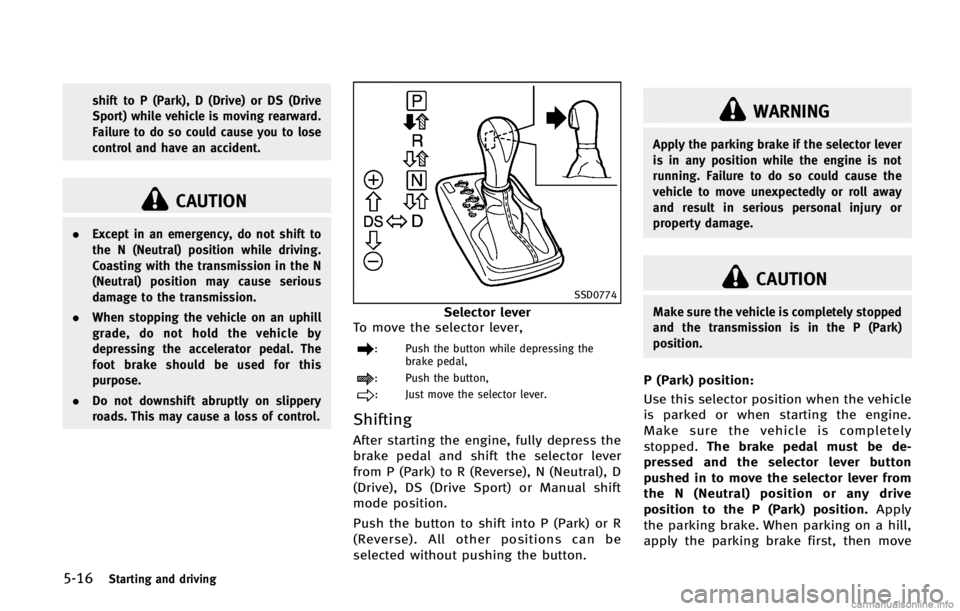
SSD0774
Selector lever
To move the selector lever,
: Push the button while depressing the brake pedal,
: Push the button,
: Just move the selector lever.
ShiftingGUID-9384D3FA-2ECF-4515-8DD6-D10E211170F1
WARNING
Apply the parking brake if the selector lever
is in any position while the engine is not
running. Failure to do so could cause the
vehicle to move unexpectedly or roll away
and result in serious personal injury or
property damage.
CAUTION
Make sure the vehicle is completely stopped
and the transmission is in the P (Park)
position.
P (Park) position:GUID-D73A39BF-43C8-459F-9C24-47B7F579C407