cruise control INFINITI FX 2013 User Guide
[x] Cancel search | Manufacturer: INFINITI, Model Year: 2013, Model line: FX, Model: INFINITI FX 2013Pages: 522, PDF Size: 7.53 MB
Page 356 of 522

SSD0913
1.Vehicle-to-vehicle distance control
mode
2. Conventional (fixed speed) cruise con- trol mode
Push the MAIN switch
*Ato choose the
cruise control mode between the vehicle-
to-vehicle distance control mode
*1and
the conventional (fixed speed) cruise con-
trol mode
*2.
To choose the vehicle-to-vehicle distance
control mode
*1, quickly push and release
the MAIN switch
*A. To choose the
conventional (fixed speed) cruise control
mode
*2, push and hold the MAIN switch
*Afor longer than approximately 1.5 seconds.
Once a control mode is activated, it cannot
be changed to the other cruise control
mode. To change the mode, push the MAIN
switch once to turn the system off. Then
push the MAIN switch again to turn the
system back on and select the desired
cruise control mode.
Always confirm the setting in the Intelligent
Cruise Control system display.
For the vehicle-to-vehicle distance control
mode, see the following description. For
“Conventional (fixed speed) cruise control
mode”
(P.5-50).
SELECTING THE VEHICLE-TO-VEHI-
CLE DISTANCE CONTROL MODE
GUID-73C83CCC-DF26-4F50-AD25-3E0D824851A8
Page 357 of 522
5-34Starting and driving
JVS0124X
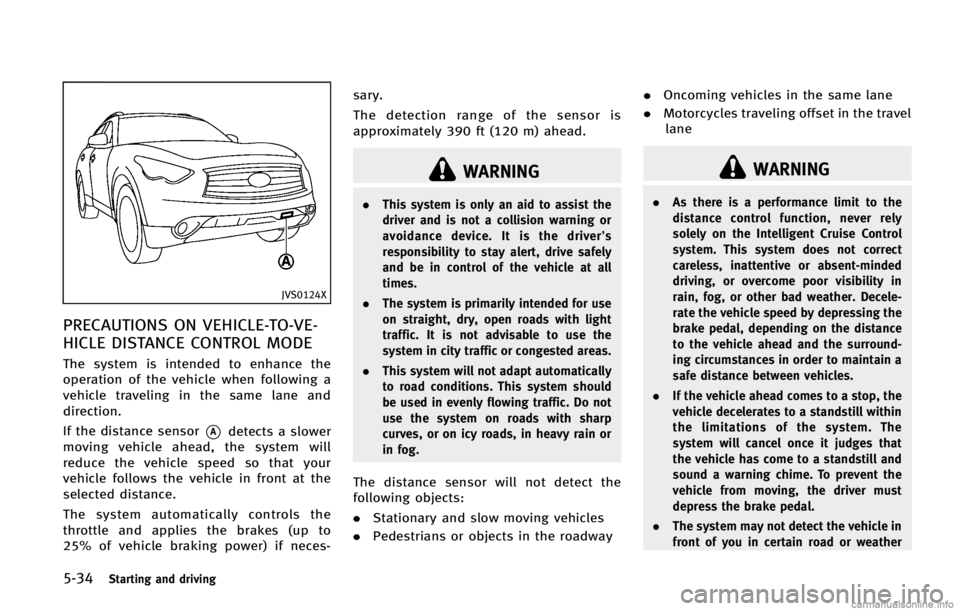
PRECAUTIONS ON VEHICLE-TO-VE-
HICLE DISTANCE CONTROL MODE
GUID-0068590B-5675-4F31-8813-EACB6A3E5FCC
WARNING
.This system is only an aid to assist the
driver and is not a collision warning or
avoidance device. It is the driver’s
responsibility to stay alert, drive safely
and be in control of the vehicle at all
times.
. The system is primarily intended for use
on straight, dry, open roads with light
traffic. It is not advisable to use the
system in city traffic or congested areas.
. This system will not adapt automatically
to road conditions. This system should
be used in evenly flowing traffic. Do not
use the system on roads with sharp
curves, or on icy roads, in heavy rain or
in fog.
The distance sensor will not detect the
following objects:
.Stationary and slow moving vehicles
. Pedestrians or objects in the roadway .
Oncoming vehicles in the same lane
. Motorcycles traveling offset in the travel
lane
WARNING
. As there is a performance limit to the
distance control function, never rely
solely on the Intelligent Cruise Control
system. This system does not correct
careless, inattentive or absent-minded
driving, or overcome poor visibility in
rain, fog, or other bad weather. Decele-
rate the vehicle speed by depressing the
brake pedal, depending on the distance
to the vehicle ahead and the surround-
ing circumstances in order to maintain a
safe distance between vehicles.
. If the vehicle ahead comes to a stop, the
vehicle decelerates to a standstill within
the limitations of the system. The
system will cancel once it judges that
the vehicle has come to a standstill and
sound a warning chime. To prevent the
vehicle from moving, the driver must
depress the brake pedal.
. The system may not detect the vehicle in
front of you in certain road or weather
Page 362 of 522

SSD0914
Intelligent cruise control switchGUID-17F085DA-9D45-4B45-A9C6-44F2E0025210
SSD0606
Intelligent cruise control system
display and indicators
GUID-E41EE259-BFF2-474E-8CC7-1337AEE4D80E
Page 363 of 522

5-40Starting and driving
4. Indicates your vehicle
5. Set vehicle speed indicator:Indicates the set vehicle speed.
For Canadian models, the speed is
displayed in km/h.
6. Intelligent Cruise Control system warn- ing light (orange):
The light comes on if there is a
malfunction in the ICC system.
SSD0607
When the ignition switch is pushed to the
ON position, the indicators come on as
illustrated to check for a burned-out bulb,
and it turns off when the engine is started.
SSD0915
Operating vehicle-to-vehicle dis-
tance control mode
GUID-D2E6E26F-0ADF-41F5-9488-F82C852D9855
Page 366 of 522

SSD0610
1. System set display with vehicle ahead
2. System set display without vehicleahead
System operationGUID-D24D9274-110A-47FC-8DEE-411846968BE0
WARNING
Normally when controlling the distance to a
vehicle ahead, this system automatically
accelerates or decelerates your vehicle
according to the speed of the vehicle ahead.
Depress the accelerator to properly accel-
erate your vehicle when acceleration is
required for a lane change. Depress the brake pedal when deceleration is required to
maintain a safe distance to the vehicle
ahead due to its sudden braking or if a
vehicle cuts in. Always stay alert when
using the ICC system.
The driver sets the desired vehicle speed
based on the road conditions. The ICC
system maintains the set vehicle speed,
similar to standard cruise control, as long
as no vehicle is detected in the lane ahead.
The ICC system displays the set speed.Vehicle detected ahead:
GUID-D73A39BF-43C8-459F-9C24-47B7F579C407
Page 373 of 522

5-50Starting and driving
WARNING
.In the conventional (fixed speed) cruise
control mode, a warning chime does not
sound to warn you if you are too close to
the vehicle ahead, as neither the pre-
sence of the vehicle ahead nor the
vehicle-to-vehicle distance is detected.
. Pay special attention to the distance
between your vehicle and the vehicle
ahead of you or a collision could occur.
. Always confirm the setting in the In-
telligent Cruise Control system display.
. Do not use the conventional (fixed
speed) cruise control mode when driving under the following conditions:
—when it is not possible to keep the
vehicle at a set speed
—in heavy traffic or in traffic thatvaries in speed
—on winding or hilly roads
—on slippery roads (rain, snow, ice,etc.)
—in very windy areas
. Doing so could cause a loss of vehicle
control and result in an accident.
SSD0736
Conventional (fixed speed) cruise
control switch
GUID-604A28F1-C0FE-4C1B-82DF-45692AAEB758
Page 374 of 522

SSD0618
Conventional (fixed speed) cruise
control mode display and indica-
tors
GUID-078516D5-42A5-4906-9C7B-8E13AFD2CE68
SSD0918
Operating conventional (fixed
speed) cruise control mode
GUID-A3567A6F-C084-47EE-9668-CFF03C274363
Page 385 of 522

5-62Starting and driving
SSD0771
Under the following conditions, the Dis-
tance Control Assist system will not oper-
ate and the Distance Control Assist (DCA)
system switch indicator light will blink:
.When the SNOW mode switch is ON (To
use the DCA system, turn off the SNOW
mode switch, then turn on the dynamic
driver assistance switch.)
For details about the SNOW mode
switch, see “Snow mode switch” (P.2-
47).
. When the VDC system is off (To use the
DCA system, turn on the VDC, then
push the dynamic driver assistance
switch.) For details about the VDC system, see
“Vehicle Dynamic Control (VDC) sys-
tem”
(P.5-83).
. When ABS or VDC (including the trac-
tion control system) is operating
. When driving into a strong light (for
example, sunlight)
When the Conventional (fixed speed) cruise
control mode is operating, the DCA system
will not operate. (To use the DCA system,
turn the Conventional (fixed speed) cruise
control mode off, then push the dynamic
driver assistance switch.)
For details about the Conventional (fixed
speed) cruise control mode, see “Intelli-
gent Cruise Control (ICC) system (FULL
SPEED RANGE)” (P.5-32).
When the engine is turned off, the system
is automatically turned off.
Page 402 of 522
WARNING
.While driving on a slippery surface, be
careful when braking, accelerating or
downshifting. Abrupt braking or accel- erating could cause the wheels to skid
and result in an accident.
. If the engine is not running or is turned
off while driving, the power assist for
the brakes will not work. Braking will be
harder.
GUID-01CCB45E-CD0C-45A3-8A40-83FF9D02ADC2
WARNING
The Brake Assist is only an aid to assist
braking operation and is not a collision
warning or avoidance device. It is the
driver’s responsibility to stay alert, drive
safely and be in control of the vehicle at all
times.
PREVIEW FUNCTION (Intelligent
Cruise Control system equipped
models)
GUID-2F7E0AB1-645D-448E-8D34-AF921D247572
Page 409 of 522

5-86Starting and driving
WARNING
.Wet ice (328F, 08C and freezing rain),
very cold snow or ice can be slick and
very hard to drive on. The vehicle will
have much less traction or “grip”under
these conditions. Try to avoid driving on
wet ice until the road is salted or
sanded.
. Whatever the condition, drive with cau-
tion. Accelerate and slow down with
care. If accelerating or downshifting too
fast, the drive wheels will lose even more traction.
. Allow more stopping distance under
these conditions. Braking should be
started sooner than on dry pavement.
. Allow greater following distances on
slippery roads.
. Watch for slippery spots (glare ice).
These may appear on an otherwise clear
road in shaded areas. If a patch of ice is
seen ahead, brake before reaching it. Try
not to brake while on the ice, and avoid
any sudden steering maneuvers.
. Do not use the cruise control on slippery
roads.
. Snow can trap dangerous exhaust gases
under your vehicle. Keep snow clear of
the exhaust pipe and from around your
vehicle.