ECU INFINITI FX 2013 Owner's Guide
[x] Cancel search | Manufacturer: INFINITI, Model Year: 2013, Model line: FX, Model: INFINITI FX 2013Pages: 522, PDF Size: 7.53 MB
Page 83 of 522

2-12Instruments and controls
GUID-3B7E2B79-E712-41D2-976D-4E1B161E68FC
All-Wheel Drive (AWD) warning light (AWD
models)*Lane departure warning light
(orange)*Front passenger air bag status light
Anti-lock Braking System (ABS) warning
lightLow tire pressure warning lightHigh beam indicator light
Master warning lightIntelligent Brake Assist (IBA) off indicator
light*
Automatic transmission check warning lightPreview Function warning light (orange)*Lane Departure Prevention (LDP) ON indica-
tor light (green)*
Brake warning lightRear Active Steer warning light*Malfunction Indicator Light (MIL)
Seat belt warning lightSecurity indicator light
Charge warning lightSupplemental air bag warning lightSPORT mode indicator light*
Distance Control Assist (DCA) system warn-
ing light (orange)*Vehicle Dynamic Control (VDC) warning lightTurn signal/hazard indicator lights
Engine oil pressure warning lightAdaptive Front lighting System (AFS) indi-
cator light*Vehicle Dynamic Control (VDC) off indicator
light
Intelligent Cruise Control (ICC) system
warning light (orange)*Automatic transmission position indicator
light*: if so equipped
Intelligent Key warning lightExterior light indicator
CHECKING BULBSGUID-FCD7FF45-DCC8-41AD-86CC-E12DA130279A
,or,,,,,,
The following lights come on briefly and then go off (if so equipped):
,or,,,,,,,,
If any light does not come on, it may
indicate a burned-out bulb or an open
circuit in the electrical system. Have the
system checked by an INFINITI retailer.
Some indicators and warnings are also
displayed on the dot matrix crystal display between the speedometer and tachometer.
(See
“Dot matrix liquid crystal display”
(P.2-21).)
WARNING/INDICATOR LIGHTS AND
AUDIBLE REMINDERS
Page 91 of 522
2-20Instruments and controls
light
should turn off if no other potential
emission control system malfunction ex-
ists.
If this indicator light remains on for 20
seconds and then blinks for 10 seconds
when the engine is not running, it indicates
that the vehicle is not ready for an
emission control system inspection/main-
tenance test. (See “Readiness for Inspec-
tion/Maintenance (I/M) test” (P.9-31).)
Operation:
GUID-D73A39BF-43C8-459F-9C24-47B7F579C407
light should turn off
after a few driving trips. If thelight
does not turn off after a few driving
trips, have the vehicle inspected by an
INFINITI retailer. You do not need to
have your vehicle towed to the retailer. .
Malfunction indicator light blinking —
An engine misfire has been detected
which may damage the emission con-
trol system.
To reduce or avoid emission control
system damage:
1) Do not drive at speeds above 45 MPH (72 km/h).
2) Avoid hard acceleration or decelera- tion.
3) Avoid steep uphill grades.
4) If possible, reduce the amount of cargo being hauled or towed.
The malfunction indicator light may
stop blinking and remain on.
Have the vehicle inspected by an
INFINITI retailer. You do not need to
have your vehicle towed to the retailer.
CAUTION
Continued vehicle operation without having
the emission control system checked and
repaired as necessary could lead to poor
driveability, reduced fuel economy, and
possible damage to the emission control
system.
Security indicator lightGUID-E639064B-1196-400E-A57A-171D183D82AE
SPORT mode indicator light (if
so equipped)
GUID-5ADC334D-C573-4CC4-B437-A2672293CF3E
Turn signal/hazard indicator
lights
GUID-5A2A07A5-27A0-4237-B457-C459CC4E811A
Vehicle Dynamic Control (VDC)
off indicator light
GUID-18254326-0B58-4BEB-982E-B46B03A0F21B
Page 101 of 522

2-30Instruments and controls
.BACK
Select this submenu to return to the top
page of the setting mode.
. LANGUAGE
Select this submenu to choose lan-
guage for display.
. UNIT
Select this submenu to choose the unit
from MPG or l/100 km.
. METER EFFECT
Select this submenu to turn on and off
the meter/ring illumination and needle
sweep function when starting the en-
gine.
7. Warning checkGUID-129FCDBB-1D5D-4522-9EE3-1C0F44C0C593
switch*Ato move to the
warning check mode.
Push the
switch*Bto select other
menu.
DETAIL:
GUID-D73A39BF-43C8-459F-9C24-47B7F579C407
SIC2133
Your vehicle has two types of security
systems, as follows:
. Vehicle security system
. INFINITI Vehicle Immobilizer System
The security condition will be shown by the
security indicator light.
VEHICLE SECURITY SYSTEMGUID-B3F5496A-376F-47AB-AE2C-0EDEA18F52E0
Page 102 of 522

SIC2045
How to arm the vehicle security
system
GUID-CE21FC3E-1F08-4715-8A70-0B5193589812
Page 103 of 522

2-32Instruments and controls
INFINITI VEHICLE IMMOBILIZER
SYSTEM
GUID-6E3959C6-6FF5-4CA8-81AC-A7E8C959A5CE
SIC2045
Security indicator lightGUID-3E2918E8-E80B-4A5C-B1D7-ABFA814E2A80
Page 125 of 522

2-54Instruments and controls
SIC3663
CARD HOLDERGUID-97E6647C-8807-49DC-AE40-3C99461021B5
SIC3248
COAT HOOKSGUID-025674FB-C7C6-4974-9A2C-ACBAA5885EC5
CAUTION
Do not place items which are more than 2 lb
(1 kg) on the hook.
SIC3849
CARGO HOOKS (if so equipped)GUID-96EA5D34-5C09-4FA4-AE6D-9E194BEEC79A
WARNING
.Always make sure that the cargo is
properly secured. Use the suitable ropes
and hooks.
. Unsecured cargo can become dangerous
in an accident or sudden stop.
Page 126 of 522

CAUTION
Do not apply a total load of more than 22 lb
(10 kg) to a single hook.
SIC3850
CARGO NET (if so equipped)GUID-8A451884-6108-427F-B920-2C513E2E942C
WARNING
.Properly secure all cargo to help prevent
it from sliding or shifting. Do not place
cargo higher than the seatbacks. In a
sudden stop or collision, unsecured
cargo could cause personal injury. .
Be sure to secure all four hooks into the
retainers. The cargo restrained in the net
must not exceed 30 lb (13.6 kg) or the
net may not stay secured.
Instruments and controls2-55
Page 127 of 522

2-56Instruments and controls
SIC3841
CARGO COVER (if so equipped)GUID-3D58369F-9794-4024-BE01-0266F164705F
SIC3842
To remove the cargo cover,
1. Return the rear seatback to the fullupright position.
2. Fold the flap
*1.
3. Lift up the rear side of the cargo cover
*2to unlatch the rear side of the cargo
cover
*Afrom the hanger bars.
4. Then, tilt up the cargo cover and
slightly slide it forward
*3to unhook
the front side of the cargo cover
*B
from the hanger bars.
5. Incline the cargo cover above the
hanger bars towards the front of the
vehicle
*4and lower the cargo cover.
6. Pull either side of the cargo cover and remove the cargo cover
*5.
When attaching the cargo cover, be sure to
return the rear seatback to the upright
position and make sure that the cargo
cover is latched securely.
Page 128 of 522

SIC3865
The rear cargo cover*1can be removed
from the lift gate.
To remove the rear cargo cover, open the
lift gate then remove the clips
*2with a
suitable tool.
WARNING
. Never put anything on the cargo cover,
no matter how small. Any object on it
could cause an injury in an accident or
sudden stop.
. Do not leave the cargo cover in the
vehicle with it disengaged from the holder.
. Properly secure all cargo with ropes or
straps to help prevent it from sliding or
shifting. Do not place cargo higher than
the seatbacks. In a sudden stop or
collision, unsecured cargo could cause
personal injury.
. If the cargo cover contacts the top tether
strap when it is attached to the top
tether anchor, remove the cargo cover
from the vehicle or secure it on the cargo
floor below its attachment location. If
the cargo cover is not removed, it may
damage the top tether strap during a
collision. Your child could be seriously
injured or killed in a collision if the child
restraint top tether strap is damaged.
. Do not allow cargo to contact the top
tether strap when it is attached to the
top tether anchor. Properly secure the
cargo so it does not contact the top
tether strap. Cargo that is not properly
secured or cargo that contacts the top
tether strap may damage the top tether
strap during a collision. Your child could
be seriously injured or killed in a
collision if the child restraint top tether
strap is damaged. .
Do not leave the cargo cover in the
vehicle with the rear half of the flap
folded up while driving. You may not be
able to see out the rear window, which
may cause an accident.
. Do not use the cargo cover if the rear
seats are folded down.
Instruments and controls2-57
Page 129 of 522
2-58Instruments and controls
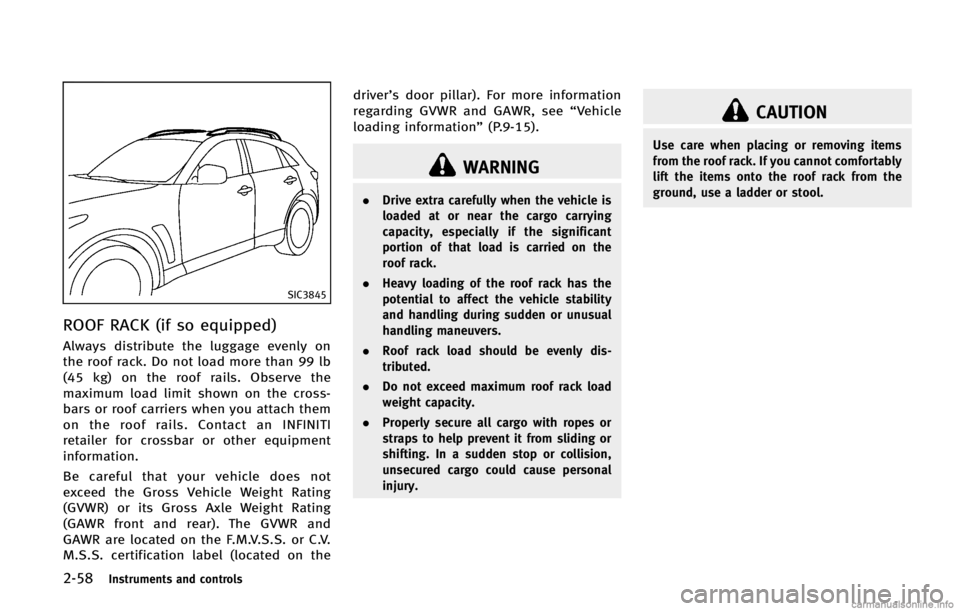
SIC3845
ROOF RACK (if so equipped)GUID-68C936C7-4F37-45FB-BD69-9A545EE27DEA
WARNING
.Drive extra carefully when the vehicle is
loaded at or near the cargo carrying
capacity, especially if the significant
portion of that load is carried on the
roof rack.
. Heavy loading of the roof rack has the
potential to affect the vehicle stability
and handling during sudden or unusual
handling maneuvers.
. Roof rack load should be evenly dis-
tributed.
. Do not exceed maximum roof rack load
weight capacity.
. Properly secure all cargo with ropes or
straps to help prevent it from sliding or
shifting. In a sudden stop or collision,
unsecured cargo could cause personal
injury.
CAUTION
Use care when placing or removing items
from the roof rack. If you cannot comfortably
lift the items onto the roof rack from the
ground, use a ladder or stool.