audio INFINITI FX 2013 Owner's Guide
[x] Cancel search | Manufacturer: INFINITI, Model Year: 2013, Model line: FX, Model: INFINITI FX 2013Pages: 522, PDF Size: 7.53 MB
Page 197 of 522

4-20Monitor, climate, audio, phone and voice recognition systems
SAA2489
Example
Others settings (models with navi-
gation system)
GUID-D4DB2F44-35D0-4833-B384-106AB311A866
SAA2488
Models with navigation system
Comfort settingsGUID-D2700228-D394-4197-AB85-F1FE23BD05F5
JVH0292M
Models without navigation system
The display illustrated will appear when
pushing the SETTING button and selecting
the “Comfort” key. This key does not
appear on the display until the ignition
switch is pushed to the ON position.
Auto Interior Illumination:
GUID-D73A39BF-43C8-459F-9C24-47B7F579C407
Page 199 of 522

4-22Monitor, climate, audio, phone and voice recognition systems
JVH0252X
Models without navigation system
The display illustrated will appear when
pushing the SETTING button and selecting
the “Language & Units” key.
Select Language:
GUID-D73A39BF-43C8-459F-9C24-47B7F579C407
SAA2491
Image Viewer (models with naviga-
tion system)
GUID-EC8932CE-2028-4612-B088-4A0A44A6F499
Page 201 of 522
4-24Monitor, climate, audio, phone and voice recognition systems
WARNING
.The RearView camera is a convenience
but it is not a substitute to check behind
the vehicle when backing up.
. The driver is always responsible for
safety during parking and other maneu-
vers.
. Objects viewed in the RearView Monitor
differ from actual distance because a
wide-angle lens is used.
. Objects in the RearView Monitor will
appear visually opposite like ones
viewed in the inside and outside mirrors.
. Make sure that the lift gate is securely
closed when backing up.
. Underneath the bumper and the corner
areas of the bumper cannot be viewed on
the rearview monitor because of its
monitoring range limitation. .
Do not put anything on the rearview
camera. The rearview camera is installed
above the license plate.
. When washing the vehicle with high-
pressure water, be sure not to spray it
around the camera. Otherwise, water
may enter the camera unit causing water
condensation on the lens, a malfunction,
fire or an electric shock.
. Do not strike the camera. It is a precision
instrument. Otherwise, it may malfunc-
tion or cause damage resulting in a fire
or an electric shock.
CAUTION
Do not scratch the camera lens when
cleaning dirt or snow from the front of the
camera.
REARVIEW MONITOR (models without
navigation system)
Page 202 of 522
SAA1896
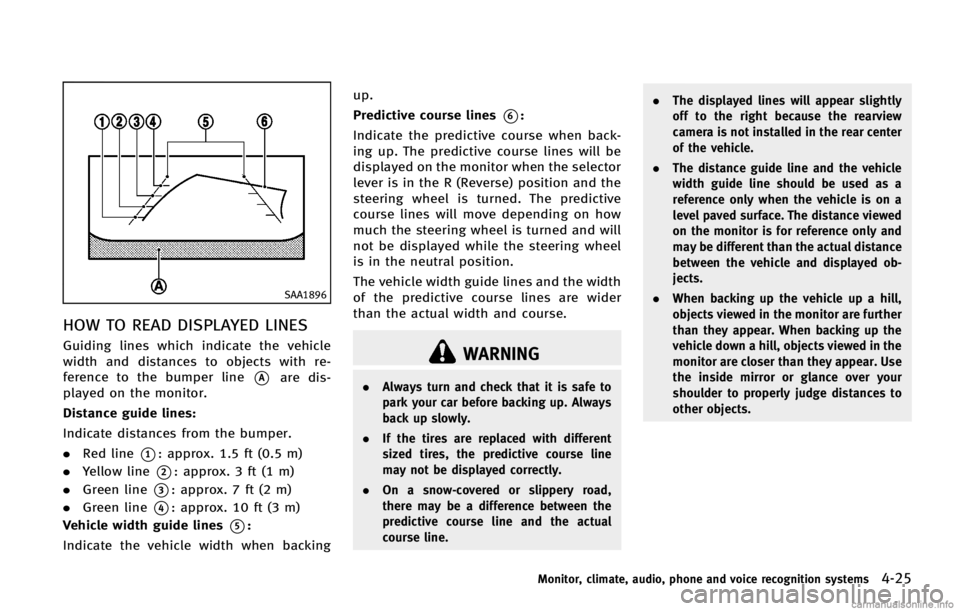
HOW TO READ DISPLAYED LINESGUID-BCFE75B5-C5A1-4F87-B804-CFCA48BAE298
WARNING
.Always turn and check that it is safe to
park your car before backing up. Always
back up slowly.
. If the tires are replaced with different
sized tires, the predictive course line
may not be displayed correctly.
. On a snow-covered or slippery road,
there may be a difference between the
predictive course line and the actual
course line. .
The displayed lines will appear slightly
off to the right because the rearview
camera is not installed in the rear center
of the vehicle.
. The distance guide line and the vehicle
width guide line should be used as a
reference only when the vehicle is on a
level paved surface. The distance viewed
on the monitor is for reference only and
may be different than the actual distance
between the vehicle and displayed ob-
jects.
. When backing up the vehicle up a hill,
objects viewed in the monitor are further
than they appear. When backing up the
vehicle down a hill, objects viewed in the
monitor are closer than they appear. Use
the inside mirror or glance over your
shoulder to properly judge distances to
other objects.
Monitor, climate, audio, phone and voice recognition systems4-25
Page 203 of 522

4-26Monitor, climate, audio, phone and voice recognition systems
SAA1897
HOW TO PARK WITH PREDICTIVE
COURSE LINES
GUID-59AAF71A-D98A-484D-9CC4-31B90C68404B
SAA1898
3. Slowly back up the vehicle adjustingthe steering wheel so that the predic-
tive course lines
*Benter the parking
space
*C.
4. When the back of the vehicle enter the parking space
*C, maneuver the steer-
ing wheel to make the vehicle width
Page 205 of 522

4-28Monitor, climate, audio, phone and voice recognition systems
SAA1979
Backing up on a steep downhillGUID-8C5A07EB-1FF9-4681-8CA9-B5329E4077F2
SAA1923
Backing up near a projecting objectGUID-D3998F42-C9F7-484E-9DFF-FBDD6CCBA589
Page 207 of 522

4-30Monitor, climate, audio, phone and voice recognition systems
HOW TO ADJUST SCREENGUID-FEF721F4-FD6F-4B52-A3A2-CB66E29E880C
Page 208 of 522

GUID-1C82F6B0-F35D-4D10-8883-9C4F05B7CE7C
SAA2148
There are some areas where the system
will not show objects. When in the front or
the rearview display, an object below the
bumper or on the ground may not be
viewed
*1. When in the bird-eye view, a
tall object near the seam of the camera
viewing areas will not appear in the monitor
*2.
WARNING
.
The Around View Monitor is a convenient
feature but it is not a substitute for
proper vehicle operation because it has
areas where objects cannot be viewed.
Always look out the windows and check
mirrors to be sure that it is safe to move.
The driver is always responsible for
safety during parking and other maneu-
vers.
. Do not use the Around View Monitor with
the outside mirror in the stored position,
and make sure that the lift gate is
securely closed when operating the
vehicle using the Around View Monitor.
. The distance between objects viewed on
the Around View Monitor differs from the
actual distance.
. The cameras are installed above the
front grille, the outside mirrors and
above the rear license plate. Do not put
anything on the cameras.
. When washing the vehicle with high-
pressure water, be sure not to spray it
around the cameras. Otherwise, water
Monitor, climate, audio, phone and voice recognition systems4-31
AROUND VIEWTMMONITOR (AVM) (models
with navigation system)
Page 209 of 522

4-32Monitor, climate, audio, phone and voice recognition systems
CAUTION
Do not scratch the lens when cleaning dirt
or snow from the front of the camera.
JVH0257X
Page 211 of 522
4-34Monitor, climate, audio, phone and voice recognition systems
WARNING
.The distance guide line and the vehicle
width line should be used as a reference
only when the vehicle is on a paved,
level surface. The distance viewed on the
monitor is for reference only and may be
different than the actual distance be-
tween the vehicle and displayed objects. .
Use the displayed lines and the bird-eye
view as a reference. The lines and the
bird-eye view are greatly affected by the
number of occupants, fuel level, vehicle
position, road condition and road grade.
. If the tires are replaced with different
sized tires, the predictive course line
and the bird-eye view may be displayed
incorrectly.
. When driving the vehicle up a hill,
objects viewed in the monitor are further
than they appear. When driving the
vehicle down a hill, objects viewed in
the monitor are closer than they appear.
Use the mirrors or actually look to
properly judge distances to other ob-
jects.
. The vehicle width and predictive course
lines are wider than the actual width and
course.
. The distance between objects viewed in
the rearview differs from actual distance
because a wide-angle lens is used.
Objects in the rearview will appear
visually opposite than when viewed in
the rearview and outside mirrors.
. On a snow-covered or slippery road,
there may be a difference between the predictive course line and the actual
course line.
. The displayed lines on the rearview will
appear slightly off to the right because
the rearview camera is not installed in
the rear center of the vehicle.