audio INFINITI FX 2013 Service Manual
[x] Cancel search | Manufacturer: INFINITI, Model Year: 2013, Model line: FX, Model: INFINITI FX 2013Pages: 522, PDF Size: 7.53 MB
Page 225 of 522

4-48Monitor, climate, audio, phone and voice recognition systems
GUID-3937E88E-58B2-4D4C-A81D-034656C15E84
SAA2149
Center ventilators
SAA2150
Side ventilators
SAA2151
Rear ventilators
Open or close, and adjust the air flow
direction of ventilators.
: This symbol indicates that the ventilators are closed.
: This symbol indicates that the ventilators areopen.
GUID-83C5DBDC-2EF4-436C-B8F0-F68300F11357
WARNING
. The air conditioner cooling function
operates only when the engine is run-
ning.
. Do not leave children or adults who
would normally require the support of
others alone in your vehicle. Pets should
not be left alone either. On hot, sunny
days, temperatures in a closed vehicle
could quickly become high enough to
cause severe or possibly fatal injuries to
people or animals.
. Do not use the recirculation mode for
long periods as it may cause the interior
air to become stale and the windows to
fog up.
Start the engine and operate the automatic
climate control system.
When the “STATUS”button is pushed, the
automatic climate control status screen
will appear. (See “How to use STATUS
button” (P.4-9).)
VENTILATORS AUTOMATIC CLIMATE CONTROL
Page 226 of 522

SAA2723
Models with navigation system
SAA1520
Models without navigation systemYou can individually set the driver and front
passenger side temperature using each
temperature control button.
Monitor, climate, audio, phone and voice recognition systems4-49
Page 227 of 522

4-50Monitor, climate, audio, phone and voice recognition systems
SAA1527
Without Advanced Climate Control System (ACCS)
SAA2153
With Advanced Climate Control System (ACCS)1.
“AUTO” automatic climate control ON
button/Temperature control dial (dri-
ver side)
2. “A/C” air conditioner ON/OFF button
3. “
”fan speed increase button
4. “
”front defroster button
5. “MODE” manual air flow control but-
ton
6. “DUAL” zone control ON/OFF button/
Temperature control dial (passenger
side)
7. “OFF” button for climate control sys-
tem
8. “
”fan speed decrease button
9. “
”rear window defroster button
(See “Rear window and outside mirror
defroster switch” (P.2-36).)
10. “
”intake air control button
11. “
”auto-recirculation button/
intake air control button
Page 228 of 522

AUTOMATIC CLIMATE CONTROLGUID-0BE1694A-DD97-4BA4-BF44-857EEABBA6F7
”front defroster button.
(The indicator light on the button will
illuminate.)
2. Turn the temperature control dial to set the desired temperature.
. To quickly remove ice from the outside
of the windows, push the fan speed
increase button “
”and set it to the
maximum position.
. As soon as possible after the wind-
shield is clean, push the “AUTO”button
to return to the auto mode.
. When the “
”front defroster button
is pushed, the air conditioner will
automatically be turned on at outside
temperatures above 238F (−58C) to
defog the windshield, and the air
recirculate mode will automatically be
turned off.
Outside air is drawn into the passenger
compartment to improve the defogging
performance.
Monitor, climate, audio, phone and voice recognition systems4-51
Page 229 of 522

4-52Monitor, climate, audio, phone and voice recognition systems
Manual operationGUID-98E726A1-B84E-4603-A00E-6B4E72820C32
”or
decrease “”buttons to manually con-
trol the fan speed.
Push the “AUTO”button to return to
automatic control of the fan speed.
Temperature control:
GUID-D73A39BF-43C8-459F-9C24-47B7F579C407
” side will
illuminate.
The air recirculation mode cannot be
activated when the air conditioner is in
the front defrosting mode “
”.
Outside air circulation:
GUID-D73A39BF-43C8-459F-9C24-47B7F579C407
” side will turn off and
“
”(if so equipped) will
illuminate.
Automatic intake air control:
GUID-D73A39BF-43C8-459F-9C24-47B7F579C407
” and outside air circulation
“” sides) will flash twice, and then
the intake air will be controlled auto-
matically.
. With Advanced Climate Control System
(ACCS):
To return to the automatic control
mode, push the intake air control
button until the indicator light on the
“
” side illuminates. The Advanced
Climate Control System (ACCS) turns on
and the intake air will be controlled
automatically. Air flow control:
GUID-D73A39BF-43C8-459F-9C24-47B7F579C407
: Air flows from center and side ventilators.
: Air flows from center and side ventilators and
foot outlets.
: Air flows mainly from foot outlets.
: Air flows from defroster and foot outlets.
To turn the system offGUID-4E10A5E2-07E8-47C9-9D90-88AB79C187D2
Page 231 of 522
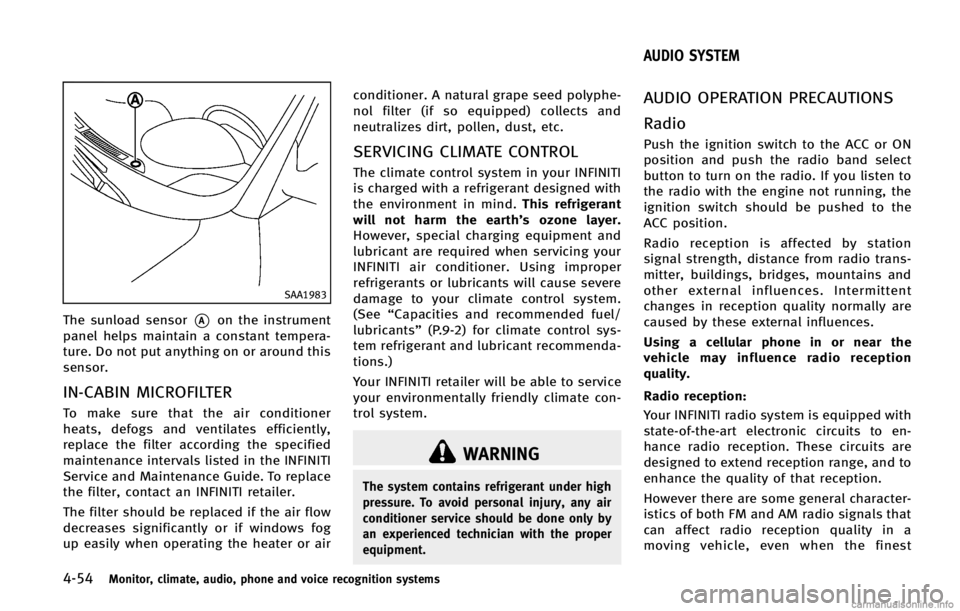
4-54Monitor, climate, audio, phone and voice recognition systems
SAA1983
The sunload sensor*Aon the instrument
panel helps maintain a constant tempera-
ture. Do not put anything on or around this
sensor.
IN-CABIN MICROFILTERGUID-B5FB0932-D5C6-4573-A11E-E201E99F47D1
WARNING
The system contains refrigerant under high
pressure. To avoid personal injury, any air
conditioner service should be done only by
an experienced technician with the proper
equipment.
GUID-3EAB71B4-A10F-4A54-9F10-43B665795E96
Page 232 of 522

equipment is used. These characteristics
are completely normal in a given reception
area, and do not indicate any malfunction
in your INFINITI radio system.
Reception conditions will constantly
change because of vehicle movement.
Buildings, terrain, signal distance and
interference from other vehicles can work
against ideal reception. Described below
are some of the factors that can affect your
radio reception.
Some cellular phones or other devices may
cause interference or a buzzing noise to
come from the audio system speakers.
Storing the device in a different location
may reduce or eliminate the noise.
SAA0306
FM radio reception:GUID-D73A39BF-43C8-459F-9C24-47B7F579C407
Page 233 of 522

4-56Monitor, climate, audio, phone and voice recognition systems
cles exist.
Static: Caused by thunderstorms, electrical
power lines, electric signs and even traffic
lights.
Satellite radio reception:
GUID-D73A39BF-43C8-459F-9C24-47B7F579C407
SAA0480
Compact Disc (CD) playerGUID-6AF0CEF7-0537-49F1-93DC-31D7E9697380
Page 234 of 522

tion.
—3.1 in (8 cm) discs
— CDs that are not round
— CDs with a paper label
— CDs that are warped, scratched, or
have abnormal edges
. This audio system can only play pre-
recorded CDs. It has no capabilities to
record or burn CDs.
. If the CD cannot be played, one of the
following messages will be displayed.
CHECK DISC:
. Confirm that the CD is inserted correctly
(the label side is facing up, etc.).
. Confirm that the CD is not bent or
warped and it is free of scratches.
PUSH EJECT:
This is an error due to the temperature
inside the player is too high. Remove the
CD by pushing the EJECT button, and after
a short time reinsert the CD. The CD can be
played when the temperature of the player
returns to normal.
UNPLAYABLE:
The file is unplayable in this audio system
(only MP3, WMA or AAC CD). Gracenote:GUID-D73A39BF-43C8-459F-9C24-47B7F579C407
NOS1898
Page 235 of 522

4-58Monitor, climate, audio, phone and voice recognition systems
identifier to track queries for statistical
purposes. The purpose of a randomly
assigned numeric identifier is to allow the
Gracenote service to count queries without
knowing anything about who you are. For
more information, see the web page for the
Gracenote Privacy Policy for the Gracenote
service.
The Gracenote Software and each item of
Gracenote Data are licensed to you“AS
IS.” Gracenote makes no representations
or warranties, express or implied, regard-
ing the accuracy of any Gracenote Data
from in the Gracenote Servers. Gracenote
reserves the right to delete data from the
Gracenote Servers or to change data
categories for any cause that Gracenote
deems sufficient. No warranty is made that
the Gracenote Software or Gracenote Ser-
vers are error-free or that functioning of
Gracenote Software or Gracenote Servers
will be uninterrupted. Gracenote is not
obligated to provide you with new en-
hanced or additional data types or cate-
gories that Gracenote may provide in the
future and is free to discontinue its
services at any time.
GRACENOTE DISCLAIMS ALL WARRANTIES
EXPRESS OR IMPLIED, INCLUDING, BUT NOT LIMITED TO, IMPLIED WARRANTIES OF
MERCHANTABILITY, FITNESS FOR A PARTI-
CULAR PURPOSE, TITLE, AND NON-INFRIN-
GEMENT. GRACENOTE DOES NOT WARRANT
THE RESULTS THAT WILL BE OBTAINED BY
YOUR USE OF THE GRACENOTE SOFTWARE
OR ANY GRACENOTE SERVER. IN NO CASE
WILL GRACENOTE BE LIABLE FOR ANY
CONSEQUENTIAL OR INCIDENTAL DAMAGES
OR FOR ANY LOST PROFITS OR LOST
REVENUES.
Copyright:
Music recognition technology and related
data are provided by Gracenote
®. Grace-
note is the industry standard in music
recognition technology and related content
delivery. For more information, please visit
www.gracenote.com.
CD and music-related data from Gracenote,
Inc., copyright © 2000-2009 Gracenote.
Gracenote Software, copyright © 2000-
2009 Gracenote. This product and service
may practice one or more of the following
U.S. Patents: #5,987,525; #6,061,680;
#6,154,773, #6,161,132, #6,230,192,
#6,230,207, #6,240,459, #6,330,593,
and other patents issued or pending. Some
services supplied under license from Open
Globe, Inc. for U.S. Patent: #6,304,523. Gracenote and CDDB are registered trade-
marks of Gracenote. The Gracenote logo
and logotype, and the
“Powered by Grace-
note” logo are trademarks of Gracenote.