ignition INFINITI FX 2013 Service Manual
[x] Cancel search | Manufacturer: INFINITI, Model Year: 2013, Model line: FX, Model: INFINITI FX 2013Pages: 522, PDF Size: 7.53 MB
Page 282 of 522

may be difficult to hear the other
person’s voice during a call.
. Immediately after the ignition switch is
pushed to the “ON”position, it may be
impossible to receive a call for a short
period of time.
. Do not place the cellular phone in an
area surrounded by metal or far away
from the in-vehicle phone module to
prevent tone quality degradation and
wireless connection disruption.
. While a cellular phone is connected
through the Bluetooth
®wireless con-
nection, the battery power of the
cellular phone may discharge quicker
than usual.
. If the Bluetooth
®Hands-Free Phone
System seems to be malfunctioning,
please contact an INFINITI retailer.
. Some cellular phones or other devices
may cause interference or a buzzing
noise to come from the audio system
speakers. Storing the device in a
different location may reduce or elim-
inate the noise.
. Refer to the cellular phone Owner’s
Manual regarding the telephone pairing
procedure specific to your phone,
battery charging, cellular phone anten- na, etc.
. The antenna display on the monitor will
not coincide with the antenna display
of some cellular phones.
. Keep the interior of the vehicle as quiet
as possible to hear the caller ’s voice
clearly as well as to minimize its
echoes.
. If reception between callers is unclear,
adjusting the incoming or outgoing call
volume may improve the clarity.
. This wireless hands free car kit is based
on Bluetooth
®technology,
— Frequency: 2402 MHz - 2480 MHz
— Output Power: 4.14 dBm E.I.R.P
— Modulation: FHSS GFSK 8DPSK, p/
4DQPSK
— Number of Channel: 79
— This wireless equipment can’t be
used for any services related to
safety because there is the possibi-
lity of radio interference.
REGULATORY INFORMATIONGUID-56E45EFA-34AD-4B0B-9087-C969D088809D
Page 294 of 522

existing phone. If the user tries to
connect a phone that has already been
connected to the vehicle system, the
system announces the name that the
phone is already using. The connecting
procedure will then be cancelled.
The Add Phone command is not avail-
able when the vehicle is moving.
. Select Phone
Use the Select Phone command to
select a phone of lesser priority when
two or more phones connected with
Bluetooth
®Hands-Free Phone System
are in the vehicle at the same time.
The system asks the user to name the
phone and confirm the selection.
Once the selection is confirmed, the
selected phone remains active until the
ignition switch is placed in the OFF
position or a new phone is selected.
. Delete Phone
Use the Delete Phone command to
delete a specific phone or all phones
from Bluetooth
®Hands-Free Phone
System. The system announces the
names of the phones already paired
with the system and their priority level.
The system then gives the option to
delete a specific phone, all phones or listen to the list again. Once the user
chooses to delete a phone or all
phones, the system asks the user to
confirm.
NOTE:
When the user deletes a phone, the
associated phone book for that phone will
also be deleted.
. Replace Phone
Use the Replace Phone command to
change the active phone. The system
will list the names assigned to each
phone and then prompt you for the
phone you wish to select. Only one
phone can be active at a time.
. Bluetooth On/Off
Use the Bluetooth On/Off command to
turn on/off Bluetooth
®Hands-Free
Phone System.
. Help
The system announces the available
commands.
SPEAKER ADAPTATION MODEGUID-79091139-17F9-427C-A973-57F86FE160C1
button.
4. Speak: “Help”. The system acknowl-
edges the command and announces
the next set of available commands.
5. Speak: “SPEAKER Adaptation”. The
system acknowledges the command
and displays the speaker adaptation
mode screen.
6. Voice memory A or memory B is
selected automatically. If both memory
locations are already in use, the system
Monitor, climate, audio, phone and voice recognition systems4-117
Page 295 of 522

4-118Monitor, climate, audio, phone and voice recognition systems
will prompt you to overwrite one.
Follow the instructions provided by
the system.
7. When preparation is complete and you are ready to begin, press the
button.
8. The speaker adaptation mode will be explained. Follow the instructions pro-
vided by the system.
9. When training is finished, the system will tell you an adequate number of
phrases have been recorded.
10. The system will ask you to say your name. Follow the instructions to regis-
ter your name.
11. The system will announce that speaker adaptation has been completed and
the system is ready.
The speaker adaptation mode will stop if:
. The
button is pressed in speaker
adaptation mode.
. The vehicle is driven during speaker
adaptation mode.
. The ignition switch is placed in the OFF
or LOCK position.
Training phrasesGUID-7A6C37C4-0427-453B-BBD7-D45378797D7C
Page 327 of 522
5-4Starting and driving
CAUTION
.Do not use leaded gasoline. Deposits
from leaded gasoline seriously reduce
the three-way catalyst’s ability to help
reduce exhaust pollutants.
. Keep your engine tuned up. Malfunctions
in the ignition, fuel injection, or elec-
trical systems can cause overrich fuel
flow into the three-way catalyst, causing
it to overheat. Do not keep driving if the
engine misfires, or if noticeable loss of
performance or other unusual operating
conditions are detected. Have the vehicle
inspected promptly by an INFINITI retai-
ler.
. Avoid driving with an extremely low fuel
level. Running out of fuel could cause
the engine to misfire, damaging the
three-way catalyst.
. Do not race the engine while warming it
up.
. Do not push or tow your vehicle to start
the engine.
TIRE PRESSURE MONITORING SYS-
TEM (TPMS)
GUID-A3B333D2-3D24-45BC-BA2B-1D802B3D86B3
Page 334 of 522

GUID-387E946E-D3FB-4B7C-A35C-9AFED0ADFEE4
WARNING
Do not operate the push-button ignition
switch while driving the vehicle except in an
emergency. (The engine will stop when the
ignition switch is pushed 3 consecutive
times or the ignition switch is pushed and
held for more than 2 seconds.) If the engine
stops while the vehicle is being driven, this
could lead to a crash and serious injury.
Before operating the push-button ignition
switch, be sure to move the selector lever
to the P (Park) position.SSD0436
OPERATING RANGE FOR ENGINE
START FUNCTION
GUID-7B325479-976E-40E9-A127-9E642D699874
Page 335 of 522

5-12Starting and driving
SSD1021
PUSH-BUTTON IGNITION SWITCH
OPERATION
GUID-19AF0B8B-5852-4753-9BD8-0A6F5DF2A211
Page 336 of 522

CAUTION
Do not leave the vehicle with the push-
button ignition switch in ACC or ON posi-
tions when the engine is not running for an
extended period. This can discharge the
battery.
EMERGENCY ENGINE SHUT OFFGUID-CCDE5281-EC93-44B1-9FDE-FD8701347DA8
SSD0731
INTELLIGENT KEY BATTERY DIS-
CHARGE
GUID-DAD6EB32-4362-42FD-8BE5-70B89936DCCC
CAUTION
.Never place anything except the Intelli-
gent Key in the Intelligent Key port.
Doing so may cause damage to the
equipment.
. Make sure the Intelligent Key is in the
correct direction when inserting it to the
Intelligent Key port. The engine may not
start if it is in the incorrect direction.
. Remove the Intelligent Key from the
Intelligent Key port after the ignition
switch is pushed to the OFF position.
Starting and driving5-13
Page 337 of 522

5-14Starting and driving
GUID-C6A44AD2-C9E9-4EA9-964E-986163AC0A36
CAUTION
Do not operate the starter for more than 15
seconds at a time. If the engine does not
start, push the ignition switch to OFF and
wait 10 seconds before cranking again,
otherwise the starter could be damaged.
4.Warm-up
Allow the engine to idle for at least 30
seconds after starting. Do not race the
engine while warming it up. Drive at
moderate speed for a short distance
first, especially in cold weather. In cold
weather, keep the engine running for a
minimum of 2 - 3 minutes before
shutting it off. Starting and stopping
the engine over a short period of time
may make the vehicle more difficult to
BEFORE STARTING THE ENGINE STARTING THE ENGINE
Page 363 of 522

5-40Starting and driving
4. Indicates your vehicle
5. Set vehicle speed indicator:Indicates the set vehicle speed.
For Canadian models, the speed is
displayed in km/h.
6. Intelligent Cruise Control system warn- ing light (orange):
The light comes on if there is a
malfunction in the ICC system.
SSD0607
When the ignition switch is pushed to the
ON position, the indicators come on as
illustrated to check for a burned-out bulb,
and it turns off when the engine is started.
SSD0915
Operating vehicle-to-vehicle dis-
tance control mode
GUID-D2E6E26F-0ADF-41F5-9488-F82C852D9855
Page 398 of 522
GUID-44459E62-6D34-4985-AA7E-DB14511A5AF5
SSD0336
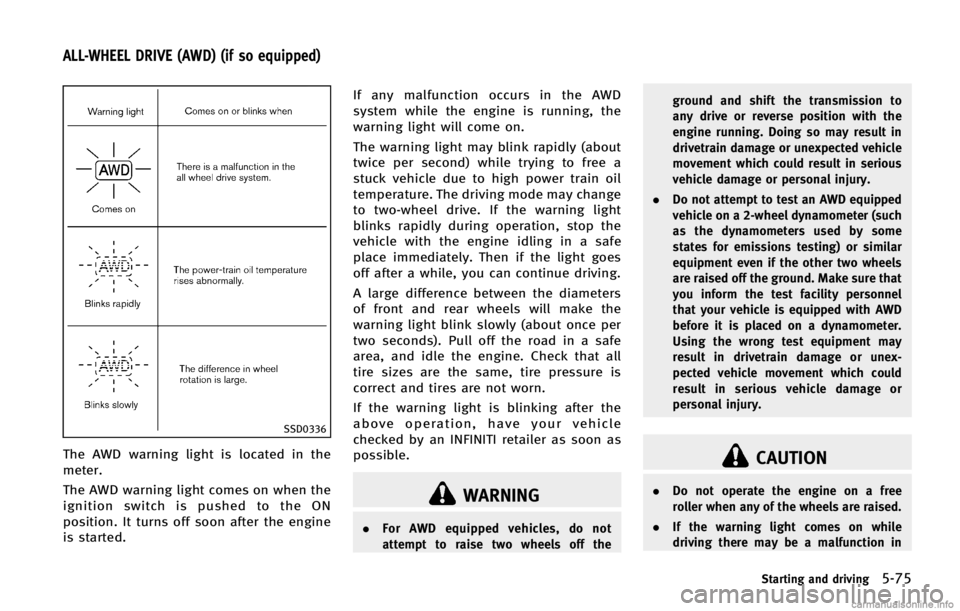
The AWD warning light is located in the
meter.
The AWD warning light comes on when the
ignition switch is pushed to the ON
position. It turns off soon after the engine
is started.If any malfunction occurs in the AWD
system while the engine is running, the
warning light will come on.
The warning light may blink rapidly (about
twice per second) while trying to free a
stuck vehicle due to high power train oil
temperature. The driving mode may change
to two-wheel drive. If the warning light
blinks rapidly during operation, stop the
vehicle with the engine idling in a safe
place immediately. Then if the light goes
off after a while, you can continue driving.
A large difference between the diameters
of front and rear wheels will make the
warning light blink slowly (about once per
two seconds). Pull off the road in a safe
area, and idle the engine. Check that all
tire sizes are the same, tire pressure is
correct and tires are not worn.
If the warning light is blinking after the
above operation, have your vehicle
checked by an INFINITI retailer as soon as
possible.
WARNING
.
For AWD equipped vehicles, do not
attempt to raise two wheels off the ground and shift the transmission to
any drive or reverse position with the
engine running. Doing so may result in
drivetrain damage or unexpected vehicle
movement which could result in serious
vehicle damage or personal injury.
. Do not attempt to test an AWD equipped
vehicle on a 2-wheel dynamometer (such
as the dynamometers used by some
states for emissions testing) or similar
equipment even if the other two wheels
are raised off the ground. Make sure that
you inform the test facility personnel
that your vehicle is equipped with AWD
before it is placed on a dynamometer.
Using the wrong test equipment may
result in drivetrain damage or unex-
pected vehicle movement which could
result in serious vehicle damage or
personal injury.
CAUTION
.Do not operate the engine on a free
roller when any of the wheels are raised.
. If the warning light comes on while
driving there may be a malfunction in
Starting and driving5-75
ALL-WHEEL DRIVE (AWD) (if so equipped)